1
R
Insight MDFG456 Reference BSP
3.
Rev1 evaluation boards have mis-wired SDRAM that requires all accesses occur in 32
bit divisible quantities. This problem is worked around by enabling the data cache at
bootstrap time and leaving it on. Instruction fetches always occur in 32 bit divisible
quantities.
4.
Since System ACE is not supported in this revision (it will be in future revisions), the
only way to get a VxWorks image downloaded into the target is via an emulator.
5.
Ethernet links have been iffy on two sample Rev1 boards this BSP has been tested on.
If the link LED on the P160 board does not illuminate after applying power to the
target (assuming there is a cable connected between the RJ45 jack and another network
device), then try reseating the P160, emulator connector, and RS232 connectors. Once
the link is established, it seems to remain that way.
6.
Use non null-modem cabling for the RS-232 serial ports.
7.
System not tested with MMU enabled.
8.
System hangs when PLB error occurs.
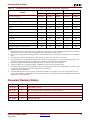
Version 1.2/1 - February10, 2003
•
Added support for System ACE.
•
Added flash booting capability.
•
Corrected Rev 1.2/0 release history information.
Errata
1.
System mode debugging through the END connection does not work.
2.
Serial port usage as the WDB target connection does not work. Serial port polling
mode does not seem to work.
3.
Rev1 evaluation boards have mis-wired SDRAM that requires all accesses occur in 32
bit divisible quantities. This problem is worked around by enabling the data cache at
bootstrap time and leaving it on. Instruction fetches always occur in 32 bit divisible
quantities.
4.
Since System ACE is not supported in this revision (it will be in future revisions), the
only way to get a VxWorks image downloaded into the target is via an emulator.
5.
Ethernet links have been iffy on two sample Rev1 boards this BSP has been tested on.
If the link LED on the P160 board does not illuminate after applying power to the
target (assuming there is a cable connected between the RJ45 jack and another network
device), then try reseating the P160, emulator connector, and RS232 connectors. Once
the link is established, it seems to remain that way.
6.
Use non null-modem cabling for the RS-232 serial ports.
7.
System not tested with MMU enabled.
8.
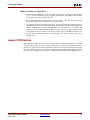
SystemACE requires DIP #1 to be set to the “OFF” position to download data to the
FPGA. VisionProbe requires the switch set to the “ON” position. If connecting to the
target with the emulator after a SystemACE download, move the switch from “OFF”
to “ON” then connect.
Processor IP Reference Guide
August 2004
www.xilinx.com
1-800-255-7778
66