1
American Microsystems, Ltd.
M6000/M6200/M6300 User's Guide
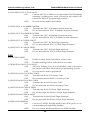
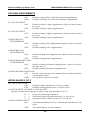
3) ENTER DATA TYPE TO EDIT
Refers to the type of bar codes for which editing can be enabled, allowing editing to be
specific to a type of bar code. The choices are listed below:
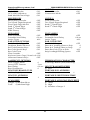
A
C
E
G
I
K
Code 39
UPC-E
EAN-8
Codabar
Code 93
Code 11
B
D
F
H
J
L
UPC-A
EAN-13
Interleaved 2 of 5
Code 128
MSI/Plessey
ISBN
X* All Bar Codes
4) STRIP LEADING & TRAILING SPACES
ON:
Any Leading and Trailing Spaces will be stripped from the data.
OFF*:
No spaces will be stripped.
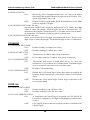
LASER/CCD OPTIONS
These options are used to configure the laser device behavior and the trigger mode for the
M6000 and the M6200/M6300.
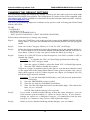
0) LASER TRIGGER MODE (0-3)
0) TRIGGER MODE
Trigger activates scanning device for one scan only.
(Recommended) (M6000/M6200/M6300)
1) PULSE MODE
Continuous scanning method for non-reflective
backgrounds; for use with MS-941 triggerless scanner
only. (M6200/M6300)
2) CONTINUOUS
Scans bar codes until the trigger is released or until the
laser/CCD time-out is reached. (M6200/M6300)
3) BLINK MODE
Continuous scanning with no time-out. Laser/CCD
turns on and off allowing safe operation.
(M6200/M6300)
NOTE: Continuous or Blink mode options not
available on the M6000. When enabled on the M6200,
wireless communications are disabled.
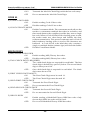
1) LASER/CCD TIMEOUT:
Turns off Laser/CCD after (0 – 9) seconds.
2) READ DELAY:
Allows re-reads. Continuous run read delay (0.0 – 9.9)
seconds is used to allow a new re-read of a bar code,
after the read delay expires.
3) READ VERIFICATION:
Performs re-reads the number of times (0 – 9) required
for accuracy critical applications.
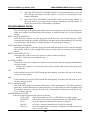
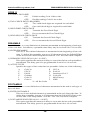
TERMINATION CHARACTER
The optional Termination Character is transmitted at the end of the data. If a user defined
Termination Character is desired, select option 4) below, then scan a single character from
the Full ASCII section of the Setup Menu. Note that there are differences between a USB
keyboard (M6300) and a traditional keyboard (M6200).
0
None
1
Horizontal Tab (M6200 & M6000: ASCII 09 M6300: Tab Key)
2 * Carriage Return (M6200 & M6000: ASCII 13 M6300: Enter Key)
3
Carriage Return & Line Feed (M6200 & M6000: ASCII 13 & ASCII 10 M6300:
not used)
4
User Defined Termination Character
19