1
American Microsystems, Ltd.
M6000/M6200/M6300 User's Guide
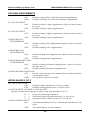
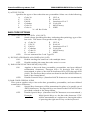
2) ACTIVE TYPES
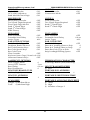
Specifies the types of bar codes that use postambles. Select one of the following:
A
C
E
G
I
K
Code 39
UPC-E
EAN-8
Codabar
Code 93
Code 11
X* All Bar Codes
B
D
F
H
J
L
UPC-A
EAN-13
Interleaved 2 of 5
Code 128
MSI/Plessey
ISBN
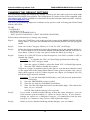
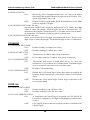
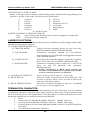
BAR CODE OPTIONS
0) SEND BAR CODE TYPE ID: (ON/OFF)
ON:
OFF*:
Sends a letter preceding the data, indicating the symbology type of the
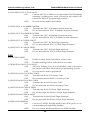
bar code. The letter corresponds to the types:
A Code 39
B
UPC-A
C UPC-E
D EAN-13
E
EAN-8
F
Interleaved 2 of 5
G Codabar
H Code 128
I
Code 93
J
MSI/Plessey
K Code 11
L
ISBN
Do not transmit Bar Code Type ID
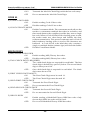
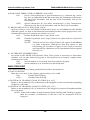
1) DUPLICATE READS ALLOWED (ON/OFF)
ON*:
Enable reading the same bar code multiple times.
OFF:
Disable reading the same bar code twice in a row.
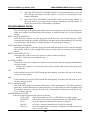
2) BAR CODE FUNCTION KEYS (ON/OFF)
ON:
Applies to bar code data, preambles, postambles, and user defined
termination characters. Function Keys F1 through F10 will be
transmitted in place of the ASCII characters DC1 (11H) through SUB
(1AH). The Function Keys values are listed in the Full ASCII Chart on
back of the Setup Menu.
OFF*:
Disable Function Keys. (Standard ASCII characters are transmitted.)
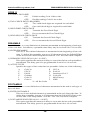
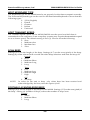
3) BAR CODE SPECIAL KEYS
This option applies only to bar code data, preambles, postambles, and user defined
termination characters.
ON*:
Special Key characters will be transmitted in place of a specific set of
ASCII characters. The Special Keys are listed in the Full ASCII Chart
provided on back of the Setup Menu.
OFF:
Disable Special Keys. (Standard ASCII Characters are transmitted.)
Example:
With Special Keys on, the bar code character "STX"
will be transmitted as a right arrow, having the affect
of pressing the right arrow key on the keyboard.
17