1
American Microsystems, Ltd.
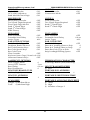
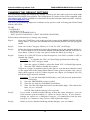
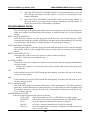
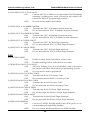
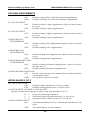
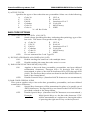
3) FIXED LENGTH
M6000/M6200/M6300 User's Guide
ON
Read only Fixed Length Interleaved 2 of 5 bar code labels
that match the lengths defined in options 4) & 5) below. The
check digit can be on or off.
OFF*
Disable Fixed Length mode. Read all Interleaved 2 of 5 labels
without regard to length.
4) SET FIXED LENGTH #1 (02-60)
Sets the first valid Fixed Length for Interleaved 2 of 5. Scan a two-digit
value to enter the length. Valid lengths are 02 to 60 characters. By
definition, the lengths of Interleaved 2 of 5 labels are an even number
of characters. The default Fixed Length is 2 characters.
5) SET FIXED LENGTH #2 (02-60)
Sets a second valid Fixed Length for Interleaved 2 of 5. Scan a twodigit value to enter the length. The default length is set to 6 characters.
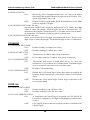
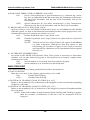
CODABAR
0) CODABAR DECODER
ON *
OFF
1) SEND START/STOP
ON
OFF *
2) CLSI FORMATTING
ON
OFF *
3) CLSI CHECK DIGIT
ON
OFF*
Enable reading Codabar bar codes.
Disable reading Codabar bar codes.
Transmit the Codabar start/stop characters.
Do not transmit the Codabar start/stop characters.
The reader will insert a blank after the 1st, 5th, and 10th
characters of a 14-character Codabar label. The label length
does not include the start and stop characters.
Disable CLSI formatting.
Enable the CLSI check digit. When this option is enabled, all
fourteen digit numeric bar codes must contain a valid check
digit.
Disable the CLSI check digit. Check digit verification will
not be performed.
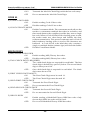
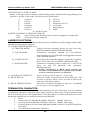
CODE 128
0) CODE 128 DECODER
ON *
OFF
Enable reading Code 128 bar codes.
Disable reading Code 128 bar codes.
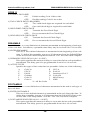
1) UCC-128 VERIFICATION
ON
A valid Mod 10 Check Digit is required on UCC-MOD 10
bar codes. (Applies to 20-digit serial shipping container bar
codes.)
OFF *
UCC-MOD 10 bar codes are accepted without valid Mod 10
Check Digits.
14