1
3.
4.
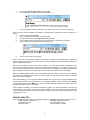
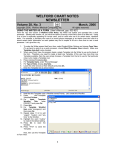
Use any age, gender, Type of Note and press OK.
In the Writer, type in advice on how to quit smoking, e.g.
5.
(You can make this as brief or elaborate as you wish). Press <F10> to store your Template.
Now, we’ll
smoker.
1.
2.
3.
4.
5.
6.
make another Template which calls the “Smoking Advice” Template, but only if the patient is a
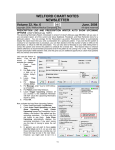
Press Libraries\Templates\Add.
Enter “Visit Summary” as the name of the Template.
Specify Visit Summary as the Type of note and press OK.
Type in whatever elements you wish to have as part of your Visit Summary Template.
At some point within your Visit Summary Template, type:
Press <F10> to store your Template.
When you use this Visit Summary Template, if the patient is a Smoker, the Smoking Advice Template will
appear at this location; whereas if the patient is not a smoker, the Smoking Advice Template is omitted from
what is displayed and printed.
Note that the <condition> needn’t be as simple as “smoker”. It can include many items combined with “and”
and “or”, like “@if female and age > 50 and age <80 and last mammogram > 1 year ago” to include some
tailored advice to women who are overdue for mammograms as to the importance of regular mammograms,
while omitting this information from Templates of women who are up-to-date in their mammograms.
Note that Template Nesting is different from Template Merging (User’s Manual, pgs. 704-707) and Template
Auto-Merge (see Newsletter April, 2002, User’s Manual pgs. 708-709), both of which eliminate redundant
lines in the merged Templates.
With Template Merge, you can combine multiple Templates into a single note by pressing Write\New Note,
choosing the Document Type, and when the list of Templates appears, select a Template, press Merge,
select another Template, press Merge, etc., until you are done selecting Templates to include in your note;
then press Cancel to move on to the Writer.
With Template Auto-Merge, the program automatically merges any relevant Templates, removing any
redundant lines, when you specify the patient’s Chief Complaint. The program looks up any Templates with
Topics matching those listed in the Chief Complaint and merges them into a single Template which is then
inserted into your note.
SEND US YOUR TIPS
If you have tips, shortcuts, questions, or suggestions for future newsletter topics, please send them to us at:
Welford Medical Computing, Inc.
or
MEDCOM Information Systems
3779 Hermitage Trail
2117 Stonington Avenue
Rockford, IL 6111
Hoffman Estates, IL 60195
6