1
B O A R D
H A R D W A R E
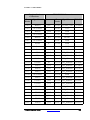
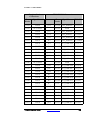
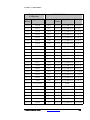
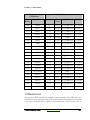
Daughter Card
Connections
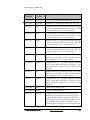
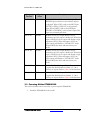
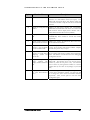
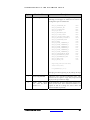
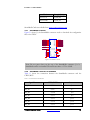
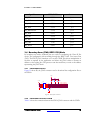
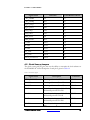
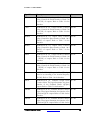
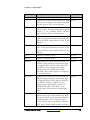
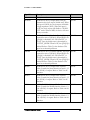
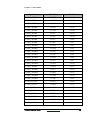
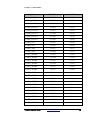
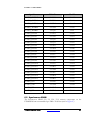
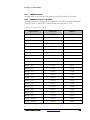
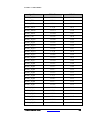
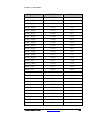
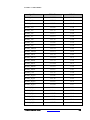
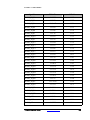
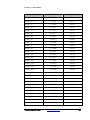
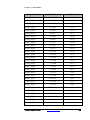
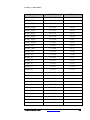
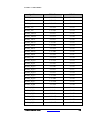
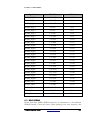
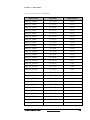
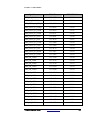
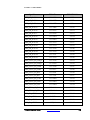
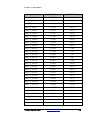
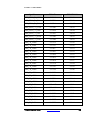
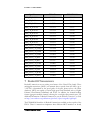
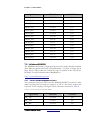
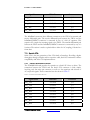
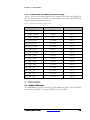
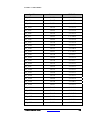
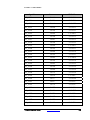
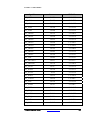
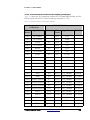
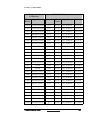
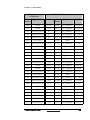
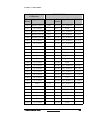
ET6000K10S IO Connections
Test
Header
Signal Name
Connector
Test
Header
J1.180
P4N22
J7.7
P11.180 TST_HDRA142 U15.AA39
J1.181
P4N17
J7.9
P11.181 TST_HDRA143
U15.AJ35
J1.182
P4N16
J7.11
P11.182 TST_HDRA144
U15.AJ36
J1.183
P4N15
J7.13
P11.183 TST_HDRA145
U15.AJ33
J1.184
GND
J2.36
P11.184
J1.185
P4N14
J7.15
P11.185 TST_HDRA146
U15.AJ34
J1.186
P4N9
J7.17
P11.186 TST_HDRA147
U15.AJ37
J1.187
P4N8
J7.19
P11.187 TST_HDRA148
U15.AJ38
J1.188
P4N5
J7.21
P11.188 TST_HDRA149
U15.AJ41
J1.189
P4N4
J7.23
P11.189 TST_HDRA150
U15.AJ42
J1.190
P4N1
J7.25
P11.190 TST_HDRA151
U15.AJ31
J1.191
P4N0
J7.27
P11.191 TST_HDRA152
U15.AJ32
J1.192
P4NX13
J7.29
P11.192 TST_HDRA153 U15.AH33
J1.193
P4NX12
J7.31
P11.193 TST_HDRA154 U15.AH37
J1.194
P4NX9
J7.33
P11.194 TST_HDRA155 U15.AH38
J1.195
No Connect
J1.196
P4NX8
J7.35
P11.196 TST_HDRA156 U15.AH31
J1.197
P4NX3
J7.37
P11.197 TST_HDRA157 U15.AH32
J1.198
P4NX2
J7.39
P11.198 TST_HDRA158
J1.199
P4NX1
J7.41
P11.199 TST_HDRA159 U15.AH40
J1.200
P4NX0
J7.43
P11.200 TST_HDRA160 U15.AH41
P11.195
Signal Name
FPGA Pin
GND
GND
U15.AJ40
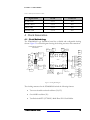
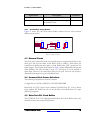
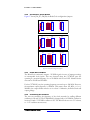
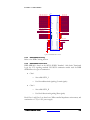
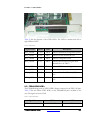
13 Mechanical
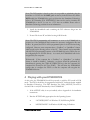
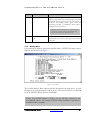
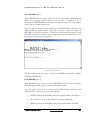
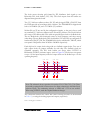
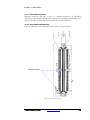
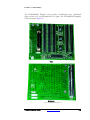
Two bus bars, MP2 and MP3 are installed to prevent flexing of the PWB. They are
connected to the ground plane and can be used to ground test equipment. Be careful
not to short any power rails or signals to these metal bars - they can carry a lot of
ET6000K10S User Guide
www.emulation.com
157