1
2 Overview
2.5 Terminal Interface
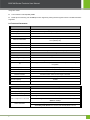
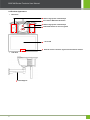
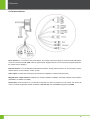
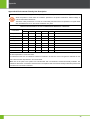
Power interface: It is connected to the power adapter. The voltage of the power supply for the device is DC 12V and the
current is not lower than 1.5A. (POE is also an optional power supply mode.) Do not use other power supplies; otherwise,
the camera may be damaged.
Network interface: It is a 10/100M self-sensing Ethernet interface, through which the device can be connected to various
network devices, such as switches, routers, or hubs.
Audio output: Connects with external play devices like act loudspeaker to utilize broadcast function.
Wiegand Input / Output Interface: Wiegand Input Interface (INWGD1, INWGD0, and GND); Wiegand Output Interface
(OUTWGD1, OUTWGD0, and GND).
Reset button: Press this button for more than 5 seconds after the device is powered on for 2 minutes; the camera will
recover to default configuration. Default IP address is 192.168.1.88, user name admin and password 123456.
10