1
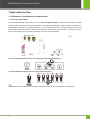
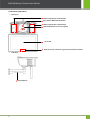
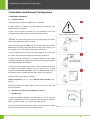
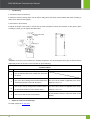
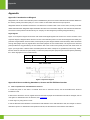
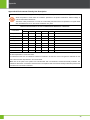
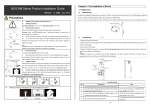
BIOCAM Series Products User Manual Top Mounting 1. Connect the steeve to the device 2. Attach the steeve mounting paper onto the wall or ceiling where the device will be installed. Drill holes according to marks on the steeve mounting paper 3. Use screws to fix the steeve 4. Adjust the length of the steeve to ensure that the Face Recognition Camera is 2.2 meters off the ground. (Note: according to needs, you can adjust it to 2~2.4 meters. Note: The steeve is not included in the standard configuration. The device supports three types of steeves that are respectively 40~80 cm, 80~160 cm, and 140~250 cm (Floor Standing). Installation Mode NO. 1 2 3 4 Description Use the standard wall-mount bracket that comes with the device. Use a 40 to 80 cm ceiling-mount bracket instead of the The 40 to 80 cm bracket is applicable to the storey standard bracket that comes with the device. height of 2.6 to 3.4 m. Use an 80 to 160 cm ceiling-mount bracket instead of The 80 to 160 cm bracket is applicable to the storey the standard bracket that comes with the device. height of 3.4 to 4.2 m. Use a 140 to 250 cm floor-mount bracket. Adjust the camera to the best angle For detail, please see 11 Auto Test. 13 Note Fix the bracket on the floor, and fix the device on the bracket.