1
User Manual
Accounts Payable
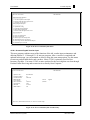
MENU-13.20
06:05:40 12 Jul 1998
2
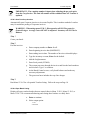
NEW ACCOUNTS PAYABLE
1 JSS.TEST dbs
Input/Maintenance/Deletion
-------------------------1. Accounts Payable Voucher Input
2. Purchase Order Receipts Update to A/P
3. Auto Post Corp Invoices
Listings/Registers/Reports
-------------------------4. Open Batch Listing
5. Sequential Voucher Register
6. Daily Hand check Register
7. Purchase Order Receipts not Invoiced
Corporate Invoices
-----------------11. Print Corp Packing List
12. Print Corp Invoices
13. Build Corp Invoice Receipt File
14. Match Receiving to Corp Invoice
15. Receiving to Invoice Reconciliation Report
16. Rebuild Corp Invoice File
Figure 13-38. New Accounts Payable menu
13.20.1 Accounts Payable Voucher Input
This new program combines most of the functions of the old voucher input, maintenance and
deletion (Menus 13.1.1 through 13.1.4) into one program. After a voucher is completed and
updated in this menu, you can maintain or delete it using this same menu option. Use this menu
to enter any and all hand checks and vouchers. Menu 13.20.1 is primarily used for NonInventory Payables. Use menu 13.20.2 to enter vouchers for the receiving that was done through
Purchase Order Receiving and to enter invoices directly from Corporate.
$$$$$$$$$$$
23:12:58 02 Mar 1999
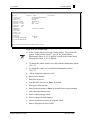
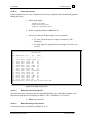
NEW ACCOUNTS PAYABLE VOUCHER ENTRY
1. Operator code :
2. Company number:
3. Voucher number:
4. Batch number :
5. # of vouchers :
6. Gross $ amount:
7. Fiscal period :
8. Due date :
9. Bank number :
DATABASE
01
06438787
Control
1
2,000.00
9812
01/12/99
001
$$$$$$$$$$$
1 JSS.TEST dbs
Applied
2,000.00
Enter Line #, 'D'elete batch, END-exit, or <enter> for voucher input
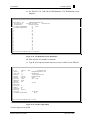
Figure 13-39. New Accounts Payable Voucher Entry
Database Business Systems
Rev.699-1-Wrd