1
User Manual
Accounts Payable
3
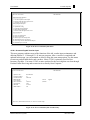
a. Enter your operator code.
b. Enter company number.
c. Enter voucher number, or Enter for new number. If you enter a
voucher that is not currently in an open batch, a new batch will be
created for this voucher. However, if the voucher is in an existing open
batch the voucher will remain in the same batch. In either case, the
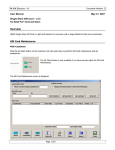
Voucher screen displays.
Open vouchers can be deleted or maintained. Use the 'L'ookup
option to find a voucher number by vendor. The option 'PARAM' is
also available (with authorization) to maintain required fields, stops,
and defaults for the voucher input items.
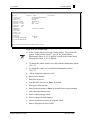
d. If you enter an existing voucher number, edit a line, 'd'elete a batch,
Enter for a new voucher, or 'end.'
e. If you enter a new voucher number, enter a batch number, or Enter to
start a new batch. You may also use 'L'ookup to choose from a list of
open A/P batches; select a number without the leading zeroes.
Use CTRL+X to stop the listing of multiple screens of open
batches. It is recommended that batches be closed on a daily
basis.
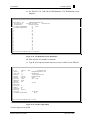
f. Type the number of vouchers. The number of vouchers and the gross
amounts are the control totals, which must be entered and match the
applied totals before a completed batch will updated.
g. Enter gross dollar amount of voucher.
h. Enter fiscal period or Enter for default to the oldest Accounts Payable
period not yet closed.
i. Enter a default due date for all vouchers in this batch, or Enter for
default (the system calculates the due date on each voucher
separately). For a batch of hand checks type 'paid.' For vendor terms
press Enter.
j. Enter a bank number.
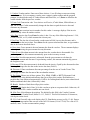
k. To delete the batch type 'd,' or Enter for Voucher Input screen.
l. Record batch number and Enter to continue.
Database Business Systems
Rev.699-1-Wrd