1
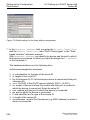
Network Load Control 8.1 Direct Packet Distribution Select the Switching:Filters for MAC Addresses dialog. Each row of the filter table represents one filter. Filters specify the way in which data packets are sent. They are set automatically by the Switch (learned status) or created manually. Data packets whose destination address is entered in the table are sent from the receiving port to the ports marked in the table. Data packets whose destination address is not in the table are sent from the receiving port to all other ports. In the "Create filter" dialog you can set up new filters. The following status settings are possible: X learned: The filter was created automatically by the device. X invalid: With this status you delete a manually created filter. X permanent: The filter is stored permanently in the device or on the URL (see on page 59 “Saving settings“). X gmrp: The filter was created by GMRP. X gmrp/permanent: GMRP added further port markings to the filter after it was created by the administrator. The port markings added by the GMRP are deleted by a restart. X igmp: The filter was created by IGMP Snooping. To delete entries with the "learned" status from the filter table, select the Basics:Restart dialog and click "Reset MAC address table". 8.1.5 Disabling the Direct Packet Distribution To enable you to observe the data at all the ports, the device allows you to disable the learning of addresses. When the learning of addresses is disabled, the device transfers all the data from all ports to all ports. Basic Configuration Release 6.0 07/2010 123