1
Do not drop, jar, bump, shock the unit, or expose to sources of excessive
vibration. Keep in mind that CitiDISK DV uses a 2.5” hard drive, similar to
those used in laptops. Gently handle and carry your CitiDISK DV, especially
during video recording. Battery is not fully charged, user must charge it for at
least 4 hours before any self-powered usage.
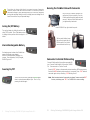
Securing the FireWire Cable with Camcorder
Plug in the 4-pin FireWire connector into
camcorder iLink port vertically. Run the
FireWire cable through the hand-wrist and
secure it. Make sure the FireWire cable is
just tightened by hand-wrist.
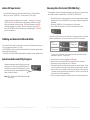
Turning On/Off Battery
Insert CitiDISK DV up right inside the pouch.
Turn on the battery by sliding the switch to the
white “DOT” position. Turn off the battery output
by sliding to other position while in storage or in
transit.
Zip the pouch halfway, leave
top portion of pouch open for
FireWire cable. Run buckle
across belt and buckle it up.
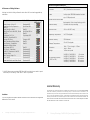
Internal Rechargeable Battery
Re-charging power is drawn from FireWire bus
power or external power adapter.
BLUE LED indicates battery charging is in
process. Once the battery is fully charged,
BLUE LED goes off.
Camcorder Controlled DV Recording
Connect FireWire cable (4-pin end) to camcorder’s DV
port. Connect FireWire cable (6-pin end) to CitiDISK
DV. Set camcorder to “Camera” mode.
Powering On/Off
Pressing “REC ” button on the camcorder to start recording. RED button starts to
flash to solid RED indicating video recording is in progress. Press “ REC ” button of
camcorder again to stop recording. RED button goes off.
Note: Must have tape inserted in camcorder to activate “camera controlled REC”
function; otherwise, press “REC ” on CitiDISK DV to start recording.
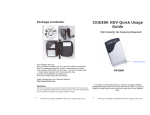
Turn on the CitiDISK DV by pressing the GREEN button
close to external power adapter input. Turn it off by
pressing the button again.
P2
Shining Technology CitiDISK DV Quick Usage Guide v5.0
P3
Shining Technology CitiDISK DV Quick Usage Guide v5.0