1
SPEED Serial Adaptors
User guide
Part number: 5500034-20
Date: 10 September 2008
Navigating around this manual
Using this on-line manual. See page 5.
Fast Contents. See page 7.
Contents. See page 8.
Quick Reference. See page 84.
Index. See page 114.
Page 1
Copyright statement
This document must not be reproduced in any way whatsoever, either printed or
electronically, without the consent of:
Perle Systems Limited
60 Renfrew Drive
Markham,
Ontario,
Canada
L3R 0E1
Perle reserves the right to make changes without further notice, to any products to improve
reliability, function or design.
Perle, the Perle logo, Specialix, the Specialix logo, JETSTREAM, JETSTREAM4000,
JETSTREAM8500 and LANSTREAM2000 are trademarks of Perle Systems Limited.
Microsoft, Windows 95, Windows 98, Windows NT, Windows 2000, Windows Vista,
Windows Server 2008, and Internet Explorer are trademarks of Microsoft Corporation.
Netscape is a trademark of Netscape Communications Corporation.
Solaris is a registered trademark of Sun Microsystems, Inc. in the USA and other countries.
Perle Systems Limited, 10 September 2008.
Page 2
FCC Note
The products described in this manual have been found to comply with the limits for a Class
A digital device, pursuant to Part 15 of the FCC rules. These limits are designed to provide
reasonable protection against harmful interference when the equipment is operated in a
commercial environment. This equipment generates, uses and can radiate radio frequency
energy and, if not installed and used in accordance with the instructions in this Guide, may
cause harmful interference to radio communications. Operation of this equipment in a
residential area is likely to cause harmful interference, in which case the user will be required
to correct the interference at his/her own expense.
EN 55022: 1998, Class A Note
Warning: This is a Class A product. In a domestic environment this product may cause radio
interference in which case the user may be required to take adequate measures.
Caution: The products described in this manual are approved for commercial use only.
Page 3
SPEED Serial Adaptors
User guide
About this manual
Purpose of this manual
This manual tells you how to install, configure and use the Perle SPEED PCI serial adaptor
cards, associated drivers and utilities.
Who this manual is for
This manual is aimed at users who want to add extra serial ports to their system using
SPEED PCI serial adaptor cards. This manual requires a working knowledge of using
personal computers and associated operating systems, as well as experience in installing
host cards.
Warning
Dangerous voltages exist inside computer systems. Before
installing host cards in your system, turn off the power supply
and disconnect the mains lead.
SPEED Serial Adaptors User guide
Purpose of this manual
Page 4
Using this on-line manual
The following is a brief guide to using this manual on-line.
Document navigation
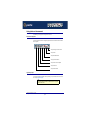
This manual features document navigation hypertext buttons in the header area as shown in
the next picture;
Jump to Using this on-line manual
Jump to Index
Jump to Quick Reference
Jump to previous location
Jump to front of current chapter
Jump to Contents
Jump to Fast contents
Hypertext jumps
You can also navigate around this manual by clicking on any cross reference or text in blue
for example, Hypertext jumps.
Note
The Fast Contents, Contents and Index entries are all hypertext
jumps into this manual.
SPEED Serial Adaptors User guide
Using this on-line manual
Page 5
Revision history
Date
Part number
Description
October 1999
5500034-10
First issue of new SPEED user manual. Includes details of drivers, utilities
and installation under the SCO OpenServer and Windows NT operating
systems.
November 1999
5500034-11
Minor content update to include details of MODEM ports.
December 1999
5500034-12
Content update to include details of drivers, utilities and installation under the
Windows 95 and 98 operating systems.
January 2000
5500034-13
Content update to include details of drivers, utilities and installation under the
Windows 2000 operating system.
March 2000
5500034-14
Update of driver installation section for Windows 95 and 98 operating
systems.
May 2000
5500034-15
Update of manual to include installation under the SCO UnixWare operating
system.
August 2000
5500034-16
Update of manual to include installation under the Linux operating system
and some additional SCO UnixWare error messages.
November 2001
5500034-17
Update to include new contact page and re-branding.
October 2005
5500034-18
Added support information for SCO Openserver 6.
March 2007
5500034-19
Added instructions for a new Windows 2000/XP/Server 2003/Vista
installation process. There are now three Windows drivers to support 32-bit,
64-bit x64, and 64-bit Itanium operating systems/processors.
September 2008
5500034-20
Updated the Windows sections to include Windows Server 2008.
Page 6
SPEED Serial Adaptors
User guide
Fast Contents
ABOUT THIS MANUAL ........................................................... 4
REVISION HISTORY ............................................................... 6
FAST CONTENTS .................................................................. 7
CONTENTS ........................................................................... 8
CHAPTER 1 INTRODUCTION .................................................. 14
CHAPTER 2 INSTALLING DRIVERS AND HOST CARDS .............. 17
CHAPTER 3 SPEED CABLING INFORMATION ........................ 72
CHAPTER 4 QUICK REFERENCE ............................................ 84
APPENDIX A SERIAL PORT DEVICE NAMES ........................... 89
APPENDIX B TRANSPARENT PRINTING .................................. 92
APPENDIX C TROUBLESHOOTING .......................................... 96
APPENDIX D CONTACTING PERLE ......................................... 108
INDEX .................................................................................. 114
SPEED Serial Adaptors User guide
Page 7
SPEED Serial Adaptors
User guide
Contents
ABOUT THIS MANUAL ............................................................ 4
Purpose of this manual ..................................................................................4
Who this manual is for ...................................................................................4
Using this on-line manual ..............................................................................5
Document navigation ................................................................................5
Hypertext jumps ........................................................................................5
REVISION HISTORY ................................................................ 6
FAST CONTENTS ................................................................... 7
CONTENTS ............................................................................ 8
SPEED Serial Adaptors User guide
Page 8
CHAPTER 1 INTRODUCTION
14
About the SPEED serial adaptor card .........................................................15
SPEED Serial Adaptors User guide
Page 9
CHAPTER 2 INSTALLING DRIVERS AND HOST CARDS
17
Before you start ...............................................................................................18
Down loading SPEED drivers from the Perle web site ............................19
Installing under SCO OpenServer ...............................................................20
General installation procedure for SCO OpenServer................................21
Installing device drivers and utilities..........................................................22
Serial port naming conventions.................................................................27
Configuring SPEED serial ports ................................................................28
Removing SPEED drivers and utilities from your system .........................33
Installing under SCO UnixWare ...................................................................35
General installation procedure for SCO UnixWare ...................................36
Installing drivers and utilities onto your system.........................................37
Configuring serial ports .............................................................................40
Configuring serial ports under SCO UnixWare 2 ......................................45
Removing SPEED drivers and utilities from your system .........................46
Installing under Windows 95 and 98 ...........................................................47
General installation procedure for Windows 95 and 98 ............................48
Installing device drivers and utilities..........................................................49
Configuring SPEED serial ports ................................................................51
Removing SPEED drivers and utilities from your system .........................55
Installing under Windows NT .......................................................................57
Installing under Windows 2000/XP/Server 2003/Vista/Server 2008 .......58
General setup procedure for Windows 2000/XP/Server 2003/Vista/
Server 2008 ..............................................................................................59
Installing device drivers and utilities onto your system .............................60
Adding additional cards and/or updating drivers .......................................62
Configuring serial ports .............................................................................62
Installing under Linux .....................................................................................64
General installation procedure for Linux ...................................................65
Installing drivers onto your system............................................................66
Creating devices for the attached ports ....................................................67
Installing a PCI host card ...............................................................................69
Removing host cards .....................................................................................70
SPEED Serial Adaptors User guide
Page 10
CHAPTER 3 SPEED CABLING INFORMATION
72
SPEED cabling guide .....................................................................................73
RJ45 socket pinouts on SPEED host cards ..............................................74
SPEED4 cards ..........................................................................................74
SPEED4+ cards ........................................................................................75
SPEED cables available from Perle .............................................................76
RJ45 (8 pin) to DB9 male cable ................................................................77
Cable diagram ............................................................................................... 77
Connector pinout table .................................................................................. 77
RJ45 (8pin) to DB25 male cable ...............................................................78
Cable diagram ............................................................................................... 78
Connector pinout table .................................................................................. 78
RJ45 (8pin) to DB25 female cable ............................................................79
Cable diagram ............................................................................................... 79
Connector pinout table .................................................................................. 79
RJ45 (10 pin) to DB9 male cable ..............................................................80
Cable diagram ............................................................................................... 80
Connector pinout table .................................................................................. 80
RJ45 (10pin) to DB25 male cable .............................................................81
Cable diagram ............................................................................................... 81
Connector pinout table .................................................................................. 81
RJ45 (10pin) to DB25 female cable ..........................................................82
Cable diagram ............................................................................................... 82
Connector pinout table .................................................................................. 82
SPEED Serial Adaptors User guide
Page 11
CHAPTER 4 QUICK REFERENCE
84
SCO OpenServer utilities ...............................................................................85
Port Configuration utility............................................................................85
Main window .................................................................................................. 85
Menu map ..................................................................................................... 86
SCO UnixWare utilities ...................................................................................87
Serial Manager..........................................................................................87
APPENDIX A SERIAL PORT DEVICE NAMES
89
Under SCO UnixWare .....................................................................................90
Device node details...................................................................................90
Under SCO UnixWare .....................................................................................91
Device node details...................................................................................91
Linux Device node details .............................................................................91
APPENDIX B TRANSPARENT PRINTING
92
What is transparent printing? .......................................................................93
Problems with printer output ........................................................................94
The printcap.spd configuration file .............................................................94
The print.spd configuration file ....................................................................95
APPENDIX C TROUBLESHOOTING
96
SCO OpenServer 5 ..........................................................................................97
Example of normal SPEED driver boot messages ...................................97
Additional card warning messages ...........................................................98
SCO OpenServer 5 error messages.........................................................99
SCO UnixWare/SCO OpenServer 6 .............................................................100
Additional card warning messages ...........................................................101
SCO UnixWare error messages ..............................................................102
Windows 95 and 98 .........................................................................................104
Windows 95 and 98 general troubleshooting ............................................104
Windows NT .....................................................................................................104
Windows NT general troubleshooting .......................................................104
SPEED Serial Adaptors User guide
Page 12
Windows 2000/XP/Server 2003/Vista/Server 2008 ....................................105
General troubleshooting under Windows 2000/XP/Server 2003/Vista/
Server 2008 ..............................................................................................106
Windows error messages .........................................................................107
APPENDIX D CONTACTING PERLE
108
Making a technical Support Query ..............................................................109
Who to contact ..........................................................................................109
Information needed when making a query................................................110
Making a support query via the Perle web page .......................................111
Repair procedure ............................................................................................112
Feedback about this manual ........................................................................112
Contacting Perle technical support .............................................................113
INDEX ................................................................................... 114
SPEED Serial Adaptors User guide
Page 13
SPEED Serial Adaptors
User guide
Chapter 1 Introduction
You need to read
this chapter if you
want to...
You need to read this chapter if you want an introduction to the Perle SPEED serial adaptor
cards, driver software and utilities.
This chapter provides introductory information about the Perle SPEED PCI serial adaptor
cards, driver software and configuration utilities.
This chapter includes the following sections;
•
About the SPEED serial adaptor card on page 15
SPEED Serial Adaptors User guide
Chapter 1 Introduction
Page 14
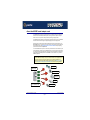
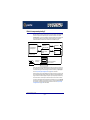
About the SPEED serial adaptor card
The SPEED product range are high performance, serial adaptor cards for PCI based host
machines. Each card features four RJ45 ports, removing the need for spider or octopus
cables. You can use up to four cards per host thus providing 16 ports per host.
The SPEED4 variant supports a full compliment of eight signal lines per port. The SPEED4+
includes enhanced modem support and significantly higher maximum port speeds.
Each serial port has three device nodes associated with it. Each node takes the form of a
special file which you can access in the normal manner from operating system utilities and
user applications. See also Appendix A Serial Port Device Names and your operating
system manual for details of special files.
You use the SPEED when you want a robust entry level solution for the small office or point
of sale applications. Typically you use SPEED because you want to add extra serial ports to
an existing computer system rather than replacing it with the considerable cost that entails.
Higher data rates and ESD protection in the SPEED4+ make it suitable for any modem or
ISDN TA application.
Note
To use the SPEED serial adaptor cards you must first install the drivers supplied with the
card and then configure each card as required prior to mechanical installation. The
installation procedure varies for different operating systems. Please read Before you start on
page 18 in Chapter 2 Installing drivers and host cards before commencing installation.
Thin Clients
Up to 4 SPEED
cards per host
Dumb Terminals
Electronic
point of sale
Printers
4 serial ports per card.
Up to 16 ports per host
Data Capture
SPEED Serial Adaptors User guide
About the SPEED serial adaptor card
Chapter 1 Introduction
Page 15
SPEED Serial Adaptors User guide
About the SPEED serial adaptor card
Chapter 1 Introduction
Page 16
SPEED Serial Adaptors
User guide
Chapter 2 Installing drivers and host cards
You need to read
this chapter if you
want to...
You need to read this chapter if you want to install SPEED serial adaptor cards and
associated software.
This chapter provides information about installing and configuring SPEED serial adaptor
cards in PCI format.
Note
The procedure for installing and configuring SPEED serial adaptor cards varies for different
operating systems. Please read Before you start on page 18 before commencing
installation.
This chapter includes the following sections;
•
Before you start on page 18
•
Down loading SPEED drivers from the Perle web site on page 19
•
Installing under SCO OpenServer on page 20
•
Installing under SCO UnixWare on page 35
•
Installing under Windows 95 and 98 on page 47
•
Installing under Windows NT on page 57
•
Installing under Windows 2000/XP/Server 2003/Vista/Server 2008 on page 58
•
Installing under Linux on page 64
•
Installing a PCI host card on page 69
•
Removing host cards on page 70.
SPEED Serial Adaptors User guide
Chapter 2 Installing drivers and host cards
Page 17
Before you start
Before you install your SPEED host cards and software, note that the procedure for installing
and configuring SPEED serial adaptor cards varies for different operating systems.
To install under a particular operating system, please refer to one of the operating system
specific installation procedures listed below;
•
Installing under SCO OpenServer on page 20.
•
Installing under SCO UnixWare on page 35
•
Installing under Windows 95 and 98 on page 47
•
Installing under Windows NT on page 57
•
Installing under Windows 2000/XP/Server 2003/Vista/Server 2008 on page 58
•
Installing under Linux on page 64.
SPEED Serial Adaptors User guide
Before you start
Chapter 2 Installing drivers and host cards
Page 18
Down loading SPEED drivers from the Perle web site
You can install the SPEED driver and utility software from the Perle web site. To do this
proceed as follows;
1. On your PC, start the Internet browser or FTP Client you want to use (for example,
Netscape).
2. Within your Internet browser window or FTP client, select the software directory using the
following URL;
http://www.perle.com/downloads
Note
In the event of any problems contact your System Administrator or
Internet Service provider for assistance.
3. Change to the software directory.
The software directory is now displayed.
4. Download the zip files in this directory to a suitable location on your PC for example, /tmp.
5. Uncompress the files using a suitable utility.
6. You can now install the driver software using the correct procedure for your operating
system. See Before you start on page 18.
SPEED Serial Adaptors User guide
Down loading SPEED drivers from the Perle web site
Chapter 2 Installing drivers and host cards
Page 19
Installing under SCO OpenServer
This section tells you how to install host cards, software drivers and utilities under the SCO
OpenServer operating system and includes the following;
•
General installation procedure for SCO OpenServer on page 21
•
Installing device drivers and utilities on page 22
•
Configuring SPEED serial ports on page 28
•
Removing SPEED drivers and utilities from your system on page 33.
SPEED Serial Adaptors User guide
Installing under SCO OpenServer
Chapter 2 Installing drivers and host cards
Page 20
General installation procedure for SCO OpenServer
The general procedure for installing and configuring host cards, drivers software and
associated utilities for the SCO OpenServer operating system is as follows:
1. Install any PCI host cards you require into your system. See Installing a PCI host
card on page 69
2. Install the SPEED SCO OpenServer drivers and utilities onto your system using the
procedures described in Installing device drivers and utilities on page 22.
3. If required, remove any host cards you want from your system. See Removing host
cards on page 70.
4. Using the Port Configuration tool, configure the serial ports you have added to the
system. See Configuring SPEED serial ports on page 28.
Your system can now use the serial adaptor cards you have installed. If required, you can
reconfigure serial ports following initial installation.
SPEED Serial Adaptors User guide
Installing under SCO OpenServer
Chapter 2 Installing drivers and host cards
Page 21
Installing device drivers and utilities
To install the SPEED device drivers and utilities for the SCO OpenServer operating system
proceed as follows;
1. Login to your system as super user.
2. Load the CDROM into your system CD drive.
3. At the command prompt, make a directory for your installation by typing:
mkdir /cdrom
4. Mount the CDROM file system using the following commands:
mount -f ISO9660 -r/dev/cd0 /cdrom
Note
The example above shows the directory name as /cdrom, You can either use this
name or use another directory name to suit your requirements. For example, /mnt.
5. In the SCO OpenServer desktop, double click on the System Administration folder.
The System Administration window is now displayed.
6. In the System Administration window, double click on the software manager icon.
The Software Manager window is now displayed.
SPEED Serial Adaptors User guide
Installing under SCO OpenServer
Chapter 2 Installing drivers and host cards
Page 22
7. In the Software Manager menu, click on Software > Install New.
The Begin Installation window is now displayed as shown in the next picture.
Click here to
select the local
host as the host
machine.
8. In the Begin Installation window, select the local host as the machine to install from by
clicking on the From localhostname button and then click on Continue.
The Select Media window is now displayed.
9. In the Select Media window, using the Media Device selector choose the Media Images
option then click on Continue.
The Enter Image Directory window is now displayed.
SPEED Serial Adaptors User guide
Installing under SCO OpenServer
Chapter 2 Installing drivers and host cards
Page 23
10.In the Enter Image Directory window, enter the following in the Image directory field;
/cdrom/drivers/speed/openserver (SCO OpenServer 5)
/cdrom/drivers/speed/openserver6 (SCO OpenServer 6)
Note
The example and picture above show a directory name including /cdrom, You can
either include this name in the path or use another directory name to suit your
requirements. For example, /mnt.
11.In the Enter Image Directory window, click on OK.
The Install Selection window is now displayed.
SPEED Serial Adaptors User guide
Installing under SCO OpenServer
Chapter 2 Installing drivers and host cards
Page 24
12.In the Install Selection window, click on the Install button.
13.In the pop-up window, click on the Continue button to continue the installation process
The following progress message is now displayed.
The Speed Installation Options window is now displayed.
Option Only
available if you are
performing an
upgrade on SCO
OpenServer 5
14.If required, in the Speed Installation Options window, select the Re-Link kernel option.
Hint
If you are installing more then one driver, you can de-select this option until you
have installed all the drivers and utilities you require to save time.
15.(SCO OpenServer 5 only) If you wish to retain the existing configuration from a previous
device driver installation, in the Speed Installation Options window, select Retain
Configuration Data.
SPEED Serial Adaptors User guide
Installing under SCO OpenServer
Chapter 2 Installing drivers and host cards
Page 25
16.In the Speed Window Installation menu, click on Options > Close to close the window
and continue the installation process.
If you select Re-link kernel, a message window is displayed at the end of the driver
installation prompting you to re-boot the system.
17.In the message window click on OK to continue the installation process.
The following message is now displayed upon completion of the installation process.
18.In the message window, click on OK to close the window.
The software manager window is now updated to show the driver you have installed as
shown in the next picture.
SPEED Serial Adaptors User guide
Installing under SCO OpenServer
Chapter 2 Installing drivers and host cards
Page 26
19.In the Software Manager window, click on the Host > Exit menu option to close the
window.
20.Shut down your system and turn the power off.
You can now continue with the rest of the installation process see General installation
procedure for SCO OpenServer on page 21.
Serial port naming conventions
Each serial port has three device nodes associated with it. Each node takes the form of a file
which you can access from operating system utilities and user applications. Details of these
nodes are shown in the next table.
Device name
Function
Description
Location
ttyz1
Normal communications port
for local “tty” devices.
Indicates normal communications port behaviour.
/dev
ttyZ1
Modem port.
Indicates that a port open will
not complete unless DCD is
present.
/dev
ttyz1p
Transparent print port.
Indicates that device should
only be used for transparent
print.
/dev
SPEED Serial Adaptors User guide
Installing under SCO OpenServer
Chapter 2 Installing drivers and host cards
Page 27
Configuring SPEED serial ports
The Port Configuration utility allows you to configure the extra SPEED serial ports you have
added to your system. To do this proceed as follows;
Note
If you want to perform transparent printing from any of the terminals attached to your
system, you need to check the contents of the printcap.spd file to see if the
terminal type you are using is supported. To do this proceed as follows;
1. Using a text editor, go to the /etc directory and open the file called
printcap.spd
2. Check the contents of the printcap.spd file to see if the terminal type you are
using is supported. See page 94 in Appendix B Transparent Printing for the
syntax of the entries in this file.
3. If the terminal type you are using is not supported, add an entry for the new
terminal type (including the type, transparent print ON and transparent print
OFF strings) to the printcap.spd file (page 94). See the user guide for your
terminal for details of the entries required.
You can now configure the ports you want using the Port Configuration utility.
Starting the Port
1. In the command prompt, type spdpcfg and press the Enter key. Alternatively use the
Configuration utility
SCO OpenServer desktop as follows;
a. In the SCO OpenServer desktop, open the System Administration folder.
The System Administration window is now displayed.
b. In the System Administration window, click on the Speed folder in SCO
OpenServer 5 or the Perle-Serial folder in SCO OpenServer 6 to open it.
The Speed window is now displayed
c. In the Speed window, click on the Speed Port Configuration Icon.
SPEED Serial Adaptors User guide
Installing under SCO OpenServer
Chapter 2 Installing drivers and host cards
Page 28
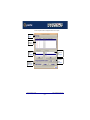
The Port Configuration window is now displayed as shown in the next picture.
Menus see
page 86.
Select one or
more ports
from this list.
Select a
terminal type
here.
See page 31
Select a getty
definition
here.
See page 30.
Enables or
disables flow
control.
See page 31
Enables or
disables login.
See page 31
SPEED Serial Adaptors User guide
Installing under SCO OpenServer
Chapter 2 Installing drivers and host cards
Page 29
Selecting ports
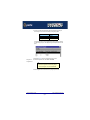
2. In the Port Configuration window, select the ports you want you want to configure by
clicking on one or more items in the list of ports (example in next picture).
Hint
To select multiple items which follow each other in the list, hold down the Shift key and click
on all the items you want.
To select multiple items from anywhere in the list, hold down the Ctrl key and click on all the
items you want.
Selecting a getty
definition
3. In the Port Configuration window, select the getty definition you want by double clicking
on an item in the Available gettydefs list. Alternatively, click on the Set button.
The list of currently selected ports is now updated to show the new getty definition.
New definition
displayed here
SPEED Serial Adaptors User guide
Installing under SCO OpenServer
Chapter 2 Installing drivers and host cards
Page 30
Selecting terminal
type
4. In the Terminal type list, double click on the terminal type you want for the currently
selected ports. Alternatively, single click on the item you want in the Terminal type list and
press the Set button.
The list of ports is now updated to show the new terminal type
New terminal type
displayed here
Enabling and
disabling flow
control
5. If required, in the Port Configuration window, click on the ixon button to enable flow
control for Transparent printing.
Note
For information about transparent printing, see Appendix B Transparent Printing.
6. If required, in the Port Configuration window, click on the ixany button to enable sending
of data on receipt of the next character (when flow control is enabled on the transparent
print port).
Setting up a port
login
7. In the Port Configuration window, click on one of the menu options shown in the next
table to display the ports with the login status you want to change. For example, ports
without logins enabled.
These options allow you to filter on the type of ports you are looking for. This facility is
helpful when you have a large number of ports installed.
To Display
Click menu option
All ports with logins enabled
Ports > Logins
All ports without logins enabled
Ports > Unconfigured
Display all ports
Ports > All
SPEED Serial Adaptors User guide
Installing under SCO OpenServer
Chapter 2 Installing drivers and host cards
Page 31
8. If required, in the Port Configuration window, select the ports whose logins status you
want to change, then click on one of the following to change the login status;
Tc
Click on..
Enable logins for a port
Enable button
Disable logins for a port
Disable button
The selected ports in the list now are updated show their new login status. For example if
you enable the login for a port, a tick is displayed along side the port as shown in the next
picture.
9. Repeat steps 2. to 8. until you have configured all the ports you want.
Exiting the Port
Configuration tool
10.In the Port Configuration menu, click on Ports > Save & Exit.
Note
To quit the Port Configuration tool without saving changes,
•
In the Port Configuration menu, click on Ports > Quit.
The Port Configuration tool now closes and saves any changes you have made.
SPEED Serial Adaptors User guide
Installing under SCO OpenServer
Chapter 2 Installing drivers and host cards
Page 32
Removing SPEED drivers and utilities from your system
To remove the SPEED device drivers and utilities for the SCO OpenServer operating system
proceed as follows;
1. In the SCO OpenServer desktop, double click on the System Administration folder.
The System Administration window is now displayed.
2. In the System Administration window, double click on the software manager icon.
The Software Manager window is now displayed.
3. In the Software Manager window select the driver you want to remove.
4. In the Software Manager menu, click on Software > Remove software.
A confirmation window is now displayed prompting you to confirm removal
SPEED Serial Adaptors User guide
Installing under SCO OpenServer
Chapter 2 Installing drivers and host cards
Page 33
5. In the confirmation window, click on the Remove button.
The software is now removed and the following Kernel re-link message is now displayed
as shown in the next picture.
The Kernel re-link message window now closes and the removal continues. A message is
displayed upon completion.
6. In the message window, click on OK to close the window.
The software manager window is now updated to show the remaining software.
SPEED Serial Adaptors User guide
Installing under SCO OpenServer
Chapter 2 Installing drivers and host cards
Page 34
Installing under SCO UnixWare
This section tells you how to install host cards, software drivers and utilities under the SCO
UnixWare operating system and includes the following;
•
General installation procedure for SCO UnixWare on page 36
•
Installing drivers and utilities onto your system on page 37
•
Configuring serial ports on page 40
•
Configuring serial ports under SCO UnixWare 2 on page 45
•
Removing SPEED drivers and utilities from your system on page 46.
SPEED Serial Adaptors User guide
Installing under SCO UnixWare
Chapter 2 Installing drivers and host cards
Page 35
General installation procedure for SCO UnixWare
The general procedure for installing and configuring host cards, drivers software and
associated utilities for the SCO UnixWare operating system is as follows:
1. Install any PCI host cards you require into your system. See Installing a PCI host
card on page 69
Note
Once you have installed the SPEED drivers, if you add or remove any host cards the
operating system will update the kernel accordingly using the spdconf program.
spdconf is run automatically during boot up and checks to see if any host cards have
been added or removed since the last time the system was powered up. If anything has
changed the files which identify the ports, terminals and transparent printing are
updated.
2. If required, install the SPEED SCO UnixWare drivers and utilities onto your system using
the procedures described in Installing drivers and utilities onto your system on
page 37.
3. If required, remove any host cards you want from your system. See Removing host
cards on page 70.
4. Using the Serial Manager utility, configure the serial ports you have added to the system.
See Configuring serial ports on page 40.
Note
If you are running version 2 of the SCO UnixWare operating system you need to use the
procedures described in Configuring serial ports under SCO UnixWare 2 on page 45 to
configure your serial ports.
Your system can now use the serial adaptor cards you have installed. If required, you can
reconfigure serial ports following initial installation.
SPEED Serial Adaptors User guide
Installing under SCO UnixWare
Chapter 2 Installing drivers and host cards
Page 36
Installing drivers and utilities onto your system
To install the SPEED device drivers and utilities for the SCO UnixWare operating system
proceed as follows;
1. Login to your system as super user.
2. Load the CDROM into your system CD drive.
3. At the command prompt, type scoadmin.
The System Administration window is now displayed.
4. In the System Administration window, double click on the Filesystem Manager folder.
The Filesystem Manager window is now displayed.
SPEED Serial Adaptors User guide
Installing under SCO UnixWare
Chapter 2 Installing drivers and host cards
Page 37
5. In the Filesystem Manager menu, click on Mount > Add Mount Configuration >Local.
The Add Local Mount Configuration window is now displayed.
6. In the Add Local Mount Configuration window, set only the options detailed in the next
table:
Option
Set to or enter....
Device File
Select cdrom or string
containing cdrom
Mount Point
/cdrom
Access Mode
Select Read-only
When to Mount
Enable Now
Disable At System Startup
SPEED Serial Adaptors User guide
Installing under SCO UnixWare
Chapter 2 Installing drivers and host cards
Page 38
7. In the Add Local Mount Configuration window, click on OK to accept the settings and
close the window.
The Filesystem Manager window is now updated to show the new mount as shown in the
next picture.
8. Filesystem Manager menu, click on Host > Exit to close the window.
9. At the command prompt, type:
pkgadd -d /cdrom/drivers/speed/unixware/spd.pkg spd
10.Press the Enter key.
The system now installs the driver and displays a series of messages ending with a
successful installation message.
Upon installation of the drivers, your SPEED cards are ready to use.
Note
A re-boot of your system is not necessary as the drivers for your SPEED card are
dynamically loadable and will be loaded as soon as any software attempts to access the
associated devices.
SPEED Serial Adaptors User guide
Installing under SCO UnixWare
Chapter 2 Installing drivers and host cards
Page 39
Configuring serial ports
The software provided with the SCO UnixWare operating system includes a utility called
Serial Manager which allows you to configure the extra serial ports you have added to your
system.
Note
If you are running version 2 of the SCO UnixWare operating system you need to use the
procedures described in Configuring serial ports under SCO UnixWare 2 on page 45 to
configure your serial ports.
Note
On UnixWare 7.0, you must apply a patch file called ptf7053 before using the Serial Manager.
You can find the patch on the SCO web site at;
http://www.sco.com
To configure serial ports with Serial Manager proceed as follows;
Note
If you want to perform transparent printing from any of the terminals attached to your
system, you need to check the contents of the printcap.spd file to see if the
terminal type you are using is supported. To do this proceed as follows;
1. Using a text editor, go to the /etc directory and open the file called
printcap.spd
2. Check the contents of the printcap.spd file to see if the terminal type you are
using is supported. See page 94 in Appendix B Transparent Printingfor the
syntax of the entries in this file.
3. If the terminal type you are using is not supported, add an entry for the new
terminal type (including the type, transparent print ON and transparent print
OFF strings) to the printcap.spd file (page 94). See the user guide for your
terminal for details of the entries required.
4. If you have made any changes then type spdconf in order to re-configure the
print port settings.
You can now configure the ports you want using the Serial Manager utility.
SPEED Serial Adaptors User guide
Installing under SCO UnixWare
Chapter 2 Installing drivers and host cards
Page 40
1. At the command prompt, type scoadmin
The System Administration window is now displayed as shown in the next picture.
2. In the System Administration tool window, click on the Hardware folder and then select
Serial Manager
The Serial Manager window is now displayed showing the host cards (including SPEED)
currently present on the system.
SPEED Serial Adaptors User guide
Installing under SCO UnixWare
Chapter 2 Installing drivers and host cards
Page 41
3. In the Serial Manager window, select the host card you want. Then in the Serial Manager
menu, click on View > Ports.
The Serial Manager window now displays the ports available for the selected host card as
shown in the next picture.
SPEED Serial Adaptors User guide
Installing under SCO UnixWare
Chapter 2 Installing drivers and host cards
Page 42
4. In the Serial Manager menu, click on Ports > Modify.
The Modify Serial Port window is now displayed.
5. In the Modify Serial Port window, set the parameters shown in the next table
Parameter
Set to
Port Type
No change, should already be
set to software flow control
Configure port
incoming only
Speed
the speed value you require
SPEED Serial Adaptors User guide
Installing under SCO UnixWare
Chapter 2 Installing drivers and host cards
Page 43
6. In the Modify Serial Port window, click on the Port settings button.
The Port settings window is now displayed.
7. In the Port settings window, select the Data bits and Parity values you require and click
on OK.
8. In the Modify Serial Port window, click on OK to accept the changes you have made and
close the window.
9. Repeat steps 3. to 8. until you have configured the serial ports for all the host cards you
require.
10.In the Serial Manager menu click on Host > Quit to quit Serial Manager and close the
window.
SPEED Serial Adaptors User guide
Installing under SCO UnixWare
Chapter 2 Installing drivers and host cards
Page 44
Configuring serial ports under SCO UnixWare 2
spxadmport
Syntax
SCO UnixWare 2 does not include the graphical user interface based Serial Manager utility. If
you are running SCO UnixWare 2 on your computer, you need to run the spxadmport script
from the command line to configure SPEED serial ports. You use this by typing a single line
command which contains the information required for a given configuration task using the
following syntax;
/etc/spxadmport command svctag [label] [owner]
where;
Procedure
Item
Description
Example
command
add, enable, disable, remove or list.
remove
svctag
device number from /dev/term.
z1
label
/etc/ttydefs entry (optional).
9600
owner
user ID assigned to the port (optional).
root
To use the spxadmport script to configure your SPEED serial ports proceed as follows;
1. At the command prompt, type one of the commands detailed in the next table using the
following syntax;
/etc/spxadmport [command] [svctag] [label] [owner]
Command
Description
Example command
Add
Adds a serial port to the
service monitor (spdmon) and
enables the port for monitoring
logins.
/etc/spxadmport add z1 9600 root
Enable
Enables a previously disabled
port for monitoring.
/etc/spxadmport enable
Disable
Disables a port. Has the effect
of disabling all further logins on
this port.
/etc/spxadmport disable z1
Remove
Removes the selected serial
port from the service monitor
(spdmon).
/etc/spxadmport remove z1
List
Lists the currently defined
services and/or port monitors.
/etc/spxadmport list
List p
Lists all logins configured.
/etc/spxadmport list p
List s
Lists all port services
configured.
/etc/spxadmport list s
SPEED Serial Adaptors User guide
Installing under SCO UnixWare
Chapter 2 Installing drivers and host cards
Page 45
2. Press the Enter key.
The revised SPEED port configuration is now adopted by the system.
Removing SPEED drivers and utilities from your system
To remove the software drivers from your system under the SCO UnixWare operating system
proceed as follows;
1. At the command prompt, type pkgrm spd and press Enter
The SPEED driver and associated utilities are now removed from your system.
SPEED Serial Adaptors User guide
Installing under SCO UnixWare
Chapter 2 Installing drivers and host cards
Page 46
Installing under Windows 95 and 98
This section tells you how to install host cards, software drivers and utilities under the
Windows 95 and Windows 98 operating systems and includes the following;
•
General installation procedure for Windows 95 and 98 on page 48
•
Installing device drivers and utilities on page 49
•
Configuring SPEED serial ports on page 51
•
Removing SPEED drivers and utilities from your system on page 55.
SPEED Serial Adaptors User guide
Installing under Windows 95 and 98
Chapter 2 Installing drivers and host cards
Page 47
General installation procedure for Windows 95 and 98
The general procedure for installing and configuring host cards, drivers software and
associated utilities for the Windows 95 and 98 operating systems is as follows:
1. Down load the SPEED driver files into your PC from the CDROM or the Perle website.
See Down loading SPEED drivers from the Perle web site on page 19.
2. Install any PCI host cards you require into your system. See Installing a PCI host
card on page 69.
3. Install the SPEED Windows 95 and 98 drivers and utilities onto your system using the
procedures described in Installing device drivers and utilities on page 49.
4. If required, remove any host cards you want from your system. See Removing host
cards on page 70.
Your system can now use the serial adaptor cards you have installed. If required, you can
reconfigure serial ports following initial installation. See Configuring SPEED serial ports on
page 51.
Note
To remove the SPEED Windows 95 and 98 drivers and utilities from your system, see
page 55.
SPEED Serial Adaptors User guide
Installing under Windows 95 and 98
Chapter 2 Installing drivers and host cards
Page 48
Installing device drivers and utilities
To install the SPEED device drivers and utilities for the Windows 95 or 98 operating systems
proceed as follows;
1. Load the CDROM into your PC.
The web browser window is now displayed automatically showing a virtual website for
your Perle product (the browser application depend on your system).
2. From the \drivers\speed\win9x directory, run the setup.exe file.
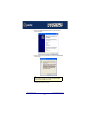
A welcome window is now displayed
3. In the Welcome window, click on the Next > button.
A progress message is displayed while installed devices are upgraded to use the new
drivers, followed by the Setup Complete window as shown in the next pictures.
SPEED Serial Adaptors User guide
Installing under Windows 95 and 98
Chapter 2 Installing drivers and host cards
Page 49
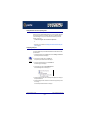
4. In the Setup Complete window click select the Yes, I want to restart my computer now
option then click on Finish button to confirm your selection.
Hint
After the machine restarts, if windows cannot find a file whilst trying to install a device, a
pop-up window is displayed asking you for the location of missing file. To remedy this;
•
In the popup window, select the windows system directory for example,
c:\windows\system.
Device installation should then be able to continue.
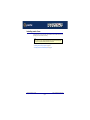
Installation of device drivers and utilities is now complete.
SPEED Serial Adaptors User guide
Installing under Windows 95 and 98
Chapter 2 Installing drivers and host cards
Page 50
Configuring SPEED serial ports
Note
SPEED ports are normally configured as part of the installation process described in
Installing device drivers and utilities on page 49. The procedures described in
this section are provided for information only.
To configure SPEED serial ports proceed as follows;
1. In the windows desktop, click on the Start button and select Settings > Control panel.
The control panel window is now displayed.
SPEED Serial Adaptors User guide
Installing under Windows 95 and 98
Chapter 2 Installing drivers and host cards
Page 51
2. In the control panel window, double click on the System icon.
The System Properties tabbed window is now displayed as shown in the next picture.
Hint
You can also display the System Properties tabbed window by right
clicking on the My Computer icon on your desktop and selecting the
Properties menu option.
3. In the System Properties tabbed window, click on the Device Manager tab.
The Device Manager page is now displayed.
4. In the Device Manager page, double click on the device whose properties you wish to
view.
The properties tabbed window for the selected device is now displayed.
SPEED Serial Adaptors User guide
Installing under Windows 95 and 98
Chapter 2 Installing drivers and host cards
Page 52
5. In the properties window, click on the Settings tab.
The Settings page is now displayed.
6. In the Settings page, select the configuration values you want and either click on the OK
button or click on the Advanced tab to display details of the device driver.
SPEED Serial Adaptors User guide
Installing under Windows 95 and 98
Chapter 2 Installing drivers and host cards
Page 53
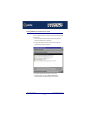
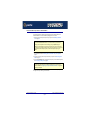
7. The Advanced page is now displayed as shown in the next picture:
Selects the port
name for a given
device.
Allows you to select
the default port
name or change it
to any unused port
name.
Default display is
the currently
assigned port
name.
Caution
It is strongly recommended that you do not make changes to the
FIFO trigger levels or com port name unless you have a valid
reason to do so.
Re-configuration of ports is now complete.
SPEED Serial Adaptors User guide
Installing under Windows 95 and 98
Chapter 2 Installing drivers and host cards
Page 54
Removing SPEED drivers and utilities from your system
To remove SPEED drivers and utilities from your system proceed as follows;
1. In the windows desktop, click on the Start button and select Settings > Control panel.
The control panel window is now displayed.
SPEED Serial Adaptors User guide
Installing under Windows 95 and 98
Chapter 2 Installing drivers and host cards
Page 55
2. In the control panel window, double click on the System icon.
The System Properties tabbed window is now displayed as shown in the next picture.
3. In the System Properties tabbed window, click on the Device Manager tab
The Device Manager page is now displayed.
4. In the Device Manager page, click on the View devices by type button.
The display is now updated to show installed devices by type.
5. In the Device Manager page, click on the device you wish to remove, highlighting it then
press the Remove button.
The selected device is now removed from the system.
Warning
If you remove the devices but do not remove the hardware, the
devices will be re-installed when you next re-boot the machine or
run the Hardware Wizard.
SPEED Serial Adaptors User guide
Installing under Windows 95 and 98
Chapter 2 Installing drivers and host cards
Page 56
Installing under Windows NT
The procedure for installing and configuring host cards, drivers software and associated
utilities for the Windows NT operating system is as follows:
Note
The Perle PortDirector software contains drivers for the SPEED host cards.
You will need to install the PortDirector for WIndows NT on your system in order to use
the SPEED host cards.
See Chapter 5 Adding and deleting host cards in the PortDirector User guide
part number 5500028 for further details.
1. Install any PCI host cards you require into your system. See Installing a PCI host
card on page 69
2. If required, remove any host cards you want from your system. See Removing host
cards on page 70.
3. Use the PortDirector software to update your system with the revised number and type of
host cards. See The PortDirector user guide part number 5500028 for further details.
Your system can now use the serial adaptor cards you have installed.
SPEED Serial Adaptors User guide
Installing under Windows NT
Chapter 2 Installing drivers and host cards
Page 57
Installing under Windows 2000/XP/Server 2003/Vista/
Server 2008
This section describes how to install the SPEED device driver software under Microsoft
Windows 2000/XP/Server 2003/Vista/Server 2008.
This section includes the following;
•
General setup procedure for Windows 2000/XP/Server 2003/Vista/Server 2008 on
page 59
•
Installing device drivers and utilities onto your system on page 60
•
Adding additional cards and/or updating drivers on page 62
•
Configuring serial ports on page 62.
SPEED Serial Adaptors User guide
Installing under Windows 2000/XP/Server 2003/Vista/Server 2008
Page 58
Chapter 2 Installing drivers and host cards
General setup procedure for Windows 2000/XP/Server 2003/Vista/Server 2008
The general procedure for installing SPEED cards under the Windows 2000, XP,
Server 2003, Vista. or Server 2008 operating systems is as follows;
1. Install or remove any PCI host cards you require on your system. See Installing a PCI
host card on page 69 and Removing host cards on page 70.
2. Install the SPEED device driver software. See Installing device drivers and utilities
onto your system on page 60
3. If you add new SPEED cards, you should run Update Driver to make sure the new cards
have the latest driver. See Adding additional cards and/or updating drivers on
page 62.
4. If required, remove any host cards you want from your system. See Removing host
cards on page 70.
5. Using the Windows 2000 Device Manager, configure the serial ports you have added to
the system. See Configuring serial ports on page 62.
SPEED Serial Adaptors User guide
Installing under Windows 2000/XP/Server 2003/Vista/Server 2008
Page 59
Chapter 2 Installing drivers and host cards
Installing device drivers and utilities onto your system
To install or enable the SPEED device drivers on your system proceed as follows;
1. Turn on your PC and if required, log in.
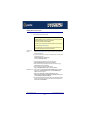
If you have installed any new host cards a Found New Hardware message is briefly
shown followed by the Found New Hardware wizard as shown in the pictures.
2. In the Found New Hardware wizard click on the Cancel button.
3. Download the lastest SPEED driver zip file from the Perle website for your operating
system:
pserial-x86.zip for 32-bit Windows operating systems.
pserial-amd64.zip for 64-bit Windows operating systems.
pserial-ia64.zip for 64-bit Windows Itanium operating systems.
4. Unzip the driver zip file to a local directory. We recommend that you use the
pserial-setup-<arch>.exe file, which will launch the installation wizard, to install the
SPEED driver.
SPEED Serial Adaptors User guide
Installing under Windows 2000/XP/Server 2003/Vista/Server 2008
Page 60
Chapter 2 Installing drivers and host cards
5. Double-click the pserial-setup-<arch>.exe installation executable and follow the
installation wizard steps:
6. During the installation, you may get a Windows Logo message. Click Continue Anyway
when these appear.
Note
If you are installing an unsigned driver, you may have to click through the Found New
Hardware wizard for every SPEED port on your system.
Your SPEED driver installation is now finished.
SPEED Serial Adaptors User guide
Installing under Windows 2000/XP/Server 2003/Vista/Server 2008
Page 61
Chapter 2 Installing drivers and host cards
Adding additional cards and/or updating drivers
Whenever you add any additional SPEED hardware to your system, Windows might install
the latest digitally signed driver in its database (depending on your Windows operating
system and settings). To ensure you have the latest driver installed after you add new
hardware, you can either:
•
Click Start > All Programs > Perle > Perle-Serial > Update Driver
or
•
Reinstall the drivers as described in Installing device drivers and utilities onto your
system on page 60.
Configuring serial ports
To configure SPEED serial ports under Windows 2000/XP/Server 2003/Vista/Server 2008,
proceed as follows;
1. In the Windows desktop, click on the Start button and select Settings > Control Panel
The control panel window is now displayed.
2. In the Control Panel window, click on the System icon.
The System Properties tabbed window is now displayed.
3. In the System Properties window, click on the Hardware tab.
The hardware page is now displayed.
4. In the Hardware page, click on the Device Manager Button.
The Device Manager window is now displayed.
5. In the Device Manager window, click on the Multiport serial adapters icon to display the
currently installed devices.
6. In the Device Manager window, double click on the device whose properties you want to
view or change
The device Properties tabbed window is now displayed.
SPEED Serial Adaptors User guide
Installing under Windows 2000/XP/Server 2003/Vista/Server 2008
Page 62
Chapter 2 Installing drivers and host cards
7. In the device Properties window, click on the Port Settings tab to display the Port
Settings page.
8. In the Port Settings page, set the Port Number, Baud Rate and other configuration
parameters you require and then click on the OK button to save changes and close the
window.
The configuration process is now complete.
SPEED Serial Adaptors User guide
Installing under Windows 2000/XP/Server 2003/Vista/Server 2008
Page 63
Chapter 2 Installing drivers and host cards
Installing under Linux
This section tells you how to install host cards, software drivers and utilities under the Linux
operating system and includes the following;
Note
As of version 2.4.x of Linux, support for the SPEED driver is built into the operating system
and does not require download of the patch file from our FTP site.
•
General installation procedure for Linux on page 65
•
Installing drivers onto your system on page 66
•
Creating devices for the attached ports on page 67.
SPEED Serial Adaptors User guide
Installing under Linux
Chapter 2 Installing drivers and host cards
Page 64
General installation procedure for Linux
The general procedure for installing and configuring host cards, drivers software and
associated utilities for the Linux operating system is as follows:
1. Install any PCI host cards you require into your system. See Installing a PCI host
card on page 69.
2. Install the SPEED Linux drivers onto your system using the procedures described in
Installing drivers onto your system on page 66.
3. Create devices for the required ports using the procedures detailed in Creating devices
for the attached ports on page 67.
Your system can now use the SPEED serial adaptor cards you have installed.
SPEED Serial Adaptors User guide
Installing under Linux
Chapter 2 Installing drivers and host cards
Page 65
Installing drivers onto your system
To install the device driver proceed as follows:
Note
When installing SPEED drivers under Linux versions 2.2.x, you will need to apply a patch file
to the kernel before enabling the drivers (step 6. of this procedure).
You can find a kernel patch file on either of the following;
•
The CDROM (in the /drivers/speed/linux directory) supplied with your Perle product.
•
The Perle website http://www.perle.com.
As of Linux version 2.4.x, you do not need to apply a patch on this or later kernels, you can
proceed straight to enabling the driver using step 6. of this procedure.
Using the kernel
patch file
1. Make sure you have an up to date Linux kernel source directory installed. This can be
obtained from ftp://ftp.linux.org or other major Linux web sites, along with instructions
on how to install and build.
2. Copy the driver patch file onto your system in a temporary directory. For example, /tmp.
The patch file will be named
speed.patch-<driver vers>-<kernel vers>.gz
For example, speed.patch-6-2.2.13.gz
3. At the command prompt, uncompress the driver patch file by typing
gunzip /tmp speed.patch-6-2.2.13.gz and pressing the Enter key.
4. At the command prompt, change directory to the kernel source directory by typing
cd /usr/src/linux and pressing the Enter key.
5. At the command prompt, apply the kernel patch by typing
patch -p1 </tmp/speed.patch-6-2.2.13.gz and pressing the Enter key.
Enabling the driver 6. Enable the driver using the make config or make xconfig kernel utility. The SPEED
driver appears in the Character devices section and is labelled SPEED system
support. Set this to m for modules
7. Within either the make config or the make xconfig kernel utility, set the
Support more than 4 serial ports and Support special multiport boards options to Y
and enable Support for sharing serial interrupts.
8. Now rebuild and install the kernel and modules. See your Linux distribution documentation
on how to rebuild and install a new kernel and modules. We recommend reading the KernelHOWTO available in /usr/doc/HOWTO.
SPEED Serial Adaptors User guide
Installing under Linux
Chapter 2 Installing drivers and host cards
Page 66
Creating devices for the attached ports
After you have installed the new kernel & hardware, and have rebooted the machine. you
need to create devices for the added ports. To do this proceed as follows;
1. At the command prompt, type grep ttyS /var/log/messages and press the Enter key to
determine how many on board devices are present.
The devices present on the system are now displayed as shown in the next example.
This example shows 2 tty devices already present in the machine.
Nov 12 09:41:43 pro800x2 kernel: ttyS00 at 0x03f8 (irq = 4) is a 16550A
Nov 12 09:41:43 pro800x2 kernel: ttyS01 at 0x02f8 (irq = 3) is a 16550A
First 2 nodes relate to the two tty
devices already present in the
machine, /dev/ttyS0 and /dev/
ttyS1
You now need to create four more nodes to support of the SPEED4 card, ttyS2, ttyS3,
ttyS4, and ttyS5. To do this proceed as follows;
2. At the command prompt, type ls -l /dev/ttyS[0-9]* and press the Enter key to determine
the major and minor node numbers.
The major and minor node numbers are now displayed as shown in the next example.
crw-rw-rw- 1 root tty 4, 64 May 5 1998 /dev/ttyS0
crw------- 1 root tty 4, 65 Nov 12 14:12 /dev/ttyS1
3. At the command prompt, enter the following commands (pressing the Enter key after
each one) to create the next 4 nodes which must follow on from the ones already defined.
For example, if S0 and S1 are already defined, then the next available serial port will be
S2 (Note that the major node number will be the same as any existing device, but the minor
node must be the next available).
Same as that for /dev/ttyS0
mknod /dev/ttyS2 c 4 66
mknod /dev/ttyS3 c 4 67
mknod /dev/ttyS4 c 4 68
mknod /dev/ttyS5 c 4 69
SPEED Serial Adaptors User guide
Installing under Linux
Uses next available number
Chapter 2 Installing drivers and host cards
Page 67
4. If you require callout devices as well as tty devices, at the command prompt, type ls -l /
dev/cua[0-9]* and press the Enter key to determine the major and minor node numbers
for callout devices.
The major and minor node numbers are now displayed as shown in the next example.
crw-rw-rw- 1 root tty 4, 64 May 5 1998 /dev/cua0
crw------- 1 root tty 4, 65 Nov 12 14:12 /dev/cua1
5. At the command prompt, type the following (pressing the Enter key after each one):
mknod /dev/cua2 c 5 66
mknod /dev/cua3 c 5 67
mknod /dev/cua4 c 5 68
mknod /dev/cua5 c 5 69
Uses next available number
Same as that for /dev/cua0
Your system can now use the SPEED serial adaptor cards you have installed.
SPEED Serial Adaptors User guide
Installing under Linux
Chapter 2 Installing drivers and host cards
Page 68
Installing a PCI host card
To install a PCI host card proceed as follows;
Note
The exact location of host card slots varies for different systems, for exact mechanical
details of your system, refer to your system documentation.
Warning
Dangerous voltages exist inside computer systems. Before
installing host cards in your system, turn off the power supply
and disconnect the mains lead.
1. Turn off the power to your system and disconnect the mains supply.
2. Remove the system cover to expose the inside of the connector panel for host cards.
3. Insert the PCI card you want to install into a vacant host card slot and secure in place as
shown in the next picture.
Caution
Full anti-static precautions should be taken when handling host
cards.
4. Repeat step 3. until you have installed all the PCI cards you want.
5. Replace and secure the system cover.
Installation of PCI host cards is now complete. For further details about installing host cards
including other types, see Before you start on page 18.
SPEED Serial Adaptors User guide
Installing a PCI host card
Chapter 2 Installing drivers and host cards
Page 69
Removing host cards
To remove a host card from your system proceed as follows;
Note
The exact location of host card slots varies for different systems, for exact mechanical
details of your system, refer to your system documentation.
Warning
Dangerous voltages exist inside computer systems. Before
removing host cards from your system, turn off the power supply
and disconnect the mains lead.
1. Turn off the power to your system and disconnect the mains supply.
2. Remove the system cover to expose the inside of the connector panel for host cards.
3. Remove all cables plugged into the host card.
4. Undo the securing screw for the host card you want to remove then lift the card out of its
slot as shown in the next picture.
Caution
Full anti-static precautions should be taken when handling host
cards.
5. Repeat step 4. until you have removed all the host cards you want.
6. Replace and secure the system cover.
7. Plug in the mains lead and turn on the power.
Removal of host cards is now complete. For further details about installation of host cards
including other types, see Before you start on page 18.
SPEED Serial Adaptors User guide
Removing host cards
Chapter 2 Installing drivers and host cards
Page 70
SPEED Serial Adaptors User guide
Removing host cards
Chapter 2 Installing drivers and host cards
Page 71
SPEED Serial Adaptors
User guide
Chapter 3 SPEED Cabling Information
You need to read
this chapter if you
want to...
You need to read this chapter if you want cabling information for the Perle SPEED serial
adaptor cards.
This chapter provides cabling and connector pinout information for the Perle SPEED serial
adaptor cards. Included are details of standard cables for use with SPEED products available
from Perle.
This chapter includes the following sections;
•
SPEED cabling guide on page 73
•
RJ45 socket pinouts on SPEED host cards on page 74
•
SPEED cables available from Perle on page 76.
SPEED Serial Adaptors User guide
Chapter 3 SPEED Cabling Information
Page 72
SPEED cabling guide
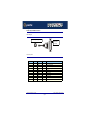
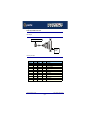
The type of cable and edge connectors used by the SPEED product range is shown in the
next table.
Product
SPEED4
Card edge
connector
Cabling information
RJ45 8pin female.
See page 74
RJ45 (8 pin) to DB9 male cable on page 77.
RJ45 (8pin) to DB25 male cable on page 78.
RJ45 (8pin) to DB25 female cable on
page 79.
SPEED4+
RJ45 10 pin female
See page 75
RJ45 (10 pin) to DB9 male cable on page 80.
RJ45 (10pin) to DB25 male cable on page 81.
RJ45 (10pin) to DB25 female cable on
page 82.
SPEED Serial Adaptors User guide
SPEED cabling guide
Chapter 3 SPEED Cabling Information
Page 73
RJ45 socket pinouts on SPEED host cards
SPEED4 cards
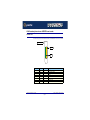
The connector pinout for each RJ45 socket fitted to the SPEED4 PCI host card is as follows;
PCI host card
Port 1
Pin 1
RJ45 pin
Signal
Direction
Description
1
DCD
In
Data Carrier Detect
2
DTR
Out
Data Terminal Ready
3
DSR
In
Data Set Ready
4
GND
5
TXD
Out
Transmit Data
6
RXD
In
Receive Data
7
RTS
Out
Request to send
8
CTS
In
Clear to Send
Ground
SPEED Serial Adaptors User guide
RJ45 socket pinouts on SPEED host cards
Chapter 3 SPEED Cabling Information
Page 74
SPEED4+ cards
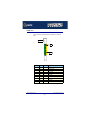
The connector pinout for each RJ45 socket fitted to the SPEED4+ PCI host card is as
follows;
PCI host card
Port 1
Pin 1
RJ45 pin
Signal
Direction
Description
1
RI
In
Ring Indicator
2
DCD
In
Data Carrier Detect
3
DTR
Out
Data Terminal Ready
4
DSR
In
Data Set Ready
5
GND
6
TXD
Out
Transmit Data
7
RXD
In
Receive Data
8
RTS
Out
Request To Send
9
CTS
In
Clear To Send
10
N/C
-
Not connected
Ground
SPEED Serial Adaptors User guide
RJ45 socket pinouts on SPEED host cards
Chapter 3 SPEED Cabling Information
Page 75
SPEED cables available from Perle
This section provides connector pinout information for the following standard cables available
from Perle:
Hint
To see which cables are used by a given SPEED product, see SPEED cabling guide on
page 73.
•
RJ45 (8 pin) to DB9 male cable on page 77
•
RJ45 (8pin) to DB25 male cable on page 78
•
RJ45 (8pin) to DB25 female cable on page 79
•
RJ45 (10 pin) to DB9 male cable on page 80
•
RJ45 (10pin) to DB25 male cable on page 81
•
RJ45 (10pin) to DB25 male cable on page 81
SPEED Serial Adaptors User guide
SPEED cables available from Perle
Chapter 3 SPEED Cabling Information
Page 76
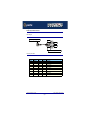
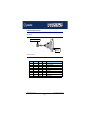
RJ45 (8 pin) to DB9 male cable
Cable diagram
Pin 1(looking into plug)
Pin 6
Pin 1
Pin 5
Pin 9
Pin numbers looking into connector
Connector pinout table
RJ45 pin
DB9 Pin
Signal
Direction
Description
1
1
DCD
In
Data Carrier Detect
2
4
DTR
Out
Data Terminal Ready
3
6
DSR
In
Data Set Ready
4
5
GND
5
3
TXD
Out
Transmit Data
6
2
RXD
In
Receive Data
7
7
RTS
Out
Request to send
8
8
CTS
In
Clear to Send
Shell
Shell
Chassis
Ground
Chassis ground.
SPEED Serial Adaptors User guide
SPEED cables available from Perle
Chapter 3 SPEED Cabling Information
Page 77
RJ45 (8pin) to DB25 male cable
Cable diagram
Pin 1(looking into plug)
Pin 1
(looking into
connector)
Connector pinout table
RJ45 pin
DB25 Pin
Signal
Direction
Description
1
8
DCD
In
Data Carrier Detect
2
20
DTR
Out
Data Terminal Ready
3
6
DSR
In
Data Set Ready
4
7
GND
5
2
TXD
Out
Transmit Data
6
3
RXD
In
Receive Data
7
4
RTS
Out
Request to send
8
5
CTS
In
Clear to Send
Shell
Shell
Chassis
Ground
Chassis ground.
SPEED Serial Adaptors User guide
SPEED cables available from Perle
Chapter 3 SPEED Cabling Information
Page 78
RJ45 (8pin) to DB25 female cable
Cable diagram
Pin 1 (looking into plug)
Pin 1
(looking into
connector)
Connector pinout table
RJ45 pin
DB25 Pin
Signal
Direction
Description
1
8
DCD
In
Data Carrier Detect
2
6
DTR
Out
Data Terminal Ready
3
20
DSR
In
Data Set Ready
4
7
GND
5
3
TXD
Out
Transmit Data
6
2
RXD
In
Receive Data
7
5
RTS
Out
Request to send
8
4
CTS
In
Clear to Send
Shell
Shell
Chassis
Ground
Chassis ground.
SPEED Serial Adaptors User guide
SPEED cables available from Perle
Chapter 3 SPEED Cabling Information
Page 79
RJ45 (10 pin) to DB9 male cable
Cable diagram
Pin 1(looking into plug)
Pin 6
Pin 1
Pin 5
Pin 9
Pin numbers looking into connector
Connector pinout table
RJ45 pin
DB9 pin
Signal
Direction
Description
1
9
RI
In
Ring Indicator
2
1
DCD
In
Data Carrier Detect
3
4
DTR
Out
Data Terminal Ready
4
6
DSR
In
Data Set Ready
5
5
GND
6
3
TXD
Out
Transmit Data
7
2
RXD
In
Receive Data
8
7
RTS
Out
Request To Send
9
8
CTS
In
Clear To Send
10
N/C
N/C
-
Not connected
Shell
Shell
Chassis
Ground
Chassis
SPEED Serial Adaptors User guide
SPEED cables available from Perle
Chapter 3 SPEED Cabling Information
Page 80
RJ45 (10pin) to DB25 male cable
Cable diagram
Pin 1(looking into plug)
Pin 1
(looking into
connector)
Connector pinout table
RJ45 pin
DB25 pin
Signal
Direction
Description
1
22
RI
In
Ring Indicator
2
8
DCD
In
Data Carrier Detect
3
20
DTR
Out
Data Terminal Ready
4
6
DSR
In
Data Set Ready
5
7
GND
6
2
TXD
Out
Transmit Data
7
3
RXD
In
Receive Data
8
4
RTS
Out
Request To Send
9
5
CTS
In
Clear To Send
10
N/C
N/C
Not connected
Shell
Shell
Chassis
Chassis
Ground
SPEED Serial Adaptors User guide
SPEED cables available from Perle
Chapter 3 SPEED Cabling Information
Page 81
RJ45 (10pin) to DB25 female cable
Cable diagram
Pin 1 (looking into plug)
Pin 1
(looking into
connector)
Connector pinout table
RJ45 pin
DB25 pin
Signal
Direction
Description
1
22
RI
In
Ring Indicator
2
8
DCD
In
Data Carrier Detect
3
6
DTR
Out
Data Terminal Ready
4
20
DSR
In
Data Set Ready
5
7
GND
6
3
TXD
Out
Transmit Data
7
2
RXD
In
Receive Data
8
5
RTS
Out
Request To Send
9
4
CTS
In
Clear To Send
10
N/C
N/C
Not connected
Shell
Shell
Chassis
Chassis
Ground
SPEED Serial Adaptors User guide
SPEED cables available from Perle
Chapter 3 SPEED Cabling Information
Page 82
SPEED Serial Adaptors User guide
SPEED cables available from Perle
Chapter 3 SPEED Cabling Information
Page 83
SPEED Serial Adaptors
User guide
Chapter 4 Quick Reference
You need to read
this chapter if you
want to...
You need to read this chapter if you want information in quick reference form about the
utilities provided with the SPEED Serial adaptor cards.
This chapter provides a quick reference guide to the software utilities provided with the
SPEED Serial adaptor cards. The utilities are grouped under operating system and include
main windows and menus. In addition, cross references are provided for further information
about each area.
This chapter includes the following sections;
•
SCO OpenServer utilities on page 85
•
SCO UnixWare utilities on page 87
SPEED Serial Adaptors User guide
Chapter 4 Quick Reference
Page 84
SCO OpenServer utilities
The following utilities are provided for use with the SCO OpenServer operating system.
•
Port Configuration utility on page 85
Port Configuration utility
Main window
The main window for the Port Configuration table is shown in the next picture. See Menu
map on page 86 for details of menus.
Menus see
page 86.
Select one or
more ports
from this list.
Select a
terminal type
here.
See page 31
Select a getty
definition
here.
See page 30.
Enables or
disables flow
control.
See page 31
Enables or
disables login.
See page 31
SPEED Serial Adaptors User guide
SCO OpenServer utilities
Chapter 4 Quick Reference
Page 85
Menu map
The Port Configuration tool menu is as follows;
Menu option
Ports
>
Description
Quit Port Configuration tool without saving
changes.
Quit
See page 32
Display all ports with logins enabled.
Logins
See page 31
Unconfigured
Display all ports without logins enabled.
See page 31
Display all ports.
All
See page 31
Save & Exit
Exit the Port Configuration tool and save
changes.
See page 32
SPEED Serial Adaptors User guide
SCO OpenServer utilities
Chapter 4 Quick Reference
Page 86
SCO UnixWare utilities
Serial Manager
Main window
The main window for the Serial Manager is shown in the next picture.You can display this
window in one of two views, Board view and Ports view. See page 88 for menu maps.
Boards view
Displays the host cards present on
the system. To obtain this view, click
on the View > Boards menu
option.
Ports view
Displays the serial ports present on
the system. To obtain this view, click
on the View > Ports menu option.
SPEED Serial Adaptors User guide
SCO UnixWare utilities
Chapter 4 Quick Reference
Page 87
Menu map
The Serial Manager menu is as follows;
Menu option
Host
>
Description
Open Host
Selects a host machine.
See your SCO UnixWare documentation for
further details.
Port
>
Exit
Exit Serial Manager.
Modify
Modifies serial port settings.
See page 40.
View
>
Ports
Show serial ports available for the currently
selected host card.
See page 40.
Boards
Show host cards present on the system.
See page 40.
SPEED Serial Adaptors User guide
SCO UnixWare utilities
Chapter 4 Quick Reference
Page 88
SPEED Serial Adaptors
User guide
Appendix A Serial Port Device Names
You need to read You need to read this appendix if you want information about device names for the Perle
this appendix if you SPEED serial adaptor cards.
want to...
This appendix provides information about the device nodes associated with each serial port
for the Perle SPEED serial adaptor cards. Included are naming conventions, functions, file
locations and some additional information about the Data terminal ready and Ready to send
signals.
This chapter includes the following sections;
•
Under SCO UnixWare on page 90
•
Under SCO UnixWare on page 91
•
Linux Device node details on page 91.
SPEED Serial Adaptors User guide
Page 89
Under SCO UnixWare
Device node details
Each serial port has three device nodes associated with it. Each node takes the form of a file
which you can access from operating system utilities and user applications. Details of these
nodes are shown in the next table.
Device name
Function
Description
Location
ttyz1
Normal communications port
for local “tty” devices.
Indicates normal
communications port
behaviour.
/dev
ttyZ1
Modem port
Indicates that a port open will
not complete unless DCD is
present
/dev
ttyz1p
Transparent print port.
Indicates that device should
only be used for transparent
print.
/dev
SPEED Serial Adaptors User guide
Under SCO UnixWare
Page 90
Under SCO UnixWare
Device node details
Each serial port has three device nodes associated with it. Each node takes the form of a file
which you can access from operating system utilities and user applications. Details of these
nodes are shown in the next table.
Device name
Function
Description
Location
z1
Normal communications port
for local “tty” devices.
Indicates normal
communications port
behaviour.
/dev/term
Z1
Modem port
Indicates that a port open will
not complete unless DCD is
present
/dev/term
z1p
Transparent print port.
Indicates that device should
only be used for transparent
print.
/dev/term
Linux Device node details
Each serial port has two device nodes associated with it. Each node takes the form of a file
which you can access from operating system utilities and user applications. Details of these
nodes are shown in the next table.
Device name
Function
Description
Location
ttyS0
Normal communications port
Indicates normal
communications port
behaviour.
/dev
cua0
Modem communications port
wait for DCD on open
This device is used when
connecting modems to the
serial port.
/dev
SPEED Serial Adaptors User guide
Under SCO UnixWare
Page 91
SPEED Serial Adaptors
User guide
Appendix B Transparent Printing
You need to read You need to read this appendix if you want background information on transparent printing.
this appendix if you
want to...
This appendix gives an overview of the transparent printing feature offered for the SCO
OpenServer operating systems and includes details of configuration files associated with
transparent printing.
This appendix includes the following sections;
•
What is transparent printing? on page 93
•
Problems with printer output on page 94
•
The printcap.spd configuration file on page 94
•
The print.spd configuration file on page 95
SPEED Serial Adaptors User guide
Page 92
What is transparent printing?
Most terminals have an auxiliary (AUX) port which can be connected to a serial printer. Data
can then be output to the terminal or the printer via the same serial line. This is called
transparent print (or xprint) and is designed for printing simple ASCII text. A separate xprint
device node (ttyinp where n is device number) is created for each port. This device is
enabled automatically if either the local or modem device is enabled for the port.
SCO OpenServer
operating system
SPEED Port
Configuration utility
print.spd file
SPEED Device
driver
SPEED host
card
Computer system
Terminal
Auxiliary port
on terminal
Serial communications
port on terminal
Printer
When a host card receives data addressed to the transparent print device it prefixes it with
the transparent print mode ON string and appends it with the transparent mode OFF string.
The ON and OFF strings for each terminal type available are defined by the printcap.spd
file. See The printcap.spd configuration file on page 94 for more details.
When the host card receives data addressed to the transparent print device, it prefixes it with
the Transparent Print Mode ON string and appends it with the Transparent Print Mode OFF
string. Terminal I/O has absolute priority over printer output. Transparent print data will only
be sent when there is a break in output to the terminal (for more than a tenth of a second)
For each port, the transparent printing parameters are controlled by an entry in the print.spd
file found in the /etc/ directory on your system. The entry for each port includes definitions of
the terminal type, transparent print throughput rate and device name. See The print.spd
configuration file on page 95 for further details.
SPEED Serial Adaptors User guide
What is transparent printing?
Page 93
Problems with printer output
When you use transparent printing you may obtain incorrect printer output due to the
following reasons;
Graphics printers may misinterpret some characters output through transparent print. This
problem is more likely if the terminal is in 7-bit mode, because 8-bit characters will not be
printed.
Some terminals suppress the output of certain characters to their printer or AUX ports. Such
terminals can prevent essential control characters from reaching the printer thus generating
incorrect printer output. This occurrence is extremely unpredictable because of the large
number of potential hardware configurations.
The printcap.spd configuration file
The printcap.spd file defines the transparent print ON and OFF strings for each terminal type
available. When a host card receives data addressed to the transparent print device it
prefixes it with the transparent print mode ON string and appends it with the transparent
mode OFF string.
ansi ^X ^T
Transparent print OFF
Terminal type.
Transparent print ON string.
If you don’t configure a specific terminal type printcap.spd will use the default type which is
“unknown”
SPEED Serial Adaptors User guide
Problems with printer output
Page 94
The print.spd configuration file
For each port, transparent printing is controlled by an entry in the print.spd file. The
print.spd file is found in the /etc/ directory on your system. The entry for each port includes
definitions of the terminal type, transparent print throughput rate, device name. The content
of the print.spd file is normally controlled automatically by either the Port Configuration utility
(SCO OpenServer). A sample entry from a typical print.spd file is shown in the next example.
Maximum number of characters per second
throughput for transparent printing
Terminal type of terminal to which your printer is
attached defined in the printcap.spd file.
100 unknown ttyz1 -ixany -ixon
Device name
Enables flow control for Transparent printing.
Enables sending of data on receipt of the next character
(when flow control is enabled on the transparent print port).
SPEED Serial Adaptors User guide
The print.spd configuration file
Page 95
SPEED Serial Adaptors
User guide
Appendix C Troubleshooting
You need to read You need to read this appendix if you want information on troubleshooting problems with
this appendix if you SPEED serial adaptor cards.
want to...
This appendix provides examples of normal boot up messages and a table of error
messages, their meaning and corrective action required for the all the currently supported
operating systems.
This appendix includes the following sections;
•
SCO OpenServer 5 on page 97.
•
SCO UnixWare/SCO OpenServer 6 on page 100
•
Windows 95 and 98 on page 104
•
Windows NT on page 104
•
Windows 2000/XP/Server 2003/Vista/Server 2008 on page 105
SPEED Serial Adaptors User guide
Page 96
SCO OpenServer 5
Example of normal SPEED driver boot messages
This example shows one SPEED4+ and one SPEED4 successfully detected and initialised
by the driver.
Driver message - always displayed if installed and configured
Driver software version
%SPD
%SPD
%SPD
%SPD
-
5
10
-
Speed Driver:1.0.0
unit:0 - Speed4+ card @0xFDFF9000 - OK
unit:1 - Speed4 card @0xFDFFC000 - OK
Total Speed Ports : 8
-
Total number of SPEED ports
%SPD
-
5
-
unit:0 - Speed4+ card @0xFDFF9000 - OK
IRQ level
Host card base address in hexidecimal
Host card ID number
Host card type
SPEED Serial Adaptors User guide
SCO OpenServer 5
Page 97
Additional card warning messages
If you install more than one SPEED host card, or install additional cards at a later date, the
following warning messages will be displayed (they appear immediately following the driver
initialisation messages shown on page 97).
Note
Display of these messages and update of Speed Node and Init files only occurs
once after installation of additional cards. This takes place during system start-up.
Message
This message tells you that...
WARNING: Speed Node file updated
- old file moved to /etc/conf/node.d/spd_nnnnnnnn
The speed node file has been updated to include
the revised number of ports.
Your old Speed node file is retained with the
file name shown in the message. 'nnnnnnnn'
is a unique number so that previous Speed
node files are not lost on updating.
You now have additional entries in the Speed
init file, existing entries are retained
unchanged. The automatic init file update is
necessary to make any additional nodes
available in the Speed Port Configuration
tool.
WARNING: New Speed ports detected
- /etc/conf/node.d/spd being updated
Hint
If you have modified your Speed node file, (for example you may have changed the default
permission for security reasons), you may wish to re-instate the previous node set-up for
existing Speed ports.
If you have not modified your Speed node file or do not require to retain the old settings you
may safely delete the file shown in the first message.
SPEED Serial Adaptors User guide
SCO OpenServer 5
Page 98
SCO OpenServer 5 error messages
Error message
Reason
Action required
ERROR: unit @0xnnnnnnnn has
bad resource(s)
Incorrectly installed or faulty
card.
1. Ensure that you have followed the
installation procedure correctly.
See page 21.
Incorrect BIOS settings.
2. Check BIOS settings.
3. If the problem persists try another card.
See page 21 and page 69.
ERROR: unit @0xnnnnnnnn not
mapped
Insufficient memory available
to kernel.
Reconfigure system/kernel memory
parameters.
ERROR: unit @0xnnnnnnnn not
initialised
Incorrectly installed or faulty
card.
1. Ensure that you have followed the
installation procedure correctly.
See page 21.
2. If the problem persists try another card.
See page 21 and page 69.
WARNING: unit @0xnnnnnnnn not
configured
System error.
1. Uninstall the driver and remove all
Speed cards from the system.
See page 33
2. Re-install the driver and cards taking
care to follow the correct procedure.
See page 21 and page 69.
WARNING: No Speed ports
configured
No cards installed.
1. Install cards. See page 69.
Installed cards suffer from
one or more of above
symptoms.
2. Resolve any above listed faults.
SPEED Serial Adaptors User guide
SCO OpenServer 5
Page 99
SCO UnixWare/SCO OpenServer 6
There are no messages displayed on the system at startup. Messages from the SPEED
driver are sent to the syslog file in the /var/adm directory. Each entry in the syslog file is
date and time stamped (You can review the content of the syslog file using a suitable text
editor). Each time the driver is loaded, entries similar to those shown below indicate
successful SPEED card detection.
Driver message - always displayed if installed and configured
Driver software version
Apr 26 16:05:15 pwredge3 unix: Speed Unixware Driver v1.0.0 Apr 26 2000 15:56:35
Apr 26 16:05:15 pwredge3 unix: Copyright (c) 2000 Perle Systems Ltd
Apr 26 16:05:15 pwredge3 unix:
unit:0 - Speed4 card @0xFDFF9000 using IRQ:10 - OK
Apr 26 16:05:15 pwredge3 unix:
unit:1 - Speed4+ card @0xFDFFD000 using IRQ:15 - OK
Apr 26 16:05:15 pwredge3 unix:
Total Speed Ports : 8
Total number of SPEED ports
IRQ level
Apr 26 16:05:15 pwredge3 unix:
unit:1 - Speed4+ card @0xFDFFD000 using IRQ:15 - OK
Host card base address in hexidecimal
Host card ID number
Host card type
SPEED Serial Adaptors User guide
SCO UnixWare/SCO OpenServer 6
Page 100
Additional card warning messages
If you install more than one SPEED host card, or install additional cards at a later date, the
following warning messages will be displayed during system start-up.
Note
Display of these messages and update of Speed Node and Init files only occurs
once after installation of additional cards. This takes place during system start-up.
Message
This message tells you that...
WARNING: Speed Node file updated
- old file moved to /etc/conf/node.d/spd_nnnnnnnn
The speed node file has been updated to include
the revised number of ports.
Your old Speed node file is retained with the
file name shown in the message. 'nnnnnnnn'
is a unique number so that previous Speed
node files are not lost on updating.
You now have additional entries in the Speed
init file, existing entries are retained
unchanged. The automatic init file update is
necessary to make any additional nodes
available in the Speed Port Configuration
tool.
WARNING: New Speed ports detected
- /etc/conf/node.d/spd being updated
Hint
If you have modified your Speed node file, (for example you may have changed the default
permission for security reasons), you may wish to re-instate the previous node set-up for
existing Speed ports.
If you have not modified your Speed node file or do not require to retain the old settings you
may safely delete the file shown in the first message.
SPEED Serial Adaptors User guide
SCO UnixWare/SCO OpenServer 6
Page 101
SCO UnixWare error messages
Error message
Reason
Action required
ERROR: unit @0xnnnnnnnn has
bad resource(s)
Incorrectly installed or faulty
card.
1. Ensure that you have followed the
installation procedure correctly.
See page 36.
Incorrect BIOS settings.
2. Check BIOS settings.
3. If the problem persists try another card.
See page 36 and page 69.
ERROR: unit @0xnnnnnnnn not
mapped
Insufficient memory available
to kernel.
Reconfigure system/kernel memory
parameters.
ERROR: unit @0xnnnnnnnn not
initialised
Incorrectly installed or faulty
card.
1. Ensure that you have followed the
installation procedure correctly.
See page 36.
2. If the problem persists try another card.
See page 36 and page 69.
WARNING: unit @0xnnnnnnnn not
configured
System error.
1. Uninstall the driver and remove all
Speed cards from the system.
See page 46
2. Re-install the driver and cards taking
care to follow the correct procedure.
See page 36 and page 69.
Error: could not register interrupt
handler for unit @0xnnnnnnnn
System error
1. Uninstall the driver and remove all
Speed cards from the system.
See page 46
2. Re-install the driver and cards taking
care to follow the correct procedure.
See page 36 and page 69.
WARNING: No Speed ports
configured
No cards installed.
1. Install cards. See page 69.
Installed cards suffer from
one or more of above
symptoms.
2. Resolve any above listed faults.
SPEED Serial Adaptors User guide
SCO UnixWare/SCO OpenServer 6
Page 102
Error message
Reason
Action required
UX: sh (sh): ERROR: telinit: Not
found
telinit command not found
None. The installation process takes care of
configuring the kernel and ensures that
SPEED ports are ready for use when the
installation process is complete.
No SPEED cards installed
during driver installation.
1. Install cards. See page 69.
(Note this error occurs on UnixWare
2 systems only)
Unable to open device /dev/spd : No
such device
SPEED Serial Adaptors User guide
SCO UnixWare/SCO OpenServer 6
Page 103
Note that there is no need to uninstall
and re-install the driver. When the
system is rebooted, your SPEED cards
will be detected and configured into the
kernel.
Windows 95 and 98
Windows 95 and 98 general troubleshooting
In the event of any problems, open the System Properties tabbed window and display the
Device Manager page. In the Device Manager page, check for warning icons on the installed
hardware. See your Windows 95 or 98 user documentation or help system for further details.
Windows NT
Windows NT general troubleshooting
In the event of any problems, open the Devices window to view the status of any installed
hardware. For further details of troubleshooting under Windows NT, see your Windows NT
user documentation or help system.
SPEED Serial Adaptors User guide
Windows 95 and 98
Page 104
Windows 2000/XP/Server 2003/Vista/Server 2008
This section describes troubleshooting SPEED products under the Windows 2000/XP/
Server 2003/Vista/Server 2008 operating system and includes the following sections;
Note
To contact Perle for technical support. see Appendix D Contacting Perle.
•
General troubleshooting under Windows 2000/XP/Server 2003/Vista/Server 2008 on
page 106.
•
Windows error messages on page 107.
SPEED Serial Adaptors User guide
Windows 2000/XP/Server 2003/Vista/Server 2008
Page 105
General troubleshooting under Windows 2000/XP/Server 2003/Vista/Server 2008
Problem
Action required
Machine fails to boot.
1. Turn off your machine, remove SPEED card(s)
and reboot. See page 70.
2. Try installing a different host card in case the one
currently installed is faulty. See page 69.
Windows operating system fails while loading
and the system hangs.
1. Reboot machine and then switch to the last
known good configuration.
2. Check for resource conflicts or faulty hardware.
3. Turn off machine, remove any SPEED cards fitted
(page 70) and then reboot your system.
4. Once the machine boots properly, change the
configuration settings of the SPEED card to match
those in the BIOS setup. See page 69.
Windows operating system fails while loading
and displays a blue screen.
1. Note the five hexadecimal numbers at the top line
of the screen
2. Reboot your machine and then switch to the last
known good configuration.
3. Check for resource conflicts or faulty hardware.
4. Turn off machine, remove any SPEED cards fitted
(page 70) and then reboot your system.
5. Once the machine boots properly, change the
configuration settings of the SPEED card to match
those in the BIOS setup. See page 69.
Operating system loads OK, but SPEED driver
or another driver fails to boot
1. Run Windows Device Manager to find available
IRQ and memory addresses.
SPEED ports do not work after installation.
1. Check the Windows Event Log and follow the
suggested actions.
SPEED Serial Adaptors User guide
Windows 2000/XP/Server 2003/Vista/Server 2008
Page 106
Problem
Action required
SPEED Windows driver fails during normal
operation, symptom: blue screen
1. Note the five hexadecimal numbers displayed at
the top line of the screen.
2. Reboot your machine and then switch to the last
known good configuration.
3. Check for resource conflicts or faulty hardware.
4. Turn off machine, remove any SPEED cards fitted
(page 70) and then reboot your system.
5. Once the machine boots properly, change the
configuration settings of the SPEED card to match
those in the BIOS setup. See page 69.
SPEED Windows driver fails during normal
operation, symptoms either:
black screen, machine reboots, or system hangs
1. Contact Technical Support. See Appendix D
Contacting Perle.
Windows error messages
In the event of any error messages, check the Windows Event Log. Also open the Windows
Device Manager and check for warming icons on the installed hardware. See your Windows
user documentation or help system for details.
For general problems, see General troubleshooting under Windows 2000/XP/Server
2003/Vista/Server 2008 on page 106.
SPEED Serial Adaptors User guide
Windows 2000/XP/Server 2003/Vista/Server 2008
Page 107
Appendix D Contacting Perle
You need to read You need to read this appendix if you want to contact Perle for technical support or any other
this appendix if you queries about this product.
want to...
This appendix includes the following sections;
•
Making a technical Support Query on page 109
•
Repair procedure on page 112
•
Feedback about this manual on page 112
•
Contacting Perle technical support on page 113
Internet access
Click here to access the our website at
the following URL:
http://www.perle.com
Email
Click here to email Perle at the following address;
Email: [email protected]
Page 108
Making a technical Support Query
This section contains the following information about making a query;
•
Who to contact on page 109
•
Information needed when making a query on page 110
•
Making a support query via the Perle web page on page 111
Who to contact
If you bought your product from a registered Perle supplier, you must contact their Technical
Support department; they are qualified to deal with your problem.
If you are a registered Perle supplier, and bought your product from Perle, contact Perle
Technical Support using the details given in Contacting Perle technical support on
page 113.
Making a technical Support Query
Page 109
Information needed when making a query
When you make a technical support enquiry please have the following information ready;
Hint
Print out this page and fill in the table provided with the basic
information you need.
Item
Write details here
Product name and version
Problem description
Operating system version
Driver version
Details of any other cards
installed in your system
Your name
Company Name
Country
Phone number
Fax number
Email address (if available)
Making a technical Support Query
Page 110
Making a support query via the Perle web page
If you have an internet connection, please send details of your problem to Technical Support
using the email links provided on the Perle web site in the ‘Support’ area.
See also Contacting Perle technical support on page 113 for email links and other contact
details for the Perle technical support centres.
Click here to access our website at the following URL:
http://www.perle.com
Making a technical Support Query
Page 111
Repair procedure
Before sending a unit for repair, you must contact your Perle supplier. If, however, you bought
your product directly from Perle you can contact directly. See Contacting Perle technical
support on page 113 for contact information.
Customers who are in Europe, Africa or Middle East can submit repair details via a website
form shown in the next picture. This form is on the Perle website, www.perle.com, in the
Support area.
Click here to access our web site at the following URL:
http://www.perle.com/support_services/rma_form.asp
In the USA and Asia contact the office shown in the Technical Support section.
Feedback about this manual
If you have any comments or suggestions for improving this manual please email Perle using
the following address;
Email: [email protected]
Please include the title, part number and date of the manual (you can find these on the title
page at the front of this manual).
Repair procedure
Page 112
Contacting Perle technical support
Note
Perle offers free technical support to Perle Authorised Distributors and Registered Perle
Resellers.
To access technical support please visit the Perle website at
www.perle.com/support_services/index.shtml.
If you are unable to find the information you require, please feel free to contact our
technical support teams by email using the addresses shown in the next table.
Region
Address
Email
North America
Perle Systems Ltd.
60 Renfrew Drive
Markham
Ontario
Canada
L3R OE1
Email: [email protected]
Europe
Perle Systems Europe Ltd.
3 Wintersells Road
Byfleet Surrey
KT14 7LF
UK
Email: [email protected]
Asia
Perle Asia Pacific (Pte) Ltd.
190 Middle Road
#19-05 Fortune Centre
Singapore 188979
Email: [email protected]
Worldwide
Perle Systems Ltd.
60 Renfrew Drive
Markham
Ontario
Canada
L3R OE1
Email: [email protected]
Contacting Perle technical support
Page 113
#A B C D E F G H I J K L M N O P Q R S T U V W X Y Z
Index
A
E
About this manual 4
email 108
error messages
SCO OpenServer 5 99
SCO UnixWare 102
C
cable
RJ45 to DB25 female 79, 82
RJ45 to DB25 male 78, 81
RJ45 to DB9 male 77, 80
cabling information 72
contacting Perle Systems 108
email 108
for technical support 109
internet 108
H
host cards
removing 70
I
installation 17
device drivers and utilities
Linux 66
SCO OpenServer 5 22
SCO UnixWare 37
Windows 2000 60
Windows 95 and 98 49
Windows NT 57
general procedure
Linux 65
SCO OpenServer 5 21
SCO UnixWare 36
Windows 2000 59
Windows 95 and 98 48
PCI host cards 69
under Linux 64
under SCO OpenServer 5 20
under SCO UnixWare 35
under Windows 2000 58
under Windows 95 and 98 47
under Windows NT 57
D
device drivers and utilities
installing
Linux 66
SCO OpenServer 5
SCO UnixWare 37
Windows 2000 60
Windows 95 and 98
Windows NT 57
removing
SCO OpenServer 5
SCO UnixWare 46
Windows 95 and 98
device names 89
device node 90, 91
device nodes 89
drivers and host cards 17
22
49
33
55
Page 114
#A B C D E F G H I J K L M N O P Q R S T U V W X Y Z
L
R
Linux
removing
device drivers and utilities
SCO OpenServer 5 33
SCO UnixWare 46
Windows 95 and 98 55
host cards 70
repair procedure 112
RJ45 socket
card edge views 74
pinouts 74
RJ45 to DB25 female cable
diagram 79, 82
pinouts 79, 82
RJ45 to DB25 male cable
diagram 78, 81
pinouts 78, 81
RJ45 to DB9 male cable
diagram 77, 80
pinouts 77, 80
general installation procedure 65
installation under 64
M
menu map
Port Configuration utility 85
menu maps of utilities 85
O
on-line manual
guide to using 5
hypertext jumps 5
navigation 5
OpenServer 5, see SCO OpenServer 5
P
PCI host cards
installation 69
pinouts
RJ45 to DB25 female cable 79, 82
RJ45 to DB25 male cable 78, 81
RJ45 to DB9 male cable 77, 80
Port Configuration utility
exiting 32
menu map 85
port login, setting up 31
starting 28
port login
setting up under SCO OpenServer 5 31
print.spd configuration file 95
printcap.spd configuration file 94
printing, transparent 92
problems 94
S
SCO OpenServer 5 85
device drivers and utilities
installing 22
removing 33
error messages 99
general installation procedure 21
installation under 20
installing device drivers and utilities 22
Port Configuration utility 28
troubleshooting 97
SCO UnixWare
device drivers and utilities
installing 37
removing 46
error messages 102
installation under 35
serial ports, configuring 40
SCO UnixWare 2
serial ports, configuring 45
Q
quick reference 84
Page 115
#A B C D E F G H I J K L M N O P Q R S T U V W X Y Z
serial ports
configuring
SCO OpenServer 5 28
SCO UnixWare 40
SCO UnixWare 2 45
under Windows 2000 62
Windows 95 and 98 51
SPEED serial adaptors
introduction to 15
Windows 95 and 98
device drivers and utilities
installing 49
removing 55
general installation procedure 48
installation under 47
installing device drivers and utilities 49
Port Configuration utility 51
troubleshooting 104
Windows NT
device drivers and utilities
installing 57
installation under 57
installing device drivers and utilities 57
troubleshooting 104
T
technical support 109
centres worldwide 113
queries, information needed for 110
via the internet 111
who to contact 109
transparent printing 92, 94
definition of 93
print.spd configuration file 95
printcap.spd configuration file 94
troubleshooting
SCO OpenServer 5 97
Windows 2000 105
Windows 95 and 98 104
Windows NT 104
U
UnixWare, see SCO UnixWare
utilities, menu maps 85
W
Windows 2000
configuring serial ports 62
device drivers and utilities
installing 60
general installation procedure 59
installation under 58
installing device drivers and utilities 60
troubleshooting 105
Page 116
Page 117