1
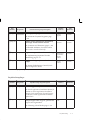
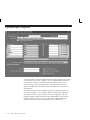
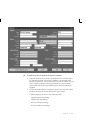
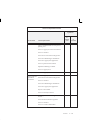
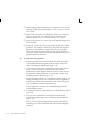
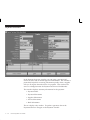
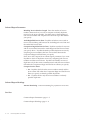
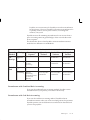
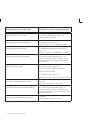
Terms. Payment Terms that Payables uses to create one or more
scheduled payments for an invoice. You define terms in the Payment
Terms window. See also: Payment Terms: page 2 – 89.
Terms Date. Beginning date from which Payment Terms start when
Payables calculates the scheduled payment(s) for an invoice. Can be the
invoice date, invoice received date, goods received date, or invoice entry
date depending on the Terms Date Basis for the supplier site. If the
Terms Date Basis is invoice or goods received date, Payables prompts
you to enter that date here and copies the value to the field of the same
name.
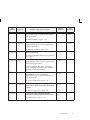
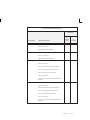
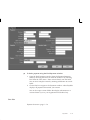
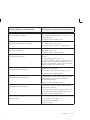
Type. The type of invoice you select determines which processing
options Payables makes available to you.
• Credit Memo. An negative amount invoice you receive from a
supplier representing a credit for goods or services purchased.
• Debit Memo. A negative amount invoice you send to notify a
supplier of a credit you recorded for goods or services purchased.
• Interest. An invoice that Payables automatically creates invoices
to pay interest for overdue invoices if you enable automatic
interest calculation for a supplier, and if you pay an overdue
invoice for the supplier in a payment batch or with a Quick
payment. See: Interest Invoices: page 10 – 7.
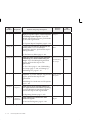
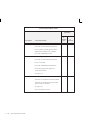
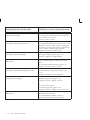
• Expense Report. An invoice you enter to record business–related
employee expenses.
• Mixed. A Standard or Credit/Debit Memo invoice for which you
can enter both positive and negative amounts and perform both
positive and negative matching. See: Mixed Invoices: page 4 – 96.
• PO Default. A trade invoice you want to automatically match to
a specified purchase order and then manually match to the
individual shipments on the purchase order. After you use this
invoice type to complete the match, the invoice will become a
Standard type invoice. See: PO Default and QuickMatch Invoices:
page 4 – 171.
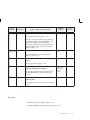
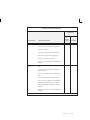
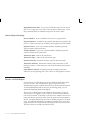
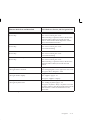
• Prepayment. An advance payment you make to a supplier or
employee. If you enter Temporary for the Prepayment Type field,
then you can later apply prepayment to an invoice. See:
Prepayments: page 4 – 195.
• QuickMatch. A trade invoice you want to automatically match to
all the shipments of a specified purchase order. See: PO Default
and QuickMatch Invoices: page 4 – 171.
4 – 348
Oracle Payables User Guide