1
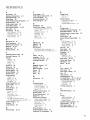
TABLE OF CONTENTS
SETUP
CONNECTIONS
AND
Step 1: Unpack
............................................
the TV .....................................................
Step 2: Connecting
your
TV .............................................
Step 3: Connecting
the IR Controller
................................
3
4
4
9
Step 4: Plug in the TV ....................................................
10
Step 5: Place Batteries
10
in Remote
...................................
Step 6: Turn on the TV ...................................................
On-Screen
Program
Step 7: Program
INTERACTIVE
Using
.......................................
the TV ..................................................
SETUP
Point
Entering
Guide
10
10
10
..........................................................
11
and Select ...................................................
12
Setup ................................................................
12
Select a Language ..........................................................
Auto Channel Search .....................................................
13
13
The GUIDE
14
Plus+
Gold
Setting
the Time
Setting
the
Setting
the VCR2
Setting
the DVD
Setting
the SAT/CABLE
Labeling
VCR1
System ......................................
.............................................................
Channel
Channel
Channel
the Channels
(auto tuning)
(auto
tuning)
(auto tuning)
Channel
16
........................
16
.........................
17
..........................
18
(auto tuning)
................
...................................................
USING
THE REMOTE
..........................................................
Remote Buttons .............................................................
Accessing the Video Input ........................................
Programming
the Remote ..............................................
Testing the Remote ...................................................
Using Automatic Code Search ..................................
Using Direct Entry ....................................................
Using the Remote to Control a Device .....................
Modes of Operation
.................................................
Front Panel ....................................................................
19
20
21
22
23
24
24
24
24
25
25
25