1
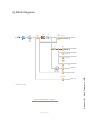
op. These microphones also control the muting of the
Control Room monitor speakers.
Control Room Guest Microphone channels will mute
the Control Room speakers and the Preview speakers
whenever the channel is ON, or if Preview key is selected.
Studio Microphone Channel
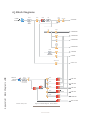
Another type of microphone channel is a Studio
Microphone. This mic is typically located in a location
separate from the control room — perhaps a voice-over
booth, a talk studio separated by glass, or a news booth.
Logic for Studio Microphone channels is identical
to that of the Control Room Guest Microphone channel.
The Studio Monitor speakers mute when a Studio Microphone channel is turned on, or if it is assigned to the
Program-4/Record bus.
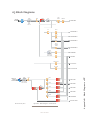
External Microphone Channel
This type of microphone operates identically to a
studio or CR guest microphone except that is does not
incorporate any monitor muting functions.
3: Console Operation • 30
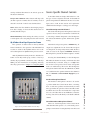
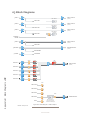
Line Channel
Line-level devices like CD players, tape players, etc.,
use the Line Channel profile. The Line Channel is stereo, but the user can change the input mode to mono, left
only or right only by using the Pan & Mode key in the
Master Module’s Channel Options section.
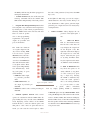
Line channels have a variety of remote logic functions available at the GPIO interface. ON and OFF keys
can be remotely controlled, as well as the Preview key.
Each function has a corresponding lamp driver.
You’ll also find a Ready command which will remotely illuminate the OFF lamp on the IQ channel and
activate the GPIO OFF lamp driver, allowing source
equipment to signal the operator with either a steadystate OFF key (indicating source ready) or a flashing
OFF lamp (indicating source next). Refer to the GPIO
Node User’s Manual for information on interfacing to
the GPIO’s inputs and outputs.
Phone Channel
The Phone Channel profile is used, naturally, for
telephone hybrid audio sources. Each Phone Channel
has its own discrete Feed-to-Source mix-minus output.
Each iQ can accommodate as many unique, automatically-generated mix-minus feeds as it has faders.
If the Feed-to-Source mode is set to “Auto”, (the most
common option - see Chapter 2: iQ Inputs and Outputs for the section entitled “Source Profile Options”),
phone callers hear the output of the Program-1 bus, minus himself, when the channels they’re assigned to are
ON. When the caller’s channel is OFF, their channel’s
Talkback key is lit and they hear the Board Operator’s
mic routed to their Talkback feed.
Phone feed-to-source outputs can also be locked to
backfeed only PGM-1, PGM-2, PGM-3 or PGM-4, using the options provided when constructing the Source
Profile for your hybrid. This automatic switching mode
makes it very easy to prep callers and then seamlessly
take them to air with a minimum of key pushes.
Codec Channel
The Codec Channel is used for codec sources. Like
the Phone Channel, each codec source is brought up on
its own channel, and an individual Feed-to-Source (mix
minus) output is provided for each codec. Codec Channels can be turned on and off remotely and provide on/
off status to a remote logic device. Remote Talk and
Remote Mute are also provided, allowing talent to take
control using their own On/Off/Mute/Talk panels.
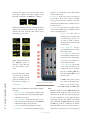
enables remote talent to communicate with the
board op using the Talkback bus. When Talk is activated, all outputs for that channel are muted and the source
audio is fed to the Talkback bus; the channel’s OLED
displays TALK to CR. When the user stops talking, the
channel returns to normal.
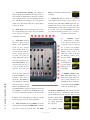
Talk
When the operator uses the Softkey to talk to the
phone or codec source, the OLED displays TALKBACK.
When the remote mute function is activated, the
OLED displays MUTED and all the channel outputs are
©2011 Axia Audio