1
APPENDIX A. TYPICAL OPERATION
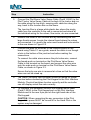
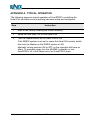
The following steps are typical operation of AutoSPRAY controlling the
Hardi Pilot controller once everything has been setup and configured.
Step
Instruction
1
Start a new field by clearing the current memory.
2
Setup the flow rates, etc on the Hardi Pilot.
3
Turn the Master switch on the Hardi Pilot to ON.
If the RINEX system is not set to sense the Hardi Pilot master switch
then turn the Master on the RINEX system to ON.
Manually turning sections ON or OFF on the controller will have no
effect. To manually spray turn the AS4080 to standby or turn
AutoSPRAY off in the Setup menu for GuideTRAX users.
1-1274 Rev A
Hardi Pilot AutoSPRAY Installation Manual
Page 10