1
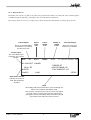
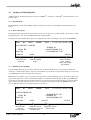
Press ENTER to make the entry the ABSOLUTE slippage of the selected track(s).
Example: 5<ENTER> causes slip to read 5.
Press SHIFT-ENTER to make the entry into MINUS the ABSOLUTE slippage of the selected track(s).
Example: 5<SHIFT-ENTER> causes slip to read -5.
Press the PLUS (+) key , to add the entry to the existing slip for the selected track(s).
Example 5<PLUS> causes slip to increase by 5
Press the MINUS (-) key, to subtract the entry from the existing slip for the selected track(s).
Example 5<MINUS> causes slip to decrease by 5.
The PLUS and MINUS keys can be pressed repeatedly, using the same entry many times. To remove the slip value
entered, press <SHIFT-RUB OUT>.
Correcting Mistakes
If you make a mistake while typing a number, use the RUB OUT key to remove the last number(s), then type correct
ones in their place. The entire number can be removed by pressing <SHIFT-RUB OUT>.
Clear Slippage
To clear slippage from the selected tracks press the CLEAR Soft key. Or enter ZERO into the Numeric Keypad and
press ENTER.
Restore Previous Setting
To go back to the previous slip setting , press the RESTORE Soft Key.
3.4.2 Dubbers
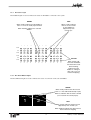
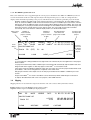
It is possible to slip a whole Dubber, as well as individual tracks. This is an offset for the whole machine.
To slip a Dubber, first select it, then press the OFFSET Soft Key.
Now use the same controls to slip the Dubber as described above for slipping tracks. Press the OFFSET Soft Key
again to deselect it and store the slippage you have entered.
It is possible to slip all Dubbers at the same time. Select all Dubbers by pressing the MACH key and then ALL, then
operate the slip functions as described above. In this mode, it is not possible to select tracks.
3.4.3 Capturing Offsets
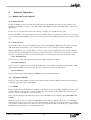
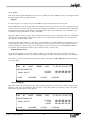
It is possible to set the slip value for a group of tracks or a Dubber by capturing its current position.
Stop the incoming time code at the new position for the audio to be slipped. You can also enter this location by
typing it into the numeric keypad and pressing ENTER.
Select the tracks you wish to slip by pressing the corresponding Track keys. Press ALL to select all tracks, or
choose OFFSET to slip the selected Dubber.
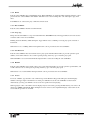
Press the CAPTURE key.
Enter the absolute time code value of the audio to be slipped on the numeric keypad or by using the jog wheel.
Remember to press ENTER when you’ve finished.
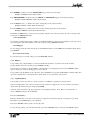
Press the CAPTURE soft key again to set the slip value.
To clear the slip settings, select the desired tracks, press the CAPTURE soft key, then press the CLEAR soft key.
15
DaDplus User Manual