1
Contents
1.
2.
Introduction .............................................................................................................. 4
Physical Components .............................................................................................. 4
2.1
The FD-24 Audio Dubber ...................................................................................................................... 4
2.1.1
Audio Channel Card .............................................................................................................................. 4
2.1.2
The CPU Card ........................................................................................................................................ 4
2.1.3
Storage ................................................................................................................................................... 4
2.1.4
Connections to the FD-24 Audio Dubber ............................................................................................... 5
2.2
The FC-100 Controller ........................................................................................................................... 6
2.2.1
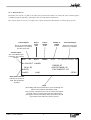
The LCD Screen ..................................................................................................................................... 8
2.2.3
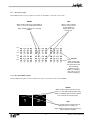
The Track Button Lights .......................................................................................................................... 9
3.
Software Operation................................................................................................ 10
3.1
Dubber and Track Selection ............................................................................................................... 10
3.1.1
Dubber Selection .................................................................................................................................. 10
3.1.2
Track Selection ..................................................................................................................................... 10
3.2
Transport Control ................................................................................................................................ 10
3.2.1
CHASE ................................................................................................................................................. 10
3.2.2
PLAY ..................................................................................................................................................... 11
3.2.3
Reverse Play ........................................................................................................................................ 11
3.2.4
Stop / Jog .............................................................................................................................................. 11
3.2.5
Fast Forward ......................................................................................................................................... 11
3.2.6
Rewind ................................................................................................................................................. 11
3.2.7
Locate ................................................................................................................................................... 11
3.3
Loading and Unloading Files .............................................................................................................. 12
3.3.1
The Title Menu ...................................................................................................................................... 12
3.3.2
The Load Sequence ............................................................................................................................. 12
3.3.3
Multi-Project Load (MPL) ...................................................................................................................... 12
3.3.4
The MPL Project Select Screen ........................................................................................................... 13
3.4
Slipping ................................................................................................................................................. 13
3.4.1
Tracks .................................................................................................................................................... 14
3.4.2
Dubbers ................................................................................................................................................ 15
3.4.3
Capturing Offsets .................................................................................................................................. 15
3.5
Synchronisation .................................................................................................................................. 16
3.5.1
The Chase Key ..................................................................................................................................... 16
3.5.2
The Sync Menu ..................................................................................................................................... 16
4.
System Test and Configuration ............................................................................ 17
4.1
The Setup Menu ................................................................................................................................... 17
4.2
The Tests Submenu ............................................................................................................................. 18
5.
Preparing Projects for Export to DaDplus .......................................................... 18
5.1
MFX3plus Workstations ...................................................................................................................... 18
5.1.1
Hard Disks ............................................................................................................................................ 18
5.1.2
Exporting the Project. ........................................................................................................................... 18
5.1.3
Special Considerations ........................................................................................................................ 18
5.2
Pro Tools™ Workstations .................................................................................................................... 19
5.2.1
Hard Disks ............................................................................................................................................ 19
5.2.2
Exporting the Project ............................................................................................................................ 19
5.2.3
Special Considerations ........................................................................................................................ 19
5.3
Akai DDPlus™ Series ......................................................................................................................... 19
5.3.1
Hard Disks ............................................................................................................................................ 19
5.3.1
Exporting the Project ............................................................................................................................ 19
5.3.2
Special Considerations ........................................................................................................................ 19
6.
Index ........................................................................................................................ 20
3
DaDplus User Manual