1
6.
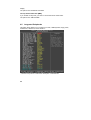
Speed Gear Operation
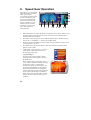
Speed Gear is an over-clocking
utility developed by Leadtek,
which you can use to
conveniently adjust the speeds
of your CPU, memory, and
PCI. You can install Speed
Gear from the software CD.
Once it is installed, you can
double click the icon in the
system tray to bring up the
menu. The operation is
described below:
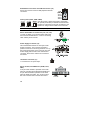
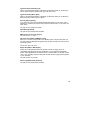
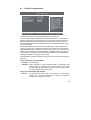
1.
When this indicator is yellow, the changes are applied to every bootup. When it is red,
the setting changes only affect this boot session. You can click on the indicator to
switch between yellow and red.
2.
The number shows the speed of CPU’s FSB. The default value is determined by the
value in the <<< X-BIOS II >>> setup screen in BIOS Setup.
3.
The ID of the speed combination of CPU’s FSB, memory, and PCI as a group. There
are three groups: A, B, and C.
4.
The number shows the speed of memory. This value changes in proportion to the
changes of CPU’s FSB.
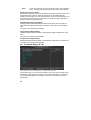
5.
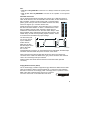
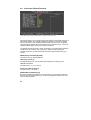
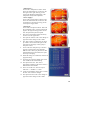
<HM> button: Click to bring up a on-screen
control panel of four buttons as shown in
the first figure to the right.
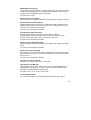
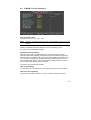
<System Voltage>:
Clicking on the <System Voltage> button
brings up another control panel as shown in
the figure below.
There are three meters showing the current
Vcore, Vddq, and Vmem, each with a reading
on the bottom. There is a small yellow
triangle arrow below one of the meters. You
can click on the handle bar on the right and
hold the mouse button down to change the
voltage of the meter pointed at by the triangle.
If you wish to make changes to a different
meter, simply click on such a meter, then the
triangle will move under the meter you just
clicked on.
40