1
Configuration
Configuration
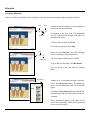
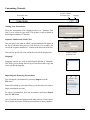
“Play Mode”
Set to Auto, so movies will begin automatically.
“Presentation Mode”
“Loop”
“Duration”
Allows users to hide the navigation menu.
“Audio”
Allows users to turn on/off sound.
“Restore corrupt
Movies”
Allows users to restore damaged movies from disk
“Software Mode”
Chairside can open in a window or full-screen
Set to On, so that the series will play indefinitely.
Set the number of seconds you wish Chairside to
wait before contiuing to the next slide.
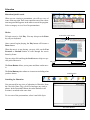
“Import Print Logo” Import a custom logo for printing
“Delete Print Logo” Deletes custom logo
“Main Image”
Main image on right can change or remain static
“Select Image”
Allows users to select which main image displays
“Log In”
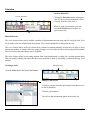
“Language”
Users must log in with administrative privileges
to create new educations
“Backup”
Allows users to create a backup of your presentations to your Documents folder or restore it from a location of your choice. This is used to transfer custom education to another Chairside installation.
To import or export a single presentation, see the Importing And Exporting Presentations section of this document.
“Chairside”
Displays your registration information.
Confirguration
Allows users to change the language used in the presentations.
26