1
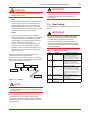
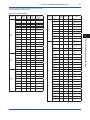
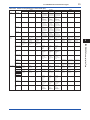
0x00
0x0F
0x10
0x13
0x14
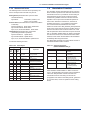
1.3 Bus Power ON
Not used
Bridge device
LM device
V(FUN)
Unused
V(FUN)+V(NUN)
3
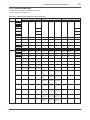
<1. FOUNDATION Fieldbus Communication Type>
V(NUN)
BASIC device
0xF7
0xF8
Turn on the power of the host and the bus and also the
power for the AXF. Where the AXF is equipped with an
LCD indicator, first all segments are lit, then the display
begins to operate.
Using the host device display function, check that the
AXF is in operation on the bus.
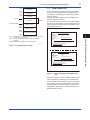
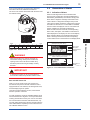
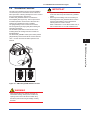
The device information, including PD tag, Node address,
and Device ID, is described on the sheet attached to the
AXF. The device information is given in duplicate on this
sheet (Refer to Figure 1.3).
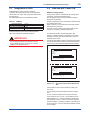
Default address
0xFB
0xFC
0xFF
Portable device address
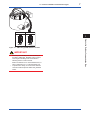
DEVICE INFORMATION
FA010201.ai
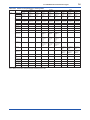
Figure 1.2 Available Address Range
:
:
:
:
:
:
594543000BXXXXXXXX
FT2001
1
0xF4
XXXXXXXXXXXXXXXXX
1
FOUNDATION Fieldbus Communication Type
Note 1: Bridge device: A linking device which brings data from
one or more H1 networks.
Note 2: LM device: with bus control function (Link Master
function)
Note 3: BASIC device: without bus control function
Device ID
PD Tag
Device Revision
Node Address
Serial No.
Physical Location
Note:
Our Device Description Files and Capabilities Files available at
http://www.yokogawa.com/fld (English) or
http://www.yokogawa.co.jp/fld/ (Japanese)
DEVICE INFORMATION
Device ID
PD Tag
Device Revision
Node Address
Serial No.
Physical Location
:
:
:
:
:
:
594543000BXXXXXXXX
FT2001
1
0xF4
XXXXXXXXXXXXXXXXX
Note:
Our Device Description Files and Capabilities Files available at
http://www.yokogawa.com/fld (English) or
http://www.yokogawa.co.jp/fld/ (Japanese)
FA010301.ai
Figure 1.3 Device Information Sheet Attached to
AXF
If no AXF is detected, check the available address range.
If the node address and PD tag are not specified when
ordering, default value is factory set. If two or more AXFs
are connected at a time with default value, only one AXF
will be detected from the host as AXFs have the same
initial address. Separately connect each AXF and set a
different address for each.
IM 01E20A01-02EN