1
TeleScript PRO – ENPS Newsroom Operations Guide
Page 3 of 14
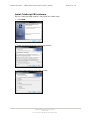
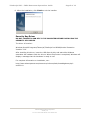
6. After the installation, click Finish to exit the installer.
Security Key Driver
DO NOT CONNECT A USB KEY TO THE COMPUTER BEFORE INSTALLING THE
SECURITY KEY DRIVER.
The driver is found at:
Windows Start/All Programs/Telescript/TeleScript Pro NEWS/Sentinel Protection
Installer 7.6.6.
After installing this driver, insert the USB Security Key and wait while Windows
associates the hardware with the drivers. When the process is completed, Windows will
display a message that the hardware is ready to use.
For complete information on installation, see:
http://www.telescriptwest.com/tswservice/onlinecs/hesk/knowledgebase.php?
article=19
TSWTX Multimedia Development
Austin, TX
Tel: 512 302 0766 Web: www.tswtx.com