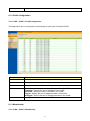
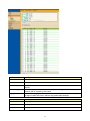
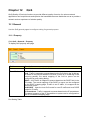
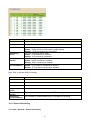
1
24/16 Giga+4*1000Mbps SFP Ports Smart Managed Switch User Manual 1 FCC Certifications This Equipment has been tested and found to comply with the limits for a Class A digital device, pursuant to part 15 of the FCC Rules. These limits are designed to provide reasonable protection against harmful interference when the equipment is operated in a commercial environment. This equipment generates, uses, and can radiate radio frequency energy and, if not installed and used in accordance with the instruction manual, may cause harmful interference to radio communications. Operation of this equipment in a residential area is likely to cause harmful interference in which case the user will be required to correct the interference at his own expense. This device complies with Part 15 of the FCC Rules. Operation is subject to the following two conditions: (1) this device may not cause harmful interference, and (2) this device must accept any interference received; including interference that may cause undesired operation. CE Mark Warning This equipment complies with the requirements relating to the EMC Directive 2004/108/EC, the Low Voltage Directive 2006/95/EC, and the RoHS Directive 2011/65/EU. Company has an on-going policy of upgrading its products and it may be possible that information in this document is not up-to-date. Please check with your local distributors for the latest information. No part of this document can be copied or reproduced in any form without written consent from the company. Trademarks: All trade names and trademarks are the properties of their respective companies. Copyright © 2015, All Rights Reserved. 2 Table of Contents Chapter 1 Introduction ··························································································6 1.1 General Description ·····························································································6 1.2 Key Features ········································································································6 1.3 The Front Panel····································································································7 LEDs Definition ··········································································································7 The Reset Button ·······································································································7 Console Port ··············································································································7 1.4 The Rear Panel ·····································································································8 Power Receptacle ······································································································8 1.5 Installation ············································································································8 Unpacking Information ······························································································8 Rack-mount Installation ····························································································8 Installing Network Cables ·························································································8 Chapter 2 Getting Started ·················································································10 2.1 Web-based Management Interface (Web UI) ···················································10 2.2 Connect to switch Web Pages ··········································································10 2.3 Graphic User Interface Overview ·····································································11 Chapter 3 Status ··································································································13 3.1 System Information ···························································································13 3.2 Logging Message ······························································································14 3.3 Port ·····················································································································15 3.3.1 Statistics ··········································································································15 3.3.2 Bandwidth Utilization ·····················································································16 3.4 Link Aggregation ·······························································································17 3.5 MAC Address Table ···························································································18 Chapter 4 Network·······························································································20 4.1 IP Address ··········································································································20 4.2 System Time·······································································································21 Chapter 5 Port······································································································24 5.1 Port Setting ········································································································24 5.2 Link Aggregation ·······························································································25 5.2.1 Trunk Group Setting ·······················································································25 5.2.2 Port Setting ·····································································································27 5.2.3 LACP ················································································································28 5.3 EEE ·····················································································································30 5.3 Jumbo Frame ·····································································································31 Chapter 6 VLAN ···································································································32 6.1 VLAN ···················································································································32 3 6.1.1 Create VLAN ····································································································32 6.1.2 VLAN Configuration ·······················································································33 6.1.3 Membership·····································································································33 6.1.4 Port Setting ·····································································································35 6.2 Voice VLAN ········································································································36 6.2.1 Property ···········································································································36 6.2.2 Voice OUI ·········································································································38 Chapter 7 MAC Address Table ···········································································39 7.1 Dynamic Address ······························································································39 7.2 Static Address····································································································39 Chapter 8 Spanning Tree Protocol (STP) ··························································41 8.1 Property ··············································································································41 8.2 Port Setting ········································································································42 8.3 Statistics ·············································································································44 Chapter 9 Discovery····························································································47 9.1 LLDP ···················································································································47 9.1.1 Property ···········································································································47 9.1.2 Port Setting ·····································································································48 9.1.3 Packet View ·····································································································49 9.1.4 Local Information ····························································································50 9.1.5 Neighbor ··········································································································51 9.1.6 Statistics ··········································································································51 Chapter 10 Multicast ···························································································54 10.1 General ·············································································································54 10.1.1 Property ·········································································································54 10.1.2 Group Address ······························································································54 10.1.3 Router Port ····································································································56 10.2 IGMP Snooping ································································································56 10.2.1 Property ·········································································································56 10.2.2 Querier ···········································································································58 10.2.3 Statistics ········································································································59 Chapter 11 Security ·····························································································62 11.1 Management Access ·······················································································62 11.1.1 Management VLAN ·······················································································62 11.1.2 Management Service ····················································································62 11.2 Protected Port ··································································································63 11.3 Storm Control···································································································64 11.4 DoS ···················································································································66 11.4.1 Property ·········································································································66 11.4.2 Port Setting····································································································67 4 Chapter 12 QoS ···································································································69 12.1 General ·············································································································69 12.1.1 Property ·········································································································69 12.1.2 Queue Scheduling ························································································70 12.1.3 CoS Mapping ·································································································72 12.1.4 DSCP Mapping ······························································································73 12.1.5 IP Precedence Mapping················································································74 12.2 Rate Limit ·········································································································75 12.2.1 Ingress/Egress Port ······················································································76 12.2.2 Egress Queue································································································77 Chapter 13 Diagnostics ······················································································79 13.1 Logging ············································································································79 13.1.1 Property ·········································································································79 13.1.2 Remove Server ······························································································80 13.2 Mirroring ···········································································································81 13.2 Ping ···················································································································81 13.3 Copper Test ······································································································82 Chapter 14 Management ·····················································································84 14.1 User Account ···································································································84 14.2 Firmware ···········································································································84 14.2.1 Upgrade/Backup ···························································································84 14.3 Configuration ···································································································86 14.3.1 Upgrade/Backup ···························································································86 14.3.2 Save Configuration ·······················································································88 14.4 SNMP ················································································································88 14.4.1 Community ····································································································88 14.4.2 Trap Event ·····································································································89 14.4.3 Notification ····································································································90 Product Specifications ····························································································91 5 Chapter 1 Introduction 1.1 General Description The Gigabit Smart Managed Switch is equipped with 24/16 gigabit RJ45 ports and 4 SFP slots. The switch supports high performance, enterprise-level security control & QoS Layer 2 management features. It is a cost-effective product solution for the small and medium business. The switch supports the WebGUI to control each port status and bandwidth control by port rate limiting. The Storm Control feature protects against Broadcast, Multicast and Unicast Storm. The rich Quality of Service (QoS) & VLAN provides enhanced traffic management capabilities to move your data smoother and faster. The device supports a complete lineup of layer 2 features, including 802.1Q tag VLAN, Port Isolation, Port Mirroring, STP/RSTP, Link Aggregation Group and 802.3x Flow Control function. It also supports SNMP management functions. The switch complies with IEEE802.3az Energy Efficient Ethernet to save power consumption, Support IGMP Snooping function to improve traffic performance. Moreover, the rich diagnostic LEDs on the front-panel provide the operating status of individual port and whole system. 1.2 Key Features 24/16 * RJ-45 ports for 10/100/1000Mbps connectivity 4* SFP ports for 1000Mbps Fiber connectivity Supports MDI/MDI-X auto crossover Supports NWay protocol and auto-detection Complies with IEEE802.3, 802.3u, 802.3ab Ethernet standards Supports IEEE802.3x Flow Control and Back-Pressure control Supports STP & RSTP Supports LLDP Discovery Supports VLAN : Static, Port Based, Tag Based, Voice OUI mode Supports QoS : CoS, DSCP, CoS-DSCP, IP Precedence Supports Security : Management Service (Telnet, HTTP, HTTPS, SNMP), Protected Port, Storm Control, DoS attack prevention Supports Storm Filter (Broadcast, Unknown Multicast, Unknown Unicast) Supports port based Ingress/Egress rate limit Supports 8 queues is handled SP and WRR Supports Jumbo Frame : 1518~10K Bytes Supports 8 Link Aggregation Groups with Static & LACP types Support port mirroring, Ping Testing, Copper Testing Supports SNMP access control & trap event Supports IGMP Snooping v2/v3 Supports IEEE802.3az EEE enable and disable Supports Firmware upgrade and backup 6 Supports Configuration upgrade and backup Full Range of Internal universal switching power supply Supports Reset to factory default button 1.3 The Front Panel The following figure shows the front panel of the switch. LEDs Definition This device provides extensive LEDs to show the activities on power, system and ports. See the following description for your reference: LED Status Operation Steady Green The switch is powered on. Off The switch is powered off. Steady Green The switch is on and functioning properly Blinking Green Off The switch is rebooting and performing self-diagnostic tests. The power is off or the system is not ready/malfunctioning. Steady Green Valid port connection;. Blinking Green Valid port connection and there is data transmitting/receiving Off Port disconnected. POWER SYSTEM Link/ACT The Reset Button Reset the switch to its factory default configuration via the RESET button. Press the RESET button for five seconds more and release. The switch automatically reboots and reloads its factory configuration file. Press the RESET button for two seconds and release, the switch will warm boot for hardware reset. The RESET button is on the front panel of the switch. Console Port This port is reserved for command-line interface (CLI) and RS232 firmware upgrade to use. 7 1.4 The Rear Panel The following figure shows the rear panel of the switch: Power Receptacle To be compatible with the electric service standards around the world, the switch is designed to afford the power supply in the range from 100 to 240 VAC, 50/60 Hz. Please make sure that your outlet standard to be within this range. To power on the switch, please plug the female end of the power cord firmly into the receptacle of the switch, the other end into an electric service outlet. After the switch powered on, please check if the power LED is lit for a normal power status. 1.5 Installation Unpacking Information The product package should include the following: One 24G/16G+4SFP Gigabit Ethernet Smart Managed Switch One power cord Rubber foot and screws Rack-mount brackets One CD-ROM for user manual Rack-mount Installation Rack Mounting the Switch in the 19-inch rack: Disconnect all cables from the switch before continuing. Place the unit the right way up on a hard, flat surface with the front facing toward you. Locate a mounting bracket over the mounting holes on one side of the unit. Insert the screws and fully tighten with a suitable screwdriver. Repeat the two previous steps for the other side of the unit. Insert the unit into the 19" rack and secure with suitable screws (not provided). Reconnect all cables. Installing Network Cables To make a valid connection and obtain the optimal performance, an appropriate cable that 8 corresponds to different transmitting/receiving speed is required. To choose a suitable cable, please refer to the following table. Media Speed 10 Mbps Network Media(Cable) 100 Mbps 1000 Mbps Wiring 10Base-T: UTP category 3, 4, 5 cable (maximum 100m) EIA/TIA-568 100Ω STP (maximum 100m) 100Base-TX: UTP category 5 cable (maximum 100m) EIA/TIA-568 100Ω STP (maximum 100m) 1000Base-T: UTP category 5, 5e cable (maximum 100m) EIA/TIA-568 100Ω STP (maximum 100m) 9 Chapter 2 Getting Started 2.1 Web-based Management Interface (Web UI) The Web UI supports all frequently used web browsers listed below: Internet Explorer 8 and above Firefox 20.0 and above Chrome 23.0 and above Safari 5.1.7 and avove 2.2 Connect to switch Web Pages 1. To connect to the web server, input the IP of switch in the URL field of the browser. 2. The default IP is 192.168.1.1 and default Subnet mask is 255.255.255.0 3. Type “http://”and the IP address of the switch (for example, the default management IP address is 192.168.1.1) in the Location or Address field. Press Enter. 4. The login screen appears. Enter the User Name and Password to login the configuration interface. They are both admin by default. You can select Remember my password to remember the User Name and Password. 10 2.3 Graphic User Interface Overview After the password authorization, the information page shows up. You may click on each folder on the left column of each page to get access to each configuration page. The Graphic User Interface is as follows: 24G+4SFP 16G+4SFP 11 In the navigation panel, click a main link to reveal a list of submenu links shown as the following: The following table describes the links in the navigation panel. LINKS Status Network Port VLAN MAC Address Table Spanning Tree Discovery (LLDP) Multicast Security QoS Diagnostics Management Submenu System Information. Logging Message Port – Statistics, Bandwidth Utilization Link Aggregation MAC Address Table IP Address System Time Port Setting Link Aggregation – Group, Port Setting, LACP EEE Jumbo Frame VLAN - Create VLAN, VLAN Configuration, Membership, Port Setting Voice VLAN - Property, Voice OUI Dynamic Address Static Address Property Port Setting Statistics Property Port Setting Packet View Local Information Neighbor Statistics General – Property, Group Address, Router Port IGMP Snooping – Property, Querier, Statistics Management Access – Management VLAN, Management Service Protected Port Storm Control DoS – Property, Port Setting General – Property, Queue Scheduling, CoS Mapping, DSCP Mapping, IP Precedence Mapping Rate Limit – Ingress/Egress Port, Egress Queue Logging – Property, Remove Server Mirroring Ping Copper Test User Account Firmware – Upgrade/Backup Active Image Configuration – Upgrade/Backup, Save Configuration, Notification 12 Chapter 3 Status Use the Status pages to view system information and status. 3.1 System Information Click Status > System Information This page shows switch panel, CPU utilization, Memory utilization and other system current information. It also allows user to edit some system information. Field Description Model System Location Model name of the switch System name of the switch. This name will also use as CLI prefix of each line Location information of the switch System Contact Contact information of the switch MAC Address Base MAC address of the switch IPv4 Address Current system IPv4 address IPv6 Address Current system IPv6 address System OID SNMP system object ID System Name 13 System Uptime Total elapsed time from booting Current Time Current system time Loader Version Boot loader image version Loader Date Boot loader image build date Firmware Version Current running firmware image version Firmware Date Current running firmware image build date Telnet HTTP Current Telnet service enable/disable state Current HTTP service enable/disable state HTTPS Current HTTPS service enable/disable state SNMP Current SNMP service enable/disable state Click “Edit” button on the table title to edit following system information. Field System Location Description System name of the switch. This name will also use as CLI prefix of each line. Location information of the switch. System Contact Contact information of the switch. System Name 3.2 Logging Message Click Status > Logging Message This page shows logging messages stored on the RAM and Flash. Field Viewing Description The logging view including : RAM : Show the logging messages stored on the RAM Flash : Show the logging messages stored on the Flash. 14 Clear Clear the logging messages. Refresh Refresh the logging messages. Log ID The log identifier. Time The time stamp for the logging message. Severity The severity for the logging message. Description The description of logging message. 3.3 Port The port configuration page displays port summary and status information. 3.3.1 Statistics Click Status > Port > Statistics On this page user can get standard counters on network traffic from the interfaces, Ethernet-like and RMON MIB. Interfaces and Ethernet-like counters display errors on the traffic passing through each port. RMON counters provide a total count of different frame types and sizes passing through each port. 15 The “Clear” button will clear MIB counter of current selected port. Field Description Port Select one port to show counter statistics. Select the MIB counter to show different count type All : All counters. Interface : Interface related MIB counters Etherlike : Ethernet-like related MIB counters RMON : RMON related MIB counters Refresh the web page every period of seconds to get new counter of specified port. MIB Counter Refresh Rate 3.3.2 Bandwidth Utilization Click Status > Port > Bandwidth Utilization 16 This page allow user to browse ports’ bandwidth utilization in real time. This page will refresh automatically in every refresh period. Field Refresh Rate Description Refresh the web page every period of second to get new bandwidth utilization data. 3.4 Link Aggregation Click Status > Link Aggregation Display the Link Aggregation status of web page. 17 Field Description Lag LAG Name. Name Link Status LAG port description The type of the LAG Static : The group of ports assigned to a static LAG are always active members. LACP : The group of ports assigned to dynamic LAG are candidate ports. LACP determines which candidate ports are active member ports. LAG port link status Active Member Active member ports of the LAG Inactive Member Inactive member ports of the LAG Type 3.5 MAC Address Table Click Status > MAC Address Table The MAC address table page displays all MAC address entries on the switch including static MAC address created by administrator or auto learned from hardware. The “Clear” button will clear all dynamic entries and “Refresh” button will retrieve latest MAC address entries and show them on page. Field Description VLAN VLAN ID of the MAC address. MAC Address MAC address The type of MAC address Management : DUT’s base MAC address for management purpose. Static : Manually configured by administrator. Dynamic : Auto learned by hardware. The type of port Type Port 18 CPU : DUT’s CPU port for management purpose Other : Normal switch port 19 Chapter 4 Network Use the Network pages to configure settings for the switch network interface and how the switch connects to a remote server to get services. 4.1 IP Address Click Network > IP Address Use the IP Setting screen to configure the switch IP address and the default gateway device. The gateway field specifies the IP address of the gateway (next hop) for outgoing traffic. The switch needs an IP address for it to be managed over the network. The factory default IP address is 192.168.1.1. The subnet mask specifies the network number portion of an IP address. The factory default subnet mask is 255.255.255.0. 20 Field Description IPv4 Address Field Address Type Select the address type of IP configuration Static: Static IP configured by users will be used. Dynamic: Enable DHCP to obtain IP information from a DHCP server on the network. IP Address Enter the IP address of your switch in dotted decimal notation for example 192.168.1.1. If static mode is enabled, enter IP address in this field. Subnet Mask Enter the IP subnet mask of your switch in dotted decimal notation for example 255.255.255.0. If static mode is enabled, enter subnet mask in this field. Default Specify the default gateway on the static configuration. The default gateway Gateway must be in the same subnet with switch IP address configuration DNS Server 1 If static mode is enabled, enter primary DNS server address in this field. DNS Server 2 If static mode is enabled, enter secondary DNS server address in this field. IPv6 Address Field Auto Select Enable or Disable the IPv6 auto configuration.. Configuration DHCPv6 DHCPv6 client state. Client Enable: Enable DHCPv6 client function. Disable: Disable DHCPv6 client function IPv6 Address Specify the IPv6 address, when the IPv6 auto configuration and DHCPv6 client are disabled. IPv6 Prefix Specify the prefix for the IPv6 address, when the IPv6 auto configuration and DHCPv6 client are disabled. Gateway Specify the IPv6 default gateway, when the IPv6 auto configuration and DHCPv6 client are disabled. DNS Server 1 Specify the primary user-defined IPv6 DNS server configuration. DNS Server 2 Specify the secondary user-defined IPv6 DNS server configuration. Operational Status IPv4 Address The operational IPv4 address of the switch. IPv4 Gateway The operational IPv4 gateway of the switch. IPv6 Address The operational IPv6 address of the switch. IPv6 Gateway The operational IPv6 gateway of the switch. Link Local The operational IPv6 link local address for the switch. Address 4.2 System Time Click Network > System Time This page allow user to set time source, static time, time zone and daylight saving settings. Time zone and daylight saving takes effect both static time or time from SNTP server. 21 Field Source Time Zone SNTP Address Type Server Address Server Port Description Select the time source SNTP: Time sync from NTP server. From Computer: Time set from browser host. Manual Time: Time set by manually configure. Select a time zone difference from listing district.. Select the address type of NTP server. This is enabled when time source is SNTP. Input IPv4 address or hostname for NTP server. This is enabled when time source is SNTP. Input NTP port for NTP server. Default is 123. This is enabled when time source is SNTP. Manual Time Date Input manual date. This is enabled when time source is manual. Time Input manual time. This is enabled when time source is manual. Daylight Saving Time Type Select the mode of daylight saving time. Disable : Disable daylight saving time. Recurring : Using recurring mode of daylight saving time. Non-Recurring : Using non-recurring mode of daylight saving time. 22 Offset Recurring From Recurring To Non-recurring From Non-recurring To USA : Using daylight saving time in the United States that starts on the second Sunday of March and ends on the first Sunday of November European : Using daylight saving time in the Europe that starts on the last Sunday in March and ending on the last Sunday in October. Specify the adjust offset of daylight saving time. Specify the starting time of recurring daylight saving time. This field available when selecting “Recurring” mode. Specify the ending time of recurring daylight saving time. This field available when selecting “Recurring” mode. Specify the starting time of non-recurring daylight saving time. This field available when selecting “Non-Recurring” mode. Specify the ending time of non-recurring daylight saving time. This field available when selecting “Non-Recurring” mode. 23 Chapter 5 Port Use the Port pages to configure settings for the switch port related features. 5.1 Port Setting Click Port > Port Setting This page shows port current status, and allow user to edit port configurations. Select port entry and click “Edit” button to edit port configurations. Field Port Type Description State Link Status Speed Description Port Name. Allows you to Enable/Disable the port. When Enable is selected, the port can forward the packets normally. Port description Port admin state. Enabled : Enable the port. Disabled : Disable the port. Current port link status Up : Port is link up. Down : Port is link down. Current port speed configuration and link speed status. 24 Duplex Current port duplex configuration and link duplex status. Flow Control Current port flow control configuration and link flow control status. Note: 1. The switch can’t be managed through the disable port. 2. The switch might lose connection temporarily for the specific port (which connect to the management PC) setting. If it happens, refresh WEB GUI can recover the connection. Edit Port Setting Field Port Description State Link Status Speed Duplex Description Selected Port list. Port description Port admin state. Enabled : Enable the port. Disabled : Disable the port. Current port link status Up : Port is link up. Down : Port is link down. Select the Port speed/duplex capabilities for the ports you need: Auto: Auto-negotiation speed/ duplex with all capabilities. Auto-10M: Auto speed with 10M ability only. Auto-100M: Auto speed with 100M ability only. Auto-1000M: Auto speed with 1000M ability only. Auto-10M/100M: Auto speed with 10M/100M abilities. 10M: Force speed with 10M ability. 100M: Force speed with 100M ability. 1000M: Force speed with 1000M ability Port duplex capabilities Auto: Auto flow control ability. Enabled: Enable flow control ability. Disabled: Disable flow control ability. 5.2 Link Aggregation Click Port > Link Aggregation The Link Aggregation is used to combine a number of ports together to make a single high-bandwidth data path, which can highly extend the bandwidth. 5.2.1 Trunk Group Setting Click Port >Link Aggregation>Group 25 This page allow user to configure link aggregation group load balance algorithm and group member. Field Description Load Balance LAG load balance distribution algorithm. Algorithm Src-dst-mac : Based on MAC address Src-dst-mac-ip : Based on MAC address and IP address LAG LAG (Link Aggregation Group) Name. Name LAG port description Type Link Status The type of the LAG. Static : The group of ports assigned to a static LAG are always active members. LACP : The group of ports assigned to dynamic LAG are candidate ports. LACP determines which candidate ports are active member ports. LAG port link status. Active Member Active member ports of the LAG. Inactive Member Inactive member ports of the LAG. Flow Control Current port flow control configuration and link flow control status. Select Link Aggregation Table and click “Edit” button to edit LAG setting. Edit LAG Group Setting Field Description LAG Selected LAG Group ID Name LAG port description Type The type of the LAG. Static : The group of ports assigned to a static LAG are always active 26 Member members. LACP : The group of ports assigned to dynamic LAG are candidate ports. LACP determines which candidate ports are active member ports. Select available port to be LAG group member port. 5.2.2 Port Setting Click Port >Link Aggregation>Port Setting This page shows LAG port current status and allows user to edit LAG port configurations. Field LAG Type Description LAG Port Name LAG Port media type Description LAG port description State Speed LAG Port admin state. Enable : Enable the port Disable : Disable the port Current LAG port link status. Up : Port is link up Down : Port is link down Current LAG port speed configuration and link speed status. Duplex Current LAG port duplex configuration and link duplex status. Flow Control Current LAG port flow control configuration and link flow control status. Link Status Select Port Setting Table and click “Edit” button to edit port setting. 27 Edit LAG Port Setting Field Port Description Description Selected port list Port description State Port admin state Enable : Enable the port Disable : Disable the port Port speed capabilities. Auto: Auto-negotiation speed/ duplex with all capabilities. Auto-10M: Auto speed with 10M ability only. Auto-100M: Auto speed with 100M ability only. Auto-1000M: Auto speed with 1000M ability only. Auto-10M/100M: Auto speed with 10M/100M abilities. 10M: Force speed with 10M ability. 100M: Force speed with 100M ability. 1000M: Force speed with 1000M ability Port flow control. Auto: Auto flow control by negotiation. Enabled: Enable flow control ability. Disabled: Disable flow control ability. Speed Flow Control 5.2.3 LACP Click Port >Link Aggregation>LACP This page allow user to configure LACP global and port configurations. 28 Field System Priority Port Description Configure the system priority of LACP. This decides the system priority field in LACP PDU. Port Name. Port Priority LACP priority value of the port. Timeout The periodic transmissions type of LACP PDUs. Long : Transmit LACP PDU with slow periodic (30s). Short : Transmit LACP PDU with fast periodic (1s). Select ports and click “Edit” button to edit port configuration. Edit LACP Port Setting Field Description Port Selected port list. Port Priority Enter the LACP priority value of the port. 29 Timeout The periodic transmissions type of LACP PDUs. Long : Transmit LACP PDU with slow periodic (30s). Short : Transmit LACP PDU with fast periodic (1s). 5.3 EEE Click Port > EEE This page allows user to enable or disable EEE (Energy Efficient Ethernet) function. Field Port Description Port Name. State Port EEE admin state. Enable : EEE is enabled Disable : EEE is disabled. 30 Operational Status Port EEE operational status. Enable : EEE is operating Disable : EEE is no operating Select EEE and click “Edit” button to edit EEE configuration. Edit EEE Setting Field Port State Description Selected port list. Port EEE admin state. Enable : Enable EEE Disable : Disabled EEE. 5.3 Jumbo Frame Click Port > Jumbo Frame This page allows user to configure switch jumbo frame size. Field Jumbo Frame Description Enable or Disable jumbo frame. When jumbo frame is enabled, switch max frame size is allowed to configure. (from 1518 to 10000) When jumbo frame is disabled, default frame size 1522 will be used. 31 Chapter 6 VLAN A virtual local area network (VLAN) is a group of hosts with a common set of requirements that communicate as if they were attached to the same broadcast domain, regardless of their physical location. A VLAN has the same attributes as a physical local area network (LAN), but it allows for end stations to be grouped together even if they are not located on the same network switch. VLAN membership can configured through software instead of physically relocating devices or connections. . 6.1 VLAN Use the VLAN pages to configure settings of VLAN and all VLAN-related protocol. 6.1.1 Create VLAN Click VLAN > VLAN > Create VLAN This page allows user to add or delete VLAN ID entries and browser all VLAN entries that add statically or dynamic learned by GVRP. Each VLAN entry has a unique name, user can edit VLAN name in edit page. Field Available VLAN Created VLAN Description VLAN has not created yet. Select available VLANs from left box then move to right box to add. VLAN had been created. Select created VLANs from right box then move to left box to delete. Click “Edit” button to edit VLAN name Field Description 32 Name Input VLAN name. 6.1.2 VLAN Configuration Click VLAN > VLAN > VLAN Configuration This page allow user to configure the membership for each port of selected VLAN. Field VLAN Description Select specified VLAN ID to configure VLAN configuration. Port Display the interface of port entry. Mode Display the interface VLAN mode of port. Membership Select the membership for this port of the specified VLAN ID. Forbidden : Specify the port is forbidden in the VLAN. Excluded : Specify the port is excluded in the VLAN. Tagged : Specify the port is tagged member in the VLAN. Untagged : Specify the port is untagged member in the VLAN. Display if it is PVID of interface. PVID 6.1.3 Membership Click VLAN > VLAN > Membership 33 This page allow user to view membership information for each port and edit membership for specified interface. Field Port Description Display the interface of port entry. Mode Display the interface VLAN mode of port. Administrative VLAN Operational VLAN Display the administrative VLAN list of this port. Display the operational VLAN list of this port. Operational VLAN means the VLAN status that really runs in device. It may different to administrative VLAN. Click “Edit” button to edit VLAN membership Field Description Port Display the interface of port entry. Mode Display the VLAN mode of interface. 34 Membership Select VLANs of left box and select one of following membership then move to right box to add membership. Select VLANs of right box then move to left box to remove membership. Tagging membership may not choose in differ VLAN port mode. Forbidden : Set VLAN as forbidden VLAN. Excluded : Set option is always disabled. Tagged : Set VLAN as tagged VLAN. Untagged : Set VLAN as untagged VLAN. PVID : Check this checkbox to select the VLAN ID to be the port-based VLAN ID for this port. PVID may auto select or can’t select in differ settings. 6.1.4 Port Setting Click VLAN > VLAN > Port Setting This page allow user to configure port VLAN settings such as VLAN port mode, PVID etc… The attributes depend on different VLAN port mode. Field Description 35 Port Display the interface. Mode Display the VLAN mode of port. PVID Display the Port-based VLAN ID of port. Accept Frame Display accepted frame type of port. Type Ingress Filtering Display ingress filter status of port Click “Edit” button to edit VLAN port setting Field Description Port Display the interface of port entry. Mode Select the VLAN mode of the interface. Hybrid : Support all functions as defined in IEEE802.1Q specification. Access : Accepts only untagged frames and join an untagged VLAN. Trunk : An untagged member of one VLAN at most, and is a tagged member of zero or more VLANs. PVID Specify the port-based VLAN ID (1~4094). It’s only available with hybrid and Trunk mode. Accept Frame Specify the acceptable-frame-type of the specified interfaces. It’s only Type available with Hybrid mode. Ingress Filtering Specify the status of ingress filtering. It’s only available with Hybrid mode. 6.2 Voice VLAN 6.2.1 Property Click VLAN > Voice VLAN > Property This page allow user to configure global and per interface setting of voice VLAN. 36 Field State Description Set checkbox to enable or disable voice VLAN function. VLAN Select Voice VLAN ID. Voice VLAN ID cannot be default VLAN. Cos/802.1p Select a value of VPT. Qualified packets will use this VPT value as inner priority. Set checkbox to enable or disable 1p remarking. If enabled, qualified packets will be remark by this value. Input value of aging time. Default is 1440 minutes. A voice VLAN entry will be age out after this time if without any packet pass through. Remarking Aging Time Field Port Description Display port entry State Display enable/disable status of interface. Mode Display voice VLAN mode. 37 QoS Policy Display voice VLAN remark will effect which kind of packet Click “Edit” button to edit Property Port. Field Description Port Display selected port to be edited. State Set checkbox to enable/disable voice VLAN function of interface. Mode Select port voice VLAN mode. Auto : Voice VLAN auto detect packets that match OUI table and add received port into voice VLAN ID tagged member. Manual : User need add interface to VLAN ID tagged member manually. Select port QoS Policy mode Voice Packet : QoS attributes are applied to packets with OUIs in the source MAC address. All : QoS attributes are applied to packets that are classified to the Voice VLAN. QoS Policy 6.2.2 Voice OUI Click VLAN > Voice VLAN > Voice OUI This page allow user to add, edit or delete OUI MAC addresses. Default has 8 pre-defined OUI MAC.. Field OUI Description Display OUI MAC address. Description Display description of OUI entry. Click “Add” or “Edit” buttons to edit Voice OUI. Field Description OUI Input OUI MAC address, Can’t be edited in edit dialog. Description Input description of the specified MAC address to the voice VLAN OUI table.. 38 Chapter 7 MAC Address Table Use the MAC Address Table pages to show dynamic MAC table and configure settings for static MAC entries. 7.1 Dynamic Address Click MAC Address Table > Dynamic Address Configure the aging time of the dynamic address. Field Aging Time Description The time in seconds that an entry remains in the MAC address table. Its valid range is from 10 to 630 seconds, and the default value is 300 seconds. 7.2 Static Address Click MAC Address Table > Static Address To display the static MAC address. Field MAC Address Description The MAC address to which packets will be statically fowarded. 39 VLAN Specify the VLAN to show or clear MAC entries. Port Interface or port number. 40 Chapter 8 Spanning Tree Protocol (STP) The Spanning Tree Protocol (STP) is a network protocol that ensures a loop-free topology for any bridged Ethernet local area network. 8.1 Property Click STP > Property Configure and display STP property configuration. Field State Description Enable/Disable the STP on the switch. Operation Mode Specify the STP operation mode. STP : Enable the Spanning Tree (STP) operation. RSTP : Enable the Rapid Spanning Tree (RSTP) operation. Specify the path cost method. Long : Specifies that the default port path costs are within the range : 1~200,000,000. Short : Specifies that the default port path costs are within the range : 1~65,535. Path Cost 41 BPDU Handling Priority Hello Time Max Age Forward Delay TX Hold Count Specify the BPDU forward method when the STP is disabled. Filtering : Filter the BPDU when STP is disabled. Flooding : Flood the BPDU when STP is disabled. Specify the bridge priority. The valid range is from 0 to 61440, and the value should be the multiple of 4096. It ensures the probability that the switch is selected as the root bridge, and the lower value has the higher priority for the switch to be selected as the root bridge of the topology. Specify the STP hello time in second to broadcast its hello message to other bridge by Designated Ports. Its valid range is from 1 to 10 seconds. Specify the time interval in seconds for a switch to wait the configuration messages, without attempting to redefine its own configuration. Specify the STP forward delay time, which is the amount of time that a port remains in the Listening and Learning states before it enters the Forwarding state. Its valid range is from 4 to 10 seconds. Specify the tx-hold-count used to limit the maximum numbers of packets transmission per second. The valid range is from 1 to 10. STP operational status Field Bridge Identifier Description Bridge identifier of the switch. Designated Root Bridge identifier of the designated root bridge. Identifier Root Port Operational root port of the switch. Root Path Cost Operational root path cost. Topology Numbers of the topology changes. Change Count Last Topology The last time for the topology change. Change 8.2 Port Setting Click STP > Port Setting Configure and display STP port settings. 42 Field Port Description Specify the interface ID or the list of interface IDs. State The operational state on the specified port. Path Cost STP path cost on the specified port. Priority STP priority on the specified port. Operation Edge The operational edge port on the specified port. Operational Point-to-Point Port Role The operational edge point-to-point status on the specified port. Port State The current port role on the specified port. The possible values are: “Disabled”, “Master”, “Root”, “Designated”, “Alternative”, and “Backup” The current port state on the specified port. The possible values are: “Disabled”, “Discarding”, “Learning”, and “Forwarding”. The bridge ID of the designated bridge. Designated Bridge Designated Port The designated port ID on the switch. ID Designated Cost The path cost of the designated port on the switch. STP port setting buttons Field Description Protocol Restart the Spanning Tree Protocol (STP) migration process (re-negotiate Migration Check with its neighborhood) on the specific interface. Edit STP port setting Field Description State Enable/Disable the STP on the specified port Path Cost Specify the STP path cost on the specified port. Priority Specify the STP priority on the specified port. Edge Port Specify the edge mode. Enable : Force to true state (as link to a host) 43 Point-to-Point Disable : Force to false state (as link to a bridge) In the edge mode, the interface would be put into the Forwarding state immediately upon link up. If the edge mode is enabled for the interface and there are BPDUs received on the interface, the loop might be occurred in the short time before the STP state change. Specify the Point-to-Point port configuration: Auto : The state is depended on the duplex setting of the port. Enable : Force to true state. Disable : Force to false state. 8.3 Statistics Click STP > Statistics To display STP statistics Bridge Protocol Data Units (BPDUs) are frames that contain information about the Spanning tree protocol (STP). Switches send BPDUs using a unique MAC address from its origin port and a multicast address as destination MAC (01:80:C2:00:00:00, or 01:00:0C:CC:CC:CD for Per VLAN Spanning Tree). For STP algorithms to function, the switches need to share information about themselves and their connections. What they share are bridge protocol data units (BPDUs). BPDUs are sent out as multicast frames to which only other layer 2 switches or bridges are listening. If any loops (multiple possible paths between switches) are found in the network topology, the switches will co-operate to disable a port or ports to ensure that there are no loops; that is, from one device to any other device in the layer 2 network, only one path can be taken. 44 Field Refresh Rate Receive (Config) Receive (TCN) Transmit (Config) Transmit (TCN) Description The option to refresh the statistics automatically. BPDU The counts of the received CONFIG BPDU. BPDU The counts of the received TCN BPDU. BPDU The counts of the transmitted CONFIG BPDU. BPDU The counts of the transmitted TCN BPDU. Field Clear Description Clear the statistics for the selected interfaces. View View the statistics for the interface. View STP Port Statistics. 45 Field Refresh Rate Description The option to refresh the statistics automatically. Clear Clear the statistics for the selected interfaces. 46 Chapter 9 Discovery 9.1 LLDP The Link Layer Discovery Protocol (LLDP) is a vendor-neutral link layer protocol in the Internet Protocol Suite used by network devices for advertising their identity, capabilities, and neighbors on an IEEE 802 local area network, principally wired Ethernet. The LLDP is a one-way protocol; there are no request/response sequences. Information is advertised by stations implementing the transmit function, and is received and processed by stations implementing the receive function. The LLDP category contains LLDP and LLDP-MED pages. 9.1.1 Property Click Discovery > LLDP > Property To display LLDP Property Setting web page. Field State Description Enable/Disable LLDP protocol on this switch LLDP Handling Select LLDP PDU handling action to be filtered, bridging or flooded when LLDP is globally disabled. Filtering : Deletes the packet. Bridging : (VLAN-aware flooding) Forwards the packet to all VLAN members. Flooding : Forwards the packet to all ports. 47 TLV Advertise Interval Holdtime Multiplier Reinitialization Delay Transmit Delay Select the interval at which frames are transmitted. The default is 30 seconds, and the valid range is 5~32767 seconds. Select the multiplier on the transmit interval to assign to TTL (range 2~10, default=4). Select the delay before a re-initialization (range 1~10 seconds, default=2). Select the delay after an LLDP frame is sent (range 1~8191 seconds, default=3). 9.1.2 Port Setting Click Discovery > LLDP > Port Setting To display LLDP Port Setting. To Edit LLDP port setting web page, select the port which to set, click button Edit. Field Port Description Select specified port or all ports to configure LLDP state. Mode Select the transmission state of LLDP port interface. Disable : Disable the transmission of LLDP PDUs. 48 RX Only : Receive LLDP PDUs only. TX Only : Transmit LLDP PDUs only. Normal : Transmit and receive LLDP PDUs both. Optional TLV Select the LLDP optional TLVs to be carried (multiple selection is allowed). System Name Port Description System Description System Capability 802.3 MAC-PHY 802.3 Link Aggregation 802.3 Maximum Frame Size Management Address 802.1 PVID 802.1 VLAN Select the VLAN Name ID to be carried (multiple selection is allowed). Name 9.1.3 Packet View Click Discovery > LLDP > Packet View To display LLDP Overloading. Field Port Description Port Name In-Use (Bytes) Total number of bytes of LLDP information in each packet. Available (Bytes) Operational Status Total number of available bytes left for additional LLDP information in each packet. Overloading or not If need detail information, select the port, then click detail. Field Description 49 Port Port Name Mandatory TLVs Total mandatory TLV byte size. Status is sent or overloading. Total 802.3 TLVs byte size. Status is sent or overloading. Total Optional TLV byte size. Status is sent or overloading. Total 802.1 TLVs byte size. Status is sent or overloading. Total number of bytes of LLDP information in each packet. 802.3 TLVs Optional TLVs 802.1 TLVs Total 9.1.4 Local Information Click Discovery > LLDP > Local Information To display LLDP Local Device. Use the LLDP Local Information to view LLDP local device information. Field Chassis Subtype Chassis ID System Name System Description Capabilities Supported Description ID Type of chassis ID, such as the MAC address. Identifier of chassis. Where the chassis ID subtype is a MAC address, the MAC address of the switch is displayed. Name of switch Description of the switch. Primary functions of the device, such as Bridge, WLAN AP, or Router. 50 Capabilities Enabled Port ID Subtype Primary enabled functions of the device. LLDP Status LLDP Tx and Rx abilities. Type of the port identifier that is shown. Click “detail” button on the page to view detail information of the selected port. 9.1.5 Neighbor Click Discovery > LLDP > Neighbor To display LLDP Remote Device. Use the LLDP Neighbor page to view LLDP neighbors information. Field Local Port Chassis Subtype Chassis ID Description Number of the local port to which the neighbor is connected. ID Type of chassis ID (for example, MAC address) Identifier of the 802 LAN neighboring device’s chassis. Port ID Subtype Type of the port identifier that is shown. Port ID Identifier of port. System Name Published name of the switch. Time to Live Time interval in seconds after which the information for this neighbor is deleted. Click “detail” to view selected neighbor detail information. 9.1.6 Statistics Click Discovery > LLDP > Statistics To display LLDP Statistics status. The Link Layer Discovery Protocol (LLDP) Statistics page displays summary and per-port information for LLDP frames transmitted and received on the switch. 51 Field Insertions Deletions Drops Age Outs Port Transmit Frame Total Receive Frame Total Receive Frame Discard Description The number of times the complete set of information advertised by a particular MAC Service Access Point (MSAP) has been inserted into tables associated with the remote systems. The number of times the complete set of information advertised by MSAP has been deleted from tables associated with the remote systems. The number of times the complete set of information advertised by MSAP could not be entered into tables associated with the remote systems because of insufficient resources. The number of times the complete set of information advertised by MSAP has been deleted from tables associated with the remote system because the information timeliness interval has expired. Interface or port number. Number of LLDP frames transmitted on the corresponding port/ Number of LLDP frames received by this LLDP agent on the corresponding port, while the LLDP agent is enabled. Number of LLDP frames discarded for any reason by the LLDP agent on the corresponding port. 52 Receive Frame Error Receive TLV Discard Receive TLV Unrecognized Neighbor Timeout Number of invalid LLDP frames received by the LLDP agent on the corresponding port, while the LLDP agent is enabled. Number of TLVs of LLDP frames discarded for any reason by the LLDP agent on the corresponding port. Number of TLVs of LLDP frames that are unrecognized while the LLDP agent is enabled. Number of age out LLDP frames. 53 Chapter 10 Multicast 10.1 General Use the General pages to configure setting of IGMP snooping property and group and router setting function. 10.1.1 Property Click Multicast > General > Property This page allow user to set multicast forwarding method and unknown multicast action. Field Unknown Multicast Action IPv4 Description Set the unknown multicast action Drop : drop the unknown multicast data. Flood : flood the unknown multicast data. Router port : forward the unknown multicast data to router port. Set the IPv4 multicast forward method. MAC-VID : forward method dmac+vid. DIP-VID : forward method dip+vid. 10.1.2 Group Address Click Multicast > General > Group Address To display Multicast General Group web page. 54 This page allow user to browse all multicast groups that dynamic learned or statically added. Field VLAN Description The VLAN ID of group. Group Address The group IP address. Member The member ports of group. Type The type of group. Static or Dynamic. Life(Sec) The life time of this dynamic group. Click “Add” to add Group Address. Field Description VLAN The VLAN ID of group. Group Address The group IP address. Member The member ports of group. Available Port : Optional port member Selected Port : Selected port member Click “Edit” to edit Group Address. Field Description VLAN The VLAN ID of group. Group Address The group IP address. Member The member ports of group. Available Port : Optional port member Selected Port : Selected port member 55 10.1.3 Router Port Click Multicast > General > Router Port To display Multicast router port table web page. This page browse all router port information. Field VLAN Description The VLAN ID router entry. Member Router Port member. Life (Sec) The expiry time of the router entry. 10.2 IGMP Snooping Use the IGMP Snooping pages to configure setting of IGMP snooping function. 10.2.1 Property Click Multicast > IGMP Snooping > Property To display IGMP Snooping global setting and VLAN setting web page. This page allow user to configure global settings of IGMP snooping and configure specific VLAN settings of IGMP Snooping. 56 Field State Version Report Suppression VLAN Description Set the enabling status of IGMP Snooping functionality Enable : If Checked Enable IGMP Snooping, else is Disabled IGMP Snooping. Set the IGMP Snooping version IGMPv2 : Only support process IGMP v2 packet. IGMPv3 : Support v3 basic and v2. Set the enabling status of IGMP v2 report suppression. Enable : If Checked Enable IGMP Snooping v2 report suppression, else Disable the report suppression function. The IGMP entry VLAN ID. Operation Status Router Port Auto Learn Query Robustness Query Interval The enable status of IGMP Snooping VLAN functionality. Query Max Response Interval Last Member Query count Last Member Query Interval Immediate Leave In Membership Query Messages, it specifies the maximum allowed time before sending a responding report in units of 1/10 second. The enabling status of IGMP Snooping router port auto learning The Query Robustness allows tuning for the expected packet lose on a subnet. The interval of query to send general query. The count that Querier-switch sends Group-Specific Queries when it receives a Leave Group message for a froup. The interval that Querier-switch sends Group-Specific Queries when it receives a Leave Group message for a group. The immediate leave status of the group will immediate leave when receive IGMP Leave message. Click “Edit” to edit VLAN Setting. Field VLAN Description The selected VLAN List State Set the enabling status of IGMP Snooping VLAN functionality Enable : If Checked Enable IGMP Snooping router VLAN, else is Disabled IGMP Snooping VLAN. 57 Router Port Set the enabling status of IGMP Snooping router port learning. Auto Learn Enable : If Checked Enable learning router port by query and PIM, DVRMP, else Disable the learning router port. Immediate Immediate Leave the group when receive IGMP Leave message. Leave Enable : If Checked Enable immediate leave, else Disable immediate leave. Query The Admin Query Robustness allows tuning for the expected packet loss Robustness on a subnet. Query Interval The Admin interval of querier to send general query. Query Max Response Interval Last Member Query Counter The Admin query max response interval, In Membership Query Messages, it specifies the maximum allowed time before sending a responding report in units of 1/10 second. The Admin last member query count that Querier-switch sends Group-Specific Queries when it receives a Leave Group message for a group. Last Member The Admin last member query interval that Querier-switch sends Query Interval Group-Specific Queries when it receives a Leave Group message for a group. Operational Status. Field Status Query Robustness Query Interval Description Operational IGMP Snooping status, must both IGMP Snooping global and IGMP Snooping enable the status will be enable. Operational Query Robustness. Operational Query Interval. Query Max Operational Query Max Response Interval. Response Interval Last Member Operational Last Member Query Count. Query Counter Last Member Operational Last Member Query Interval. Query Interval 10.2.2 Querier Click Multicast > IGMP Snooping > Querier To display IGMP Snooping Querier setting web page. This page allow user to configure querier setting on specific VLAN of IGMP Snooping. 58 Field VLAN Description IGMP Snooping querier entry VLAN ID. State The IGMP Snooping querier Admin State. Operational Status Querier Version The IGMP Snooping querier operational status. Querier IP The operational querier IP address on the VLAN. The IGMP Snooping querier operational version. Click “Edit” to edit IGMP Snooping Querier. Field VLAN Description The selected Edit IGMP Snooping querier VLAN list. State Set the enabling status of IGMP Querier Election on the chose VLANs. Enabled : If checked Enable IGMP Querier, else Disable IGMP Querier. Set the query version of IGMP Querier Election on the chose VLANs. IGMPv2 : Querier version 2 IGMPv3 : Querier version 3. (IGMP Snooping version should be IGMPv3) Version 10.2.3 Statistics Click Multicast > IGMP Snooping > Statistics This page allow user to display IGMP Snooping Statistics and clear IGMP Snooping statistics. 59 Receive Packet Field Total Description Total RX IGMP packet, include IPv4 multicast data to CPU. Valid The valid IGMP Snooping process packet. InValid The invalid IGMP Snooping process packet. Other The ICMP protocol is not 2, and is not IPv4 multicast data packet. Leave IGMP leave packet. Report IGMP join and report packet. General Query IGMP general query packet Special Group IGMP special group general query packet Query Source-specific IGMP special source and group general query packet Group Query Transmit Packet Field Leave Description IGMP leave packet 60 Report IGMP join and report packet General Query IGMP general query packet includes querier transmit general query packet. Special Group IGMP special group query packet include querier transmit special group Query query packet. Source-specific IGMP special source and group general query packet. Group Query 61 Chapter 11 Security Use the security pages to configure setting for the switch security features. 11.1 Management Access Use the Management Access pages to configure setting of management access.. 11.1.1 Management VLAN Click Security > Management Access > Management VLAN This page allow user to change Management VLAN connection. Field Management VLAN Description Select management VLAN in option list. Management connection, such as http, https, SNMP etc.., has the same VLAN of management VLAN are allow connecting to device. Others will be dropped. 11.1.2 Management Service Click Security > Management Access > Management Service This page allow user to change management services related configurations. 62 Field Management Service Session Timeout Description Management Service admin state. Telnet : Connect CLI through Telnet. HTTP : Connect Web UI through HTTP. HTTPS : Connect Web UI through HTTPS. SNMP : Manage switch through SNMP. Set session timeout minutes for user access to user interface. O minutes means never timeout. 11.2 Protected Port Click Security > Protected Port This page allow user to configure protected port setting to prevent the selected ports from communication with each other. Protected port is only allowed to communicate with unprotected port. In other words, protected port is not allowed to communicate with another protected port. 63 Field Port Description Port Name State Port protected admin state. Protected : Port is protected. Unprotected : Port is unprotected. Click “Edit” to edit the protected port. Field Port Description Selected port list State Port protected admin state. Protected : Enable protecting function. Unprotected : Disable protecting function. 11.3 Storm Control Click Security > Storm Control To display Storm Control global setting web page. 64 Field Unit IFG Description Select the unit of storm control Packet/Sec : storm control rate calculates by packet-based Kbits/Sec : storm control rate calculates by octet-based Select the rate calculates w/o preamble & IFG (20 bytes) Excluded : exclude preamble & IFG (20 bytes) when count ingress storm control rate. Included : include preamble & IFG (20 bytes) when count ingress storm control rate. Click “Edit” to edit the storm control port setting web page. Field Port Description Select the setting ports State Select the state of setting. Enable : Enable the storm control function. Enable : Enable the storm control function of broadcast packet. Value of storm control rate, Unit: pps (packet per-second, range 1~262143) or Kbps (Kbits per-second, range16~1000000) depends on global mode setting. Enable : Enable the storm control function of unknown multicast packet. Value of storm control rate, Unit: pps (packet per-second, range 1~262143) or Kbps (Kbits per-second, range16~1000000) depends on global mode setting. Enable : Enable the storm control function of unknown unicast packet. Value of storm control rate, Unit: pps (packet per-second, range 1~262143) or Kbps (Kbits per-second, range16~1000000) depends on global mode setting. Select the state of setting. Drop : Packets exceed storm control rate will be dropped. Shutdown : Port will be shutdown when packets exceed storm control rate. Broadcast Unknown Multicast Unknown Unicast Action 65 11.4 DoS A Denial of Service (DoS) attack is a hacker attempt to make a device unavailable to its users. DoS attacks saturate the device with external communication requests, so that it cannot respond to legitimate traffic. These attacks usually lead to a device CPU overload. The DoS protection feature is a set of predefined rules that protect the network from malicious attacks. The DoS Security Suite Setting enables activating the security suite. 11.4.1 Property Click Security > DoS > Property To display DoS Global Setting web page. 66 Field POD Description Avoids ping of death attack. Land Drops the packets if the source IP address is equal to the destination IP address. Drops the packets if the UDP source port equals to the UDP destination port. Drops the packages if the TCP source port is equal to the TCP destination port. Drops the packets if the destination MAC address is equal to the source MAC address. Drops the packets with NULL scan. UDP Blat TCP Blat DMAC=SMAC Null Scan Attack X-Mas Scan Attack TCP SYN-FIN Attack TCP SYN-RST Attack ICMP Flagment Drops the packets if the sequence number is zero, and the FIN, URG and PSH bits are set. Drops the packets with SYN and FIN bits set. Drops the packets with SYN and RST bits set. Drops the fragmented ICMP packets. TCP-SYN(SPOR Drops SYN packets with sport less than 1024. T<1024) TCP Fragment Drops the TCP fragment packets with offset equals to one. (Offset=1) Ping Max Size Specify the maximum size of the ICMPv4/ICMPv6 ping packets. The valid range is from 0 to 65535 bytes, and the default value is 512 bytes. IPv4 Ping Max Checks the maximum size of ICMP ping packets, and drops the packets Size larger than the maximum packet size. IPv6 Ping Max Checks the maximum size of ICMPv6 ping packets, and drops the packets Size larger than the maximum packet size TCP Min Hdr Checks the minimum TCP header and drops the TCP packets with the Size header smaller than the minimum size. The length range is from 0 to 31 bytes, and default length is 20 bytes. IPv6 Min Checks the minimum size of IPv6 fragments, and drops the packets Flagment smaller than the minimum size. The valid range is from 0 to 65535 bytes, and default value is 1240 bytes. Smurf Attack Avoid smurf attack. The length range of the netmask is from 0 to 323 bytes, and default length is 0 bytes. 11.4.2 Port Setting Click Security > DoS > Port Setting To configure and display the state of DoS protection for interfaces. 67 Field Port Description Interface or port number. State Enable/Disable the DoS protection on the interface. 68 Chapter 12 QoS QoS (Quality of Service) functions to provide different quality of service for various network applications and requirements and optimize the bandwidth resource distribution so as to provide a network service experience of a better quality. 12.1 General Use the QoS general pages to configure setting for general purpose. 12.1.1 Property Click QoS > General > Property To display QoS property web page. Field State Description Set checkbox to enable/disable QoS. Trust Mode Select QoS trust mode. CoS : Traffic is mapped to queues based on the CoS field in the VLAN tag, or based on the per-port default CoS value (if there is no VLAN tag on the incoming packet), the actual mapping of the CoS to queue can be configured on port setting dialog. DSCP : All IP traffic is mapped to queues based on the DSCP field in the IP header. The actual mapping of the DSCP to queue can be configured on the DSCP mapping page. If traffic is not IP traffic, it is mapped to the best effort queue. CoS-DSCP : Uses the trust CoS mode for non-IP traffic and trust DSCP mode for IP traffic. IP Precedence : Traffic is mapped to queues based on the IP precedence. The actual mapping of the IP precedence to queue can be configured on the IP Precedence mapping page. Port Setting Table 69 Field Port Description Port name CoS Port default CoS priority value for the selected ports. Trust Port trust state Enable : Traffic will follow trust mode in global setting. Disable : Traffic will always use best efforts. Port CoS remarking admin state. Enable : CoS remarking is enabled Disable : CoS remarking is disabled Port DSCP remarking admin state. Enable : DSCP remarking is enabled Disable : DSCP remarking is disabled Port IP Precedence remarking admin state. Enable : IP Precedence remarking is enabled Disable : IP Precedence remarking is disabled Remarking (CoS) Remarking (DSCP) Remarking (IP Precedence) Click “Edit” to edit the QoS port setting. Field Port Description Select port list CoS Set default CoS priority value for the selected ports. Trust Set checkbox to enable/disable port trust state. Remarking (CoS) Remarking (DSCP) Remarking (IP Precedence) Set checkbox to enable/disable port CoS remarking. Set checkbox to enable/disable port DSCP remarking. Set checkbox to enable/disable port IP Precedence remarking. 12.1.2 Queue Scheduling Click QoS > General > Queue Scheduling 70 To display Queue Scheduling web page. The switch supports eight queues for each interface. Queue number 8 is the highest priority queue. Queue number 1 is the lowest priority queue. There are two ways of determining how traffic in queues is handled, Strict Priority (SP) and Weighted Round Robin (WRR). Strict Priority (SP) : Egress traffic from the highest priority queue is transmitted first. Traffic from the lower queues is processed only after the highest queue has been transmitted, which provide the highest level of priority of traffic to the highest numbered queue. Weighted Round Robin (WRR) : In WRR mode the number of packets sent from the queue is proportional to the weight of the queue (the higher the weight, the more frames are sent). The queuing mode can be selected on the Queue page. When the queuing mode is by Strict Priority, the priority sets the order in which queues are serviced, starting with queue_8 (the highest priority queue) and going to the next lower queue when each queue is completed. When the queuing mode is Weighted Round Robin, queues are serviced until their quota has been used up and then another queue is serviced. It is also possible to assign some of the lower queues to WRR, while keeping some of the higher queues in Strict Priority. In this case traffic for the SP queues is always sent before traffic from the WRR queues. After the SP queues has been emptied, traffic from the WRR queues is forwarded. (The relative portion from each WRR queue depends on its weight). Field Queue Description Queue ID to configure Strict Priority Set queue to strict priority type 71 WRR Set queue to Weight Round Robin type. Weight If the queue type is WRR, set the queue weight for the queue. WRR Bandwidth Percentage of WRR queue bandwidth. 12.1.3 CoS Mapping Click QoS > General > CoS Mapping To display CoS Mapping web page. The CoS to Queue table determines the egress queues of the incoming packets based on the 802.1p priority in their VLAN tags. For incoming untagged packets, the 802.1p priority will be the default CoS/802.1p priority assigned to the ingress ports. Use the Queues to CoS table to remark the CoS/802.1p priority for egress traffic from each queue. Field CoS Description CoS value Queue Select queue ID for the CoS value 72 Field Queue Description Queue ID CoS Select CoS value for the queue ID. 12.1.4 DSCP Mapping Click QoS > General > DSCP Mapping To display DSCP Mapping web page. The DSCP to Queue table determines the egress queues of the incoming IP packets based on their DSCP values. The original VLAN Priority Tag (VPT) of the packet is unchanged. Use the Queues to DSCP page to remark DSCP value for egress traffic from each queue. 73 Field DSCP Description DSCP value Queue Select Queue ID for DSCP value. Queue to DSCP Mapping Field Description Queue Queue ID DSCP Select DSCP value for Queue ID. 12.1.5 IP Precedence Mapping Click QoS > General > IP Precedence Mapping To display IP Precedence Mapping web page. 74 This page allow user to configure IP Precedence to Queue Mapping and Queue to IP Precedence Mapping. Field IP Precedence Description IP Precedence value Queue Queue value which IP Precedence is mapped. Queue to IP Precedence Mapping Field Description Queue Queue ID IP Precedence IP Precedence value which queue is mapped. 12.2 Rate Limit 75 Use the Rate Limit pages to define values that determine how much traffic the switch can receive and send on specific port or queue. 12.2.1 Ingress/Egress Port Click QoS > Rate Limit > Ingress/Egress To display Ingress/Egress Port web page. This page allow user to configure ingress port rate limit and egress port rate limit. The ingress rate limit is the number of bits per second that can be received from the ingress interface. Excess bandwidth above this limit is discarded. Field Port Description Port name Ingress (State) Port ingress rate limit state Enable : Ingress rate limit is enabled. Disable : Ingress rate limit is disabled. Port ingress rate limit value if ingress rate state is enabled. Ingress (Rate) Egress (State) Egress (Rate) Port egress rate limit state Enable : Egress rate limit is enabled. Disable : Egress rate limit is disabled. Port egress rate limit value if egress rate state is enabled. Click “Edit” to edit Ingress/Egress Port. Field Description Port Select Port list Ingress Set checkbox to enable/disable ingress rate limit. If ingress rate limit is 76 enabled, rate limit value need to be assigned. Egress Set checkbox to enable/disable egress rate limit. If egress rate limit is enabled, rate limit value need to be assigned. 12.2.2 Egress Queue Click QoS > Rate Limit > Egress Queue To display Egress Queue web page. Egress rate limiting is performed by shaping the output load. Field Port Description Port name Queue 1 (State) Port egress queue 1 rate limit state. Enable : Egress queue rate limit is enable. Disable : Egress queue rate limit is disable. Queue 1 egress committed information rate. Queue 1 (CIR) Queue 2 (State) Queue 2 (CIR) Queue 3 (State) Queue 3 (CIR) Queue 4 (State) Queue 4 (CIR) Queue 5 (State) Port egress queue 2 rate limit state. Enable : Egress queue rate limit is enable. Disable : Egress queue rate limit is disable. Queue 2 egress committed information rate. Port egress queue 3 rate limit state. Enable : Egress queue rate limit is enable. Disable : Egress queue rate limit is disable. Queue 3 egress committed information rate. Port egress queue 4 rate limit state. Enable : Egress queue rate limit is enable. Disable : Egress queue rate limit is disable. Queue 4 egress committed information rate. Port egress queue 5 rate limit state. Enable : Egress queue rate limit is enable. Disable : Egress queue rate limit is disable. 77 Queue 5 (CIR) Queue 5 egress committed information rate. Queue 6 (State) Port egress queue 6 rate limit state. Enable : Egress queue rate limit is enable. Disable : Egress queue rate limit is disable. Queue 6 egress committed information rate. Queue 6 (CIR) Queue 7 (State) Queue 7 (CIR) Queue 8 (State) Queue 8 (CIR) Port egress queue 7 rate limit state. Enable : Egress queue rate limit is enable. Disable : Egress queue rate limit is disable. Queue 7 egress committed information rate. Port egress queue 8 rate limit state. Enable : Egress queue rate limit is enable. Disable : Egress queue rate limit is disable. Queue 8 egress committed information rate. Click “Edit” to edit Egress Queue Field Description Port Select port list Queue 1 Queue 2 Queue 3 Queue 4 Queue 5 Queue 6 Queue 7 Queue 8 Set checkbox to enable/disable egress queue 1 rate limit is enabled, rate limit value need to be assigned. Set checkbox to enable/disable egress queue 2 rate limit is enabled, rate limit value need to be assigned. Set checkbox to enable/disable egress queue 3 rate limit is enabled, rate limit value need to be assigned. Set checkbox to enable/disable egress queue 4 rate limit is enabled, rate limit value need to be assigned. Set checkbox to enable/disable egress queue 5 rate limit is enabled, rate limit value need to be assigned. Set checkbox to enable/disable egress queue 6 rate limit is enabled, rate limit value need to be assigned. Set checkbox to enable/disable egress queue 7 rate limit is enabled, rate limit value need to be assigned. Set checkbox to enable/disable egress queue 8 rate limit is enabled, rate limit value need to be assigned. 78 limit. If egress rate limit. If egress rate limit. If egress rate limit. If egress rate limit. If egress rate limit. If egress rate limit. If egress rate limit. If egress rate Chapter 13 Diagnostics Use the Diagnostic pages to configure settings for the switch diagnostics feature or operating diagnostic utilities. 13.1 Logging 13.1.1 Property Click Diagnostics > Logging > Property To display the Logging Service web page. Field State Description Enable/Disable the global logging services. When the logging service is enabled, logging configuration of each destination rule can be individually configured. If the logging service is disabled, no messages will be sent to these destinations. Console Logging 79 Field State Description Enable/Disable the console logging service. Minimum Severity The minimum severity for the console logging. RAM Logging Field State Minimum Severity Flash Logging Field State Minimum Severity Description Enable/Disable the RAM logging service. The minimum severity for the RAM logging. Description Enable/Disable the Flash logging service. The minimum severity for the Flash logging. 13.1.2 Remote Server Click Diagnostics > Logging > Remote Server To display the Remote Logging Server web page. Field Server Address Description The IP address of the remote logging server. Server Ports The port number of the remote logging server. Facility The facility of the logging messages. It can be one of the following values: local0, local1, local2, local3, local4, local5, local6, and local7. The minimum severity Emergence : System is not usable. Alert : Immediate action is needed. Critical : System is in the critical condition. Severity 80 Error : System is in error condition. Warning : System warning has occurred. Notice : System is functioning properly, but a system notice has occurred. Informational : Device information. Debug : Provides detailed information about an event. 13.2 Mirroring Click Diagnostics > Mirroring To display the Port Mirroring web page. Field Session ID Description Select mirror session ID State Ingress Port Select mirror session state : port-base mirror or disable Enabled : Enable port based mirror Disabled : Disable mirror Select mirror session monitor port, and select. Whether normal packet could be sent or received by monitor port. Select mirror session source RX ports. Egress Port Select mirror session source TX ports. Monitor Port 13.2 Ping Click Diagnostics > Ping To display the Diagnostic Ping functionality web page. 81 Field Address Type Description Specify the address type to “Hostname”, “IPv6”, or “IPv4”. Server Address Specify the Hostname/IPv6/IPv4 address for the remote logging server. Count Specify the numbers of each ICMP ping request. 13.3 Copper Test Click Diagnostics > Copper Test To test the copper length diagnostic. 82 Field Port Copper Test Result Field Port Result Length Description Specify the interface for the copper test. Description The interface for the copper test. The status of copper test. It include: OK : Correctly terminated pair. Short Cable : Shorted pair. Open Cable : Open pair, no link partner. Impedance Mismatch : Terminating impedance is not in the reference range. Line Drive : Distance in meter from the port to the location on the cable where the fault was discovered. 83 Chapter 14 Management Use the Management pages to configure setting for the switch management features. 14.1 User Account Click Management > User Account To display User Account web page. The default username/password is admin/admin. And default account is not able to be deleted. Use this page to add additional users that are permitted to manage the switch or to change the passwords of existing users. Field Username Description User name of the account. Privilege Select privilege level for new account. Admin : Allow to change switch settings. Privilege value equals to 15. User : See switch settings only. Not allow to change it. Privilege level equals to 1. Click “Add” or “Edit” to add/edit User Account. Field Description Username User name of the account. Password Set password of the account. Confirm Password Privilege Set the same password of the account as in “Password” field Select privilege level for new account. Admin : Allow to change switch settings. Privilege value equals to 15. User : See switch settings only. Not allow to change it. Privilege level equals to 1. 14.2 Firmware 14.2.1 Upgrade/Backup 84 Click Management > Firmware > Upgrade/Backup To display the Firmware Upgrade or Backup web page. This page allow user to upgrade or backup firmware image through HTTP or TFTP server. Upgrade Firmware through HTTP Field Description Action Firmware operations Upgrade : Upgrade firmware from remote host to DUT. Backup : Backup firmware image from DUT to remote host. Method Firmware upgrade/backup method TFTP : Using TFTP to upgrade/backup firmware. HTTP : Using WEB browser to upgrade/backup firmware. Filename Use browser to upgrade firmware, you should select firmware image file on your host PC. Upgrade Firmware through TFTP. Field Description Action Firmware operations Upgrade : Upgrade firmware from remote host to DUT. Backup : Backup firmware image from DUT to remote host. Method Firmware upgrade/backup method TFTP : Using TFTP to upgrade/backup firmware. HTTP : Using WEB browser to upgrade/backup firmware. Address Type Specify TFTP server address type Hostname : Use domain name as server address. IPv4 : Use IPv4 as server address IPv6 : Use IPv6 as server address Server Address Specify TFTP server address. Filename Firmware image file name on remote TFTP server Backup Firmware through HTTP Field Description Action Firmware operations Upgrade : Upgrade firmware from remote host to DUT. 85 Backup : Backup firmware image from DUT to remote host. Method Firmware upgrade/backup method TFTP : Using TFTP to upgrade/backup firmware. HTTP : Using WEB browser to upgrade/backup firmware. Backup Firmware through TFTP Field Description Action Firmware operations Upgrade : Upgrade firmware from remote host to DUT. Backup : Backup firmware image from DUT to remote host. Method Firmware upgrade/backup method TFTP : Using TFTP to upgrade/backup firmware. HTTP : Using WEB browser to upgrade/backup firmware. Address Type Specify TFTP server address type Hostname : Use domain name as server address IPv4 : Use IPv4 as server address IPv6 : Use IPv6 as server address Server Address Specify TFPT server address Firmware File name saved on remote TFTP server 14.3 Configuration 14.3.1 Upgrade/Backup Click Management > Configuration > Upgrade/Backup To display the Firmware Upgrade or Backup web page. This page allow user to upgrade or backup configuration file through HTTP or TFPT server. Upgrade Configuration through HTTP 86 Field Action Method Configuration Filename Description Configuration operations Upgrade : Upgrade Configuration from remote host to DUT. Backup : Backup Configuration image from DUT to remote host. Configuration upgrade/backup method TFTP : Using TFTP to upgrade/backup Configuration. HTTP : Using WEB browser to upgrade/backup Configuration.. Configuration types Running Configuration : Merge to current running configuration file. Startup Configuration : Replace startup configuration file. Use browser to upgrade Configuration, you should select Configuration image file on your host PC. Upgrade Configuration through TFTP. Field Description Action Configuration operations Upgrade : Upgrade Configuration from remote host to DUT. Backup : Backup Configuration image from DUT to remote host. Method Configuration upgrade/backup method TFTP : Using TFTP to upgrade/backup Configuration. HTTP : Using WEB browser to upgrade/backup Configuration. Configuration Configuration types Running Configuration : Merge to current running configuration file. Startup Configuration : Replace startup configuration file. Address Type Specify TFTP server address type Hostname : Use domain name as server address. IPv4 : Use IPv4 as server address IPv6 : Use IPv6 as server address Server Address Specify TFTP server address. Filename Configuration image file name on remote TFTP server Backup Configuration through HTTP Field Description Action Configuration operations Upgrade : Upgrade Configuration from remote host to DUT. Backup : Backup Configuration image from DUT to remote host. Method Configuration upgrade/backup method TFTP : Using TFTP to upgrade/backup Configuration. HTTP : Using WEB browser to upgrade/backup Configuration.. Configuration Configuration types Running Configuration : Merge to current running configuration file. Startup Configuration : Replace startup configuration file. RAM Log : Backup log file stored in RAM Flash Log : Backup log files store in Flash. Backup Configuration through TFTP. Field Description Action Configuration operations Upgrade : Upgrade Configuration from remote host to DUT. Backup : Backup Configuration image from DUT to remote host. Method Configuration upgrade/backup method TFTP : Using TFTP to upgrade/backup Configuration. 87 HTTP : Using WEB browser to upgrade/backup Configuration. Configuration Server Address Configuration types Running Configuration : Merge to current running configuration file. Startup Configuration : Replace startup configuration file. RAM Log : Backup log file stored in RAM Flash Log : Backup log files store in Flash. Specify TFTP server address type Hostname : Use domain name as server address. IPv4 : Use IPv4 as server address IPv6 : Use IPv6 as server address Specify TFTP server address. Filename Configuration image file name on remote TFTP server Address Type 14.3.2 Save Configuration Click Management > Configuration > Save Configuration To display the Save Configuration web page. This page allow user to manage configuration file saved on DUT and click “Restore Factory Default” button to restore factory defaults. Field Source File Destination File Description Source file types Running Configuration : Copy running configuration file to destination. Startup Configuration : Copy startup configuration file to destination. Destination file Startup Configuration : Save file as startup configuration. 14.4 SNMP 14.4.1 Community Click Management > SNMP > Community 88 To display and configure the SNMP community settings. Field Community Description The SNMP community name. Its maximum length is 20 characters. Access Right SNMP access mode Read-Only : Read only Read-Write : Read and Write. 14.4.2 Trap Event Click Management > SNMP > Trap Event To display and configure the SNMP trap event. Field Authentication Failure Link Up/Down Description SNMP authentication failure trap, when community not match or user authentication password not match. Port link up or down trap. Cold Start Device reboot configure by user trap. 89 Warm Start Device reboot by power down trap 14.4.3 Notification Click Management > SNMP > Notification To configure the hosts to receive SNMP v1/v2 notification. Field Server Address Description IP address or the hostname of the SNMP trap recipients. Version Specify SNMP notification version SNMPv1 : SNMP Version 1 notification SNMPv2 : SNMP Version 2 notification. Notification Type Trap: Send SNMP traps to the host. Inform : Send SNMP informs to the host. SNMP community name for notification. Type Community 90 Product Specifications Standard IEEE802.3, IEEE802.3u, and IEEE802.3ab IEEE 802.3x flow control IEEE 802.1p class of service, priority protocols IEEE 802.3az Energy Efficient Ethernet(EEE) Interface 24/16* 10/100/1000Mbps ports RJ-45 NWay ports 4* SFP 1000Mbps ports 1* DB9 Console Port 1* Reset button 10/100Mbps: Full-duplex, Half-duplex 1000Mbps: Full-duplex 8K 10K Bytes 524.8K Bytes Operating: 0°C ~ 50°C (32°F ~122°F) Operating: 5% ~ 90% RH, non-condensing 1*Power LED(Green) 1*System LED(Green) 24/16*Gigabit port LEDs(Link/Act: Green) 4*SFP port LEDs(Link/Act: Green) Internal Switching Power Supply, 100~240VAC, 50~60Hz 441*131*44 mm EMC/FCC, CE Class A; LVD Transmission Mode MAC Address Table Jumbo Frame Buffer Memory Temperature Humidity LED Indications Power Supply Dimensions Certification 91