1
Section 3. Report: SPLIT
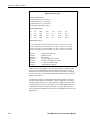
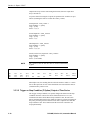
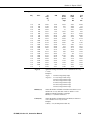
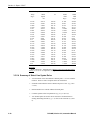
For example, referring to Table 3.3-1, if only those hours during day 189 when
the temperature was above 90 and the soil temperature was below 62 is
desired, or, during day 189 when the average wind speed was below 21 while
the wind direction was between 255 to 265 is desired, the Copy condition
would be:
1[189]and4[90..150]and5[0..61.99]or1[189]and6[0..20.99]and7[255..265]
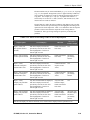
Only Output Arrays with hours 1300 and 1500, Table 3.3-1, conform to the
above Copy conditions.
To use the time synchronize function, time element(s) must be specified in the
Start Condition (Section 3.3.1.1). The user specifies a time interval in the
Copy condition. For instance, if the original data had 15 minute outputs and
you only want hourly outputs, then an interval of 60 minutes must be specified
following the element number. This is entered as (assuming hrmn is element
number 3) “ 3[60]” . If time synchronization is specified in the Start Condition,
SPLIT looks for the interval in a time element in the Copy condition. Only
one time interval is specified. This interval is the unit of time to synchronize
each file.
The interval can be given tolerance limits by following the interval with a
comma and the tolerance. For example, if 3 is the hrmn element, and the time
interval is 60 minutes +2 minutes, the syntax is 3[60,2].
If the time synchronize function is enabled, and data are missing at one or
more of the time intervals specified, then a blank (or the comment entered in
the “ Replace bad data with” field) is output to the Output File.
3.3.5 Select
The Select line specifies which elements of an Output Array are selected for
processing and/or output to the specified Output File. The Select line becomes
operable only after the Start Condition and Copy condition are met, and before
the Stop Condition is satisfied. If the Select line is left blank, all elements in
output arrays meeting the Start Condition and Copy conditions are output to
the Output File. Up to 255 characters can be entered on one Select line. If this
is a limitation, open the Input Data file twice (use the EDIT | ADD DATA
FILE menu) and use the Select line in the second Input File template to define
the additional operations.
3-18
PC208W, Version 3.3, Instruction Manual