1
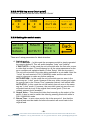
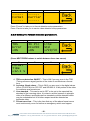
Table 2 - GPO operation modes GPO test state ForceH ForceL OFF OFF Current video output X X MAIN BACKUP GPO High Low High LOW 3.2.23 Power on memory On power up, this product will automatically load the settings it had the last time it had power. 3.2.24 User memories The user memories are a generic feature of all eyeheight geNETics products. The AV-2M has six presets for common legalisation standards and six user memories, which are initially named, ‘user Mem 1’ through to ‘user mem 6’. To save a user memory after entering the memory section press the grey NEXT button twice and you will find the save memories section. Pressing any one of these buttons will save the current state in the respective memory. user mem 1 Save user mem 2 Save user mem 3 Save next *BACK* prev user mem 4 Save user mem 5 Save user mem 6 Save *BACK* prev To show this memory as the loaded memory you will need to immediately load it once it’s saved, using the appropriate ‘user mem recall’ button below. 3.2.25 Naming User Memories The user memories can be named with up to 12 characters. To do this plug in a PS-2 Keyboard into a Flexipanel and select the appropriate processor card with a device button. (See Figure 5: AV-2M connections for connector location). To name memory 1, “625v1 050309” 1. Hit F9 function key. The LCD displays will change to text entry mode. - 21 eyeheight Unit 34 Park House Watford Business Park Greenhill Crescent Watford Herts GB WD18 8PH Reg. No. 2855535 Telephone: +44 (0) 1923 256 000 Fax: +44 (0) 1923 256 100 email: [email protected]