1
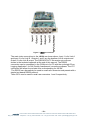
software) using a standard serial cable. Finally the com port needs to be
configured in the logging software via the Comms menu.
Understanding the Application
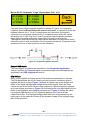
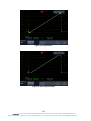
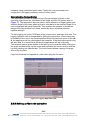
The application provides a graphical log of the percentage of pixels in the
incoming video which are considered to be illegal and the GUI can be seen in
Figure 17. The application also provides a visual indication of illegal (green) and
severely illegal (red) pixels where a pixel is considered to be severely illegal if it is
more illegal than the gamut threshold. This enables the operator to isolate the
dangerously illegal cases from those caused by minor variations between
legaliser designs.
To start logging set up the COM port in the comms menu and then click start. The
logging operation can be suspended by hitting the stop button. Where timecode
is available to the unit in the format specified within the timecode menu of the LE2, the application will log data against the timecode. If the timecode stops the log
will also stop. If no timecode is present the application will log continually.
The received section gives details of the last log entry received whilst clicking on
the graph window brings up the cursor and populates the cursor section with the
log entry relating the selected bar. The zoom control allows viewing of a larger
area of the log data.
Logs can be saved and opened at a later date using the file menu.
Figure 17: Logging Application GUI
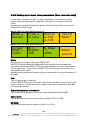
3.3.5 Setting up timecode extraction
- 25 eyeheight Unit 34 Park House Watford Business Park Greenhill Crescent Watford Herts GB WD18 8PH
Reg. No. 2855535 Telephone: +44 (0) 1923 256 000 Fax: +44 (0) 1923 256 100 email: [email protected]