1
iSync_Manual
3/18/06
10:19 AM
Page 4
Page 4 of 31
Page 5 of 31
iSync HD and iSync Pro User Manual
Table of Contents
Key Features . . . . . . . . . . . . . . . . . . . . . . . . . . . . . . . . . . . . . . . . . . . . . . . . . . . . .5
About the iSync HD and iSync Pro . . . . . . . . . . . . . . . . . . . . . . . . . . . . . . . . . . . .7
Input and Output Features . . . . . . . . . . . . . . . . . . . . . . . . . . . . . . . . . . . . . . . . . .8
Getting Started . . . . . . . . . . . . . . . . . . . . . . . . . . . . . . . . . . . . . . . . . . . . . . . . . . .9
Basic Operation of the iSync HD and iSync Pro . . . . . . . . . . . . . . . . . . . . . . . . .14
iSync HD and iSync Pro User Manual
Key Features
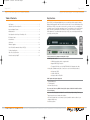
iSync HD [Pro] is a full featured digital video processor and video switcher capable of driving
displays with all popular HD and SD resolutions at 60 Hz and 50 Hz up to and including 1080p.
With the iSync HD [Pro] it is possible to connect all of your video sources to your display, and
your audio sources to your audio surround processor. For each input, you can control a broad
range of functions, from Brightness and Contrast, to Size, Position and even Zoom/Aspect
Ratio adjustments. Test patterns built into the iSync HD [Pro] are conveniently provided to help
you set up your video system.
IR Remote Control . . . . . . . . . . . . . . . . . . . . . . . . . . . . . . . . . . . . . . . . . . . . . . . .17
Control Menus . . . . . . . . . . . . . . . . . . . . . . . . . . . . . . . . . . . . . . . . . . . . . . . . . .19
A/V Control . . . . . . . . . . . . . . . . . . . . . . . . . . . . . . . . . . . . . . . . . . . . . . . . . . . . .22
Firmware Upgrades . . . . . . . . . . . . . . . . . . . . . . . . . . . . . . . . . . . . . . . . . . . . . . .24
List of RS232C Commands for iSync HD [Pro] . . . . . . . . . . . . . . . . . . . . . . . . . .26
Technical Specifications . . . . . . . . . . . . . . . . . . . . . . . . . . . . . . . . . . . . . . . . . . .28
Video Processing Functions . . . . . . . . . . . . . . . . . . . . . . . . . . . . . . . . . . . . . . . .29
How to Contact Key Digital® . . . . . . . . . . . . . . . . . . . . . . . . . . . . . . . . . . . . . . . .31
Connect and Select any Digital or Analog Video Input
■
HDMI Digital Video inputs
➾ 2 HDMI: plug and play and also supports audio
➾ Supports HDCP Copy Protection
➾ To support DVI-D Video, use Key Digital® HDMI to DVI-D adapters and cables
■
Analog Video (individual analog video connectors for each of the following interfaces):
➾ 3 Component: YPbPr
➾ 2 S-Video: NTSC, PAL
➾ 3 Composite Video: NTSC, PAL
Audio Inputs and Outputs Supported
■
4 Digital PCM (Coax)
■
2 Toslink (Optical)
■
4 Channel Stereo Analog
Processes and Scales any HDMI or Analog Video Input to Match the Native Resolution
of Chosen Display
■
Uses renowned Key Digital® Clear Matrix Pro® and SDS (Super Digital Scaling) Technology
■
Supports popular source formats and resolutions
■
Sizes most popular video source formats to precisely match the native resolution of your
display including 1080p
■
Built in test patterns