1
3-1
Section 3: Windows and
Commands
A
ll of 3DACM97’s commands are access from the Main window, which opens after
3DACM97 has completed its startup. (See “Starting 3DACM97” on page 2-4 for
instructions on how to start 3DACM97.) This section provides a general
description of the Main window as well as the Instrument Identification window, a
window that provides information about the connected instrument, and shows how to
access menus and choose commands.
The Main Window
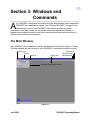
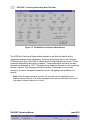
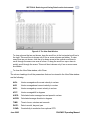
After 3DACM97 has completed its startup, the Main window shown in Figure 3-1 opens.
The Main window provides access to all of 3DACM97’s commands through the menu
System menu
Title bar
Display area
Menu bar
Close button
Maximize button
Minimize button
Instrument Identification window
Figure 3-1
June 2003
3DACM97 Operating Manual