1
A-2
ADDENDUM A: 3DACM Status Command (STAT)
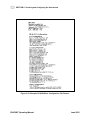
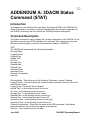
Here is an example of the command:
STAT
Interval
Logging Pointer=39
Logging Ops Set
Interval Time = 00:01:00
ON Time = 00:00:30
Averaging Interval Time = 00:30
Delayed Start Date = 07-01-2003
Delayed Start Time = 20:50:00
Time = 15:34:53
Date = Thr 07-03-2003
AVN = ON, AVE = ON, AVU = ON, ATLT = ON, ATIME = ON, DIR = ON, BATT = ON,
STEMP = ON, SV = ON, 39
-82.04, 367.44, -140.91, 43.20, 15:34:53, 07-03-2003, 107.25, 7.58, 21.62,
152578.00
Note: When you deploy the instrument interval mode, the Logging Pointer will
remain at zero until the 3DACM logs one data set. If the user issues the STAT
command before any data is logged, the logging pointer will remain at zero. In order
to see the logging pointer increment, wait for the first on time to complete. Make sure
the Kick Start Switch is OFF at the Start of any interval.
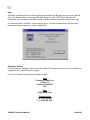
Kick Start Warning
When the 3DACM is in Delayed Start or Interval Operations, care must be taken to
avoid missing either the Delayed Start turn on time or missing the start of an interval. If
the 3DACM is in Delayed Start Mode then you will need to use the Kick Start Switch to
communicate with the 3DACM.
When the 3DACM is in Delayed Start mode it removes power and relies on the real-time
clock to turn power on. If the Kick Start switch (or using the old test cable that connects
kick start to ground when connected to the 3DACM) is in the ON position, when the
delayed time expires, it will miss the Delayed Start Event and will not operate properly
from Delayed Start. If you need to communicate to the 3DACM while in Delayed Start,
make sure the Delayed Time is out far enough in time so that you will not connect to the
3DACM around the time it was supposed to turn on. Then you will not disturb the correct
turn on time. After you communicate with the 3DACM, turn off the Kick Start Switch and
the 3DACM will return to Delay Start Mode.
3DACM97 Operating Manual
June 2003