1
SECTION 3
USING THE HSL-SM8
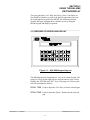
KEYPAD/DISPLAY
LAST SHIFT: Used to display the total number of coated cans for
the previous (last) shift.
GUN LIFE:
Used to display the total number of spray cycles and
percent of used life for each gun.
SET-UP:
Initiates the set-up menu which contains the
following selections:
1: Set Expected Gun Life (# of Sprays)
2: Preset or Reset # of Gun Sprays
3: Set Can PRX-to-Gun Number of Indexes (shifts)
________________________________________________________
3.2 DEFAULT SCREEN
The default screen (displayed when no other commands are active)
contains the following data:
DELAY:xxx SPRAY:xxx
MACH:x GUN:x
Where "Delay" is the "on" delay time and "Spray" is the "spray"
duration. "Mach" and "Gun" specify the currently selected machine
and gun for which the delay and spray times are displayed. The "on"
delay and "spray" duration times are adjusted from the screen be
selecting the "DELAY TIME" and "SPRAY TIME" keys
respectively. This screen is always returned to when no other
commands are active.
________________________________________________________
3.3 SELECTING MACHINE (GUN) TO ADJUST
The "NEXT MACH" key and "NEXT GUN" key are used to select
the machine/gun for adjustment of any of the following variables:
"on" delay, "spray" time, gun count, gun life expectancy limit, or Can
PRX-to-Gun indexes. The "NEXT MACH" key increments the
machine number as displayed in the "MACH" field by one when
depressed. If the previous machine number was 8, pressing "NEXT
MACH" causes the machine number to roll over to 1 again. The
"NEXT GUN" key also increments the machine number by one when
depressed. If the previous machine number was 8, pressing the
"NEXT GUN" causes the machine number to roll over to 1 again.
HSL-SM8 User’s Manual
SYSTEMS Electronics Group
- 19 -