1
Synchronizing Access to Resources
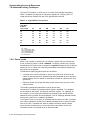
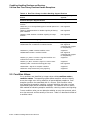
7.2 Concepts of Resources and Locks
7.2.8 Deadlock Detection
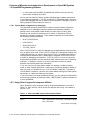
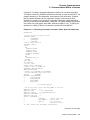
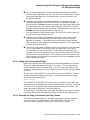
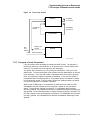
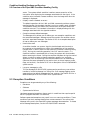
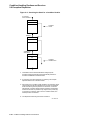
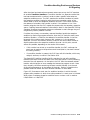
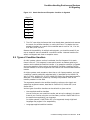
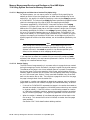
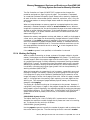
A deadlock occurs when any group of locks are waiting for each other in a circular
fashion.
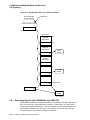
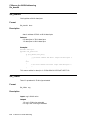
In Figure 7–3, three processes have queued requests for resources that cannot be
accessed until the current locks held are dequeued (or converted to a lower lock
mode).
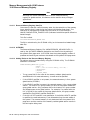
Figure 7–3 Deadlock
A
B
Waiting for
the Resource
That B Has
Waiting for
the Resource
That C Has
C
Waiting for
the Resource
That A Has
ZK−0375−GE
If the lock management services determine that a deadlock exists, the services
choose a process to break the deadlock. The chosen process is termed the victim.
If the victim has requested a new lock, the lock is not granted; if the victim has
requested a lock conversion, the lock is returned to its old lock mode. In either
case, the status code SS$_DEADLOCK is placed in the lock status block. Note
that granted locks are never revoked; only waiting lock requests can receive the
status code SS$_DEADLOCK.
Note
Programmers must not make assumptions regarding which process is to
be chosen to break a deadlock.
7.2.9 Lock Quotas and Limits
The OpenVMS lock manager was modified for OpenVMS Version 7.1. Some
internal restrictions on the number of locks and resources available on the system
have been eased and a method to allow enqueue limit quota (ENQLM) of greater
than 32767 has been added. No changes were made to the interface and no
programming changes to applications are required to take advantage of these
changes.
7–8 Synchronizing Access to Resources