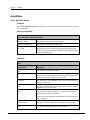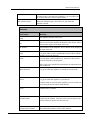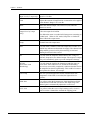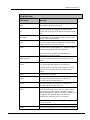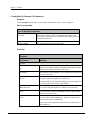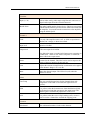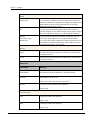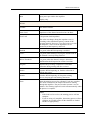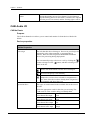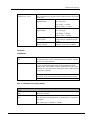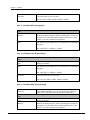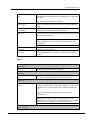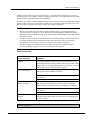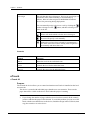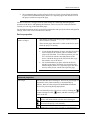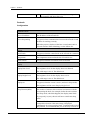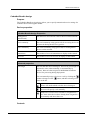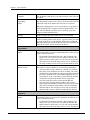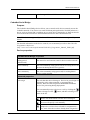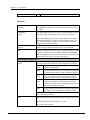
1
NWare Device Reference Version 1.7.2.3 May 28, 2015 Copyright notice The information contained in this manual is subject to change without notice. Peavey Electronics is not liable for improper installation or configuration. The information contained herein is intended only as an aid to qualified personnel in the design, installation and maintenance of engineered audio systems. The installing contractor or end user is ultimately responsible for the successful implementation of these systems. All creative content in this manual, including the layout, art design, content, photography, drawings, specifications and all other intellectual property is Copyright © 2015 Peavey Electronics Corporation. All Rights Reserved. Features & specifications subject to change without notice. All other registered trademarks or trademarks are the property of their respective owners. The ratc-server component is based in part on the work of the libwebsockets project: http://libwebsockets.org. Prepared by Peavey Digital Research, 6 Elm Place, Eynsham, Oxford, OX29 4BD, UK. Email:[email protected] (mailto:[email protected]). Scope This guide describes each of the devices you can select from the NWare device tree and use in your designs. ii Version 1.7.2.3 May 28, 2015 Contents Chapter 1 Hardware ............................................................................................... 5 Amplifiers ..................................................................................................................................................6 CAB Audio I/O ........................................................................................................................................22 D Series Controls ...................................................................................................................................72 Mobile Display ........................................................................................................................................75 NION Audio Processor ...........................................................................................................................80 Telephone Interface..............................................................................................................................127 Third Party ............................................................................................................................................130 XControl ................................................................................................................................................144 nTouch ..................................................................................................................................................154 nControl ................................................................................................................................................164 Chapter 2 DSP ..................................................................................................... 175 Arcane ..................................................................................................................................................176 DTMF ....................................................................................................................................................180 Delays ...................................................................................................................................................183 Dynamics ..............................................................................................................................................186 Equalizers .............................................................................................................................................211 Filters ....................................................................................................................................................220 Generators ............................................................................................................................................229 Levels ...................................................................................................................................................234 Meters ...................................................................................................................................................242 Mixers ...................................................................................................................................................247 Processors ............................................................................................................................................259 Routers .................................................................................................................................................267 Tools .....................................................................................................................................................272 Wave File Players .................................................................................................................................285 Wave File Recorders ............................................................................................................................287 Chapter 3 Control ............................................................................................... 291 Knobs, Faders, Etc. ..............................................................................................................................292 Live Python ...........................................................................................................................................302 Logic .....................................................................................................................................................304 Project Linking ......................................................................................................................................315 Python Scripting ...................................................................................................................................319 Tools .....................................................................................................................................................320 Chapter 4 Presets ................................................................................................ 353 Purpose ................................................................................................................................................354 Global ...................................................................................................................................................355 Snapshot...............................................................................................................................................357 Sub .......................................................................................................................................................359 Chapter 5 nControl Devices .............................................................................. 361 Introduction ...........................................................................................................................................362 Miscellaneous .......................................................................................................................................362 SNMP Components ..............................................................................................................................378 Switches ...............................................................................................................................................395 UPS ......................................................................................................................................................414 May 28, 2015 Version 1.7.2.3 iii Email Sender - Secure .........................................................................................................................421 Media Player .........................................................................................................................................423 Media Recorder ....................................................................................................................................425 Chapter 6 Graphic Elements and Blocks ......................................................... 429 Bump Panels ........................................................................................................................................430 Control Block ........................................................................................................................................430 DSP block .............................................................................................................................................431 Kiosk2Go Layouts ................................................................................................................................431 Kiosk Layouts .......................................................................................................................................436 Labels ...................................................................................................................................................436 GUI block ..............................................................................................................................................438 Launcher ...............................................................................................................................................439 Chapter 7 Plugins ................................................................................................ 441 Purpose ................................................................................................................................................442 nWall .....................................................................................................................................................442 iv Version 1.7.2.3 May 28, 2015 Chapter 1 Hardware In This Chapter Amplifiers ......................................................................................................... 6 CAB Audio I/O ................................................................................................. 22 D Series Controls .............................................................................................. 72 Mobile Display.................................................................................................. 75 NION Audio Processor ..................................................................................... 80 Telephone Interface .......................................................................................... 127 Third Party ........................................................................................................ 130 XControl ........................................................................................................... 144 nTouch .............................................................................................................. 154 nControl ............................................................................................................ 164 May 28, 2015 Version 1.7.2.3 5 Chapter 1 - Hardware . Amplifiers Crest Amplifier Stack Purpose The Crest Amplifier Stack block allows you to control and monitor multiple Crest CKi or Ci series amplifiers. Device properties Crest Amplifier Stack Properties Amplifier Model The model of amplifier used in the stack. Number of amplifiers The number of amplifiers in the stack. Live Taper Will make it easier to make fine adjustments at higher gain levels (by decreasing the rate at which the gain changes when it is near the maximum). Controls Main Field name Meaning Amp The amplifier number in the stack. ID The two octets of the amplifier ID number in hex format. This is shown on the display at the back of the unit. IP Address The IP address of the amplifier. This is shown on the display at the back of the unit. Link Lit (green) when a link is established between NWare and the amplifier across the network. Fault Lit (red) when a fault condition, e.g. thermal or short circuit, has been detected by the amplifier. Please refer to the amplifier documentation for information on fault conditions. 6 Rmte (Remote) Lit (green) when the amplifier is running in remote mode. Power Lit (green) when the amplifier is switched on. Version 1.7.2.3 May 28, 2015 NWare Device Reference If remote mode is selected on the amplifier, you can switch it on or off using the Power button within NWare. Mute (number/letter) Mutes the channel output. The LED is lit (red) when the channel is muted. Channels Field name Meaning Amp The amplifier number in the stack. ID The two octets of the amplifier ID number in hex format. This is shown on the display at the back of the unit. IP Address The IP address of the amplifier. This is shown on the display at the back of the unit. Link Lit (green) when a link is established between NWare and the amplifier across the network. Fault Lit (red) when a fault condition, e.g. thermal or short circuit, has been detected by the amplifier. Please refer to the amplifier documentation for information on fault conditions. Rmte (Remote) Lit (green) when the amplifier is running in remote mode. Power Lit (green) when the amplifier is switched on. If remote mode is selected on the amplifier, you can switch it on or off using the Power button within NWare. May 28, 2015 Chan Channel letter or number. Channel Name A name for the channel. This label can be used to improve the clarity of the user interface for the end user. Cobranet Sub Channel The subchannel numbers for the audio channels. Version 1.7.2.3 7 Chapter 1 - Hardware Input Level (Ci amps only) Input level in dBu. 8 Gain Adjusts the amount of amplification or attenuation to be applied to the channel. Range is -97 to 0 dB. Mute Mutes the channel output. The LED is lit (red) when the channel is muted. Output Level (Ci amps only) Full scale output level in dBu. Temp Channel heat sink temperature. Ther Lit (red) when a channel’s heat sink temperature reaches 75°C (which may indicate an obstructed air supply). The channel will independently protect itself by disconnecting its load and shutting down until it has cooled. DC Lit (red) when the amplifier channel detects DC voltage or subsonic frequencies at a channel output. The respective output relay will immediately open to prevent loudspeaker damage. RTLM (Real Time Load Monitoring) Lit (red) when the load for the channel exceeds the upper or lower limit. If this indicator is lit, and the RTLM training process has successfully completed, it indicates that the load on the amplifier has altered significantly. This could be because a loud speaker has blown, for example. User Temp The user-specified upper limit for the channels' heat sink temperature. If the limit is exceeded, the light will be lit (yellow). IGM Alert Lit (yellow) when the Instantaneous Gain Modulation (IGM) circuit detects a load that overstresses the output stage. The channel gain is automatically adjusted to a safe level. ACL Alert Lit (yellow) when the Active Clip Limiting (ACL) circuit is active because a channel has reached the clipping point. Zero dB on the meter is reached at full amp power (assuming an 8 Ohm load). When in 70V mode, full power is reached at about 5dB on the output meter. Version 1.7.2.3 May 28, 2015 NWare Device Reference RTLM (CKi amp) Field name Meaning Amp The amplifier number in the stack. ID The two octets of the amplifier ID number in hex format. This is shown on the display at the back of the unit. IP Address The IP address of the amplifier. This is shown on the display at the back of the unit. Link Lit (green) when a link is established between NWare and the amplifier across the network. Fault Lit (red) when a fault condition, e.g. thermal or short circuit, has been detected by the amplifier. Please refer to the amplifier documentation for information on fault conditions. Rmte (Remote) Lit (green) when the amplifier is running in remote mode. Power Lit (green) when the amplifier is switched on. If remote mode is selected on the amplifier, you can switch it on or off using the Power button within NWare. Chan Channel letter or number. Upper The upper limit for the load level. If the limit is exceeded, the Fault light will be lit. Lower The lower limit for the load level. If the limit is exceeded, the Fault light will be lit. Train Starts the training process. Used once speakers have been connected to the outputs and audio is running through the amplifier. The process takes between 5 and 10 minutes. The Training light will switch off automatically when the process is complete. Note: If the load level is too low, the training process will not complete. Abort May 28, 2015 Aborts the training process. Use this button to stop the Version 1.7.2.3 9 Chapter 1 - Hardware training process if more than 10 minutes have elapsed since the process was started, and the Training light is still lit. Training Lit (green) when Training is in progress. RTLM (Ci amp) Field name Meaning Amp The amplifier number in the stack. ID The two octets of the amplifier ID number in hex format. This is shown on the display at the back of the unit. IP Address The IP address of the amplifier. This is shown on the display at the back of the unit. Link Lit (green) when a link is established between NWare and the amplifier across the network. Fault Lit (red) when a fault condition, e.g. thermal or short circuit, has been detected by the amplifier. Please refer to the amplifier documentation for information on fault conditions. Rmte (Remote) Lit (green) when the amplifier is running in remote mode. Power Lit (green) when the amplifier is switched on. If remote mode is selected on the amplifier, you can switch it on or off using the Power button within NWare. 10 Chan Channel letter or number. Enable Switches RTLM reporting on. Enables collection of RTLM data points. Disable Switches RTLM reporting off. Stops the training process, keeping previous training data intact. Norm Load Impedance of the channel normalized to 100 ohms. Version 1.7.2.3 May 28, 2015 NWare Device Reference Char Load Full spectrum load impedance. The value can change (along the impedance curve) according to the dominant frequency content of the program material. However, if you feed a sine wave into the amplifier, a more accurate impedance can be measured (at that frequency and level). Enabled Lit (green) when RTLM reporting is enabled. Active Lit (green) when training is in progress and the load on the channel is actively being checked. Below Threshold Lit (green) when the channel voltage is below the minimum threshold required to measure load data. Progress Indicates the percentage completion of load data collection during training and after a reboot. Upper The upper limit for the load level. If the limit is exceeded, the Fault light will be lit. Lower The lower limit for the load level. If the limit is exceeded, the Fault light will be lit. Train Starts the training process. Used once speakers have been connected to the outputs and audio is running through the amplifier. The process takes between 5 and 10 minutes. The Training light will switch off automatically when the process is complete. Note: If the load level is too low, the training process will not complete. Abort Aborts the training process. Use this button to stop the training process if more than 10 minutes have elapsed since the process was started, and the Training light is still lit. Training Lit (green) when Training is in progress. Advanced May 28, 2015 Field name Meaning Amp The amplifier number in the stack. ID The two octets of the amplifier ID number in hex format. This is shown on the display at the back of the unit. Version 1.7.2.3 11 Chapter 1 - Hardware IP Address The IP address of the amplifier. This is shown on the display at the back of the unit. Link Lit (green) when a link is established between NWare and the amplifier across the network. Fault Lit (red) when a fault condition, e.g. thermal or short circuit, has been detected by the amplifier. Please refer to the amplifier documentation for information on fault conditions. Rmte (Remote) Lit (green) when the amplifier is running in remote mode. Power Lit (green) when the amplifier is switched on. If remote mode is selected on the amplifier, you can switch it on or off using the Power button within NWare. Subnet The subnet mask for the Ethernet / CobraNet network. Gateway The IP address of the router. If there is no router, this will be set to 0.0.0.0. Input (Line / Cobra) Selects either analog audio input using Phoenix connectors or digital audio input from the CobraNet network. Bundle Num. The audio bundle number for the device. This must correspond with the bundle number specified for the NION associated with the amplifier. You can then make connections to the amplifier using the NION flyoffs. Gain/Sensitivity Position of the Gain switch at the rear of the amplifier. (CKi amps only) This can be set to give constant sensitivity, or a constant gain of x20 (26 dB) or x40 (32 dB). Display only. Volt Voltage provided to the amplifier. Display only. Amp Current provided to the amplifier. Display only. Watt Input power provided to the amplifier. Display only. 12 Version 1.7.2.3 May 28, 2015 NWare Device Reference Version Firmware version running on the amplifier. Display only. . May 28, 2015 Version 1.7.2.3 13 Chapter 1 - Hardware Cki Amp Purpose The CKi Amplifier block allows you to control and monitor Crest CKi series amplifiers. Device properties Crest CKi Amplifier Properties Live Taper Will make it easier to make fine adjustments at higher gain levels (by decreasing the rate at which the gain changes when it is near the maximum). Amplifier Model The model of amplifier used in the stack. Controls Channels Field name Meaning General ID The two octets of the amplifier ID number in hex format. This is shown on the display at the back of the unit. IP Address The IP address of the amplifier. This is shown on the display at the back of the unit. Power Lit (green) when the amplifier is switched on. If remote mode is selected on the amplifier, you can switch it on or off using the Power button within NWare. Rmte (Remote) Lit (green) when the amplifier is running in remote mode. Link Lit (green) when a link is established between NWare and the device across the network. Fault Lit (red) when a fault condition, e.g. thermal or short circuit, has been detected by the amplifier. Please refer to the amplifier documentation for information on fault conditions. 14 Version 1.7.2.3 May 28, 2015 NWare Device Reference CobraNet Input (A / D) Selects either analog audio input using Phoenix connectors or digital audio input from the CobraNet network. Bundle Num. The audio bundle number for the device. This must correspond with the bundle number specified for the NION associated with the amplifier. You can then make connections to the amplifier using the NION flyoffs. Channel x Fault Lit (red) if the amplifier enters ACL or IGM or experiences a thermal, DC voltage, or short circuit fault. Name A name for the channel. This label can be used to improve the clarity of the user interface for the end user. Gain Adjusts the amount of amplification or attenuation to be applied to the channel. Range is -97 to 0 dB. Mute Mutes the channel output. The LED is lit (red) when the channel is muted. Alerts User Temp The user-specified upper limit for the channels' heat sink temperature. If the limit is exceeded, the light will be lit (yellow). IGM Lit (yellow) when the Instantaneous Gain Modulation (IGM) circuit detects a load that overstresses the output stage. The channel gain is automatically adjusted to a safe level. ACL Lit (yellow) when the Active Clip Limiting (ACL) circuit is active because a channel has reached the clipping point. Cobranet Subchannel The subchannel numbers for the audio channels. Faults May 28, 2015 Temperature Lit (red) when a channel’s heat sink temperature reaches 75°C (which may indicate an obstructed air supply). The channel will independently protect itself by disconnecting its load and shutting down until it has cooled. DC Lit (red) when the amplifier channel detects DC voltage or Version 1.7.2.3 15 Chapter 1 - Hardware subsonic frequencies at a channel output. The respective output relay will immediately open to prevent loudspeaker damage. RTLM (Real Time Load Monitoring) Lit (red) when the load for the channel exceeds the upper or lower limit. If this indicator is lit, and the RTLM training process has successfully completed, it indicates that the load on the amplifier has altered significantly. This could be because a loud speaker has blown, for example. RTLM Upper The upper limit for the load level. If the limit is exceeded, the Fault light will be lit. Lower The lower limit for the load level. If the limit is exceeded, the Fault light will be lit. Advanced Field name Meaning Subnet Mask The subnet mask for the Ethernet / CobraNet network. Gateway The IP address of the router. If there is no router, this will be set to 0.0.0.0. Gain/Sensitivity Position of the Gain switch at the rear of the amplifier. This can be set to give constant sensitivity, or a constant gain of x20 (26 dB) or x40 (32 dB). Display only. Version Firmware version running on the amplifier. Display only. AC Power Info Volt Voltage provided to the amplifier. Display only. Amp Current provided to the amplifier. Display only. Watt 16 Input power provided to the amplifier. Version 1.7.2.3 May 28, 2015 NWare Device Reference Display only. RTLM Channel The channel number. Train Starts the training process for a channel. Used once speakers have been connected to the outputs and audio is running through the amplifier. The process takes between 5 and 10 minutes. The Training light will switch off automatically when the process is complete. Notes: If the load level is too low, the training process will not complete. If you are using a Ci amplifier, the training process will not complete successfully unless all the channels are loaded and driven appropriately. Abort May 28, 2015 Aborts the training process for a channel. Use this button to stop the training process if more than 10 minutes have elapsed since the process was started, and the Training light is still lit. Version 1.7.2.3 17 Chapter 1 - Hardware . Ci Amplifier (4 Channels / 8 Channels) Purpose The Ci Amplifier block allows you to control and monitor Crest Ci series amplifiers. Device properties Crest Ci Amplifier Properties Live Taper Will make it easier to make fine adjustments at higher gain levels (by decreasing the rate at which the gain changes when it is near the maximum). Amplifier Model The model of amplifier used in the stack. Controls Channels Field name Meaning General ID The two octets of the amplifier ID number in hex format. This is shown on the display at the back of the unit. IP Address The IP address of the amplifier. This is shown on the display at the back of the unit. Power Lit (green) when the amplifier is switched on. If remote mode is selected on the amplifier, you can switch it on or off using the Power button within NWare. Rmte (Remote) Lit (green) when the amplifier is running in remote mode. Link Lit (green) when a link is established between NWare and the device across the network. Fault Lit (red) when a fault condition, e.g. thermal or short circuit, has been detected by the amplifier. Please refer to the amplifier documentation for information on fault conditions. 18 Version 1.7.2.3 May 28, 2015 NWare Device Reference CobraNet Input (A / D) Selects either analog audio input using Phoenix connectors or digital audio input from the CobraNet network. Bundle Num. The audio bundle number for the device. This must correspond with the bundle number specified for the NION associated with the amplifier. You can then make connections to the amplifier using the NION flyoffs. Channel x Fault Lit (red) if the amplifier enters ACL or IGM or experiences a thermal, DC voltage, or short circuit fault. Input level Input level in dBu. Output level Full scale output level in dBu. Zero dB on the meter is reached at full amp power (assuming an 8 Ohm load). When in 70V mode, full power is reached at about 5dB on the output meter. Name A name for the channel. This label can be used to improve the clarity of the user interface for the end user. Gain Adjusts the amount of amplification or attenuation to be applied to the channel. Range is -97 to 0 dB. Mute Mutes the channel output. The LED is lit (red) when the channel is muted. Alerts User Temp The user-specified upper limit for the channels' heat sink temperature. If the limit is exceeded, the light will be lit (yellow). IGM Lit (yellow) when the Instantaneous Gain Modulation (IGM) circuit detects a load that overstresses the output stage. The channel gain is automatically adjusted to a safe level. ACL Lit (yellow) when the Active Clip Limiting (ACL) circuit is active because a channel has reached the clipping point. Cobranet Subchannel May 28, 2015 The subchannel numbers for the audio channels. Version 1.7.2.3 19 Chapter 1 - Hardware Faults Temperature Lit (red) when a channel’s heat sink temperature reaches 75°C (which may indicate an obstructed air supply). The channel will independently protect itself by disconnecting its load and shutting down until it has cooled. DC Lit (red) when the amplifier channel detects DC voltage or subsonic frequencies at a channel output. The respective output relay will immediately open to prevent loudspeaker damage. RTLM (Real Time Load Monitoring) Lit (red) when the load for the channel exceeds the upper or lower limit. If this indicator is lit, and the RTLM training process has successfully completed, it indicates that the load on the amplifier has altered significantly. This could be because a loud speaker has blown, for example. RTLM Upper The upper limit for the load level. If the limit is exceeded, the Fault light will be lit. Lower The lower limit for the load level. If the limit is exceeded, the Fault light will be lit. Advanced Field name Meaning Subnet Mask The subnet mask for the Ethernet / CobraNet network. Gateway The IP address of the router. If there is no router, this will be set to 0.0.0.0. Version Firmware version running on the amplifier. Display only. AC Power Info Volt Voltage provided to the amplifier. Display only. Amp Current provided to the amplifier. Display only. 20 Version 1.7.2.3 May 28, 2015 NWare Device Reference Watt Input power provided to the amplifier. Display only. RTLM Channel The channel number. Norm Load Impedance of the channel normalized to 100 ohms. Char Load Full spectrum load impedance. The value can change (along the impedance curve) according to the dominant frequency content of the program material. However, if you feed a sine wave into the amplifier, a more accurate impedance can be measured (at that frequency and level). Enabled Lit (green) when RTLM reporting is enabled. Active Lit (green) when training is in progress and the load on the channel is actively being checked. Below Threshold Lit (green) when the channel voltage is below the minimum threshold required to measure load data. Progress Indicates the percentage completion of load data collection during training and after a reboot. Enable Switches RTLM reporting on. Enables collection of RTLM data points. Disable Switches RTLM reporting off. Stops the training process, keeping previous training data intact. Train Starts the training process for a channel. Used once speakers have been connected to the outputs and audio is running through the amplifier. The process takes between 5 and 10 minutes. The Training light will switch off automatically when the process is complete. Notes: If the load level is too low, the training process will not complete. If you are using a Ci amplifier, the training process will not complete successfully unless all the channels are loaded and driven appropriately. May 28, 2015 Version 1.7.2.3 21 Chapter 1 - Hardware Abort Aborts the training process for a channel. Use this button to stop the training process if more than 10 minutes have elapsed since the process was started, and the Training light is still lit. CAB Audio I/O CAB 4n Dante Purpose The CAB 4n Dante device allows you to control and monitor CAB 4n devices fitted with DLMs. Device properties CAB 4n Properties Role assign The role that this device belongs to. Devices in your design are allocated to roles (either manually, or automatically by NWare). Roles are then assigned to MediaMatrix hardware devices for processing during deployment. You can manually assign a device to a role by clicking the button to change it to the button, and then selecting a role name in the list. NWare will decide which role this device belongs to. The user will specify a role manually. Multiple devices have been selected for assignment to a role; some of the devices have already been assigned to a role manually and others have not. Expansion Slot x The types of cards inserted in the available slots at the rear of the unit. Select the appropriate cards for the slots you are using. The CAB cards are color-coded to help you identify them. 22 Four channel line input Black Four channel mic input Green Four channel line output Blue Four channel AEC input Orange Version 1.7.2.3 May 28, 2015 NWare Device Reference GPIO Pin 1-4, 14-17 The assignments for the pins on the GPIO connector at the rear of the unit. Digital Output 3.0V TTL logic Low: 0VDC - 0.4VDC High: 2.4VDC - 3.3VDC Digital Input 3.0V TTL logic Low: 0VDC - 0.8VDC High: 2.0VDC - 24VDC Analog Input Using external, regulated 24VDC supply. Rotary encoder Requires 2 pins and a common. Controls CAB Dante Link Lit (green) when a link is established between NWare and the device across the network. id A four digit hexadecimal number between 0000 and FFFF (0000 is off). This number uniquely identifies the CAB on the network. It is specified on the front panel of the CAB hardware using rotary switches. When a valid number is entered, the Link LED will be lit and the LEDs on the CAB will turn from Hardware IDs to meters. Slot x: 4 Channel Line Input (black) Input Mute Mutes the channel. Gain Sets the amount of amplification or attenuation to be applied to the signal. The valid range is -95dBu to +30dBu. May 28, 2015 Version 1.7.2.3 23 Chapter 1 - Hardware Full Scale Full scale in the A to D converter. You can select 12dBu, 18dBu, 24dBu or 30dBu. Slot x: 4 Channel Mic Input (green) Input Phantom Enables the phantom power feature which supplies power to a microphone via the audio cables attached to the device. This feature is used for condenser microphones. Gain Sets the amount of amplification or attenuation to be applied to the signal. The valid range is -95dBu to +30dBu. Slot x: 4 Channel Line Output (blue) Output Mute Mutes the channel. Gain Sets the amount of amplification or attenuation to be applied to the signal. The valid range is -95dBu to +30dBu. Full Scale Full scale in the D to A converter. You can select 6dBu, 12dBu, 18dBu or 24dBu. Slot x: 4 Channel AEC Input (orange) Reference Input channel number (1 or 2) to use for the AEC reference signal. This is the signal from the far end (microphone). Input 24 Mute Mutes the channel. Phantom Enables the phantom power feature which supplies power to a microphone via the audio cables attached to the device. This feature is used for condenser microphones. Version 1.7.2.3 May 28, 2015 NWare Device Reference Gain Sets the amount of amplification or attenuation to be applied to the signal. The valid range is -65dBu to +20dBu. Coarse Gain Allows gain adjustment in steps. Settings are 0dB, 25dB and 55dB. AEC Enable Switches on echo cancellation for the channel. AEC Level Can be set to None (off), Soft, Medium or Aggressive to control the speed of convergence. Tip: We recommend that you test out these options carefully when configuring your system to see which gives the best performance. NC Enable Enables noise cancellation. NC Level Noise cancellation level. Settings are 0dB, -6dB, -9dB and -12dB. GPIO Digital Outs Pin x Click to enable digital output on the pin. Digital Ins Pin x Lit (green) when digital input is detected on the pin. Analog Ins Value Displays a representation of the input voltage level range. The minimum value is represented by zero and the maximum by 1.0. Typically, these inputs are physically connected to a potentiometer. Tip: The knob control cannot be gestured, but you can duplicate it and wire the copy to other controls in your design. This enables you to pass the values to other controls. Rotary Encoders May 28, 2015 Version 1.7.2.3 25 Chapter 1 - Hardware Value Displays the input value for a rotary encoder wired to the GPIO port. The value increases when the rotary encoder is moved in one direction and decreased when it is moved in the other. You can also set the value manually by gesturing the knob. Relays 1-4 Buttons that trigger the internal relays. There are four sets of normally closed (NC) or normally open (NO) relays. For more information, see GPIO overview in the Cab4n Hardware Manual. CAB 4n Purpose The CAB 4n device allows you to control and monitor CAB 4n devices on the CobraNet network. Device properties CAB 4n Properties Role assign The role that this device belongs to. Devices in your design are allocated to roles (either manually, or automatically by NWare). Roles are then assigned to MediaMatrix hardware devices for processing during deployment. You can manually assign a device to a role by clicking the button to change it to the button, and then selecting a role name in the list. NWare will decide which role this device belongs to. The user will specify a role manually. Multiple devices have been selected for assignment to a role; some of the devices have already been assigned to a role manually and others have not. Expansion Slot x The types of cards inserted in the available slots at the rear of the unit. Select the appropriate cards for the slots you are using. The CAB cards are color-coded to help you identify them. 26 Version 1.7.2.3 May 28, 2015 NWare Device Reference GPIO Pin 1-8 Four channel line input Black Four channel mic input Green Four channel line output Blue Four channel AEC input Orange The assignments for the pins on the GPIO connector at the rear of the unit. Digital Output 3.0V TTL logic Low: 0VDC - 0.4VDC High: 2.4VDC - 3.3VDC Digital Input 3.0V TTL logic Low: 0VDC - 0.8VDC High: 2.0VDC - 24VDC Analog Input Using external, regulated 24VDC supply. Rotary encoder Requires 2 pins and a common. Advanced properties RS485 Raw MAC Enable When selected, enables a raw, RS-485 MAC configuration to send and receive from non-CobraNet MACs. ControlMatrix Mode When selected, will set the baud rate and format defaults and add input wiring nodes to the block for serial bridging MACs when used with ControlMatrix. Advanced Subchannel Mapping When selected, NWare allows you to specify how the CobraNet input and output channels will be organized into bundles. Controls CAB 4n May 28, 2015 Link Lit (green) when a link is established between NWare and the device across the network. id A four digit hexadecimal number between 0000 and FFFF (0000 is off). This number uniquely identifies the CAB on the Version 1.7.2.3 27 Chapter 1 - Hardware network. It is specified on the front panel of the CAB hardware using rotary switches. When a valid number is entered, the Link LED will be lit and the LEDs on the CAB will turn from Hardware IDs to meters. Transmitters TX Lit (green) when data is being transmitted on one or more of the subchannels in the bundle. Bundle The bundle number that identifies a group of up to eight sub-channels. Each bundle can manage between 1 and 8 channels. The range is 0 to 65,535 (0 is off). For multicast bundles, the number must be in the range 1 to 255. For unicast bundles, the number must be in the range 256 to 65,279. Numbers in the range 65280 to 65535 are reserved and cannot be used. Sub-Channel Mapping 1-8 Boxes for each sub-channel in the bundle. In these boxes you specify the corresponding hardware channel number you want to transmit. Tip: Values in the Sub-Channel Mapping boxes may be changed on a dynamic basis. This allows any hardware channel number to be mapped to any bundle sub-channel(s) at any time, greatly expanding signal routing flexibility. However, only users familiar with advanced CobraNet practices should use this feature. Num Chan The number of audio channels to be included in the bundle. The Num Chan setting, which has a default of 8, controls how many audio channels are sent in a bundle. The value should be set to the number of contiguous channels that will be used, as defined in the Sub-channel Mapping boxes. If Num Chan is set to a value that is greater than the number of channels used, then the bundle will be larger than necessary and will result in wasted bandwidth and processor time. Unused channels with a value of 0 are represented in the bundle by header data only (and no audio data will be included). If the bundle contains subchannel numbers that are not used, they will be sent as full audio channels and consume 1 Mbit of bandwidth per channel. Priority The priority of the group of sub-channels. Tip: You can use the priority setting to implement a redundancy system for transmitters. Specify the priority for a row and then, on a second device, specify the same settings, but 28 Version 1.7.2.3 May 28, 2015 NWare Device Reference use a lower priority. If the transmission of the first row fails, the lower priority row will be transmitted. Unicast Mode Controls how a bundle is transmitted onto to the CobraNet network. There are several modes of operation: Unicast - the bundle is sent directly to only one receiver. Multicast - the bundle is sent to all receivers, even if it is not required by the receiver. This mode will always consume bandwidth at all nodes. Multi-unicast - up to four copies of the same bundle are sent unicast to up to four different receiving nodes. Specify Always (the default) to always use unicast, or 1, 2, 3 or 4 to specify the number of receivers for the bundle. If there is only one receiver for a transmission, unicast will be used automatically. If Unicast Mode is set to 1 or greater, unicast will be used unless the number of receivers on the network for a particular bundle number is greater than the value of Unicast Mode; in this case, bundles will be sent as multi-unicast until the number reaches the value of Max Unicast. Note: If you specify a bundle number that is less than 256, multicast will always be used and the Unicast Mode setting will be ignored. Examples Unicast Mode is set to Always. Max Unicast setting is ignored. There are four receivers set to receive the bundle. The bundle will always be sent multicast because the number of receivers for the bundle is greater than 0. Bundle number is greater than 256. Unicast Mode is set to Always. Max Unicast setting is ignored. There is just one receiver set to receive the bundle. The bundle will be sent unicast because the number of receivers is less than 2 (and the bundle number is greater than 256, so multicast mode is not enforced). May 28, 2015 Version 1.7.2.3 29 Chapter 1 - Hardware Unicast Mode is set to 2. Max Unicast is set to 2 or greater. There are four receivers set to receive the bundle. The receiver bundle count is 4, which is greater than 2, so the bundle will be sent multicast. Max Unicast The number of duplicated bundle transmissions (rows with identical settings and the same bundle number) that will be sent in multi-unicast mode before true multicast is used. Receivers RX Lit (green) when data is being received on one or more of the subchannels in the bundle. Bundle The bundle number that identifies a group of up to eight sub-channels. Each bundle can manage between 1 and 8 channels. The range is 0 to 65,535 (0 is off). For multicast bundles, the number must be in the range 1 to 255. For unicast bundles, the number must be in the range 256 to 65,279. Numbers in the range 65280 to 65535 are reserved and cannot be used. Sub-Channel Mapping 1-8 Boxes for each sub-channel in the bundle. In these boxes you specify the corresponding hardware channel number you want to receive. Tip: Values in the Sub-Channel Mapping boxes may be changed on a dynamic basis. This allows any hardware channel number to be mapped to any bundle sub-channel(s) at any time, greatly expanding signal routing flexibility. However, only users familiar with advanced CobraNet practices should use this feature. Priority The priority of the group of sub-channels. Tip: You can use the priority setting to implement a redundancy system for transmitters. Specify the priority for a row and then, on a second device, specify the same settings, but use a lower priority. If the transmission of the first row fails, the lower priority row will be transmitted. Slot x: 4 Channel Line Input (black) 30 Version 1.7.2.3 May 28, 2015 NWare Device Reference Default display (advanced subchannel mapping switched off) Bundle (TX/RX) The bundle number that identifies a group of sub-channels. Each bundle can manage between 1 and 8 channels. The range is 0 to 65,535 (0 is off). For multicast bundles, the number must be in the range 1 to 255. For unicast bundles, the number must be in the range 256 to 65,279. Numbers in the range 65280 to 65535 are reserved and cannot be used. As the CAB 4n cards only support 4 channels, the extra slots are not used. Transmitter Lit (green) when data is being transmitted on one or more of the subchannels in the bundle. Input Mute Mutes the channel. Gain Sets the amount of amplification or attenuation to be applied to the signal. The valid range is -95dBu to +30dBu. Full Scale Full scale in the A to D converter. You can select 12dBu, 18dBu, 24dBu or 30dBu. Slot x: 4 Channel Mic Input (green) Default display (advanced subchannel mapping switched off) Bundle (TX/RX) The bundle number that identifies a group of sub-channels. Each bundle can manage between 1 and 8 channels. The range is 0 to 65,535 (0 is off). For multicast bundles, the number must be in the range 1 to 255. For unicast bundles, the number must be in the range 256 to 65,279. Numbers in the range 65280 to 65535 are reserved and cannot be used. As the CAB 4n cards only support 4 channels, the extra slots are not used. Transmitter Lit (green) when data is being transmitted on one or more of the subchannels in the bundle. Input May 28, 2015 Version 1.7.2.3 31 Chapter 1 - Hardware Phantom Enables the phantom power feature which supplies power to a microphone via the audio cables attached to the device. This feature is used for condenser microphones. Gain Sets the amount of amplification or attenuation to be applied to the signal. The valid range is -95dBu to +30dBu. Slot x: 4 Channel Line Output (blue) Default display (advanced subchannel mapping switched off) Bundle (TX/RX) The bundle number that identifies a group of sub-channels. Each bundle can manage between 1 and 8 channels. The range is 0 to 65,535 (0 is off). For multicast bundles, the number must be in the range 1 to 255. For unicast bundles, the number must be in the range 256 to 65,279. Numbers in the range 65280 to 65535 are reserved and cannot be used. As the CAB 4n cards only support 4 channels, the extra slots are not used. Receiver Lit (green) when data is being received on one or more of the subchannels in the bundle. Output Mute Mutes the channel. Gain Sets the amount of amplification or attenuation to be applied to the signal. The valid range is -95dBu to +30dBu. Full Scale Full scale in the D to A converter. You can select 6dBu, 12dBu, 18dBu or 24dBu. Slot x: 4 Channel AEC Input (orange) This card has been discontinued. Default display (advanced subchannel mapping switched off) 32 Version 1.7.2.3 May 28, 2015 NWare Device Reference Bundle (TX/RX) The bundle number that identifies a group of sub-channels. Each bundle can manage between 1 and 8 channels. The range is 0 to 65,535 (0 is off). For multicast bundles, the number must be in the range 1 to 255. For unicast bundles, the number must be in the range 256 to 65,279. Numbers in the range 65280 to 65535 are reserved and cannot be used. As the CAB 4n cards only support 4 channels, the extra slots are not used. Transmitter Lit (green) when data is being transmitted on one or more of the subchannels in the bundle. Reference Input channel number (1 or 2) to use for the AEC reference signal. This is the signal from the far end (microphone). Input Mute Mutes the channel. Phantom Enables the phantom power feature which supplies power to a microphone via the audio cables attached to the device. This feature is used for condenser microphones. Gain Sets the amount of amplification or attenuation to be applied to the signal. The valid range is -65dBu to +20dBu. Coarse Gain Allows gain adjustment in steps. Settings are 0dB, 25dB and 55dB. AEC Enable Switches on echo cancellation for the channel. AEC Level Can be set to None (off), Soft, Medium or Aggressive to control the speed of convergence. Tip: We recommend that you test out these options carefully when configuring your system to see which gives the best performance. NC Enable Enables noise cancellation. NC Level Noise cancellation level. Settings are 0dB, -6dB, -9dB and -12dB. GPIO May 28, 2015 Version 1.7.2.3 33 Chapter 1 - Hardware Digital Outs Pin x Click to enable digital output on the pin. Digital Ins Pin x Lit (green) when digital input is detected on the pin. Analog Ins Value Displays a representation of the input voltage level range. The minimum value is represented by zero and the maximum by 1.0. Typically, these inputs are physically connected to a potentiometer. Tip: The knob control cannot be gestured, but you can duplicate it and wire the copy to other controls in your design. This enables you to pass the values to other controls. Rotary Encoders Value Displays the input value for a rotary encoder wired to the GPIO port. The value increases when the rotary encoder is moved in one direction and decreased when it is moved in the other. You can also set the value manually by gesturing the knob. Relays 1-4 Buttons that trigger the internal relays. There are four sets of normally closed (NC) or normally open (NO) relays. For more information, see GPIO overview in the Cab4n Hardware Manual. RS485 RS-485 Configuration Enable Enable the use of RS-485. Notes: CAB CM-1 cards support 8 and 9 bit serial data. CAB CM-2 cards support 8 bit serial data only. CAB Dante does not support RS-485. 34 Version 1.7.2.3 May 28, 2015 NWare Device Reference Unicast Address Prevents multicast RS-485 data connections across the network. Only Unicast connections to a single destination may be established. Format Set to 9 bit. The 9th data bit is bridged over the Ethernet along with the standard 8 data bits. This value cannot be changed. Baud Rate Baud rate for data transmission and reception in bits per second. Set to 38400. This value cannot be changed. Rx MAC MAC address of the CobraNet Interface from which SCI data will be accepted. This may be any multicast address except 01:60:2B:FD:00:00 through 01:60:2B:FD:FF:FF, which have been reserved by Cirrus Logic for use as asynchronous global channels. Tx MAC MAC address of the CobraNet interface to which serial data is sent. May be any multicast or unicast address. RX Channel The number of the receive channel to which this CAB belongs. This CAB will be able to receive serial data from other CABs transmitting on this channel. TX Channel The number of the transmit channel to which this CAB belongs. This CAB will be able to transmit serial data to other CABs receiving on this channel. PPeriod The polling period for devices attached to the serial port. The time in milliseconds that elapses after a device has been polled before it is polled again. Advanced Buddy Link Mode Disabled Disables Buddy Link Mode. This is the default setting. Buddy Link Enables the Buddy Link system that allows CABs to be paired to provide audio input and output redundancy. If you are using a CAB 4n, you can find more information in the section Link connections in the Cab4n Hardware Manual. May 28, 2015 Version 1.7.2.3 35 Chapter 1 - Hardware Buddy Link mode is normally enabled on the secondary (backup) CAB and disabled on the primary CAB. When the secondary CAB detects that the primary CAB has failed, it takes over. External Sync The CobraNet clock for this device will be automatically synchronized with the clock signal received from external device. Note: CAB 4ns only support support 48KHz clock signals from the external source. Buddy Link Force Conductor Priority Used on the secondary (backup) device. Simulates failure of the primary buddy link device so that the secondary device will automatically take over. The conductor priority of this device. The default is 32. If you leave this setting at the default value, a CobraNet Conductor will be selected automatically. The device with the highest value will become the Conductor, therefore selecting a higher value makes it more likely that this device will become the Conductor. CAB 8i Purpose The CAB 8i device allows you to control and monitor CAB 8i devices on the network. Device properties CAB 8i Properties Role assign The role that this device belongs to. Devices in your design are allocated to roles (either manually, or automatically by NWare). Roles are then assigned to MediaMatrix hardware devices for processing during deployment. You can manually assign a device to a role by clicking the button to change it to the button, and then selecting a role name in the list. NWare will decide which role this device belongs to. The user will specify a role manually. 36 Version 1.7.2.3 May 28, 2015 NWare Device Reference Multiple devices have been selected for assignment to a role; some of the devices have already been assigned to a role manually and others have not. Advanced properties RS485 Raw MAC Enable When selected, enables a raw, RS-485 MAC configuration to send and receive from non-CobraNet MACs. ControlMatrix Mode When selected, will set the baud rate and format defaults and add input wiring nodes to the block for serial bridging MACs when used with ControlMatrix. Advanced Subchannel Mapping When selected, NWare allows you to specify how the CobraNet input and output channels will be organized into bundles. Controls CAB 8i id A four digit hexadecimal number between 0000 and FFFF (0000 is off). This number uniquely identifies the CAB on the network. It is specified on the front panel of the CAB hardware using rotary switches. When a valid number is entered, the Link LED will be lit and the LEDs on the CAB will turn from Hardware IDs to meters. Link Lit (green) when a link is established between NWare and the device across the network. Transmitters Transmitter / TX Lit (green) when data is being transmitted on one or more of the subchannels in the bundle. Bundle The bundle number that identifies a group of up to eight sub-channels. Each bundle can manage between 1 and 8 channels. The range is 0 to 65,535 (0 is off). For multicast bundles, the number must be in the range 1 to 255. For unicast bundles, the number must be in the range 256 to 65,279. Numbers in the range 65280 to 65535 are reserved and cannot be used. Sub-Channel Mapping 1-8 May 28, 2015 Boxes for each sub-channel in the bundle. In these boxes you Version 1.7.2.3 37 Chapter 1 - Hardware specify the numbers (1-32) of the CM-1 outputs you want to transmit. Tip: Values in the Sub-Channel Mapping boxes may be changed on a dynamic basis. This allows any hardware channel number to be mapped to any bundle sub-channel(s) at any time, greatly expanding signal routing flexibility. However, only users familiar with advanced CobraNet practices should use this feature. Num Chan The number of audio channels to be included in the bundle. The Num Chan setting, which has a default of 8, controls how many audio channels are sent in a bundle. The value should be set to the number of contiguous channels that will be used, as defined in the Sub-channel Mapping boxes. If Num Chan is set to a value that is greater than the number of channels used, then the bundle will be larger than necessary and will result in wasted bandwidth and processor time. Unused channels with a value of 0 are represented in the bundle by header data only (and no audio data will be included). If the bundle contains subchannel numbers that are not used, they will be sent as full audio channels and consume 1 Mbit of bandwidth per channel. Priority The priority of the group of sub-channels. Tip: You can use the priority setting to implement a redundancy system for transmitters. Specify the priority for a row and then, on a second device, specify the same settings, but use a lower priority. If the transmission of the first row fails, the lower priority row will be transmitted. Unicast Mode Controls how a bundle is transmitted onto to the CobraNet network. There are several modes of operation: Unicast - the bundle is sent directly to only one receiver. Multicast - the bundle is sent to all receivers, even if it is not required by the receiver. This mode will always consume bandwidth at all nodes. Multi-unicast - up to four copies of the same bundle are sent unicast to up to four different receiving nodes. Specify Always (the default) to always use unicast, or 1, 2, 3 or 4 to specify the number of receivers for the bundle. If there is only one receiver for a transmission, unicast will be used automatically. If Unicast Mode is set to 1 or greater, unicast will be used unless the number of receivers on the network for a particular bundle number is greater than the value of Unicast Mode; in 38 Version 1.7.2.3 May 28, 2015 NWare Device Reference this case, bundles will be sent as multi-unicast until the number reaches the value of Max Unicast. Note: If you specify a bundle number that is less than 256, multicast will always be used and the Unicast Mode setting will be ignored. Examples Unicast Mode is set to Always. Max Unicast setting is ignored. There are four receivers set to receive the bundle. The bundle will always be sent multicast because the number of receivers for the bundle is greater than 0. Bundle number is greater than 256. Unicast Mode is set to Always. Max Unicast setting is ignored. There is just one receiver set to receive the bundle. The bundle will be sent unicast because the number of receivers is less than 2 (and the bundle number is greater than 256, so multicast mode is not enforced). Unicast Mode is set to 2. Max Unicast is set to 2 or greater. There are four receivers set to receive the bundle. The receiver bundle count is 4, which is greater than 2, so the bundle will be sent multicast. May 28, 2015 Max Unicast The number of duplicated bundle transmissions (rows with identical settings and the same bundle number) that will be sent in multi-unicast mode before true multicast is used. Mic Preamp Enables the microphone preamplifier for the channel, boosting the signal by 20dB. Phantom Enables the phantom power feature which supplies power to a microphone via the audio cables attached to the device. This feature is used for condenser microphones. Version 1.7.2.3 39 Chapter 1 - Hardware Gain Sets the amount of amplification or attenuation to be applied to the signal. The valid range is -8 to +61 dB. GPIO Digital Outs 1-8 Buttons that enable each of the outputs for transmitting audio data on to the network. Analog Ins 1-8 Display-only controls that show the control voltage wired to each of the analog inputs at the rear of the unit. Tip: The knob control cannot be gestured, but you can duplicate it and wire the copy to other controls in your design. This enables you to pass the values to other controls. Relays 1-8 Buttons that trigger the internal, normally closed (NC) or normally open (NO) relays. RS485 RS-485 Configuration Enable Enable the use of RS-485. Notes: CAB CM-1 cards support 8 and 9 bit serial data. CAB CM-2 cards support 8 bit serial data only. CAB Dante does not support RS-485. 40 Version 1.7.2.3 May 28, 2015 NWare Device Reference Unicast Address Prevents multicast RS-485 data connections across the network. Only Unicast connections to a single destination may be established. Format Set to 9 bit. The 9th data bit is bridged over the Ethernet along with the standard 8 data bits. This value cannot be changed. Baud Rate Baud rate for data transmission and reception in bits per second. Set to 38400. This value cannot be changed. Rx MAC MAC address of the CobraNet Interface from which SCI data will be accepted. This may be any multicast address except 01:60:2B:FD:00:00 through 01:60:2B:FD:FF:FF, which have been reserved by Cirrus Logic for use as asynchronous global channels. Tx MAC MAC address of the CobraNet interface to which serial data is sent. May be any multicast or unicast address. RX Channel The number of the receive channel to which this CAB belongs. This CAB will be able to receive serial data from other CABs transmitting on this channel. TX Channel The number of the transmit channel to which this CAB belongs. This CAB will be able to transmit serial data to other CABs receiving on this channel. PPeriod The polling period for devices attached to the serial port. The time in milliseconds that elapses after a device has been polled before it is polled again. Advanced Buddy Link Mode Disabled Disables Buddy Link Mode. This is the default setting. Buddy Link Enables the Buddy Link system that allows CABs to be paired to provide audio input and output redundancy. If you are using a CAB 4n, you can find more information in the section Link connections in the Cab4n Hardware Manual. Buddy Link mode is normally enabled on May 28, 2015 Version 1.7.2.3 41 Chapter 1 - Hardware the secondary (backup) CAB and disabled on the primary CAB. When the secondary CAB detects that the primary CAB has failed, it takes over. External Sync The CobraNet clock for this device will be automatically synchronized with the clock signal received from external device. Note: CAB 4ns only support support 48KHz clock signals from the external source. Buddy Link Force Conductor Priority Used on the secondary (backup) device. Simulates failure of the primary buddy link device so that the secondary device will automatically take over. The conductor priority of this device. The default is 32. If you leave this setting at the default value, a CobraNet Conductor will be selected automatically. The device with the highest value will become the Conductor, therefore selecting a higher value makes it more likely that this device will become the Conductor. CAB 8n Purpose The CAB 8n device allows you to control and monitor CAB 8n devices on the network. Device properties CAB 8n Properties Role assign The role that this device belongs to. Devices in your design are allocated to roles (either manually, or automatically by NWare). Roles are then assigned to MediaMatrix hardware devices for processing during deployment. You can manually assign a device to a role by clicking the button to change it to the button, and then selecting a role name in the list. NWare will decide which role this device belongs to. The user will specify a role manually. Multiple devices have been selected for assignment to a 42 Version 1.7.2.3 May 28, 2015 NWare Device Reference role; some of the devices have already been assigned to a role manually and others have not. Audio 1-8 GPIO Pin 1-8 The function of each audio connector on the device. Input The audio connector will be used to receive audio signals into the device. Output The audio connector will be used to transmit audio signals from the device. The assignments for the pins on the GPIO connector at the rear of the unit. Analog Input 10-bit resolution, 12V full-scale, reverse voltage and transient protection. Digital Input 2.5V high level (LVTTL) with reverse voltage and transient protection. Digital Output 2.5V high level (LVTTL) short circuit current 1.4mA. High Current Output Voltage is as supplied by external DC power (Ext Pwr connector). Absolute max. current draw 0.5A per I/O. Total limited by external PSU. Not available if using PoE. Advanced properties Advanced Subchannel Mapping When selected, NWare allows you to specify how the CobraNet input and output channels will be organized into bundles. Controls CAB 8n May 28, 2015 Link Lit (green) when a link is established between NWare and the device across the network. id A four digit hexadecimal number between 0000 and FFFF (0000 is off). This number uniquely identifies the CAB on the network. It is specified on the front panel of the CAB hardware using rotary switches. When a valid number is entered, the Link Version 1.7.2.3 43 Chapter 1 - Hardware LED will be lit. Conductor Priority CobraNet Conductor priority. If you leave this setting at the default value, a CobraNet Conductor will be selected automatically. The device with the highest value will become the Conductor, therefore selecting a higher value makes it more likely that this device will become the Conductor. Fault When lit (red) indicates an unexpected condition within the CobraNet interface. Failover Mode Specifies whether this unit will be part of a redundant set up. When redundancy is used, two CAB 8ns are configured so that if one CAB fails, the other takes over and audio will continue to be transferred across the network. The CABs are wired together using the Fault connectors on the rears of the units and audio inputs and outputs are wired to both units. Disabled This unit will not be used in a redundant set up. This is the default setting. 44 Master This is the primary unit that will be used to transfer audio. It is assumed that a second CAB (physically connected to the first one) has been configured to operate in slave mode. Slave This is the backup unit that will not be used to transfer audio unless the primary unit fails. Force Failover Forces a switchover from the master unit to the slave unit. The slave unit will become the master and vice versa. Reset Failover Actions a switchover from the slave unit back to the master unit. Persistent configuration Click to specify that the configuration settings specified on the control surface will be used instead of the default settings when the unit is power cycled. Standalone mode Click to specify that the CAB will continue to send and receive audio data even if it can no longer communicate with the NioNode running the project. Version 1.7.2.3 May 28, 2015 NWare Device Reference Default display (advanced subchannel mapping switched off) Bundle (TX/RX) The bundle number that identifies a group of up to eight sub-channels. Each bundle can manage between 1 and 8 channels. The range is 0 to 65,535 (0 is off). For multicast bundles, the number must be in the range 1 to 255. For unicast bundles, the number must be in the range 256 to 65,279. Numbers in the range 65280 to 65535 are reserved and cannot be used. The TX bundle will contain all the audio channels set to input on the device properties of the CAB 8n. The RX bundle will contain all the audio channels set to output on the device properties of the CAB 8n. The TX and RX channels will be arranged in numerical order within the bundle. TX Lit (green) when data is being transmitted on one or more of the subchannels in the bundle. RX Lit (green) when data is being received on one or more of the subchannels in the bundle. Advanced subchannel mapping display Transmitters TX Lit (green) when data is being transmitted on one or more of the subchannels in the bundle. Bundle The bundle number that identifies a group of up to eight sub-channels. Each bundle can manage between 1 and 8 channels. The range is 0 to 65,535 (0 is off). For multicast bundles, the number must be in the range 1 to 255. For unicast bundles, the number must be in the range 256 to 65,279. Numbers in the range 65280 to 65535 are reserved and cannot be used. Sub-Channel Mapping 1-8 Boxes for each sub-channel in the bundle. In these boxes you specify the corresponding hardware channel number you want to transmit. Tip: Values in the Sub-Channel Mapping boxes may be changed on a dynamic basis. This allows any hardware channel number to be mapped to any bundle sub-channel(s) at any time, greatly expanding signal routing flexibility. However, only May 28, 2015 Version 1.7.2.3 45 Chapter 1 - Hardware users familiar with advanced CobraNet practices should use this feature. Num Chan The number of audio channels to be included in the bundle. The Num Chan setting, which has a default of 8, controls how many audio channels are sent in a bundle. The value should be set to the number of contiguous channels that will be used, as defined in the Sub-channel Mapping boxes. If Num Chan is set to a value that is greater than the number of channels used, then the bundle will be larger than necessary and will result in wasted bandwidth and processor time. Unused channels with a value of 0 are represented in the bundle by header data only (and no audio data will be included). If the bundle contains subchannel numbers that are not used, they will be sent as full audio channels and consume 1 Mbit of bandwidth per channel. Priority The priority of the group of sub-channels. Tip: You can use the priority setting to implement a redundancy system for transmitters. Specify the priority for a row and then, on a second device, specify the same settings, but use a lower priority. If the transmission of the first row fails, the lower priority row will be transmitted. Unicast Mode Controls how a bundle is transmitted onto to the CobraNet network. There are several modes of operation: Unicast - the bundle is sent directly to only one receiver. Multicast - the bundle is sent to all receivers, even if it is not required by the receiver. This mode will always consume bandwidth at all nodes. Multi-unicast - up to four copies of the same bundle are sent unicast to up to four different receiving nodes. Specify Always (the default) to always use unicast, or 1, 2, 3 or 4 to specify the number of receivers for the bundle. If there is only one receiver for a transmission, unicast will be used automatically. If Unicast Mode is set to 1 or greater, unicast will be used unless the number of receivers on the network for a particular bundle number is greater than the value of Unicast Mode; in this case, bundles will be sent as multi-unicast until the number reaches the value of Max Unicast. Note: If you specify a bundle number that is less than 256, multicast will always be used and the Unicast Mode setting will be ignored. 46 Version 1.7.2.3 May 28, 2015 NWare Device Reference Examples Unicast Mode is set to Always. Max Unicast setting is ignored. There are four receivers set to receive the bundle. The bundle will always be sent multicast because the number of receivers for the bundle is greater than 0. Bundle number is greater than 256. Unicast Mode is set to Always. Max Unicast setting is ignored. There is just one receiver set to receive the bundle. The bundle will be sent unicast because the number of receivers is less than 2 (and the bundle number is greater than 256, so multicast mode is not enforced). Unicast Mode is set to 2. Max Unicast is set to 2 or greater. There are four receivers set to receive the bundle. The receiver bundle count is 4, which is greater than 2, so the bundle will be sent multicast. Max Unicast The number of duplicated bundle transmissions (rows with identical settings and the same bundle number) that will be sent in multi-unicast mode before true multicast is used. Receivers RX Lit (green) when data is being received on one or more of the subchannels in the bundle. Bundle The bundle number that identifies a group of up to eight sub-channels. Each bundle can manage between 1 and 8 channels. The range is 0 to 65,535 (0 is off). For multicast bundles, the number must be in the range 1 to 255. For unicast bundles, the number must be in the range 256 to 65,279. Numbers in the range 65280 to 65535 are reserved and cannot be used. Sub-Channel Mapping 1-8 May 28, 2015 Boxes for each sub-channel in the bundle. In these boxes you specify the corresponding hardware channel number you want Version 1.7.2.3 47 Chapter 1 - Hardware to receive. Tip: Values in the Sub-Channel Mapping boxes may be changed on a dynamic basis. This allows any hardware channel number to be mapped to any bundle sub-channel(s) at any time, greatly expanding signal routing flexibility. However, only users familiar with advanced CobraNet practices should use this feature. Priority The priority of the group of sub-channels. Tip: You can use the priority setting to implement a redundancy system for transmitters. Specify the priority for a row and then, on a second device, specify the same settings, but use a lower priority. If the transmission of the first row fails, the lower priority row will be transmitted. Audio Peak Digital Input Meters Peak digital input level in dB (23 dB equals full-scale digital input). Inputs Phantom Power Enables the phantom power feature which supplies power to a microphone via the audio cables attached to the device. This feature is used for condenser microphones. Note: If PoE is used, the total power consumed by the unit must not exceed 12.5W. If more power is consumed, the unit will automatically shut down. Maximum Input Signal The maximum expected analog RMS input level for the channel. The peak level is 3dB higher. This control is used when you are setting up the gain structure. For more information, see Setting up the gain structure in the NWare User Guide. The valid range is -48dB to +24dB. Level Control The level of gain to be applied to the analog signal inside the unit. The gain is applied before A to D conversion takes place. The valid range is -96dB to +0dB. 48 Version 1.7.2.3 May 28, 2015 NWare Device Reference Analog Clip Lit (red) when the input signal is clipped. This occurs when the signal level exceeds the maximum analog sine input level plus 3dB. Mute Mutes the channel. Outputs Analog Gain Sets the amount of amplification or attenuation to be applied to the signal. The valid range is -96dBu to +22dBu. Mute (Relay) Mutes the channel and switches off the relay on the output. GPIO Analog Inputs Value Displays a representation of the input voltage level range. The minimum value is represented by zero and the maximum by 1.0. Typically, these inputs are physically connected to a potentiometer. Tip: The knob control cannot be gestured, but you can duplicate it and wire the copy to other controls in your design. This enables you to pass the values to other controls. Calibrate Sets the range of recognized input values arriving into the analog inputs. After the potentiometer has been installed, and you are ready to set the minimum and maximum values: 1. Click Calibrate to start calibration. 2. Sweep the pot from the minimum to the maximum twice. 3. Click Calibrate again to stop calibration. Note: Calibration takes into account the resistance of the wire and the tolerances of the potentiometer. Min Calibration The minimum and maximum recognized analog input values. Max Calibration If you leave these values set to zero, they will be updated automatically by the calibration process. Alternatively, you can specify values by typing in the boxes. May 28, 2015 Version 1.7.2.3 49 Chapter 1 - Hardware This allows you to restrict the range of values that can be generated by a potentiometer. Squelch A control noise squelch that adjusts the bit resolution of the analog input. The higher the squelch value, the greater the change in value required in the input in order for it to be recognized as a change. This is typically used when the input signal is fluctuating because of noise. We recommend that you use the minimum squelch value possible in order to stop the input signal fluctuating. Digital Inputs Status Lit (green) when digital input is detected on the pin. Digital Outputs On/Off Click to enable digital output on the pin. 2.5V high level (LVTTL) short circuit current 1.4mA. High Current Outputs On/Off Click to enable output on the pin. Voltage is as supplied by external DC power (Ext Pwr connector). Absolute max. current draw 0.5A per I/O. Total limited by external PSU. Not available if using PoE. Relays On/Off Click to control the contact-closure circuits. Max voltage 30V DC, max current 1A. Serial 50 Interface Specifies the mode for data communications. This can be RS-232 Full Duplex, RS-422 Full Duplex, RS-485 Half Duplex, RS-485 Full Duplex, RS-232, RS-422 or RS-485. Unicast Address Prevents multicast RS-485 data connections across the network. Only Unicast connections to a single destination may be established. Baud Rate Baud rate for data transmission and reception in bits per second. RX Channel The number of the receive channel to which this CAB belongs. Version 1.7.2.3 May 28, 2015 NWare Device Reference This CAB will be able to receive serial data from other CABs transmitting on this channel. TX Channel The number of the transmit channel to which this CAB belongs. This CAB will be able to transmit serial data to other CABs receiving on this channel. PPeriod The polling period for devices attached to the serial port. The time in milliseconds that elapses after a device has been polled before it is polled again. Status Status LEDs used to diagnose problems with the operation of the CAB 8n. For more information, contact MediaMatrix Technical Support (mailto:[email protected]). Reset Status Click to reset the LEDs on the control surface. LED Brightness Controls the brightness of the LEDs on the front panel of the CAB. The valid range is 1 to 100. CAB 8o Purpose The CAB 8o device allows you to control and monitor CAB 8o devices on the network. Device properties CAB 8o Properties Role assign The role that this device belongs to. Devices in your design are allocated to roles (either manually, or automatically by NWare). Roles are then assigned to MediaMatrix hardware devices for processing during deployment. You can manually assign a device to a role by clicking the button to change it to the button, and then selecting a role name in the list. NWare will decide which role this device belongs to. The user will specify a role manually. May 28, 2015 Version 1.7.2.3 51 Chapter 1 - Hardware Multiple devices have been selected for assignment to a role; some of the devices have already been assigned to a role manually and others have not. Advanced properties RS485 Raw MAC Enable When selected, enables a raw, RS-485 MAC configuration to send and receive from non-CobraNet MACs. ControlMatrix Mode When selected, will set the baud rate and format defaults and add input wiring nodes to the block for serial bridging MACs when used with ControlMatrix. Advanced Subchannel Mapping When selected, NWare allows you to specify how the CobraNet input and output channels will be organized into bundles. Controls CAB 8o id A four digit hexadecimal number between 0000 and FFFF (0000 is off). This number uniquely identifies the CAB on the network. It is specified on the front panel of the CAB hardware using rotary switches. When a valid number is entered, the Link LED will be lit and the LEDs on the CAB will turn from Hardware IDs to meters. Link Lit (green) when a link is established between NWare and the device across the network. Receivers Receiver / RX Lit (green) when data is being received on one or more of the subchannels in the bundle. Bundle The bundle number that identifies a group of up to eight sub-channels. Each bundle can manage between 1 and 8 channels. The range is 0 to 65,535 (0 is off). For multicast bundles, the number must be in the range 1 to 255. For unicast bundles, the number must be in the range 256 to 65,279. Numbers in the range 65280 to 65535 are reserved and cannot be used. Sub-Channel Mapping 1-8 52 Boxes for each sub-channel in the bundle. In these boxes you Version 1.7.2.3 May 28, 2015 NWare Device Reference specify the numbers (1-32) of the CM-1 inputs you want to receive. Tip: Values in the Sub-Channel Mapping boxes may be changed on a dynamic basis. This allows any hardware channel number to be mapped to any bundle sub-channel(s) at any time, greatly expanding signal routing flexibility. However, only users familiar with advanced CobraNet practices should use this feature. Priority The priority of the group of sub-channels. Tip: You can use the priority setting to implement a redundancy system for transmitters. Specify the priority for a row and then, on a second device, specify the same settings, but use a lower priority. If the transmission of the first row fails, the lower priority row will be transmitted. Mute Mutes the channel. Gain Sets the amount of amplification or attenuation to be applied to the signal. The valid range is -95.5 to +30.5 dB. Note: If you turn down the gain to a very low level, for use with a microphone, for example, this can cause distortion in the output signal. We therefore recommend that you leave the gain set at a relatively high level and control the output level using a separate device. GPIO Digital Outs 1-8 Buttons that enable each of the outputs for transmitting audio data on to the network. Analog Ins 1-8 Display-only controls that show the control voltage wired to each of the analog inputs at the rear of the unit. Tip: The knob control cannot be gestured, but you can duplicate it and wire the copy to other controls in your design. This enables you to pass the values to other controls. May 28, 2015 Version 1.7.2.3 53 Chapter 1 - Hardware Relays 1-8 Buttons that trigger the internal, normally closed (NC) or normally open (NO) relays. RS485 RS-485 Configuration Enable Enable the use of RS-485. Notes: CAB CM-1 cards support 8 and 9 bit serial data. CAB CM-2 cards support 8 bit serial data only. CAB Dante does not support RS-485. Unicast Address Prevents multicast RS-485 data connections across the network. Only Unicast connections to a single destination may be established. Format Set to 9 bit. The 9th data bit is bridged over the Ethernet along with the standard 8 data bits. This value cannot be changed. Baud Rate Baud rate for data transmission and reception in bits per second. Set to 38400. This value cannot be changed. 54 Rx MAC MAC address of the CobraNet Interface from which SCI data will be accepted. This may be any multicast address except 01:60:2B:FD:00:00 through 01:60:2B:FD:FF:FF, which have been reserved by Cirrus Logic for use as asynchronous global channels. Tx MAC MAC address of the CobraNet interface to which serial data is sent. May be any multicast or unicast address. RX Channel The number of the receive channel to which this CAB belongs. This CAB will be able to receive serial data from other CABs Version 1.7.2.3 May 28, 2015 NWare Device Reference transmitting on this channel. TX Channel The number of the transmit channel to which this CAB belongs. This CAB will be able to transmit serial data to other CABs receiving on this channel. PPeriod The polling period for devices attached to the serial port. The time in milliseconds that elapses after a device has been polled before it is polled again. Advanced Buddy Link Mode Disabled Disables Buddy Link Mode. This is the default setting. Buddy Link Enables the Buddy Link system that allows CABs to be paired to provide audio input and output redundancy. If you are using a CAB 4n, you can find more information in the section Link connections in the Cab4n Hardware Manual. Buddy Link mode is normally enabled on the secondary (backup) CAB and disabled on the primary CAB. When the secondary CAB detects that the primary CAB has failed, it takes over. External Sync The CobraNet clock for this device will be automatically synchronized with the clock signal received from external device. Note: CAB 4ns only support support 48KHz clock signals from the external source. Buddy Link Force Conductor Priority May 28, 2015 Used on the secondary (backup) device. Simulates failure of the primary buddy link device so that the secondary device will automatically take over. The conductor priority of this device. The default is 32. If you leave this setting at the default value, a CobraNet Conductor will be selected automatically. The device with the highest value will become the Conductor, therefore selecting a higher value makes it more likely that this device will become the Conductor. Version 1.7.2.3 55 Chapter 1 - Hardware CAB 16d Purpose The CAB 16d device allows you to control and monitor CAB 16d devices on the network. Device properties CAB 16d Properties Role assign The role that this device belongs to. Devices in your design are allocated to roles (either manually, or automatically by NWare). Roles are then assigned to MediaMatrix hardware devices for processing during deployment. You can manually assign a device to a role by clicking the button to change it to the button, and then selecting a role name in the list. NWare will decide which role this device belongs to. The user will specify a role manually. Multiple devices have been selected for assignment to a role; some of the devices have already been assigned to a role manually and others have not. Advanced properties RS485 Raw MAC Enable When selected, enables a raw, RS-485 MAC configuration to send and receive from non-CobraNet MACs. ControlMatrix Mode When selected, will set the baud rate and format defaults and add input wiring nodes to the block for serial bridging MACs when used with ControlMatrix. Advanced Subchannel Mapping When selected, NWare allows you to specify how the CobraNet input and output channels will be organized into bundles. Controls CAB 16d id 56 A four digit hexadecimal number between 0000 and FFFF Version 1.7.2.3 May 28, 2015 NWare Device Reference (0000 is off). This number uniquely identifies the CAB on the network. It is specified on the front panel of the CAB hardware using rotary switches. When a valid number is entered, the Link LED will be lit and the LEDs on the CAB will turn from Hardware IDs to meters. Link Lit (green) when a link is established between NWare and the device across the network. Input Channels / Transmitters Transmitter / TX Lit (green) when data is being transmitted on one or more of the subchannels in the bundle. Bundle The bundle number that identifies a group of up to eight sub-channels. Each bundle can manage between 1 and 8 channels. The range is 0 to 65,535 (0 is off). For multicast bundles, the number must be in the range 1 to 255. For unicast bundles, the number must be in the range 256 to 65,279. Numbers in the range 65280 to 65535 are reserved and cannot be used. Sub-Channel Mapping 1-8 Boxes for each sub-channel in the bundle. In these boxes you specify the numbers (1-32) of the CM-1 outputs you want to transmit. Tip: Values in the Sub-Channel Mapping boxes may be changed on a dynamic basis. This allows any hardware channel number to be mapped to any bundle sub-channel(s) at any time, greatly expanding signal routing flexibility. However, only users familiar with advanced CobraNet practices should use this feature. May 28, 2015 Num Chan The number of audio channels to be included in the bundle. The Num Chan setting, which has a default of 8, controls how many audio channels are sent in a bundle. The value should be set to the number of contiguous channels that will be used, as defined in the Sub-channel Mapping boxes. If Num Chan is set to a value that is greater than the number of channels used, then the bundle will be larger than necessary and will result in wasted bandwidth and processor time. Unused channels with a value of 0 are represented in the bundle by header data only (and no audio data will be included). If the bundle contains subchannel numbers that are not used, they will be sent as full audio channels and consume 1 Mbit of bandwidth per channel. Priority The priority of the group of sub-channels. Version 1.7.2.3 57 Chapter 1 - Hardware Tip: You can use the priority setting to implement a redundancy system for transmitters. Specify the priority for a row and then, on a second device, specify the same settings, but use a lower priority. If the transmission of the first row fails, the lower priority row will be transmitted. Unicast Mode Controls how a bundle is transmitted onto to the CobraNet network. There are several modes of operation: Unicast - the bundle is sent directly to only one receiver. Multicast - the bundle is sent to all receivers, even if it is not required by the receiver. This mode will always consume bandwidth at all nodes. Multi-unicast - up to four copies of the same bundle are sent unicast to up to four different receiving nodes. Specify Always (the default) to always use unicast, or 1, 2, 3 or 4 to specify the number of receivers for the bundle. If there is only one receiver for a transmission, unicast will be used automatically. If Unicast Mode is set to 1 or greater, unicast will be used unless the number of receivers on the network for a particular bundle number is greater than the value of Unicast Mode; in this case, bundles will be sent as multi-unicast until the number reaches the value of Max Unicast. Note: If you specify a bundle number that is less than 256, multicast will always be used and the Unicast Mode setting will be ignored. Examples Unicast Mode is set to Always. Max Unicast setting is ignored. There are four receivers set to receive the bundle. The bundle will always be sent multicast because the number of receivers for the bundle is greater than 0. Bundle number is greater than 256. Unicast Mode is set to Always. Max Unicast setting is ignored. There is just one receiver set to receive the bundle. 58 Version 1.7.2.3 May 28, 2015 NWare Device Reference The bundle will be sent unicast because the number of receivers is less than 2 (and the bundle number is greater than 256, so multicast mode is not enforced). Unicast Mode is set to 2. Max Unicast is set to 2 or greater. There are four receivers set to receive the bundle. The receiver bundle count is 4, which is greater than 2, so the bundle will be sent multicast. Max Unicast The number of duplicated bundle transmissions (rows with identical settings and the same bundle number) that will be sent in multi-unicast mode before true multicast is used. Output Channels / Receivers Receiver / RX Lit (green) when data is being received on one or more of the subchannels in the bundle. Bundle The bundle number that identifies a group of up to eight sub-channels. Each bundle can manage between 1 and 8 channels. The range is 0 to 65,535 (0 is off). For multicast bundles, the number must be in the range 1 to 255. For unicast bundles, the number must be in the range 256 to 65,279. Numbers in the range 65280 to 65535 are reserved and cannot be used. Sub-Channel Mapping 1-8 Boxes for each sub-channel in the bundle. In these boxes you specify the numbers (1-32) of the CM-1 inputs you want to receive. Tip: Values in the Sub-Channel Mapping boxes may be changed on a dynamic basis. This allows any hardware channel number to be mapped to any bundle sub-channel(s) at any time, greatly expanding signal routing flexibility. However, only users familiar with advanced CobraNet practices should use this feature. Priority The priority of the group of sub-channels. Tip: You can use the priority setting to implement a redundancy system for transmitters. Specify the priority for a row and then, on a second device, specify the same settings, but use a lower priority. If the transmission of the first row fails, the lower priority row will be transmitted. May 28, 2015 Version 1.7.2.3 59 Chapter 1 - Hardware Disable SRC When clicked, the sample rate converter for this channel is disabled. This allows you to use an external device for sample rate conversion. Once you have configured your sample rate converter, you will need to lock the audio output from the device to the sample clock in the NioNode. Note: MediaMatrix uses high quality sample rate converters, so there is generally no need to use separate devices. Error Lit (red) when an error is detected on the incoming audio data stream. There is a single LED for each digital channel (2 audio channels). Professional Lit (green) when the audio data stream is labeled as professional (AES data, for example), or unlit when the data stream is labeled as consumer (S/PDIF data, for example). Lock Lit (green) when the device has locked to the incoming audio data stream. Copy Lit (green) when the copy bit on the AES audio stream is set. This means the data is not copyright protected. Audio Lit (green) when valid audio data has been detected on an input. Sample Rate The sample rate of the incoming AES data stream. This is the sample rate of the input signal before conversion. Emphasis Encoded audio signal emphasis, as described in the AES3-2003: AES standard for digital audio engineering - serial transmission format for two-channel linearly represented digital audio data. For more information, refer to the standards section of the Audio Engineering Society website (http://www.aes.org/publications/standards). 60 ???? Emphasis not specified. Receiver defaults defaults to no emphasis, but may be manually overridden. None No emphasis. Receiver may not be manually overridden. 50/15 us Signal has been emphasized using a 50/15 uS filter. Receiver may not be manually overridden. Version 1.7.2.3 May 28, 2015 NWare Device Reference CCIT .J17 Disable CCITT J.17 pre-emphasis filter with 6.5 dB insertion loss at 800Hz. Receiver may not be manually overridden. When clicked, disables the AES transmitter so that no valid AES data is output. Note: This feature differs from a mute function. Muting stops audio data, but maintains valid AES output. Professional When clicked, identifies the audio output as being from a professional grade product. If the button is not clicked, it is identified as being from a consumer product. Copy When clicked, sets the copy bit on the AES audio stream. Emphasis Encoded audio signal emphasis, as described in the AES3-2003: AES standard for digital audio engineering - serial transmission format for two-channel linearly represented digital audio data. For more information, refer to the standards section of the Audio Engineering Society website (http://www.aes.org/publications/standards). ???? Emphasis not specified. Receiver defaults defaults to no emphasis, but may be manually overridden. None No emphasis. Receiver may not be manually overridden. 50/15 us Signal has been emphasized using a 50/15 uS filter. Receiver may not be manually overridden. CCIT .J17 CCITT J.17 pre-emphasis filter with 6.5 dB insertion loss at 800Hz. Receiver may not be manually overridden. RS485 RS-485 Configuration Enable Enable the use of RS-485. Notes: CAB CM-1 cards support 8 and 9 bit serial data. May 28, 2015 Version 1.7.2.3 61 Chapter 1 - Hardware CAB CM-2 cards support 8 bit serial data only. CAB Dante does not support RS-485. Unicast Address Prevents multicast RS-485 data connections across the network. Only Unicast connections to a single destination may be established. Format Set to 9 bit. The 9th data bit is bridged over the Ethernet along with the standard 8 data bits. This value cannot be changed. Baud Rate Baud rate for data transmission and reception in bits per second. Set to 38400. This value cannot be changed. Rx MAC MAC address of the CobraNet Interface from which SCI data will be accepted. This may be any multicast address except 01:60:2B:FD:00:00 through 01:60:2B:FD:FF:FF, which have been reserved by Cirrus Logic for use as asynchronous global channels. Tx MAC MAC address of the CobraNet interface to which serial data is sent. May be any multicast or unicast address. RX Channel The number of the receive channel to which this CAB belongs. This CAB will be able to receive serial data from other CABs transmitting on this channel. TX Channel The number of the transmit channel to which this CAB belongs. This CAB will be able to transmit serial data to other CABs receiving on this channel. PPeriod The polling period for devices attached to the serial port. The time in milliseconds that elapses after a device has been polled before it is polled again. Advanced Buddy Link Mode Disabled Disables Buddy Link Mode. This is the default setting. Buddy Link Enables the Buddy Link system that allows CABs to be paired to provide audio input and output redundancy. If you are using a CAB 4n, you can find more information in the section Link 62 Version 1.7.2.3 May 28, 2015 NWare Device Reference connections in the Cab4n Hardware Manual. Buddy Link mode is normally enabled on the secondary (backup) CAB and disabled on the primary CAB. When the secondary CAB detects that the primary CAB has failed, it takes over. External Sync The CobraNet clock for this device will be automatically synchronized with the clock signal received from external device. Note: CAB 4ns only support support 48KHz clock signals from the external source. Buddy Link Force Conductor Priority Used on the secondary (backup) device. Simulates failure of the primary buddy link device so that the secondary device will automatically take over. The conductor priority of this device. The default is 32. If you leave this setting at the default value, a CobraNet Conductor will be selected automatically. The device with the highest value will become the Conductor, therefore selecting a higher value makes it more likely that this device will become the Conductor. CAB 16i Purpose The CAB 16i device allows you to control and monitor CAB 16i devices on the network. Device properties CAB 16i Properties Role assign The role that this device belongs to. Devices in your design are allocated to roles (either manually, or automatically by NWare). Roles are then assigned to MediaMatrix hardware devices for processing during deployment. You can manually assign a device to a role by clicking the button to change it to the button, and then selecting a role name in the list. NWare will decide which role this device belongs to. May 28, 2015 Version 1.7.2.3 63 Chapter 1 - Hardware The user will specify a role manually. Multiple devices have been selected for assignment to a role; some of the devices have already been assigned to a role manually and others have not. Advanced properties RS485 Raw MAC Enable When selected, enables a raw, RS-485 MAC configuration to send and receive from non-CobraNet MACs. ControlMatrix Mode When selected, will set the baud rate and format defaults and add input wiring nodes to the block for serial bridging MACs when used with ControlMatrix. Advanced Subchannel Mapping When selected, NWare allows you to specify how the CobraNet input and output channels will be organized into bundles. Controls CAB 16i id A four digit hexadecimal number between 0000 and FFFF (0000 is off). This number uniquely identifies the CAB on the network. It is specified on the front panel of the CAB hardware using rotary switches. When a valid number is entered, the Link LED will be lit and the LEDs on the CAB will turn from Hardware IDs to meters. Link Lit (green) when a link is established between NWare and the device across the network. Transmitters Transmitter / TX Lit (green) when data is being transmitted on one or more of the subchannels in the bundle. Bundle The bundle number that identifies a group of up to eight sub-channels. Each bundle can manage between 1 and 8 channels. The range is 0 to 65,535 (0 is off). For multicast bundles, the number must be in the range 1 to 255. For unicast bundles, the number must be in the range 256 to 65,279. Numbers in the range 65280 to 65535 are reserved and cannot be used. 64 Version 1.7.2.3 May 28, 2015 NWare Device Reference Sub-Channel Mapping 1-8 Boxes for each sub-channel in the bundle. In these boxes you specify the numbers (1-32) of the CM-1 outputs you want to transmit. Tip: Values in the Sub-Channel Mapping boxes may be changed on a dynamic basis. This allows any hardware channel number to be mapped to any bundle sub-channel(s) at any time, greatly expanding signal routing flexibility. However, only users familiar with advanced CobraNet practices should use this feature. Num Chan The number of audio channels to be included in the bundle. The Num Chan setting, which has a default of 8, controls how many audio channels are sent in a bundle. The value should be set to the number of contiguous channels that will be used, as defined in the Sub-channel Mapping boxes. If Num Chan is set to a value that is greater than the number of channels used, then the bundle will be larger than necessary and will result in wasted bandwidth and processor time. Unused channels with a value of 0 are represented in the bundle by header data only (and no audio data will be included). If the bundle contains subchannel numbers that are not used, they will be sent as full audio channels and consume 1 Mbit of bandwidth per channel. Priority The priority of the group of sub-channels. Tip: You can use the priority setting to implement a redundancy system for transmitters. Specify the priority for a row and then, on a second device, specify the same settings, but use a lower priority. If the transmission of the first row fails, the lower priority row will be transmitted. Unicast Mode Controls how a bundle is transmitted onto to the CobraNet network. There are several modes of operation: Unicast - the bundle is sent directly to only one receiver. Multicast - the bundle is sent to all receivers, even if it is not required by the receiver. This mode will always consume bandwidth at all nodes. Multi-unicast - up to four copies of the same bundle are sent unicast to up to four different receiving nodes. Specify Always (the default) to always use unicast, or 1, 2, 3 or 4 to specify the number of receivers for the bundle. If there is only one receiver for a transmission, unicast will be used automatically. If Unicast Mode is set to 1 or greater, unicast will be used May 28, 2015 Version 1.7.2.3 65 Chapter 1 - Hardware unless the number of receivers on the network for a particular bundle number is greater than the value of Unicast Mode; in this case, bundles will be sent as multi-unicast until the number reaches the value of Max Unicast. Note: If you specify a bundle number that is less than 256, multicast will always be used and the Unicast Mode setting will be ignored. Examples Unicast Mode is set to Always. Max Unicast setting is ignored. There are four receivers set to receive the bundle. The bundle will always be sent multicast because the number of receivers for the bundle is greater than 0. Bundle number is greater than 256. Unicast Mode is set to Always. Max Unicast setting is ignored. There is just one receiver set to receive the bundle. The bundle will be sent unicast because the number of receivers is less than 2 (and the bundle number is greater than 256, so multicast mode is not enforced). Unicast Mode is set to 2. Max Unicast is set to 2 or greater. There are four receivers set to receive the bundle. The receiver bundle count is 4, which is greater than 2, so the bundle will be sent multicast. Max Unicast The number of duplicated bundle transmissions (rows with identical settings and the same bundle number) that will be sent in multi-unicast mode before true multicast is used. Sensitivity Input sensitivity. This can be set to 12 dBu, 18 dBu, 24 dBu and 30 dBu. The levels indicate a maximum setting and allow the user to shift the available dynamic range for flexibility in matching nominal incoming signal levels. When the gain is at 0 dB, the input sensitivity is determined solely by the sensitivity setting. 66 Version 1.7.2.3 May 28, 2015 NWare Device Reference Gain Sets the amount of amplification or attenuation to be applied to the signal. The valid range is -95.5 to +30.5 dB. RS485 RS-485 Configuration Enable Enable the use of RS-485. Notes: CAB CM-1 cards support 8 and 9 bit serial data. CAB CM-2 cards support 8 bit serial data only. CAB Dante does not support RS-485. Unicast Address Prevents multicast RS-485 data connections across the network. Only Unicast connections to a single destination may be established. Format Set to 9 bit. The 9th data bit is bridged over the Ethernet along with the standard 8 data bits. This value cannot be changed. Baud Rate Baud rate for data transmission and reception in bits per second. Set to 38400. This value cannot be changed. May 28, 2015 Rx MAC MAC address of the CobraNet Interface from which SCI data will be accepted. This may be any multicast address except 01:60:2B:FD:00:00 through 01:60:2B:FD:FF:FF, which have been reserved by Cirrus Logic for use as asynchronous global channels. Tx MAC MAC address of the CobraNet interface to which serial data is sent. May be any multicast or unicast address. RX Channel The number of the receive channel to which this CAB belongs. This CAB will be able to receive serial data from other CABs transmitting on this channel. TX Channel The number of the transmit channel to which this CAB belongs. This CAB will be able to transmit serial data to other CABs receiving on this channel. PPeriod The polling period for devices attached to the serial port. The time in milliseconds that elapses after a device has been polled before it is polled again. Version 1.7.2.3 67 Chapter 1 - Hardware Advanced Buddy Link Mode Disabled Disables Buddy Link Mode. This is the default setting. Buddy Link Enables the Buddy Link system that allows CABs to be paired to provide audio input and output redundancy. If you are using a CAB 4n, you can find more information in the section Link connections in the Cab4n Hardware Manual. Buddy Link mode is normally enabled on the secondary (backup) CAB and disabled on the primary CAB. When the secondary CAB detects that the primary CAB has failed, it takes over. External Sync The CobraNet clock for this device will be automatically synchronized with the clock signal received from external device. Note: CAB 4ns only support support 48KHz clock signals from the external source. Buddy Link Force Conductor Priority Used on the secondary (backup) device. Simulates failure of the primary buddy link device so that the secondary device will automatically take over. The conductor priority of this device. The default is 32. If you leave this setting at the default value, a CobraNet Conductor will be selected automatically. The device with the highest value will become the Conductor, therefore selecting a higher value makes it more likely that this device will become the Conductor. CAB 16o Purpose The CAB 16o device allows you to control and monitor CAB 16o devices on the network. Device properties 68 Version 1.7.2.3 May 28, 2015 NWare Device Reference CAB 16o Properties Role assign The role that this device belongs to. Devices in your design are allocated to roles (either manually, or automatically by NWare). Roles are then assigned to MediaMatrix hardware devices for processing during deployment. You can manually assign a device to a role by clicking the button to change it to the button, and then selecting a role name in the list. NWare will decide which role this device belongs to. The user will specify a role manually. Multiple devices have been selected for assignment to a role; some of the devices have already been assigned to a role manually and others have not. Advanced properties RS485 Raw MAC Enable When selected, enables a raw, RS-485 MAC configuration to send and receive from non-CobraNet MACs. ControlMatrix Mode When selected, will set the baud rate and format defaults and add input wiring nodes to the block for serial bridging MACs when used with ControlMatrix. Advanced Subchannel Mapping When selected, NWare allows you to specify how the CobraNet input and output channels will be organized into bundles. Controls CAB 16o id A four digit hexadecimal number between 0000 and FFFF (0000 is off). This number uniquely identifies the CAB on the network. It is specified on the front panel of the CAB hardware using rotary switches. When a valid number is entered, the Link LED will be lit and the LEDs on the CAB will turn from Hardware IDs to meters. Link May 28, 2015 Lit (green) when a link is established between NWare and the device across the network. Version 1.7.2.3 69 Chapter 1 - Hardware Receivers Receiver / RX Lit (green) when data is being received on one or more of the subchannels in the bundle. Bundle The bundle number that identifies a group of up to eight sub-channels. Each bundle can manage between 1 and 8 channels. The range is 0 to 65,535 (0 is off). For multicast bundles, the number must be in the range 1 to 255. For unicast bundles, the number must be in the range 256 to 65,279. Numbers in the range 65280 to 65535 are reserved and cannot be used. Sub-Channel Mapping 1-8 Boxes for each sub-channel in the bundle. In these boxes you specify the numbers (1-32) of the CM-1 outputs you want to transmit. Tip: Values in the Sub-Channel Mapping boxes may be changed on a dynamic basis. This allows any hardware channel number to be mapped to any bundle sub-channel(s) at any time, greatly expanding signal routing flexibility. However, only users familiar with advanced CobraNet practices should use this feature. Priority The priority of the group of sub-channels. Tip: You can use the priority setting to implement a redundancy system for transmitters. Specify the priority for a row and then, on a second device, specify the same settings, but use a lower priority. If the transmission of the first row fails, the lower priority row will be transmitted. Mute Mutes the channel. Output (dBu) Output scale. This can be set to 6 dBu, 12 dBu, 18 dBu and 24 dBu. The levels indicate a maximum setting and allow the user to shift the available dynamic range for flexibility in matching the input sensitivity of the power amplifier unit. When the gain is at 0 dB, the input sensitivity is determined solely by the Output (dBu) setting. Gain Sets the amount of amplification or attenuation to be applied to the signal. The valid range is -95.5 to +30.5 dB. Note: If you turn down the gain to a very low level, for use with a microphone, for example, this can cause distortion in the 70 Version 1.7.2.3 May 28, 2015 NWare Device Reference output signal. We therefore recommend that you leave the gain set at a relatively high level and control the output level using a separate device. RS485 RS-485 Configuration Enable Enable the use of RS-485. Notes: CAB CM-1 cards support 8 and 9 bit serial data. CAB CM-2 cards support 8 bit serial data only. CAB Dante does not support RS-485. Unicast Address Prevents multicast RS-485 data connections across the network. Only Unicast connections to a single destination may be established. Format Set to 9 bit. The 9th data bit is bridged over the Ethernet along with the standard 8 data bits. This value cannot be changed. Baud Rate Baud rate for data transmission and reception in bits per second. Set to 38400. This value cannot be changed. May 28, 2015 Rx MAC MAC address of the CobraNet Interface from which SCI data will be accepted. This may be any multicast address except 01:60:2B:FD:00:00 through 01:60:2B:FD:FF:FF, which have been reserved by Cirrus Logic for use as asynchronous global channels. Tx MAC MAC address of the CobraNet interface to which serial data is sent. May be any multicast or unicast address. RX Channel The number of the receive channel to which this CAB belongs. This CAB will be able to receive serial data from other CABs transmitting on this channel. TX Channel The number of the transmit channel to which this CAB belongs. This CAB will be able to transmit serial data to other CABs receiving on this channel. PPeriod The polling period for devices attached to the serial port. The time in milliseconds that elapses after a device has been polled Version 1.7.2.3 71 Chapter 1 - Hardware before it is polled again. Advanced Buddy Link Mode Disabled Disables Buddy Link Mode. This is the default setting. Buddy Link Enables the Buddy Link system that allows CABs to be paired to provide audio input and output redundancy. If you are using a CAB 4n, you can find more information in the section Link connections in the Cab4n Hardware Manual. Buddy Link mode is normally enabled on the secondary (backup) CAB and disabled on the primary CAB. When the secondary CAB detects that the primary CAB has failed, it takes over. External Sync The CobraNet clock for this device will be automatically synchronized with the clock signal received from external device. Note: CAB 4ns only support support 48KHz clock signals from the external source. Buddy Link Force Conductor Priority Used on the secondary (backup) device. Simulates failure of the primary buddy link device so that the secondary device will automatically take over. The conductor priority of this device. The default is 32. If you leave this setting at the default value, a CobraNet Conductor will be selected automatically. The device with the highest value will become the Conductor, therefore selecting a higher value makes it more likely that this device will become the Conductor. D Series Controls 72 Version 1.7.2.3 May 28, 2015 NWare Device Reference . D1V Purpose The MediaMatrix D1V is a one-gang Decora panel with four programmable virtual rotary controls and status LEDs. The NWare D1V device is linked to the physical device via its device ID. The NWare device can be wired to other devices in the design to specify exactly what function the physical controls will perform when the user interacts with them. Device properties Wall model The wall controller model. D1V is selected automatically. Location (optional) Information on the location of the device. This is displayed on the device block. Device ID (control aliases) Identifies an individual D series device attached to a NION on the network. The device ID is set using DIP switches on the physical device. For information on setting the device ID, see Setting the device ID for a panel in the D Series Hardware Manual. The PASHA control aliases (shown in brackets) are used by NWare to reference controls on the physical device. Controls Level x Controls the level for an individual function. This could be the gain for an audio channel, for example. Functions are assigned to the controls by wiring the output nodes on the device to other blocks in the design. D4S Purpose The MediaMatrix D4S is a one-gang Decora panel with four programmable buttons and status LEDs. The NWare D4S device is linked to the physical device via its device ID. The NWare device can be wired to other devices in the design to specify exactly what function the physical controls will perform when the user interacts with them. Device properties May 28, 2015 Version 1.7.2.3 73 Chapter 1 - Hardware Wall model D4S Switch Mode In switch mode, each button is independent and does not function as part of a mutually exclusive group. Each button sends alternate on and off commands with each button press. The LED indicates the on/off status for each button separately. This feature is used primarily to turn on specific audio functions, such as a mute, or in conjunction with level controls, switches and simple audio routing. D4S Trigger Mode In trigger mode, each button transmits a momentary signal when pressed. This signal is a one-shot command that the software recognizes as a trigger. A trigger has no on or off state, it is simply a momentary logic signal. When a trigger has been activated, the button LED will illuminate and stay illuminated until another trigger in the same group is activated. The buttons work in the same way as radio buttons in a software application, and are typically used as source selectors. Location (optional) Information on the location of the device. This is displayed on the device block. Device ID (control aliases) Identifies an individual D series device attached to a NION on the network. The device ID is set using DIP switches on the physical device. For information on setting the device ID, see Setting the device ID for a panel in the D Series Hardware Manual. The PASHA control aliases (shown in brackets) are used by NWare to reference controls on the physical device. Controls Trigger Mode Trigger x Transmits a signal momentarily to trigger a device. Switch Mode 74 Version 1.7.2.3 May 28, 2015 NWare Device Reference Switch x Switches between the on and off states. The button LED is lit when it is switched on. Mobile Display iPad Device Purpose The iPad device allows you to control an NWare project from an iPad. It works in conjunction with an nControl unit or an nTouch 180 unit, which hosts the Kiosk pages from the NWare project. Notes: The iPad requires iOS version 4.2 or later. The NWare Mobile application or NWare Mobile Designer Edition application must be installed on the iPad. These are both available via iTunes (http://itunes.apple.com/gb/artist/peavey-electronics-corporation/id436001313). NWare Mobile Designer Edition is fully functional, but has a time limit. You can use it to connect to a project as many times as you want for one hour; afterwards, connections will be refused until the project has been redeployed or reemulated, or the host (nControl or nTouch 180) has been power cycled. If you are going to deploy the project, Apple Bonjour must be installed on the nControl or nTouch 180. If you are going to use emulation mode, Apple Bonjour must be installed on the NWare PC. This application is installed automatically when iTunes is installed. There is no set limit on the number of iPad devices that can be added to a project. However, if you add several of these devices and users are interacting with them simultaneously, you may find that the responsiveness of the Kiosk screens is affected. We recommend that you place nTouch 60 devices, Kiosk Layout blocks, Kiosk2Go Layout blocks and Mobile Display blocks on a separate page to the other devices in the project, and do not export the page. Device properties Mobile Display Properties Device Type Number of Pages May 28, 2015 iPad - Landscape Sets the screen design area to 1024x768 pixels. iPhone - Portrait Sets the screen design area to 320x480 pixels. The number of individual design pages displayed on the device when it is created. Version 1.7.2.3 75 Chapter 1 - Hardware These are the pages that will be visible on the device itself when the project is running. Notes: If you change the number of pages after the device has been created, all the controls you have added to the pages will be deleted. To avoid this problem, you can use a GUI block with the same dimensions as the device, finish the design in the GUI block, then copy the controls over to the device. We recommend that you place nTouch 60 devices, Kiosk Layout blocks, Kiosk2Go Layout blocks and Mobile Display blocks on a separate page to the other devices in the project, and do not export the page. Advanced properties Role assign The role that this device belongs to. Devices in your design are allocated to roles (either manually, or automatically by NWare). Roles are then assigned to MediaMatrix hardware devices for processing during deployment. You can manually assign a device to a role by clicking the button to change it to the button, and then selecting a role name in the list. NWare will decide which role this device belongs to. The user will specify a role manually. Multiple devices have been selected for assignment to a role; some of the devices have already been assigned to a role manually and others have not. Controls Configuration Configuration Mobile Display Name 76 A name to identify this individual iPad device in your project. This name will be available for selection in the NWare mobile app on the iPad; when it is selected, the pages in the device block can be viewed on the iPad screen. Version 1.7.2.3 May 28, 2015 NWare Device Reference Note: Only one iPad can connect to the iPad device at a time. If a user attempts to connect another iPad, an error will be displayed on the iPad. Authentication PIN Pin code that the iPad user must enter in order to access the screens on the NWare iPad device. This setting is optional. Communications Client IP Address The IP address of the iPad. This value cannot be edited. Client Connected Lit (green) when communications between the iPad and the host are working correctly. When the project is deployed, the host is an nControl unit or nTouch 180 unit. When emulating, it is the NWare PC. Controls Active Global LED that indicates that any of the pages in this iPad device are being viewed. Wire the LED to other devices to trigger events when the user is viewing any of the available pages. Page x LED that indicates when the user is viewing page x. Wire the LED to other devices to trigger events when the user is viewing a particular page. iPhone Device Purpose The iPhone device allows you to control an NWare project from an iPhone. It works in conjunction with an nControl unit or an nTouch 180 unit, which hosts the Kiosk pages from the NWare project. Notes: The iPhone requires iOS version 4.2 or later. The NWare Mobile application or NWare Mobile Designer Edition application must be installed on the iPhone. These are both available via iTunes (http://itunes.apple.com/gb/artist/peavey-electronics-corporation/id436001313). May 28, 2015 Version 1.7.2.3 77 Chapter 1 - Hardware NWare Mobile Designer Edition is fully functional, but has a time limit. You can use it to connect to a project as many times as you want for one hour; afterwards, connections will be refused until the project has been redeployed or reemulated, or the host (nControl or nTouch 180) has been power cycled. If you are going to deploy the project, Apple Bonjour must be installed on the nControl or nTouch 180. If you are going to use emulation mode, Apple Bonjour must be installed on the NWare PC. This application is installed automatically when iTunes is installed. There is no set limit on the number of iPhone devices that can be added to a project. However, if you add several of these devices and users are interacting with them simultaneously, you may find that the responsiveness of the Kiosk screens is affected. We recommend that you place nTouch 60 devices, Kiosk Layout blocks, Kiosk2Go Layout blocks and Mobile Display blocks on a separate page to the other devices in the project, and do not export the page. Device properties Mobile Display Properties Device Type Number of Pages iPad - Landscape Sets the screen design area to 1024x768 pixels. iPhone - Portrait Sets the screen design area to 320x480 pixels. The number of individual design pages displayed on the device when it is created. These are the pages that will be visible on the device itself when the project is running. Notes: If you change the number of pages after the device has been created, all the controls you have added to the pages will be deleted. To avoid this problem, you can use a GUI block with the same dimensions as the device, finish the design in the GUI block, then copy the controls over to the device. We recommend that you place nTouch 60 devices, Kiosk Layout blocks, Kiosk2Go Layout blocks and Mobile Display blocks on a separate page to the other devices in the project, and do not export the page. 78 Version 1.7.2.3 May 28, 2015 NWare Device Reference Advanced properties Role assign The role that this device belongs to. Devices in your design are allocated to roles (either manually, or automatically by NWare). Roles are then assigned to MediaMatrix hardware devices for processing during deployment. You can manually assign a device to a role by clicking the button to change it to the button, and then selecting a role name in the list. NWare will decide which role this device belongs to. The user will specify a role manually. Multiple devices have been selected for assignment to a role; some of the devices have already been assigned to a role manually and others have not. Controls Configuration Configuration Mobile Display Name A name to identify this individual iPhone device in your project. This name will be available for selection in the NWare mobile app on the iPhone; when it is selected, the pages in the device block can be viewed on the iPhone screen. Note: Only one iPhone can connect to the iPhone device at a time. If a user attempts to connect another iPhone, an error will be displayed on the iPhone. Authentication PIN Pin code that the iPhone user must enter in order to access the screens on the NWare iPhone device. This setting is optional. Communications May 28, 2015 Client IP Address The IP address of the iPhone. This value cannot be edited. Client Connected Lit (green) when communications between the iPhone and the host are working correctly. Version 1.7.2.3 79 Chapter 1 - Hardware When the project is deployed, the host is an nControl unit or nTouch 180 unit. When emulating, it is the NWare PC. Controls Active Global LED that indicates that any of the pages in this iPhone device are being viewed. Wire the LED to other devices to trigger events when the user is viewing any of the available pages. Page x LED that indicates when the user is viewing page x. Wire the LED to other devices to trigger events when the user is viewing a particular page. NION Audio Processor XDAB Purpose The XDAB device allows you to control the flow of data between NioNodes that have been physically wired together into an XDAB cluster. Wiring devices together in this way allows available DSP processing capacity to be shared between the group. Note: XDAB is available on NION n3 and N6 models, but not nX or nE models. NWare requires that you indicate which NioNodes are wired together by connecting them to an XDAB device. You must also specify which devices will be processed by which nodes. For information on using XDAB devices in your project design, see Using XDAB to share DSP resources in the NWare User Guide. For more information on the technical aspects of using XDAB with VLANs and CobraNet networks, see Using XDAB clusters with VLANs and CobraNet in the CobraNet Networking Guide. Device properties XDAB Channel Count (Max 448) The number of input and output channels on the device block. Advanced Override 448 Channel Limit When selected, allows you to specify a greater number of channels than the default limit of 448. Note: It is possible to exceed the 448 channel limit, but it is not 80 Version 1.7.2.3 May 28, 2015 NWare Device Reference recommended. Testing has shown that using a greater number of channels can produce unexpected results. Overridden Channel Count (Max 512) The new channel limit for the device. Controls This device does not have any controls. N3/N6 Purpose The N3 and N6 devices allow you to control and monitor a NION N3 or a NION N6 installed on the local area network. For detailed information on how to install and configure NION units, refer to the NION Hardware Manual. Device properties NioNode Properties Role name The name of the role for this node. Devices in your design are allocated to roles (either manually, or automatically by NWare). Roles are then assigned to MediaMatrix hardware devices for processing during deployment. Note: You must specify a unique role name in the Role name box. If you do not do this, an error will be displayed when you deploy the project. NioNode model The model of NioNode used: N3 or N6. Expansion Slot 1-x The types of cards inserted in the available slots at the rear of the unit. Select the appropriate cards for the slots you are using; for empty slots, leave the selection at None. A tab will be added to the NioNode device for each card. Flyoffs will be created on the Flyoffs tab for each audio connector on each card. Audio Network Configuration Specifies configuration settings for the CobraNet CM-1 network interface or that a Dante DLM is to be used instead. Tip: Unless you are intending to use the NioNode in conjunction with a CAB device, or use a Dante DLM card, you May 28, 2015 Version 1.7.2.3 81 Chapter 1 - Hardware can leave this setting as None. CobraNet CM1: 4 8 Channel Bundles Audio inputs and outputs on the device will be arranged into four bundles of eight input channels and four bundles of eight output channels. A CM-1 tab will be added to the NioNode device. CobraNet CM1: 8 4 Channel Bundles Audio inputs and outputs on the device will be arranged into eight bundles of four input channels and eight bundles of four output channels. A CM-1 tab will be added to the NioNode device. CobraNet CM1: Advanced The CM-1 transmitters and receives are listed individually, allowing you to specify which audio input and output channels to include in each bundle. A CM-1 tab will be added to the NioNode device. Dante DLM A Dante DLM card is installed in the NION. For more information, see Using a NioNode on a Dante network. Network Control Protocol The type of protocol (RATC1, RATC2 or RATC2 RAW) to use for remote control of a project via the IP network. A tab will be added to the NioNode device for the protocol you choose. 82 Network Control Port The port for RATC communications. The default is 1632. RS-422/485 Protocol (COM1:) The type of protocol (RATC1, RATC2, PASHA/PageMatrix, PASHA/XControl or PASHA/Legacy) to use for remote control of a project via the serial port. If you want to use the Comms Processor (on page 323) device to send and receive data via the serial port, or you do not want to use the serial port at all, select None/Comms processor. Version 1.7.2.3 May 28, 2015 NWare Device Reference RS-232 Protocol (COM2:) The type of protocol (RATC1, RATC2, PASHA/PageMatrix, PASHA/XControl or PASHA/Legacy) to use for remote control of a project via the serial port. If you want to use the Comms Processor (on page 323) device to send and receive data via the serial port, or you do not want to use the serial port at all, select None/Comms processor. Number of SNMP exported The number of controls to monitor using SNMP. The maximum controls you can monitor is 512 per NioNode. SNMP flyoffs are created for each control on the Flyoffs tab, allowing you to wire them to controls you want to control and monitor. Python scripts can also be controlled by wiring a generic control to both the Python script and the SNMP flyoff. An SNMP Exports tab will be added to the NioNode device, allowing you to read and write control values. Configure GPIO Select if you want to use the GPIO port on the NION for communicating with external devices. You will be prompted to specify how you want to use each of the pins on the port connector. Advanced properties Note: You do not normally need to change these settings from the defaults. Only change these settings if you are familiar with CobraNet and XDAB and are aware of how the changes will affect your installation. CobraNet CM-1 latency The latency to use when transmitting data across the CobraNet network. A smaller latency means data packets will be transmitted more often, but we do not recommend reducing the latency unless network performance is adequate. The timing of transmission and receipt of packets is fundamental to the operation of a networked audio system. The default is 5.333 ms. CobraNet Conductor Priority Determines whether the node will become the CobraNet Conductor on the network. The node with the highest priority will become the conductor. If you want to prevent the node from becoming a conductor, choose Never. This is useful when the NION is a part of an XDAB cluster connected to a CobraNet network. If the CobraNet priority on the NION is not set to Never, an interruption in the CobraNet clock packets (beat packets) will often cause the CM-1 to briefly attempt to become the Conductor, resulting in an XDAB re-arbitration. This in turn results in a larger than necessary dropout in the audio. May 28, 2015 Version 1.7.2.3 83 Chapter 1 - Hardware XDAB Clock Master Priority Determines whether the node will become the XDAB master in a cluster of NioNodes. The node with the highest priority will become the master, providing the audio clock to the other devices in the cluster. Clock Source Specifies the source for the CobraNet clock signal. This is used to synchronize devices on the network. Automatic If a CM-1 card is fitted to the NioNode, the clock signal will be received via this interface. If no CM-1 card is fitted, the signal will be generated by the AES card. This is the default setting. CM-1 The clock signal will be received via the CM-1 interface. I/O slot x The clock signal will be received from an external source via an AES card in slot x. For information on using this setting, see Using an external clock source to synchronize devices on a CobraNet network in the NWare User Guide. Configure NioNode GPIO Pin 2-5, 9, 14-21 GIO Digital In (3.0V TTL logic - Low: 0 VDC - 0.8 VDC; High: 2.0 VDC - 24 VDC) Digital Out (3.0V TTL logic - Low: 0V DC - 0.4 VDC; High: 2.4 VDC - 3.3 VDC) Analog In 1K, 12V (using external 12 VDC power source) Analog In 10K, 12V (using external 12 VDC power source) Analog In 10K, 24V (using external 24 VDC power source) Analog In 1K, self powered (pin feeds required voltage through pot or switch to common) Analog In 10K, self powered (pin feeds required voltage through pot or switch to common) Rotary Encoder - pins 2, 4, 14, 16 ,18 ,20 only (requires 2 pins and a common) Raw (all modes available, software configurable) 84 Version 1.7.2.3 May 28, 2015 NWare Device Reference Pin 6 - GIO/SCLK Digital In (3.0V TTL logic - Low: 0 VDC - 0.8 VDC; High: 2.0 VDC - 24 VDC) Digital Out (3.0V TTL logic - Low: 0V DC - 0.4 VDC; High: 2.4 VDC - 3.3 VDC) Analog In 1K, 12V (using external 12 VDC power source) Analog In 10K, 12V (using external 12 VDC power source) Analog In 10K, 24V (using external 24 VDC power source) Analog In 1K, self powered (pin feeds required voltage through pot or switch to common) Analog In 10K, self powered (pin feeds required voltage through pot or switch to common) Rotary Encoder (requires 2 pins and a common) Word clock out Raw (all modes available, software configurable) Pin 7 - GIO/FCLK Digital In (3.0V TTL logic - Low: 0 VDC - 0.8 VDC; High: 2.0 VDC - 24 VDC) Digital Out (3.0V TTL logic - Low: 0V DC - 0.4 VDC; High: 2.4 VDC - 3.3 VDC) Analog In 1K, 12V (using external 12 VDC power source) Analog In 10K, 12V (using external 12 VDC power source) Analog In 10K, 24V (using external 24 VDC power source) Analog In 1K, self powered (pin feeds required voltage through pot or switch to common) Analog In 10K, self powered (pin feeds required voltage through pot or switch to common) Rotary Encoder (requires 2 pins and a common) Frame clock out Raw (all modes available, software configurable) Pin 8 - GIO/VCLK Digital In (3.0V TTL logic - Low: 0 VDC - 0.8 VDC; High: 2.0 VDC - 24 VDC) Digital Out (3.0V TTL logic - Low: 0V DC - 0.4 VDC; High: 2.4 VDC - 3.3 VDC) May 28, 2015 Version 1.7.2.3 85 Chapter 1 - Hardware Analog In 1K, 12V (using external 12 VDC power source) Analog In 10K, 12V (using external 12 VDC power source) Analog In 10K, 24V (using external 24 VDC power source) Analog In 1K, self powered (pin feeds required voltage through pot or switch to common) Analog In 10K, self powered (pin feeds required voltage through pot or switch to common) Rotary Encoder (requires 2 pins and a common) Vector clock out Raw (all modes available, software configurable) Pin 10,11,22,23 - HCO High current out PWM (Pulse Width Modulation) out. Controls Slot x: 4x4 Input Peak Digital Input Meters Peak digital input level in dB (23 dB equals full-scale digital input). Analog Clip Lit (red) when the input signal is clipped. This occurs when the signal level exceeds the maximum analog sine input level plus 3dB. Phantom Power Enables the phantom power feature which supplies power to a microphone via the audio cables attached to the device. This feature is used for condenser microphones. Note: Check the power requirements of microphones, before connecting them to the NION. Maximum Analog Sine Input Level The maximum expected analog RMS input level for the channel. The peak level is 3dB higher. This control scales the analog input section before the signal is passed to the analog to digital converter. Use it to adjust the sensitivity of the input stage so that the meter display moves 86 Version 1.7.2.3 May 28, 2015 NWare Device Reference across its full range and not just in a small area. The range is dependent on the type of card you are using. Mute Mutes the channel. Invert Inverts the polarity of the signal. Solo. Specifies that the channel is to remain open while all others are muted. Any other channel with Solo on will also remain open. Digital Gain The level of gain to be applied to digital signal inside the unit. The signal has already been converted from analog to digital by the A/D converter. The range is to -100dB to 18dB. Output Peak Analog Output Meters Post-converter peak analog output level (dBu). Mute (Relay) Mutes the channel and switches off the relay on the output. Maximum Analog Sine Output Level The maximum analog output signal level as it leaves the card. This is the RMS level of the signal. When the signal level exceeds the peak level (3 dB higher than the RMS level), it is clipped automatically as indicated by the Digital Clip LED. The range is dependent on the type of card you are using. Peak Digital Output Meters Pre-Converter Peak Digital Output Level (dB). 23dB equals full-scale digital output. Digital Clip Lit (red) when the output signal is clipped. This occurs when the signal exceeds the peak level. Infinite Clip Hold When clicked, the hold indicators on the digital output level meters will continually show the maximum signal value. The hold indicators will only change when a higher signal level is detected. Clip Hold Time The time in seconds that the hold indicators on the digital output level meters will continually show the maximum signal value. The range is 100ms to 100s. Invert Inverts the polarity of the signal. Solo. Specifies that the channel is to remain open while all May 28, 2015 Version 1.7.2.3 87 Chapter 1 - Hardware others are muted. Any other channel with Solo on will also remain open. Digital Gain The level of gain to be applied to digital signal inside the unit. The signal has already been converted from analog to digital by the A/D converter. The range is to -100dB to 18dB. Slot x: 8i Peak Digital Input Meters Peak digital input level in dB (23 dB equals full-scale digital input). Analog Clip Lit (red) when the input signal is clipped. This occurs when the signal level exceeds the maximum analog sine input level plus 3dB. Maximum Analog Sine Input Level The maximum expected analog RMS input level for the channel. The peak level is 3dB higher. This control scales the analog input section before the signal is passed to the analog to digital converter. Use it to adjust the sensitivity of the input stage so that the meter display moves across its full range and not just in a small area. The range is dependent on the type of card you are using. Mute Mutes the channel. Invert Inverts the polarity of the signal. Solo. Specifies that the channel is to remain open while all others are muted. Any other channel with Solo on will also remain open. Digital Gain The level of gain to be applied to digital signal inside the unit. The signal has already been converted from analog to digital by the A/D converter. The range is to -100dB to 18dB. Slot x: 8ml 88 Peak Digital Input Meters Peak digital input level in dB (23 dB equals full-scale digital input). Mic (+20dB) Enables the microphone preamplifier for the channel, boosting Version 1.7.2.3 May 28, 2015 NWare Device Reference the signal by 20dB. Phantom Power Enables the phantom power feature which supplies power to a microphone via the audio cables attached to the device. This feature is used for condenser microphones. Note: Check the power requirements of microphones, before connecting them to the NION. Maximum Analog Sine Input Level The maximum expected analog RMS input level for the channel. The peak level is 3dB higher. This control scales the analog input section before the signal is passed to the analog to digital converter. Use it to adjust the sensitivity of the input stage so that the meter display moves across its full range and not just in a small area. The range is dependent on the type of card you are using. Mute Mutes the channel. Invert Inverts the polarity of the signal. Solo. Specifies that the channel is to remain open while all others are muted. Any other channel with Solo on will also remain open. Digital Gain The level of gain to be applied to digital signal inside the unit. The signal has already been converted from analog to digital by the A/D converter. The range is to -100dB to 18dB. Slot x: 8ml II Peak Digital Input Meters Peak digital input level in dB (23 dB equals full-scale digital input). Analog Clip Lit (red) when the input signal is clipped. This occurs when the signal level exceeds the maximum analog sine input level plus 3dB. Phantom Power Enables the phantom power feature which supplies power to a microphone via the audio cables attached to the device. This feature is used for condenser microphones. Note: Check the power requirements of microphones, before connecting them to the NION. May 28, 2015 Version 1.7.2.3 89 Chapter 1 - Hardware Maximum Analog Sine Input Level The maximum expected analog RMS input level for the channel. The peak level is 3dB higher. This control scales the analog input section before the signal is passed to the analog to digital converter. Use it to adjust the sensitivity of the input stage so that the meter display moves across its full range and not just in a small area. The range is dependent on the type of card you are using. Mute Mutes the channel. Invert Inverts the polarity of the signal. Solo. Specifies that the channel is to remain open while all others are muted. Any other channel with Solo on will also remain open. Digital Gain The level of gain to be applied to digital signal inside the unit. The signal has already been converted from analog to digital by the A/D converter. The range is to -100dB to 18dB. Slot x: 8o Peak Analog Output Meters Post-converter peak analog output level (dBu). Mute (Relay) Mutes the channel and switches off the relay on the output. Maximum Analog Sine Output Level The maximum analog output signal level as it leaves the card. This is the RMS level of the signal. When the signal level exceeds the peak level (3 dB higher than the RMS level), it is clipped automatically as indicated by the Digital Clip LED. The range is dependent on the type of card you are using. Peak Digital Output Meters Pre-Converter Peak Digital Output Level (dB). 23dB equals full-scale digital output. 90 Digital Clip Lit (red) when the output signal is clipped. This occurs when the signal exceeds the peak level. Infinite Clip Hold When clicked, the hold indicators on the digital output level meters will continually show the maximum signal value. The hold indicators will only change when a higher signal level is detected. Version 1.7.2.3 May 28, 2015 NWare Device Reference Clip Hold Time The time in seconds that the hold indicators on the digital output level meters will continually show the maximum signal value. The range is 100ms to 100s. Invert Inverts the polarity of the signal. Solo. Specifies that the channel is to remain open while all others are muted. Any other channel with Solo on will also remain open. Digital Gain The level of gain to be applied to digital signal inside the unit. The signal has already been converted from analog to digital by the A/D converter. The range is to -100dB to 18dB. Slot x: 8o w/d (with dither) Peak Analog Output Meters Post-converter peak analog output level (dBu). Mute (Relay) Mutes the channel and switches off the relay on the output. Maximum Analog Sine Output Level The maximum analog output signal level as it leaves the card. This is the RMS level of the signal. When the signal level exceeds the peak level (3 dB higher than the RMS level), it is clipped automatically as indicated by the Digital Clip LED. The range is dependent on the type of card you are using. Peak Digital Output Meters Pre-Converter Peak Digital Output Level (dB). 23dB equals full-scale digital output. Digital Clip Lit (red) when the output signal is clipped. This occurs when the signal exceeds the peak level. Infinite Clip Hold When clicked, the hold indicators on the digital output level meters will continually show the maximum signal value. The hold indicators will only change when a higher signal level is detected. Clip Hold Time The time in seconds that the hold indicators on the digital output level meters will continually show the maximum signal value. The range is 100ms to 100s. May 28, 2015 Version 1.7.2.3 91 Chapter 1 - Hardware Invert Inverts the polarity of the signal. Solo. Specifies that the channel is to remain open while all others are muted. Any other channel with Solo on will also remain open. Digital Gain The level of gain to be applied to digital signal inside the unit. The signal has already been converted from analog to digital by the A/D converter. The range is to -100dB to 18dB. Dither Setup (double-click to display settings) Mute (X) Mutes the dither noise generator. Type Specifies the type of dithering to use. Low-level white noise is added to the signal in order to randomize quantization errors, which has the effect of turning unpleasant distortion into a more acceptable analog noise. Rectangular The most basic shape: it decorrelates the noise from the signal anywhere within the range. Triangular Gives triangular probability distribution for the noise. Shaped Triangular Adds triangular noise then feeds the signal through a high-shelf filter to push the noise spectrum towards the higher frequencies. This lowers the overall perceived volume of the noise. Round Adds 1/2 LSB (Least Significant Bit). Size Sets the noise level to match the target number of bits. The range is 2 to 32. Slot x: AES Disable SRC When clicked, the sample rate converter for this channel is disabled. This allows you to use an external device for sample rate conversion. Once you have configured your sample rate converter, you will need to lock the audio output from the device to the sample 92 Version 1.7.2.3 May 28, 2015 NWare Device Reference clock in the NioNode. Note: MediaMatrix uses high quality sample rate converters, so there is generally no need to use separate devices. Error Lit (red) when an error is detected on the incoming audio data stream. There is a single LED for each digital channel (2 audio channels). Professional Lit (green) when the audio data stream is labeled as professional (AES data, for example), or unlit when the data stream is labeled as consumer (S/PDIF data, for example). The signal levels required to work with the different standards are controlled by DIP switches on the AES card. For more information, refer to AES card DIP switches in the NION Hardware Manual. Lock Lit (green) when the device has locked to the incoming audio data stream. Copy Lit (green) when the copy bit on the AES audio stream is set. This means the data is not copyright protected. Audio Lit (green) when valid audio data has been detected on an input. Ext clock source Lit (green) when a clock signal is being received from an external source into a connector on the AES card. Sample Rate The sample rate of the incoming AES data stream. This is the sample rate of the input signal before conversion. Emphasis Encoded audio signal emphasis, as described in the AES3-2003: AES standard for digital audio engineering - serial transmission format for two-channel linearly represented digital audio data. For more information, refer to the standards section of the Audio Engineering Society website (http://www.aes.org/publications/standards). May 28, 2015 ???? Emphasis not specified. Receiver defaults defaults to no emphasis, but may be manually overridden. None No emphasis. Receiver may not be manually overridden. 50/15 us Signal has been emphasized using a 50/15 uS filter. Receiver may not be manually overridden. Version 1.7.2.3 93 Chapter 1 - Hardware CCIT .J17 CCITT J.17 pre-emphasis filter with 6.5 dB insertion loss at 800Hz. Receiver may not be manually overridden. Origin Alphanumeric identifier for the origin of the AES data stream. This value can be edited for output channels. Maximum length is 4 characters. Destination Alphanumeric identifier for the destination of the AES data stream. This value can be edited for output channels. Maximum length is 4 characters. Slot x: AEC Peak Digital Input Meters Peak digital input level in dB (23 dB equals full-scale digital input). Analog Clip Lit (red) when the input signal is clipped. This occurs when the signal level exceeds the maximum analog sine input level plus 3dB. Phantom Power Enables the phantom power feature which supplies power to a microphone via the audio cables attached to the device. This feature is used for condenser microphones. Note: Check the power requirements of microphones, before connecting them to the NION. Maximum Analog Sine Input Level The maximum expected analog RMS input level for the channel. The peak level is 3dB higher. This control scales the analog input section before the signal is passed to the analog to digital converter. Use it to adjust the sensitivity of the input stage so that the meter display moves across its full range and not just in a small area. The range is dependent on the type of card you are using. Mute Mutes the channel. Invert Inverts the polarity of the signal. Solo. Specifies that the channel is to remain open while all others are muted. Any other channel with Solo on will also remain open. Digital Gain 94 The level of gain to be applied to digital signal inside the unit. The signal has already been converted from analog to digital by Version 1.7.2.3 May 28, 2015 NWare Device Reference the A/D converter. The range is to -100dB to 18dB. AEC Enable Switches on echo cancellation for the channel. Acoustic Echo Cancellation Setup (double-click to display settings) AEC Input Level meter for input to AEC card from near end (microphone) containing echo. AEC Ref Level meter for input to AEC card from far end (microphone). Echo Atten. Echo attenuation level (echo return loss enhancement (ERLE)). AEC Out Level meter for output from AEC card with the echo removed. AEC Enable Switches on echo cancellation for the channel. Adaption Halt Disables the adaption filter for the channel. If you disable the adaption filter, this will prevent any further tuning of the echo cancellation system for the channel. You may want to disable the filter as soon as the system is found to be working as required and you do not expect any further changes that might affect its operation, such as microphone positioning, for example. When enabled, the filter will continually tune the echo cancellation system using the reference signal from the far end (AEC Ref) and the input signal from the near end (AEC input). NLP Enable Switches on the non-linear processing stage of the AEC system for a channel. NLP Threshold Specifies the threshold for an Expander (on page 205) device wired to the AEC Out signal. For more information, see Threshold Level (for Expander device) in the NWare Device Reference. Echo Detect Lit (green) when an echo is found in the audio signal sent to the AEC card. Echo Path Change Lit (green) when the AEC system is converging. AEC input clipping Lit (red) when the input level from the near end reaches an internally set threshold and is automatically clipped. Note: When clipping occurs, AEC performance will be impaired. May 28, 2015 Version 1.7.2.3 95 Chapter 1 - Hardware CM-1 Link Lit (green) when a link is established between NWare and the device across the network. Conductor Lit (yellow) when this unit is the CobraNet Conductor. Note: Currently, it is not possible to specify the conductor priority manually. Fault Lit (red) when a fault condition, e.g. thermal or short circuit, has been detected. Err Count The number of errors recorded by the device. Note: Errors are recorded when certain routine operations are carried out, including disconnecting cables and rerouting. TX Lit (green) when data is being transmitted. TX ERR Lit (red) when an error occurs during data transmission. RX Lit (green) when data is being received. RX ERR Lit (red) when an error occurs during data reception. Transmitters Transmitter / TX Lit (green) when data is being transmitted on one or more of the subchannels in the bundle. Bundle The bundle number that identifies a group of up to eight sub-channels. Each bundle can manage between 1 and 8 channels. The range is 0 to 65,535 (0 is off). For multicast bundles, the number must be in the range 1 to 255. For unicast bundles, the number must be in the range 256 to 65,279. Numbers in the range 65280 to 65535 are reserved and cannot be used. Sub-Channel Mapping 1-8 Boxes for each sub-channel in the bundle. In these boxes you specify the corresponding hardware channel number you want to transmit. Tip: Values in the Sub-Channel Mapping boxes may be changed on a dynamic basis. This allows any hardware channel number to be mapped to any bundle sub-channel(s) at any time, greatly expanding signal routing flexibility. However, only 96 Version 1.7.2.3 May 28, 2015 NWare Device Reference users familiar with advanced CobraNet practices should use this feature. Num Chan The number of audio channels to be included in the bundle. The Num Chan setting, which has a default of 8, controls how many audio channels are sent in a bundle. The value should be set to the number of contiguous channels that will be used, as defined in the Sub-channel Mapping boxes. If Num Chan is set to a value that is greater than the number of channels used, then the bundle will be larger than necessary and will result in wasted bandwidth and processor time. Unused channels with a value of 0 are represented in the bundle by header data only (and no audio data will be included). If the bundle contains subchannel numbers that are not used, they will be sent as full audio channels and consume 1 Mbit of bandwidth per channel. Priority The priority of the group of sub-channels. Tip: You can use the priority setting to implement a redundancy system for transmitters. Specify the priority for a row and then, on a second device, specify the same settings, but use a lower priority. If the transmission of the first row fails, the lower priority row will be transmitted. Unicast Mode Controls how a bundle is transmitted onto to the CobraNet network. There are several modes of operation: Unicast - the bundle is sent directly to only one receiver. Multicast - the bundle is sent to all receivers, even if it is not required by the receiver. This mode will always consume bandwidth at all nodes. Multi-unicast - up to four copies of the same bundle are sent unicast to up to four different receiving nodes. Specify Always (the default) to always use unicast, or 1, 2, 3 or 4 to specify the number of receivers for the bundle. If there is only one receiver for a transmission, unicast will be used automatically. If Unicast Mode is set to 1 or greater, unicast will be used unless the number of receivers on the network for a particular bundle number is greater than the value of Unicast Mode; in this case, bundles will be sent as multi-unicast until the number reaches the value of Max Unicast. Note: If you specify a bundle number that is less than 256, multicast will always be used and the Unicast Mode setting will be ignored. May 28, 2015 Version 1.7.2.3 97 Chapter 1 - Hardware Examples Unicast Mode is set to Always. Max Unicast setting is ignored. There are four receivers set to receive the bundle. The bundle will always be sent multicast because the number of receivers for the bundle is greater than 0. Bundle number is greater than 256. Unicast Mode is set to Always. Max Unicast setting is ignored. There is just one receiver set to receive the bundle. The bundle will be sent unicast because the number of receivers is less than 2 (and the bundle number is greater than 256, so multicast mode is not enforced). Unicast Mode is set to 2. Max Unicast is set to 2 or greater. There are four receivers set to receive the bundle. The receiver bundle count is 4, which is greater than 2, so the bundle will be sent multicast. Max Unicast The number of duplicated bundle transmissions (rows with identical settings and the same bundle number) that will be sent in multi-unicast mode before true multicast is used. Receivers RX Lit (green) when data is being received on one or more of the subchannels in the bundle. Bundle The bundle number that identifies a group of up to eight sub-channels. Each bundle can manage between 1 and 8 channels. The range is 0 to 65,535 (0 is off). For multicast bundles, the number must be in the range 1 to 255. For unicast bundles, the number must be in the range 256 to 65,279. Numbers in the range 65280 to 65535 are reserved and cannot be used. Sub-Channel Mapping 1-8 98 Boxes for each sub-channel in the bundle. In these boxes you specify the corresponding hardware channel number you want Version 1.7.2.3 May 28, 2015 NWare Device Reference to receive. Tip: Values in the Sub-Channel Mapping boxes may be changed on a dynamic basis. This allows any hardware channel number to be mapped to any bundle sub-channel(s) at any time, greatly expanding signal routing flexibility. However, only users familiar with advanced CobraNet practices should use this feature. Priority The priority of the group of sub-channels. Tip: You can use the priority setting to implement a redundancy system for transmitters. Specify the priority for a row and then, on a second device, specify the same settings, but use a lower priority. If the transmission of the first row fails, the lower priority row will be transmitted. GPIO Digital Ins Pin x Lit (green) when digital input is detected on the pin. Digital Outs Pin x Click to enable digital output on the pin. Clock Outputs Word clock Click to enable NION word clock output on pin 6 for synchronization of external devices. The sample rate used for this clock is the sample rate specified for the project you are running on the NION. To view the project sample rate, on the File menu, click Project Properties. Frame clock Click to enable NION frame clock output on pin 7 for synchronization of external devices. Vector clock Click to enable NION vector clock output on pin 8 for synchronization of external devices. Analog Ins Value May 28, 2015 Displays a representation of the input voltage level range. The minimum value is represented by zero and the maximum by 1.0. Version 1.7.2.3 99 Chapter 1 - Hardware The values are shown for 1K, 10K 12V, 10K 24V, 1K self-powered and 10K self-powered. Typically, these inputs are physically connected to a potentiometer. Tip: The knob control cannot be gestured, but you can duplicate it and wire the copy to other controls in your design. This enables you to pass the values to other controls. Calibrate Sets the range of recognized input values arriving into the analog inputs. After the potentiometer has been installed, and you are ready to set the minimum and maximum values: 1. Click Calibrate to start calibration. 2. Sweep the pot from the minimum to the maximum twice. 3. Click Calibrate again to stop calibration. Note: Calibration takes into account the resistance of the wire and the tolerances of the potentiometer. Min Calibration The minimum recognized analog input value (set during the calibration process). Max Calibration The maximum recognized analog input value (set during the calibration process). Squelch A control noise squelch that adjusts the bit resolution of the analog input. The higher the squelch value, the greater the change in value required in the input in order for it to be recognized as a change. This is typically used when the input signal is fluctuating because of noise. We recommend that you use the minimum squelch value possible in order to stop the input signal fluctuating. Rotary Encoder Value Displays the input value for a rotary encoder wired to the GPIO port. The value increases when the rotary encoder is moved in one direction and decreased when it is moved in the other. You can also set the value manually by gesturing the knob. Sensitivity 100 Adjusts the bit resolution of the analog input. The higher the value, the greater the change in value required in order for it to be recognized as a change. This is typically used when the input signal is fluctuating because of noise. Version 1.7.2.3 May 28, 2015 NWare Device Reference Reverse When clicked, reverses the direction in which the rotary encoder must be moved in order to increase or decrease the value. Wrap When clicked, there will be no minimum or maximum value for the control knob. It can be continually gestured in either direction to adjust its value without reaching any end stops. Raw Special Enable When clicked, enables the user to monitor the raw (unfiltered) input and output values on a particular GPIO pin. Output Enable When clicked, enables the user to monitor the raw (unfiltered) output values by clicking the Output button. This button is used by administrators to control user access to the output monitoring function. Output When clicked, switches on the output pin. Input Lit (pink) when a voltage of 2V or greater is fed into the input connector. ADC Analog to Digital Conversion (of input signals). Shows information on signals arriving on the pin. When a potentiometer is connected to the pin, for example, it will show different readings as the knob is turned. Encoder Shows readings for input or output signals, depending on how the pin is being used. Up to 4096 distinct values can be detected for an input. High Current Outs Pin x Click to enable high current output on the pin. Provides 11.5V DC and up to 500mA of current.. PWM Outs Pin x Adjusts the pulse width on the output pin. The range is 0 to 1. Provides 25KHz PWM output. This is handy for driving LEDs (with the addition of a resistor). Monitor May 28, 2015 Version 1.7.2.3 101 Chapter 1 - Hardware Power Supply The actual voltages provided by the power supply to various components. Temp Temperature in degrees centigrade measured at the CPU and at another position inside the case (Sys). Fan Speed in RPM x1000 of the CPU and case (Sys) fans. Net Ctl <protocol> Net Ctl <protocol> Status The current status of the network control service. Listening Lit green when the service is operational and waiting for data to arrive. Clear Counters Resets all the counters at the bottom of the tab. Bytes In The number of bytes received by the service. Bytes Out The number of bytes transmitted by the service. Commands The number of commands that the service has received. Errors The number of commands that did not execute because they could not be parsed or failed when they were executed. Serial <protocol> 102 Comm port The comm port and serial protocol to use for data transfer. Bits per sec The baud rate (speed) for data transfer. Data bits The number of data bits in each character. Baudot uses 5, true ASCII uses 7. We recommend using 8, as this can be used for any type of data. Parity Specifies that an extra bit is to be included in the data transmission. This can be used for error detection. none No parity bit is sent. Error detection is handled by the communication protocol. even The parity bit is set to 1 if the number of ones in the set of bits is odd, therefore making the number of ones even. Version 1.7.2.3 May 28, 2015 NWare Device Reference odd The parity bit is set to 1 if the number of ones in the set of bits is even, therefore making the number of ones odd. mark Parity bit is always set to the mark signal condition (logical 1). space Parity bit is always set to the space signal condition. Stop bits Bits sent at the end of every character to signify the end of the character in the data transmission. Normally, 1 stop bit is used. Rear mode The operating mode for a data port that supports more than one mode. For example, RS-422 or RS-485. Status The current status of device. Listening Lit (green) when the device is operational and waiting for data to arrive. Clear Counters Resets all the counters at the bottom of the tab. Bytes In The number of bytes received by the device. Bytes Out The number of bytes transmitted by the device. Activity Lit yellow when data is being transmitted or received. Mute Unit Mutes all audio output from the unit. The Muted LED will be lit (red) when the unit is muted. System Mutes all audio output from the unit and all other NioNodes in the project. CABs are also muted. The Muted LED will be lit (red) when the system is muted. SNMP Exports Index May 28, 2015 The number of the control that will be monitored. This number corresponds to the SNMP flyoff number and the number for the control in the exportedControlTable in the SNMP MIB. Version 1.7.2.3 103 Chapter 1 - Hardware Each NioNode can control and monitor up to 256 controls. Tip: Wire SNMP flyoffs to master nodes on controls that you want to monitor or control. To provide SNMP control of a Python script, wire a generic control to both the Python script and to the SNMP flyoff. R/O When clicked, sets the control to read-only, so its value cannot be changed via SNMP. When this button is switched off, the value of the control can be read and set using SNMP. Label A label for the control, which will be stored under controlLabel in the exportedControlTable in the SNMP MIB. nX/nE Purpose The nX/nE device allows you to control and monitor a NION nX or nE installed on the local area network. For detailed information on how to install and configure NION units, refer to the NION Hardware Manual. Device properties NioNode Properties Role name The name of the role for this node. Devices in your design are allocated to roles (either manually, or automatically by NWare). Roles are then assigned to MediaMatrix hardware devices for processing during deployment. Note: You must specify a unique role name in the Role name box. If you do not do this, an error will be displayed when you deploy the project. Expansion Slot 1-x The types of cards inserted in the available slots at the rear of the unit. Select the appropriate cards for the slots you are using; for empty slots, leave the selection at None. A tab will be added to the NioNode device for each card. Flyoffs will be created on the Flyoffs tab for each audio connector on each card. Audio Network Configuration 104 Specifies configuration settings for the CobraNet CM-1 network interface or that a Dante DLM is to be used instead. Version 1.7.2.3 May 28, 2015 NWare Device Reference Tip: Unless you are intending to use the NioNode in conjunction with a CAB device, or use a Dante DLM card, you can leave this setting as None. CobraNet CM1: 4 8 Channel Bundles Audio inputs and outputs on the device will be arranged into four bundles of eight input channels and four bundles of eight output channels. A CM-1 tab will be added to the NioNode device. CobraNet CM1: 8 4 Channel Bundles Audio inputs and outputs on the device will be arranged into eight bundles of four input channels and eight bundles of four output channels. A CM-1 tab will be added to the NioNode device. CobraNet CM1: Advanced The CM-1 transmitters and receives are listed individually, allowing you to specify which audio input and output channels to include in each bundle. A CM-1 tab will be added to the NioNode device. Dante DLM A Dante DLM card is installed in the NION. For more information, see Using a NioNode on a Dante network. Network Control Protocol The type of protocol (RATC1, RATC2 or RATC2 RAW) to use for remote control of a project via the IP network. A tab will be added to the NioNode device for the protocol you choose. May 28, 2015 Network Control Port The port for RATC communications. The default is 1632. RS-422/485 Protocol (COM1:) The type of protocol (RATC1, RATC2, PASHA/PageMatrix, PASHA/XControl or PASHA/Legacy) to use for remote control of a project via the serial port. If you want to use the Comms Processor (on page 323) device to send and receive Version 1.7.2.3 105 Chapter 1 - Hardware data via the serial port, or you do not want to use the serial port at all, select None/Comms processor. RS-232 Protocol (COM2:) The type of protocol (RATC1, RATC2, PASHA/PageMatrix, PASHA/XControl or PASHA/Legacy) to use for remote control of a project via the serial port. If you want to use the Comms Processor (on page 323) device to send and receive data via the serial port, or you do not want to use the serial port at all, select None/Comms processor. Number of SNMP exported The number of controls to monitor using SNMP. The maximum controls you can monitor is 512 per NioNode. SNMP flyoffs are created for each control on the Flyoffs tab, allowing you to wire them to controls you want to control and monitor. Python scripts can also be controlled by wiring a generic control to both the Python script and the SNMP flyoff. An SNMP Exports tab will be added to the NioNode device, allowing you to read and write control values. Configure GPIO Select if you want to use the GPIO port on the NION for communicating with external devices. You will be prompted to specify how you want to use each of the pins on the port connector. Advanced properties Note: You do not normally need to change these settings from the defaults. Only change these settings if you are familiar with CobraNet and XDAB and are aware of how the changes will affect your installation. CobraNet CM-1 latency The latency to use when transmitting data across the CobraNet network. A smaller latency means data packets will be transmitted more often, but we do not recommend reducing the latency unless network performance is adequate. The timing of transmission and receipt of packets is fundamental to the operation of a networked audio system. The default is 5.333 ms. CobraNet Conductor Priority Determines whether the node will become the CobraNet Conductor on the network. The node with the highest priority will become the conductor. If you want to prevent the node from becoming a conductor, choose Never. This is useful when the NION is a part of an XDAB cluster connected to a CobraNet network. If the CobraNet priority on the NION is not set to Never, an interruption in the CobraNet clock packets (beat packets) will 106 Version 1.7.2.3 May 28, 2015 NWare Device Reference often cause the CM-1 to briefly attempt to become the Conductor, resulting in an XDAB re-arbitration. This in turn results in a larger than necessary dropout in the audio. Clock Source Specifies the source for the CobraNet clock signal. This is used to synchronize devices on the network. Automatic If a CM-1 card is fitted to the NioNode, the clock signal will be received via this interface. If no CM-1 card is fitted, the signal will be generated by the AES card. This is the default setting. CM-1 The clock signal will be received via the CM-1 interface. I/O slot x The clock signal will be received from an external source via an AES card in slot x. For information on using this setting, see Using an external clock source to synchronize devices on a CobraNet network in the NWare User Guide. Configure NioNode GPIO Pin 2-5, 9, 14-21 GIO Digital In (3.0V TTL logic - Low: 0 VDC - 0.8 VDC; High: 2.0 VDC - 24 VDC) Digital Out (3.0V TTL logic - Low: 0V DC - 0.4 VDC; High: 2.4 VDC - 3.3 VDC) Analog In 1K, 12V (using external 12 VDC power source) Analog In 10K, 12V (using external 12 VDC power source) Analog In 10K, 24V (using external 24 VDC power source) Analog In 1K, self powered (pin feeds required voltage through pot or switch to common) Analog In 10K, self powered (pin feeds required voltage through pot or switch to common) Rotary Encoder - pins 2, 4, 14, 16 ,18 ,20 only (requires 2 pins and a common) Raw (all modes available, software configurable) Pin 6 - GIO/SCLK May 28, 2015 Digital In (3.0V TTL logic - Low: 0 VDC - 0.8 VDC; High: 2.0 Version 1.7.2.3 107 Chapter 1 - Hardware VDC - 24 VDC) Digital Out (3.0V TTL logic - Low: 0V DC - 0.4 VDC; High: 2.4 VDC - 3.3 VDC) Analog In 1K, 12V (using external 12 VDC power source) Analog In 10K, 12V (using external 12 VDC power source) Analog In 10K, 24V (using external 24 VDC power source) Analog In 1K, self powered (pin feeds required voltage through pot or switch to common) Analog In 10K, self powered (pin feeds required voltage through pot or switch to common) Rotary Encoder (requires 2 pins and a common) Word clock out Raw (all modes available, software configurable) Pin 7 - GIO/FCLK Digital In (3.0V TTL logic - Low: 0 VDC - 0.8 VDC; High: 2.0 VDC - 24 VDC) Digital Out (3.0V TTL logic - Low: 0V DC - 0.4 VDC; High: 2.4 VDC - 3.3 VDC) Analog In 1K, 12V (using external 12 VDC power source) Analog In 10K, 12V (using external 12 VDC power source) Analog In 10K, 24V (using external 24 VDC power source) Analog In 1K, self powered (pin feeds required voltage through pot or switch to common) Analog In 10K, self powered (pin feeds required voltage through pot or switch to common) Rotary Encoder (requires 2 pins and a common) Frame clock out Raw (all modes available, software configurable) Pin 8 - GIO/VCLK Digital In (3.0V TTL logic - Low: 0 VDC - 0.8 VDC; High: 2.0 VDC - 24 VDC) Digital Out (3.0V TTL logic - Low: 0V DC - 0.4 VDC; High: 2.4 VDC - 3.3 VDC) Analog In 1K, 12V (using external 12 VDC power source) 108 Version 1.7.2.3 May 28, 2015 NWare Device Reference Analog In 10K, 12V (using external 12 VDC power source) Analog In 10K, 24V (using external 24 VDC power source) Analog In 1K, self powered (pin feeds required voltage through pot or switch to common) Analog In 10K, self powered (pin feeds required voltage through pot or switch to common) Rotary Encoder (requires 2 pins and a common) Vector clock out Raw (all modes available, software configurable) Pin 10,11,22,23 - HCO High current out PWM (Pulse Width Modulation) out. Controls Slot x: 4x4 Input Peak Digital Input Meters Peak digital input level in dB (23 dB equals full-scale digital input). Analog Clip Lit (red) when the input signal is clipped. This occurs when the signal level exceeds the maximum analog sine input level plus 3dB. Phantom Power Enables the phantom power feature which supplies power to a microphone via the audio cables attached to the device. This feature is used for condenser microphones. Note: Check the power requirements of microphones, before connecting them to the NION. Maximum Analog Sine Input Level The maximum expected analog RMS input level for the channel. The peak level is 3dB higher. This control scales the analog input section before the signal is passed to the analog to digital converter. Use it to adjust the sensitivity of the input stage so that the meter display moves across its full range and not just in a small area. May 28, 2015 Version 1.7.2.3 109 Chapter 1 - Hardware The range is dependent on the type of card you are using. Mute Mutes the channel. Invert Inverts the polarity of the signal. Solo. Specifies that the channel is to remain open while all others are muted. Any other channel with Solo on will also remain open. Digital Gain The level of gain to be applied to digital signal inside the unit. The signal has already been converted from analog to digital by the A/D converter. The range is to -100dB to 18dB. Output Peak Analog Output Meters Post-converter peak analog output level (dBu). Mute (Relay) Mutes the channel and switches off the relay on the output. Maximum Analog Sine Output Level The maximum analog output signal level as it leaves the card. This is the RMS level of the signal. When the signal level exceeds the peak level (3 dB higher than the RMS level), it is clipped automatically as indicated by the Digital Clip LED. The range is dependent on the type of card you are using. Peak Digital Output Meters Pre-Converter Peak Digital Output Level (dB). 23dB equals full-scale digital output. Digital Clip Lit (red) when the output signal is clipped. This occurs when the signal exceeds the peak level. Infinite Clip Hold When clicked, the hold indicators on the digital output level meters will continually show the maximum signal value. The hold indicators will only change when a higher signal level is detected. Clip Hold Time The time in seconds that the hold indicators on the digital output level meters will continually show the maximum signal value. The range is 100ms to 100s. Invert Inverts the polarity of the signal. Solo. Specifies that the channel is to remain open while all others are muted. Any other channel with Solo on will also 110 Version 1.7.2.3 May 28, 2015 NWare Device Reference remain open. Digital Gain The level of gain to be applied to digital signal inside the unit. The signal has already been converted from analog to digital by the A/D converter. The range is to -100dB to 18dB. Slot x: 8i Peak Digital Input Meters Peak digital input level in dB (23 dB equals full-scale digital input). Analog Clip Lit (red) when the input signal is clipped. This occurs when the signal level exceeds the maximum analog sine input level plus 3dB. Maximum Analog Sine Input Level The maximum expected analog RMS input level for the channel. The peak level is 3dB higher. This control scales the analog input section before the signal is passed to the analog to digital converter. Use it to adjust the sensitivity of the input stage so that the meter display moves across its full range and not just in a small area. The range is dependent on the type of card you are using. Mute Mutes the channel. Invert Inverts the polarity of the signal. Solo. Specifies that the channel is to remain open while all others are muted. Any other channel with Solo on will also remain open. Digital Gain The level of gain to be applied to digital signal inside the unit. The signal has already been converted from analog to digital by the A/D converter. The range is to -100dB to 18dB. Slot x: 8ml May 28, 2015 Peak Digital Input Meters Peak digital input level in dB (23 dB equals full-scale digital input). Mic (+20dB) Enables the microphone preamplifier for the channel, boosting the signal by 20dB. Version 1.7.2.3 111 Chapter 1 - Hardware Phantom Power Enables the phantom power feature which supplies power to a microphone via the audio cables attached to the device. This feature is used for condenser microphones. Note: Check the power requirements of microphones, before connecting them to the NION. Maximum Analog Sine Input Level The maximum expected analog RMS input level for the channel. The peak level is 3dB higher. This control scales the analog input section before the signal is passed to the analog to digital converter. Use it to adjust the sensitivity of the input stage so that the meter display moves across its full range and not just in a small area. The range is dependent on the type of card you are using. Mute Mutes the channel. Invert Inverts the polarity of the signal. Solo. Specifies that the channel is to remain open while all others are muted. Any other channel with Solo on will also remain open. Digital Gain The level of gain to be applied to digital signal inside the unit. The signal has already been converted from analog to digital by the A/D converter. The range is to -100dB to 18dB. Slot x: 8ml II Peak Digital Input Meters Peak digital input level in dB (23 dB equals full-scale digital input). Analog Clip Lit (red) when the input signal is clipped. This occurs when the signal level exceeds the maximum analog sine input level plus 3dB. Phantom Power Enables the phantom power feature which supplies power to a microphone via the audio cables attached to the device. This feature is used for condenser microphones. Note: Check the power requirements of microphones, before connecting them to the NION. 112 Version 1.7.2.3 May 28, 2015 NWare Device Reference Maximum Analog Sine Input Level The maximum expected analog RMS input level for the channel. The peak level is 3dB higher. This control scales the analog input section before the signal is passed to the analog to digital converter. Use it to adjust the sensitivity of the input stage so that the meter display moves across its full range and not just in a small area. The range is dependent on the type of card you are using. Mute Mutes the channel. Invert Inverts the polarity of the signal. Solo. Specifies that the channel is to remain open while all others are muted. Any other channel with Solo on will also remain open. Digital Gain The level of gain to be applied to digital signal inside the unit. The signal has already been converted from analog to digital by the A/D converter. The range is to -100dB to 18dB. Slot x: 8o Peak Analog Output Meters Post-converter peak analog output level (dBu). Mute (Relay) Mutes the channel and switches off the relay on the output. Maximum Analog Sine Output Level The maximum analog output signal level as it leaves the card. This is the RMS level of the signal. When the signal level exceeds the peak level (3 dB higher than the RMS level), it is clipped automatically as indicated by the Digital Clip LED. The range is dependent on the type of card you are using. Peak Digital Output Meters Pre-Converter Peak Digital Output Level (dB). 23dB equals full-scale digital output. May 28, 2015 Digital Clip Lit (red) when the output signal is clipped. This occurs when the signal exceeds the peak level. Infinite Clip Hold When clicked, the hold indicators on the digital output level meters will continually show the maximum signal value. The hold indicators will only change when a higher signal level is detected. Version 1.7.2.3 113 Chapter 1 - Hardware Clip Hold Time The time in seconds that the hold indicators on the digital output level meters will continually show the maximum signal value. The range is 100ms to 100s. Invert Inverts the polarity of the signal. Solo. Specifies that the channel is to remain open while all others are muted. Any other channel with Solo on will also remain open. Digital Gain The level of gain to be applied to digital signal inside the unit. The signal has already been converted from analog to digital by the A/D converter. The range is to -100dB to 18dB. Slot x: 8o w/d (with dither) Peak Analog Output Meters Post-converter peak analog output level (dBu). Mute (Relay) Mutes the channel and switches off the relay on the output. Maximum Analog Sine Output Level The maximum analog output signal level as it leaves the card. This is the RMS level of the signal. When the signal level exceeds the peak level (3 dB higher than the RMS level), it is clipped automatically as indicated by the Digital Clip LED. The range is dependent on the type of card you are using. Peak Digital Output Meters Pre-Converter Peak Digital Output Level (dB). 23dB equals full-scale digital output. Digital Clip Lit (red) when the output signal is clipped. This occurs when the signal exceeds the peak level. Infinite Clip Hold When clicked, the hold indicators on the digital output level meters will continually show the maximum signal value. The hold indicators will only change when a higher signal level is detected. Clip Hold Time The time in seconds that the hold indicators on the digital output level meters will continually show the maximum signal value. The range is 100ms to 100s. 114 Version 1.7.2.3 May 28, 2015 NWare Device Reference Invert Inverts the polarity of the signal. Solo. Specifies that the channel is to remain open while all others are muted. Any other channel with Solo on will also remain open. Digital Gain The level of gain to be applied to digital signal inside the unit. The signal has already been converted from analog to digital by the A/D converter. The range is to -100dB to 18dB. Dither Setup (double-click to display settings) Mute (X) Mutes the dither noise generator. Type Specifies the type of dithering to use. Low-level white noise is added to the signal in order to randomize quantization errors, which has the effect of turning unpleasant distortion into a more acceptable analog noise. Rectangular The most basic shape: it decorrelates the noise from the signal anywhere within the range. Triangular Gives triangular probability distribution for the noise. Shaped Triangular Adds triangular noise then feeds the signal through a high-shelf filter to push the noise spectrum towards the higher frequencies. This lowers the overall perceived volume of the noise. Round Adds 1/2 LSB (Least Significant Bit). Size Sets the noise level to match the target number of bits. The range is 2 to 32. Slot x: AES Disable SRC When clicked, the sample rate converter for this channel is disabled. This allows you to use an external device for sample rate conversion. Once you have configured your sample rate converter, you will need to lock the audio output from the device to the sample May 28, 2015 Version 1.7.2.3 115 Chapter 1 - Hardware clock in the NioNode. Note: MediaMatrix uses high quality sample rate converters, so there is generally no need to use separate devices. Error Lit (red) when an error is detected on the incoming audio data stream. There is a single LED for each digital channel (2 audio channels). Professional Lit (green) when the audio data stream is labeled as professional (AES data, for example), or unlit when the data stream is labeled as consumer (S/PDIF data, for example). The signal levels required to work with the different standards are controlled by DIP switches on the AES card. For more information, refer to AES card DIP switches in the NION Hardware Manual. Lock Lit (green) when the device has locked to the incoming audio data stream. Copy Lit (green) when the copy bit on the AES audio stream is set. This means the data is not copyright protected. Audio Lit (green) when valid audio data has been detected on an input. Ext clock source Lit (green) when a clock signal is being received from an external source into a connector on the AES card. Sample Rate The sample rate of the incoming AES data stream. This is the sample rate of the input signal before conversion. Emphasis Encoded audio signal emphasis, as described in the AES3-2003: AES standard for digital audio engineering - serial transmission format for two-channel linearly represented digital audio data. For more information, refer to the standards section of the Audio Engineering Society website (http://www.aes.org/publications/standards). 116 ???? Emphasis not specified. Receiver defaults defaults to no emphasis, but may be manually overridden. None No emphasis. Receiver may not be manually overridden. 50/15 us Signal has been emphasized using a 50/15 uS filter. Receiver may not be manually overridden. Version 1.7.2.3 May 28, 2015 NWare Device Reference CCIT .J17 CCITT J.17 pre-emphasis filter with 6.5 dB insertion loss at 800Hz. Receiver may not be manually overridden. Origin Alphanumeric identifier for the origin of the AES data stream. This value can be edited for output channels. Maximum length is 4 characters. Destination Alphanumeric identifier for the destination of the AES data stream. This value can be edited for output channels. Maximum length is 4 characters. Slot x: AEC Peak Digital Input Meters Peak digital input level in dB (23 dB equals full-scale digital input). Analog Clip Lit (red) when the input signal is clipped. This occurs when the signal level exceeds the maximum analog sine input level plus 3dB. Phantom Power Enables the phantom power feature which supplies power to a microphone via the audio cables attached to the device. This feature is used for condenser microphones. Note: Check the power requirements of microphones, before connecting them to the NION. Maximum Analog Sine Input Level The maximum expected analog RMS input level for the channel. The peak level is 3dB higher. This control scales the analog input section before the signal is passed to the analog to digital converter. Use it to adjust the sensitivity of the input stage so that the meter display moves across its full range and not just in a small area. The range is dependent on the type of card you are using. Mute Mutes the channel. Invert Inverts the polarity of the signal. Solo. Specifies that the channel is to remain open while all others are muted. Any other channel with Solo on will also remain open. Digital Gain May 28, 2015 The level of gain to be applied to digital signal inside the unit. The signal has already been converted from analog to digital by Version 1.7.2.3 117 Chapter 1 - Hardware the A/D converter. The range is to -100dB to 18dB. AEC Enable Switches on echo cancellation for the channel. Acoustic Echo Cancellation Setup (double-click to display settings) AEC Input Level meter for input to AEC card from near end (microphone) containing echo. AEC Ref Level meter for input to AEC card from far end (microphone). Echo Atten. Echo attenuation level (echo return loss enhancement (ERLE)). AEC Out Level meter for output from AEC card with the echo removed. AEC Enable Switches on echo cancellation for the channel. Adaption Halt Disables the adaption filter for the channel. If you disable the adaption filter, this will prevent any further tuning of the echo cancellation system for the channel. You may want to disable the filter as soon as the system is found to be working as required and you do not expect any further changes that might affect its operation, such as microphone positioning, for example. When enabled, the filter will continually tune the echo cancellation system using the reference signal from the far end (AEC Ref) and the input signal from the near end (AEC input). NLP Enable Switches on the non-linear processing stage of the AEC system for a channel. NLP Threshold Specifies the threshold for an Expander (on page 205) device wired to the AEC Out signal. For more information, see Threshold Level (for Expander device) in the NWare Device Reference. Echo Detect Lit (green) when an echo is found in the audio signal sent to the AEC card. Echo Path Change Lit (green) when the AEC system is converging. AEC input clipping Lit (red) when the input level from the near end reaches an internally set threshold and is automatically clipped. Note: When clipping occurs, AEC performance will be impaired. 118 Version 1.7.2.3 May 28, 2015 NWare Device Reference CM-1 Link Lit (green) when a link is established between NWare and the device across the network. Conductor Lit (yellow) when this unit is the CobraNet Conductor. Note: Currently, it is not possible to specify the conductor priority manually. Fault Lit (red) when a fault condition, e.g. thermal or short circuit, has been detected. Err Count The number of errors recorded by the device. Note: Errors are recorded when certain routine operations are carried out, including disconnecting cables and rerouting. TX Lit (green) when data is being transmitted. TX ERR Lit (red) when an error occurs during data transmission. RX Lit (green) when data is being received. RX ERR Lit (red) when an error occurs during data reception. Transmitters Transmitter / TX Lit (green) when data is being transmitted on one or more of the subchannels in the bundle. Bundle The bundle number that identifies a group of up to eight sub-channels. Each bundle can manage between 1 and 8 channels. The range is 0 to 65,535 (0 is off). For multicast bundles, the number must be in the range 1 to 255. For unicast bundles, the number must be in the range 256 to 65,279. Numbers in the range 65280 to 65535 are reserved and cannot be used. Sub-Channel Mapping 1-8 Boxes for each sub-channel in the bundle. In these boxes you specify the corresponding hardware channel number you want to transmit. Tip: Values in the Sub-Channel Mapping boxes may be changed on a dynamic basis. This allows any hardware channel number to be mapped to any bundle sub-channel(s) at any time, greatly expanding signal routing flexibility. However, only May 28, 2015 Version 1.7.2.3 119 Chapter 1 - Hardware users familiar with advanced CobraNet practices should use this feature. Num Chan The number of audio channels to be included in the bundle. The Num Chan setting, which has a default of 8, controls how many audio channels are sent in a bundle. The value should be set to the number of contiguous channels that will be used, as defined in the Sub-channel Mapping boxes. If Num Chan is set to a value that is greater than the number of channels used, then the bundle will be larger than necessary and will result in wasted bandwidth and processor time. Unused channels with a value of 0 are represented in the bundle by header data only (and no audio data will be included). If the bundle contains subchannel numbers that are not used, they will be sent as full audio channels and consume 1 Mbit of bandwidth per channel. Priority The priority of the group of sub-channels. Tip: You can use the priority setting to implement a redundancy system for transmitters. Specify the priority for a row and then, on a second device, specify the same settings, but use a lower priority. If the transmission of the first row fails, the lower priority row will be transmitted. Unicast Mode Controls how a bundle is transmitted onto to the CobraNet network. There are several modes of operation: Unicast - the bundle is sent directly to only one receiver. Multicast - the bundle is sent to all receivers, even if it is not required by the receiver. This mode will always consume bandwidth at all nodes. Multi-unicast - up to four copies of the same bundle are sent unicast to up to four different receiving nodes. Specify Always (the default) to always use unicast, or 1, 2, 3 or 4 to specify the number of receivers for the bundle. If there is only one receiver for a transmission, unicast will be used automatically. If Unicast Mode is set to 1 or greater, unicast will be used unless the number of receivers on the network for a particular bundle number is greater than the value of Unicast Mode; in this case, bundles will be sent as multi-unicast until the number reaches the value of Max Unicast. Note: If you specify a bundle number that is less than 256, multicast will always be used and the Unicast Mode setting will be ignored. 120 Version 1.7.2.3 May 28, 2015 NWare Device Reference Examples Unicast Mode is set to Always. Max Unicast setting is ignored. There are four receivers set to receive the bundle. The bundle will always be sent multicast because the number of receivers for the bundle is greater than 0. Bundle number is greater than 256. Unicast Mode is set to Always. Max Unicast setting is ignored. There is just one receiver set to receive the bundle. The bundle will be sent unicast because the number of receivers is less than 2 (and the bundle number is greater than 256, so multicast mode is not enforced). Unicast Mode is set to 2. Max Unicast is set to 2 or greater. There are four receivers set to receive the bundle. The receiver bundle count is 4, which is greater than 2, so the bundle will be sent multicast. Max Unicast The number of duplicated bundle transmissions (rows with identical settings and the same bundle number) that will be sent in multi-unicast mode before true multicast is used. Receivers RX Lit (green) when data is being received on one or more of the subchannels in the bundle. Bundle The bundle number that identifies a group of up to eight sub-channels. Each bundle can manage between 1 and 8 channels. The range is 0 to 65,535 (0 is off). For multicast bundles, the number must be in the range 1 to 255. For unicast bundles, the number must be in the range 256 to 65,279. Numbers in the range 65280 to 65535 are reserved and cannot be used. Sub-Channel Mapping 1-8 May 28, 2015 Boxes for each sub-channel in the bundle. In these boxes you specify the corresponding hardware channel number you want Version 1.7.2.3 121 Chapter 1 - Hardware to receive. Tip: Values in the Sub-Channel Mapping boxes may be changed on a dynamic basis. This allows any hardware channel number to be mapped to any bundle sub-channel(s) at any time, greatly expanding signal routing flexibility. However, only users familiar with advanced CobraNet practices should use this feature. Priority The priority of the group of sub-channels. Tip: You can use the priority setting to implement a redundancy system for transmitters. Specify the priority for a row and then, on a second device, specify the same settings, but use a lower priority. If the transmission of the first row fails, the lower priority row will be transmitted. GPIO Digital Ins Pin x Lit (green) when digital input is detected on the pin. Digital Outs Pin x Click to enable digital output on the pin. Clock Outputs Word clock Click to enable NION word clock output on pin 6 for synchronization of external devices. The sample rate used for this clock is the sample rate specified for the project you are running on the NION. To view the project sample rate, on the File menu, click Project Properties. Frame clock Click to enable NION frame clock output on pin 7 for synchronization of external devices. Vector clock Click to enable NION vector clock output on pin 8 for synchronization of external devices. Analog Ins Value 122 Displays a representation of the input voltage level range. The minimum value is represented by zero and the maximum by 1.0. Version 1.7.2.3 May 28, 2015 NWare Device Reference The values are shown for 1K, 10K 12V, 10K 24V, 1K self-powered and 10K self-powered. Typically, these inputs are physically connected to a potentiometer. Tip: The knob control cannot be gestured, but you can duplicate it and wire the copy to other controls in your design. This enables you to pass the values to other controls. Calibrate Sets the range of recognized input values arriving into the analog inputs. After the potentiometer has been installed, and you are ready to set the minimum and maximum values: 1. Click Calibrate to start calibration. 2. Sweep the pot from the minimum to the maximum twice. 3. Click Calibrate again to stop calibration. Note: Calibration takes into account the resistance of the wire and the tolerances of the potentiometer. Min Calibration The minimum recognized analog input value (set during the calibration process). Max Calibration The maximum recognized analog input value (set during the calibration process). Squelch A control noise squelch that adjusts the bit resolution of the analog input. The higher the squelch value, the greater the change in value required in the input in order for it to be recognized as a change. This is typically used when the input signal is fluctuating because of noise. We recommend that you use the minimum squelch value possible in order to stop the input signal fluctuating. Rotary Encoder Value Displays the input value for a rotary encoder wired to the GPIO port. The value increases when the rotary encoder is moved in one direction and decreased when it is moved in the other. You can also set the value manually by gesturing the knob. Sensitivity May 28, 2015 Adjusts the bit resolution of the analog input. The higher the value, the greater the change in value required in order for it to be recognized as a change. This is typically used when the input signal is fluctuating because of noise. Version 1.7.2.3 123 Chapter 1 - Hardware Reverse When clicked, reverses the direction in which the rotary encoder must be moved in order to increase or decrease the value. Wrap When clicked, there will be no minimum or maximum value for the control knob. It can be continually gestured in either direction to adjust its value without reaching any end stops. Raw Special Enable When clicked, enables the user to monitor the raw (unfiltered) input and output values on a particular GPIO pin. Output Enable When clicked, enables the user to monitor the raw (unfiltered) output values by clicking the Output button. This button is used by administrators to control user access to the output monitoring function. Output When clicked, switches on the output pin. Input Lit (pink) when a voltage of 2V or greater is fed into the input connector. ADC Analog to Digital Conversion (of input signals). Shows information on signals arriving on the pin. When a potentiometer is connected to the pin, for example, it will show different readings as the knob is turned. Encoder Shows readings for input or output signals, depending on how the pin is being used. Up to 4096 distinct values can be detected for an input. High Current Outs Pin x Click to enable high current output on the pin. Provides 11.5V DC and up to 500mA of current.. PWM Outs Pin x Adjusts the pulse width on the output pin. The range is 0 to 1. Provides 25KHz PWM output. This is handy for driving LEDs (with the addition of a resistor). Monitor 124 Version 1.7.2.3 May 28, 2015 NWare Device Reference Power Supply The actual voltages provided by the power supply to various components. Temp Temperature in degrees centigrade measured at the CPU and at another position inside the case (Sys). Fan Speed in RPM x1000 of the CPU and case (Sys) fans. Net Ctl <protocol> Net Ctl <protocol> Status The current status of the network control service. Listening Lit green when the service is operational and waiting for data to arrive. Clear Counters Resets all the counters at the bottom of the tab. Bytes In The number of bytes received by the service. Bytes Out The number of bytes transmitted by the service. Commands The number of commands that the service has received. Errors The number of commands that did not execute because they could not be parsed or failed when they were executed. Serial <protocol> May 28, 2015 Comm port The comm port and serial protocol to use for data transfer. Bits per sec The baud rate (speed) for data transfer. Data bits The number of data bits in each character. Baudot uses 5, true ASCII uses 7. We recommend using 8, as this can be used for any type of data. Parity Specifies that an extra bit is to be included in the data transmission. This can be used for error detection. none No parity bit is sent. Error detection is handled by the communication protocol. even The parity bit is set to 1 if the number of ones in the set of bits is odd, therefore making the number of ones even. Version 1.7.2.3 125 Chapter 1 - Hardware odd The parity bit is set to 1 if the number of ones in the set of bits is even, therefore making the number of ones odd. mark Parity bit is always set to the mark signal condition (logical 1). space Parity bit is always set to the space signal condition. Stop bits Bits sent at the end of every character to signify the end of the character in the data transmission. Normally, 1 stop bit is used. Rear mode The operating mode for a data port that supports more than one mode. For example, RS-422 or RS-485. Status The current status of device. Listening Lit (green) when the device is operational and waiting for data to arrive. Clear Counters Resets all the counters at the bottom of the tab. Bytes In The number of bytes received by the device. Bytes Out The number of bytes transmitted by the device. Activity Lit yellow when data is being transmitted or received. Mute Unit Mutes all audio output from the unit. The Muted LED will be lit (red) when the unit is muted. System Mutes all audio output from the unit and all other NioNodes in the project. CABs are also muted. The Muted LED will be lit (red) when the system is muted. SNMP Exports Index 126 The number of the control that will be monitored. This number corresponds to the SNMP flyoff number and the number for the control in the exportedControlTable in the SNMP MIB. Version 1.7.2.3 May 28, 2015 NWare Device Reference Each NioNode can control and monitor up to 256 controls. Tip: Wire SNMP flyoffs to master nodes on controls that you want to monitor or control. To provide SNMP control of a Python script, wire a generic control to both the Python script and to the SNMP flyoff. R/O When clicked, sets the control to read-only, so its value cannot be changed via SNMP. When this button is switched off, the value of the control can be read and set using SNMP. Label A label for the control, which will be stored under controlLabel in the exportedControlTable in the SNMP MIB. Telephone Interface MediaMatrix TPU units connect to a NioNode via an RS-232 cable. Each TPU can be programmed using an NWare TPU device to automatically answer phone calls. The user interface also provides a ring indicator to inform the user that the line is ringing and a box for entering phone numbers to dial. You can use the Snapshot (on page 357) device in NWare to preload telephone numbers for preset calling. DTMF codes that are received via the NioNode can be decoded using the DTMF Decoder (on page 180) device. Note: In order for the NioNode and TPU unit to communicate, the RS-232 port on the NION must be set up so that console mode is disabled. For more information on configuring the port, refer to the section Specifying the function of the RS-232 serial port in the NION Hardware Manual. Tip: NWare only provides a basic interface to the features of MediaMatrix TPU devices. You can use the command line interface to the units to perform further functions. For more information, refer to the product documentation supplied with the units. TPU 2 Purpose The TPU2 device allows you to control and monitor MediaMatrix TPU2 telephone paging units. Device properties Number of channels May 28, 2015 The number of phone / line inputs on the device. Version 1.7.2.3 127 Chapter 1 - Hardware Advanced properties Role assign The role that this device belongs to. Devices in your design are allocated to roles (either manually, or automatically by NWare). Roles are then assigned to MediaMatrix hardware devices for processing during deployment. You can manually assign a device to a role by clicking the button to change it to the button, and then selecting a role name in the list. NWare will decide which role this device belongs to. The user will specify a role manually. Multiple devices have been selected for assignment to a role; some of the devices have already been assigned to a role manually and others have not. Controls Controls Channel 1/2 Auto Ans Off Automatic answering of incoming calls is switched off. 0-6 The number of rings that will be played before the call is taken off the hook, i.e. answered. Ring Lit (green) when a device is being paged. Hook When clicked, sets the channel on or off hook. When the channel is on-hook, calls can be received. When it is off-hook, calls can be made, but no calls can be received. DTMF string (yellow text box) The numbers and other characters to be dialed when making a phone call; the numbers and other characters sent by the remote phone when receiving a call. Tip: You can connect a Snapshot (on page 357) device to this control and use it to store numbers you want to dial or create a list of received calls. 128 Version 1.7.2.3 May 28, 2015 NWare Device Reference Configuration Comm port The comm port and serial protocol to use for data transfer. Bits per sec The baud rate (speed) for data transfer. Status The current status of device. Serial Link Lit (green) when a link is established between the comm port on the unit and another device. TPU 4 Purpose The TPU4 device allows you to control and monitor MediaMatrix TPU4 telephone paging units. Device properties Number of channels The number of phone / line inputs on the device. Advanced properties Role assign The role that this device belongs to. Devices in your design are allocated to roles (either manually, or automatically by NWare). Roles are then assigned to MediaMatrix hardware devices for processing during deployment. You can manually assign a device to a role by clicking the button to change it to the button, and then selecting a role name in the list. NWare will decide which role this device belongs to. The user will specify a role manually. Multiple devices have been selected for assignment to a role; some of the devices have already been assigned to a role manually and others have not. Controls May 28, 2015 Version 1.7.2.3 129 Chapter 1 - Hardware Controls Channel 1/2/3/4 Auto Ans Off Automatic answering of incoming calls is switched off. 0-6 The number of rings that will be played before the call is taken off the hook, i.e. answered. Ring Lit (green) when a device is being paged. Hook When clicked, sets the channel on or off hook. When the channel is on-hook, calls can be received. When it is off-hook, calls can be made, but no calls can be received. DTMF string (yellow text box) The numbers and other characters to be dialed when making a phone call; the numbers and other characters sent by the remote phone when receiving a call. Tip: You can connect a Snapshot (on page 357) device to this control and use it to store numbers you want to dial or create a list of received calls. Configuration Comm port The comm port and serial protocol to use for data transfer. Bits per sec The baud rate (speed) for data transfer. Status The current status of device. Serial Link Lit (green) when a link is established between the comm port on the unit and another device. Third Party Furman F1500 Purpose A Furman F1500 UPS (uninterruptable power supply) is a battery backup device designed to weather power surges. The product also decreases the amount of AC lines noise. The NWare Furman F1500 UPS device allows you to remotely control the physical Furman device via a serial connection between the MediaMatrix device hosting the project and the Furman device. 130 Version 1.7.2.3 May 28, 2015 NWare Device Reference Device properties Advanced properties Role assign The role that this device belongs to. Devices in your design are allocated to roles (either manually, or automatically by NWare). Roles are then assigned to MediaMatrix hardware devices for processing during deployment. You can manually assign a device to a role by clicking the button to change it to the button, and then selecting a role name in the list. NWare will decide which role this device belongs to. The user will specify a role manually. Multiple devices have been selected for assignment to a role; some of the devices have already been assigned to a role manually and others have not. Controls Control Properties UPS Controls Bank 1-4 Switch on/off the AC outlet banks at the rear of the Furman device. When a bank is switched on, the corresponding LED is lit (green). The F1500 has 2 programmable critical load management AC outlet banks (Bank 1 and Bank 2) and two non-critical load AC outlet banks (Bank 3 and Bank 4). Note: You will not be asked to confirm your choice when you switch a bank on or off. Be sure to check that the equipment connected to the bank on the Furman device is ready to be switched on or off before proceeding. Input/Output May 28, 2015 Input VAC Mains power input voltage arriving into the UPS. Output VAC Output voltage supplied by the UPS. Version 1.7.2.3 131 Chapter 1 - Hardware Watts Power supplied by the UPS. Amps Current supplied by the UPS. Over Voltage Lit when the AC voltage received by the unit exceeds the expected voltage. Under Voltage Lit when the AC voltage received by the unit falls below the expected voltage. Lost Power Lit when power is no longer being received by the unit from the AC power connection. Test Mode Lit when the unit is in test mode. This mode verifies that the UPS inverter can adequately supply the connected load. Battery Status Output Load Status Percentage of available power currently being drawn from the UPS. Battery Status Percentage charge available in the batteries of the UPS. Bank 3 Threshold The percentage level of charge that must be reached before bank 3 automatically shuts off. The default is 20%. Shutting off this bank will reserve charge for the critical load outlets. Bank 4 Threshold The percentage level of charge that must be reached before bank 4 automatically shuts off. The default is 20%. Shutting off this bank will reserve charge for the critical load outlets. Buzzer Enables/disables the buzzer, which sounds automatically when the AC power supplied to the UPS is interrupted (and the batteries are used to supply power). Configuration AVR Mode 132 Specifies the automatic voltage regulation mode. Off No automatic voltage regulation. Standard Voltage is adjusted only when larger fluctuations in the level occur. Sensitive Voltage is adjusted when small fluctuations in the level occur. Version 1.7.2.3 May 28, 2015 NWare Device Reference Configuration Configuration Comm port The comm port and serial protocol to use for data transfer. Status The current status of the device. Serial Link Lit (green) when a link is established between the comm port on the unit and another device. JL Cooper Eclipse 24 Purpose The JL Cooper Eclipse 24 device presents a control surface that resembles the physical appearance of a JL Cooper Eclipse 24 desktop controller. The Raw Controls tab is designed to present the controls in a simple format and allow wiring from them to other devices in the design. This feature can be used to add custom functionality. Notes: NWare is compatible with the TCP/IP version of the JL Cooper devices, as well as the RS-232 and RS-422 serial versions, but not the other variations. If you are using a serial connection, the JL Cooper device must be physically connected to a NioNode via the RS-232 or RS-422 port. If you use the NioNode RS-232 port, it must be configured so that console mode is disabled. For more information on console mode, see Specifying the function of the RS-232 serial port in the NION Hardware Manual. For information on the JL Cooper Eclipse 24, see http://www.jlcooper.com (http://www.jlcooper.com). Device properties Comms Type Specifies either serial or TCP communications. Advanced Properties May 28, 2015 Version 1.7.2.3 133 Chapter 1 - Hardware Role assign The role that this device belongs to. Devices in your design are allocated to roles (either manually, or automatically by NWare). Roles are then assigned to MediaMatrix hardware devices for processing during deployment. You can manually assign a device to a role by clicking the button to change it to the button, and then selecting a role name in the list. NWare will decide which role this device belongs to. The user will specify a role manually. Multiple devices have been selected for assignment to a role; some of the devices have already been assigned to a role manually and others have not. Controls Raw Controls Controls arranged in a simple format with LEDs next to each of the main buttons. Comms (serial) Comm port The comm port and serial protocol to use for data transfer. Rear Port The operating mode for a data port that supports more than one mode. For example, RS-422 or RS-485. Status Status message showing whether the device responded. Connected Lit (green) when a connection has been made to the device. Comms (TCP) IP address 134 The IP address of the device you want to contact. This value can be edited. Version 1.7.2.3 May 28, 2015 NWare Device Reference IP port The port number on which the device will listen for data transmissions from other devices. This setting must match the port number used by the transmitting device. The default is 0. The valid range is 0-65535. Status Status message showing whether the device responded. Connected Lit (green) when a connection has been made to the device. JL Cooper Fader Controls Purpose The JL Cooper Fader Controls device allows you to create a JL Cooper ES-8 100 device, JL Cooper Eclise MX device or a JL Cooper Eclipse MXL device. Once the device is created, its control surface will resemble the physical appearance of the JL Cooper device. Furthermore, when you press a button on the control surface of the physical JL Cooper device, the corresponding button will toggle state on the control surface of the NWare device and vice versa. The Raw Controls tab is designed to present the controls in a simple format and allow wiring from them to other devices in the design. This feature can be used to add custom functionality. For example, when a button in the Select column is pressed and held, the fader control could adjust a different setting rather than the channel gain, but when released, it would perform its normal function. Notes: The mixer controls are designed to be wired to a DSP mixer (on page 247) device, as by default they will not actually perform any function. NWare is compatible with the TCP/IP version of the JL Cooper devices, as well as the RS-232 and RS-422 serial versions, but not the other variations. If you are using a serial connection, the JL Cooper device must be physically connected to a NioNode via the RS-232 or RS-422 port. If you use the NioNode RS-232 port, it must be configured so that console mode is disabled. For more information on console mode, see Specifying the function of the RS-232 serial port in the NION Hardware Manual. For more information on the JL Cooper ES-8/100, see http://www.jlcooper.com/pages/es8100.html (http://www.jlcooper.com/pages/es8100.html). For more information on the JL Cooper Eclipse MX faderbox, see http://www.jlcooper.com/pages/eclipsemx.html (http://www.jlcooper.com/pages/eclipsemx.html). Device properties May 28, 2015 Version 1.7.2.3 135 Chapter 1 - Hardware Device Type Specifies the model of the device. Comms Type Specifies either serial or TCP communications. Advanced Properties Role assign The role that this device belongs to. Devices in your design are allocated to roles (either manually, or automatically by NWare). Roles are then assigned to MediaMatrix hardware devices for processing during deployment. You can manually assign a device to a role by clicking the button to change it to the button, and then selecting a role name in the list. NWare will decide which role this device belongs to. The user will specify a role manually. Multiple devices have been selected for assignment to a role; some of the devices have already been assigned to a role manually and others have not. Controls Controls Controls arranged to resemble the physical appearance of the device. Note: The mixer controls are designed to be wired to a DSP mixer (on page 247) device, as by default they will not actually perform any function. Raw Controls Controls from the Controls tab arranged in a simple format with LEDs next to each of the main buttons. 136 Version 1.7.2.3 May 28, 2015 NWare Device Reference Comms (serial) Comm port The RS-232 COM port of the device (a NioNode, for example) directly connected to the JL Cooper device. For the NioNode RS-232 port, specify /dev/ttyS0. For the nControl node, specify com<number> where <number> is the number of the RS-232 COM port. Rear Port The RS-422 / RS-485 COM port of the device (an nControl node, for example) directly connected to the JL Cooper device. For the nControl node, specify com<number> where <number> is the number of the RS-422 / RS-485 COM port. Note: A connection to a JL Cooper device via the RS-422/RS-485 port at the rear of an nControl node has not been tested with the current release of software and hardware. Status Status message showing whether the device responded. Connected Lit (green) when a connection has been made to the device. Comms (TCP) IP address The IP address of the device you want to contact. This value can be edited. IP port The port number on which the device will listen for data transmissions from other devices. This setting must match the port number used by the transmitting device. The default is 0. The valid range is 0-65535. Status Status message showing whether the device responded. Connected Lit (green) when a connection has been made to the device. Middle Atlantic 2200 UPS Purpose A Middle Atlantic 2200 UPS (uninterruptable power supply) is a battery backup device designed to weather power surges. The product also decreases the amount of AC lines noise. May 28, 2015 Version 1.7.2.3 137 Chapter 1 - Hardware The NWare Middle Atlantic 2200 UPS device allows you to remotely control the physical Middle Atlantic device via a serial connection between the MediaMatrix device hosting the project and the Middle Atlantic device. Device properties Advanced Properties Role assign The role that this device belongs to. Devices in your design are allocated to roles (either manually, or automatically by NWare). Roles are then assigned to MediaMatrix hardware devices for processing during deployment. You can manually assign a device to a role by clicking the button to change it to the button, and then selecting a role name in the list. NWare will decide which role this device belongs to. The user will specify a role manually. Multiple devices have been selected for assignment to a role; some of the devices have already been assigned to a role manually and others have not. Controls Controls UPS Controls Standby When clicked, switches the device into standby mode. In this mode, the UPS provides only surge protection and battery backup. When not in standby mode, the UPS provides additional features, including buck-boost technology, which automatically increases or decreases the output voltage as necessary. In Standby Lit (green) when the device is in standby mode. Reboot When clicked, power-cycles the device. Input/Output 138 Version 1.7.2.3 May 28, 2015 NWare Device Reference Input VAC Mains power input voltage arriving into the UPS. Output VAC Output voltage supplied by the UPS. Output Frequency Output frequency in Hz. Note: When the UPS is no longer receiving power and the batteries are used, this reading will change. Check the UPS specification for details. Output Amps Current supplied by the UPS. Output Watts Power supplied by the UPS. Output Pct Power output as a percentage of the maximum. Output V Boosted 1 Lit (red) when the output voltage has been boosted automatically by the first boost level when it is below the required level. Output V Boosted 2 Lit (red) when the output voltage has been boosted automatically by the second boost level when it is below the required level. Output V Bucked Lit (red) when the output voltage has been reduced automatically when it is above the required level. Outlets Off Lit (red) when the power outlets from the UPS are switched off. No load Lit (yellow) when there is no load on the outputs from the UPS. Overload Lit (red) when an output on the UPS is drawing more power than the device can supply. Output Shorted Indicates that one of the outputs has short circuited. Battery Status May 28, 2015 Battery Capacity Available battery power as a percentage of the total available power. Charge Time The amount of time required to fully recharge the battery. Battery Remaining Amount of time left before the battery is drained. Battery Full Lit (green) when the battery is fully charged. Battery Changing Lit (yellow) when the battery is charging. Version 1.7.2.3 139 Chapter 1 - Hardware Battery Discharging Lit (red) when the battery is discharging. As soon as the UPS is receiving power, and the battery is being charged, the LED will be turned off. Capacity Low Lit (red) when the battery capacity has reached a low level. Capacity Critical Lit (red) when the battery capacity has reached a critical level. Capacity Exhausted Lit (red) when there is no capacity left in the battery. Battery Voltage The voltage level supplied by the battery. Battery Test Lit (yellow) when the battery is in test mode. UPS Status Power On Pending Lit (yellow) when the UPS has been switched on, but has not yet started to power up. Shutdown pending Lit (yellow) when the UPS has been switched off, and will be powering down shortly. Cabinet Temp The temperature measured inside the cabinet / casing of the UPS. Hardware Warning Lit (red) when a warning condition has been detected inside the UPS. Check the UPS documentation for more information. Hardware Error Lit (red) when an error condition has been detected inside the UPS. Check the UPS documentation for more information. Utility Pwr Failure Lit (red) when the utility power (input mains power) has failed. The UPS will automatically start supplying battery power. Utility Freq Abnormal Lit (red) when the frequency of the utility power (input mains power) is no longer at its regular level. In the US, for example, it is normally 60Hz and in the UK, 50Hz. Utility Volts Abnormal Lit (red) when the voltage of the utility power (input mains power) is no longer at its regular level. In the US, for example, it is normally 110V and in the UK, 240V. Non-Critical Outlets 140 Version 1.7.2.3 May 28, 2015 NWare Device Reference Noncritical Outlets When clicked, switches on the output from the non-critical outlets on the UPS. The UPS only normally guarantees power for the maximum available time from the critical outlets, and power from the non-critical outlets for a reduced time. Noncritical Off Lit (red) when power output for the non-critical outlets is switched off. Scheduled On Lit (green) when the UPS has been automatically powered up according to a predefined schedule. Scheduled Off Lit (yellow) when the UPS has been automatically powered down according to a predefined schedule. Off below threshold Lit (red) when when the UPS has been automatically powered down, because the available battery power has dropped below a predefined threshold. Configuration Configuration Comm port The comm port and serial protocol to use for data transfer. Status The current status of the device. Serial Link Lit (green) when a link is established between the comm port on the unit and another device. Sealevel Seal/O-470 Purpose The Sealevel SeaI/O-470 is an RS-232 Modbus RTU interface that provides eight differential or 16 single-ended 12-bit inputs and two 12-bit D/A output channels. The NWare Sealevel SeaI/O-470 device allows you to control and monitor a Sealevel SeaI/O-470 device on the network. The device is contacted using its IP address and device ID. Device properties Advanced properties May 28, 2015 Version 1.7.2.3 141 Chapter 1 - Hardware Role assign The role that this device belongs to. Devices in your design are allocated to roles (either manually, or automatically by NWare). Roles are then assigned to MediaMatrix hardware devices for processing during deployment. You can manually assign a device to a role by clicking the button to change it to the button, and then selecting a role name in the list. NWare will decide which role this device belongs to. The user will specify a role manually. Multiple devices have been selected for assignment to a role; some of the devices have already been assigned to a role manually and others have not. Controls Control Purpose IP address The IP address of the device you want to contact. This value can be edited. Responding The Responding LED is lit if a device on the network could be contacted using the IP address the last time it was polled. Device ID Unique identifier for the device. IP port The port number on which the device will listen for data transmissions from other devices. This setting must match the port number used by the transmitting device. The default is 0. The valid range is 0-65535. Digital Ins Digital Ins Lit (green) when there is a signal present on one of the digital input connectors on the device. Digital Outs Digital Outs 1-8 142 When clicked, enable the individual digital outputs on the device. Version 1.7.2.3 May 28, 2015 NWare Device Reference D/A Outs D/A Outs Digital to analog output controls. Analog Ins Value Displays a representation of the input voltage level range. The minimum value is represented by zero and the maximum by 1.0. Typically, these inputs are physically connected to a potentiometer. Tip: The knob control cannot be gestured, but you can duplicate it and wire the copy to other controls in your design. This enables you to pass the values to other controls. Calibrate Sets the range of recognized input values arriving into the analog inputs. After the potentiometer has been installed, and you are ready to set the minimum and maximum values: 1. Click Calibrate to start calibration. 2. Sweep the pot from the minimum to the maximum twice. 3. Click Calibrate again to stop calibration. Note: Calibration takes into account the resistance of the wire and the tolerances of the potentiometer. Min Calibration The minimum recognized analog input value (set during the calibration process). Max Calibration The maximum recognized analog input value (set during the calibration process). Squelch A control noise squelch that adjusts the bit resolution of the analog input. The higher the squelch value, the greater the change in value required in the input in order for it to be recognized as a change. This is typically used when the input signal is fluctuating because of noise. We recommend that you use the minimum squelch value possible in order to stop the input signal fluctuating. May 28, 2015 Version 1.7.2.3 143 Chapter 1 - Hardware XControl 4L Purpose The 4L device allows you to control and monitor MediaMatrix XControl 4L panels. Device properties (Switch/Trigger) base address An address that maps a group of controls on a physical device to a sequence of serial ID numbers, and allows NWare to identify each control. The address shown in the list has two parts: a number in brackets – the base address a number range – the serial ID sequence. The base address corresponds to the base address set on the unit using the DIP switches. For information on setting the base address on the device, refer to the user manual, which is available from the MediaMatrix website (http://www.peaveycommercialaudio.com/products.cfm). The serial ID sequence consists of four numbers for each group of controls. The base address can be unique for each device in a project, or multiple devices can share a single address. A maximum of 32 unique base addresses can exist on a single network. Available base addresses start at 0, and continue in multiples of 4. The serial ID sequence numbers start one number higher than each base address. Therefore, if you choose base address 0 for a device, the serial ID sequence will be 1-4. If you choose base address 4, the serial ID sequence will be 5-8, and so on. XControl model Identifies the type of XControl device that the XControl block will represent in the project. Location (optional) Information on the location of the device. This is displayed on the device block. Controls Level x 144 Controls the level for an individual function. This could be the Version 1.7.2.3 May 28, 2015 NWare Device Reference gain for an audio channel, for example. Functions are assigned to the controls by wiring the output nodes on the device to other blocks in the design. 4S Switch Mode Purpose The 4S Switch Mode device allows you to control and monitor MediaMatrix XControl 4S panels running in switch mode. In switch mode, each button is independent and can be in an on or an off state. The button LED is lit when a button is switched on. Device properties (Switch/Trigger) base address An address that maps a group of controls on a physical device to a sequence of serial ID numbers, and allows NWare to identify each control. The address shown in the list has two parts: a number in brackets – the base address a number range – the serial ID sequence. The base address corresponds to the base address set on the unit using the DIP switches. For information on setting the base address on the device, refer to the user manual, which is available from the MediaMatrix website (http://www.peaveycommercialaudio.com/products.cfm). The serial ID sequence consists of four numbers for each group of controls. The base address can be unique for each device in a project, or multiple devices can share a single address. A maximum of 32 unique base addresses can exist on a single network. Available base addresses start at 0, and continue in multiples of 4. The serial ID sequence numbers start one number higher than each base address. Therefore, if you choose base address 0 for a device, the serial ID sequence will be 1-4. If you choose base address 4, the serial ID sequence will be 5-8, and so on. May 28, 2015 XControl model Identifies the type of XControl device that the XControl block will represent in the project. Location (optional) Information on the location of the device. This is displayed on the device block. Version 1.7.2.3 145 Chapter 1 - Hardware Controls Switch x Switches between the on and off states. The button LED is lit when it is switched on. Functions are assigned to the controls by wiring the output nodes on the device to other blocks in the design. 4S Trigger Mode Purpose The 4S Trigger Mode device allows you to control and monitor MediaMatrix XControl 4S panels running in trigger mode. In trigger mode, when a button on the device is pressed, a momentary signal is transmitted (there is no on or off state). Device properties (Switch/Trigger) base address An address that maps a group of controls on a physical device to a sequence of serial ID numbers, and allows NWare to identify each control. The address shown in the list has two parts: a number in brackets – the base address a number range – the serial ID sequence. The base address corresponds to the base address set on the unit using the DIP switches. For information on setting the base address on the device, refer to the user manual, which is available from the MediaMatrix website (http://www.peaveycommercialaudio.com/products.cfm). The serial ID sequence consists of four numbers for each group of controls. The base address can be unique for each device in a project, or multiple devices can share a single address. A maximum of 32 unique base addresses can exist on a single network. Available base addresses start at 0, and continue in multiples of 4. The serial ID sequence numbers start one number higher than each base address. Therefore, if you choose base address 0 for a device, the serial ID sequence will be 1-4. If you choose base address 4, the serial ID sequence will be 5-8, and so on. 146 Version 1.7.2.3 May 28, 2015 NWare Device Reference XControl model Identifies the type of XControl device that the XControl block will represent in the project. Location (optional) Information on the location of the device. This is displayed on the device block. Controls Trigger x Transmits a signal momentarily to trigger a device. Functions are assigned to the controls by wiring the output nodes on the device to other blocks in the design. 4x4 Switch Mode Purpose The 4x4 Switch Mode device allows you to control and monitor MediaMatrix XControl 4x4 panels running in switch mode. In switch mode, each button is independent and can be in an on or an off state. The button LED is lit when a button is switched on. Device properties (Switch/Trigger) base address An address that maps a group of controls on a physical device to a sequence of serial ID numbers, and allows NWare to identify each control. The address shown in the list has two parts: a number in brackets – the base address a number range – the serial ID sequence. The base address corresponds to the base address set on the unit using the DIP switches. For information on setting the base address on the device, refer to the user manual, which is available from the MediaMatrix website (http://www.peaveycommercialaudio.com/products.cfm). The serial ID sequence consists of four numbers for each group of controls. The base address can be unique for each device in a project, or multiple devices can share a single address. A maximum of 32 unique base addresses can exist on a single network. Available base addresses start at 0, and continue in multiples of May 28, 2015 Version 1.7.2.3 147 Chapter 1 - Hardware 4. The serial ID sequence numbers start one number higher than each base address. Therefore, if you choose base address 0 for a device, the serial ID sequence will be 1-4. If you choose base address 4, the serial ID sequence will be 5-8, and so on. Level base address An address that maps the knob (level) control group on a on a physical device to a sequence of serial ID numbers, and allows NWare to identify each control. The address shown in the list has two parts: a number in brackets – the base address a number range – the serial ID sequence. The base address corresponds to the base address set on the unit using the knob control. For information on setting the base address on the device, refer to the user manual, which is available from the MediaMatrix website (http://www.peaveycommercialaudio.com/products.cfm). The serial ID sequence consists of four numbers for each group of controls. The base address can be unique for each device in a project, or multiple devices can share a single address. A maximum of 32 unique base addresses can exist on a single network. Available base addresses start at 0, and continue in multiples of 4. The serial ID sequence numbers start one number higher than each base address. Therefore, if you choose base address 0 for a device, the serial ID sequence will be 1-4. If you choose base address 4, the serial ID sequence will be 5-8, and so on. XControl model Identifies the type of XControl device that the XControl block will represent in the project. Location (optional) Information on the location of the device. This is displayed on the device block. Controls Switch x Switches between the on and off states. The button LED is lit when it is switched on. Functions are assigned to the controls by wiring the output nodes on the device to other blocks in the design. 148 Version 1.7.2.3 May 28, 2015 NWare Device Reference Level x Controls the level for an individual function. This could be the gain for an audio channel, for example. Functions are assigned to the controls by wiring the output nodes on the device to other blocks in the design. 4x4 Trigger Mode Purpose The 4x4 Trigger Mode device allows you to control and monitor MediaMatrix XControl 4x4 panels running in trigger mode. In trigger mode, when a button on the device is pressed, a momentary signal is transmitted (there is no on or off state). Device properties (Switch/Trigger) base address An address that maps a group of controls on a physical device to a sequence of serial ID numbers, and allows NWare to identify each control. The address shown in the list has two parts: a number in brackets – the base address a number range – the serial ID sequence. The base address corresponds to the base address set on the unit using the DIP switches. For information on setting the base address on the device, refer to the user manual, which is available from the MediaMatrix website (http://www.peaveycommercialaudio.com/products.cfm). The serial ID sequence consists of four numbers for each group of controls. The base address can be unique for each device in a project, or multiple devices can share a single address. A maximum of 32 unique base addresses can exist on a single network. Available base addresses start at 0, and continue in multiples of 4. The serial ID sequence numbers start one number higher than each base address. Therefore, if you choose base address 0 for a device, the serial ID sequence will be 1-4. If you choose base address 4, the serial ID sequence will be 5-8, and so on. Level base address May 28, 2015 An address that maps the knob (level) control group on a on a physical device to a sequence of serial ID numbers, and allows NWare to identify each control. Version 1.7.2.3 149 Chapter 1 - Hardware The address shown in the list has two parts: a number in brackets – the base address a number range – the serial ID sequence. The base address corresponds to the base address set on the unit using the knob control. For information on setting the base address on the device, refer to the user manual, which is available from the MediaMatrix website (http://www.peaveycommercialaudio.com/products.cfm). The serial ID sequence consists of four numbers for each group of controls. The base address can be unique for each device in a project, or multiple devices can share a single address. A maximum of 32 unique base addresses can exist on a single network. Available base addresses start at 0, and continue in multiples of 4. The serial ID sequence numbers start one number higher than each base address. Therefore, if you choose base address 0 for a device, the serial ID sequence will be 1-4. If you choose base address 4, the serial ID sequence will be 5-8, and so on. XControl model Identifies the type of XControl device that the XControl block will represent in the project. Location (optional) Information on the location of the device. This is displayed on the device block. Controls Trigger x Transmits a signal momentarily to trigger a device. Functions are assigned to the controls by wiring the output nodes on the device to other blocks in the design. Level x Controls the level for an individual function. This could be the gain for an audio channel, for example. Functions are assigned to the controls by wiring the output nodes on the device to other blocks in the design. 150 Version 1.7.2.3 May 28, 2015 NWare Device Reference LCD Generic Controls (PASHA) Purpose The Generic Controls (PASHA) device allows a physical xControl LCD device to directly control devices in your project, and for your NWare project to control the xControl device itself. The device block has mute, level and source control wiring nodes for wiring to other controls in your design. When the user of the xControl changes the level for a particular zone, for example, the control surface of the Generic Controls (PASHA) device updates to show the new level, and the level value is passed to the device wired to the corresponding L (level) output wiring node. Notes: Before an xControl LCD can interact with an NWare project, you must set the Serial Control Protocol (on page 81) on the NioNode device properties to PASHA/XControl, and change the Rear Mode (on page 102) setting on the Serial PASHAX tab to RS-485 on the control surface. In order to control a physical xControl LCD device form an NWare xControl LCD device, you must set the EIA-485 termination switch to In at the rear of the unit. For more information, see Installation steps in the xControl LCD Hardware Manual. The Generic Controls (PASHA) device uses control wiring nodes, while the Zone Source and Volume (PASHA) (on page 152) device uses audio wiring nodes. Device Properties Device Property Purpose Identifier The unique identifier (base code) for the xControl LCD. This must match the base code specified via the set up screens on the physical device. For more information, see Setting the unit base code in the xControl LCD Hardware Manual. Number of Sources The number of inputs to use as program sources. An input wiring node will be added for each one. Note: Currently, the xControl LCD can control a maximum of four sources. Number of Zones The number of zones that the xControl LCD will manage. These could be individual rooms in a building, for example. Note: Currently, the xControl LCD can control a maximum of four zones. May 28, 2015 Version 1.7.2.3 151 Chapter 1 - Hardware Change to peer to peer wiring When selected, the output wiring nodes on the device block are configured for peer-to-peer wiring, as opposed to master-slave wiring, which is the default. Location The physical location of the xControl LCD. It is displayed on the device block. Advanced Properties Role assign The role that this device belongs to. Devices in your design are allocated to roles (either manually, or automatically by NWare). Roles are then assigned to MediaMatrix hardware devices for processing during deployment. You can manually assign a device to a role by clicking the button to change it to the button, and then selecting a role name in the list. NWare will decide which role this device belongs to. The user will specify a role manually. Multiple devices have been selected for assignment to a role; some of the devices have already been assigned to a role manually and others have not. Controls Control Purpose Mute x Mutes the level for the individual zone. Level x Controls the level for the individual zone. Source x Controls the source for the individual zone. Zone Source and Volume Purpose The Zone Source and Volume (PASHA) device allows a physical xControl LCD device to directly control devices in your project, and for your NWare project to control the xControl device itself. 152 Version 1.7.2.3 May 28, 2015 NWare Device Reference The device block has source input wiring nodes – for connecting to audio sources, such as NioNode flyoffs, for example – and zone output wiring nodes – for connecting to devices that channel audio to particular zones in an installation. When the user of the xControl changes the level for a particular zone, for example, the control surface of the Zone Source and Volume (PASHA) device updates to show the new level, and the level value is passed to the device wired to the output wiring node. Notes: Before an xControl LCD can interact with an NWare project, you must set the Serial Control Protocol (on page 81) on the NioNode device properties to PASHA/XControl, and change the Rear Mode (on page 102) setting on the Serial PASHAX tab to RS-485 on the control surface. In order to control a physical xControl LCD device form an NWare xControl LCD device, you must set the EIA-485 termination switch to In at the rear of the unit. For more information, see Installation steps in the xControl LCD Hardware Manual. The Zone, Source and Volume device uses audio wiring nodes, while the Generic Controls (PASHA) (on page 151) device uses control wiring nodes. Device properties Device Property Purpose Identifier The unique identifier (base code) for the xControl LCD. This must match the base code specified via the set up screens on the physical device. For more information, see Setting the unit base code in the xControl LCD Hardware Manual. Number of Sources The number of inputs to use as program sources. An input wiring node will be added for each one. Note: Currently, the xControl LCD can control a maximum of four sources. Number of Zones The number of zones that the xControl LCD will manage. These could be individual rooms in a building, for example. Note: Currently, the xControl LCD can control a maximum of four zones. Location The physical location of the xControl LCD. It is displayed on the device block. Advanced Properties May 28, 2015 Version 1.7.2.3 153 Chapter 1 - Hardware Role assign The role that this device belongs to. Devices in your design are allocated to roles (either manually, or automatically by NWare). Roles are then assigned to MediaMatrix hardware devices for processing during deployment. You can manually assign a device to a role by clicking the button to change it to the button, and then selecting a role name in the list. NWare will decide which role this device belongs to. The user will specify a role manually. Multiple devices have been selected for assignment to a role; some of the devices have already been assigned to a role manually and others have not. Controls Control Purpose Mute x Mutes the level for the individual zone. Level x Controls the level for the individual zone. Source x Controls the source for the individual zone. nTouch nTouch 60 Purpose The nTouch 60 device allows you to control and monitor an nTouch 60 installed on the local area network. The device is created with individual pages that the user can customize. These are the pages that will be visible on the device itself when the project is running. Notes: If you change the number of pages after the device has been created, all the controls you have added to the pages will be deleted. To avoid this problem, you can use a GUI block with the same dimensions as the device, finish the design in the GUI block, then copy the controls over to the device. 154 Version 1.7.2.3 May 28, 2015 NWare Device Reference We recommend that you place nTouch 60 devices, Kiosk Layout blocks, Kiosk2Go Layout blocks and Mobile Display blocks on a separate page to the other devices in the project, and do not export the page. The device also has a Configuration tab with settings for contacting and managing the operation of the device and updating the firmware, and a Controls tab with user interface controls you can copy to the individual pages. For detailed information on how to install nTouch 60 units and specify the initial configuration settings, refer to the nTouch 60 Hardware Manual. Device properties Number of Pages The number of individual design pages displayed on the device when it is created. These are the pages that will be visible on the device itself when the project is running. Notes: If you change the number of pages after the device has been created, all the controls you have added to the pages will be deleted. To avoid this problem, you can use a GUI block with the same dimensions as the device, finish the design in the GUI block, then copy the controls over to the device. We recommend that you place nTouch 60 devices, Kiosk Layout blocks, Kiosk2Go Layout blocks and Mobile Display blocks on a separate page to the other devices in the project, and do not export the page. Advanced properties Role assign The role that this device belongs to. Devices in your design are allocated to roles (either manually, or automatically by NWare). Roles are then assigned to MediaMatrix hardware devices for processing during deployment. You can manually assign a device to a role by clicking the button to change it to the button, and then selecting a role name in the list. NWare will decide which role this device belongs to. The user will specify a role manually. Multiple devices have been selected for assignment to a May 28, 2015 Version 1.7.2.3 155 Chapter 1 - Hardware role; some of the devices have already been assigned to a role manually and others have not. Controls Configuration Communications Device IP Address The IP address of the nTouch 60. Device Responding Lit (green) when communications between the nTouch 60 and the host are working correctly. When the project is deployed, the host is an nControl unit or nTouch 180 unit. When emulating, it is the NWare PC. Sensors Knob Touch Lit (green) when the control knob on the nTouch 60 is touched. Temperature The temperature measured inside the nTouch 60 case. Screen Touch Lit (green) when the nTouch 60 screen is touched. Display Display Dim Level The brightness level for the display when it is dimmed. The valid range is 0 to 8. The default is 0. Display Bright Level The brightness level for the display when it is lit. The valid range is 0 to 8. The default is 8. Display On Lit (green) when the screen is active (and not in sleep mode). The brightness will be set to Display Bright Level. Sleep Timeout (Mins) The number of minutes after someone last interacts with the unit (turning the knob, for example) before the unit switches into sleep mode; when this happens, the display turns black. If you specify 0 (zero), the unit will never switch into sleep mode. Caution: The nTouch 60 uses an OLED display, which is susceptible to burn-in if the same image is displayed continuously for a long period of time. To minimize the risk of this problem, we recommend that you set the Sleep Timeout to 156 Version 1.7.2.3 May 28, 2015 NWare Device Reference 1. Firmware Currently Running The version of firmware currently installed and running on the nTouch 60. Latest Available The version of firmware available on the host. When the project is deployed, the host is an nControl unit or nTouch 180 unit. When emulating, it is the NWare PC.. Firmware Error Lit (red) when an error has been detected in the firmware running on the nTouch 60. If this LED is lit, contact MediaMatrix Technical Support (mailto:[email protected]) for further information. Firmware Mismatch Lit (yellow) when the firmware running on the nTouch 60 and the firmware available on the host do not match. When you upgrade a host (an nControl unit, for example) to the latest firmware version, this will make the latest nTouch 60 firmware available for download. Notes: To reduce the risk of compatibility problems, we recommend that all nTouch 60 units on the network run the same firmware version, and that the version matches the one available with the host firmware. If the Firmware Mismatch LED is lit before you perform a firmware upgrade, it will not be immediately unlit after the upgrade has finished. The nTouch 60 checks the firmware version it is running against the latest available at set intervals, and the LED will not be unlit until the interval has elapsed. Update Automatically The version of firmware running on the nTouch 60 is compared with the version available on the host. If the version on the nTouch 60 is earlier, it is updated automatically. Update Now Updates the firmware on the nTouch 60 to the version available on the host. Controls Active May 28, 2015 Version 1.7.2.3 157 Chapter 1 - Hardware Global LED that indicates that any of the pages in this nTouch 60 device are being viewed. Wire the LED to other devices to trigger events when the user is viewing any of the available pages. Page x LED that indicates when the user is viewing page x. Wire the LED to other devices to trigger events when the user is viewing a particular page. Number of Knob Rotations for Full Range Global The number of times you need to turn the knob on the nTouch 60 to move from the minimum setting to the maximum. This setting remains constant when the user displays different pages on the nTouch 60 screen. Page x The number of times you need to turn the knob on the nTouch 60 to move from the minimum setting to the maximum. This setting is stored for each individual page. Knob Positions Global The current position of the knob on the front of the nTouch 60. This setting remains constant when the user displays different pages on the nTouch 60 screen. Page x The current position of the knob on the front of the nTouch 60. This setting is stored for each individual page. nTouch 180 Purpose The nTouch 180 device allows you to control and monitor an nTouch 180 installed on the local area network. For detailed information on how to install and configure nTouch 180 units, refer to the nTouch 180 Hardware Manual. Device properties 158 Version 1.7.2.3 May 28, 2015 NWare Device Reference nTouch 180 Properties Role name The name of the role for this node. Devices in your design are allocated to roles (either manually, or automatically by NWare). Roles are then assigned to MediaMatrix hardware devices for processing during deployment. Note: You must specify a unique role name in the Role name box. If you do not do this, an error will be displayed when you deploy the project. CobraNet BOOTP When selected, configures the nTouch 180 unit as a CobraNet BOOTP server, providing IP addresses to other devices automatically. Notes: The BOOTP server is recommended for use with CobraNet devices only. It is unlikely that any device will consistently receive the same address after the nTouch 180 is rebooted. The BOOTP server is designed to support CobraNet devices and uses the more recent BOOTP extensions detailed in RFC 1497. The server is not guaranteed to be backwardly compatible with all BOOTP clients. It is possible, although unlikely, that the BOOTP server will allocate IP addresses to non-CobraNet devices on the network that are configured to use DHCP. If this problem occurs, we recommend that you switch off the BOOTP server on the nTouch 180 unit and use an alternative server. SNMP Discovery Allows you to dynamically locate and identify SNMP enabled devices on your network. The discovery process will retrieve a set of information from each device that includes the MAC address, SNMP Object ID, name, location and contact. Notes: This feature can generate a large amount of network traffic. This feature must be enabled in order to use the SNMP Agent Discovery device in your design. Network Control Protocol May 28, 2015 The version of the RATC protocol that can be used to manage the nTouch 180. Version 1.7.2.3 159 Chapter 1 - Hardware Network Control Port The port number on which the RATC server (on the nTouch 180 unit) will listen. The default is 1632. The valid range is 1-32767. RS-232 Protocol (COM port) The type of protocol (RATC1, RATC2, PASHA/PageMatrix, PASHA/XControl or PASHA/Legacy) to use for remote control of a project via the serial port. If you want to use the Comms Processor (on page 323) device to send and receive data via the serial port, or you do not want to use the serial port at all, select None/Comms processor. Configure BootP Server IP address start The start IP address for the range that can be allocated to clients requesting IP addresses. IP address end The end IP address for the range that can be allocated to clients requesting IP addresses. Subnet Mask The subnet mask for the IP address range. Advanced Properties Threads The maximum number of IP address requests the BOOTP server can process simultaneously. Tip: We recommend that you leave the thread count setting set to 2. Configure Discovery Server IP address start The start IP address for the range that will be scanned during the discovery process. If you want to use a broadcast address, which will provide better performance when scanning a large range of addresses, type the broadcast address. When a large number of devices are discovered, using a broadcast address will greatly reduce the impact on the network. The format of a broadcast address is x.x.x.255. This will broadcast to the entire /24 subnet. You can also use x.x.255.255 to broadcast to a /16 subnet, but the impact of addressing such a large number of devices must be considered carefully. Note: Not all SNMP devices will respond to a 160 Version 1.7.2.3 May 28, 2015 NWare Device Reference broadcast addresses. Check that the devices you are using are compatible. IP address end The end IP address for the range that will be scanned during the discovery process. If you are using a broadcast address, leave this box blank. Read community The read community string (password) for accessing devices on the network during the discovery process. Update period (mins) The interval to use between scans for devices on the network. Switch port support Allows devices to be detected via the switch port to which they are connected. Both the switch and the device must support SNMP. Furthermore, the device must respond to the SNMP discovery process. Controls Monitor Power Supply The actual voltages provided by the power supply to various components. Temp Temperature in degrees centigrade measured at the CPU and at another position inside the case (Sys). Serial <protocol> May 28, 2015 Status The current status of device. Listening Lit (green) when the device is operational and waiting for data to arrive. Clear Counters Resets all the counters at the bottom of the tab. Bytes In The number of bytes received by the device. Bytes Out The number of bytes transmitted by the device. Activity Lit yellow when data is being transmitted or received. Version 1.7.2.3 161 Chapter 1 - Hardware Comm port The comm port and serial protocol to use for data transfer. Bits per sec The baud rate (speed) for data transfer. Data bits The number of data bits in each character. Baudot uses 5, true ASCII uses 7. We recommend using 8, as this can be used for any type of data. Parity Specifies that an extra bit is to be included in the data transmission. This can be used for error detection. none No parity bit is sent. Error detection is handled by the communication protocol. even The parity bit is set to 1 if the number of ones in the set of bits is odd, therefore making the number of ones even. odd The parity bit is set to 1 if the number of ones in the set of bits is even, therefore making the number of ones odd. mark Parity bit is always set to the mark signal condition (logical 1). space Parity bit is always set to the space signal condition. Stop bits Bits sent at the end of every character to signify the end of the character in the data transmission. Normally, 1 stop bit is used. Rear mode The operating mode for a data port that supports more than one mode. For example, RS-422 or RS-485. BOOTP Status Lit green when the BOOTP server is running. Lit red when the server has stopped. Served The number of IP addresses that the BOOTP server has allocated to devices on the network since the nControl unit was last booted. Failed The number of requests for IP addresses that were unfulfilled. A failure can occur when all the IP addresses in the range have 162 Version 1.7.2.3 May 28, 2015 NWare Device Reference already been allocated and a further request for an IP address arrives. The list of available IP addresses changes when addresses are allocated to devices and when addresses are reclaimed from devices when they are no longer required. Message A status message indicating that a task has been completed successfully, or that a problem has occurred. Discovery Status Lit green when the SNMP discovery feature is enabled. Lit red when the feature is disabled. Count The number of devices found during the last scan for devices on the network. Refresh Starts the discovery process. Message A status message indicating that a task has been completed successfully, or that a problem has occurred. Net Ctl <protocol> May 28, 2015 Status The current status of the network control service. Listening Lit green when the service is operational and waiting for data to arrive. Clear Counters Resets all the counters at the bottom of the tab. Bytes In The number of bytes received by the service. Bytes Out The number of bytes transmitted by the service. Commands The number of commands that the service has received. Errors The number of commands that did not execute because they could not be parsed or failed when they were executed. Version 1.7.2.3 163 Chapter 1 - Hardware Redundancy Active Host Information Host Name The name of the nTouch 180 unit that is currently active. This will change to the name of the standby unit if it takes over. This name is specified on the Network page of the web user interface. Power Off Powers down the unit. Note: When you click this button, you will lose contact with the unit and no longer be able to control it until it has been switched back on and booted. Failover Switches control over to the standby unit. This is useful for testing the backup system once it has been configured, or manually switching over to the standby unit when the active unit has stopped functioning. Standby Host Information Host Name The name of the standby unit. Address The IP address of the standby unit. State The status of the standby unit. Last Sync The date and time the standby unit last synchronized with the active unit. Status Lit (green) when NWare can contact the standby nTouch 180 unit. If this LED is unlit, check that the redundancy settings on the Special tab of the nTouch 180 web UI are correct. nControl Purpose The nControl device allows you to control and monitor nControl units installed on the local area network. For detailed information on how to install and configure nControl units, refer to the nControl Hardware Manual. Device properties 164 Version 1.7.2.3 May 28, 2015 NWare Device Reference nControl Properties Role name The name of the role for this node. Devices in your design are allocated to roles (either manually, or automatically by NWare). Roles are then assigned to MediaMatrix hardware devices for processing during deployment. Note: You must specify a unique role name in the Role name box. If you do not do this, an error will be displayed when you deploy the project. Expansion Slot <number> The type of card installed in each PCI expansion slot. 8 ch relay/digital in: PCI-1761 Eight channel digital input/output card. For more information, see advantech.com (http://www.advantech.com.t w/products/8-ch-Relay-and-8ch-Isolated-Digital-Input-PCI -Card/mod_1-2MLHK7.aspx) . CobraNet: Audio Science-5416 CobraNet sound card. For more information, see audioscience.com (http://www.audioscience.co m/internet/products/sound_ca rds/asi54xx.htm). CobraNet BOOTP When selected, configures the nControl unit as a CobraNet BOOTP server, providing IP addresses to other devices automatically. Notes: The BOOTP server is recommended for use with CobraNet devices only. It is unlikely that any device will consistently receive the same address after the nControl is rebooted. The BOOTP server is designed to support CobraNet devices and uses the more recent BOOTP extensions detailed in RFC 1497. The server is not guaranteed to be backwardly compatible with all BOOTP clients. It is possible, although unlikely, that the BOOTP server will allocate IP addresses to non-CobraNet devices on the network that are configured to use DHCP. If this problem occurs, we recommend that you switch off the BOOTP server on the nControl unit and use an alternative server. May 28, 2015 Version 1.7.2.3 165 Chapter 1 - Hardware SNMP Discovery Allows you to dynamically locate and identify SNMP enabled devices on your network. The discovery process will retrieve a set of information from each device that includes the MAC address, SNMP Object ID, name, location and contact. Notes: This feature can generate a large amount of network traffic. This feature must be enabled in order to use the SNMP Agent Discovery device in your design. Network Control Protocol The version of the RATC protocol that can be used to manage the nControl. Network Control Port The port number on which the RATC server (on the nControl unit) will listen. The default is 1632. The valid range is 1-32767. RS-232 Protocol (COM port) The type of protocol (RATC1, RATC2, PASHA/PageMatrix, PASHA/XControl or PASHA/Legacy) to use for remote control of a project via the serial port. If you want to use the Comms Processor (on page 323) device to send and receive data via the serial port, or you do not want to use the serial port at all, select None/Comms processor. Configure BootP Server IP address start The start IP address for the range that can be allocated to clients requesting IP addresses. IP address end The end IP address for the range that can be allocated to clients requesting IP addresses. Subnet Mask The subnet mask for the IP address range. Advanced Properties Threads The maximum number of IP address requests the BOOTP server can process simultaneously. Tip: We recommend that you leave the thread count setting set to 2. 166 Version 1.7.2.3 May 28, 2015 NWare Device Reference Configure Discovery Server IP address start The start IP address for the range that will be scanned during the discovery process. If you want to use a broadcast address, which will provide better performance when scanning a large range of addresses, type the broadcast address. When a large number of devices are discovered, using a broadcast address will greatly reduce the impact on the network. The format of a broadcast address is x.x.x.255. This will broadcast to the entire /24 subnet. You can also use x.x.255.255 to broadcast to a /16 subnet, but the impact of addressing such a large number of devices must be considered carefully. Note: Not all SNMP devices will respond to a broadcast addresses. Check that the devices you are using are compatible. IP address end The end IP address for the range that will be scanned during the discovery process. If you are using a broadcast address, leave this box blank. Read community The read community string (password) for accessing devices on the network during the discovery process. Update period (mins) The interval to use between scans for devices on the network. Switch port support Allows devices to be detected via the switch port to which they are connected. Both the switch and the device must support SNMP. Furthermore, the device must respond to the SNMP discovery process. Controls Slot <number>: PCI-1761 Digital Ins (1-8) Lit green when the corresponding input channel on the card is receiving data. Relays (1-8) When clicked, the corresponding relay on the card is triggered or reset. Lit green when a relay is triggered. Present May 28, 2015 Lit green when a PC-1761 card is installed in the slot. Version 1.7.2.3 167 Chapter 1 - Hardware Slot <number>: AudioScience 5416 Link Lit (green) when a link is established between NWare and the device across the network. Conductor Lit (yellow) when this unit is the CobraNet Conductor. Note: Currently, it is not possible to specify the conductor priority manually. Fault Lit (red) when a fault condition, e.g. thermal or short circuit, has been detected. Err Count The number of errors recorded by the device. Note: Errors are recorded when certain routine operations are carried out, including disconnecting cables and rerouting. TX Lit (green) when data is being transmitted. TX ERR Lit (red) when an error occurs during data transmission. RX Lit (green) when data is being received. RX ERR Lit (red) when an error occurs during data reception. Transmitters Transmitter / TX Lit (green) when data is being transmitted on one or more of the subchannels in the bundle. Bundle The bundle number that identifies a group of up to eight sub-channels. Each bundle can manage between 1 and 8 channels. The range is 0 to 65,535 (0 is off). For multicast bundles, the number must be in the range 1 to 255. For unicast bundles, the number must be in the range 256 to 65,279. Numbers in the range 65280 to 65535 are reserved and cannot be used. Sub-Channel Mapping 1-8 168 Boxes for each sub-channel in the bundle. In these boxes you specify the corresponding hardware channel number you want to transmit. Version 1.7.2.3 May 28, 2015 NWare Device Reference Tip: Values in the Sub-Channel Mapping boxes may be changed on a dynamic basis. This allows any hardware channel number to be mapped to any bundle sub-channel(s) at any time, greatly expanding signal routing flexibility. However, only users familiar with advanced CobraNet practices should use this feature. Num Chan The number of audio channels to be included in the bundle. The Num Chan setting, which has a default of 8, controls how many audio channels are sent in a bundle. The value should be set to the number of contiguous channels that will be used, as defined in the Sub-channel Mapping boxes. If Num Chan is set to a value that is greater than the number of channels used, then the bundle will be larger than necessary and will result in wasted bandwidth and processor time. Unused channels with a value of 0 are represented in the bundle by header data only (and no audio data will be included). If the bundle contains subchannel numbers that are not used, they will be sent as full audio channels and consume 1 Mbit of bandwidth per channel. Priority The priority of the group of sub-channels. Tip: You can use the priority setting to implement a redundancy system for transmitters. Specify the priority for a row and then, on a second device, specify the same settings, but use a lower priority. If the transmission of the first row fails, the lower priority row will be transmitted. Unicast Mode Controls how a bundle is transmitted onto to the CobraNet network. There are several modes of operation: Unicast - the bundle is sent directly to only one receiver. Multicast - the bundle is sent to all receivers, even if it is not required by the receiver. This mode will always consume bandwidth at all nodes. Multi-unicast - up to four copies of the same bundle are sent unicast to up to four different receiving nodes. Specify Always (the default) to always use unicast, or 1, 2, 3 or 4 to specify the number of receivers for the bundle. If there is only one receiver for a transmission, unicast will be used automatically. If Unicast Mode is set to 1 or greater, unicast will be used unless the number of receivers on the network for a particular bundle number is greater than the value of Unicast Mode; in this case, bundles will be sent as multi-unicast until the number reaches the value of Max Unicast. May 28, 2015 Version 1.7.2.3 169 Chapter 1 - Hardware Note: If you specify a bundle number that is less than 256, multicast will always be used and the Unicast Mode setting will be ignored. Examples Unicast Mode is set to Always. Max Unicast setting is ignored. There are four receivers set to receive the bundle. The bundle will always be sent multicast because the number of receivers for the bundle is greater than 0. Bundle number is greater than 256. Unicast Mode is set to Always. Max Unicast setting is ignored. There is just one receiver set to receive the bundle. The bundle will be sent unicast because the number of receivers is less than 2 (and the bundle number is greater than 256, so multicast mode is not enforced). Unicast Mode is set to 2. Max Unicast is set to 2 or greater. There are four receivers set to receive the bundle. The receiver bundle count is 4, which is greater than 2, so the bundle will be sent multicast. Max Unicast The number of duplicated bundle transmissions (rows with identical settings and the same bundle number) that will be sent in multi-unicast mode before true multicast is used. Receivers RX Lit (green) when data is being received on one or more of the subchannels in the bundle. Bundle The bundle number that identifies a group of up to eight sub-channels. Each bundle can manage between 1 and 8 channels. The range is 0 to 65,535 (0 is off). For multicast bundles, the number must be in the range 1 to 255. For unicast bundles, the number must 170 Version 1.7.2.3 May 28, 2015 NWare Device Reference be in the range 256 to 65,279. Numbers in the range 65280 to 65535 are reserved and cannot be used. Sub-Channel Mapping 1-8 Boxes for each sub-channel in the bundle. In these boxes you specify the corresponding hardware channel number you want to receive. Tip: Values in the Sub-Channel Mapping boxes may be changed on a dynamic basis. This allows any hardware channel number to be mapped to any bundle sub-channel(s) at any time, greatly expanding signal routing flexibility. However, only users familiar with advanced CobraNet practices should use this feature. Priority The priority of the group of sub-channels. Tip: You can use the priority setting to implement a redundancy system for transmitters. Specify the priority for a row and then, on a second device, specify the same settings, but use a lower priority. If the transmission of the first row fails, the lower priority row will be transmitted. Monitor Power Supply The actual voltages provided by the power supply to various components. Temp Temperature in degrees centigrade measured at the CPU and at another position inside the case (Sys). Fan Speed in RPM x1000 of the CPU and case (Sys) fans. Serial <protocol> May 28, 2015 Status The current status of device. Listening Lit (green) when the device is operational and waiting for data to arrive. Clear Counters Resets all the counters at the bottom of the tab. Bytes In The number of bytes received by the device. Version 1.7.2.3 171 Chapter 1 - Hardware Bytes Out The number of bytes transmitted by the device. Activity Lit yellow when data is being transmitted or received. Comm port The comm port and serial protocol to use for data transfer. Bits per sec The baud rate (speed) for data transfer. Data bits The number of data bits in each character. Baudot uses 5, true ASCII uses 7. We recommend using 8, as this can be used for any type of data. Parity Specifies that an extra bit is to be included in the data transmission. This can be used for error detection. none No parity bit is sent. Error detection is handled by the communication protocol. even The parity bit is set to 1 if the number of ones in the set of bits is odd, therefore making the number of ones even. odd The parity bit is set to 1 if the number of ones in the set of bits is even, therefore making the number of ones odd. mark Parity bit is always set to the mark signal condition (logical 1). space Parity bit is always set to the space signal condition. Stop bits Bits sent at the end of every character to signify the end of the character in the data transmission. Normally, 1 stop bit is used. Rear mode The operating mode for a data port that supports more than one mode. For example, RS-422 or RS-485. BOOTP Status Lit green when the BOOTP server is running. Lit red when the server has stopped. Served 172 The number of IP addresses that the BOOTP server has allocated to devices on the network since the nControl unit was last booted. Version 1.7.2.3 May 28, 2015 NWare Device Reference Failed The number of requests for IP addresses that were unfulfilled. A failure can occur when all the IP addresses in the range have already been allocated and a further request for an IP address arrives. The list of available IP addresses changes when addresses are allocated to devices and when addresses are reclaimed from devices when they are no longer required. Message A status message indicating that a task has been completed successfully, or that a problem has occurred. Discovery Status Lit green when the SNMP discovery feature is enabled. Lit red when the feature is disabled. Count The number of devices found during the last scan for devices on the network. Refresh Starts the discovery process. Message A status message indicating that a task has been completed successfully, or that a problem has occurred. Net Ctl <protocol> May 28, 2015 Status The current status of the network control service. Listening Lit green when the service is operational and waiting for data to arrive. Clear Counters Resets all the counters at the bottom of the tab. Bytes In The number of bytes received by the service. Bytes Out The number of bytes transmitted by the service. Commands The number of commands that the service has received. Errors The number of commands that did not execute because they could not be parsed or failed when they were executed. Version 1.7.2.3 173 Chapter 1 - Hardware Redundancy Active Host Information Host Name The name of the nControl unit that is currently active. This will change to the name of the standby unit if it takes over. This name is specified on the Network page of the web user interface. Power Off Powers down the unit. Note: When you click this button, you will lose contact with the unit and no longer be able to control it until it has been switched back on and booted. Failover Switches control over to the standby unit. This is useful for testing the backup system once it has been configured, or manually switching over to the standby unit when the active unit has stopped functioning. Standby Host Information 174 Host Name The name of the standby unit. Address The IP address of the standby unit. State The status of the standby unit. Last Sync The date and time the standby unit last synchronized with the active unit. Status Lit (green) when NWare can contact the standby nControl unit. If this LED is unlit, check that the redundancy settings on the Special tab of the nControl web UI are correct. Version 1.7.2.3 May 28, 2015 Chapter 2 DSP In This Chapter Arcane ............................................................................................................... 176 DTMF ............................................................................................................... 180 Delays ............................................................................................................... 183 Dynamics .......................................................................................................... 186 Equalizers.......................................................................................................... 211 Filters ................................................................................................................ 220 Generators ......................................................................................................... 229 Levels ................................................................................................................ 234 Meters ............................................................................................................... 242 Mixers ............................................................................................................... 247 Processors ......................................................................................................... 259 Routers .............................................................................................................. 267 Tools ................................................................................................................. 272 Wave File Players ............................................................................................. 285 Wave File Recorders ......................................................................................... 287 May 28, 2015 Version 1.7.2.3 175 Chapter 2 - DSP . Arcane Components Full Wave Rectifier Purpose The full wave rectifier inverts the negative part of the signal passing through it. It is useful for building signal detectors. Multiplier Purpose Each output of the multiplier is simply the product of the corresponding input, and the input labeled G. For example, if you connected G to a DC generator, the level of the DC generator would control the gain of each channel. If you hooked it to a low frequency oscillator, the gain will vary up and down. You can also use it for special effects, multiplying two signals together. Detectors Maximum Detector Purpose The Maximum detector compares the input signals on a per sample basis and simply outputs the highest. It is useful for inexpensively measuring several channels. Device Properties Input count Input count selects the number of inputs to be compared. Peak Detector Purpose The Peak detector shows the power used to deliver the peak input signal. It is similar to the RMS detector because the meter shows overall power level; however, it surpasses the relative power in most instances, so it does not accurately show system load in the same way that the RMS detector does. The Peak detector detects the positive peaks in the input signal(s) and incorporates an exponential signal decay, up to 67% before the next peak is detected. Device Properties Number of Inputs Set the desired number of inputs. Controls 176 Version 1.7.2.3 May 28, 2015 NWare Device Reference Power Each input channel has a power button. The meter is only affected if you switch off the maximum input signal's power switch. Time Constant Sets the sample interval, in milliseconds. Peak Square Detector Purpose The Peak Square detector is a cross between the Mean Square detector and the Peak detector. Like the Peak detector, it samples the peak of the input signal, but it shows an averaged value, so it does not show the true peak level unless the input level is constant during the sample period. The Peak Square detector is one of the components of the Gain-Sharing Automatic Mixer. The Peak detector detects the positive peaks in the input signal(s) and incorporates an exponential signal decay of up to 67% before the next peak detected. Before sending, the detector passes the output through a low-pass filter to smooth the output signal. Device Properties Number of Inputs Set the desired number of inputs. Controls Power Each input channel has a power button. Switching off the power causes the meter to update only if you've switched off the maximum input signal. Time Constant Sets the sample interval, in milliseconds. RMS - Log Ratio Purpose The RMS Log Ratio detector expresses the difference in power between two input signals logarithmically. The Log Ratio version of the RMS detector is useful because it does not require the same extensive processing resources that are needed by the RMS detector. The RMS Log Ratio detector obtains its input from two low-pass filters, which average the incoming signals. The RMS log ratio detector then compares samples taken periodically (set by the Time Constant control) and expresses the logarithmic difference between the highest and the lowest strength signal in dB. Controls May 28, 2015 Version 1.7.2.3 177 Chapter 2 - DSP Time Constant Sets the sample rate, in milliseconds. The Log Ratio Indicator will update at the same rate. Log Ratio Indicator Shows the difference in power levels between the two input signals as a ratio, in dB. Updates dynamically, at the rate set on the Time Constant control. Root Mean Square (RMS) Detector Purpose The RMS detector samples the incoming signal and reports its relative loudness. When there is more than one input, the maximum of all RMS input levels is shown on the meter. Device Properties Number of Inputs Set the desired number of inputs. Controls Power Each input channel has a power button. The meter is only affected if you switch off the maximum input signal's power switch. Time Constant Sets the sample interval, in milliseconds. Sample Rate Converters Introduction The sample rate converters allow you to interface with audio systems/files with different sample rates. The following converters, and factors, are available in NWare. Downsamplers 178 Version 1.7.2.3 May 28, 2015 NWare Device Reference Downsampler The Downsampler is available in factors of 1.5 and 2. They do not include anti-alias filters, so they should be used only if a low-pass filter will be set up further down-channel. Decimator The Decimator is available in factors of 1.5 and 2. They include low-pass anti-aliasing filters. Upsamplers Upsampler The Upsampler is available in factors of 1.5 and 2. They do not include interpolation filters, so they should be used only if a low-pass filter will be set up further down-channel. Interpolator The Interpolator is available in factors of 1.5 and 2. They include low-pass interpolating filters. Octave Divider Purpose The octave divider samples the input signal and then generates an output signal one octave lower. This is an effects device, used mainly for electric guitars or to give Senators a deeper voice. Controls May 28, 2015 Mute When activated, silences the output signal. Threshold Sets the input level above which the device will calculate a second output signal. Level Sets the calculated output level. If you want a subtle effect, set this to a lower setting. Version 1.7.2.3 179 Chapter 2 - DSP DTMF Decoder Purpose The DTMF Decoder device recognizes sequences of DTMF (Dual Tone Multi-Frequency) tones from a standard Touch-Tone phone and asserts control outputs when user specified patterns are matched. To use the device, it must be graphically connected to an external analog connection that is patched into the phone system. This connection will typically require a line interface circuit, which provides electrical compliance with the telephone system and call progress functions, such as automatic on-hook and off-hook sequencing. Tips: The DTMF decoder is very tolerant of level variations. However, it will work best if signal levels are adjusted for a nominal 0dB to the device. Erratic operation is a good indication that levels may need to be adjusted. You can test the DTMF decoder using the DTMF Generator device. When the decoder detects an incoming sequence that matches any of the strings, the associated LED is lit (green). The LED remains lit until the next DTMF digit is received. To control a NioNode function, control wire the LED to the appropriate NioNode device. A typical application would be recalling a subpreset, for example. The DTMF Decoder is designed to continuously monitor the incoming audio signal for valid DTMF digits. It discriminates DTMF digits from voice or other interference audio using the duration and spacing of the DTMF tones as the main detection criteria. The DTMF specification calls for a minimum of 40 msec duration and 40 msec spacing. The DTMF decoder works with tones as short as 30 msec for 48 kHz sample rate systems. However, in 32kHz systems the 40 msec minimum timings should be considered the specification. Device Properties Pattern count The number of patterns the user can specify for matching. FIFO depth The maximum number of tones in an incoming sequence to buffer before being checked for valid DTMF digits, as part of the monitoring process. The valid range for this setting is 8 to 32. Controls Decoded 180 Displays the decoded DTMF digits and other characters as they are received by the device. Version 1.7.2.3 May 28, 2015 NWare Device Reference As each digit arrives, it is moved to the rightmost position position. You can use this field to confirm that the encoding and decoding process is working successfully. Pattern n The string pattern to be matched in the incoming data. It may only contain the digits 0-9,A,B,C,D,*and #. We suggest that the # key be reserved for an enter function. This is an effective way to signal the end of the string and also helps prevent detection of partial strings. We also recommend that command strings are the same length. This is not a requirement, but the designer must be aware that if string1 is set to 4321# and string2 is set to 54321#, when the input sequence 654321# arrives, both Match LEDs will be lit. Tip: The digits A, B, C and D can be used to secure command sequences, as they are not present on standard phones – only military phones and certain custom dialing devices. LED Lit (green) when the corresponding pattern is detected in the incoming data. Generator Purpose The DTMF Generator creates standard DTMF (Dual Tone Multi-Frequency) tones that are useful for controlling phone system equipment. To use the device, it must be graphically connected to an external analog connection that is patched into the phone system. This connection will typically require a line interface circuit, which provides electrical compliance with the telephone system and call progress functions, such as automatic on-hook and off-hook sequencing. Tip: You can test the DTMF decoder using the DTMF Generator device. Transmitted frequencies The tables below show the frequencies that are transmitted when different characters are sent using the DTMF Generator. May 28, 2015 Version 1.7.2.3 181 Chapter 2 - DSP Digit 1 2 3 4 5 Low Frequency 697Hz 697Hz 697Hz 770Hz 770Hz High Frequency 1.21kHz 1.34kHz 1.48kHz 1.21kHz 1.34kHz Digit 6 7 8 9 Low Frequency 770Hz 852Hz 852Hz 852Hz High Frequency 1.48kHz 1.21kHz 1.34kHz 1.48kHz Digit A B C D 0 * # Low Frequency 697Hz 770Hz 852Hz 941Hz 941Hz 941Hz 941Hz High Frequency 1.633kH 1.633kH 1.633kH 1.633kH 1.34kHz 1.21kHz 1.48kHz z z z z Device Properties Pattern count The number of patterns the user can specify for matching. FIFO depth The maximum number of generated tones to buffer before transferring them on to the device connected to the DTMF Generator. The valid range for this setting is 8 to 32. Controls Dialed Displays the most recently dialed digits and other characters. Number and character keypad Buttons you can use to dial the numbers and characters for transmission. Mutes the audio output. 182 Version 1.7.2.3 May 28, 2015 NWare Device Reference Level Controls the output tone level. Delta Boosts the high-frequency portion of the output signal. Designed to compensate for the attenuation of higher frequencies by some telephone lines. Pattern n The string pattern to be sent as tones. Tip: The digits A, B, C and D can be used to secure command sequences, as they are not present on standard phones – only military phones and certain custom dialing devices. Button Click to send the corresponding pattern. Delays MultiTap Purpose Delay devices implement an audio time delay. They have the following uses: To accomplish architectural delay, that is, to compensate for speech passing through the air and for speaker echo. To align the drivers in a speaker array. For effects. Delays are typically used when signals are electrically out of line, but the user wants to align them acoustically. MultiTap delay devices are available with single and multiple delay taps and with various maximum delay times. The devices have several output wiring nodes, allowing you to implement a delay for a number of devices at the same time. The level of DSP resources consumed by the delay device is proportional to the number of delay taps and the maximum delay of the device, even if none of the taps are set to the full delay time. Select the smallest delay line which satisfies the requirements of your application. Device Properties delay unit The unit of measurement for the delay. This can be seconds (s), samples (z), meters (m) or feet (f). Max delay (unit) The delay (in the selected units) for all taps. Note: Selecting a long delay consumes more DSP memory resources, and reduces the resolution of the knob. A short delay consumes less DSP memory, and increases the resolution of the May 28, 2015 Version 1.7.2.3 183 Chapter 2 - DSP knob. Tips: The word max is included in the description because this setting indicates the maximum delay time for all the taps. For example, if there are 16 output wiring nodes (taps) on a 5ms MultiTap device, 5ms is the maximum time it will take for signals to flow through all 16 outputs. You are not restricted to the delays available from the knob, you can always type in a precise value. Tap count The number of delay taps. The range is 1 to 32. An output wiring node is added to the device block for each delay tap. Advanced properties Device sample rate Sets the sample rate that the device will use to sample incoming signals. By default, this is set to the system sample rate, which is specified as part of the project properties. You can view the Project Properties by clicking Project Properties on the File menu. You can manually specify the sample rate by clicking the button to change it to the button, and then typing a value. The device will use the system sample rate. The user will specify the sample rate manually. This is a composite device. Different sample rates have been selected for the child devices. Tip: If you reduce the sample rate for a device, it will consume less DSP resources. 184 Version 1.7.2.3 May 28, 2015 NWare Device Reference Device latency calculation script This setting does not normally need to be changed. Only change this setting when under instruction from MediaMatrix Technical Support. Role assign The role that this device belongs to. Devices in your design are allocated to roles (either manually, or automatically by NWare). Roles are then assigned to MediaMatrix hardware devices for processing during deployment. You can manually assign a device to a role by clicking the button to change it to the button, and then selecting a role name in the list. NWare will decide which role this device belongs to. The user will specify a role manually. Multiple devices have been selected for assignment to a role; some of the devices have already been assigned to a role manually and others have not. DSP assign The DSP chip within the node that will process this device. You can manually assign a device to a DSP by clicking the button to change it to the button, and then selecting a DSP in the list. NWare will decide which DSP this device belongs to. The user will specify a DSP manually. This is a composite device. Different DSPs have been selected for the child devices. Delay comp combiner When selected, ensures that signals arriving at each of the input wiring nodes are fed into the device at exactly the same time. If some signals arrive before others, delays are added to the signals that arrive earlier to ensure that they are synchronized with the signals that arrive later. May 28, 2015 Version 1.7.2.3 185 Chapter 2 - DSP Controls Bypass Mstr (master) Bypasses all taps (sets the delay of each tap to zero). Channel n Bypasses individual tap (set the delay of the tap to zero). Mute Mutes the channel. Polarity Inv. Inverts the polarity of the signal. Solo. Specifies that the channel is to remain open while all others are muted. Any other channel with Solo on will also remain open. Gain Sets the amount of amplification or attenuation to be applied to the signal. Delay Time Mstr (master) Scales the delay time for each tap by the specified amount. For example, specifying 50% halves the delay time set for each channel. Channel n Sets the delay time for an individual tap. Each channel operates independently. Setting the delay time to zero effectively bypasses the delay. Dynamics Ambient Sensing Leveler (continuous sensing) Purpose The Ambient Sensing Leveler provides an automatic volume control when the ambient noise levels in a venue start to affect the perceptibility of paging announcements and background music. The device measures the following: The incoming program material level. The ambient level from the incoming zone (using a microphone connected to the sense input). The output level of the Ambient Sensing Leveler device. The ambient sound level is measured continuously. The device then applies gain to the input signal based on the detected ambient level. This allows different equalization settings to be selected as the ambient noise level rises in the room. 186 Version 1.7.2.3 May 28, 2015 NWare Device Reference Controls Calibration Start Button Starts the calibration process. Please read the How To topic for details about the proper calibration procedure. Calibration LED Switches to Green when the Start button is pressed and the ambient sense microphone senses input. Calibration Noise Level During the Calibration process, sets the level of the noise injected into the room to isolate the speaker leakage from the ambient background noise. Failure LED Lights when the Calibration process fails. Speaker Level Meter Shows the Speaker audio input level measured by the RMS detector. Sensor Level Meter Shows the Sensor audio input level measured by the RMS detector. Room Gain When the Calibration process is complete, reports the estimated room gain. Ambient Speaker HP Frequency Sets the frequency above which the speaker input (routed from the audio output block) will be passed as normal. Any input below this value will be attenuated. Sense HP Frequency Sets the frequency above which the input from the ambient sense microphone will be passed as normal. Any input below this value will be attenuated. Sense RMS Time Sets the sample length for the RMS detector. If this control is set to 1 second, the device will only use events that occur during a 1 second period to derive the calculated ambient level. The smaller the value, the more responsive the system will be to changes. In an industrial or public transportation environment, the time should be short (somewhere in the area of 2 seconds). In other applications, such as casinos and dining rooms, the time should be longer (around 30 seconds). May 28, 2015 Version 1.7.2.3 187 Chapter 2 - DSP Ambient Level Meter Shows the ambient sound input level captured by the sense microphone. Gain Update Bypass When activated, routes the input signal directly to the output channel without passing through the Ambient Sensing Leveler device; however, unity gain is still applied to the output. Ambient Threshold Level Sets the input level from the sense microphone above which the device will increase the gain added to the program material, up to the maximum gain level. Ratio Sets the ratio of gain applied to the sense microphone input signal once it exceeds the ambient threshold level. For instance, if the ambient level exceeds the ambient threshold level by 3 dB and the ratio control is set to 1.5 dB, the program material output level will increase by 4.5 dB. Attack Time Sets the reaction time for the gain circuit to make changes when the calculated ambient level rises above the ambient threshold level. Release Time Sets the reaction time for the gain circuit to return from changes made when the calculated ambient level drops below the ambient threshold level. Minimum Gain Sets the minimum amount of amplification or attenuation to be applied to the output signal. Maximum Gain Sets the maximum amount of amplification or attenuation to be applied to the output signal. Gain Level Meter Shows the amount of gain that is added to the output signal. Note: This meter does not indicate any gain when Bypass is selected, however, unity is applied. Ambient Sensing Leveler with Router (continuous sensing) Purpose The Ambient Sensing Leveler (Router) provides an automatic volume control when the ambient noise levels in a venue start to affect the perceptibility of paging announcements and background music. The device also allows you to equalize and otherwise process the input signal differently, depending on the ambient noise levels. 188 Version 1.7.2.3 May 28, 2015 NWare Device Reference The device measures the following: The incoming program material level (both unprocessed and up to 64 different processed inputs). The ambient level from the incoming zone (using a microphone connected to the sense input). The output level of the Ambient Sensing Leveler device. The ambient sound level is measured continuously. The device then applies gain to the input signal based on the detected ambient level. The device switches inputs based on the ambient noise level. Device Properties channel count The number of program material inputs to be configured. This control automatically adds Threshold Level controls for each additional channel (and removes them when you subtract channels). Controls Calibration Start Button Starts the Calibration process. Please read the How To topic for details about the proper calibration procedure. Calibration LED Switches to Green when the Start button is pressed and the ambient sense microphone senses input. Calibration Noise Level During the Calibration process, sets the level of the noise injected into the room to isolate the speaker leakage from the ambient background noise. Failure LED Lights when the Calibration process fails. Speaker Level Meter Shows the Speaker audio input level measured by the RMS detector. Sensor Level Meter Shows the Sensor audio input level measured by the RMS detector. Room Gain When the Calibration process is complete, reports the estimated room gain. Ambient May 28, 2015 Version 1.7.2.3 189 Chapter 2 - DSP Speaker HP Frequency Sets the frequency above which the speaker input (routed from the audio output block) will be passed as normal. Any input below this value will be attenuated. Sense HP Frequency Sets the frequency above which the input from the ambient sense microphone will be passed as normal. Any input below this value will be attenuated. Sense RMS Time Sets the sample length for the RMS detector. If this control is set to 1 second, the device will only use events that occur during a 1 second period to derive the calculated ambient level. The smaller the value, the more responsive the system will be to changes. In an industrial or public transportation environment, the time should be short (somewhere in the area of 2 seconds). In other applications, such as casinos and dining rooms, the time should be longer (around 30 seconds). Ambient Level Meter Shows the ambient sound input level captured by the sense microphone. Gain Update Bypass When activated, routes the input signal directly to the output channel without passing through the Ambient Sensing Leveler and Router device; however, unity gain is still applied to the output. Ambient Threshold Level Sets the input level from the sense microphone above which the device will increase the gain added to the program material, up to the maximum gain level. Ratio Sets the ratio of gain applied to the sense microphone input signal once it exceeds the ambient threshold level. For instance, if the ambient level exceeds the ambient threshold level by 3 dB and the ratio control is set to 1.5 dB, the program material output level will increase by 4.5 dB. 190 Attack Time Sets the reaction time for the gain circuit to make changes when the calculated ambient level rises above the ambient threshold level. Release Time Sets the reaction time for the gain circuit to return from changes made when the calculated ambient level drops below the ambient threshold level. Version 1.7.2.3 May 28, 2015 NWare Device Reference Minimum Gain Sets the minimum amount of amplification or attenuation to be applied to the output signal. Maximum Gain Sets the maximum amount of amplification or attenuation to be applied to the output signal. Gain Level Meter Shows the amount of gain that is added to the output signal. Note: This meter does not indicate any gain when Bypass is selected, however, unity is applied. Router Hysteresis Sets the change in level beyond each router's Threshold Level that is necessary to switch between routers. When correctly set, Hysteresis ensures that a jittery signal, which gets louder and quieter randomly, does not switch between routers unnecessarily. Threshold Levels 2-4 Sets the ambient microphone level that will cause a switch between router input channels. We recommend setting the leftmost control to the lowest threshold level and then setting the thresholds progressively higher, with the rightmost control set to the highest threshold level. The green LEDs located between each threshold control indicate which router input is currently open. Crossfade Time Sets the amount of time to be used for a complete crossfade. Ambient Sensing Leveler (gap sensing) Purpose The Gap Ambient Sensing Leveler provides an automatic volume control when the ambient noise levels in a venue start to affect the perceptibility of paging announcements and background music. The device measures the following: The incoming program material level. The ambient level from the incoming zone (using a microphone connected to the sense input). The output level of the Ambient Sensing Leveler device. The ambient sound level is measured during gaps in the program material. The device then applies gain to the input signal based on the detected ambient level. May 28, 2015 Version 1.7.2.3 191 Chapter 2 - DSP The Gap version of the Ambient Sensing Leveler is easier to set up and consumes fewer DSP resources than the regular version. Also, the device accurately calculates the necessary gain even when there are long gaps in the program material. Controls Now Sensing Gap Threshold Level Sets the program input level that triggers the device to start sampling the sense microphone input. When the program input level is above the threshold, the sense microphone is ignored. When the program input level falls below the threshold, the Now Sensing circuit becomes active. Sense Delay Time Sets the interval between the program material falling below the threshold level and the device sampling the input from the sense microphone. When correctly set, this delay allows the acoustic signal level in the room to decay by about 10dB so that the program material is not detected by the sense microphone. Sense RMS Time Sets the sample rate for the RMS detector. If this control is set to 1 second, the device will only use events that occur during a 1 second period to derive the calculated ambient level. The smaller the value, the more responsive the system will be to changes. In an industrial or public transportation environment, the time should be short (somewhere in the area of 2 seconds). In other applications, such as casinos and dining rooms, the time should be longer (around 30 seconds). Gain Update Ambient Threshold Level Sets the input level from the sense microphone above which the device will increase the gain added to the program material, up to the maximum gain level. Ratio Sets the ratio of gain applied to the sense microphone input signal once it exceeds the ambient threshold level. For instance, if the ambient level exceeds the ambient threshold level by 3 dB and the ratio control is set to 1.5 dB, the program material output level will increase by 4.5 dB. 192 Version 1.7.2.3 May 28, 2015 NWare Device Reference Response Time Sets the response time of the circuit once it exceeds the ambient threshold level. A short response time will result in a signal that responds very quickly to changes in the ambient level in the room. A long response time will average the signal over a longer period of time, resulting in a slower, but smoother effect. In most applications a short response time is not desirable. Minimum Gain Sets the minimum amount of amplification or attenuation to be applied to the output signal. Maximum Gain Sets the maximum amount of amplification or attenuation to be applied to the output signal. Bypass When activated, routes the input signal directly to the output channel without passing through the Gap Ambient Sensing Leveler device; however, unity gain is still applied to the output. Now Sensing LED Switches on when the ambient microphone sensing circuit is active. Ambient Level Meter Indicates the ambient sound level from the sense microphone input. Gain Meter Shows the amount of gain that is added to the output signal. Note: This meter does not indicate unity if Bypass is pressed, although the actual gain applied does equal unity. Ambient Sensing Leveler with Router (gap sensing with router) Purpose The Gap Ambient Sensing Leveler and Router provides an automatic volume control when the ambient noise levels in a venue start to affect the perceptibility of paging announcements and background music. The device measures the following: The incoming program material level. The ambient level from the incoming zone (using a microphone connected to the sense input). The output level of the Ambient Sensing Leveler device. The ambient sound level is measured during gaps in the program material. The device then applies gain to the input signal based on the detected ambient level. The device switches inputs based on the ambient noise level. May 28, 2015 Version 1.7.2.3 193 Chapter 2 - DSP The Gap version of the Ambient Sensing Leveler is easier to set up and consumes fewer DSP resources than the regular version. Also, the device accurately calculates the necessary gain even when there are long gaps in the program material. Device Properties Channel Count Sets the number of program material inputs to be configured. This control automatically adds Threshold Level controls for each additional channel (and removes them when you subtract channels). Controls Now Sensing Now Sensing LED Switches on when the ambient microphone sensing circuit is active. Gap Threshold Level Sets the program input level that triggers the device to start sampling the sense microphone input. When the program input level is above the threshold, the sense microphone is ignored. When the program input level falls below the threshold, the Now Sensing circuit becomes active. Sense Delay Time Sets the interval between the program material falling below the threshold level and the device sampling the input from the sense microphone. When correctly set, this delay allows the acoustic signal level in the room to decay sufficiently so that the program material is not detected by the sense microphone. Sense RMS Time Sets the sample length for the RMS detector. If this control is set to 1 second, the device will only use events that occur during a 1 second period to derive the calculated ambient level. The smaller the value, the more responsive the system will be to changes. In an industrial or public transportation environment, the time should be short (somewhere in the area of 2 seconds). In other applications, such as casinos and dining rooms, the time should be longer (around 30 seconds). Ambient Level Meter 194 Indicates the ambient sound level from the sense microphone input. Version 1.7.2.3 May 28, 2015 NWare Device Reference Gain Update Bypass When activated, routes the input signal directly to the output channel without passing through the Gap Ambient Sensing Leveler device; however, unity gain is still applied to the output. Ambient Threshold Level Sets the input level from the sense microphone above which the device will increase the gain added to the program material, up to the maximum gain level. Ratio Sets the ratio of gain applied to the sense microphone input signal once it exceeds the ambient threshold level. For instance, if the ambient level exceeds the ambient threshold level by 3 dB and the ratio control is set to 1.5 dB, the program material output level will increase by 4.5 dB. Response Time Sets the response time of the circuit once it exceeds the ambient threshold level. A short response time will result in a signal that responds very quickly to changes in the ambient level in the room. A long response time will average the signal over a longer period of time, resulting in a slower, but smoother effect. In most applications a short response time is not desirable. Minimum Gain Sets the minimum amount of amplification or attenuation to be applied to the output signal. Maximum Gain Sets the maximum amount of amplification or attenuation to be applied to the output signal. Gain Meter Shows the amount of gain that is added to the output signal. Note: This meter does not indicate unity if Bypass is pressed, although the actual gain applied does equal unity. Router Hyst(eresis) May 28, 2015 Sets the change in level beyond each router's Threshold Level that is necessary to switch between routers. When correctly set, Hysteresis ensures that a jittery signal, which gets louder and quieter randomly, does not switch between routers unnecessarily. Version 1.7.2.3 195 Chapter 2 - DSP Thres(hold) Levels 2-4 Sets the ambient microphone level that will cause a switch between router input channels. We recommend setting the leftmost control to the lowest threshold level and then setting the thresholds progressively higher, with the right-most control set to the highest threshold level. The green LEDs located between each threshold control indicate which router input is currently open. Xfade (Crossfade) Time The amount of time to be used for a complete crossfade. Automatic Gain Control Purpose The Automatic Gain Control controls signal dynamics so that, despite variations in the input level, the average output level from the device is at a pre-set level. The automatic gain control is typically used to mimic the action of a sound mixer riding the faders. The AGC can compensate for loud or soft spoken speakers by automatically raising or lowering the gain. The AGC contains threshold and recovery circuitry which makes it particularly suited for applications where speech is input. Device Properties Detector type Channel Count RMS Use a Mean Square Detector to sample the input signals. Peak Use a Peak Square Detector (on page 177) to sample the input signals. The number of input and output channels. The valid range is 1-64. Side Chain Count The number of side chain inputs. If the number is zero, each of the input channels is fed into the detector. If the number is greater than zero, the side chain inputs are fed into the detector. The valid range is 0-64. Controls 196 Version 1.7.2.3 May 28, 2015 NWare Device Reference Bypass Bypasses the AGC gain stage. The Gain Change Meter continues to operate as though the device were active. Note: When the bypass is engaged, the AGC continues to compute as the gain changes, and although this computed gain is not applied to the signal passing through the device, the gain change meter continues to function as if bypass were not engaged. Response Time Determines how fast the AGC adjusts the gain in response to a change in the side chain signal level. Threshold Level The Threshold level and associated logic is intended to detect pauses in speech and suspend operation of the AGC during these pauses. If this feature were not provided, the AGC would eventually turn up a silent input to the Maximum Gain setting. When the RMS input level falls below the threshold level and Gain Recovery is switched off, the AGC enters a frozen state. In this state, the gain through the device will longer be updated based on the input signal level. With Gain Recovery enabled, the gain applied to the input signal gradually returns to unity at the rate determined by recovery time setting. Tip: For most applications, the threshold level should be set so that the quietest valid source level is above the point where the AGC would enter the frozen state by at least 6 dB. An input with no source (such as an open microphone channel) being fed into the AGC should cause the AGC to either remain frozen or return to unity. When properly set, only a true source (not background noise) will cause the AGC to become active (as shown by the Below Threshold Indicator). State Indicates the current status of the AGC. When Recovery is lit, the gain is in the process of returning to unity. Maximum Gain This is the maximum level of the gain that the AGC provides. This prohibits the AGC from applying so much gain to a quiet source that problems such as feedback arise. Note: There is no limit to the amount of attenuation the AGC can produce. Ratio May 28, 2015 Sets the attenuation ratio to be applied to the input signals below the threshold, up to the maximum attenuation. For Version 1.7.2.3 197 Chapter 2 - DSP example, if the input signal is at -20dB, a ratio of two will result in the signal being attenuated to -40dB. Target level The desired RMS level of the output signal. The AGC will apply an appropriate gain to the input signal in order to achieve this desired output level. Hold Time Determines how long the gate will remain open after the side chain signal falls below the threshold. The hold time evens out the response of the device by allowing some time for the signal to exceed the threshold after amplifying the output signal. If recovery is enabled, the hold time value is replaced by the recovery time value. Recovery Time The time taken for the gain to return to unity once the input signal has fallen below the Threshold Level. Note: Gain recovery must be enabled. Recov Enb Enables gain recovery. Hard Clipper Purpose The hard clipper modifies the incoming signal by not allowing it to exceed the selected clip level. Any signal below this level is passed through unchanged. Any signal above this level is forced to the selected level. The effect is similar to overdriving a digital input. The clipper does this on every sample with no time constraints. Because of this, signals that exceed the chosen clip level are distorted. Tip: This device can be used as an alternative to the Hard Limiter (on page 210). It is less functional, but uses considerably fewer DSP resources. Response Graph When the clip level is set to 18dB, the response graph is: 198 Version 1.7.2.3 May 28, 2015 NWare Device Reference Frequency Wave Response Curve Controls Clip Level The level above which the signal is clipped. Device properties Advanced properties Device sample rate Sets the sample rate that the device will use to sample incoming signals. By default, this is set to the system sample rate, which is specified as part of the project properties. You can view the Project Properties by clicking Project Properties on the File menu. You can manually specify the sample rate by clicking the button to change it to the button, and then typing a value. The device will use the system sample rate. The user will specify the sample rate manually. This is a composite device. Different sample rates have been selected for the child devices. Tip: If you reduce the sample rate for a device, it will consume less DSP resources. Device latency calculation script May 28, 2015 This setting does not normally need to be changed. Only change this setting when under instruction from MediaMatrix Technical Support. Version 1.7.2.3 199 Chapter 2 - DSP Role assign The role that this device belongs to. Devices in your design are allocated to roles (either manually, or automatically by NWare). Roles are then assigned to MediaMatrix hardware devices for processing during deployment. You can manually assign a device to a role by clicking the button to change it to the button, and then selecting a role name in the list. NWare will decide which role this device belongs to. The user will specify a role manually. Multiple devices have been selected for assignment to a role; some of the devices have already been assigned to a role manually and others have not. DSP assign The DSP chip within the node that will process this device. You can manually assign a device to a DSP by clicking the button to change it to the button, and then selecting a DSP in the list. NWare will decide which DSP this device belongs to. The user will specify a DSP manually. This is a composite device. Different DSPs have been selected for the child devices. Soft Clipper Purpose Like the Hard Clipper (on page 198), the soft clipper modifies the incoming signal by not allowing it to exceed the selected clip level, but the effect on audio signals is less harsh than the hard clipper. The soft clipper adds a second threshold that allows the device to begin the clipping process at a lower level. Any signal below this level is passed through unchanged. When the signal exceeds the clip level minus the soft knee level, it is attenuated. As it gets closer to the clip level, more and more attenuation is applied. At the clip level, attenuation is applied such that the signal can get no higher. Controls Soft Knee 200 The dB level before the clip level where attenuation will start to be applied. Version 1.7.2.3 May 28, 2015 NWare Device Reference The soft knee control provides a smooth transition between the non-clipped and clipped output signal by gradually increasing the attenuation as the input signal level approaches, and then crosses, the clip level. Clip Level The level above which the signal is clipped. This is the hard clip level. Device properties Advanced properties Device sample rate Sets the sample rate that the device will use to sample incoming signals. By default, this is set to the system sample rate, which is specified as part of the project properties. You can view the Project Properties by clicking Project Properties on the File menu. You can manually specify the sample rate by clicking the button to change it to the button, and then typing a value. The device will use the system sample rate. The user will specify the sample rate manually. This is a composite device. Different sample rates have been selected for the child devices. Tip: If you reduce the sample rate for a device, it will consume less DSP resources. Device latency calculation script This setting does not normally need to be changed. Only change this setting when under instruction from MediaMatrix Technical Support. Role assign The role that this device belongs to. Devices in your design are allocated to roles (either manually, or automatically by NWare). Roles are then assigned to MediaMatrix hardware devices for processing during deployment. You can manually assign a device to a role by clicking the button to change it to the button, and then selecting a role name in the list. May 28, 2015 Version 1.7.2.3 201 Chapter 2 - DSP NWare will decide which role this device belongs to. The user will specify a role manually. Multiple devices have been selected for assignment to a role; some of the devices have already been assigned to a role manually and others have not. DSP assign The DSP chip within the node that will process this device. You can manually assign a device to a DSP by clicking the button to change it to the button, and then selecting a DSP in the list. NWare will decide which DSP this device belongs to. The user will specify a DSP manually. This is a composite device. Different DSPs have been selected for the child devices. Compressor Limiter Purpose The compressor provides a means of reducing the dynamics in an audio signal to improve the overall sound level (the volume perceived by the audience). Level response curve Inputs/Outputs This device supports a main audio input and a side chain input. The side chain input can be enabled or disabled using the device properties. If there is a side-chain input, the gain calculation will be made based on its input. The device has one output node. 202 Version 1.7.2.3 May 28, 2015 NWare Device Reference Device Properties Detector Type Choose between RMS (on page 178) or Peak (on page 176) detectors. Channel Count Sets the number of program material inputs. Each channel is input and modified equally. Sidechain Count Sets the number of side-chain inputs to use for sampling. Controls Byp (bypass) Thresh (threshold level) Ratio (compression ratio) Max Atten (maximum attenuation) Signal When activated, routes the input signal directly to the output channel without passing through the Compressor Limiter. The Side Chain input is not bypassed, so the threshold indicators and gain reduction meters continue to update. Sets the input level above which the compressor will attenuate the input signal. If the level of the signal at the Side Chain input is lower than the Threshold Setting, the compressor routes the signal through the device unaffected (unless a Soft Knee value has been specified). Adjusts the severity of gain reduction produced by the compressor once the input signal has exceeded the Threshold Level. Dynamic variations in the input signal will be reduced by a factor equal to the compression ratio. Sets the maximum amount of attenuation to be applied to the output signal. Above Lit when the input signal level exceeds the Threshold level. Knee Lit when the input signal level exceeds the Soft Knee level. Below Lit when the input signal is below the Soft Knee level. Note: These indicators sample the actual input signal, before the expander's response. Attack time May 28, 2015 Sets how quickly the compressor reacts to an increasing input signal. Version 1.7.2.3 203 Chapter 2 - DSP Release Time Sets how long the compressor waits before releasing its attenuation value. Gain Reduction Meter Indicates the amount of attenuation currently being produced by the compressor. Note: The compressor is capable of unlimited attenuation. However, the meter is limited to -35dB. Soft Knee Sets a second threshold level, which attenuates the incoming signal at a reduced compression ratio before it reaches the Threshold level. Make Up Gain Increases or decreases the signal level. Response Graph showing the compressor limited output level. Ducker Purpose The Ducker provides a means of using one signal to attenuate another. Device Properties Type Specifies the device type. Automatically set to Ducker. Channel Count Sets the number of inputs to be configured. Changing the channel count automatically adds a multiplier to the device circuit. Sidechain Count Sets the number of real side-chain inputs to user for sampling. Controls 204 Bypass When activated, routes the input signal directly to the output channel without passing through the compressor. the Side Chain input is not bypassed, so the threshold indicators and gain reduction meters continue to update. State LED When lit, shows that normal input is being passed through the device with no attenuation Detect decay (det decay) Sets the peak detector time. Version 1.7.2.3 May 28, 2015 NWare Device Reference Hysteresis Sets the drop in level below the Peak Threshold Level that is necessary to switch back to the side-chain input. When correctly set, hysteresis ensures that an announcement of varying levels does not get dropped during its lower levels. Peak Threshold Sets the side-chain input level above which the device will attenuate the main input level by the main input level. Depth Sets the amount of attenuation to apply to the main input signal when the side-chain input exceeds the Peak threshold value. Attack Time Sets how long the device will wait between detecting side-chain input and attenuating the main input. Release time Sets how long after the Hold Time the device will wait before raising the main input level back to its original level. Gain meter Shows how much the signal is being attenuated when the Ducker is active. Hold Time Sets how long the Ducker will hold the attenuation after the signal drops below the Peak Threshold Value. Mask time Sets how long the Ducker will wait before sampling after the attenuation has been released. This control keeps the Ducker from reengaging straight after releasing. Expander Purpose The expander provides a means of exaggerating the dynamics in an audio signal. If the signal is very quiet, it will make it quieter. If the signal is very loud, it will make it louder. The expander is often used as a single-ended noise reduction device that improves the signal-to-noise ratio. The Compressor and Expander perform in opposite ways: the Expander attenuates signals below the Threshold Level while the Compressor attenuates signals above the Threshold Level. Also, whereas the compressor begins to operate as a Limiter at higher compression ratios, the Expander begins to operate as a Gate at higher expansion ratios. Inputs/Outputs This device supports a main audio input and a side chain input. The side chain input can be enabled or disabled using the device properties. If there is a side-chain input, the gain calculation will be made based on its input. The device has one output node. Device Properties May 28, 2015 Version 1.7.2.3 205 Chapter 2 - DSP Detector Type Choose between RMS or Peak detectors Channel Count Sets the number of program material inputs to be configured. Each channel is input and modified equally. Sidechain Count Sets the number of side-chain inputs to use for sampling. Controls Threshold Level Sets the input level that determines whether the expander attenuates or amplifies the signal. An input signal below the threshold will be attenuated An Input signal above the threshold will be amplified. Ratio Sets the attenuation ratio to be applied to input signals below the threshold, up to the maximum attenuation. For example, if the input signal is at -20B, a ratio of two will result in the signal being attenuated to -40. Maximum Attenuation Set the maximum amount of attenuation to be applied to the output signal. Attack Time Sets how quickly the expander reacts to an increasing input signal level. Release Time Sets how the long expander reacts to an increasing input signal level Soft Knee Sets a second threshold level, which attenuates incoming signals below the threshold value at a reduced compression ratio before it reach the Threshold level. Note: The soft knee features is most useful with a high Ratio setting, as the amplification effect is less noticeable when the expansion ratio is higher. 206 Version 1.7.2.3 May 28, 2015 NWare Device Reference Signal These LEDs indicate: Above: When the input signal level exceeds the Threshold level. Knee: When the input signal level exceeds the Soft Knee level. Below: When the input signal is below the Soft Knee level. Note: These indicators sample the actual input signal, before the expander's response. Gain Reduction Meter Indicates the amount of attenuation currently being produced by the compressor. Note: the compressor is capable of unlimited attenuation, however the meters limit is -35dB. Bypass When activated, routes the input signal directly to the output channel without passing through the Expander. The Side Chain input is not bypassed. so the threshold indicators and gain reduction meters continue to update. Response Expander output level. Gate (Zero-Crossing) Purpose The Gate permits signals above a certain level to pass through while prohibiting or reducing the output level of lower level signals. When the Gate is in its open state, the input signal passes through un-attenuated. When the gate is in its closed state, the input signal is attenuated as specified by the Depth control. The Gate waits for a zero crossing before switching between open and closed states. This generally keeps the switch action from being audible and allows the gate to open quickly when an adequate signal level is detected. The Zero-Crossing Switched Gate uses fewer DSP resources than the Deluxe Gate (on page 208). Device Properties Channel Count May 28, 2015 Sets the number of inputs to be configured. Changing the channel count automatically adds a multiplier to the device circuit. Version 1.7.2.3 207 Chapter 2 - DSP Sidechain Count Sets the number of real side-chain inputs to user for sampling. Inputs/Outputs This device supports a main audio input and a side chain input. The side chain input can be enabled or disabled using the device properties. The device is opened or closed according to the peak level of the signal detected at the side chain input. Zero cross detection is performed on the signal at the audio input. The device has one output node. This is the gated audio output. Controls Bypass When activated, routes the input signal directly to the output channel without passing through the gate. The Side Chain input is not bypassed, so the state LED continues to update. Peak Threshold Sets the input level above which the gate will open. Depth Sets the amount of attenuation to apply to the input. Hold Time Determines how long the gate will remain open after the side chain signal falls below the threshold. The hold time evens out the response of the device by allowing some time for the signal to exceed the threshold after amplifying the output signal. If recovery is enabled, the hold time value is replaced by the recovery time value. State LED When lit, shows that the gate is open (the signal is being passed through the gate with no attenuation). Note: The Gate waits for a zero crossing to occur before switching between open and closed states. The Open Indicator accurately reflects the state of the device given this condition. If a DC signal is applied to the input, the gate may not be able to change state because the signal may not invert. Detect decay (det decay) Sets the peak detector time. Gate Deluxe Purpose The Gate permits signals above a certain level to pass through while prohibiting or reducing the output level of lower level signals. When the Gate is in its open state the input signal passes through un-attenuated. When the gate is in its closed state, the input signal is attenuated as specified by the Depth control. 208 Version 1.7.2.3 May 28, 2015 NWare Device Reference The Gate waits for a zero crossing before switching between open and closed states. This generally keeps the switch action from being audible and allows the gate to open quickly when a adequate signal is detected. Device properties Type Specifies the device type. Automatically set to Gate. Channel Count Sets the number of inputs to be configured. Changing the channel count automatically adds a multiplier to the device circuit. Sidechain Count Sets the number of real side-chain inputs to user for sampling. Inputs/Outputs This device supports a main audio input and a side chain input. The side chain input can be enabled or disabled using the device properties. The device is opened or closed according to the peak level of the signal detected at the side chain input. Zero cross detection is performed on the signal at the audio input. The device has one output node. This is the gated audio output. Controls May 28, 2015 Bypass When activated, routes the input signal directly to the output channel without passing through the compressor. the Side Chain input is not bypassed, so the threshold indicators and gain reduction meters continue to update. State LED When lit, shows that normal input is being passed through the device with no attenuation Detect decay (det decay) Sets the peak detector time. Hysteresis Sets the drop in level below the Peak Threshold Level that is necessary to switch back to the side-chain input. When correctly set, hysteresis ensures that an announcement of varying levels does not get dropped during its lower levels. Peak Threshold Sets the side-chain input level above which the device will attenuate the main input level by the main input level. Depth Sets the amount of attenuation to apply to the main input signal when the side-chain input exceeds the Peak threshold value. Version 1.7.2.3 209 Chapter 2 - DSP Attack Time Sets how long the device will wait between detecting side-chain input and attenuating the main input. Release time Sets how long after the Hold Time the device will wait before raising the main input level back to its original level. Gain meter Shows how much the signal is being attenuated when the Gate Deluxe is active. Hold Time Sets how long the Gate Deluxe will hold the attenuation after the signal drops below the Peak Threshold Value. Mask time Sets how long the Gate Deluxe will wait before sampling after the attenuation has been released. This control keeps the Gate Deluxe from reengaging straight after releasing. Hard Limiter Purpose The limiter provides a means of limiting the dynamics in an audio signal. Limiters are often used as a last line of defense to prevent clipping and protect speaker drivers. The main difference between the Limiter and the Compressor is that the Limiter uses a peak level detector on at the Side Chain input whereas the Compressor uses an RMS level detector. Device Properties Channel Count Sets the number of inputs to be configured. Changing the channel count automatically adds a multiplier to the device circuit. Sidechain Count Sets the number of real side-chain inputs to use for sampling. Inputs/Outputs This device supports a main audio input and a side chain input. The side chain input can be enabled or disabled using the device properties. If there is a side-chain input, the gain calculation will be made based on its input. The device has one output node. Controls Bypass 210 When activated, routes the input signal directly to the output channel without passing through the Hard Limiter. The Side Chain input is not bypassed, so the gain reduction meter continues to update. Version 1.7.2.3 May 28, 2015 NWare Device Reference Threshold Sets the input level above which the compressor will attenuate the input signal. If the level of the signal at the Side Chain input is lower than the Threshold setting, the hard limiter routes the signal through the device unaffected. Attack Time Sets how quickly the compressor reacts to an increasing input signal level. Release Time Sets how long the compressor waits before releasing its attenuation value. Gain Reduction Meter Indicates the amount of attenuation currently being produced by the hard limiter. Note: The hard limiter is capable of unlimited attenuation, however the meter's limit is -35dB. Equalizers Graphic Equalizer Purpose A graphic equalizer can provide up to 18dB of boost or cut for each frequency band. The center frequency of each band is fixed at standard ISO frequencies. The bandwidth of each filter is fixed and depends on the number of bands in the equalizer. Graphic equalizers are available in a number of octave sizes, including one octave, 2/3 octave, and 1/3 octave. In a digital system, a graphic equalizer is, in most applications, less efficient than a parametric equalizer. Each band of a graphic equalizer uses approximately the same DSP resources as a single parametric equalizer band. we recommend that parametric equalizers are used when possible. The main advantage of a graphic equalizer over a bank of parametrics is its ease of setup and use. Device Properties Bandwidth The bandwidth for each band in the equalizer. The number of bands is adjusted automatically, depending on the bandwidth setting. Controls Band Bypass May 28, 2015 Bypasses a single equalizer band. Engaging this button has the Version 1.7.2.3 211 Chapter 2 - DSP same effect as setting the corresponding Band level control to 0+dB Band Level Adjusts the amount of boost or cut provided by the frequency band. Parametric Equalizer Purpose The Parametric Equalizer boosts or cuts the signal at a specific, chosen frequency. It is available in a variety of sizes ranging from a single band up to 64 bands. Parametric Equalizers may be wired in series if you desire more bands. A multi-band Parametric consumes less DSP resources than the equivalent series connection of single band Parametric Equalizers. We recommend the use of Parametric Equalizers for most equalization applications as they provide the most flexibility and are efficient. Controls Asymmetric/symmetric When enabled, sets the equalizer's attenuation response to asymmetric (i.e. the attenuation response will be narrower than the amplification response). Therefore, when disabled, it will act as a graphic equalizer, which has a symmetric frequency response. Type Sets the type of frequency response. Choose between Parametric, Low Shelf, and High Shelf. Bandwidth Sets the equalizer's frequency range, measured in octaves. For instance, a Bandwidth setting of "1" results in a filter response with 3dB down points, 1 octave apart. Center frequency Sets the center of the affected frequencies. Gain Sets the amount of attenuation or amplification to be applied at the center frequency. Bypass Device Bypass: when activated, routes the input signal directly to the output at 0dB. Channel Bypass: when activated, routes the input signal directly to the output for one band of the equalizer at 0dB. Device properties 212 Version 1.7.2.3 May 28, 2015 NWare Device Reference Advanced properties Device sample rate Sets the sample rate that the device will use to sample incoming signals. By default, this is set to the system sample rate, which is specified as part of the project properties. You can view the Project Properties by clicking Project Properties on the File menu. You can manually specify the sample rate by clicking the button to change it to the button, and then typing a value. The device will use the system sample rate. The user will specify the sample rate manually. This is a composite device. Different sample rates have been selected for the child devices. Tip: If you reduce the sample rate for a device, it will consume less DSP resources. Device latency calculation script This setting does not normally need to be changed. Only change this setting when under instruction from MediaMatrix Technical Support. Role assign The role that this device belongs to. Devices in your design are allocated to roles (either manually, or automatically by NWare). Roles are then assigned to MediaMatrix hardware devices for processing during deployment. You can manually assign a device to a role by clicking the button to change it to the button, and then selecting a role name in the list. NWare will decide which role this device belongs to. The user will specify a role manually. Multiple devices have been selected for assignment to a role; some of the devices have already been assigned to a role manually and others have not. DSP assign The DSP chip within the node that will process this device. You can manually assign a device to a DSP by clicking the May 28, 2015 Version 1.7.2.3 213 Chapter 2 - DSP button to change it to the in the list. button, and then selecting a DSP NWare will decide which DSP this device belongs to. The user will specify a DSP manually. This is a composite device. Different DSPs have been selected for the child devices. Parametric Equalizer Frequency Response Magnitude Response with Symmetry control Off, Center frequency 1000Hz, Gain +12dB (Red) and -12dB (Blue), Bandwidth 0.64. Magnitude Response with Symmetry control On, Center frequency 1000Hz, Gain +12dB (Red) and -12dB (Blue), Bandwidth 0.64. High Shelf Equalizer Purpose The High Shelving Filter divides the audio spectrum into two. Frequency components above the division may be amplified or attenuated, while frequencies below the division are unaffected. The transition between the two regions occurs at a fixed 6dB/octave rate. The width of the transition between the shelved and un-shelved is dependent on the magnitude of the amplification or attenuation applied. 214 Version 1.7.2.3 May 28, 2015 NWare Device Reference Controls Frequency Sets the transition frequency of the shelving filter. Gain Sets the amplification or attenuation level to be applied to the high frequency shelf. The un-shelved portion of the frequency spectrum is output unchanged. Bypass When activated, routes the input signal directly to the output channel at unity gain. Device properties Advanced properties Device sample rate Sets the sample rate that the device will use to sample incoming signals. By default, this is set to the system sample rate, which is specified as part of the project properties. You can view the Project Properties by clicking Project Properties on the File menu. You can manually specify the sample rate by clicking the button to change it to the button, and then typing a value. The device will use the system sample rate. The user will specify the sample rate manually. This is a composite device. Different sample rates have been selected for the child devices. Tip: If you reduce the sample rate for a device, it will consume less DSP resources. Device latency calculation script May 28, 2015 This setting does not normally need to be changed. Only change this setting when under instruction from MediaMatrix Technical Support. Version 1.7.2.3 215 Chapter 2 - DSP Role assign The role that this device belongs to. Devices in your design are allocated to roles (either manually, or automatically by NWare). Roles are then assigned to MediaMatrix hardware devices for processing during deployment. You can manually assign a device to a role by clicking the button to change it to the button, and then selecting a role name in the list. NWare will decide which role this device belongs to. The user will specify a role manually. Multiple devices have been selected for assignment to a role; some of the devices have already been assigned to a role manually and others have not. DSP assign The DSP chip within the node that will process this device. You can manually assign a device to a DSP by clicking the button to change it to the button, and then selecting a DSP in the list. NWare will decide which DSP this device belongs to. The user will specify a DSP manually. This is a composite device. Different DSPs have been selected for the child devices. Frequency Response The response of the High Shelf filter is shown for a Level control setting of +6dB (red) and -6dB (blue) and a Frequency control setting of 1,000Hz. 216 Version 1.7.2.3 May 28, 2015 NWare Device Reference Low Shelf Equalizer Purpose The Low Shelving Filter divides the audio spectrum into two. Frequency components below the division may be amplified or attenuated, while frequencies above the division are unaffected. The transition between the two regions occurs at a fixed 6dB/octave rate. The width of the transition between the shelved and un-shelved is dependent on the magnitude of the amplification or attenuation applied. Controls Frequency Sets the transition frequency of the shelving filter. Gain Sets the amplification or attenuation level to be applied to the high frequency shelf. The un-shelved portion of the frequency spectrum is output unchanged. Bypass When activated, routes the input signal directly to the output channel at unity gain. Device properties Advanced properties Device sample rate Sets the sample rate that the device will use to sample incoming signals. By default, this is set to the system sample rate, which is specified as part of the project properties. You can view the Project Properties by clicking Project Properties on the File menu. You can manually specify the sample rate by clicking the button to change it to the button, and then typing a value. The device will use the system sample rate. The user will specify the sample rate manually. This is a composite device. Different sample rates have been selected for the child devices. Tip: If you reduce the sample rate for a device, it will consume less DSP resources. May 28, 2015 Version 1.7.2.3 217 Chapter 2 - DSP Device latency calculation script This setting does not normally need to be changed. Only change this setting when under instruction from MediaMatrix Technical Support. Role assign The role that this device belongs to. Devices in your design are allocated to roles (either manually, or automatically by NWare). Roles are then assigned to MediaMatrix hardware devices for processing during deployment. You can manually assign a device to a role by clicking the button to change it to the button, and then selecting a role name in the list. NWare will decide which role this device belongs to. The user will specify a role manually. Multiple devices have been selected for assignment to a role; some of the devices have already been assigned to a role manually and others have not. DSP assign The DSP chip within the node that will process this device. You can manually assign a device to a DSP by clicking the button to change it to the button, and then selecting a DSP in the list. NWare will decide which DSP this device belongs to. The user will specify a DSP manually. This is a composite device. Different DSPs have been selected for the child devices. 218 Version 1.7.2.3 May 28, 2015 NWare Device Reference Frequency Response The response of the Low Shelf filter is shown for a Level control setting of +6dB (red) and -6dB (blue) and a Frequency control setting of 1,000Hz. Tone Control Equalizer Purpose The Tone Control Equalizer is similar to those found in the audio receivers used in homes and cars. Controls May 28, 2015 Low Sets the amount of attenuation or amplification to be applied to the low shelving filter in the tone control equalizer. To change the transition frequency of the low tones, open the low shelf filter in the schematic tab and change the frequency control. Mid Sets the amount of attenuation or amplification to be applied to the parametric equalizer in the tone control equalizer. To change the center frequency of the mid tones, open the parametric equalizer on the schematic tab and change the frequency control. High Sets the amount of attenuation or amplification to be applied to the high shelving filter in the tone control equalizer. To change the transition frequency of the high tones, open the high shelf filter in the schematic tab and change the frequency control. Version 1.7.2.3 219 Chapter 2 - DSP Filters All Pass Filters Purpose The All Pass Filter produces a flat amplitude response and a smoothly changing phase response, from zero to -360 degrees. The All Pass Filter is found in custom crossovers to help with driver alignment and in some types of special effects processing. Device Properties Advanced properties Device sample rate Sets the sample rate that the device will use to sample incoming signals. By default, this is set to the system sample rate, which is specified as part of the project properties. You can view the Project Properties by clicking Project Properties on the File menu. You can manually specify the sample rate by clicking the button to change it to the button, and then typing a value. The device will use the system sample rate. The user will specify the sample rate manually. This is a composite device. Different sample rates have been selected for the child devices. Tip: If you reduce the sample rate for a device, it will consume less DSP resources. Device latency calculation script This setting does not normally need to be changed. Only change this setting when under instruction from MediaMatrix Technical Support. Role assign The role that this device belongs to. Devices in your design are allocated to roles (either manually, or automatically by NWare). Roles are then assigned to MediaMatrix hardware devices for processing during deployment. You can manually assign a device to a role by clicking the button to change it to the button, and then selecting a role name in the list. 220 Version 1.7.2.3 May 28, 2015 NWare Device Reference NWare will decide which role this device belongs to. The user will specify a role manually. Multiple devices have been selected for assignment to a role; some of the devices have already been assigned to a role manually and others have not. DSP assign The DSP chip within the node that will process this device. You can manually assign a device to a DSP by clicking the button to change it to the button, and then selecting a DSP in the list. NWare will decide which DSP this device belongs to. The user will specify a DSP manually. This is a composite device. Different DSPs have been selected for the child devices. Controls Bypass When activated, routes the input signal directly to the output channel at unity gain. Center Frequency Sets the center frequency for the phase shift. The phase shift is exactly -180 degrees at the center frequency. Crossovers Purpose Crossovers divide the frequency spectrum into two or more bands that are processed independently and typically sent to separate power amplifiers. Crossovers are constructed of Low Pass and High Pass Filters, and their controls relate to the corresponding controls of their component filter sections. Crossover devices can have 2, 3 and 4 bands and maximum slopes of 24, 36 and 48dB/octave. Crossovers consume DSP resources proportional to the number of bands and their maximum filter slope. Select the smallest Crossover which fulfills the requirements for your application. Once compiled, filter slopes may be adjusted downward with the Slope Controls but no DSP resources will be recovered by doing this. Notes: There is a gain control for each band, whilst the frequency controls divide the bands. May 28, 2015 Version 1.7.2.3 221 Chapter 2 - DSP There are only three crossover points in a 4-way system. For a 3-way system, there are two, and so on. Crossover Output Invert Recommendations The Crossover filters generate phase shifts dependent on Filter Type and Slope. For correct combination of frequency components, the Output Invert buttons must be set correctly as described below. Butterworth Filter Type Filter Slope Band 1 Polarity Band 2 Polarity Band 3 Polarity Band 4 Polarity Combine Response 6dB/Octave + (Off) + (Off) + (Off) + (Off) 0dB 0° 12dB/Octave + (Off) - (On) + (Off) - (On) +3dB -90° 18dB/Octave + (Off) + (Off) + (Off) + (Off) 0dB -180° 24dB/Octave + (Off) + (Off) + (Off) + (Off) +3dB -180° 30dB/Octave + (Off) + (Off) + (Off) + (Off) 0dB -180° 36dB/Octave + (Off) - (On) + (Off) - (On) +3dB +90° 42dB/Octave + (Off) + (Off) + (Off) + (Off) 0dB 0° 48dB/Octave + (Off) + (Off) + (Off) + (Off) +3dB 0° 54dB/Octave + (Off) + (Off) + (Off) + (Off) 0dB 0° 60dB/Octave + (Off) - (On) + (Off) - (On) +3dB -90° Linkwitz-Riley Filter Type 222 Filter Slope Band 1 Polarity Band 2 Polarity Band 3 Polarity Band 4 Polarity Combined Response 12dB/Octave + (Off) - (On) + (Off) - (On) 0dB -90° 24dB/Octave + (Off) + (Off) + (Off) + (Off) 0dB -180° 36dB/Octave + (Off) - (On) + (Off) - (On) 0dB +90° 48dB/Octave + (Off) + (Off) + (Off) + (Off) 0dB 0° 60dB/Octave + (Off) - (On) + (Off) - (On) 0dB -90° Version 1.7.2.3 May 28, 2015 NWare Device Reference Only multiples of 12dB/Octave Filter Slope settings are allowed when the Linkwitz-Riley Filter Type is selected. Bessel Filter Type There are no simple alignment rules when the Bessel Filter Type is selected or when different filter slopes are used at different crossover points. Device Properties Output Count Select the number of crossover outputs. This also sets the number of frequency ranges shown in the Control Panel. Maximum Slope Select the maximum slope value. The slope values start at 6dB and go up to 48dB in 6dB increments. Controls Mute When activated, silences the input signal. Invert When activated, inverts the output signal's polarity by 90 degrees. Crossover Frequency Sets the crossover frequency. Gain Sets the amount of attenuation to be applied to the signals for the particular output. Filter Type Buttons Choose between Butterworth, Linkwitz-Riley and Bessel. Note: Each digital filtering technique produces a different response characteristic, allowing the crossover to be used for different applications. Bessel Normalization Button When you click the Bessel Normalization button, you can choose between Phase Match, Time Delay, -3dB, -6dB and none. Slope Sets the slope of the attenuation response curve for signals below the corner frequency, in 6dB/octave increments (Bessel and Butterworth filters) and 12dB/octave for Linkwitz-Riley filters. The maximum slope possible is 60dB/octave. Note: For best results, the Slope settings on adjacent frequency bands should be identical. May 28, 2015 Version 1.7.2.3 223 Chapter 2 - DSP FIR Filter Purpose The Finite Impulse Response (FIR) filter is an advanced filter that can be used for specialized applications. FIR filters can be used to implement linear-phase filters. Usually, you would use filter design software to compute the FIR filter's coefficient and then copy them to NWare. Device Properties Tap Count Enter (or change) the number of taps to suit your design needs. Controls Tap Weight For each tap, sets the weight of the gain applied to create the desired impulse response. Band Pass Filter Purpose The Band Pass Filter passes frequency components in the vicinity of the Center Frequency setting. Frequencies above and below the Center Frequency are rolled off at a 6dB/octave rate. The band pass filter is useful for building spectrum analyzers. These filters can also be created by combining a low pass filter with a high-pass filter. Potential applications for the band pass filter include spectrum analyzers and inexpensive crossovers. Controls 224 Mute When activated, silences the output. Invert Polarity When activated, inverts the out signal's polarity. Bandwidth Sets the range of frequencies affected by changes in gain. Lower settings produce a sharper response. Centre Frequency Selects the center frequency of the filters response. Gain Sets the amount of attenuation at the center frequency. Response Clicking on the response tab will display the band pass/stop frequency response. Version 1.7.2.3 May 28, 2015 NWare Device Reference Band Pass Frequency Response Magnitude response for a Center Frequency of 1kHz and a Bandwidth of 1. Band Stop Purpose A band-stop filter is a filter that passes most frequencies unaltered, but attenuates those in a specific range to very low levels. It is the opposite of a band-pass filter. Device properties Advanced properties Device sample rate Sets the sample rate that the device will use to sample incoming signals. By default, this is set to the system sample rate, which is specified as part of the project properties. You can view the Project Properties by clicking Project Properties on the File menu. You can manually specify the sample rate by clicking the button to change it to the button, and then typing a value. The device will use the system sample rate. The user will specify the sample rate manually. This is a composite device. Different sample rates have been selected for the child devices. Tip: If you reduce the sample rate for a device, it will consume May 28, 2015 Version 1.7.2.3 225 Chapter 2 - DSP less DSP resources. Device latency calculation script This setting does not normally need to be changed. Only change this setting when under instruction from MediaMatrix Technical Support. Role assign The role that this device belongs to. Devices in your design are allocated to roles (either manually, or automatically by NWare). Roles are then assigned to MediaMatrix hardware devices for processing during deployment. You can manually assign a device to a role by clicking the button to change it to the button, and then selecting a role name in the list. NWare will decide which role this device belongs to. The user will specify a role manually. Multiple devices have been selected for assignment to a role; some of the devices have already been assigned to a role manually and others have not. DSP assign The DSP chip within the node that will process this device. You can manually assign a device to a DSP by clicking the button to change it to the button, and then selecting a DSP in the list. NWare will decide which DSP this device belongs to. The user will specify a DSP manually. This is a composite device. Different DSPs have been selected for the child devices. Controls 226 Bypass The input signal is passed directly to the output, bypassing the filter signal processing. Invert Polarity When activated, inverts the output signal polarity. Bandwidth Sets the range of frequencies affected by changes in gain. Lower settings produce a sharper response. Version 1.7.2.3 May 28, 2015 NWare Device Reference Centre Frequency Selects the center frequency of the filters response. Gain Sets the amount of attenuation at the center frequency. Response Displays the band pass/stop frequency response. Side Chain Purpose The Side-Chain is used to feed the level detection. By filtering the side-chain the compression can be made to act more or less to certain frequencies. A typical use would be to have a high-pass filter in the Side Chain. This cuts out some of the bass, meaning that the compressor does not react so strongly to basslines / kick drums etc, and instead is more likely to grab onto snares or other prominent sounds further up the spectrum. The outputted sound itself is not filtered. Advanced Device Properties Advanced properties Device sample rate Sets the sample rate that the device will use to sample incoming signals. By default, this is set to the system sample rate, which is specified as part of the project properties. You can view the Project Properties by clicking Project Properties on the File menu. You can manually specify the sample rate by clicking the button to change it to the button, and then typing a value. The device will use the system sample rate. The user will specify the sample rate manually. This is a composite device. Different sample rates have been selected for the child devices. Tip: If you reduce the sample rate for a device, it will consume less DSP resources. Device latency calculation script May 28, 2015 This setting does not normally need to be changed. Only change this setting when under instruction from MediaMatrix Technical Support. Version 1.7.2.3 227 Chapter 2 - DSP Role assign The role that this device belongs to. Devices in your design are allocated to roles (either manually, or automatically by NWare). Roles are then assigned to MediaMatrix hardware devices for processing during deployment. You can manually assign a device to a role by clicking the button to change it to the button, and then selecting a role name in the list. NWare will decide which role this device belongs to. The user will specify a role manually. Multiple devices have been selected for assignment to a role; some of the devices have already been assigned to a role manually and others have not. DSP assign The DSP chip within the node that will process this device. You can manually assign a device to a DSP by clicking the button to change it to the button, and then selecting a DSP in the list. NWare will decide which DSP this device belongs to. The user will specify a DSP manually. This is a composite device. Different DSPs have been selected for the child devices. Controls Bandwidth Lower settings produce a sharper response Center frequency Selects the center frequency of the filter's response Gain Sets the amount of attenuation at the center frequency. Bypass When activated, routes the input signal directly to the output channel at unity gain. Type Select a Filter type Filter Type 228 Version 1.7.2.3 Purpose May 28, 2015 NWare Device Reference Low pass See Low Pass High pass See High Pass Band pass Band stop See Band Pass Filter (on page 224) See Band Stop (on page 225) Parametric See Parametric Equalizer (on page 212) Low-shelf See Low Shelf Equalizer (on page 217) High-shelf See High Shelf Equalizer (on page 214) Generators DC Generator Purpose The DC Generator produces a constant value signal at the device output. Note: Most analog output devices to do not pass DC signals. Controls Level Adjusts the level of the DC signal produced by the generator. Mute Mutes the output of the generator. Invert Causes the generator to produce a negative DC signal. Dither Generator Purpose The Dither Generator is a specialized noise generator designed to help reduce low-level signal distortion. Controls Type May 28, 2015 Sets the amount of noise to be added to the signal in order to de-couple the noise from the signal when it is received. Version 1.7.2.3 229 Chapter 2 - DSP Choose from Rectangular, Triangular or Shaped Triangular.Rectangular is the most basic shape: it de-correlates the noise from the signal anywhere within the range. It is unlikely that you would find this noise shape very useful. Triangular gives triangular probability distribution for the noise. Shaped Triangular adds triangular noise then feeds the signal through a high-shelf filter to push the noise spectrum towards the higher frequencies. This lowers the overall perceived volume of the noise. Round Adds 1/2 LSB. Word Size Sets the noise level to match the target number of bits. Mute Mutes the noise generator. Pink Noise Generator Purpose Generates a pink noise test signal. Pink noise is useful since it has equal energy in each equal fraction of an octave. As a result it looks "flat" when viewed on a common 1/3 or 1 octave band Real Time Analyzer. Controls 230 Level Sets the RMS level of the pink noise generated. The peak level for pink noise is approximately 10dB greater than its RMS level. Mute Mutes the output of the generator. Version 1.7.2.3 May 28, 2015 NWare Device Reference Pink Noise Frequency Response While pink noise looks "flat" when viewed on a 1/3 octave Real Time Analyzer, it actually has a response which decreases with increasing frequency. The analyzer however, averages an increasingly large bandwidth in each band, so the resulting combination looks flat. This is what the actual response of the pink noise looks like. Magnitude response of the Pink Noise Generator. The slope is -10dB/Decade or -3dB/Octave. White Noise Generator Purpose Generates a white noise test signal. White noise contains equal amounts of energy at each frequency. When viewed on a constant bandwidth analyzer such as an FFT analyzer it will appear flat. However when viewed on a constant percentage bandwidth analyzer such as all the common Real Time Analyzers, it will appear to increase in level with increasing frequency at a rate of 3 dB per octave. For use with RTA's, use the pink noise generator (on page 230) instead, which will appear flat on them. Controls Level Sets the RMS level of the noise generated. The peak level for white noise is 4.77dB greater than its RMS level. Mute Mutes the output of the generator. Pulse Generator Purpose The Pulse Generator generates impulses. These are useful in control applications and for testing. May 28, 2015 Version 1.7.2.3 231 Chapter 2 - DSP Controls Single Sided When enabled, sends positive pulses only. When disabled, sends a positive pulse immediately followed by an equal but negative pulse. Single Sample When enabled, generates single sample impulses. Overrides the Width setting. Width Sets the duty cycle of the pulse. Rate Sets the rate pulses are generated. Level Sets the Output level Mute Mutes the generator Invert Inverts the output Saw Generator Purpose The Saw Generator generates a saw wave. Controls Frequency Sets the frequency of the saw wave. Level Sets the level of the saw wave. Mute Mutes the output of the generator. Invert Inverts the signal polarity. Sine Generator Purpose Generates a high frequency sinusoidal signal of selected amplitude and frequency. Note: The maximum frequency depends on the selected sample rate. 232 Version 1.7.2.3 May 28, 2015 NWare Device Reference Controls Frequency Sets the frequency of the sine wave generated. Level Sets the RMS level of the sine wave generated. Note: The peak level of a sine wave is 3dB greater than its RMS level. Mute Mutes the output of the sine generator. Sine - HFO Purpose The High Frequency Oscillator is identical to the Sine Generator, but with a frequency range of a 16kHz to 48kHz. The HFO Generator is used for specialized control applications and special effects. Controls Frequency Sets the center frequency for the generated signal. Level Sets the output level for the generated signal. Mute Mutes the generator. Sine - LFO Purpose The Low Frequency Oscillator is identical to the Sine Generator, but with a frequency range of a fraction of a Hz to 100Hz. The LFO Generator is used for specialized control applications and special effects. Controls May 28, 2015 Frequency Sets the center frequency for the generated signal. Level Sets the output level for the generated signal. Mute Mutes the generator. Version 1.7.2.3 233 Chapter 2 - DSP Quadrature Sine Generator Purpose The Quadrature Sine Generator outputs two sine waves, the second 90 degrees out of phase with the first. This is typically used in control applications. Outputs Two outputs, labeled s (sine) and c (cosine). Controls Frequency Sets the frequency of the sine waves generated. Level Sets the RMS level of the sine waves generated. Note: that the peak level of a sine wave is 3dB greater than its RMS level. Mute Mutes the output of the generator. Levels Gains Purpose The Gain device amplifies or attenuates incoming signals based on the gain control's position. Device Properties Channel Count Sets the number of channels to be routed through the gain device. The permitted range is even integers between 2 and 128. Inputs/Outputs The Gain device is available in a single channel or multi-channel version. Controls Gain Master Gain: Sets the amount of amplification or attenuation to be applied to the output signal on all channels. Channel Gain: Overrides the master control by specifying a gain for one specific channel. 234 Version 1.7.2.3 May 28, 2015 NWare Device Reference Bypass Master Bypass: when activated, routes the input signal directly to the output port without passing through the gain device. Channel Bypass: when activated, routes the input signal directly to the output port for one specific channel. Mute Master Mute: when activated, silences the input signal on all channels. Channel Mute when activated, silences the input signal for the specific channel. Note: Mute does not function when the Solo button is also on. Invert Polarity Master Invert changes the output signal's polarity by 90 degrees. Channel Mute changes the output signal for the specific channel. Solo Specifies that the channel is to remain open while all others are muted. Any other channel with Solo on will also remain open. Panners Purpose The Left-Right (LR) and Left-Center-Right (LCR) panners route the input signal into two (or three) different outputs depending on the position of the gain controls. These panners also allow you to adjust the gain proportionately for a specific effect, such as compensating for speaker clusters that are nearer or further from a specific audience position. The 4-way and 5-way panners route the input signal towards the left, right, front, and back depending on the position of the axes within the control box. They do not have gain or trim controls. Device Properties Number of outputs. enter the desired number of outputs. Controls Left-Right and Left-Center-Right Panner Controls May 28, 2015 Version 1.7.2.3 235 Chapter 2 - DSP Type Sets the level at which both the left and right input signals are sent to the output at 0% pan. When the Pan control is adjusted from 0%, one of the input signals is attenuated and the other input signal is amplified according to the amount of panning applied. -3dB is the recommended setting. -6dB works well for highly correlated inputs, but causes a 3dB attenuation of uncorrelated inputs at the 50% position. Trim Sets the attenuation for the panner's output signals. Pan Sets the proportion of the left and right input signals that are sent to the output. As you pan left, the display will show negative numbers. As you pan right, the display will show positive numbers. Left Gain Shows the current level of attenuation or amplification being applied to the signal on the left input. Right Gain Shows the current level of attenuation or amplification being applied to the signal on the right input. Center Gain (LCR Only) Shows the current level of attenuation or amplification being applied to the center output signal Mute When activated, silences the output signal on all outputs. Invert Polarity Changes the output signal's polarity by 90 degrees. 4 and 5-way Panner Controls and Indicators Front-Rear Between the Front and Rear labels there is a grey position indicator. This indicator corresponds the position of the x-axis in the box. To pan between the front and the rear outputs, click anywhere in the box and hold. While holding, drag the x-axis to the desired position. As you pan towards the rear, the position value will be negative; as you pan towards the front, it will be positive. Left-Right Between the Left and Right labels there is a grey position indicator. This indicator corresponds to the position of the y-axis in the box To pan between the front and the rear outputs, click anywhere in the box and hold. While holding, drag the y-axis to the desired position. As you pan towards the left, the position value will be negative; as you pan towards the right, it will be positive. 236 Version 1.7.2.3 May 28, 2015 NWare Device Reference Cross Fader - Moto Cross Purpose The Cross Fader - MotoCross device is an automatic cross-fading mixer. The device allows you to trigger a timed, automatic crossfade between two sources. It provides a mix of the two inputs during crossfade. The inputs are mixed at equal amplitude at mid-crossfade. Device Properties Initial position (%) The initial position of the motocross. The default is 50% (halfway). The valid range is 0 to 100%. Advanced properties Device sample rate Sets the sample rate that the device will use to sample incoming signals. By default, this is set to the system sample rate, which is specified as part of the project properties. You can view the Project Properties by clicking Project Properties on the File menu. You can manually specify the sample rate by clicking the button to change it to the button, and then typing a value. The device will use the system sample rate. The user will specify the sample rate manually. This is a composite device. Different sample rates have been selected for the child devices. Tip: If you reduce the sample rate for a device, it will consume less DSP resources. Device latency calculation script May 28, 2015 This setting does not normally need to be changed. Only change this setting when under instruction from MediaMatrix Technical Support. Version 1.7.2.3 237 Chapter 2 - DSP Role assign The role that this device belongs to. Devices in your design are allocated to roles (either manually, or automatically by NWare). Roles are then assigned to MediaMatrix hardware devices for processing during deployment. You can manually assign a device to a role by clicking the button to change it to the button, and then selecting a role name in the list. NWare will decide which role this device belongs to. The user will specify a role manually. Multiple devices have been selected for assignment to a role; some of the devices have already been assigned to a role manually and others have not. DSP assign The DSP chip within the node that will process this device. You can manually assign a device to a DSP by clicking the button to change it to the button, and then selecting a DSP in the list. NWare will decide which DSP this device belongs to. The user will specify a DSP manually. This is a composite device. Different DSPs have been selected for the child devices. delay comp group The name of the delay compensation group to which the device belongs. Multiple devices are added to the same group by specifying the group name in the device properties for each of the devices. Signals arriving at each of the input wiring nodes of each of the devices in the group are fed into the devices at exactly the same time. Note: In order for this feature to work, the delay comp combiner check box must be selected. 238 Version 1.7.2.3 May 28, 2015 NWare Device Reference Delay comp combiner When selected, ensures that signals arriving at each of the input wiring nodes are fed into the device at exactly the same time. If some signals arrive before others, delays are added to the signals that arrive earlier to ensure that they are synchronized with the signals that arrive later. Controls Type Midpoint Brings the target source to unity gain before starting to attenuate the current source. The result is a summation of both sources with unity gain at the 50% position. Constant Power At the midpoint of the crossfade, the input sources are summed at a gain of –3dB each. This is referred to a constant power summation for uncorrelated sources. Tip: This is the recommended setting. Constant Voltage At the midpoint of the crossfade, the input sources are summed at a gain of –6dB each. This is referred to as constant voltage summation. This works well for highly correlated inputs. For uncorrelated inputs, this setting will result in a 3dB dip in level at the 50% position. Xfade to A Fades to gain level on channel input A of the block. Xfade to B Fades to gain level on channel input B of the block. Time The time in seconds that it takes to move the current fade position from 0% to 100% or from 100% to 0%. Note: The speed of the transition is only calculated from end to end. If the crossfader is stopped in any position other than 0% or 100%, the crossfade time will be proportionately less than the current crossfade time. In this case, the device is just continuing the crossfade as if it were simply interrupted. Gain A Gain B Position May 28, 2015 The current gain level for channel input A. The current gain level for channel input B. The relative position of the crossfade transition between channel Version 1.7.2.3 239 Chapter 2 - DSP inputs A and B. Note: This control does not accept user input - it is for display purposes only. Level Ramp Purpose The Level Ramp device adjusts the gain of the input signal in multiple stages: 1. As soon as the project starts, the gain level specified by the Initial gain setting on the device properties is applied. 2. The gain level specified by Target Gain A (on the control surface) is applied gradually during the time period specified by the first Ramp Time setting. 3. Optionally, the user can click the Ramp To Target Gain B button to apply the gain level specified by Target Gain B. The gain is applied gradually during the time period specified by the second Ramp Time setting. Device properties Initial Gain (dB) The level of gain to apply to the input signal as soon as the project starts. This is applied before the gain is set to Target Gain A. The valid range is -100dB to +24dB. Advanced properties Device sample rate Sets the sample rate that the device will use to sample incoming signals. By default, this is set to the system sample rate, which is specified as part of the project properties. You can view the Project Properties by clicking Project Properties on the File menu. You can manually specify the sample rate by clicking the button to change it to the button, and then typing a value. The device will use the system sample rate. The user will specify the sample rate manually. This is a composite device. Different sample rates have been selected for the child devices. 240 Version 1.7.2.3 May 28, 2015 NWare Device Reference Tip: If you reduce the sample rate for a device, it will consume less DSP resources. Device latency calculation script This setting does not normally need to be changed. Only change this setting when under instruction from MediaMatrix Technical Support. Role assign The role that this device belongs to. Devices in your design are allocated to roles (either manually, or automatically by NWare). Roles are then assigned to MediaMatrix hardware devices for processing during deployment. You can manually assign a device to a role by clicking the button to change it to the button, and then selecting a role name in the list. NWare will decide which role this device belongs to. The user will specify a role manually. Multiple devices have been selected for assignment to a role; some of the devices have already been assigned to a role manually and others have not. DSP assign The DSP chip within the node that will process this device. You can manually assign a device to a DSP by clicking the button to change it to the button, and then selecting a DSP in the list. NWare will decide which DSP this device belongs to. The user will specify a DSP manually. This is a composite device. Different DSPs have been selected for the child devices. Controls May 28, 2015 Ramp To Target Gain B Adjusts the gain level by applying the gain specified by Target Gain B. Stop Stops the progress of the current ramp operation. Click the Stop button again to continue. Version 1.7.2.3 241 Chapter 2 - DSP Curr Gain The total level of gain currently being applied by the Level Ramp. Target Gain A The gain level to apply to the input signal after the Initial gain setting (on the device properties) has been applied. The time taken to reach this level is set by Ramp Time (A). Ramp Time (A/B) The time the ramp operation will take to complete. Ramp Rate (A/B) The dB rate per second at which the signal level will change during the ramp operation. Target Gain B The gain level to apply to the input signal when the Ramp To Target Gain B button is clicked. Rels Time The time taken by the compressor to release its attenuation value. Mute Mute the output from the Level Ramp. Meters Level Meter Purpose The Level Meter displays both the current peak signal level and the current Root Mean Square (RMS) signal level. The peak signal meter displays the highest energy or loudness level that the input signal reaches. The RMS signal meter measures the energy or loudness of a signal and samples the true Root Mean Square signal level. Two hold indicators, peak hold and RMS hold, indicate the maximum levels that were reached over a specified, or infinite, period of time. This meter is useful for measuring the dynamic range of a signal. The peak meter is especially useful when adjusting levels through a signal path to accurately indicate the headroom available. 242 Version 1.7.2.3 May 28, 2015 NWare Device Reference Device Properties deep mode Increases the range of the meter to -100dB to +35dB. By default, the range is -35dB to +35dB. channel count The number of audio channels to monitor, and therefore the number of meters to display. Advanced properties Device sample rate Sets the sample rate that the device will use to sample incoming signals. By default, this is set to the system sample rate, which is specified as part of the project properties. You can view the Project Properties by clicking Project Properties on the File menu. You can manually specify the sample rate by clicking the button to change it to the button, and then typing a value. The device will use the system sample rate. The user will specify the sample rate manually. This is a composite device. Different sample rates have been selected for the child devices. Tip: If you reduce the sample rate for a device, it will consume less DSP resources. Device latency calculation script This setting does not normally need to be changed. Only change this setting when under instruction from MediaMatrix Technical Support. Role assign The role that this device belongs to. Devices in your design are allocated to roles (either manually, or automatically by NWare). Roles are then assigned to MediaMatrix hardware devices for processing during deployment. You can manually assign a device to a role by clicking the button to change it to the button, and then selecting a role name in the list. May 28, 2015 Version 1.7.2.3 243 Chapter 2 - DSP NWare will decide which role this device belongs to. The user will specify a role manually. Multiple devices have been selected for assignment to a role; some of the devices have already been assigned to a role manually and others have not. DSP assign The DSP chip within the node that will process this device. You can manually assign a device to a DSP by clicking the button to change it to the button, and then selecting a DSP in the list. NWare will decide which DSP this device belongs to. The user will specify a DSP manually. This is a composite device. Different DSPs have been selected for the child devices. Controls Signal meter Shows a graphical representation of the incoming signal strength. It is divided into color segments: Green indicates that the input level is below the nominal +0dB. Yellow indicates that the signal is reaching the headroom provided between +0dB and +20dB. Red indicates that the level is above +20dB. 244 Red bars (hold indicators) Show the highest recent signal levels shown on the meter. The hold indicators are displayed for a set period of time – the hold time. RMS Response Time The length of time over which to sample the RMS signal value and derive an average for display on the RMS signal meter. Peak Decay Time The length of time to display the last reading of the peak signal meter before it displays to a lower reading. Hold Time The length of time to display the peak and RMS hold indicators in their last positions before they are updated. Version 1.7.2.3 May 28, 2015 NWare Device Reference Infinite Hold When clicked, the hold indicators on the level meters will continually show the maximum signal value. Signal Presence Detector Purpose The Signal Presence Detector indicates when the peak level of a signal exceeds the threshold level. When this occurs, the Presence LED is lit (green). The threshold level is specified manually using the Thresh setting on the control surface of the device. The signal is supplied via the input wiring node on the device. Device properties Advanced properties Device sample rate Sets the sample rate that the device will use to sample incoming signals. By default, this is set to the system sample rate, which is specified as part of the project properties. You can view the Project Properties by clicking Project Properties on the File menu. You can manually specify the sample rate by clicking the button to change it to the button, and then typing a value. The device will use the system sample rate. The user will specify the sample rate manually. This is a composite device. Different sample rates have been selected for the child devices. Tip: If you reduce the sample rate for a device, it will consume less DSP resources. Device latency calculation script May 28, 2015 This setting does not normally need to be changed. Only change this setting when under instruction from MediaMatrix Technical Support. Version 1.7.2.3 245 Chapter 2 - DSP Role assign The role that this device belongs to. Devices in your design are allocated to roles (either manually, or automatically by NWare). Roles are then assigned to MediaMatrix hardware devices for processing during deployment. You can manually assign a device to a role by clicking the button to change it to the button, and then selecting a role name in the list. NWare will decide which role this device belongs to. The user will specify a role manually. Multiple devices have been selected for assignment to a role; some of the devices have already been assigned to a role manually and others have not. DSP assign The DSP chip within the node that will process this device. You can manually assign a device to a DSP by clicking the button to change it to the button, and then selecting a DSP in the list. NWare will decide which DSP this device belongs to. The user will specify a DSP manually. This is a composite device. Different DSPs have been selected for the child devices. Controls Presence Lit (green) when the peak input signal level exceeds the Thresh (threshold) value. Inf Hold When clicked, if the Presence LED is already lit, it will continue to stay lit, even if the peak signal level drops below the threshold level. When Inf Hold is subsequently switched off, if the signal level drops below the threshold level, the LED will be unlit after the Hold Time has elapsed. Hold Time The time in seconds that the Presence LED will continue to be lit after the peak signal level drops below the threshold level. The range is 100ms to 100s. 246 Version 1.7.2.3 May 28, 2015 NWare Device Reference Thresh The threshold for the peak signal level. When the level is exceeded, the signal presence LED will be lit (green). Mixers Standard Mixer Purpose Standard Mixer devices are designed to work in the same way as analog audio mixers. Each input channel has a level knob to control the output mix, and also includes mute, polarity and solo buttons, and fader controls. The controls for the output channels are located to the right of the control surface, and include mute buttons, polarity buttons and fader controls. Note: Mixer devices can be resource intensive, so we recommend that you configure these devices with the smallest possible number of input and output channels. Several small mixer devices may be a more efficient use of resources than a single, large mixer device. And if you want to present the controls from all the mixer devices in one place, you can copy them out of the individual devices to create a single control panel. Device Properties input count The number of input wiring nodes to add to the device. output count The number of output wiring nodes to add to the device. Live Taper When selected, will make it easier to make fine adjustments at higher gain levels (by decreasing the rate at which the gain changes when it is near the maximum). Advanced properties Device sample rate Sets the sample rate that the device will use to sample incoming signals. By default, this is set to the system sample rate, which is specified as part of the project properties. You can view the Project Properties by clicking Project Properties on the File menu. You can manually specify the sample rate by clicking the button to change it to the button, and then typing a value. The device will use the system sample rate. May 28, 2015 Version 1.7.2.3 247 Chapter 2 - DSP The user will specify the sample rate manually. This is a composite device. Different sample rates have been selected for the child devices. Tip: If you reduce the sample rate for a device, it will consume less DSP resources. Device latency calculation script This setting does not normally need to be changed. Only change this setting when under instruction from MediaMatrix Technical Support. Role assign The role that this device belongs to. Devices in your design are allocated to roles (either manually, or automatically by NWare). Roles are then assigned to MediaMatrix hardware devices for processing during deployment. You can manually assign a device to a role by clicking the button to change it to the button, and then selecting a role name in the list. NWare will decide which role this device belongs to. The user will specify a role manually. Multiple devices have been selected for assignment to a role; some of the devices have already been assigned to a role manually and others have not. DSP assign The DSP chip within the node that will process this device. You can manually assign a device to a DSP by clicking the button to change it to the button, and then selecting a DSP in the list. NWare will decide which DSP this device belongs to. The user will specify a DSP manually. This is a composite device. Different DSPs have been selected for the child devices. 248 Version 1.7.2.3 May 28, 2015 NWare Device Reference delay comp group The name of the delay compensation group to which the device belongs. Multiple devices are added to the same group by specifying the group name in the device properties for each of the devices. Signals arriving at each of the input wiring nodes of each of the devices in the group are fed into the devices at exactly the same time. Note: In order for this feature to work, the delay comp combiner check box must be selected. Delay comp combiner When selected, ensures that signals arriving at each of the input wiring nodes are fed into the device at exactly the same time. If some signals arrive before others, delays are added to the signals that arrive earlier to ensure that they are synchronized with the signals that arrive later. Controls Inputs Controls the level of this input that will appear in the output mix. A row of input level controls is displayed for each of the output channels. Tip: The color of each input level control corresponds to the output channel in which it will appear. Mutes the audio input signal. Inverts the polarity of the signal. Solo. Specifies that the channel is to remain open while all others are muted. Any other channel with Solo on will also remain open. May 28, 2015 Version 1.7.2.3 249 Chapter 2 - DSP Input gain control. Controls the level of gain or attenuation to apply to the input signal. Outputs Mutes the audio output. Inverts the polarity of the signal. Output gain control. Controls the level of gain or attenuation to apply to the output signal. Gain Sharing Automatic Mixer Purpose The Gain Sharing Automatic Mixer is used in conferences, teleconferences and boardrooms to assign all the available system gain to the microphones in use. The Gain-Sharing Auto-Mixer improves system performance by: Sharing the available system gain smoothly between all active microphones. Never letting the system get into feedback due to excess gain when multiple microphones are in use. This is even true if the direct outs are used. Being insensitive to high and low frequency noise that will cause problems for other automatic mic mixers. The Gain-Sharing Automatic Mixer works well in mix-minus designs. How it works By default, all input levels are set to the Rest Gain setting (accessed via the Gain Share Setup button on the control surface). The system measures the incoming mid-band speech frequency signal components on all inputs (this reduces the possibility of low or high frequency background noise triggering a gain increase on the input). When an input exceeds the threshold level, the maximum available gain is applied to that input, while the other inputs are attenuated to the Depth setting to maintain the feedback stability margin. Part of the reason the Gain Sharing Automatic Mixers work so well is that the mics are never shut off. With no one speaking, all the inputs are set to the nominal Rest Gain setting. When someone speaks into a microphone, that input is set to full gain, while the other inputs are set to the lower Depth gain setting. Thus no input is ever gated off, and the changes in gain are made smoothly. When more than one mic is in use at the same time, the available gain is shared between the microphones in use. Inputs and outputs You can use one of the Gain Sharing Auto-mixer device presets of 2,4,6,8,12,16, or 32 channels, or you can create a custom device. 250 Version 1.7.2.3 May 28, 2015 NWare Device Reference Any even number of inputs between 2 and 256 is valid. You can also add high-pass filters and/or expanders to the inputs in the device properties. On the Gain Sharing Auto Mixer, there are regular outputs and a mix output (labeled M). The mix output provides a convenient way to wire all the outputs to the next device or flyoff in the design using a single output wiring node. If you want to use the mix output for all output channels, you can leave the regular outputs unwired. On the other hand, if you want to use independent equalizers on the outputs, wire them to the individual outputs. You can hide the mix output in the device properties. Linking Gain-Sharing Automatic Mixers Sometimes you may want to select which role and/or node hosts the Gain-Sharing Auto-Mixer. If necessary, you can also break up larger devices into two or more smaller devices and link them together. When you select the Include Link check box on the device properties, an extra input node and output node (both labeled L) are added to the device block. The links work by forwarding the calculations from one mixer to the next so that the gain-sharing is still updated between devices. Note: If you have created more than two Gain-Sharing Auto Mixers to be linked, you must add a mixer device to the chain so that all mixer link outputs can be mixed. In filtered link mode, the inputs to the mixer come from the outputs of the Side Chain filters on the input channels. The output of the mixer is linked directly into the Auto-Mixer Gate. In non-filtered link mode, the inputs to the mixer come directly from the inputs before the Side Chain filters. The output of the mixer is linked through a Side Chain filter into the Auto-Mixer Gate. Device Properties May 28, 2015 channel count The number of input channels for the device. An input wiring node is added to the device block for each channel. Highpass Filter on Inputs When selected, high pass filters are added to each input. These reduce the amplification of low frequency noise below the speech frequencies. Expanders on Inputs When selected, expanders are added to each input. These reduce the influence of room noise on microphone inputs that are not in use. Include Output Mix When selected, a mix output (labeled M) is added to the device block. Version 1.7.2.3 251 Chapter 2 - DSP Include Link When selected, link input and output wiring nodes are added to the device block, allowing you to wire multiple Gain Sharing Auto-mixers together. Filtered Link When selected, the link output signal is filtered. Controls Channel The input channel numbers. Open Lit (green) when a channel is sharing the available input gain. Channel Gain Meter that shows the gain currently being applied to the input signal. When the Open LED is lit green, the meter shows a value of 0dB or above; when the Open LED is unlit, the meter shows the value specified for either Rest Gain or the Depth (available via the Gain Share Setup button). Output Mix Specifies the weight of a particular input, so it will be louder in the output mix. Normally, these controls are left set to 0 dB. Since these controls affect the signals after the gain sharing circuitry, they do not affect how much of the shared gain the input receives. For example, an input could be set 6 dB above the other inputs on the input level controls, but turned down 6 dB on the output mix. Note: Do not try to kill an individual input using these controls, since the input will still be included in the gain sharing, even though it will not be part of the output mix. Out Specifies the amount of amplification or attenuation to be applied to the mix output. Gain Share Setup Depth The level of attenuation to apply to the closed channels when one or more channels are open. When someone speaks into a microphone, that input is set to full gain, while the other inputs are set to the lower Depth gain setting. Rest Gain 252 The level of attenuation to apply to all channels when no Version 1.7.2.3 May 28, 2015 NWare Device Reference channel is open. Tip: We suggest using -12 dB as a starting Rest Gain setting. If -3 dB were selected, then there would be little advantage of the automatic mixer over a plain mixer. If -24 dB were selected, then background noise would cause a greater modulation of the gain changes. Time Const The sample rate for the gain sharing. Tip: We suggest starting with a sample rate of between 30 and 50ms. The most suitable setting will be dependent on many environmental factors, and should be determined in the finished system. Gated Automatic Mixer Purpose The Gated Automatic Mixer is designed for panels, boardrooms and other applications where there are numerous microphones, though generally only a few are in use at any time. The Gated Automatic Mixer improves system performance in these situations with the following features: Background noise from inactive microphones is gated out when it enters the system. A higher gain is allowed before feedback because the number of open mics (NOM) in the system is controlled and compensated for. The pecking order is controlled through a priority logic mechanism. Inputs and outputs There is a single input for each source to be automatically mixed. There is a direct output for each input to the mixer. The gated version of each input is available at these outputs. The last output, labeled M, is the mixed sum of the gated inputs, attenuated by the NOM compensation factor. Device Properties channel count The number of channels in the mixer. The maximum is 64. Controls Individual channel controls May 28, 2015 Version 1.7.2.3 253 Chapter 2 - DSP Channel The input channel numbers. Solo. Specifies that the channel is to remain open while all others are muted. Any other channel with Solo on will also remain open. Inverts the polarity of the signal. Mutes the audio input signal. Level Sets the input signal level before the gate. Open mode The conditions that will cause the channel to be opened when the input signal level exceeds the channel threshold level. Manual The channel is always open, regardless of the input signal level. Filibuster The channel is opened only if no other channel is open. Auto The channel is opened whenever the input signal exceeds the threshold level. Priority The channel is opened only if no channel with a higher priority is already open. Priority Level The priority level for the input channel. Open Lit (green) when the input channel gate is open. Hold Time The length of time in milliseconds that the gate will remain open after the input signal level has dropped below the threshold level. Threshold The input signal level above which the gate will open. Hysteresis Lowers the threshold level so that the gate closes only when the signal drops off. When Hysteresis is set to 0dB, the gate will open when the signal exceeds the threshold level and will close when the signal falls below the threshold level. By adding a few dB of hysteresis, the gate will only close again once the signal drops well below the threshold value. When correctly set, hysteresis ensures that a speaker whose voice gets louder and quieter does not cause the channel to close unnecessarily. Gate 254 Version 1.7.2.3 May 28, 2015 NWare Device Reference Background Percentage Sets how much to gradually increase the Threshold setting by when the overall volume of the inputs into the mixer increases. This prevents gates from opening unintentionally as the level of background noise received by the mixer increases. Depth The attenuation provided by the gate when in its closed state. NOM (Number Of Microphones) Last Mic On When switched on, holds the last microphone on, even if the signal level falls below the threshold level. The microphone will remain on until the signal level of another input is higher than the threshold level; when this occurs, the microphone in question will stay on until the signal level of the next microphone is higher than the threshold level, and so on. NOM The number of microphone channels currently open. NOM Linear When switched on, linear mode is selected. The output is attenuated by the amount specified by the NOM Gain Step setting for each output channel opened after the first. When switched off, exponential mode is selected. The output is attenuated by the amount specified by the NOM Attenuation Setup control each time the NOM value doubles. The output attenuation is adjusted in fractional attenuation steps, as single channels open and close. The exponential response produces an optimally high gain before feedback for all possible open mic counts. Both options help prevent feedback in a system while keeping the overall sound level reasonable when several participants speak simultaneously. NOM Response Determines how quickly the NOM attenuation is applied at the output in response to a change in the NOM value. NOM Gain Step The amount of gain by which all inputs will be attenuated when each single additional microphone is added. NOM Min Gain The lowest gain level for the microphones. Any microphones added after this level has been reached will not cause the system to change the gain on the open microphones. Gain Indicates the attenuation currently applied at the output due to the current number of open microphones and the current NOM Mode and NOM Attenuation Setup settings. Out May 28, 2015 Version 1.7.2.3 255 Chapter 2 - DSP Mutes the audio output. Inverts the polarity of the signal. Controls the output level from the mixer by reducing all contributions to the mix bus. Sparse Mixer Purpose Sparse Mixer devices provide an easy way of mixing two or more inputs on any output. Sparse Mixers consume fewer DSP resources than Standard Mixers (on page 247) and also allow you to create a mix-minus variant. Note: Mixer devices can be resource intensive, so we recommend that you configure these devices with the smallest possible number of input and output channels. Several small mixer devices may be a more efficient use of resources than a single, large mixer device. And if you want to present the controls from all the mixer devices in one place, you can copy them out of the individual devices to create a single control panel. Device Properties input count The number of input wiring nodes to add to the device. mix count The maximum number of channels to be mixed on each output. Must be in the range 2 to 128. Must be an even number. output count The number of output wiring nodes to add to the device. mix minus When selected, the input channel corresponding to each output channel will be removed from the mix. For example, output 1 would have input 1 removed from its mix. Advanced properties Device sample rate Sets the sample rate that the device will use to sample incoming signals. By default, this is set to the system sample rate, which is specified as part of the project properties. You can view the Project Properties by clicking Project Properties on the File 256 Version 1.7.2.3 May 28, 2015 NWare Device Reference menu. You can manually specify the sample rate by clicking the button to change it to the button, and then typing a value. The device will use the system sample rate. The user will specify the sample rate manually. This is a composite device. Different sample rates have been selected for the child devices. Tip: If you reduce the sample rate for a device, it will consume less DSP resources. Device latency calculation script This setting does not normally need to be changed. Only change this setting when under instruction from MediaMatrix Technical Support. Role assign The role that this device belongs to. Devices in your design are allocated to roles (either manually, or automatically by NWare). Roles are then assigned to MediaMatrix hardware devices for processing during deployment. You can manually assign a device to a role by clicking the button to change it to the button, and then selecting a role name in the list. NWare will decide which role this device belongs to. The user will specify a role manually. Multiple devices have been selected for assignment to a role; some of the devices have already been assigned to a role manually and others have not. DSP assign The DSP chip within the node that will process this device. You can manually assign a device to a DSP by clicking the button to change it to the button, and then selecting a DSP in the list. NWare will decide which DSP this device belongs to. The user will specify a DSP manually. This is a composite device. Different DSPs have been May 28, 2015 Version 1.7.2.3 257 Chapter 2 - DSP selected for the child devices. delay comp group The name of the delay compensation group to which the device belongs. Multiple devices are added to the same group by specifying the group name in the device properties for each of the devices. Signals arriving at each of the input wiring nodes of each of the devices in the group are fed into the devices at exactly the same time. Note: In order for this feature to work, the delay comp combiner check box must be selected. Delay comp combiner When selected, ensures that signals arriving at each of the input wiring nodes are fed into the device at exactly the same time. If some signals arrive before others, delays are added to the signals that arrive earlier to ensure that they are synchronized with the signals that arrive later. Controls Outputs (1, 2, etc.) A column of controls is shown for each output on the device. The input channel number to include in the mix. Input gain level. Sets the level of amplification or attenuation to be applied to the input signal. This determines how loud or soft the input signal will appear in the output mix. Mutes the audio input signal. Inverts the polarity of the signal. Output gain fader. Adjusts the final output level from the mixer. The box below the mixer shows the current output gain. 258 Version 1.7.2.3 May 28, 2015 NWare Device Reference Processors Feedback Ferret Purpose The Feedback Ferret is an automatic feedback eliminator. Once it has been configured, it automatically detects and controls feedback. The NWare Feedback Ferret device works in the same way as the hardware version, but uses the DSP resources of the NION instead of dedicated hardware. Device Properties Band Count Number of incoming frequency bands to be examined. Filter Count Maximum number of filters that the Feedback Ferret can create, if necessary. Requiring more than six filters can sometimes be the sign of a flaw in the system design. Controls Locked Indicator Indicates that the feedback ferret has detected feedback and is currently attenuating the affected frequency band. Bandwidth Shows the width of the frequency band that is being attenuated. Frequency Shows which frequency is being attenuated. Gain Shows the attenuation level currently being applied to the input signal. Mode Performance May 28, 2015 When activated, uses the filters that the feedback ferret has created during the Pre-Show Ringout. Version 1.7.2.3 259 Chapter 2 - DSP Pre-Show Ringout When activated, sets up the feedback control filters before Performance mode can be used. To set up the system: 1. Slowly increase the Microphone's input gain control. 2. When feedback is detected, stop increasing the gain and allow the Ferret to create the necessary filter. 3. When you stop hearing signal changes and the Feedback Ferret Filter Statistics area is no longer updating, slowly increase the gain again. 4. Continue until one of the following occurs: You've reached maximum input gain on the input channel and have feedback. The Feedback Ferret has locked 6 filters. System gain before feedback has been increased by 10 dB. Filters set during pre-show are meant to control dominant room modes. For this reason, if more than 6 filters are needed to obtain the necessary sound level, then you should carefully review your system design looking for system design problems. Filter Control Wide Filters When activated, widens the width of the frequency band to increase the number of frequencies that will be attenuated. Reset button The Reset button is a convenient way of clearing the Feedback Ferret's filters when you need to make changes to the system to improve performance. For instance, you may find that extra equalization is needed on one band, and would like to restart the Feedback Ferret once you've changed the equalizer settings. Cautions: Only use the Reset button during pre-show ringout. Before using the reset button, make sure that the system gain is well below feedback; otherwise, serious system damage is possible. This control should never appear on the top level of a system view. Note: Recompiling the project also resets the Feedback Ferret's filters. 260 Version 1.7.2.3 May 28, 2015 NWare Device Reference Panic Filters Enable button When activated, the Feedback Ferret will apply a panic filter (a one-octave bandwidth notch filter at -6dB) when it detects sudden uncontrolled blasts of feedback. The filter's response and release time are preset and based on subsequent samples. Threshold Level Sets the panic filter threshold. Set this control to just below Nominal operating level (0 dB), unless your design requires more or less headroom. Setting this threshold too low may cause unnecessary filters to be set during normal program material. Kosmos Purpose Kosmos is a subharmonic and stereo image enhancement system. It replaces lost atmosphere and stereo separation, as well as bass that gets lost in the normal system chain. The NWare Kosmos device works in the same way as the hardware version, but uses the DSP resources of the NION instead of dedicated hardware. Tip: When using Kosmos, we recommend that other equalization devices (especially output equalization devices) be set flat. Device Properties Use bitmap version When selected, displays a background image on the control surface. Advanced properties Role assign The role that this device belongs to. Devices in your design are allocated to roles (either manually, or automatically by NWare). Roles are then assigned to MediaMatrix hardware devices for processing during deployment. You can manually assign a device to a role by clicking the button to change it to the button, and then selecting a role name in the list. May 28, 2015 Version 1.7.2.3 261 Chapter 2 - DSP NWare will decide which role this device belongs to. The user will specify a role manually. Multiple devices have been selected for assignment to a role; some of the devices have already been assigned to a role manually and others have not. Controls Global Bypass Disables all the functions that the Kosmos device provides, but still passes the signal through the device. Cut SubBass from Main Removes the quake subharmonics and the thud bass from the left and right outputs. Note: Xpanse is always sent to the left and right outputs (except when globally bypassed) and is not affected by this setting. Subterranean Shift Changes the subharmonic tuning between two speaker size settings. When switched off, the device produces a higher epicenter (center frequency) that is more suitable for small speakers. Tip: The difference this setting makes is subtle. Listen for its action on bass guitar frequencies. Deeper bass sounds like it is coming from the floor instead of at your chest. Act Shows activity from the quake circuit. Quake Adds a synthesized bass signal one octave lower than the source signal. This feature generates bass subharmonics that are pleasing to the ear, and does no processing when the input signal is outside of its defined range. It will thicken and deepen the bass of most program material and is especially effective on bass (kick) drums, since it boosts the low frequency portion significantly. Caution: Care must be taken to prevent amplifier clipping and speaker damage by excessive bass levels. Thud 262 Adds a specific band of bass frequencies (natural, not synthesized) to the subharmonics generated by the quake process. It is tuned roughly an octave above the subharmonics and is used to even out the low-end balance. Version 1.7.2.3 May 28, 2015 NWare Device Reference XPanse This is a combination control, simultaneously adjusting high-frequency boost and stereo width. The minimum position is the flat setting. As the control is rotated clockwise, the left/right image becomes wider and clarity is increased. This feature is designed to pull vocals more to the front of the mix, while giving them a 3-dimensional quality. LCR Matrix Purpose The LCR Matrix device was created for those who need to generate three unique channels from stereo (2-channel) source material. This is primarily for speaker clusters with distinct Left, Center and Right channels. The only control is a matrix level control (and presets for it). Controls Matrix Level Sets the level of left and right input to be mixed into a new center output channel. When the control is set to the left of center, left will be the dominant input into the center channel. Similarly, when the control is set to the right of center, right will be the dominant input into the center channel. Matrix Ratio These buttons are simply copies of the Matrix Level control with pre-defined settings. There are presets for .316, .5 and .79. The ratios refer to the amount of left input in the right input. Octave Divider Purpose The octave divider samples the input signal and then generates an output signal one octave lower. This is an effects device, used mainly for electric guitars or to give Senators a deeper voice. Controls May 28, 2015 Mute When activated, silences the output signal. Threshold Sets the input level above which the device will calculate a second output signal. Level Sets the calculated output level. If you want a subtle effect, set this to a lower setting. Version 1.7.2.3 263 Chapter 2 - DSP Reverb Purpose The Reverb adds reverberation to the signal, simulating anything from a small room to a concert hall. Controls Revert Time Set to 0 for a short reverberation time, to 100 for long. Damping Damping adds a low pass filter to the reverb. Set to a high frequency to simulate a space with hard walls, set lower for softer walls. Changing damping varies the reverberation from bright to muffled. Dry level Sets the level of unprocessed audio passed to the output. Wet Level Sets the level of processed (reverb) audio passed to the output. Room Combiner Device Properties Number of rooms Adjusts the number of rooms. Note:The valid range is 2 to 32. Number of walls Adjusts the number of walls separating the rooms. Note:The valid range is 1 to 128. Controls 264 All Rooms Combines all the rooms into a single large room. No Rooms Turns off all combining, and returns each room to its normal state. Mute All Mutes all of the inputs on all of the auto mixers in each room. Wall Controls Double-click to display the wall controls. Version 1.7.2.3 May 28, 2015 NWare Device Reference Wall Controls May 28, 2015 Wall The number of the wall separating two rooms. Combine Combine the two rooms separated by the wall. Version 1.7.2.3 265 Chapter 2 - DSP Room A, B The room numbers that are separated by the wall. When the project is emulated or deployed, type the room numbers into the yellow boxes. Here are two examples. In the first example, wall 1 separates rooms 1 and 3, so those are the values to enter for the Wall 1 row. In the second example, wall 1 separates rooms 1 and 2, so those are the values to enter for the Wall 1 row. 266 Version 1.7.2.3 May 28, 2015 NWare Device Reference Vocal Eliminator Purpose The vocal eliminator is a device for removing vocals from stereo audio. It would typically be used for karaoke applications (sing along with pre-recorded accompaniment music). The technique for this audio trick is not new and involves using phase cancellation to remove vocals, which are usually recorded with equal level on both Left and Right channels. For this reason, stereo audio is required. Mono recordings or only Left or Right channels will not work. A Fine Tune control is provided for those instances where the Left and Right channels are not properly time-aligned, such as when a tape head is misaligned. This error in the recording can ruin the whole effect. The Fine Tune is the Delay Time in samples ('z'=Audio Samples). The delay time is expressed in samples to allow the finest control of the delay. Note: This algorithm will not remove a multi-mic choir from a recording. Controls Fine Tune Adjusts the time-alignment of the Left channel to the Right channel inputs. The Right channel is fixed at 96 Samples ('z') and the Left channel is variable. Normally, you should leave the Fine Tune set to 96.0z, so that both channels are delayed equally. Fine Tune settings lower than 96.0z will delay the Left channel less than the Right channel. Settings higher than 96.0z will delay the Left channel more than the Right channel. For optimum performance, this control should be adjusted for each tape you play though the device. CD sourced audio, although less likely to be misaligned, can still need Fine Tuning. Bypass When activated, routes the input signal directly to the output channels (in stereo) without passing through the vocal eliminator. Routers Basic Router Purpose The Basic Router device allows you to connect one or more signal inputs to one or more outputs. It functions as a patch-bay. This type of router does not allow you to cross-fade or ramp between inputs as a deluxe router does, but it consumes fewer DSP resources. May 28, 2015 Version 1.7.2.3 267 Chapter 2 - DSP The same input can be used on more than one output, for instance, to send program material to more than one room in a venue, but you cannot use the router to mix inputs on any output, so only one input per output is allowed. The appearance of the cross-connect depends on the settings selected in the Control Panel Style list in the Device Properties. Device Properties Input count The number of device inputs. The maximum is 256. Output count The number of outputs. The maximum is 256. Allow 'off' state When selected, adds an Off button to the control surface for each output. Clicking the Off button clears the input channel selection for the corresponding output channel. It effectively mutes the output channel. Control Panel Style Auto When the number of inputs and outputs is 11 or below: Input/output pairings are selected by clicking the button that selects an output channel number for the particular input row. When it is 12 or above: An input channel number is selected from a drop-down list to route it to a particular output channel. Crosspoint buttons Input/output pairings are selected by clicking the button that selects an output channel number for the particular input row. This layout is used regardless of the number of inputs and outputs. Combo box An input channel number is selected from a drop-down list to route it to a particular output channel. This layout is used regardless of the number of inputs and outputs. 268 Version 1.7.2.3 May 28, 2015 NWare Device Reference Advanced properties Device sample rate Sets the sample rate that the device will use to sample incoming signals. By default, this is set to the system sample rate, which is specified as part of the project properties. You can view the Project Properties by clicking Project Properties on the File menu. You can manually specify the sample rate by clicking the button to change it to the button, and then typing a value. The device will use the system sample rate. The user will specify the sample rate manually. This is a composite device. Different sample rates have been selected for the child devices. Tip: If you reduce the sample rate for a device, it will consume less DSP resources. Device latency calculation script This setting does not normally need to be changed. Only change this setting when under instruction from MediaMatrix Technical Support. Role assign The role that this device belongs to. Devices in your design are allocated to roles (either manually, or automatically by NWare). Roles are then assigned to MediaMatrix hardware devices for processing during deployment. You can manually assign a device to a role by clicking the button to change it to the button, and then selecting a role name in the list. NWare will decide which role this device belongs to. The user will specify a role manually. Multiple devices have been selected for assignment to a role; some of the devices have already been assigned to a role manually and others have not. DSP assign May 28, 2015 The DSP chip within the node that will process this device. Version 1.7.2.3 269 Chapter 2 - DSP You can manually assign a device to a DSP by clicking the button to change it to the button, and then selecting a DSP in the list. NWare will decide which DSP this device belongs to. The user will specify a DSP manually. This is a composite device. Different DSPs have been selected for the child devices. delay comp group The name of the delay compensation group to which the device belongs. Multiple devices are added to the same group by specifying the group name in the device properties for each of the devices. Signals arriving at each of the input wiring nodes of each of the devices in the group are fed into the devices at exactly the same time. Note: In order for this feature to work, the delay comp combiner check box must be selected. Delay comp combiner When selected, ensures that signals arriving at each of the input wiring nodes are fed into the device at exactly the same time. If some signals arrive before others, delays are added to the signals that arrive earlier to ensure that they are synchronized with the signals that arrive later. Controls Mutes the audio output. Input x 270 Selects the input channel to connect to the output channel. Version 1.7.2.3 May 28, 2015 NWare Device Reference Deluxe Router Purpose The Deluxe Router allows you to connect one or more signal inputs to one or more outputs. It functions as a patch-bay. This device includes the features of a basic router, and it can also switch smoothly between two inputs by crossfading or ramping between them. This extra functionality does, however, mean it consumes more DSP resources than a basic router. The same input can be used on more than one output, for instance, to send program material to more than one room in a venue, but you cannot use the router to mix inputs on any output, so only one input per output is allowed. The appearance of the cross-connect depends on the settings selected in the Control Panel Style list in the Device Properties. Device Properties Input count The number of device inputs. The maximum is 256. Output count The number of outputs. The maximum is 256. Allow 'off' state When selected, adds an Off button to the control surface for each output. Clicking the Off button clears the input channel selection for the corresponding output channel. It effectively mutes the output channel. Control Panel Style Auto When the number of inputs and outputs is 11 or below: Input/output pairings are selected by clicking the button that selects an output channel number for the particular input row. When it is 12 or above: An input channel number is selected from a drop-down list to route it to a particular output channel. Crosspoint buttons Input/output pairings are selected by clicking the button that selects an output channel number for the particular input row. This layout is used regardless of the number of inputs and outputs. May 28, 2015 Version 1.7.2.3 271 Chapter 2 - DSP Combo box An input channel number is selected from a drop-down list to route it to a particular output channel. This layout is used regardless of the number of inputs and outputs. Controls Mutes the audio output. Input x Selects the input channel to connect to the output channel. Router Setup Type The type of transition to make when switching between two inputs. Time The time the device will take to transition between the two inputs. Tools Fixed-Point Delay Purpose The Fixed-Point Delay device delays a fixed point signal by a specified number of milliseconds. Note: You cannot use the Fixed-Point Delay device with audio signals. Tip: You can perform a continual test of the delay memory of a NioNode by wiring a and a on either side of a Fixed-Point Delay device. Any memory failures will be detected by the . Device Properties Max delay (unit) 272 The delay (in the selected units) for all taps. Version 1.7.2.3 May 28, 2015 NWare Device Reference Note: Selecting a long delay consumes more DSP memory resources, and reduces the resolution of the knob. A short delay consumes less DSP memory, and increases the resolution of the knob. Tips: The word max is included in the description because this setting indicates the maximum delay time for all the taps. For example, if there are 16 output wiring nodes (taps) on a 5ms MultiTap device, 5ms is the maximum time it will take for signals to flow through all 16 outputs. You are not restricted to the delays available from the knob, you can always type in a precise value. Advanced properties Device sample rate Sets the sample rate that the device will use to sample incoming signals. By default, this is set to the system sample rate, which is specified as part of the project properties. You can view the Project Properties by clicking Project Properties on the File menu. You can manually specify the sample rate by clicking the button to change it to the button, and then typing a value. The device will use the system sample rate. The user will specify the sample rate manually. This is a composite device. Different sample rates have been selected for the child devices. Tip: If you reduce the sample rate for a device, it will consume less DSP resources. Device latency calculation script May 28, 2015 This setting does not normally need to be changed. Only change this setting when under instruction from MediaMatrix Technical Support. Version 1.7.2.3 273 Chapter 2 - DSP Role assign The role that this device belongs to. Devices in your design are allocated to roles (either manually, or automatically by NWare). Roles are then assigned to MediaMatrix hardware devices for processing during deployment. You can manually assign a device to a role by clicking the button to change it to the button, and then selecting a role name in the list. NWare will decide which role this device belongs to. The user will specify a role manually. Multiple devices have been selected for assignment to a role; some of the devices have already been assigned to a role manually and others have not. DSP assign The DSP chip within the node that will process this device. You can manually assign a device to a DSP by clicking the button to change it to the button, and then selecting a DSP in the list. NWare will decide which DSP this device belongs to. The user will specify a DSP manually. This is a composite device. Different DSPs have been selected for the child devices. Controls Delay Sets the delay time for the device. Setting the delay time to zero effectively bypasses the delay. PRN Generator Purpose The PRN (Pseudo-Random Number) Generator device generates pseudo-random numbers for test purposes. The signal can be detected in another part of the design by the PRN Verifier (on page 276) device, which shows a summary of the test results. 274 Version 1.7.2.3 May 28, 2015 NWare Device Reference Tips: You can check for signal corruption over an XDAB connection by wiring a PRN Generator and a PRN Verifier on either side of an XDAB device. You can perform a continual test of the delay memory of a NioNode by wiring a PRN Generator and a PRN Verifier on either side of a Fixed-Point Delay device. Any memory failures will be detected by the PRN Verifier. You can use a PRN Generator and PRN Verifier to test an AES connection. You can make the physical connection between the AES cards in two NIONs, or you can create a loopback connection between the connectors on a single card. Device Properties increment Two values used with the pseudo random number generator and verifier algorithms to generate and decode values. multiplier The values specified here should be the same for both the PRN Generator and PRN Verifier. Advanced properties Device sample rate Sets the sample rate that the device will use to sample incoming signals. By default, this is set to the system sample rate, which is specified as part of the project properties. You can view the Project Properties by clicking Project Properties on the File menu. You can manually specify the sample rate by clicking the button to change it to the button, and then typing a value. The device will use the system sample rate. The user will specify the sample rate manually. This is a composite device. Different sample rates have been selected for the child devices. Tip: If you reduce the sample rate for a device, it will consume less DSP resources. Device latency calculation script May 28, 2015 This setting does not normally need to be changed. Only change this setting when under instruction from MediaMatrix Technical Support. Version 1.7.2.3 275 Chapter 2 - DSP Role assign The role that this device belongs to. Devices in your design are allocated to roles (either manually, or automatically by NWare). Roles are then assigned to MediaMatrix hardware devices for processing during deployment. You can manually assign a device to a role by clicking the button to change it to the button, and then selecting a role name in the list. NWare will decide which role this device belongs to. The user will specify a role manually. Multiple devices have been selected for assignment to a role; some of the devices have already been assigned to a role manually and others have not. DSP assign The DSP chip within the node that will process this device. You can manually assign a device to a DSP by clicking the button to change it to the button, and then selecting a DSP in the list. NWare will decide which DSP this device belongs to. The user will specify a DSP manually. This is a composite device. Different DSPs have been selected for the child devices. PRN Verifier Purpose The PRN verifier device receives pseudo randoms generated by a PRN Generator (on page 274) device and shows a summary of the test results. Tips: You can check for signal corruption over an XDAB connection by wiring a PRN Generator and a PRN Verifier on either side of an XDAB device. You can perform a continual test of the delay memory of a NioNode by wiring a PRN Generator and a PRN Verifier on either side of a Fixed-Point Delay device. Any memory failures will be detected by the PRN Verifier. You can use a PRN Generator and PRN Verifier to test an AES connection. You can make the physical connection between the AES cards in two NIONs, or you can create a loopback connection between the connectors on a single card. 276 Version 1.7.2.3 May 28, 2015 NWare Device Reference Device Properties increment Two values used with the pseudo random number generator and verifier algorithms to generate and decode values. multiplier The values specified here should be the same for both the PRN Generator and PRN Verifier. Advanced properties Device sample rate Sets the sample rate that the device will use to sample incoming signals. By default, this is set to the system sample rate, which is specified as part of the project properties. You can view the Project Properties by clicking Project Properties on the File menu. You can manually specify the sample rate by clicking the button to change it to the button, and then typing a value. The device will use the system sample rate. The user will specify the sample rate manually. This is a composite device. Different sample rates have been selected for the child devices. Tip: If you reduce the sample rate for a device, it will consume less DSP resources. Device latency calculation script This setting does not normally need to be changed. Only change this setting when under instruction from MediaMatrix Technical Support. Role assign The role that this device belongs to. Devices in your design are allocated to roles (either manually, or automatically by NWare). Roles are then assigned to MediaMatrix hardware devices for processing during deployment. You can manually assign a device to a role by clicking the button to change it to the button, and then selecting a role name in the list. NWare will decide which role this device belongs to. May 28, 2015 Version 1.7.2.3 277 Chapter 2 - DSP The user will specify a role manually. Multiple devices have been selected for assignment to a role; some of the devices have already been assigned to a role manually and others have not. DSP assign The DSP chip within the node that will process this device. You can manually assign a device to a DSP by clicking the button to change it to the button, and then selecting a DSP in the list. NWare will decide which DSP this device belongs to. The user will specify a DSP manually. This is a composite device. Different DSPs have been selected for the child devices. Controls Failure Cnt The sum of the packet loss (the expected packets - received packets) and the packets with bad bits. Expected Displays the number of packets that were expected (sent by the PRN Generator). Because the same algorithm is used by both the Generator and the Verifier, the Verifier will always know which packets are expected. Received The actual number of packets received by the PRN Verifier. Bad Bits The number of packets containing bad bits. Reset Resets the counters. Signal Probe Purpose The signal probe is used to check the audio paths between devices by connecting to the wires in the project. The Probe point valid LED lights when the audio wire or wiring node you are testing is connected to an audio device, e.g. a pink noise generator, and not a logic device, e.g. an AND gate. The device also displays the device ID and port type. 278 Version 1.7.2.3 May 28, 2015 NWare Device Reference Note: The Signal Probe is designed to be used when the project has been deployed and audio can pass between the devices. The Probe point valid LED only works when the project has been deployed. Tips: You can connect the output wiring node on the Signal Probe block to a meter to instantly see when a signal is present at the test point. As an alternative to using the Signal Probe device, you can connect an oscilloscope to an output connector on a NioNode to check for the presence of a signal. Device Properties Advanced properties Device sample rate Sets the sample rate that the device will use to sample incoming signals. By default, this is set to the system sample rate, which is specified as part of the project properties. You can view the Project Properties by clicking Project Properties on the File menu. You can manually specify the sample rate by clicking the button to change it to the button, and then typing a value. The device will use the system sample rate. The user will specify the sample rate manually. This is a composite device. Different sample rates have been selected for the child devices. Tip: If you reduce the sample rate for a device, it will consume less DSP resources. Device latency calculation script May 28, 2015 This setting does not normally need to be changed. Only change this setting when under instruction from MediaMatrix Technical Support. Version 1.7.2.3 279 Chapter 2 - DSP Role assign The role that this device belongs to. Devices in your design are allocated to roles (either manually, or automatically by NWare). Roles are then assigned to MediaMatrix hardware devices for processing during deployment. You can manually assign a device to a role by clicking the button to change it to the button, and then selecting a role name in the list. NWare will decide which role this device belongs to. The user will specify a role manually. Multiple devices have been selected for assignment to a role; some of the devices have already been assigned to a role manually and others have not. DSP assign The DSP chip within the node that will process this device. You can manually assign a device to a DSP by clicking the button to change it to the button, and then selecting a DSP in the list. NWare will decide which DSP this device belongs to. The user will specify a DSP manually. This is a composite device. Different DSPs have been selected for the child devices. Controls Signal Probe icon. Click the icon to start using the signal probe. The cursor will change. Click a connection wire or a wiring node to test the connection. Click the signal probe icon to stop testing. 280 Probe point ID Device ID and port type. Probe point valid Lit (green) when the audio wire or wiring node you are testing is connected to an audio device, e.g. a pink noise generator, and not a logic device, e.g. an AND gate. Version 1.7.2.3 May 28, 2015 NWare Device Reference Test Pattern Generator Purpose The Test Pattern Generator and Test Pattern Monitor can be used to test digital audio circuits. They can detect bit errors, which can be, for example, stuck bits or missing bits due to 8/12 bit conversion. The Test Pattern Generator generates audio input data. The Test Pattern Monitor displays the results received from the generator. Tips: You can check for signal corruption over an XDAB connection by wiring a Test Pattern Generator and a Test Pattern Monitor on either side of an XDAB device. You can perform a continual test of the delay memory of a NioNode by wiring a Test Pattern Generator and a Test Pattern Monitor on either side of a Fixed-Point Delay device. Any memory failures will be detected by the Test Pattern Monitor. You can use a Test Pattern Generator and Test Pattern Monitor to test an AES connection. You can make the physical connection between the AES cards in two NIONs, or you can create a loopback connection between the connectors on a single card. For more complicated tests, we recommend using the PRN generator/verifier (on page 274). Device Properties Advanced properties Device sample rate Sets the sample rate that the device will use to sample incoming signals. By default, this is set to the system sample rate, which is specified as part of the project properties. You can view the Project Properties by clicking Project Properties on the File menu. You can manually specify the sample rate by clicking the button to change it to the button, and then typing a value. The device will use the system sample rate. The user will specify the sample rate manually. This is a composite device. Different sample rates have been selected for the child devices. Tip: If you reduce the sample rate for a device, it will consume less DSP resources. May 28, 2015 Version 1.7.2.3 281 Chapter 2 - DSP Device latency calculation script This setting does not normally need to be changed. Only change this setting when under instruction from MediaMatrix Technical Support. Role assign The role that this device belongs to. Devices in your design are allocated to roles (either manually, or automatically by NWare). Roles are then assigned to MediaMatrix hardware devices for processing during deployment. You can manually assign a device to a role by clicking the button to change it to the button, and then selecting a role name in the list. NWare will decide which role this device belongs to. The user will specify a role manually. Multiple devices have been selected for assignment to a role; some of the devices have already been assigned to a role manually and others have not. DSP assign The DSP chip within the node that will process this device. You can manually assign a device to a DSP by clicking the button to change it to the button, and then selecting a DSP in the list. NWare will decide which DSP this device belongs to. The user will specify a DSP manually. This is a composite device. Different DSPs have been selected for the child devices. Controls Sample 282 A value to be sent to the Test Pattern Monitor. Version 1.7.2.3 May 28, 2015 NWare Device Reference Test Pattern Monitor Purpose The Test Pattern Generator and Test Pattern Monitor can be used to test digital audio circuits. They can detect bit errors, which can be, for example, stuck bits or missing bits due to 8/12 bit conversion. The Test Pattern Generator generates audio input data. The Test Pattern Monitor displays the results received from the generator. Tips: You can check for signal corruption over an XDAB connection by wiring a Test Pattern Generator and a Test Pattern Monitor on either side of an XDAB device. You can perform a continual test of the delay memory of a NioNode by wiring a Test Pattern Generator and a Test Pattern Monitor on either side of a Fixed-Point Delay device. Any memory failures will be detected by the Test Pattern Monitor. You can use a Test Pattern Generator and Test Pattern Monitor to test an AES connection. You can make the physical connection between the AES cards in two NIONs, or you can create a loopback connection between the connectors on a single card. For more complicated tests, we recommend using the PRN generator/verifier (on page 274). Device Properties Advanced properties Device sample rate Sets the sample rate that the device will use to sample incoming signals. By default, this is set to the system sample rate, which is specified as part of the project properties. You can view the Project Properties by clicking Project Properties on the File menu. You can manually specify the sample rate by clicking the button to change it to the button, and then typing a value. The device will use the system sample rate. The user will specify the sample rate manually. This is a composite device. Different sample rates have been selected for the child devices. Tip: If you reduce the sample rate for a device, it will consume less DSP resources. May 28, 2015 Version 1.7.2.3 283 Chapter 2 - DSP Device latency calculation script This setting does not normally need to be changed. Only change this setting when under instruction from MediaMatrix Technical Support. Role assign The role that this device belongs to. Devices in your design are allocated to roles (either manually, or automatically by NWare). Roles are then assigned to MediaMatrix hardware devices for processing during deployment. You can manually assign a device to a role by clicking the button to change it to the button, and then selecting a role name in the list. NWare will decide which role this device belongs to. The user will specify a role manually. Multiple devices have been selected for assignment to a role; some of the devices have already been assigned to a role manually and others have not. DSP assign The DSP chip within the node that will process this device. You can manually assign a device to a DSP by clicking the button to change it to the button, and then selecting a DSP in the list. NWare will decide which DSP this device belongs to. The user will specify a DSP manually. This is a composite device. Different DSPs have been selected for the child devices. Controls Sample The value received from the Test Pattern Generator. Check that this value is identical to the corresponding one sent by the Test Pattern Generator. 284 Version 1.7.2.3 May 28, 2015 NWare Device Reference Wave File Players Purpose The Wave File Player device allows you to play .wav media files that have been uploaded to a NioNode in the project. In order to use the media files, you must import them into NWare via the Media tab, or upload them directly to the NioNode using FTP. If you import the files using the Media tab, they will be available in the /mnt/hda4/project folder on the NioNode when the project is deployed. When you use the Wave File Player, you can simply type the file name directly into the File Name box without specifying a path. If you upload the files using ftp, they will be available in the /var/ftp folder on the NioNode. When you use the Wave File Player, prefix the file name with ftp/ in the File Name box. You do not need to specify a path unless you have stored the files in a sub folder on the NioNode. For information on uploading files using ftp, see Copying media files to the NION in the NION CobraNet Hardware Manual or NION Dante Hardware Manual. There are different variants of the device for mono and stereo audio and different sample rates. Notes: The sample rate for the player or recorder device must be set to a multiple of the project sample rate. For example, if the system sample rate is 48KHz (which is typical), then realistic values for the sample rate are 48000, 24000, or 12000. The interpolation value (for the player device) or decimation value (for the recorder device) when multiplied with the sample rate must equal the project sample rate. For example, if the sample rate is set to 12000 and the project sample rate is 48000, then the correct setting for interpolation or decimation is 4x. When you choose a player or recorder device with a particular sample rate, the interpolation or decimation is set automatically by NWare, according to the project sample rate you are using. The number of Wave File Players and Wave File Recorders you can add to your project is limited by the available memory on the NioNode that is hosting the project. If you add too many of these devices, an error will be displayed when the project is deployed. The memory usage is affected by a number of factors, including the sample rate and whether mono or stereo is selected. When the project is deployed, media files must be located on the same node that hosts the NWare device playing the files. If the files are located on a different node, you will not be able to play them. We recommend that you manually assign the device playing the files to a role and deploy that role to the node that will host the media files. Troubleshooting Symptoms Explanation File will not play. File name is misspelled. Bit rate of file is incorrect. May 28, 2015 Version 1.7.2.3 285 Chapter 2 - DSP File was created using a software recorder (ProTools, for example) that uses a broadcast-style header. You are trying to specify a file name before the project has been deployed. File plays, but at a different The sample rate of the media file does not match the player pitch/speed than the one at sample rate. which it was recorded. Device properties Wave file format The format, i.e. mono or stereo, and the bit rate to use when playing the audio file. Sample rate The sample rate used to create the audio file (in Hz). It must be set to a multiple of the project sample rate. For example, if the system sample rate is 48KHz (which is typical), then realistic values for the sample rate are 48000, 24000, or 12000. Max wave file format The number of channels, i.e. mono or stereo and the bit rate for the audio file. sample rate The sample rate used to create the audio file. interpolation The value when multiplied with the sample rate must equal the project sample rate. For example, if the sample rate is set to 12000 and the project sample rate is 48000, then the correct setting for interpolation or decimation is 4x. Controls File Name If you want to play a file imported into the project via the Media tab, specify the file name only. If you do not include the file extension, it will be assumed to be .wav. If you want to play a file stored on the remote node, specify the path and file name of the media file. Here is the format: ftp/<path>/my_file Note: The project must be deployed before you specify the file 286 Version 1.7.2.3 May 28, 2015 NWare Device Reference name. Stop playback. Start playback. Pause playback. Repeat playback of the track. The LED above the button will flash on and off each time the track repeats. Tip: You can use the LED to control logic in your design. For example, you could count the number of repeats or initiate other logic operations each time the track repeats. Mutes the audio output. Inverts the polarity of the signal. Gain. Sets the amount of amplification or attenuation to be applied to the signal. Error Error messages indicating problems that have occurred when recording or playing back audio files. If an error is displayed and you are using an nControl node, check that the nControl node has an AudioScience card installed; if you are playing a file stored on the node, connect to it via FTP and check that the file you are referencing exists. Wave File Recorders Purpose The Wave File Recorder device allows you to record stereo or mono audio from devices in your project to a wave file stored on a NioNode. The recorder has either one or two input wiring nodes, depending on whether you are recording mono or stereo audio. The recorded wave file is stored in the /mnt/hda4/project folder on the NioNode that hosts the Wave File Recorder device. The device has a special mode called CHIMP, which allows you to stream audio to the sound card in your PC, rather than to a file. This allows you to monitor the audio arriving via the device input wiring nodes. CHIMP mode is selected via a setting on the device properties. May 28, 2015 Version 1.7.2.3 287 Chapter 2 - DSP There are different variants of the device for mono and stereo audio and different sample rates. Notes: The sample rate for the player or recorder device must be set to a multiple of the project sample rate. For example, if the system sample rate is 48KHz (which is typical), then realistic values for the sample rate are 48000, 24000, or 12000. The interpolation value (for the player device) or decimation value (for the recorder device) when multiplied with the sample rate must equal the project sample rate. For example, if the sample rate is set to 12000 and the project sample rate is 48000, then the correct setting for interpolation or decimation is 4x. When you choose a player or recorder device with a particular sample rate, the interpolation or decimation is set automatically by NWare, according to the project sample rate you are using. The number of Wave File Players and Wave File Recorders you can add to your project is limited by the available memory on the NioNode that is hosting the project. If you add too many of these devices, an error will be displayed when the project is deployed. The memory usage is affected by a number of factors, including the sample rate and whether mono or stereo is selected. By default, each NioNode allocates approximately 116MB to storage of audio files. As you create recordings, the available disk space is consumed, and when it is all used you will not be able to create further recordings or save project files to the node. It is not possible to append to an audio file. Therefore, if you start recording to a file, stop recording and then resume recording, you will overwrite the existing content of the file. Device properties Wave file format The format, i.e. mono or stereo, and the bit rate to use when creating the audio file. Sample rate The sample rate to use when creating the audio file (in Hz). It must be set to a multiple of the project sample rate. For example, if the system sample rate is 48KHz (which is typical), then realistic values for the sample rate are 48000, 24000, or 12000. decimation The value when multiplied with the sample rate must equal the project sample rate. For example, if the sample rate is set to 12000 and the project sample rate is 48000, then the correct setting for interpolation or decimation is 4x. Advanced properties enable CHIMP 288 When selected, adds a CHIMP button Version 1.7.2.3 to the control May 28, 2015 NWare Device Reference surface. When the project is running and this button is clicked, audio received via the input wiring nodes on the Wave File Recorder is directed to the PC sound card. This allows you to monitor the audio via the PC speakers or headphones. Controls File Name The name of the file that will store the audio recording. If you do not include the file extension, it will be assumed to be .wav. If you want to access the file on the NION using FTP, specify the file name using the following format: ftp/<path>/my_file Note: Any path you specify must already exist on the NION. The copy process cannot create folders. If you use the CHIMP feature to listen to audio, the file name will automatically change to show the IP address of your PC. When a recording is being made or the CHIMP is used, an LED will be lit (green) below the File Name box. Stop recording. Start recording. Gain. Sets the amount of amplification or attenuation to be applied to the signal. Error Error messages indicating problems that have occurred when recording or playing back audio files. If an error is displayed and you are using an nControl node, check that the nControl node has an AudioScience card installed; if you are playing a file stored on the node, connect to it via FTP and check that the file you are referencing exists. Mutes the audio input signal. Inverts the polarity of the signal. May 28, 2015 Clip Lit (red) when the input signal is clipped. This occurs when it exceeds a maximum preset level. Inf Hold If the Clip LED is already lit, it will continue to stay lit, even if Version 1.7.2.3 289 Chapter 2 - DSP the peak signal level drops below the threshold level. When Inf Hold is subsequently switched off, if the signal level drops below the threshold level, the LED will be unlit after the Hold Time has elapsed. Hold Time The time in seconds the Clip LED will continue to be lit after the peak signal level drops below the threshold level. Starts CHIMP mode. When enabled, audio received via the input wiring nodes on the Wave File Recorder is directed to the PC sound card. This allows you to monitor the audio via the PC speakers or headphones. To use CHIMP mode, click the CHIMP button. The File Name box will be updated to show the IP address of the PC and port number used. If you click the button again, a new port number will be used. 290 Version 1.7.2.3 May 28, 2015 Chapter 3 Control In This Chapter Knobs, Faders, Etc. ........................................................................................... 292 Live Python ....................................................................................................... 302 Logic ................................................................................................................. 304 Project Linking.................................................................................................. 315 Python Scripting................................................................................................ 319 Tools ................................................................................................................. 320 May 28, 2015 Version 1.7.2.3 291 Chapter 3 - Control . Knobs, Faders, Etc. 2D Control Purpose The 2D Control device is similar to a trackpad on a laptop computer. It allows the user to specify an X and a Y value by moving cross hairs on the control surface. The values range from (0,0) in the lower left corner to (1,1) in the upper right corner. The values are passed on to other devices in the design via the output wiring nodes. The device is ideal for controlling the panning of audio in a 5.1 surround system, and can also be used with intelligent lighting fixtures (via the Enttec ODE Ethernet to DMX device, for example). Tips: By default, the cross hairs are located at (0,0), which is the far bottom left corner. You can find them by dragging first to the right and then up on the control surface. To pass values from the device, you can peer wire its output nodes to knob controls and then master wire the knobs to other controls. If you want to wire the device directly to two controls in a master/slave configuration, you will need to edit the schematic of the device. Open the 2D Control block, press CTRL+Q, right-click next to the Controls tab, then click Show 'Schematic'. Change the wiring configuration from peer to master/slave. Controls X The x co-ordinate of the vertical cross hair. Y The y co-ordinate of the horizontal cross hair. Display showing location of the cross hairs. Drag on this area to move the cross hairs and change the co-ordinates. Generic Controls Purpose The Generic Controls device is used to create a number of different controls in the project, including: knobs faders buttons meters. 292 Version 1.7.2.3 May 28, 2015 NWare Device Reference When you drag a Generic Controls device over to the page, you can specify the type and range of values it will control. You can then open the Controls block that has been created and change the properties of the control inside to select the style: knob, button, meter etc. For every actual/native control that is used to control the DSP algorithms, there is a generic control that can be used to mimic, as well as range-limit, the actual control. A good example is a level control inside a mixer (on page 247). The normal range for a mixer input level is -100 to 0 dB. A generic level that has min/max values of -18 to 0 dB could be connected to the actual control, which is the control the end-user or external control systems uses. The input is then limited to the values set in the generic control. Generic controls can be controlled using RATC from applications outside NWare. You can specify values for controls using the controlSet command and read control values using the controlGet command. For more information, see External Control in the External Control User Guide. Tips: If you set the Number of controls value on the device properties to greater than 1, you can create multiple controls of the same type in one operation. The options available on the Style tab depend on the control style you select. For example, a meter has options for orientation and labels, whereas a text box has options for font size, background, and so on. Device Properties Number of controls The number of controls to create. All the controls will be created inside a single Controls block. Type of control(s) The type of value the control(s) will store. For example: string, boolean, float etc. Minimum value The minimum value in the range that may be selected using the control(s). Maximum value The maximum value in the range that may be selected using the control(s). Advanced properties Role assign The role that this device belongs to. Devices in your design are allocated to roles (either manually, or automatically by NWare). Roles are then assigned to MediaMatrix hardware devices for processing during deployment. You can manually assign a device to a role by clicking the button to change it to the button, and then selecting a role name in the list. May 28, 2015 Version 1.7.2.3 293 Chapter 3 - Control NWare will decide which role this device belongs to. The user will specify a role manually. Multiple devices have been selected for assignment to a role; some of the devices have already been assigned to a role manually and others have not. Control Properties Type Control Type The type of control: knob, button, fader, etc. Options Color when off The color of the control when it is switched off. Click the color sample, then choose a color from the color palette. Toggle When clicked, the control switches on and remains on until it is clicked again. Momentary While the mouse pointer is over the control and the mouse button is down, the control is switched on. It switches off immediately when the mouse button is released. Binary The control is switched on when the position value passed to it from another control is greater than 0.5. Color The color of the control is specified by a CSS color string value passed to it from another control. For example, if the value #FF0000 is passed to the control, it will be colored red. String The control is switched on when the string value passed to it from another control matches the specified value. For example, if a button is wired to the control in a master/slave configuration, it will pass the value true when it is clicked. Therefore, if you specify true in the String box, the control will be activated when the master button is clicked. 294 Version 1.7.2.3 May 28, 2015 NWare Device Reference Linked to Page The page to open when the control is activated. If the control is placed inside a block, all the pages in the block are listed. If the control is placed on a page in the main NWare window, all the top-level pages are listed. Note: Hidden pages are also listed, but these pages cannot be opened by activating the control. Activate When selected, allows a page to be chosen from the list. Force visible Forces a block containing a page to be opened before the page is displayed. This option would be used in the following example scenario: 1. A control is added to a page inside a block and configured to open one of the other pages in the block. 2. The control is duplicated and the copy is placed on a page outside the block. 3. The user wants to click the copy of the control and view the linked page. Popup Dialog Dialog The dialog to be displayed when the user activates the control in Kiosk2Go. Enable Dialog Popup When selected, you can specify a dialog to display. Jump to K2G Device Device The Kiosk2Go device to navigate to in the browser when the control is activated. Enable Jump to K2G device When selected, you can specify a Kiosk2Go device to navigate to. May 28, 2015 Version 1.7.2.3 295 Chapter 3 - Control Enable Decoration When selected, you can specify images from the Media tab for a Kiosk2Go control. Slider Image The image to display for the handle on a fader. Background Image The image to display for the background on a control. Image Filename The file name of an image to display on a knob control. Image Type Specifies how the image will be used on a knob control. Right-click the Image Type list to change the type. Fixed Images to display as the background for the knob. Below is an example. Moves Image to display for the marker on the knob control. This indicates the value selected by the user. The image will be rotated as the value on the control increases. Below is an example (a border has been added for clarity). Series 296 Version 1.7.2.3 Images to display as the value of a knob control changes. These could be dots that slowly create a circle, for example, like these (borders have been added for clarity): May 28, 2015 NWare Device Reference Add Add a series of images for a knob control to the image file list. Images available on the Media tab are shown. Delete Remove the selected image from the list. Up / Down Move the selected image up or down the list. On Image Image to display when an LED is on (lit). Off Image Image to display when an LED is off (unlit). Meter Image Image to display on a meter control. On Style Image Displays an image on the control when it is in the on state. Image and Color Displays an image on the control and a background color (selected under Drawing Style) when the control is in the on state. Image Displays an image on the control when it is in the off state. Image and Color Displays an image on the control and a background color (selected under Drawing Style) when the control is in the off state. Off Style Enter each option separated Options to display in the combo box. See Combo box control by a colon (:) style above for an example. (Combo box) May 28, 2015 Available Pages Pages available inside the Kiosk2Go block. Selected Pages Pages selected to be displayed in the page selection combo box in Kiosk2Go. Add Adds the selected pages to the Selected Pages list. Remove Removes the selected pages from the Selected Pages list. Up Moves the selected pages up towards the top of the Selected Pages list. Version 1.7.2.3 297 Chapter 3 - Control Down Moves the selected pages down towards the bottom of the Selected Pages list. Flip default meter orientation Changes the meter style from a vertical meter (default) to a horizontal meter. Show gain labels Displays labels at the side of the meter to indicate the values the meter is showing. Labels Labels to show at the side of the meter to indicate the scale. Each label must be separated by a colon (:). Default setting: 35:20:10:4:0:-2:-6:-10:-15:-25:-35 Font Size Text font size used on the control. Scale to fit Scales down large text so that it fits into the control. Transparent background Makes the region behind the text transparent. Alert Text Text to display on the control when the value of the control is 1. Drawing Style Color The color of the control when it is switched on. Click the color sample, then choose a color from the color palette. Draw Border Draws a raised border around the control. Gesture Control Accepts User Input Allows the user to change the value of the control by gesturing it with the mouse, or hovering over the control and typing a value. Size Automatically Size The control will be drawn at its default size. Width The width of the control in pixels. Height The height of the control in pixels. Text Box None 298 Hides the text box on the control. Version 1.7.2.3 May 28, 2015 NWare Device Reference (Position) Displays a text box on the control at the specified position. Style Drawing Style Color The color of the control when it is switched on. Click the color sample, then choose a color from the color palette. Draw Border Draws a raised border around the control. Gesture Control Accepts User Input Allows the user to change the value of the control by gesturing it with the mouse, or hovering over the control and typing a value. Size Automatically Size The control will be drawn at its default size. Width The width of the control in pixels. Height The height of the control in pixels. Text Box None Hides the text box on the control. (Position) Displays a text box on the control at the specified position. Advanced Styles (For combo box controls. Available via the Configure button.) May 28, 2015 Font Name The name of the font used to render the items in the combo box list. Font Size The size in points of the font used to render the items in the combo box list. Text Color The color of the text shown in the combo box list. Background Color The color shown behind the combo box. The same color is shown behind the list when it is open or closed. Border Width The width of the border around the edge of the combo box when it is closed. Border Color The color of the border around the edge of the combo box when it is closed. Version 1.7.2.3 299 Chapter 3 - Control Corner Radius The radius of the curve of the border displayed around the edge of the combo box. A larger number produces a rounder look for the corners. A smaller number produces a sharper look. Some examples are shown below. 0 10 20 Justify Specifies the alignment for the list entries: Left, Center or Right. Separators When selected, horizontal lines are shown between each of the options in the list. Drop Shadow When selected, adds a drop shadow to the combo box. Label None Do not display a label on the device. (Position) Top, Bottom, Left, Right Displays a label at the specified position. Stack Displays a label at the top of the control, wrapping the text if required. (text box) 300 The text for the label. Version 1.7.2.3 May 28, 2015 NWare Device Reference Horizontal Alignment Aligns the label with the left, center or right of the control. Vertical Alignment Aligns the label with the top, center or bottom of the control. Draw Border Displays a border around the edge of the label. Hover Text Tooltip text to display when the mouse is over the label. Style - for buttons only Font The name of the font to use for the label text. Note: If you are intending to use this control in Kiosk2Go, it is important to check that the selected font is supported in the browser(s) you will be using. Text Size The size of the font in points. Color The color of the font text. Click the color sample to select a new color. Help Help Text Help text for the Kiosk2Go control, or a reference to help text in an external file. If you want to store the help text with the control properties, just type the text directly into the Help Text box. If you want to reference help text in an external file, type the help ID in the format #helpID. For more information, see Adding context sensitive help to a Kiosk2Go control in the NWare User Guide. When you are running Kiosk2Go, click/tap the change it to help. button to , and then click/tap the control to display the Note: NWare: Kiosk does not support help tooltips – only Kiosk2Go. May 28, 2015 Version 1.7.2.3 301 Chapter 3 - Control Wiring Control Wiring Control Alias Enable master wiring mode When this control is wired to a slave control, the slave will track this control as it is gestured. Enable peer wiring mode When this control is wired to another peer control, the controls will track each other as they are gestured. Enable slave wiring mode When this control is wired to a master control it will track the value of the master control as it is gestured. The name to use when referring to the control from an external protocol, like RATC or PASHA. If you are editing a control inside a Kiosk2Go block, the alias will be specified automatically. Note: When you specify an alias, NWare will check to see if that alias is already in use by another control. If it is, a warning will be displayed. If you click Yes, the control alias will be moved over from the old control to the new control. If you click No, the alias will not be moved. If you want to control multiple controls using the same alias, assign the alias to one of the controls and then use control wiring to connect them together in the project. Live Python Purpose The Live Python device allows you to add Python scripts to your project as string control values, rather than creating individual functions on the Script tab. The main benefits are: Live editing of scripts at run-time without redeploying the project. Copying and pasting of scripts between projects instead of having to export and then import scripts. The device has an editor icon on its control surface. Once you have emulated or deployed the project, you can double-click this icon to edit the script in an external editor. When scripts are stored in Live Python devices, they are encrypted. If you place a Live Python device on a locked page, users who do not have the required access rights will not be able to view the script, either by clicking the editor icon or by viewing the project or plugin file. 302 Version 1.7.2.3 May 28, 2015 NWare Device Reference Notes: Before you can type in or paste in script to the device, you must emulate or deploy the project. As Live Python devices allow live editing of script, making manual changes to script when a project is deployed and running must be done with caution, as a change could stop the project from functioning. Tips: If you would like to use a different editor to the default one, on the Tools menu, click User Preferences, and then specify the path to the new editor in the Path box. You can automatically update the script in a Live Python device by wiring a Preset (on page 353) to the input node. For more information on writing Python scripts, refer to Adding flexibility to your design using Python scripting in the NWare User Guide. Device Properties Input count The number of input connector nodes for passing values to the script. The valid range is 1 to 256. Output count The number of output connector nodes. The valid range is 1 to 256. Watch input Any If the values of any of the inputs change, the Python script will be run. First If the value of the first input changes, the Python script will be run. Last If the value of the last input changes, the Python script will be run. Threaded When selected, the script will run in its own thread when the device is triggered. Using threads allows multiple scripts to be run simultaneously. If you leave this option cleared, only the script configured for this device will run when it is triggered. Other scripts cannot run simultaneously, even when they are triggered. May 28, 2015 Version 1.7.2.3 303 Chapter 3 - Control Advanced properties Role assign The role that this device belongs to. Devices in your design are allocated to roles (either manually, or automatically by NWare). Roles are then assigned to MediaMatrix hardware devices for processing during deployment. You can manually assign a device to a role by clicking the button to change it to the button, and then selecting a role name in the list. NWare will decide which role this device belongs to. The user will specify a role manually. Multiple devices have been selected for assignment to a role; some of the devices have already been assigned to a role manually and others have not. Controls When double-clicked, opens the Python script editor. Note: Before you can type in or paste in script to the device, you must emulate or deploy the project. Message Displays any messages that are included in the code. If there are no messages in the script, this field will be blank. Error Displays an error message when a fault occurs in the script. Logic Purpose The devices in the Logic folder allow you to add simple boolean logic to the control flow in your design, or more complex logic using the Flip Flop and Custom devices. Logic gates 304 Version 1.7.2.3 May 28, 2015 NWare Device Reference AND Inputs Outputs Truth table >= 2 1 Inputs Output 0 0 0 0 1 0 1 0 0 1 1 1 NAND Inputs Outputs Truth table >= 2 1 Inputs Output 0 0 1 0 1 0 1 0 0 1 1 0 NOR Inputs Outputs Truth table >= 2 1 Inputs Output 0 0 1 0 1 0 1 0 0 1 1 0 NOT May 28, 2015 Inputs Outputs Truth table 1 1 Input Version 1.7.2.3 Output 305 Chapter 3 - Control NOT Inputs Outputs Truth table 0 1 1 0 OR Inputs Outputs Truth table >= 2 1 Inputs Output 0 0 0 0 1 1 1 0 1 1 1 1 XNOR Inputs Outputs Truth table >= 2 1 Inputs Output 0 0 1 0 1 0 1 0 0 1 1 1 XOR Inputs Outputs Truth table >= 2 1 Inputs 0 306 Output 0 Version 1.7.2.3 0 May 28, 2015 NWare Device Reference XOR Inputs Outputs Truth table 0 1 1 1 0 1 1 1 0 Flip Flop Purpose A Flip Flop is a circuit that has two stable states and can be used to store state information. For more information, see http://en.wikipedia.org/wiki/Flip-flop_(electronics) (http://en.wikipedia.org/wiki/Flip-flop_(electronics)). Device Properties Type Clocking May 28, 2015 D (delay or data) Captures the value of the D-input at a portion of the clock cycle. The delay ensures that inputs are never equal to one another at the same time. JK The most versatile of the basic flip flops, it has the input-following character of the D flip flop as well as the ability to perform the functions of a toggle flip flop. SR (Set and reset) Triggered to a high state at Q by the set signal and holds that value until reset to low by a signal at the reset input. T (toggle) Changes its output on each clock edge, giving an output which is half the frequency of the signal to the T input. Controls when input values are processed. Inputs are effectively ignored except at the transition of the clock signal or when a trigger signal is present. Version 1.7.2.3 307 Chapter 3 - Control Rising Edge Transition of the input signal from low to high. Falling Edge Transition of the input signal from high to low. Trigger Trigger input is high. Advanced Properties Role assign The role that this device belongs to. Devices in your design are allocated to roles (either manually, or automatically by NWare). Roles are then assigned to MediaMatrix hardware devices for processing during deployment. You can manually assign a device to a role by clicking the button to change it to the button, and then selecting a role name in the list. NWare will decide which role this device belongs to. The user will specify a role manually. Multiple devices have been selected for assignment to a role; some of the devices have already been assigned to a role manually and others have not. Inputs and outputs Inputs 308 D The value of this input is captured at a definite portion of the clock cycle (such as the rising edge of the clock). The captured value becomes the Q output. J Set (for a J-K flip flop). K Reset (for a J-K flip flop). R Reset (for an S-R flip flop). S Set (for an S-R flip flop). Version 1.7.2.3 May 28, 2015 NWare Device Reference T If this input is high, the flip flop changes state whenever the clock input is strobed. CLK Clock. CLR Clear. Outputs Q Output from the flip flop. Q' Notted output from the flip flop. Custom Device properties operation Name Inputs Outputs Description Invert Position 1 1 Output position is the reverse of the input position. Since the position has a range of 0 to 1, the output position is 1 minus the position of the input. Negate Value 1 1 Output value is the negative of the input value. Note: The output control value will be clamped to remain in range if necessary. Absolute Value May 28, 2015 Version 1.7.2.3 1 1 Output value is the absolute value of the input value. Clamping of the output control value may occur. 309 Chapter 3 - Control Threshold 1 1 Output position is 1 if the input position is greater than 0.5, 0 otherwise. Hysteresis 1 1 Output position is either 0 or 1, based on the input position using a threshold with hysteresis. A high output will go low when the input position falls below 0.3; a low output will go high when the input position rises above 0.7. If used with a noisy input, cleans up the signal. If it's a low signal, it has to go to 75% to go high, it then needs to go about 25% to go low. 310 Toggle on Rising Edge 1 1 Using a threshold with hysteresis detector as described above, the output position toggles between 0 and 1 on each rising edge of the input. Toggle on Falling Edge 1 1 Using a threshold with hysteresis detector as described above, the output position toggles between 0 and 1 on each falling edge of the input. Version 1.7.2.3 May 28, 2015 NWare Device Reference May 28, 2015 Value Sum >= 2 1 Output value is the sum of the values of all inputs. Clamping may occur if the range of the output control is insufficient. Value Product >= 2 1 Output value is the product of the values of all inputs. Clamping may occur. Value Average >= 2 1 Output value is the average of the values of all inputs. Value Minimum >= 2 1 Output value is the minimum of the values of all inputs. Value Maximum >= 2 1 Output value is the maximum of the values of all inputs. Value Compare 2 1 Output position is 1 if the value of the first input is greater than or equal to value of the second input, 0 otherwise. Value Link 1 1 Output value is the input value. Position Sum >= 2 1 Output position is the sum of the positions of all inputs. If the sum exceeds 1, it will be clamped to 1. Position Product >= 2 1 Output position is the product of the position of all inputs. Version 1.7.2.3 311 Chapter 3 - Control 312 Position Average >= 2 1 Output position is the average of the positions of all inputs. Position Minimum >= 2 1 Output position is the minimum of the positions of all inputs. Position Maximum >= 2 1 Output position is the maximum of the positions of all inputs. Position Compare 2 1 Output position is 1 if the position of the first input is greater than or equal to the position of the second input, 0 otherwise. Position Link 1 1 Output position is position of input. Multiplexer 2 to 31 1 The input positions are treated as Booleans by comparing to 0.5. The Booleans are treated as the bits of a binary word, with the first input the least significant bit position. The output value is the value of this binary word. Version 1.7.2.3 May 28, 2015 NWare Device Reference Demultiplexer 2 to 31 String Link 1 The input value is treated as a binary word. Each output position is set to either 0 or 1 based on a bit of that word. The first output is the least significant bit. This is the exact complement to the multiplexer. 1 Output string is a copy of the input string. For the following 6 logical operations, the inputs are treated as Boolean values with the value True if the input position is greater than 0.5 and False otherwise. May 28, 2015 Logical AND >= 2 1 Output position is the logical AND of the Boolean values of the inputs. Logical NAND >= 2 1 Output position is the logical NAND of the Boolean values of the inputs. NAND stands for NOT AND, or the complement of the output of an AND operator. Logical OR >= 2 1 Output position is the logical OR of the Boolean values of the inputs. Logical NOR >= 2 1 Output position is the logical NOR of the Boolean values of the inputs. NOR stands for NOT OR, or the complement of the output of an OR operator. Version 1.7.2.3 313 Chapter 3 - Control Logical XOR >= 2 1 Output position is the logical XOR of the Boolean values of the inputs. For more than 2 inputs, XOR is defined as True if an odd number of inputs are True, False otherwise. Logical NOT XOR >= 2 1 Output position is the compliment of the logical XOR of the Boolean values of the inputs. input count The number of input wiring nodes to add to the device. output count The number of output wiring nodes to add to the device. Advanced Properties Role assign The role that this device belongs to. Devices in your design are allocated to roles (either manually, or automatically by NWare). Roles are then assigned to MediaMatrix hardware devices for processing during deployment. You can manually assign a device to a role by clicking the button to change it to the button, and then selecting a role name in the list. NWare will decide which role this device belongs to. The user will specify a role manually. Multiple devices have been selected for assignment to a role; some of the devices have already been assigned to a role manually and others have not. 314 Version 1.7.2.3 May 28, 2015 NWare Device Reference Project Linking Peer Status Purpose Allows you to monitor the status of roles in the current project when you are using project linking. It shows whether a particular role is able to communicate at the control level with the other roles in the design. Notes: Your project must contain more than one role, otherwise the control surface will not display any information. The role names are automatically added to the control surface of the device, but you must ensure that there are sufficient slots for displaying all the role names. Device properties Role assign The role that this device belongs to. Devices in your design are allocated to roles (either manually, or automatically by NWare). Roles are then assigned to MediaMatrix hardware devices for processing during deployment. You can manually assign a device to a role by clicking the button to change it to the button, and then selecting a role name in the list. NWare will decide which role this device belongs to. The user will specify a role manually. Multiple devices have been selected for assignment to a role; some of the devices have already been assigned to a role manually and others have not. Number of roles The number of roles in the project that you would like to monitor. Controls Role The name of one of the other roles in the project. This field is only displayed when the project contains more than one role. May 28, 2015 Version 1.7.2.3 315 Chapter 3 - Control Status LED Lit (green) when the role is running normally. Project Link Client Purpose The Project Link Client device is used with the Project Link Server (on page 317) device to allow controls in one project to be linked to controls in another project. When the user gestures a knob control in the client project, for example, the value can be passed to a knob control in the server project. As the first knob moves, the second knob moves at exactly the same time. Control signals can flow in either direction between the client and server, or they can be bidirectional. A Project Link Client device is placed in the project that will be linked to the server project. There can be several client projects for each server project. In the client projects, you wire devices to the inputs and outputs of the Project Link Client device. In the server project, you wire the inputs and outputs of the Project Link Service device to devices. Device Properties Project Link ID The identifier for the Project Link Server you want this client to connect to. If you leave this field blank, you can specify the value when the project has been deployed or emulated. Poll period ms Period in milliseconds between status update requests from client to server. The valid range is 10 to 60000. Control write count The number of controls that will be sending values via the Project Link Client over to the Project Link Server. These controls must be master wired to the write wiring nodes on the left of the device block. The valid range is 0 to 200. Control read count The number of controls that will be receiving values via the Project Link Client from the Project Link Server. These controls must be slave wired to the read wiring nodes on right of the device block. The valid range is 0 to 200. Control peer count The number of controls that will be both sending and receiving values via the Project Link Client to/from the Project Link Server. These controls must be master wired to the peer wiring nodes on the left of the device block. The valid range is 0 to 200. 316 Version 1.7.2.3 May 28, 2015 NWare Device Reference Advanced Properties Role assign The role that this device belongs to. Devices in your design are allocated to roles (either manually, or automatically by NWare). Roles are then assigned to MediaMatrix hardware devices for processing during deployment. You can manually assign a device to a role by clicking the button to change it to the button, and then selecting a role name in the list. NWare will decide which role this device belongs to. The user will specify a role manually. Multiple devices have been selected for assignment to a role; some of the devices have already been assigned to a role manually and others have not. Controls Project Link ID The identifier for the Project Link Server you want this client to connect to. Connected Lit (green) when the Project Link Client is connected to the Project Link Server. Project Link Server Purpose A Project Link Server device is used with the Project Link Client (on page 316) device to allow controls in one project to be linked to controls in another project. When the user gestures a knob control in the client project, for example, the value can be passed to a knob control in the server project. As the first knob moves, the second knob moves at exactly the same time. Control signals can flow in either direction between the client and server, or they can be bidirectional. A Project Link Server device is placed in the project that will be linked to the client project. There can be several client projects for each server project. In the client projects, you wire devices to the inputs and outputs of the Project Link Client device. In the server project, you wire the inputs and outputs of the Project Link Service device to devices. Device Properties May 28, 2015 Version 1.7.2.3 317 Chapter 3 - Control Project Link ID The identifier for this server. Project Link Clients will need to use this ID when they connect. If you leave this field blank, you can specify the value when the project has been deployed or emulated. Control write count The number of controls that will be receiving values via the Project Link Client from the Project Link Server. These controls must be slave wired to the read wiring nodes on right of the device block. The valid range is 0 to 200. Control read count The number of controls that will be sending values via the Project Link Server over to the Project Link Clients. These controls must be master wired to the read wiring nodes on the left of the device block. The valid range is 0 to 200. Control peer count The number of controls that will be both sending and receiving values via the Project Link Server to/from the Project Link Client. These controls must be master wired to the peer wiring nodes on the left of the device block. The valid range is 0 to 200. Advanced Properties Role assign The role that this device belongs to. Devices in your design are allocated to roles (either manually, or automatically by NWare). Roles are then assigned to MediaMatrix hardware devices for processing during deployment. You can manually assign a device to a role by clicking the button to change it to the button, and then selecting a role name in the list. NWare will decide which role this device belongs to. The user will specify a role manually. Multiple devices have been selected for assignment to a role; some of the devices have already been assigned to a role manually and others have not. Controls Project Link ID 318 The identifier for this server. Project Link Clients will need to use this ID when they connect. Version 1.7.2.3 May 28, 2015 NWare Device Reference Python Scripting Control Scripter Purpose The Control Scripter is a control processing device, like the Control Operator. It allows you to apply a Python script to the output control(s) based on the value of the input control(s). The Python scripts must be written before they can be used in this device. You can create or import Python scripts using the Script tab on the Utility Frame. Refer to Adding flexibility to your design using Python scripting in the NWare User Guide for more information. Note: The use of global variables in Python scripting is possible, but is not recommended. You can select a function name on the device properties of the Control Scripter to assign a Python Script to the device. The number of input and output wiring nodes can also be specified. When the project is deployed, the script begins processing. It runs in a loop, unless the threaded option is selected on the device properties. Tip: You can set the device to watch the inputs; this will trigger the script anytime an input value changes. If you wire a Blinking Light (on page 322) device to one of the inputs, it can trigger the Control Scripter regularly after a specified interval. Device properties Function name The Python script function that will be run when one of the inputs on the device is triggered. Input count The number of input connector nodes for passing values to the script. The valid range is 1 to 256. Output count The number of output connector nodes. The valid range is 1 to 256. Watch input Any If the values of any of the inputs change, the Python script will be run. First If the value of the first input changes, the Python script will be run. Last If the value of the last input changes, the Python script will be run. Threaded May 28, 2015 When selected, the script will run in its own thread when the device is triggered. Using threads allows multiple scripts to be run simultaneously. Version 1.7.2.3 319 Chapter 3 - Control If you leave this option cleared, only the script configured for this device will run when it is triggered. Other scripts cannot run simultaneously, even when they are triggered. Advanced properties Role assign The role that this device belongs to. Devices in your design are allocated to roles (either manually, or automatically by NWare). Roles are then assigned to MediaMatrix hardware devices for processing during deployment. You can manually assign a device to a role by clicking the button to change it to the button, and then selecting a role name in the list. NWare will decide which role this device belongs to. The user will specify a role manually. Multiple devices have been selected for assignment to a role; some of the devices have already been assigned to a role manually and others have not. Controls Message Displays any messages that are included in the code. If there are no messages in the script, this field will be blank. Error Displays an error message when a fault occurs in the script. Tools Auto Group Purpose The Auto Group device automatically groups together controls with the same RUID when they are located inside the same block (or inside any blocks located within the block). When controls are grouped, setting a value on one control automatically sets the same value on the other controls in the group. 320 Version 1.7.2.3 May 28, 2015 NWare Device Reference In the example below, we have a control block containing four knob controls. Without the presence of an Auto Group device, you can gesture each of the knobs and they move independently. When the Auto Group device is added, gesturing the knob labeled 1 automatically gestures the other knob labeled 1; gesturing the knob labeled 2 automatically gestures the other knob labeled 2. This is because the RUIDs of the knobs are the same. The Auto Group device is useful when creating stereo or multi-channel devices. Changing the settings for one channel can automatically change the settings for the other channel(s) at exactly the same time. This avoids having to use control wiring to synchronize the controls. Notes: The Auto Group device can group many different types of controls – not just knobs, faders etc. If you use the device with other types of controls, we recommend that you test the configuration thoroughly. Controls inside blocks within the current block are also grouped – not just the controls located next to the Auto Group device. This means that adjusting the value of a control will also adjust the value of all the controls with the same RUID located inside blocks within the current block, and any blocks within those blocks. Device Properties May 28, 2015 Enabled Enable or disable the automatic grouping of controls. Group Name The name of the group containing the controls. Exclude controls The names of the controls to exclude from the group, separated by commas. Version 1.7.2.3 321 Chapter 3 - Control Blinking Light Purpose Outputs a control signal automatically at a specified interval, for a specified period of time. This device can be wired to an LED Generic Control (on page 292) to switch it on and off. Device Properties blink period (ms) The length of time in milliseconds the Blinker spends in the off or on state. The default is zero. Note: If you specify a value for this setting on the device properties, you cannot specify a value for Period on the control surface – the control is removed. Advanced properties Role assign The role that this device belongs to. Devices in your design are allocated to roles (either manually, or automatically by NWare). Roles are then assigned to MediaMatrix hardware devices for processing during deployment. You can manually assign a device to a role by clicking the button to change it to the button, and then selecting a role name in the list. NWare will decide which role this device belongs to. The user will specify a role manually. Multiple devices have been selected for assignment to a role; some of the devices have already been assigned to a role manually and others have not. Controls 322 State Shows when the blinker is on or off. Enable Enables or disables the blinker. Period The length of time the blinker is on or off. Half of the period is used for the on state and half for the off state. Version 1.7.2.3 May 28, 2015 NWare Device Reference The valid range is 0-120000 milliseconds. Comms Processor Purpose The Comms Processor device allows you to send and receive textual data over a serial or TCP connection. In TCP mode, the device operates as a Telnet TCP client, initiating connections using a specified IP address and port. While the device can initiate outgoing connections, it is not capable of accepting incoming connections and cannot operate as a TCP server. Notes: This device is not supported in Emulation mode. If you use the NioNode RS-232 port, it must be configured so that console mode is disabled. For more information on console mode, see Specifying the function of the RS-232 serial port in the NION Hardware Manual. When you use TCP mode, the role containing the Comms Processor can be deployed to any NioNode in your project. This is because a TCP connection can be made from any NioNode on the network to the receiving device. When you use a serial connection, however, the receiving device must be physically connected to a particular NioNode. You must therefore deploy the role to this NioNode and not any other in the project. Device properties Number of transmit strings The number of rows of transmit strings that will be available on the device control surface. Number of receive strings The number of rows of receive strings that will be available on the device control surface. Comms Type Specifies either serial or TCP communications. Advanced properties Role assign The role that this device belongs to. Devices in your design are allocated to roles (either manually, or automatically by NWare). Roles are then assigned to MediaMatrix hardware devices for processing during deployment. You can manually assign a device to a role by clicking the button to change it to the button, and then selecting a role name in the list. NWare will decide which role this device belongs to. The user will specify a role manually. May 28, 2015 Version 1.7.2.3 323 Chapter 3 - Control Multiple devices have been selected for assignment to a role; some of the devices have already been assigned to a role manually and others have not. Controls Controls Transmit Characters Characters you want to transmit over the serial or TCP connection. Transmission starts when you click the button next to the row of characters. Non-printable characters can be represented using hex values in the format #xx, where xx is a valid hexadecimal value. For example, #0D matches a carriage return, #0A matches a line feed and ## represents a hash character. The input wiring nodes on the device block map to the buttons on each transmit row, so the buttons can be triggered by another device. Transmit Buffer: CLR Clears the buffer (and display) of characters transmitted to the device. Receive Characters Characters you want to find in the stream of characters received via the serial or TCP connection. When a match is found, the LED for the row is lit (green). Note: Each row is matched against characters at the end of the incoming data buffer. Therefore, the characters in the row must be found at the end of the buffer in order to light the corresponding LED. The output wiring nodes on the device block map to each LED, so when an LED is lit, a device connected to the corresponding wiring node is triggered. This allows you, for example, to wire an output wiring node to one of the input wiring nodes, so that when a particular string is received, a transmit is actioned to send a string back to the device. Receive Buffer: CLR Clears the buffer (and display) of characters received from the device. Configuration 324 Version 1.7.2.3 May 28, 2015 NWare Device Reference Comms Type: TCP IP address The IP address of the device you want to contact. This value can be edited. IP port The port number on which the device will listen for data transmissions from other devices. This setting must match the port number used by the transmitting device. The default is 0. The valid range is 0-65535. Status The current status of device. Listening Lit (green) when the device is operational and waiting for data to arrive. Clear Counters Resets all the counters at the bottom of the tab. Bytes In The number of bytes received by the device. Bytes Out The number of bytes transmitted by the device. Activity Lit yellow when data is being transmitted or received. Comms Type: Serial May 28, 2015 Comm port The comm port and serial protocol to use for data transfer. Bits per sec The baud rate (speed) for data transfer. Data bits The number of data bits in each character. Baudot uses 5, true ASCII uses 7. We recommend using 8, as this can be used for any type of data. Parity Specifies that an extra bit is to be included in the data transmission. This can be used for error detection. none No parity bit is sent. Error detection is handled by the communication protocol. even The parity bit is set to 1 if the number of ones in the set of bits is odd, therefore making the number of ones even. odd The parity bit is set to 1 if the number of ones in the set of bits is even, therefore making the number of ones odd. mark Parity bit is always set to the mark signal condition (logical 1). Version 1.7.2.3 325 Chapter 3 - Control space Parity bit is always set to the space signal condition. Stop bits Bits sent at the end of every character to signify the end of the character in the data transmission. Normally, 1 stop bit is used. Rear mode The operating mode for a data port that supports more than one mode. For example, RS-422 or RS-485. Status The current status of device. Listening Lit (green) when the device is operational and waiting for data to arrive. Clear Counters Resets all the counters at the bottom of the tab. Bytes In The number of bytes received by the device. Bytes Out The number of bytes transmitted by the device. Activity Lit yellow when data is being transmitted or received. Control Delay Purpose The Control Delay device performs routine timing and sequencing operations without consuming DSP resources. It can be used to generate: a delayed action a repetitive action complex sequences of events (when multiple devices are linked together). Note: The device uses either Windows or Linux timing – depending on whether you are using an nControl or NION. Consequently, accuracy of timing intervals is limited. Short delay accuracy is limited to 100 msec and delays from 100 to 3600 seconds are limited to 1 second accuracy. Device Properties Maximum delay seconds The maximum Delay Time value that can be specified on the control surface. The maximum time you can set is 10800, or 3 hours. Maximum pulse seconds The maximum Pulse Time value that can be specified on the control surface. The maximum time you can set is 10800, or 3 hours. 326 Version 1.7.2.3 May 28, 2015 NWare Device Reference Controls Trigger Starts the timing sequence: active - delay - pulse, as indicated by the LEDs on the control surface. Retriggerable When enabled, trigger pulses during the delay phase cause the timer to reset to the beginning of the delay phase. This allows the timer to be used as a missing pulse detector, or heartbeat. Once the timer enters the pulse phase, trigger pulses cause the timer to reset to the beginning of the delay phase. When disabled, additional triggers are ignored while a timing sequence is in process. Loop Starts the timing sequence and repeats it indefinitely. Reset Stops the timing sequence and clears all LEDs. If Loop is enabled, this button is ignored. Delay Time The duration of the delay phase. The timer enters this phase when it is started. Pulse Time The duration of the phase that starts after the delay phase. Active Lit (yellow) when the device has been triggered and the timing sequence has started. If Loop is enabled, Active is lit continuously. Delay Lit (purple) during the delay phase. Pulse Lit (light blue) during the pulse phase. Control Router Purpose The Control Router device is a patch-bay. It allows you to manage the flow of control signals from multiple inputs to multiple outputs. Device Properties Number of control inputs May 28, 2015 The number of inputs to the device. Range is 1-1024. Version 1.7.2.3 327 Chapter 3 - Control Number of control outputs The number of outputs from the device. Range is 1-1024. Allow 'off' state Adds an Off button to the control surface for each output. This button switches off the output. Without the Off button, one of the inputs is always selected. Advanced properties Role assign The role that this device belongs to. Devices in your design are allocated to roles (either manually, or automatically by NWare). Roles are then assigned to MediaMatrix hardware devices for processing during deployment. You can manually assign a device to a role by clicking the button to change it to the button, and then selecting a role name in the list. NWare will decide which role this device belongs to. The user will specify a role manually. Multiple devices have been selected for assignment to a role; some of the devices have already been assigned to a role manually and others have not. Controls Controls Purpose Input Allows you to numerically select to which input, if any, an output is patched to. Note: Routing changes made via the Input Select control are reflected in the Cross-Connect buttons and vice-versa. Off 328 Turns all inputs off and allows an output to select no input. Version 1.7.2.3 May 28, 2015 NWare Device Reference Counter Processor Purpose The Counter Processor device displays a counter value that is incremented or decremented according to control values received on the input wiring nodes. If a boolean button is wired to the device, for example, the value is incremented or decremented by 1 each time the button is clicked. If more than one input wiring node is present, the value can be incremented or decremented by any of the wired controls. The counter value is reset to zero when the Reset button is clicked. If an output wiring node is added to the block (using the output node setting on the device properties), the counter value can be passed to other devices in the design. Device Properties Input count The number of input wiring nodes on the device. Output node Adds an output wiring node on the device block so that the value can be passed on to another device in the design. Advanced properties Role assign The role that this device belongs to. Devices in your design are allocated to roles (either manually, or automatically by NWare). Roles are then assigned to MediaMatrix hardware devices for processing during deployment. You can manually assign a device to a role by clicking the button to change it to the button, and then selecting a role name in the list. NWare will decide which role this device belongs to. The user will specify a role manually. Multiple devices have been selected for assignment to a role; some of the devices have already been assigned to a role manually and others have not. Controls Counter The counter value. This value increases and decreases according to the values May 28, 2015 Version 1.7.2.3 329 Chapter 3 - Control received on the input wiring nodes. Note: The value can be negative if it is reset to zero and then decremented by an input value. Reset Resets the counter to zero. Email Sender Purpose The Email Sender device allows you to send emails from a project running on a NioNode, nControl or nTouch 180 using the standard SMTP protocol. Note: The NioNode or nControl node must have access to an email server. Tip: If you want to send a secure email (requiring a user name and password) from an nControl or nTouch 180, use the Email Sender - Secure (on page 421) device. Device Properties Advanced properties Role assign The role that this device belongs to. Devices in your design are allocated to roles (either manually, or automatically by NWare). Roles are then assigned to MediaMatrix hardware devices for processing during deployment. You can manually assign a device to a role by clicking the button to change it to the button, and then selecting a role name in the list. NWare will decide which role this device belongs to. The user will specify a role manually. Multiple devices have been selected for assignment to a role; some of the devices have already been assigned to a role manually and others have not. 330 Version 1.7.2.3 May 28, 2015 NWare Device Reference Huge Mixer Controller Purpose The Huge Mixer Controller allows you to change the settings for channels on multiple mixer devices from a single control surface. This is handy when your design contains many mixers, especially mixers with large, complicated control surfaces. In the example below, two mixers have been added to the design with two inputs and two outputs. One control from each mixer is copied, and the copy is wired to the Huge Mixer Controller. This creates a logical link between the devices and is required, although any of the controls on the mixer control surface can be wired to the Huge Mixer Controller in this way and the link will be set up. Once the project is deployed or emulated, adjusting a control on the Huge Mixer Controller device also adjusts the corresponding control on the mixer. In the example above, option 2 is selected under Input Select. This means column 2 under Inputs on the mixer devices will be controlled. As you can see, the positions of the knobs 1 and 2 on the Huge Mixer Controller match the control positions in column 2 of the inputs on the first mixer, and column 2 of the inputs on the second mixer. Note: The Huge Mixer Controller is not compatible with mixers that have the Live Taper option selected on the device properties. Device Properties Mode May 28, 2015 input select The device will control the send level of each input to each output. output select The device will control the mix to each Version 1.7.2.3 331 Chapter 3 - Control output. Number of input channels The number of input channels the device will control. Number of output channels The number of output channels the device will control. This must be equal to the total number of outputs of all the mixers wired to the device. Number of mixers The number of mixers that will be wired to the device. An input wiring node is added to the block for each mixer. Group Input Gain Automatically group the input gain controls of the mixers. When you adjust this setting on one mixer, it will change on all the others. Group Input Mute Automatically group the input mute controls of the mixers. When you switch this on or off on one mixer, it will be switched on or off on all the others. Group Input Invert Automatically group the input invert controls of the mixers. When you switch this on or off on one mixer, it will be switched on or off on all the others. Group Input Solo Automatically group the input solo controls of the mixers. When you switch this on or off on one mixer, it will be switched on or off on all the others. Advanced properties Role assign The role that this device belongs to. Devices in your design are allocated to roles (either manually, or automatically by NWare). Roles are then assigned to MediaMatrix hardware devices for processing during deployment. You can manually assign a device to a role by clicking the button to change it to the button, and then selecting a role name in the list. NWare will decide which role this device belongs to. The user will specify a role manually. Multiple devices have been selected for assignment to a 332 Version 1.7.2.3 May 28, 2015 NWare Device Reference role; some of the devices have already been assigned to a role manually and others have not. Scriptable Instantiates a Python script for each input for modifying the gain matrix. Script name The name of the Python script to run. Scripts are created in the Utility window, on the Script tab. Number of extra script arguments The number of extra arguments that can be passed to the Python script for each input channel. Input wiring nodes are added to the device block automatically, allowing values to be passed to the device. Watch input Threaded Any If the values of any of the inputs change, the Python script will be run. First If the value of the first input changes, the Python script will be run. Last If the value of the last input changes, the Python script will be run. When selected, the script will run in its own thread when the device is triggered. Using threads allows multiple scripts to be run simultaneously. If you leave this option cleared, only the script configured for this device will run when it is triggered. Other scripts cannot run simultaneously, even when they are triggered. Controls Input Send Level Controls the mix to each output channel. When the 1 button is activated under Output Select, for example, this controls Input 1 Send 1 on the mixer. This control is activated when Output select is selected on the device properties. Output Send Level May 28, 2015 Version 1.7.2.3 333 Chapter 3 - Control Controls the output send level of the selected mixer input channel. When the 1 button is activated under Input Select, for example, this controls Input 1 Send 1 on the mixer. This control is activated when Input select is selected on the device properties. Output Select Selects a channel on the mixer to be controlled. This control is activated when Output select is selected on the device properties. Input Select Selects a channel on the mixer to be controlled. This control is activated when Input select is selected on the device properties. Latching Light Purpose The Latching Light device has an LED on the control surface that is lit when an input is detected on one of the input wiring nodes. The LED stays lit until the Reset button is clicked. The LED on the device is suitable for use as a warning light, as unlike a regular LED, it stays lit until the latch is reset, even if there is no longer a signal any of the input connectors. Device Properties Number of Inputs The number of inputs to device. A signal on any of the inputs will light the LED. Advanced properties 334 Version 1.7.2.3 May 28, 2015 NWare Device Reference Role assign The role that this device belongs to. Devices in your design are allocated to roles (either manually, or automatically by NWare). Roles are then assigned to MediaMatrix hardware devices for processing during deployment. You can manually assign a device to a role by clicking the button to change it to the button, and then selecting a role name in the list. NWare will decide which role this device belongs to. The user will specify a role manually. Multiple devices have been selected for assignment to a role; some of the devices have already been assigned to a role manually and others have not. Controls State Lit (red) when a signal is detected on one of the input wiring nodes. The LED remains lit until the Reset button is clicked. Reset Switches off the LED. Logger Purpose The Logger device allows you to manually or automatically write entries to the log stored on the node hosting the project. The device can accept input from one or more devices. When the value received on an input node changes, an entry is automatically written to the log. Tip: To try out the device, you can add a Generic Control of type string to your design, change the wiring mode to master, and then wire it to one of the input connectors on the Logger device. When you specify a string on the control surface of the Generic Control, it will be passed to the Logger device and written to the log. The format of the log entry is controlled by the Format field on the device properties. You can specify a format manually, or leave this setting blank and NWare will generate a log entry in the format: The value is <input_1>, where <input_1> is the value received on input node number 1 on the device block. May 28, 2015 Version 1.7.2.3 335 Chapter 3 - Control Device properties Role assign The role that this device belongs to. Devices in your design are allocated to roles (either manually, or automatically by NWare). Roles are then assigned to MediaMatrix hardware devices for processing during deployment. You can manually assign a device to a role by clicking the button to change it to the button, and then selecting a role name in the list. NWare will decide which role this device belongs to. The user will specify a role manually. Multiple devices have been selected for assignment to a role; some of the devices have already been assigned to a role manually and others have not. Input Ports The number of input nodes to display on the device block. When the Log button on the control surface is clicked or any of the values received on the input nodes changes, an entry is written to the log. The format of the entry is controlled by the Format field. Severity (optional) The severity of the log entry, e.g. warning or fault. Format (optional) The default format of string values that will be written to the log. If you want the value received on input node 3 to be written to the log, for example, you can specify this string: Value received on third input node is <input_3> If this field is left blank, the following string is written to the log: The value is <input_1> The value received on the first input node of the Logger device is substituted for <input_1>. Controls Log 336 When clicked, writes the text shown in the Format field to the Version 1.7.2.3 May 28, 2015 NWare Device Reference log. Severity The severity of the log entry. Format The format of string values that will be written to the log. If you want the value received on input node 3 to be written to the log, for example, you can specify this string: Value received on third input node is <input_3> MediaMatrix Subnet Bridge Purpose The MediaMatrix Subnet Bridge device allows you to create a bridge between subnets on the network, so that devices discovered by the Pandad service on a remote subnet are available on the local subnet. This device is commonly used when you want to link two projects together and a project is located on a NION or nControl on a remote subnet. When devices on remote subnets are discovered, they are listed on the Remote Log tab at the bottom of the NWare window as if they were located on the local subnet. Note: It is important to understand that even if a device can be reached on a remote part of the network, you may still need to complete further network configuration in order to allow full communication with the device. Device properties Advanced properties Role assign The role that this device belongs to. Devices in your design are allocated to roles (either manually, or automatically by NWare). Roles are then assigned to MediaMatrix hardware devices for processing during deployment. You can manually assign a device to a role by clicking the button to change it to the button, and then selecting a role name in the list. NWare will decide which role this device belongs to. The user will specify a role manually. Multiple devices have been selected for assignment to a role; some of the devices have already been assigned to a role manually and others have not. May 28, 2015 Version 1.7.2.3 337 Chapter 3 - Control Controls Refresh When clicked, polls the device manually. Status Lit green if a device on the network could be contacted using the IP address the last time it was polled. Lit red if the device could not be contacted the last time it was polled. Message Status message showing whether the device responded. IP address The IP address of the PC on the remote subnet that is running the Pandad service. NioNode Frontpanel Control Purpose The NioNode Frontpanel Control device allows you to specify a value for a control, such as a knob or fader, using the data wheel on the front of a NioNode. Add a NioNode Frontpanel Control device to your project for each individual control, then master wire the control to the input wiring node on the NioNode Frontpanel Control device. 338 Version 1.7.2.3 May 28, 2015 NWare Device Reference On the front panel of the NioNode, when you click the CONTROL option from the main menu, you can select the control you want to use and then specify a value using the data wheel. Device properties Label The label that will be displayed next to the control value on the front panel of the NioNode. In the example below, the labels are CONTROL KNOB 1 and FADER 1. Labels are displayed in alphabetical order. If there are more than six, you can use the data wheel on the front of the NION to scroll through the list. Role assign The role that this device belongs to. Devices in your design are allocated to roles (either manually, or automatically by NWare). Roles are then assigned to MediaMatrix hardware devices for processing during deployment. You can manually assign a device to a role by clicking the button to change it to the button, and then selecting a role name in the list. NWare will decide which role this device belongs to. The user will specify a role manually. Multiple devices have been selected for assignment to a role; some of the devices have already been assigned to a role manually and others have not. Tip: You can use the Role assign feature to control exactly which NioNode displays the Frontpanel control. When you assign this device to a particular role, and then deploy the role to a NioNode, the FrontPanel control will appear on the display of that NioNode. May 28, 2015 Version 1.7.2.3 339 Chapter 3 - Control PageMatrix Purpose The Peavey PageMatrix system is a paging system that works in conjunction with a MediaMatrix audio system. The NWare PageMatrix device allows you to control paging within a number of zones for a number of paging stations. This section assumes that you have already installed and connected the PageMatrix system and it is connected to the NION that will host the project. Each paging zone is normally a separate physical area that requires different paging announcements or different background music (referred to as BGM) . If two physical areas will always use the same background music and will always need to hear the same pages, then those separate areas could be connected to the same zone output on either the PageMatrix device or the analog audio output on the CAB or NION. When you add the PageMatrix device to your design, you can choose the number of paging stations and zones. When deciding what number of each to specify, consider the number of physical paging stations being used (and the number of inputs) and round up the number, and the number of output zones (and round up the number). Understanding the control surface The buttons on the left of the control surface, under Paging Stations, represent the Push-to-talk (PTT) buttons on each station. The buttons under the zone numbers are the pre-assign buttons that assign a station to a paging zone. These are configured using the separate PageMatrix software. The LEDs above the zone numbers indicate when a station is paging the zone. The numbers in white boxes at the bottom indicate which station number is paging the zone. Station priority Station priority is also controlled using the NWare PageMatrix device. When more than one station has its Push-to-Talk button pressed, the microphone signal of one of the stations will override any others that are in use. You can set the priority either by assigning a priority level to a station or to a zone. Double-click a station block or a numbered zone block and change the settings inside using the arrow buttons. Managing device connection limits A Command center can work with a maximum of 16 individual paging stations. It can also be used with a larger PageMatrix device, but would only allow control of the first 16 stations. When you create the PageMatrix device, you can select a compliant device (with up to 16 stations) or a non-compliant device (with up to 99 stations). 340 Version 1.7.2.3 May 28, 2015 NWare Device Reference So if, for example, the system requires phone paging, or needs a simple PTT microphone to page into all or a few pre-selected zones, a non-compliant , twenty zone device could be created. The first 16 inputs would be connected to paging stations. The remaining 4 inputs would be wired to other types of devices: phone, PTT microphone etc. Priority settings would then control whether a paging station or other device would page into a particular zone. Filibuster mode This operating mode prevents stations with the same or lower priority from interrupting a page. The station that is in use is allowed to finish the page before another station can start paging the same zone. When Filibuster mode is switched off, and the station trying to page has the same priority as the station that is currently paging, the page can be interrupted if the number of the interrupting station is lower. For example, if station #3 and station #2 have the same priority, and station #3 is making a page, station #2 will interrupt station #3, even if it is not finished. Using BGM inputs Typically, for an airport, subway, and many other facilities, a single BGM input that is played in every zone is all that is required. The example below shows how the two channels from a CD player can provide the background music input to the PageMatrix device. The music is played when there is no paging in a zone. In other installations, however, a range of different BGM sources is required for the different paging zones. When the Use multiple BGM inputs option is selected on the device properties of the PageMatrix device, each paging zone will have a separate BGM wiring node. The BGM sources can be straightforward inputs, as shown by BGM1-BGM11 in the example above; they can also be created by combining multiple sources, as shown by BGM12. The gym has three microphone inputs in addition to the BGM input, mixed down into a single source input. This BGM source will now fade down or duck, allowing the page to be easily heard. The zone processing (EQ, compressor/limiting etc.) would normally be done after the PageMatrix device so the paging voice would also be processed to give the best results. May 28, 2015 Version 1.7.2.3 341 Chapter 3 - Control Example PageMatrix GUI Here is an example of a PageMatrix GUI that could be created for an end user. This GUI would be made available in Kiosk. The user would be able to change the phone paging zone using the buttons under Phone Page Controls. They would also see when someone is paging from a particular place (Paging Source) to a particular zone (Page Zones). Device Properties Number of stations The number of paging stations that will be connected to the PageMatrix device. Number of zones The number of zones which can be given different messages over a loudspeaker system. Command Center Compliance Non-Compliant Up to 99 paging stations can be wired to the device. See Managing device connection limits (on page 340). Compliant Use multiple BGM inputs Up to 16 paging stations can be wired to the device. Allows each paging zone to have a separate BGM source. Audio is played from these inputs to the zones when no paging announcements are made. See Using BGM inputs (on page 341). Filibuster Mode Specifies that when a page is in progress from a paging station, only a page from a station with a higher priority can interrupt. See Filibuster mode (on page 341). Advanced properties 342 Version 1.7.2.3 May 28, 2015 NWare Device Reference Role assign The role that this device belongs to. Devices in your design are allocated to roles (either manually, or automatically by NWare). Roles are then assigned to MediaMatrix hardware devices for processing during deployment. You can manually assign a device to a role by clicking the button to change it to the button, and then selecting a role name in the list. NWare will decide which role this device belongs to. The user will specify a role manually. Multiple devices have been selected for assignment to a role; some of the devices have already been assigned to a role manually and others have not. Controls Push To Talk (PTT) button for a station. Double-click the Station button to select the priority level of the station for the different zones. LED that is lit (orange) when the zone is being paged. Double-click the numbered zone button to select the priority level of the different stations for the zone. Selects a zone for a station to page. Indicates which stations are paging the zones. BGM Ramp and Time settings BGM Duck Level The level to duck (lower) the BGM source by when the PTT button is clicked. Ramp Time The time taken to duck the BGM source when the PTT button is clicked. Note: If you specify a long ramp time, the page could start before the background music is fully ducked. May 28, 2015 Version 1.7.2.3 343 Chapter 3 - Control Register Purpose This multi-channel device latches the values of the input controls on the rising edge of the clock input and sets the latched values to the outputs on the falling edge of the clock input. This is useful for creating certain kinds of logic (like state machines). Device Properties Number of channels The number of input and output channels for the device. Advanced properties Role assign The role that this device belongs to. Devices in your design are allocated to roles (either manually, or automatically by NWare). Roles are then assigned to MediaMatrix hardware devices for processing during deployment. You can manually assign a device to a role by clicking the button to change it to the button, and then selecting a role name in the list. NWare will decide which role this device belongs to. The user will specify a role manually. Multiple devices have been selected for assignment to a role; some of the devices have already been assigned to a role manually and others have not. Schedule Generator Purpose The Schedule Generator device allows you to specify configuration settings for triggering events automatically. The settings are stored in a custom match string, which can then be passed automatically to a Scheduler (on page 347) device by wiring it to the Schedule Generator. Tip: The control surface of the Schedule Generator features a variety of different configuration options for creating custom match strings, but you can also manually amend the custom match string to make changes to the schedule settings. 344 Version 1.7.2.3 May 28, 2015 NWare Device Reference Device Properties Advanced properties Role assign The role that this device belongs to. Devices in your design are allocated to roles (either manually, or automatically by NWare). Roles are then assigned to MediaMatrix hardware devices for processing during deployment. You can manually assign a device to a role by clicking the button to change it to the button, and then selecting a role name in the list. NWare will decide which role this device belongs to. The user will specify a role manually. Multiple devices have been selected for assignment to a role; some of the devices have already been assigned to a role manually and others have not. Controls Schedule The details of a schedule, referred to as a custom match string. This string is generated automatically when you choose the settings for the schedule using the on screen options. The string is designed to be transferred to a Scheduler device by wiring the output node of the Schedule Generator to the input node of the Scheduler. hourly Click to specify an hourly schedule. x minutes after the hour The number of minutes past the hour that the event will be triggered. Every Hour The event will be triggered every hour. Working Hours (8am-6pm) The event will be triggered every hour from 8am until 6pm, but not outside these hours. Every x Hours May 28, 2015 The event will be triggered at the specified hourly interval. Version 1.7.2.3 345 Chapter 3 - Control daily Click to specify a daily schedule. <hour>:<minute> <AM/PM> The time at which the event will be triggered. Every Day The event will be triggered every day of the week. Week Days The event will be triggered on weekdays only (Monday-Friday). Every x Days The event will be triggered at the specified daily interval. weekly Click to specify a weekly schedule. <hour>:<minute> <AM/PM> The time at which the event will be triggered. Every x weeks on The event will be triggered at the specified weekly interval. monthly Click to specify a monthly schedule. <hour>:<minute> <AM/PM> The time at which the event will be triggered. Day The day of the month on which the event will be triggered. The <occurrence> <day> The event will be triggered on the specified occurrence of the specified day. For example, 2nd Sunday will mean the event will be triggered on the second Sunday of every month. 346 in <month> The month of the year in which the event will be triggered. once Click to specify a one-off schedule. <hour>:<minute> <AM/PM> The time at which the event will be triggered. <month> <day> <year> The date on which the event will be triggered. <hour>:<minute> <AM/PM> The time at which the event will be triggered. Version 1.7.2.3 May 28, 2015 NWare Device Reference Scheduler Purpose The Scheduler triggers events automatically at specified times. The settings for the schedule are stored in a custom match string, which can be specified manually or created using the Schedule Generator (on page 344) device. When an event is triggered, the following occurs: 1. The device wired to the start output wiring node on the Scheduler block is triggered. 2. The state LED is lit for the length of time specified in the Duration setting. 3. The state LED is unlit. 4. The device wired to the stop output wiring node is triggered. You can manually trigger devices by clicking the trigger button. You can clear the triggered state by clicking the clear button. When this is done, the State LED will be unlit. Note: Before using the Scheduler in an installation, it is important to check that the time and date are correctly specified on the node that will host the project. If the settings are inaccurate, tasks may not be performed at the expected times. For information on setting the time and date, refer to the hardware manual for the type of node you are using. Device Properties Advanced properties Role assign The role that this device belongs to. Devices in your design are allocated to roles (either manually, or automatically by NWare). Roles are then assigned to MediaMatrix hardware devices for processing during deployment. You can manually assign a device to a role by clicking the button to change it to the button, and then selecting a role name in the list. NWare will decide which role this device belongs to. The user will specify a role manually. Multiple devices have been selected for assignment to a role; some of the devices have already been assigned to a role manually and others have not. Controls May 28, 2015 Version 1.7.2.3 347 Chapter 3 - Control Config String Specifies when and how often events are triggered. The Config String consists of a series of space-delimited matches. Each match is in the form unit:spec1,spec2,spec3, etc. The unit specifies the unit of measurement for the time, e.g. hourly. The spec defines the duration, e.g. 7, so that specifies every seven hours. Specifying * as a spec will match every number. Using the form /n+m will match when (value+m)%n = 0. Unit Meaning yr The year minus 1900. For example, 2004 is represented by 104. mo The month (January = 0). wy Week number in the year (1-51). wm Weekday number in the month. For example, wm:5 dw:0 means the 5th Sunday in the month. dw Day of the week (Sunday = 0). dm Day of the month. dy Day of the year. hr Hour. mn Minute. Examples 348 mn:32 hr:9 Every day at 9:32 AM. mn:/15 Every 15 minutes (at 0, 15, 30, and 45 minutes after the hour). mn:/15+4 Every 15 minutes (at 11, 26, 41, and 56 minutes after the hour - when clock minutes+4 is a multiple of 15). dm:15 mo:8 mn:32 hr:9 Once a year at 9:32 AM on September 16th. dw:1,2,3,4,5 mn:32 hr:9 Every weekday at 9:32 AM. Version 1.7.2.3 May 28, 2015 NWare Device Reference state Lit (red) when an event is triggered. The LED stays lit for the length of time specified by the Duration setting. trigger When clicked, triggers the device wired to the start output wiring node. clear Clears the triggered state. Duration The time that the device will remain in the triggered state. String Demultiplexer Purpose The String Demultiplexer takes a series of values in a string control (generated by the String Multiplexer (on page 350)) and demultiplexes them into individual controls. The input value is treated as a binary word. Each output position is set to either 0 or 1 based on a bit of that word. The first output is the least significant bit. Device Properties output count The number of outputs on the demultiplexer. Advanced properties Role assign The role that this device belongs to. Devices in your design are allocated to roles (either manually, or automatically by NWare). Roles are then assigned to MediaMatrix hardware devices for processing during deployment. You can manually assign a device to a role by clicking the button to change it to the button, and then selecting a role name in the list. NWare will decide which role this device belongs to. The user will specify a role manually. Multiple devices have been selected for assignment to a role; some of the devices have already been assigned to a role manually and others have not. May 28, 2015 Version 1.7.2.3 349 Chapter 3 - Control String Multiplexer Purpose The String Multiplexer is used to aggregate the values of a number of controls (wired to the input side of the device) into a series of values in a string control. The value from the string control is then passed to the output node of the String Multiplexer. The control containing the string of values can be queried by an external control system, which can parse the string and update the values of the controls in the control system. Also, this aggregated string of values can be shared with another NWare project by use of Project Linker (on page 315)s. The input positions are treated as booleans by comparing to 0.5. The booleans are treated as the bits of a binary word, with the first input the least significant bit position. The output value is the value of this binary word. Device Properties input count The number of inputs on the multiplexer. Advanced properties Role assign The role that this device belongs to. Devices in your design are allocated to roles (either manually, or automatically by NWare). Roles are then assigned to MediaMatrix hardware devices for processing during deployment. You can manually assign a device to a role by clicking the button to change it to the button, and then selecting a role name in the list. NWare will decide which role this device belongs to. The user will specify a role manually. Multiple devices have been selected for assignment to a role; some of the devices have already been assigned to a role manually and others have not. 350 Version 1.7.2.3 May 28, 2015 NWare Device Reference Virtual Assignment Purpose The Virtual Assignment device allows you select a control from a group of controls wired to the device and assign a value to it. You can create compact user interfaces where two controls, for example, replace a number of individual controls on the user control surface. One control selects the control in another part of the design to assign a value to (the real control) and one specifies the value (the virtual control). Tip: The Virtual Assign device can be created with several virtual controls to create a virtual control panel, allowing you to specify values for several devices at the same time. In the example below, five knob controls have been wired to the Virtual Assign device. The Master Gain knob will be used to specify a value for one of the other gain controls. The number of the gain control that is currently being assigned a value is shown on the control surface of the Virtual Assign device (number 2 in the example). The value being assigned to the control is shown on the Master Gain control (13.6). When the Master Gain control is gestured, Gain 2 is also gestured. Conversely, if a new value for Gain 2 is specified, Master Gain is set to this value. Note: The numbering of the real controls (labeled Gain 1-4 in the example) starts at 2. Control number 1 is the virtual control. If you hover the mouse over the input wiring nodes on the device block, tooltips will be shown that identify their function. May 28, 2015 Version 1.7.2.3 351 Chapter 3 - Control Device properties Number of virtual controls The number of virtual controls that can be wired to the device. Typically, these would be generic controls (on page 292) configured with the same type and range as the real controls. Number of real controls The number of real controls that can be wired to the device. You can connect controls across multiple channels of processing, or corresponding controls across multiple bands of a multi-band device. Advanced properties Role assign The role that this device belongs to. Devices in your design are allocated to roles (either manually, or automatically by NWare). Roles are then assigned to MediaMatrix hardware devices for processing during deployment. You can manually assign a device to a role by clicking the button to change it to the button, and then selecting a role name in the list. NWare will decide which role this device belongs to. The user will specify a role manually. Multiple devices have been selected for assignment to a role; some of the devices have already been assigned to a role manually and others have not. Controls The number of the control to assign a value to. Control number 1 is wired to the second input wiring node, control number 2 is wired to the third, and so on. The first wiring node is used for the virtual control that assigns values to the other real controls. 352 Version 1.7.2.3 May 28, 2015 Chapter 4 Presets In This Chapter Purpose.............................................................................................................. 354 Global................................................................................................................ 355 Snapshot ............................................................................................................ 357 Sub .................................................................................................................... 359 May 28, 2015 Version 1.7.2.3 353 Chapter 4 - Presets . Purpose A preset is a device that saves and restores the control values of other devices in the design. Each preset device can save and restore several sets of control values in datasets. There are several types of preset: Global Saves the settings of all the controls in a project. The data is stored in a file on the NWare PC. In order to change the settings in a dataset, you must resave it. Snapshot Saves a set of values passed to the Snapshot device via its wiring nodes. The data is stored in text box controls inside the Snapshot device. This means you can view and change values individually. Text boxes showing individual snapshot values can be control wired to other parts of the design. Snapshot values can also be changed manually by the user; they are then passed back to the corresponding controls in the design. This feature is useful, for example, if you are using an external program to calculate values. You can simply paste them into the text boxes in the Snapshot device. Note: In order to enable this feature, you need to change the device properties for each text box control. Select the Control Accepts User Input check box on the Style tab. Snapshot values can be saved in a global preset or subpreset, so that when the preset is loaded, the settings in the snapshot are assigned to individual controls. Subpreset Saves the settings of all the controls within the block where the subpreset block resides. If some of the controls are blocks containing further controls, then the settings for the controls within these blocks are also saved. The data is stored in a file on the NWare PC. In order to change the settings in a dataset, you must resave it. Note: If you copy some controls from a device into a block where a subpreset device resides, only those controls which have been copied will be saved when the subpreset device save operation is carried out. The remaining controls in the device will not be saved. 354 Version 1.7.2.3 May 28, 2015 NWare Device Reference Global Purpose The Global preset device allows you to save and restore the current settings of all controls in the project. Note: Each project has a single set of global data to which the Global preset has access. If you add a second Global preset device to your project, it will access exactly the same data as the first Global preset device. It is not possible to keep multiple sets of global data. Tip: If you want to save and restore settings for a small number of controls, we recommend that you use the Snapshot (on page 357) device. Device properties Preset name The name of the preset. Dataset count The number of datasets to make available for saving control settings in the project. A column of settings for each dataset will be added to the control surface. Advanced Define the preset domain When selected, indicates that the device is a subpreset. When cleared, indicates that the device is a global preset. Include dataset zero When selected, settings for an extra dataset called dataset 0 will be added to the control surface. Dataset zero stores the default settings for each control. These settings are configured automatically by NWare when the project is deployed for the first time. When the user subsequently adjusts control settings when they are connected to the project, the changes can be saved as the new defaults or ignored. Note: If you connect to the project using NWare, you can choose whether to save new defaults. If you connect using Kiosk, the latest settings are automatically saved as the defaults. May 28, 2015 Version 1.7.2.3 355 Chapter 4 - Presets Controls Dataset The number of the dataset. Each dataset stores the settings for a group of controls in the project. A preset file can contain several datasets. If the include dataset zero check box is selected on the device properties, an extra dataset, called dataset 0, is added to the list of available datasets. Loaded Lit (green) when the dataset has loaded and the controls have been assigned values. Loading Lit (green) when the dataset is loading. Saved Lit (red) when the settings of the controls have been saved in the dataset. Saving Lit (red) when the dataset is being saved to the preset file. When there is a large number of controls in the dataset, the save operation can take several seconds to complete. Idle Lit (blue) when the dataset is not in use – another dataset is being used. Missing Lit (yellow) if no preset file has been found. You must save a dataset before you can load it. Error Lit (yellow) if an error has occurred. During a load operation, this could occur because some controls specified in the dataset no longer exist in the preset file. This typically is the result of devices being replaced or deleted without resaving the dataset. During a save operation, this could occur cause because: A preset file could not be written to during the save operation. There is no available disk space for saving the preset file. 356 Load Click to load the dataset from the preset file. If the load is successful, all the controls in the project are set to the values specified by the dataset. Save Click to save the current control settings to the dataset in the preset file. Version 1.7.2.3 May 28, 2015 NWare Device Reference Snapshot Purpose The Snapshot device allows you to save and restore the settings of controls that are wired directly to the Snapshot device. The device displays the values that are stored for the controls wired to the input nodes. This means you will know exactly what value will be assigned to a particular control when you load values from the snapshot. When you use a Global Preset device or a Subpreset device, however, you will not be able to see the values that will be loaded. Tip: A Snapshot device is useful for quickly assigning stored values to a small number of controls in the project. If you want to assign values to a large number of controls, we recommend that you use a Global (on page 355) Preset device or a Subpreset (on page 359) device. Device properties Type String The control value passed to the Snapshot device will be stored as a string. If you wire a boolean device to the Snapshot device, 0 and 1 will be stored as true and false. Tip: We recommend using this setting for most situations where Snapshot devices are used. Value The control value passed to the Snapshot device will be stored as a decimal value. If you wire a control knob configured with an integer range of 0 to 20 to the Snapshot device, values on this scale will be stored. Position A value in the range 0 to 1 will be stored. This represents the control position as a percentage of the maximum or fully-on position. For example, if the control is turned halfway towards the maximum setting, a value of 0.5 is stored, i.e. 50%. This setting is designed to work with generic controls that have been set up with the Type of control(s) property on May 28, 2015 Version 1.7.2.3 357 Chapter 4 - Presets the device properties set to position. Number of Controls The number of controls that will supply settings to the Snapshot device. The current settings of these controls will be stored by the Snapshot device. The maximum number of controls you can wire to the Snapshot device is 256. Number of Banks The number of banks to make available for saving control settings in the project. A column of settings for each bank will be added to the control surface. The maximum number of banks is 64. Advanced properties Role assign The role that this device belongs to. Devices in your design are allocated to roles (either manually, or automatically by NWare). Roles are then assigned to MediaMatrix hardware devices for processing during deployment. You can manually assign a device to a role by clicking the button to change it to the button, and then selecting a role name in the list. NWare will decide which role this device belongs to. The user will specify a role manually. Multiple devices have been selected for assignment to a role; some of the devices have already been assigned to a role manually and others have not. Controls 358 Bank The number of the bank. Each bank stores the settings for a group of controls wired to the Snapshot device. Active Lit (blue) when an input value has just been loaded from the bank or saved to the bank. Load Click to load the saved bank settings. If the load is successful, the Active LED will be lit (blue) and the controls wired to the Snapshot device will be set to the values specified by the bank. Save Click to save the current control settings to the bank. Version 1.7.2.3 May 28, 2015 NWare Device Reference 1..n The values of the settings stored in each bank. Sub Purpose The sub preset device allows you to save and restore the current settings of all controls in the block containing the Sub Preset device. Tip: If you want to save and restore settings for a small number of controls, we recommend that you use the Snapshot (on page 357) device. Device properties Preset name The name of the preset. Dataset count The number of datasets to make available for saving control settings in the project. A column of settings for each dataset will be added to the control surface. Advanced Define the preset domain When selected, indicates that the device is a subpreset. When cleared, indicates that the device is a global preset. Include dataset zero When selected, settings for an extra dataset called dataset 0 will be added to the control surface. Dataset zero stores the default settings for each control. These settings are configured automatically by NWare when the project is deployed for the first time. When the user subsequently adjusts control settings when they are connected to the project, the changes can be saved as the new defaults or ignored. Note: If you connect to the project using NWare, you can choose whether to save new defaults. If you connect using Kiosk, the latest settings are automatically saved as the defaults. Controls Dataset May 28, 2015 The number of the dataset. Each dataset stores the settings for a Version 1.7.2.3 359 Chapter 4 - Presets group of controls in the project. A preset file can contain several datasets. If the include dataset zero check box is selected on the device properties, an extra dataset, called dataset 0, is added to the list of available datasets. Loaded Lit (green) when the dataset has loaded and the controls have been assigned values. Loading Lit (green) when the dataset is loading. Saved Lit (red) when the settings of the controls have been saved in the dataset. Saving Lit (red) when the dataset is being saved to the preset file. When there is a large number of controls in the dataset, the save operation can take several seconds to complete. Idle Lit (blue) when the dataset is not in use – another dataset is being used. Missing Lit (yellow) if no preset file has been found. You must save a dataset before you can load it. Error Lit (yellow) if an error has occurred. During a load operation, this could occur because some controls specified in the dataset no longer exist in the preset file. This typically is the result of devices being replaced or deleted without resaving the dataset. During a save operation, this could occur cause because: A preset file could not be written to during the save operation. There is no available disk space for saving the preset file. 360 Load Click to load the dataset from the preset file. If the load is successful, all the controls in the project are set to the values specified by the dataset. Save Click to save the current control settings to the dataset in the preset file. Version 1.7.2.3 May 28, 2015 Chapter 5 nControl Devices In This Chapter Introduction ....................................................................................................... 362 Miscellaneous ................................................................................................... 362 SNMP Components .......................................................................................... 378 Switches ............................................................................................................ 395 UPS ................................................................................................................... 414 Email Sender - Secure ....................................................................................... 421 Media Player ..................................................................................................... 423 Media Recorder................................................................................................. 425 May 28, 2015 Version 1.7.2.3 361 Chapter 5 - nControl Devices . Introduction The nControl Devices part of the device tree contains devices for use exclusively with nControl nodes and nTouch 180 nodes. Note: These devices cannot be used with NioNodes. Miscellaneous Nion Monitor Purpose The Nion Monitor device allows you to monitor the status of a NioNode on the network via SNMP. The input wiring node on the device block allows you to pass an IP address to the device, instead of specifying it manually. You can use this feature to pass a single IP address to multiple devices, so you do not have to specify the IP address for each SNMP device. Notes: When you pass an IP address to the device in this way, the IP address box in the device properties will become read-only. In order to use this device, you must select the SNMP check box under Services on the Network screen of the NION web interface. Device properties Nion Monitor Properties 362 Polling period (milliseconds) The interval to use between scans for devices on the network. Read community The read community string (password) for accessing devices on the network during the discovery process. Write community The write community string (password) for writing data to devices on the network. DSP Count The number of DSPs installed in the unit. This depends on the NION model. Version 1.7.2.3 May 28, 2015 NWare Device Reference Advanced properties Role assign The role that this device belongs to. Devices in your design are allocated to roles (either manually, or automatically by NWare). Roles are then assigned to MediaMatrix hardware devices for processing during deployment. You can manually assign a device to a role by clicking the button to change it to the button, and then selecting a role name in the list. NWare will decide which role this device belongs to. The user will specify a role manually. Multiple devices have been selected for assignment to a role; some of the devices have already been assigned to a role manually and others have not. Controls Project IP address The IP address of the device you want to contact. This value can be edited. Responding/ Update The Responding LED is lit if a device on the network could be contacted using the IP address the last time it was polled. When the polling period is set to zero in the device properties, the Responding LED is replaced with an Update button. You can click this button to poll the device manually (it will no longer be polled automatically). Message Status message showing whether the device responded. Lock Used for writing values to the device. Type the values you want to assign to the device in the editable fields, then click Lock. When the update period (on the nControl device properties) has elapsed, the values will be written to the device. Status Fault Lit red when a fault occurs. Device is muted automatically. XDAB XDAB interface status. Lit red when a fault has occurred. May 28, 2015 Version 1.7.2.3 363 Chapter 5 - nControl Devices CM1 CobraNet CM-1 interface status. Lit green when a link is established to the network. Lit orange when this unit is the CobraNet Conductor. Project Project The NWare project (.npa file) currently loaded on the device. You can save a project to a device when you deploy a role in NWare. Role The role currently loaded on the device. When a project is designed in NWare, devices are assigned to roles and when the project is deployed, roles are assigned to NIONs and nControl. Up Time The length of time the device has been running since it was last powered up. The units of time change as the length of time increases. Initially, minutes, seconds, tenths of a second and hundredths of a second are shown. Hardware Thermal Temp Temperature in degrees centigrade measured inside the case of the unit. Fan 1, 2 Speed in RPM of internal fans. Power (Millivolts) +24V, +12V, +5V, +3.3V, +2.5V, +1.8V, -24V Exact measurements of the voltage (in millivolts) provided at different levels by the power supply inside the unit. IO Cards IO Card 1-4 I/O cards inserted into the available slots. Motherboard Board ID 364 Identifier for the motherboard. Version 1.7.2.3 May 28, 2015 NWare Device Reference Board Rev Revision of the motherboard. Firmware Firmware version running on the unit. Processor Host Processor Diagnostic information for the host processor inside the unit. Note: If the % Idle box is zero, this means that the processor is overloaded. SHARC DSP 1 -6 Diagnostic information for the individual DSP SHARC processors inside the unit. The number of processors depends on the model of NION you are connecting to. Note: If a % Idle box is zero, this means that the DSP is overloaded. May 28, 2015 Version 1.7.2.3 365 Chapter 5 - nControl Devices . Rane NM 1 Purpose Allows you to control and monitor a RANE NM 1 network microphone preamp. The NM 1 is a single channel CobraNet device with a microphone input and a single amplifier output for connection to a loudspeaker. The microphone signal can be transmitted over CobraNet and the amplifier input can be driven by any CobraNet audio channel. The device can be powered by local power source or using Power over Ethernet, but using PoE does limit the amplifier power. For more information on this device, see http://www.rane.com/nm1.html (http://www.rane.com/nm1.html). The input wiring node on the device block allows you to pass an IP address to the device, instead of specifying it manually. You can use this feature to pass a single IP address to multiple devices, so you do not have to specify the IP address for each SNMP device. Note: When you pass an IP address to the device in this way, the IP address box in the device properties will become read-only. Device properties Rane NM 1 Properties Polling period (milliseconds) The interval to use between scans for devices on the network. Read community The read community string (password) for accessing devices on the network during the discovery process. Write community The write community string (password) for writing data to devices on the network. Chairmans Position When selected, specifies that this microphone is to be used in the chairman's position in an audio conference. When the chairman is speaking into a mic and someone speaks into one of the other mics at the same time, the gain of the chairman's mic is kept constant, but the other speaker can still be heard. 366 Version 1.7.2.3 May 28, 2015 NWare Device Reference Advanced properties Role assign The role that this device belongs to. Devices in your design are allocated to roles (either manually, or automatically by NWare). Roles are then assigned to MediaMatrix hardware devices for processing during deployment. You can manually assign a device to a role by clicking the button to change it to the button, and then selecting a role name in the list. NWare will decide which role this device belongs to. The user will specify a role manually. Multiple devices have been selected for assignment to a role; some of the devices have already been assigned to a role manually and others have not. Controls IP address The IP address of the device you want to contact. This value can be edited. Responding/ Update The Responding LED is lit if a device on the network could be contacted using the IP address the last time it was polled. When the polling period is set to zero in the device properties, the Responding LED is replaced with an Update button. You can click this button to poll the device manually (it will no longer be polled automatically). Message Status message showing whether the device responded. Lock Used for writing values to the device. Type the values you want to assign to the device in the editable fields, then click Lock. When the update period (on the nControl device properties) has elapsed, the values will be written to the device. Rane CLU May 28, 2015 Talk When clicked, activates the microphone. Mic Muted Lit green when the microphone is muted. Gain Gain through the mic preamp stage. The range is 10-65dB with 1dB increments. Version 1.7.2.3 367 Chapter 5 - nControl Devices Private When clicked, the audio distribution is limited. For example, audio could be limited to the room where the speaker and a small audience are sitting, and withheld from a second audience in a different room. Cough Lit green when the Cough button is pressed on the physical device. The button is used to mute the chairman's microphone for a short period of time because the chairman has started to cough, for example. Override Lit green when the override function is enabled on the physical device. Only audio from the chairman's mic will be heard. Rane NM 1 Deluxe Purpose Allows you to control and monitor a RANE NM 1 network microphone preamp. Includes extra controls in addition to those of the Rane NM 1 device, allowing: CobraNet bundle assignment Device discovery using a range of properties Retrieval of SNMP system information Retrieval of SNMP interface information. The NM 1 is a single channel CobraNet device with a microphone input and a single amplifier output for connection to a loudspeaker. The microphone signal can be transmitted over CobraNet and the amplifier input can be driven by any CobraNet audio channel. The device can be powered by local power source or using Power over Ethernet, but using PoE does limit the amplifier power. For more information on this device, see http://www.rane.com/nm1.html (http://www.rane.com/nm1.html). Device properties Chairmans Position When selected, specifies that this microphone is to be used in the chairman's position in an audio conference. When the chairman is speaking into a mic and someone speaks into one of the other mics at the same time, the gain of the chairman's mic is kept constant, but the other speaker can still be heard. Use discovery When selected, a Discovery tab is added to the controls of the device, allowing you to use SNMP Agent Discovery (on page 378) to locate the device on the network. When the device is discovered, its IP address is copied to the other tabs and the IP address settings on the other tabs become 368 Version 1.7.2.3 May 28, 2015 NWare Device Reference read-only. When discovery is switched off, you can change the IP address on any of the device tabs and it will be copied to the other tabs automatically. Advanced properties Role assign The role that this device belongs to. Devices in your design are allocated to roles (either manually, or automatically by NWare). Roles are then assigned to MediaMatrix hardware devices for processing during deployment. You can manually assign a device to a role by clicking the button to change it to the button, and then selecting a role name in the list. NWare will decide which role this device belongs to. The user will specify a role manually. Multiple devices have been selected for assignment to a role; some of the devices have already been assigned to a role manually and others have not. Controls NM1 IP address The IP address of the device you want to contact. This value can be edited. Responding/ Update The Responding LED is lit if a device on the network could be contacted using the IP address the last time it was polled. When the polling period is set to zero in the device properties, the Responding LED is replaced with an Update button. You can click this button to poll the device manually (it will no longer be polled automatically). May 28, 2015 Message Status message showing whether the device responded. Lock Used for writing values to the device. Type the values you want to assign to the device in the editable fields, then click Lock. When the update period (on the nControl device properties) has elapsed, the values will be written to the device. Version 1.7.2.3 369 Chapter 5 - nControl Devices Rane CLU Talk When clicked, activates the microphone. Mic Muted Lit green when the microphone is muted. Gain Gain through the mic preamp stage. The range is 10-65dB with 1dB increments. Private When clicked, the audio distribution is limited. For example, audio could be limited to the room where the speaker and a small audience are sitting, and withheld from a second audience in a different room. Cough Lit green when the Cough button is pressed on the physical device. The button is used to mute the chairman's microphone for a short period of time because the chairman has started to cough, for example. Override Lit green when the override function is enabled on the physical device. Only audio from the chairman's mic will be heard. CobraNet IP address The IP address of the device you want to contact. This value can be edited. Responding/ Update The Responding LED is lit if a device on the network could be contacted using the IP address the last time it was polled. When the polling period is set to zero in the device properties, the Responding LED is replaced with an Update button. You can click this button to poll the device manually (it will no longer be polled automatically). Message Status message showing whether the device responded. Lock Used for writing values to the device. Type the values you want to assign to the device in the editable fields, then click Lock. When the update period (on the nControl device properties) has elapsed, the values will be written to the device. Transmitters Bundle 370 The bundle number to use for transmitting data to other devices on the CobraNet network. Each bundle can manage between 1 and 8 channels. The range is 0 to 65,535 (0 is off). For multicast bundles, the number must be in the range 1 to 255. For unicast bundles, the number must be in the range 256 to 65,279. Numbers in Version 1.7.2.3 May 28, 2015 NWare Device Reference the range 65280 to 65535 are reserved and cannot be used. Channel Count The number of audio channels to be included in the bundle. The Num Chan setting, which has a default of 8, controls how many audio channels are sent in a bundle. The value should be set to the number of contiguous channels that will be used, as defined in the Sub-channel Mapping boxes. If Num Chan is set to a value that is greater than the number of channels used, then the bundle will be larger than necessary and will result in wasted bandwidth and processor time. Unused channels with a value of 0 are represented in the bundle by header data only (and no audio data will be included). If the bundle contains subchannel numbers that are not used, they will be sent as full audio channels and consume 1 Mbit of bandwidth per channel. Receivers Bundle May 28, 2015 The bundle number to use for receiving data from other devices on the CobraNet network. Each bundle can manage between 1 and 8 channels. The range is 0 to 65,535 (0 is off). For multicast bundles, the number must be in the range 1 to 255. For unicast bundles, the number must be in the range 256 to 65,279. Numbers in the range 65280 to 65535 are reserved and cannot be used. Version 1.7.2.3 371 Chapter 5 - nControl Devices . Discovery Category The identifying criterion for the SNMP device. A device on the network must have a property with the same value in order to be discovered. If multiple criteria are set, the device must have properties that match all criteria. The number of criteria you can specify is controlled by the Number of criteria setting on the Agent Discovery device properties. IP Address Confirms a connection to a device with the expected IP address. For example, if you expect a CAB to be at 192.168.1.15, you can specify this address next to an IP Address category and the Sys Object ID for the CAB next to a Sys Object ID category. If a device cannot be found with the settings, there is a problem with the network configuration. MAC Address Confirms a connection to a device with the expected MAC address. Sys Object ID The identifier for the device supplied by the vendor. Sys Name The name assigned to this device for SNMP management. For a NION positioned in an auditorium, for example, this could be Upper Balcony, which is a user-specified value. In the case of CAB 4ns, this field must be set to: CAB 4n - 0x<Four digit hardware ID> For example, CAB 4n - 0x0021. Sys Contact The contact person for this device. Sys Location The physical location of this device. 372 Identifier The value of the identifying criterion. IP address The IP address of the SNMP device that matches the identifying criteria. This field will remain empty until a match is found. Version 1.7.2.3 May 28, 2015 NWare Device Reference Tip: The value of this field can be passed to other devices in your design using a wiring node on the device block. Discovered Lit if exactly one device on the network can be identified using the criterion specified in the Category list. Tip: The value of this field can be passed to other devices in your design using a wiring node on the device block. Conflict Lit if more than one device on the network can be identified using the criterion specified in the Category list. Tip: The value of this field can be passed to other devices in your design using a wiring node on the device block. System Info IP address The IP address of the device you want to contact. This value can be edited. Responding/ Update The Responding LED is lit if a device on the network could be contacted using the IP address the last time it was polled. When the polling period is set to zero in the device properties, the Responding LED is replaced with an Update button. You can click this button to poll the device manually (it will no longer be polled automatically). Message Status message showing whether the device responded. Lock Used for writing values to the device. Type the values you want to assign to the device in the editable fields, then click Lock. When the update period (on the nControl device properties) has elapsed, the values will be written to the device. System Information May 28, 2015 Description Information about the hardware device. For an nControl node, this includes the processor family and the operating system software version and build. Object ID Numerical identifier that corresponds to the manufacturer and product. Contact Contact information for someone who can provide help or Version 1.7.2.3 373 Chapter 5 - nControl Devices information about the device. This value can be edited. Name The name of the device. By convention, this is the fully-qualified domain name of the device. This value can be edited. Location The physical location of the device. This value can be edited. Up Time The length of time the device has been running since it was last powered up. The units of time change as the length of time increases. Initially, minutes, seconds, tenths of a second and hundredths of a second are shown. Interface IP address The IP address of the device you want to contact. This value can be edited. Responding/ Update The Responding LED is lit if a device on the network could be contacted using the IP address the last time it was polled. When the polling period is set to zero in the device properties, the Responding LED is replaced with an Update button. You can click this button to poll the device manually (it will no longer be polled automatically). Message Status message showing whether the device responded. Lock Used for writing values to the device. Type the values you want to assign to the device in the editable fields, then click Lock. When the update period (on the nControl device properties) has elapsed, the values will be written to the device. Interface Description A description of the interface provided by the manufacturer. Address The physical address of the interface, typically the MAC address. This address is at the protocol layer in the IP stack, below the network layer. For interfaces that do not have such an address, this field will be blank. 374 Version 1.7.2.3 May 28, 2015 NWare Device Reference Status Admin Switch that activates or deactivates the interface. Note: This feature must be used with care, as it could stop users from being able to contact the device on the network. Operation Lit green when the interface is operating. Operation is also indicated by the picture of the interface and its color. Green The link is active. Grey The link is inactive. Yellow The errors per hour rate is one half of the limit. Red The errors per hour rate has met or exceeded the limit. The number above the picture indicates the number of the interface, helping you to locate it on the device when there are several. Errors/Hour The average hourly error count recorded by the interface. Error Alarm Lit red when the number of errors that occurred in the last hour exceeds the maximum specified in the Accept errors/hour field on the device properties. Error Reset Resets the error counter. Sensatronics Temp Probe Purpose Allows you to view readings from multiple Sensatronics temperature probes, attached to devices such as the E4 Temperature Monitor. The E4 can monitor four individual temperature points and is compatible with a variety of different probes. For more information on Sensatronics temperature probes, see http://www.sensatronics.com/index.php/products/all-products.html (http://www.sensatronics.com/index.php/products/all-products.html). The input wiring node on the device block allows you to pass an IP address to the device, instead of specifying it manually. You can use this feature to pass a single IP address to multiple devices, so you do not have to specify the IP address for each SNMP device. Note: When you pass an IP address to the device in this way, the IP address box in the device properties will become read-only. May 28, 2015 Version 1.7.2.3 375 Chapter 5 - nControl Devices Device properties Sensatronics Temperature Probe Properties Polling period (ms) The interval to use between scans for devices on the network. Read community The read community string (password) for accessing devices on the network during the discovery process. Num Ports The number of temperature sensor ports available on the temperature monitor device. Advanced properties Role assign The role that this device belongs to. Devices in your design are allocated to roles (either manually, or automatically by NWare). Roles are then assigned to MediaMatrix hardware devices for processing during deployment. You can manually assign a device to a role by clicking the button to change it to the button, and then selecting a role name in the list. NWare will decide which role this device belongs to. The user will specify a role manually. Multiple devices have been selected for assignment to a role; some of the devices have already been assigned to a role manually and others have not. Controls IP address The IP address of the device you want to contact. This value can be edited. Responding/ Update The Responding LED is lit if a device on the network could be contacted using the IP address the last time it was polled. When the polling period is set to zero in the device properties, the Responding LED is replaced with an Update button. You can click this button to poll the device manually (it will no longer be polled automatically). 376 Version 1.7.2.3 May 28, 2015 NWare Device Reference May 28, 2015 Message Status message showing whether the device responded. Name The name assigned to the device. This can be specified via the web interface. Port Name The temperature sensor port name. This can be specified via the web interface. Temp The reading from a temperature probe attached to the temperature monitor device. Version 1.7.2.3 377 Chapter 5 - nControl Devices . SNMP Components The devices in the SNMP Components area of the device tree are building blocks that can be used for interrogating SNMP enabled devices on the network. You can read values from devices and some values can also be updated on the devices. Agent Discovery Purpose The Agent Discovery device allows you to discover a particular device on the network by specifying different identifying criteria, which can include the IP address, MAC address, Sys Name etc. Note: In order to use the Agent Discovery device, you must select the SNMP Discovery check box on the device properties of the nControl or nTouch 180 device. The controls of the Agent Discovery device allow you to specify the identifying criteria. If exactly one device on the network matches all of the criteria, then the IP address of that device will be shown in the IP Address box of the Agent Discovery device, and the Discovered LED will be lit. If more than one device matches the criteria, then the Conflict LED will be lit and the IP Address box will remain empty. Tip: The values of the IP address box, Discovered LED and Conflict LED can be passed to other devices in your design by connecting the three wiring nodes on the Agent Discovery block to the other devices. Device properties SNMP Agent Discovery Properties Number of criteria The number of criteria the user will be able to specify in the device properties, in addition to the IP address, in order to identify the SNMP device on the network. The default is 1. The valid range is 0-5. Advanced properties Role assign The role that this device belongs to. Devices in your design are allocated to roles (either manually, or automatically by NWare). Roles are then assigned to MediaMatrix hardware devices for processing during deployment. You can manually assign a device to a role by clicking the button to change it to the button, and then selecting a role name in the list. 378 Version 1.7.2.3 May 28, 2015 NWare Device Reference NWare will decide which role this device belongs to. The user will specify a role manually. Multiple devices have been selected for assignment to a role; some of the devices have already been assigned to a role manually and others have not. Switch Port Discovery Detects SNMP enabled devices on the network using a supplied port number that identifies the switch port number the devices are connected to. In order to use this feature, you must also select the Switch port support check box on the properties of the host device. Controls Category The identifying criterion for the SNMP device. A device on the network must have a property with the same value in order to be discovered. If multiple criteria are set, the device must have properties that match all criteria. The number of criteria you can specify is controlled by the Number of criteria setting on the Agent Discovery device properties. IP Address Confirms a connection to a device with the expected IP address. For example, if you expect a CAB to be at 192.168.1.15, you can specify this address next to an IP Address category and the Sys Object ID for the CAB next to a Sys Object ID category. If a device cannot be found with the settings, there is a problem with the network configuration. MAC Address Confirms a connection to a device with the expected MAC address. Sys Object ID The identifier for the device supplied by the vendor. Sys Name The name assigned to this device for SNMP management. For a NION positioned in an auditorium, for example, this could be Upper Balcony, which is a user-specified value. May 28, 2015 Version 1.7.2.3 379 Chapter 5 - nControl Devices In the case of CAB 4ns, this field must be set to: CAB 4n - 0x<Four digit hardware ID> For example, CAB 4n - 0x0021. Sys Contact The contact person for this device. Sys Location The physical location of this device. Identifier The value of the identifying criterion. IP address The IP address of the SNMP device that matches the identifying criteria. This field will remain empty until a match is found. Tip: The value of this field can be passed to other devices in your design using a wiring node on the device block. Discovered Lit if exactly one device on the network can be identified using the criterion specified in the Category list. Tip: The value of this field can be passed to other devices in your design using a wiring node on the device block. Conflict Lit if more than one device on the network can be identified using the criterion specified in the Category list. Tip: The value of this field can be passed to other devices in your design using a wiring node on the device block. Port The switch port number the device is connected to. This option is only displayed if you have selected Switch Port Discovery on the Advanced Properties of the SNMP Agent Discovery device. Active 380 Lit if the device is attached to the specified port. Version 1.7.2.3 May 28, 2015 NWare Device Reference . CobraNet Bundle Assign Purpose The CobraNet Bundle Assign device allows you to specify transmit and receive settings for CobraNet devices that support SNMP. Device properties CobraNet Bundle Assign Properties Polling period (milliseconds) The interval to use between scans for devices on the network. Read community The read community string (password) for accessing devices on the network during the discovery process. Write community The write community string (password) for writing data to devices on the network. Transmitters The number of rows of transmitters to display on the control. Receivers The number of rows of receivers to display on the control. Advanced properties Role assign The role that this device belongs to. Devices in your design are allocated to roles (either manually, or automatically by NWare). Roles are then assigned to MediaMatrix hardware devices for processing during deployment. You can manually assign a device to a role by clicking the button to change it to the button, and then selecting a role name in the list. NWare will decide which role this device belongs to. The user will specify a role manually. Multiple devices have been selected for assignment to a role; some of the devices have already been assigned to a role manually and others have not. Controls May 28, 2015 Version 1.7.2.3 381 Chapter 5 - nControl Devices IP address The IP address of the device you want to contact. This value can be edited. Responding/ Update The Responding LED is lit if a device on the network could be contacted using the IP address the last time it was polled. When the polling period is set to zero in the device properties, the Responding LED is replaced with an Update button. You can click this button to poll the device manually (it will no longer be polled automatically). Message Status message showing whether the device responded. Lock Used for writing values to the device. Type the values you want to assign to the device in the editable fields, then click Lock. When the update period (on the nControl device properties) has elapsed, the values will be written to the device. Transmitters Bundle The bundle number to use for transmitting data to other devices on the CobraNet network. Each bundle can manage between 1 and 8 channels. The range is 0 to 65,535 (0 is off). For multicast bundles, the number must be in the range 1 to 255. For unicast bundles, the number must be in the range 256 to 65,279. Numbers in the range 65280 to 65535 are reserved and cannot be used. Channel Count The number of audio channels to be included in the bundle. The Num Chan setting, which has a default of 8, controls how many audio channels are sent in a bundle. The value should be set to the number of contiguous channels that will be used, as defined in the Sub-channel Mapping boxes. If Num Chan is set to a value that is greater than the number of channels used, then the bundle will be larger than necessary and will result in wasted bandwidth and processor time. Unused channels with a value of 0 are represented in the bundle by header data only (and no audio data will be included). If the bundle contains subchannel numbers that are not used, they will be sent as full audio channels and consume 1 Mbit of bandwidth per channel. Receivers Bundle 382 The bundle number to use for receiving data from other devices on the CobraNet network. Each bundle can manage between 1 and 8 channels. The range is 0 to 65,535 (0 is off). For multicast bundles, the number must be in the range 1 to 255. For unicast bundles, the number must be in the range 256 to 65,279. Numbers in Version 1.7.2.3 May 28, 2015 NWare Device Reference the range 65280 to 65535 are reserved and cannot be used. CobraNet Serial Bridge Purpose The CobraNet Serial Bridge device allows you to control serial devices remotely across the CobraNet network. You can use it to send serial data packaged inside CobraNet packets to a device, such as a Rane NM-1, and then on to a serial device connected to it. Data can also be received from the serial device and transmitted back on to the CobraNet network. Note: This device is supported by the Rane NM-1 and CAB 4n, but is not supported by NIONs. For detailed information on the device controls, we recommend you refer to the CobraNet Programmer's Reference (http://www.cirrus.com/en/pubs/manual/CobraNet_Programmer_Manual_PM25.pdf). Device properties CobraNet Serial Bridge Properties Polling period (milliseconds) The interval to use between scans for devices on the network. Read community The read community string (password) for accessing devices on the network during the discovery process. Write community The write community string (password) for writing data to devices on the network. Advanced properties Role assign The role that this device belongs to. Devices in your design are allocated to roles (either manually, or automatically by NWare). Roles are then assigned to MediaMatrix hardware devices for processing during deployment. You can manually assign a device to a role by clicking the button to change it to the button, and then selecting a role name in the list. NWare will decide which role this device belongs to. The user will specify a role manually. Multiple devices have been selected for assignment to a role; some of the devices have already been assigned to a May 28, 2015 Version 1.7.2.3 383 Chapter 5 - nControl Devices role manually and others have not. Controls IP address The IP address of the device you want to contact. This value can be edited. Responding/ Update The Responding LED is lit if a device on the network could be contacted using the IP address the last time it was polled. When the polling period is set to zero in the device properties, the Responding LED is replaced with an Update button. You can click this button to poll the device manually (it will no longer be polled automatically). Message Status message showing whether the device responded. Lock Used for writing values to the device. Type the values you want to assign to the device in the editable fields, then click Lock. When the update period (on the nControl device properties) has elapsed, the values will be written to the device. Serial Bridge Configuration Format The data format for transmission and reception of serial data. 0x01 Enable serial bridging. 0x02 Use nine-bit data format. The 9th data bit is bridged over the Ethernet along with the standard 8 data bits. 0x04 Use SCI_SCLK (an active high signal) to control transmit enable for multi-drop (RS485) operation. 0x08 Enable local loopback. This feature is intended primarily for factory test. SCI bridging must also be enabled for loopback to operate. 0x10 Accept properly unicast addressed data in addition to data addressed in accordance to Rx MAC setting. This value can be edited. Baud Baud rate for data transmission and reception in bits per second. Minimum baud is 600, maximum is 57,600. This value can be edited. 384 Version 1.7.2.3 May 28, 2015 NWare Device Reference Packing Time in 256ths of a millisecond the device will wait after a character received at the SCI port is placed into a packet and transmitted. With a longer delay, more characters can be packed into a packet before transmission, resulting in increased efficiency. This value can be edited. TX Priority Serial bridging bundle priority in most significant byte. Higher priority bundles are transmitted earlier in the isochronous cycle and are thus less susceptible to dropouts in the event network bandwidth is exhausted. This value can be edited. TX Channel The number of unique audio channels currently being transmitted onto the network. This value can be edited. Rx MAC MAC address of the CobraNet Interface from which SCI data will be accepted. This may be any multicast address except 01:60:2B:FD:00:00 through 01:60:2B:FD:FF:FF, which have been reserved by Cirrus Logic for use as asynchronous global channels. Tx MAC MAC address of the CobraNet interface to which serial data is sent. May be any multicast or unicast address. Host Information Purpose The Host Information device allows you to retrieve information from devices on the network that includes the amount of memory installed in the device, the percentage load on the processors, the amount of available storage, etc. An IP address is used to identify the device on the network. The input wiring node on the device block allows you to pass an IP address to the device, instead of specifying it manually. You can use this feature to pass a single IP address to multiple devices, so you do not have to specify the IP address for each SNMP device. Notes: NioNodes do not support the processor variables in this device. If you use this device with a NioNode, you must set the Processor (opt) value to zero. When you pass an IP address to the device in this way, the IP address box in the device properties will become read-only. May 28, 2015 Version 1.7.2.3 385 Chapter 5 - nControl Devices Device properties Host Information Properties Polling period (milliseconds) The interval to use between scans for devices on the network. Read community The read community string (password) for accessing devices on the network during the discovery process. Write community The write community string (password) for writing data to devices on the network. Processor (opt) The number of processors installed in the device. Note: If you use this device with a NioNode, you must set the Processor (opt) value to zero. Storage Device (opt) The number of storage devices, i.e. hard disk drives, installed in the device. Advanced properties Role assign The role that this device belongs to. Devices in your design are allocated to roles (either manually, or automatically by NWare). Roles are then assigned to MediaMatrix hardware devices for processing during deployment. You can manually assign a device to a role by clicking the button to change it to the button, and then selecting a role name in the list. NWare will decide which role this device belongs to. The user will specify a role manually. Multiple devices have been selected for assignment to a role; some of the devices have already been assigned to a role manually and others have not. Controls IP address 386 The IP address of the device you want to contact. This value can be edited. Version 1.7.2.3 May 28, 2015 NWare Device Reference Responding/ Update The Responding LED is lit if a device on the network could be contacted using the IP address the last time it was polled. When the polling period is set to zero in the device properties, the Responding LED is replaced with an Update button. You can click this button to poll the device manually (it will no longer be polled automatically). Message Status message showing whether the device responded. Lock Used for writing values to the device. Type the values you want to assign to the device in the editable fields, then click Lock. When the update period (on the nControl device properties) has elapsed, the values will be written to the device. Host Information Up Time The length of time the device has been running since it was last powered up. The units of time change as the length of time increases. Initially, minutes, seconds, tenths of a second and hundredths of a second are shown. Users The number of users logged on to the device. Memory The amount of allocated memory on the system in bytes. Processes The number of running processes on the system. Load The percentage of processor cycles that are being used. Storage device (Enabled by Storage Device setting on Device Properties) Description Information about the storage device, which includes the drive letter, label and serial number for an nControl node, for example. Size The total capacity of the storage device in bytes. Used The amount of storage already used in bytes. Interface Information Purpose The Interface Information device allows you to monitor the network interfaces on a device, such as a switch or a NioNode. It can retrieve information that includes the data throughput for the network interfaces and the number of errors recorded. May 28, 2015 Version 1.7.2.3 387 Chapter 5 - nControl Devices The input wiring node on the device block allows you to pass an IP address to the device, instead of specifying it manually. You can use this feature to pass a single IP address to multiple devices, so you do not have to specify the IP address for each SNMP device. The second input wiring node allows you to reset the error count. The output wiring node passes the link state of the interface as a boolean. An IP address is used to identify the device on the network. Notes: This device allows you to disable an interface, which could stop users contacting the device, so it must be used with caution. When you pass an IP address to the device in this way, the IP address box in the device properties will become read-only. Device properties Interface Information Properties Polling period (milliseconds) The interval to use between scans for devices on the network. Read community The read community string (password) for accessing devices on the network during the discovery process. Write community The write community string (password) for writing data to devices on the network. Interface position The offset for determining the position of an interface in the SNMP interfaces table. Note: All SNMP devices support this property, but the conventions for storing position numbers in the table vary. Typically, the interface position number will be the same as the physical port number used on the device, but not always. If you are using a Cisco switch or an nControl node, for example, a different number may be required. Therefore, we recommend that you check the entries in the table. SNMP MIB 388 Specifies the SNMP MIB to use when communicating with devices. Select the MIB that is supported by the type of device you want to contact. Interface RFC1213 - The interface MIB. RMON RFC1271 - The remote monitoring MIB. Version 1.7.2.3 May 28, 2015 NWare Device Reference CobraNet Accept errors/hour Custom CobraNet MIB. This MIB deals exclusively with CobraNet related values. When using the device in this mode, the error counter refers to CobraNet specific errors rather than generic network errors. The maximum number of errors that can occur in one hour without triggering the alarm. If any further errors occur during this time, the alarm will be triggered. The error state will be reset each hour. If you want the alarm to be triggered if just one single error occurs, specify 0. Monitor thruput Adds the speed in megabits/second and the percentage throughput for the interface to the controls. The percentage throughput is equivalent to the actual amount of data passing through the interface as a proportion of its theoretical maximum data rate. The measurement is taken for data traveling in both directions. Advanced properties Role assign The role that this device belongs to. Devices in your design are allocated to roles (either manually, or automatically by NWare). Roles are then assigned to MediaMatrix hardware devices for processing during deployment. You can manually assign a device to a role by clicking the button to change it to the button, and then selecting a role name in the list. NWare will decide which role this device belongs to. The user will specify a role manually. Multiple devices have been selected for assignment to a role; some of the devices have already been assigned to a role manually and others have not. Controls IP address May 28, 2015 The IP address of the device you want to contact. This value can be edited. Version 1.7.2.3 389 Chapter 5 - nControl Devices Responding/ Update The Responding LED is lit if a device on the network could be contacted using the IP address the last time it was polled. When the polling period is set to zero in the device properties, the Responding LED is replaced with an Update button. You can click this button to poll the device manually (it will no longer be polled automatically). Message Status message showing whether the device responded. Lock Used for writing values to the device. Type the values you want to assign to the device in the editable fields, then click Lock. When the update period (on the nControl device properties) has elapsed, the values will be written to the device. Interface Description A description of the interface provided by the manufacturer. Address The physical address of the interface, typically the MAC address. This address is at the protocol layer in the IP stack, below the network layer. For interfaces that do not have such an address, this field will be blank. Status Admin Switch that activates or deactivates the interface. Note: This feature must be used with care, as it could stop users from being able to contact the device on the network. Operation Lit green when the interface is operating. Operation is also indicated by the picture of the interface and its color. Green The link is active. Grey The link is inactive. Yellow The errors per hour rate is one half of the limit. Red The errors per hour rate has met or exceeded the limit. The number above the picture indicates the number of the interface, helping you to locate it on the device when there are several. Errors/Hour 390 The average hourly error count recorded by the interface. Version 1.7.2.3 May 28, 2015 NWare Device Reference Error Alarm Lit red when the number of errors that occurred in the last hour exceeds the maximum specified in the Accept errors/hour field on the device properties. Error Reset Resets the error counter. Thruput Spd Mbits Maximum speed supported by the interface in megabits/second. Thruput The actual amount of data passing through the interface as a proportion of its theoretical maximum data rate. The measurement is taken for data traveling in both directions. System Information Purpose The System Information device allows you to retrieve information from devices on the network that includes the location of the device, contact information and the up time. An IP address is used to identify the device on the network. The input wiring node on the device block allows you to pass an IP address to the device, instead of specifying it manually. You can use this feature to pass a single IP address to multiple devices, so you do not have to specify the IP address for each SNMP device. Note: When you pass an IP address to the device in this way, the IP address box in the device properties will become read-only. Device properties System Information Properties May 28, 2015 Polling period (milliseconds) The interval to use between scans for devices on the network. Read community The read community string (password) for accessing devices on the network during the discovery process. Write community The write community string (password) for writing data to devices on the network. Version 1.7.2.3 391 Chapter 5 - nControl Devices Advanced properties Role assign The role that this device belongs to. Devices in your design are allocated to roles (either manually, or automatically by NWare). Roles are then assigned to MediaMatrix hardware devices for processing during deployment. You can manually assign a device to a role by clicking the button to change it to the button, and then selecting a role name in the list. NWare will decide which role this device belongs to. The user will specify a role manually. Multiple devices have been selected for assignment to a role; some of the devices have already been assigned to a role manually and others have not. Controls IP address The IP address of the device you want to contact. This value can be edited. Responding/ Update The Responding LED is lit if a device on the network could be contacted using the IP address the last time it was polled. When the polling period is set to zero in the device properties, the Responding LED is replaced with an Update button. You can click this button to poll the device manually (it will no longer be polled automatically). Message Status message showing whether the device responded. Lock Used for writing values to the device. Type the values you want to assign to the device in the editable fields, then click Lock. When the update period (on the nControl device properties) has elapsed, the values will be written to the device. System Information 392 Description Information about the hardware device. For an nControl node, this includes the processor family and the operating system software version and build. Object ID Numerical identifier that corresponds to the manufacturer and product. Version 1.7.2.3 May 28, 2015 NWare Device Reference Contact Contact information for someone who can provide help or information about the device. This value can be edited. Name The name of the device. By convention, this is the fully-qualified domain name of the device. This value can be edited. Location The physical location of the device. This value can be edited. Up Time The length of time the device has been running since it was last powered up. The units of time change as the length of time increases. Initially, minutes, seconds, tenths of a second and hundredths of a second are shown. VLAN Configuration Purpose The VLAN Configuration device allows you to read configuration data for VLANs from switches on the network and write data back to the switches to create or edit VLANs. The different settings are specified using hexadecimal strings. These strings are generated by switches when you configure them via the normal user interfaces outside NWare. You can copy and paste the strings into the NWare device to configure a switch with the same settings as another switch on the network. In order to use this device, the switch must support the 802.1q MIB. An IP address is used to identify the device on the network. The input wiring node on the device block allows you to pass an IP address to the device, instead of specifying it manually. You can use this feature to pass a single IP address to multiple devices, so you do not have to specify the IP address for each SNMP device. Note: When you pass an IP address to the device in this way, the IP address box in the device properties will become read-only. Device properties Switch VLAN Configuration Properties Polling period (milliseconds) May 28, 2015 The interval to use between scans for devices on the network. Version 1.7.2.3 393 Chapter 5 - nControl Devices Read community The read community string (password) for accessing devices on the network during the discovery process. Write community The write community string (password) for writing data to devices on the network. Number of VLANs The number of VLANs you want to configure. Properties for each VLAN are added to the controls on the device. Advanced properties Role assign The role that this device belongs to. Devices in your design are allocated to roles (either manually, or automatically by NWare). Roles are then assigned to MediaMatrix hardware devices for processing during deployment. You can manually assign a device to a role by clicking the button to change it to the button, and then selecting a role name in the list. NWare will decide which role this device belongs to. The user will specify a role manually. Multiple devices have been selected for assignment to a role; some of the devices have already been assigned to a role manually and others have not. Controls IP address The IP address of the device you want to contact. This value can be edited. Responding/ Update The Responding LED is lit if a device on the network could be contacted using the IP address the last time it was polled. When the polling period is set to zero in the device properties, the Responding LED is replaced with an Update button. You can click this button to poll the device manually (it will no longer be polled automatically). 394 Message Status message showing whether the device responded. Lock Used for writing values to the device. Type the values you want to assign to the device in the editable fields, then click Lock. Version 1.7.2.3 May 28, 2015 NWare Device Reference When the update period (on the nControl device properties) has elapsed, the values will be written to the device. VLAN (number) Name The name of the VLAN. This value can be edited. Static A hexadecimal string that specifies settings for the switch. This value can be edited. Forbidden A hexadecimal string that specifies settings for the switch. This value can be edited. Untagged A hexadecimal string that specifies settings for the switch. This value can be edited. Status A hexadecimal string that specifies settings for the switch. This value can be edited. Switches Cisco C3560E Purpose The Cisco C3560E device allows you to control and monitor a Cisco Catalyst C3560-E switch. For more information, see http://www.cisco.com/en/US/prod/collateral/switches/ps5718/ps7078/prod_bulletin0900aecd 805bac33.html (http://www.cisco.com/en/US/prod/collateral/switches/ps5718/ps7078/prod_bulletin0900aec d805bac33.html). Device properties May 28, 2015 Polling period (milliseconds) The interval to use between scans for devices on the network. Read community The read community string (password) for accessing devices on the network during the discovery process. Write community The write community string (password) for writing data to devices on the network. Version 1.7.2.3 395 Chapter 5 - nControl Devices Enable Discovery Detects SNMP enabled devices on the network using a supplied port number that identifies the switch port number the devices are connected to. In order to use this feature, you must also select the Switch port support check box on the properties of the host device. Controls Ports A graphic is shown for each port. The colors are explained below. Green The link is active. Grey The link is inactive. Yellow The errors per hour rate is one half of the limit. Red The errors per hour rate has met or exceeded the limit. Errors Shows the errors per hour for each network port. System Info IP address The IP address of the device you want to contact. This value can be edited. Responding/ Update The Responding LED is lit if a device on the network could be contacted using the IP address the last time it was polled. When the polling period is set to zero in the device properties, the Responding LED is replaced with an Update button. You can click this button to poll the device manually (it will no longer be polled automatically). Message Status message showing whether the device responded. Lock Used for writing values to the device. Type the values you want to assign to the device in the editable fields, then click Lock. When the update period (on the nControl device properties) has elapsed, the values will be written to the device. System Information Description 396 Information about the hardware device. For an nControl node, this includes the processor family and the operating system software version and build. Version 1.7.2.3 May 28, 2015 NWare Device Reference Object ID Numerical identifier that corresponds to the manufacturer and product. Contact Contact information for someone who can provide help or information about the device. This value can be edited. Name The name of the device. By convention, this is the fully-qualified domain name of the device. This value can be edited. Location The physical location of the device. This value can be edited. Up Time The length of time the device has been running since it was last powered up. The units of time change as the length of time increases. Initially, minutes, seconds, tenths of a second and hundredths of a second are shown. Discovery Category The identifying criterion for the SNMP device. A device on the network must have a property with the same value in order to be discovered. If multiple criteria are set, the device must have properties that match all criteria. The number of criteria you can specify is controlled by the Number of criteria setting on the Agent Discovery device properties. IP Address Confirms a connection to a device with the expected IP address. For example, if you expect a CAB to be at 192.168.1.15, you can specify this address next to an IP Address category and the Sys Object ID for the CAB next to a Sys Object ID category. If a device cannot be found with the settings, there is a problem with the network configuration. MAC Address May 28, 2015 Version 1.7.2.3 Confirms a connection to a device with the expected MAC address. 397 Chapter 5 - nControl Devices Sys Object ID The identifier for the device supplied by the vendor. Sys Name The name assigned to this device for SNMP management. For a NION positioned in an auditorium, for example, this could be Upper Balcony, which is a user-specified value. In the case of CAB 4ns, this field must be set to: CAB 4n - 0x<Four digit hardware ID> For example, CAB 4n - 0x0021. Sys Contact The contact person for this device. Sys Location The physical location of this device. Identifier The value of the identifying criterion. IP address The IP address of the SNMP device that matches the identifying criteria. This field will remain empty until a match is found. Tip: The value of this field can be passed to other devices in your design using a wiring node on the device block. Discovered Lit if exactly one device on the network can be identified using the criterion specified in the Category list. Tip: The value of this field can be passed to other devices in your design using a wiring node on the device block. Conflict Lit if more than one device on the network can be identified using the criterion specified in the Category list. Tip: The value of this field can be passed to other devices in your design using a wiring node on the device block. 398 Version 1.7.2.3 May 28, 2015 NWare Device Reference Foundry Edge 2402 Purpose The Foundry Edge 2402 device allows you to control and monitor an Edge 2402 Foundry FastIron switch. Device properties Polling period (milliseconds) The interval to use between scans for devices on the network. Read community The read community string (password) for accessing devices on the network during the discovery process. Write community The write community string (password) for writing data to devices on the network. Enable Discovery Detects SNMP enabled devices on the network using a supplied port number that identifies the switch port number the devices are connected to. In order to use this feature, you must also select the Switch port support check box on the properties of the host device. Advanced Properties Role assign The role that this device belongs to. Devices in your design are allocated to roles (either manually, or automatically by NWare). Roles are then assigned to MediaMatrix hardware devices for processing during deployment. You can manually assign a device to a role by clicking the button to change it to the button, and then selecting a role name in the list. NWare will decide which role this device belongs to. The user will specify a role manually. Multiple devices have been selected for assignment to a role; some of the devices have already been assigned to a role manually and others have not. May 28, 2015 Version 1.7.2.3 399 Chapter 5 - nControl Devices Controls Ports A graphic is shown for each port. The colors are explained below. Green The link is active. Grey The link is inactive. Yellow The errors per hour rate is one half of the limit. Red The errors per hour rate has met or exceeded the limit. Errors Shows the errors per hour for each network port. System Info IP address The IP address of the device you want to contact. This value can be edited. Responding/ Update The Responding LED is lit if a device on the network could be contacted using the IP address the last time it was polled. When the polling period is set to zero in the device properties, the Responding LED is replaced with an Update button. You can click this button to poll the device manually (it will no longer be polled automatically). Message Status message showing whether the device responded. Lock Used for writing values to the device. Type the values you want to assign to the device in the editable fields, then click Lock. When the update period (on the nControl device properties) has elapsed, the values will be written to the device. System Information Description Information about the hardware device. For an nControl node, this includes the processor family and the operating system software version and build. Object ID Numerical identifier that corresponds to the manufacturer and product. Contact Contact information for someone who can provide help or information about the device. This value can be edited. 400 Version 1.7.2.3 May 28, 2015 NWare Device Reference Name The name of the device. By convention, this is the fully-qualified domain name of the device. This value can be edited. Location The physical location of the device. This value can be edited. Up Time The length of time the device has been running since it was last powered up. The units of time change as the length of time increases. Initially, minutes, seconds, tenths of a second and hundredths of a second are shown. Discovery Category The identifying criterion for the SNMP device. A device on the network must have a property with the same value in order to be discovered. If multiple criteria are set, the device must have properties that match all criteria. The number of criteria you can specify is controlled by the Number of criteria setting on the Agent Discovery device properties. IP Address Confirms a connection to a device with the expected IP address. For example, if you expect a CAB to be at 192.168.1.15, you can specify this address next to an IP Address category and the Sys Object ID for the CAB next to a Sys Object ID category. If a device cannot be found with the settings, there is a problem with the network configuration. MAC Address Confirms a connection to a device with the expected MAC address. Sys Object ID The identifier for the device supplied by the vendor. Sys Name The name assigned to this device for SNMP management. For a NION positioned in an auditorium, for example, this could be Upper Balcony, which is May 28, 2015 Version 1.7.2.3 401 Chapter 5 - nControl Devices a user-specified value. In the case of CAB 4ns, this field must be set to: CAB 4n - 0x<Four digit hardware ID> For example, CAB 4n - 0x0021. Sys Contact The contact person for this device. Sys Location The physical location of this device. Identifier The value of the identifying criterion. IP address The IP address of the SNMP device that matches the identifying criteria. This field will remain empty until a match is found. Tip: The value of this field can be passed to other devices in your design using a wiring node on the device block. Discovered Lit if exactly one device on the network can be identified using the criterion specified in the Category list. Tip: The value of this field can be passed to other devices in your design using a wiring node on the device block. Conflict Lit if more than one device on the network can be identified using the criterion specified in the Category list. Tip: The value of this field can be passed to other devices in your design using a wiring node on the device block. Foundry FastIron LS624 Purpose The Foundry FastIron LS624 device allows you to control and monitor a Foundry FastIron LS624 switch. For more information, see http://www.foundrynet.com/products/enterprise/adv-conv-edge/fi-ls-series.html (http://www.foundrynet.com/products/enterprise/adv-conv-edge/fi-ls-series.html). Device properties Polling period 402 The interval to use between scans for devices on the network. Version 1.7.2.3 May 28, 2015 NWare Device Reference (milliseconds) Read community The read community string (password) for accessing devices on the network during the discovery process. Write community The write community string (password) for writing data to devices on the network. Enable Discovery Detects SNMP enabled devices on the network using a supplied port number that identifies the switch port number the devices are connected to. In order to use this feature, you must also select the Switch port support check box on the properties of the host device. Controls Ports A graphic is shown for each port. The colors are explained below. Green The link is active. Grey The link is inactive. Yellow The errors per hour rate is one half of the limit. Red The errors per hour rate has met or exceeded the limit. Errors Shows the errors per hour for each network port. System Info IP address The IP address of the device you want to contact. This value can be edited. Responding/ Update The Responding LED is lit if a device on the network could be contacted using the IP address the last time it was polled. When the polling period is set to zero in the device properties, the Responding LED is replaced with an Update button. You can click this button to poll the device manually (it will no longer be polled automatically). May 28, 2015 Message Status message showing whether the device responded. Lock Used for writing values to the device. Type the values you want to assign to the device in the editable fields, then click Lock. When the update period (on the nControl device properties) has Version 1.7.2.3 403 Chapter 5 - nControl Devices elapsed, the values will be written to the device. System Information Description Information about the hardware device. For an nControl node, this includes the processor family and the operating system software version and build. Object ID Numerical identifier that corresponds to the manufacturer and product. Contact Contact information for someone who can provide help or information about the device. This value can be edited. Name The name of the device. By convention, this is the fully-qualified domain name of the device. This value can be edited. Location The physical location of the device. This value can be edited. Up Time The length of time the device has been running since it was last powered up. The units of time change as the length of time increases. Initially, minutes, seconds, tenths of a second and hundredths of a second are shown. Discovery Category The identifying criterion for the SNMP device. A device on the network must have a property with the same value in order to be discovered. If multiple criteria are set, the device must have properties that match all criteria. The number of criteria you can specify is controlled by the Number of criteria setting on the Agent Discovery device properties. IP Address Confirms a connection to a device with the expected IP address. For example, if you expect a CAB to be at 192.168.1.15, you can specify this address next to an IP Address category and the Sys Object ID for the CAB next to a Sys Object ID 404 Version 1.7.2.3 May 28, 2015 NWare Device Reference category. If a device cannot be found with the settings, there is a problem with the network configuration. MAC Address Confirms a connection to a device with the expected MAC address. Sys Object ID The identifier for the device supplied by the vendor. Sys Name The name assigned to this device for SNMP management. For a NION positioned in an auditorium, for example, this could be Upper Balcony, which is a user-specified value. In the case of CAB 4ns, this field must be set to: CAB 4n - 0x<Four digit hardware ID> For example, CAB 4n - 0x0021. Sys Contact The contact person for this device. Sys Location The physical location of this device. Identifier The value of the identifying criterion. IP address The IP address of the SNMP device that matches the identifying criteria. This field will remain empty until a match is found. Tip: The value of this field can be passed to other devices in your design using a wiring node on the device block. Discovered Lit if exactly one device on the network can be identified using the criterion specified in the Category list. Tip: The value of this field can be passed to other devices in your design using a wiring node on the device block. Conflict Lit if more than one device on the network can be identified using the criterion specified in the Category list. Tip: The value of this field can be passed to other devices in your design using a wiring node on the device block. May 28, 2015 Version 1.7.2.3 405 Chapter 5 - nControl Devices Generic Switch Purpose The Generic Switch device allows you to control and monitor a number of different switches via SNMP. If the make and model of switch you are using is not listed in the device tree, use the Generic Switch object. Device properties Generic Switch Polling period (milliseconds) The interval to use between scans for devices on the network. Read community The read community string (password) for accessing devices on the network during the discovery process. Write community The write community string (password) for writing data to devices on the network. Number of Ports The number of switch ports you want to include on the Ports tab of the device. Enable Discovery Detects SNMP enabled devices on the network using a supplied port number that identifies the switch port number the devices are connected to. In order to use this feature, you must also select the Switch port support check box on the properties of the host device. Advanced properties Starting Index in IF Table The offset for determining the position of an interface in the SNMP interfaces table. Note: All SNMP devices support this property, but the conventions for storing position numbers in the table vary. Typically, the interface position number will be the same as the physical port number used on the device, but not always. If you are using a Cisco switch or an nControl node, for example, a different number may be required. Therefore, we recommend that you check the entries in the table. The default is 1. 406 Version 1.7.2.3 May 28, 2015 NWare Device Reference . Controls Ports A graphic is shown for each port. The colors are explained below. Green The link is active. Grey The link is inactive. Yellow The errors per hour rate is one half of the limit. Red The errors per hour rate has met or exceeded the limit. Errors Shows the errors per hour for each network port. System Info IP address The IP address of the device you want to contact. This value can be edited. Responding/ Update The Responding LED is lit if a device on the network could be contacted using the IP address the last time it was polled. When the polling period is set to zero in the device properties, the Responding LED is replaced with an Update button. You can click this button to poll the device manually (it will no longer be polled automatically). Message Status message showing whether the device responded. Lock Used for writing values to the device. Type the values you want to assign to the device in the editable fields, then click Lock. When the update period (on the nControl device properties) has elapsed, the values will be written to the device. System Information Description Information about the hardware device. For an nControl node, this includes the processor family and the operating system software version and build. Object ID Numerical identifier that corresponds to the manufacturer and product. Contact Contact information for someone who can provide help or information about the device. This value can be edited. May 28, 2015 Version 1.7.2.3 407 Chapter 5 - nControl Devices Name The name of the device. By convention, this is the fully-qualified domain name of the device. This value can be edited. Location The physical location of the device. This value can be edited. Up Time The length of time the device has been running since it was last powered up. The units of time change as the length of time increases. Initially, minutes, seconds, tenths of a second and hundredths of a second are shown. Discovery Category The identifying criterion for the SNMP device. A device on the network must have a property with the same value in order to be discovered. If multiple criteria are set, the device must have properties that match all criteria. The number of criteria you can specify is controlled by the Number of criteria setting on the Agent Discovery device properties. IP Address Confirms a connection to a device with the expected IP address. For example, if you expect a CAB to be at 192.168.1.15, you can specify this address next to an IP Address category and the Sys Object ID for the CAB next to a Sys Object ID category. If a device cannot be found with the settings, there is a problem with the network configuration. MAC Address Confirms a connection to a device with the expected MAC address. Sys Object ID The identifier for the device supplied by the vendor. Sys Name The name assigned to this device for SNMP management. For a NION positioned in an auditorium, for example, this could be Upper Balcony, which is 408 Version 1.7.2.3 May 28, 2015 NWare Device Reference a user-specified value. In the case of CAB 4ns, this field must be set to: CAB 4n - 0x<Four digit hardware ID> For example, CAB 4n - 0x0021. Sys Contact The contact person for this device. Sys Location The physical location of this device. Identifier The value of the identifying criterion. IP address The IP address of the SNMP device that matches the identifying criteria. This field will remain empty until a match is found. Tip: The value of this field can be passed to other devices in your design using a wiring node on the device block. Discovered Lit if exactly one device on the network can be identified using the criterion specified in the Category list. Tip: The value of this field can be passed to other devices in your design using a wiring node on the device block. Conflict Lit if more than one device on the network can be identified using the criterion specified in the Category list. Tip: The value of this field can be passed to other devices in your design using a wiring node on the device block. HP ProCurve 2626 Purpose The HP ProCurve 2626 device allows you to control and monitor a Hewlett Packard ProCurve 2626 switch. For more information, see http://www.hp.com/rnd/products/switches/HP_ProCurve_Switch_2600_Series/overview.htm (http://www.hp.com/rnd/products/switches/HP_ProCurve_Switch_2600_Series/overview.htm ). Device properties May 28, 2015 Version 1.7.2.3 409 Chapter 5 - nControl Devices Polling period (milliseconds) The interval to use between scans for devices on the network. Read community The read community string (password) for accessing devices on the network during the discovery process. Write community The write community string (password) for writing data to devices on the network. Enable Discovery Detects SNMP enabled devices on the network using a supplied port number that identifies the switch port number the devices are connected to. In order to use this feature, you must also select the Switch port support check box on the properties of the host device. Controls Ports A graphic is shown for each port. The colors are explained below. Green The link is active. Grey The link is inactive. Yellow The errors per hour rate is one half of the limit. Red The errors per hour rate has met or exceeded the limit. Errors Shows the errors per hour for each network port. System Info IP address The IP address of the device you want to contact. This value can be edited. Responding/ Update The Responding LED is lit if a device on the network could be contacted using the IP address the last time it was polled. When the polling period is set to zero in the device properties, the Responding LED is replaced with an Update button. You can click this button to poll the device manually (it will no longer be polled automatically). 410 Message Status message showing whether the device responded. Lock Used for writing values to the device. Type the values you want Version 1.7.2.3 May 28, 2015 NWare Device Reference to assign to the device in the editable fields, then click Lock. When the update period (on the nControl device properties) has elapsed, the values will be written to the device. System Information Description Information about the hardware device. For an nControl node, this includes the processor family and the operating system software version and build. Object ID Numerical identifier that corresponds to the manufacturer and product. Contact Contact information for someone who can provide help or information about the device. This value can be edited. Name The name of the device. By convention, this is the fully-qualified domain name of the device. This value can be edited. Location The physical location of the device. This value can be edited. Up Time The length of time the device has been running since it was last powered up. The units of time change as the length of time increases. Initially, minutes, seconds, tenths of a second and hundredths of a second are shown. Discovery Category The identifying criterion for the SNMP device. A device on the network must have a property with the same value in order to be discovered. If multiple criteria are set, the device must have properties that match all criteria. The number of criteria you can specify is controlled by the Number of criteria setting on the Agent Discovery device properties. IP Address Confirms a connection to a device with the expected IP address. For example, if you expect a CAB to be at 192.168.1.15, you can specify this address next May 28, 2015 Version 1.7.2.3 411 Chapter 5 - nControl Devices to an IP Address category and the Sys Object ID for the CAB next to a Sys Object ID category. If a device cannot be found with the settings, there is a problem with the network configuration. MAC Address Confirms a connection to a device with the expected MAC address. Sys Object ID The identifier for the device supplied by the vendor. Sys Name The name assigned to this device for SNMP management. For a NION positioned in an auditorium, for example, this could be Upper Balcony, which is a user-specified value. In the case of CAB 4ns, this field must be set to: CAB 4n - 0x<Four digit hardware ID> For example, CAB 4n - 0x0021. Sys Contact The contact person for this device. Sys Location The physical location of this device. Identifier The value of the identifying criterion. IP address The IP address of the SNMP device that matches the identifying criteria. This field will remain empty until a match is found. Tip: The value of this field can be passed to other devices in your design using a wiring node on the device block. Discovered Lit if exactly one device on the network can be identified using the criterion specified in the Category list. Tip: The value of this field can be passed to other devices in your design using a wiring node on the device block. Conflict Lit if more than one device on the network can be identified using the criterion specified in the Category list. Tip: The value of this field can be passed to other devices in 412 Version 1.7.2.3 May 28, 2015 NWare Device Reference your design using a wiring node on the device block. May 28, 2015 Version 1.7.2.3 413 Chapter 5 - nControl Devices . UPS APC UPS Purpose The APC UPS device allows you to control and monitor APC uninterruptable power supplies that support SNMP. For more information on APC UPS devices, see http://www.apc.com/index.cfm (http://www.apc.com/index.cfm). Device properties Polling period (milliseconds) The interval to use between scans for devices on the network. Read community The read community string (password) for accessing devices on the network during the discovery process. Write community The write community string (password) for writing data to devices on the network. Temperature probe When selected, allows you to view the temperature from a temperature probe inside the device. Advanced properties Role assign The role that this device belongs to. Devices in your design are allocated to roles (either manually, or automatically by NWare). Roles are then assigned to MediaMatrix hardware devices for processing during deployment. You can manually assign a device to a role by clicking the button to change it to the button, and then selecting a role name in the list. NWare will decide which role this device belongs to. The user will specify a role manually. Multiple devices have been selected for assignment to a role; some of the devices have already been assigned to a role manually and others have not. 414 Version 1.7.2.3 May 28, 2015 NWare Device Reference May 28, 2015 Version 1.7.2.3 415 Chapter 5 - nControl Devices . Controls APC UPS IP address The IP address of the device you want to contact. This value can be edited. Responding/ Update The Responding LED is lit if a device on the network could be contacted using the IP address the last time it was polled. When the polling period is set to zero in the device properties, the Responding LED is replaced with an Update button. You can click this button to poll the device manually (it will no longer be polled automatically). Message Status message showing whether the device responded. Lock Used for writing values to the device. Type the values you want to assign to the device in the editable fields, then click Lock. When the update period (on the nControl device properties) has elapsed, the values will be written to the device. Battery Status Status Battery status. Lit red when the battery capacity is almost fully depleted. On Batt Lit red when the device is running on battery power. Service Lit red when the battery requires servicing. Shutdown Shuts down the UPS and powers down the attached equipment. Reboot Reboots the UPS and attached equipment. Signal Flashes the lights on the unit and causes it to beep. This is useful for identifying the unit when there are several in close proximity. Remaining 416 The length of time the device will operate on battery power. Version 1.7.2.3 May 28, 2015 NWare Device Reference On Batt The length of time the device has been operating on battery power. Capacity % / Charge % The percentage of battery capacity remaining. Load % The percentage of rated load capacity currently being used. Environment / Temperature Probe Temp The temperature measured by the remote probe. Units The units of measurement for the temperature (centigrade or fahrenheit). Generic UPS Purpose The Generic UPS device allows you to control and monitor uninterruptable power supplies that support SNMP and RFC 1628 (http://www.ietf.org/rfc/rfc1628.txt). Device properties May 28, 2015 Polling period (milliseconds) The interval to use between scans for devices on the network. Read community The read community string (password) for accessing devices on the network during the discovery process. Write community The write community string (password) for writing data to devices on the network. Power Controls When selected, Shutdown and Reboot controls will be added to the device. Version 1.7.2.3 417 Chapter 5 - nControl Devices Advanced properties Role assign The role that this device belongs to. Devices in your design are allocated to roles (either manually, or automatically by NWare). Roles are then assigned to MediaMatrix hardware devices for processing during deployment. You can manually assign a device to a role by clicking the button to change it to the button, and then selecting a role name in the list. NWare will decide which role this device belongs to. The user will specify a role manually. Multiple devices have been selected for assignment to a role; some of the devices have already been assigned to a role manually and others have not. Controls Generic UPS IP address The IP address of the device you want to contact. This value can be edited. Responding/ Update The Responding LED is lit if a device on the network could be contacted using the IP address the last time it was polled. When the polling period is set to zero in the device properties, the Responding LED is replaced with an Update button. You can click this button to poll the device manually (it will no longer be polled automatically). Message Status message showing whether the device responded. Lock Used for writing values to the device. Type the values you want to assign to the device in the editable fields, then click Lock. When the update period (on the nControl device properties) has elapsed, the values will be written to the device. Battery Status Status Battery status. Lit red when the battery capacity is almost fully depleted. 418 Version 1.7.2.3 May 28, 2015 NWare Device Reference On Batt Lit red when the device is running on battery power. Shutdown Shuts down the UPS and powers down the attached equipment. Reboot Reboots the UPS and attached equipment. Remaining The length of time the device will operate on battery power. On Batt The length of time the device has been operating on battery power. Capacity % / Charge % The percentage of battery capacity remaining. PowerWare UPS Purpose The PowerWare UPS device allows you to control and monitor PowerWare uninterruptable power supplies that support SNMP. For more information on PowerWare UPS devices, see http://www.powerware.com/UPS/Products.asp (http://www.powerware.com/UPS/Products.asp). Device properties May 28, 2015 Polling period (milliseconds) The interval to use between scans for devices on the network. Read community The read community string (password) for accessing devices on the network during the discovery process. Write community The write community string (password) for writing data to devices on the network. Temperature probe When selected, allows you to view the temperature from a temperature probe inside the device. Version 1.7.2.3 419 Chapter 5 - nControl Devices Advanced properties Role assign The role that this device belongs to. Devices in your design are allocated to roles (either manually, or automatically by NWare). Roles are then assigned to MediaMatrix hardware devices for processing during deployment. You can manually assign a device to a role by clicking the button to change it to the button, and then selecting a role name in the list. NWare will decide which role this device belongs to. The user will specify a role manually. Multiple devices have been selected for assignment to a role; some of the devices have already been assigned to a role manually and others have not. Controls PowerWare UPS IP address The IP address of the device you want to contact. This value can be edited. Responding/ Update The Responding LED is lit if a device on the network could be contacted using the IP address the last time it was polled. When the polling period is set to zero in the device properties, the Responding LED is replaced with an Update button. You can click this button to poll the device manually (it will no longer be polled automatically). Message Status message showing whether the device responded. Lock Used for writing values to the device. Type the values you want to assign to the device in the editable fields, then click Lock. When the update period (on the nControl device properties) has elapsed, the values will be written to the device. Battery Status Status Battery status. Lit red when the battery capacity is almost fully depleted. 420 Version 1.7.2.3 May 28, 2015 NWare Device Reference On Batt Lit red when the device is running on battery power. Shutdown Shuts down the UPS and powers down the attached equipment. Reboot Reboots the UPS and attached equipment. Remaining The length of time the device will operate on battery power. On Batt The length of time the device has been operating on battery power. Capacity % / Charge % The percentage of battery capacity remaining. Load % The percentage of rated load capacity currently being used. Environment / Temperature Probe Temp The temperature measured by the remote probe. Humidity Percentage relative humidity measured by the remote probe. This is ratio of the amount of water in the air to the maximum amount the air can hold at the measured temperature, expressed as a percentage. Email Sender - Secure Purpose The Email Sender - Secure device allows you to send email using a secure SMTP host that requires a password. It is compatible with both the nControl and nTouch 180. If you want to use a Gmail account, for example, you can use these settings: server: smtp.gmail.com port: 587 security: TLS May 28, 2015 Version 1.7.2.3 421 Chapter 5 - nControl Devices Note: The nControl or nTouch 180 must have access to the Internet, and DHCP or a DNS server must be configured. Device properties Device Type Normal Hide the settings on the control surface for sending secure emails. Secure Show the settings on the control surface for sending secure emails. Advanced Properties Role assign The role that this device belongs to. Devices in your design are allocated to roles (either manually, or automatically by NWare). Roles are then assigned to MediaMatrix hardware devices for processing during deployment. You can manually assign a device to a role by clicking the button to change it to the button, and then selecting a role name in the list. NWare will decide which role this device belongs to. The user will specify a role manually. Multiple devices have been selected for assignment to a role; some of the devices have already been assigned to a role manually and others have not. Controls Server Configuration 422 Server The IP address or domain name of the mail server. For example, smtp.gmail.com. Port Email server port. For Gmail with TLS, this is 587. Security TLS Transport Layer Security (http://en.wikipedia.org/wiki/Transport_ Layer_Security). SSL Secure Sockets Layer. Version 1.7.2.3 May 28, 2015 NWare Device Reference Login User name for email server. Password Password for email server. Message From The email address of the sender. Required. Must be a valid email address. To A comma-separated list of email addresses to which the email will be sent. Up to 100 addresses can be specified. Required. Must be valid email addresses. Subject The subject of the email. Message The main body of the email. Controls Send Sends the email. Progress Shows the progress of the mail sending process, which is useful for debugging. Status Shows a result message with a date/time stamp when the process completes successfully. In the event one or more of the recipients is rejected by the server, the addresses of those recipients will be displayed in the Status field. Media Player Purpose The Media Player device allows you to stream audio files on an nControl to another device on the CobraNet network. The audio is streamed via an AudioScience card. Notes: In order to use the Media Player, you must use an nControl node and it must be fitted with an AudioScience card. nTouch 180 nodes do not support this device. The Media Player device is not compatible with MP3 files that contain album artwork information. When the project is deployed, media files must be located on the same node that hosts the NWare device playing the files. If the files are located on a different node, you will not be able to play them. We recommend that you manually assign the device playing the files to a role and deploy that role to the node that will host the media files. May 28, 2015 Version 1.7.2.3 423 Chapter 5 - nControl Devices If you have not already uploaded the files, see Copying media files to a NION or nControl unit in the nControl Hardware Manual. Device properties Advanced properties Role assign The role that this device belongs to. Devices in your design are allocated to roles (either manually, or automatically by NWare). Roles are then assigned to MediaMatrix hardware devices for processing during deployment. You can manually assign a device to a role by clicking the button to change it to the button, and then selecting a role name in the list. NWare will decide which role this device belongs to. The user will specify a role manually. Multiple devices have been selected for assignment to a role; some of the devices have already been assigned to a role manually and others have not. Controls Media Player File Name If you want to play a file imported into the project via the Media tab, specify the file name only. If you do not include the file extension, it will be assumed to be .wav. If you want to play a file stored on the remote node, specify the path and file name of the media file. Here is the format: ftp/<path>/my_file Note: The project must be deployed before you specify the file name. Stop playback. Start playback. 424 Version 1.7.2.3 May 28, 2015 NWare Device Reference Repeat playback of the track. The LED above the button will flash on and off each time the track repeats. Tip: You can use the LED to control logic in your design. For example, you could count the number of repeats or initiate other logic operations each time the track repeats. Mutes the audio output. Gain. Sets the amount of amplification or attenuation to be applied to the signal. Error Error messages indicating problems that have occurred when recording or playing back audio files. If an error is displayed and you are using an nControl node, check that the nControl node has an AudioScience card installed; if you are playing a file stored on the node, connect to it via FTP and check that the file you are referencing exists. Card The adapter number of the AudioScience card. Each card shipped from Peavey has an adapter number of 1, which is set using a jumper on the card. If you want to fit more than one AudioScience card to an nControl, you must specify a unique adapter number for each card. For more information, see Installing multiple Audio Science cards in the nControl Hardware Manual. Chan The audio channel number used for playback or recording. Media Recorder Purpose The Media Recorder device allows you to record audio on an nControl from CobraNet sources on the network. Note: In order to use the Media Recorder, you must use an nControl fitted with an AudioScience card. nTouch 180 nodes do not support this device. May 28, 2015 Version 1.7.2.3 425 Chapter 5 - nControl Devices Advanced properties Advanced Properties Role assign The role that this device belongs to. Devices in your design are allocated to roles (either manually, or automatically by NWare). Roles are then assigned to MediaMatrix hardware devices for processing during deployment. You can manually assign a device to a role by clicking the button to change it to the button, and then selecting a role name in the list. NWare will decide which role this device belongs to. The user will specify a role manually. Multiple devices have been selected for assignment to a role; some of the devices have already been assigned to a role manually and others have not. Controls Control Property File Name The name of the file that will store the audio recording. If you do not include the file extension, it will be assumed to be .wav. If you want to access the file on the nControl using FTP, specify the file name using the following format: ftp/<path>/my_file Note: Any path you specify must already exist on the nControl. The copy process cannot create folders. Stop recording. Start recording. Pause recording. Error 426 Error messages indicating problems that have occurred when Version 1.7.2.3 May 28, 2015 NWare Device Reference recording or playing back audio files. If an error is displayed and you are using an nControl node, check that the nControl node has an AudioScience card installed; if you are playing a file stored on the node, connect to it via FTP and check that the file you are referencing exists. Card The adapter number of the AudioScience card. Each card shipped from Peavey has an adapter number of 1, which is set using a jumper on the card. If you want to fit more than one AudioScience card to an nControl, you must specify a unique adapter number for each card. For more information, see Installing multiple Audio Science cards in the nControl Hardware Manual. Chan May 28, 2015 The audio channel number used for playback or recording. Version 1.7.2.3 427 Chapter 6 Graphic Elements and Blocks In This Chapter Bump Panels ..................................................................................................... 430 Control Block .................................................................................................... 430 DSP block ......................................................................................................... 431 Kiosk2Go Layouts ............................................................................................ 431 Kiosk Layouts ................................................................................................... 436 Labels ................................................................................................................ 436 GUI block ......................................................................................................... 438 Launcher ........................................................................................................... 439 May 28, 2015 Version 1.7.2.3 429 Chapter 6 - Graphic Elements and Blocks . Bump Panels Purpose Bump Up and Bump Down Panels are used extensively in control panels for devices to produce a 3-D chiseled gray relief look. You may wish to carry this look to your system control panels by adding these devices to your design. Bump Up Panel Bump Down Panel Control Block Purpose You can use a block to store selected controls from your design. Using blocks helps to save on design space. A Control block is designed to contain control elements from your design, like knobs, faders, and so on. It has both a Controls tab and a Schematic tab (with control wiring nodes ). Device Properties audio input count The number audio input wiring nodes. audio output count The number of audio output wiring nodes. control input count The number of control input wiring nodes. control output count The number of control output wiring nodes. Create Control Page When selected, adds a control page to the block. You can drag devices to this page and wire them to the input and output wiring nodes. Advanced properties Create Schematic Page 430 When selected, adds a schematic page to the block. You can drag devices to this page and wire them to the input and output wiring nodes. Version 1.7.2.3 May 28, 2015 NWare Device Reference DSP block Purpose You can use a block to store selected controls from your design. Using blocks helps to save on design space. A DSP block is designed to contain DSP elements from your design, like filters (on page 220) and meters (on page 242). It has both a Controls tab and a Schematic tab (with audio wiring nodes ). Device Properties audio input count The number audio input wiring nodes. audio output count The number of audio output wiring nodes. control input count The number of control input wiring nodes. control output count The number of control output wiring nodes. Create Control Page When selected, adds a control page to the block. You can drag devices to this page and wire them to the input and output wiring nodes. Advanced properties Create Schematic Page When selected, adds a schematic page to the block. You can drag devices to this page and wire them to the input and output wiring nodes. Kiosk2Go Layouts Smartphone, Tablet and Generic Purpose The devices in this part of the tree allow you to arrange pages for display in Kiosk2Go. Choose a Kiosk2Go Layout device that has the same name as the physical device you are planning to use with Kiosk2Go. The device will be created with dimensions that match the model you choose. If you cannot find the device you need, choose the Generic device. You can add controls to the pages of a Kiosk2Go Layout device by firstly dragging them over to the main design page, opening the control blocks, and then copying and pasting the controls into the Kiosk2Go Layout block. May 28, 2015 Version 1.7.2.3 431 Chapter 6 - Graphic Elements and Blocks Note: In order to use Kiosk2Go, a NioNode, nControl node or nTouch 180 node must be set up to use RATC2 as the network protocol. Also, a project user must be granted access to the page group for the Kiosk2Go Layout device, and granted the Network Control Access permission. Device properties Device property Purpose Height The height in pixels of the Kiosk2Go Layout device. Width The width in pixels of the Kiosk2Go Layout device. Page Count The numbers of pages on the device. Page Group Name The name of the page group to which the pages in the device will be exported. This name will be displayed as the title at the top of the browser screen running Kiosk2Go. Note: You must grant a user access to this page group for them to be able to view the pages in Kiosk2Go. For more information, see Setting up user access for Kiosk2Go in the NWare User Guide. Display Page Buttons Display Help Button Help/Page Button Size Control Gesture Type 432 When selected, buttons will be displayed on each page in the browser that allow the user to move to the next or previous page. When selected, a Help (?) button will be displayed on each page in the browser. Clicking/tapping this button and then clicking/tapping a control will display tooltip help for that control, as specified on the Help tab of the control properties. Specifies the size of the Help (?) button and paging buttons. Available sizes are small, medium and large. The style of gesturing you need to use in order to interact with knob controls in Kiosk2Go. Version 1.7.2.3 May 28, 2015 NWare Device Reference Enhanced Touch Click/tap the center of the knob to change to gesture mode. A colored gesture area will be displayed around the knob control. Drag inside this area to gesture the knob and change its value. Click/tap the center of the knob to exit gesture mode. Swap Height/Width NWare Compatible Similar to the style used in regular Kiosk. Tap/hold the center of the knob and then drag to gesture. Auto Select A mode will be selected automatically, based on the type of device running Kiosk2Go. Swaps the height and width settings over to change the layout between landscape and portrait. K2G Dialog Purpose You can use dialogs to display controls to the user, and just with dialogs in Windows and other operating systems, they can be closed by tapping the close (X) button in the top corner. The dialogs also support help via the help button in the same way as pages on a Kiosk2Go device. For more information, see Adding context sensitive help to a Kiosk2Go control. Note: Currently, you cannot drag a dialog to reposition it. May 28, 2015 Version 1.7.2.3 433 Chapter 6 - Graphic Elements and Blocks Layout Properties 434 Device property Purpose Height The height in pixels of the K2G Dialog device. Width The width in pixels of the K2G Dialog device. Dialog Name The name of the dialog displayed in the title bar. Dialog Type Standard Dialog with titlebar, help button and close button. No Titlebar Dialog with help button and close button, but no title bar. Version 1.7.2.3 May 28, 2015 NWare Device Reference Empty Frame Dialog with controls only. No titlebar, help button, close button or border are shown. (A dotted border is shown in the example to illustrate that the dialog size has not changed.) Notes: If a background image is added to the dialog in NWare, it will be displayed in Kiosk2Go. If you want to add a help button or close button to an empty frame dialog, you must add the button to the dialog manually in NWare, then assign a special alias to it on the Wiring tab: helpbutton or closebutton. Drop Shadow When checked, adds a drop shadow to the right and bottom of the dialog. Note: This setting is only valid for the Empty Frame dialog type. May 28, 2015 Version 1.7.2.3 435 Chapter 6 - Graphic Elements and Blocks Kiosk Layouts Purpose This device is designed to speed up the process of exporting pages for display in Kiosk. The pages in the device are automatically exported to a page group, which is a task that normally needs to be performed manually. Note: Once the device is set up, you will still need to grant the Kiosk user access to the page group to make the pages visible to them when they run Kiosk. For more information on Kiosk, see Running NWare in Kiosk mode. Device properties Device property Purpose Height The height in pixels of the Kiosk Layout device. Width The width in pixels of the Kiosk Layout device. Page Count The numbers of pages on the device. Page Group name The name of the page group to which the pages in the device will be exported. Note: Users need to be granted access to the group in order to view the pages in Kiosk. Labels Purpose A label can be used to clearly identify a part of your design. You can customize a label to use a particular font size, alignment, color and so on. Graphic Properties Block Shape 436 None Use no predefined shape. (Shape type) Type of shape to use for label block, such as rectangle, for Version 1.7.2.3 May 28, 2015 NWare Device Reference example. Fill None Do not fill the label area. (Fill type) Type of pattern to use when filling the label. Color The fill color for the label. Click the color sample to choose a color from the palette. Note: A shape must be selected for the label before the color is visible. Image None Do not display an image on the label. (Image name) The image to display on the label. Import Displays the Open dialog box, allowing you to choose an image file. The file is then imported into NWare and made available in the (Image name) list. Size Lock size When checked, prevents the user resizing the device by dragging its corners on the design page. Width Width, in pixels, of the label. Height Height, in pixels, of the label. Text (Text label) The text to display on the label. Horizontal Alignment Left Align label text with the left of the label. Center Center the label text horizontally. Right Align label text with the right of the label. Vertical Alignment Top May 28, 2015 Align label text with the top of the label. Version 1.7.2.3 437 Chapter 6 - Graphic Elements and Blocks Center Center the label text vertically. Bottom Align label text with the bottom of the label. Style Font The font face for the label text. Text Size The font size in points (pt). Color Painted Color The text color will match the color selected under Fill on the Block tab. Contrast Painted Color A text color which is visible against the background color of the label will be chosen automatically. Background Color The text color will match the color selected for the background color of the page. Contrast Background Color A text color will be chosen automatically that is visible against the background color of the page. GUI block Purpose You can use a block to store selected controls from your design. Using blocks helps to save on design space. A GUI block is designed to contain GUI elements from your design, like labels and graphics. It does not have any wiring or control nodes. Device Properties 438 audio input count The number audio input wiring nodes. audio output count The number of audio output wiring nodes. control input count The number of control input wiring nodes. control output count The number of control output wiring nodes. Create Control Page When selected, adds a control page to the block. You can drag Version 1.7.2.3 May 28, 2015 NWare Device Reference devices to this page and wire them to the input and output wiring nodes. Advanced properties Create Schematic Page When selected, adds a schematic page to the block. You can drag devices to this page and wire them to the input and output wiring nodes. Launcher Purpose The Launcher device allows you to: start applications installed on the PC running NWare or Kiosk. jump to pages within the block containing the Launcher device. Note: You cannot jump to pages outside the Launcher block. Launcher properties Label Launch Application Text label displayed on the block. Target Path and file name of application to launch. For example: c:\windows\notepad.exe Args Arguments to pass to the application. For example: c:\docs\my_document.txt Jump to page Page Name of page within the Launcher block to jump to. Note: You cannot jump to pages outside the Launcher block. Color The background color of the block. Click the color sample, then choose a color from the color palette. Size May 28, 2015 Width Version 1.7.2.3 The width of the block in pixels. 439 Chapter 6 - Graphic Elements and Blocks Height 440 Version 1.7.2.3 The height of the block in pixels. May 28, 2015 Chapter 7 Plugins In This Chapter Purpose.............................................................................................................. 442 nWall ................................................................................................................. 442 May 28, 2015 Version 1.7.2.3 441 Chapter 7 - Plugins . Purpose Plugins store collections of devices from your designs. By creating a series of plugins you can reuse and share custom functionality with other users. Here are some things you can do with plugins: Customize devices to always appear the way you want, with the default values you want. Build, reuse, and distribute your own custom design elements and title blocks. Create devices to control other products. Distribute, either freely or for money, the devices you create. Plugins can store devices that perform signal processing and control tasks, and can also include images and Python scripts created using the Live Python device. Notes: Plugins cannot include preset datasets, audio .wav files or Python scripts that are not part of Live Python devices. In order to create a plugin, Edit mode must be selected. You can switch to this mode by on the toolbar. clicking the Edit button For information on adding your own plugins to the device tree, see Storing and reusing devices using plugins in the NWare User Guide. nWall Purpose The nWall devices allow you to control and monitor different nWall models installed on a CobraNet network. There is a device for each variant of the nWall (0.2, 1.1 and 2.0), and one for the predecessor to the nWall 2.0 (labeled simply nWall). An nWall device requires the IP address of the nWall that it will monitor on the network. When a connection is made to the device, the Link LED is lit (green). Once a connection has been made, you can specify a bundle number for transmission or reception of audio via the CobraNet network. Notes: The NWare nWall device requires an nControl or nTouch 180 to function, but you can still use an nWall to pass audio on the CobraNet network without one of these devices. You will need to configure the nWall using CobraNet discovery. For more information, see Using CobraNet Discovery (Disco) in the NWare User Guide. Before you can contact an nWall using NWare, it must be assigned an IP address. For more information, see Adding the nWall device and assigning an IP address and bundle number in the NWare User Guide. The devices have an input wiring node, which allows an IP address to be passed from another device to the IP address box on the nWall control surface. You can use an Agent Discovery (on page 378) device to discover the nWall on the network using its Sys Name property, for example, and then pass the IP address of the nWall over to the nWall device using the input wiring node. 442 Version 1.7.2.3 May 28, 2015 NWare Device Reference For information on installing an nWall, refer to the nWall Hardware Manual. Controls IP address The IP address of the device you want to contact. This value can be edited. Link Lit (green) when a link is established between NWare and the device across the network. Bundle The bundle number that the nWall will use to transmit or receive audio via the CobraNet network. Each bundle can manage between 1 and 8 channels. The range is 0 to 65,535 (0 is off). For multicast bundles, the number must be in the range 1 to 255. For unicast bundles, the number must be in the range 256 to 65,279. Numbers in the range 65280 to 65535 are reserved and cannot be used. For an nWall 0.2, the bundle will contain two output channels: The line output for the first XLR connector and first mini-jack. The line output for the second XLR connector and second mini-jack. For an nWall 1.1, two bundle numbers are used. When the device is transmitting audio onto the network, the two channels inside the transmitter bundle contain two separate audio streams: audio from the mini-jack on channel 1. audio from the XLR connector on channel 2. When the device is receiving audio from the network, the two channels of audio inside the receiver bundle are used as follows: The mini-jack receives audio from channel 1. The XLR connector receives audio from channel 2. For an nWall 2.0, the bundle will contain two input channels: The mic input from the first XLR connector summed with the line input from the first mini-jack. The mic input from the second XLR connector summed with the line input from the second mini-jack. Transmitting May 28, 2015 Lit (green) when the nWall is transmitting audio data onto the CobraNet network, and another device is receiving the audio stream. Version 1.7.2.3 443 Chapter 7 - Plugins Receiving Lit (green) when the nWall is receiving audio data from the CobraNet network. Device Properties audio input count The number audio input wiring nodes. audio output count The number of audio output wiring nodes. control input count The number of control input wiring nodes. control output count The number of control output wiring nodes. Create Control Page When selected, adds a control page to the block. You can drag devices to this page and wire them to the input and output wiring nodes. Advanced properties Create Schematic Page 444 When selected, adds a schematic page to the block. You can drag devices to this page and wire them to the input and output wiring nodes. Version 1.7.2.3 May 28, 2015 MediaMatrix® A Division of Peavey Electronics Corp. 5022 Hartley Peavey Drive, Meridian Mississippi, 39305, USA Phone: 866.662.8750 http://www.peaveycommercialaudio.com/products.cfm/mm/ Features & Specifications subject to change without notice Copyright © 2015, All Rights Reserved 80307495