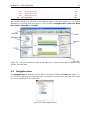
1
CHAPTER 3. USER INTERFACE
3.5.1
3.5.2
3.5.3
3.6
List
62
Create Workspace
Select Workspace
Delete Workspace
of shortcuts . . . .
.
.
.
.
.
.
.
.
.
.
.
.
.
.
.
.
.
.
.
.
.
.
.
.
.
.
.
.
.
.
.
.
.
.
.
.
.
.
.
.
.
.
.
.
.
.
.
.
.
.
.
.
.
.
.
.
.
.
.
.
.
.
.
.
.
.
.
.
.
.
.
.
.
.
.
.
.
.
.
.
.
.
.
.
.
.
.
.
.
.
.
.
.
.
.
.
.
.
.
.
.
.
.
.
.
.
.
.
.
.
.
.
.
.
.
.
.
.
.
.
79
79
80
80
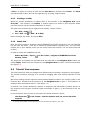
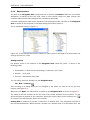
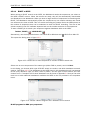
This chapter provides an overview of the different areas in the user interface of CLC Protein
Workbench. As can be seen from figure 3.1 this includes a Navigation Area, View Area, Menu
Bar, Toolbar, Status Bar and Toolbox.
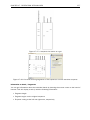
Figure 3.1: The user interface consists of the Menu Bar, Toolbar, Status Bar, Navigation Area,
Toolbox, and View Area.
3.1
Navigation Area
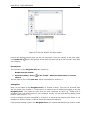
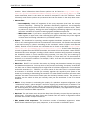
The Navigation Area is located in the left side of the screen, under the Toolbar (see figure 3.2).
It is used for organizing and navigating data. Its behavior is similar to the way files and folders
are usually displayed on your computer.
Figure 3.2: The Navigation Area.