1
Component Installation
The GA8500 system may be fitted to a multitude of vehicles and
as such it is not possible to provide a set of unique instructions for
individual vehicles. Hence this section recommends where it is
possible to mount the various components of the GA8500 system
and provides examples where applicable.
It is recommended that the components are installed in the
following order for optimal placement of the individual components.
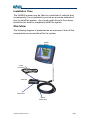
GA8500 Console
The GA8500 console needs to be within easy reach of the
operator when seated in the normal operating position. Ideally it
needs to be easily visible in the forward vision of the operator.
The screen should not be placed where it may impede the
safe vision of the operation of the vehicle.
Typically most agricultural vehicles will have entry to the operators
cab from the left hand side of the vehicle. Consequently most
people prefer to mount the screen on the right hand side of the
vehicle. The screen location should also be such that direct
sunlight on the screen is minimised to avoid intense glare from
sunlight on the screen which makes viewing of the screen difficult.
The screen is fitted with a swivel mount so that it may be easily reorientated in these situations.
Attach the screen mounting arm to the ball mount on the rear of
the screen. The screen may need to be swivelled on its mount for
optimum viewing.
Care must be taken not to drop the screen when unscrewing
the mounting arm, as it is sprung and clamps on to both ball
joints simultaneously. It is recommended that the screen be
laid flat on a clean smooth surface and removed from the
mounting arm before mounting the ball mount and arm on
the vehicle.
Once the desired location has been identified, the remaining ball
mount will need to be secured to the vehicle. It may be necessary
to install a suitable bracket on which to install the ball mount. The
GA8500 Installation Manual
Page 9