1
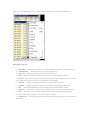
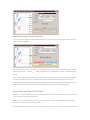
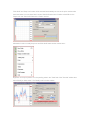
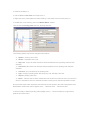
Right click the mouse button on the “Market Watch” window to produce the context menu. Market Watch Window New Order – enables the window to open/close a position or to place a new pending order; Chart Window – enables the chart of a currency pair or CFD; Tick Chart – shows the tick chart for the selected instrument; Hide – deletes the specified symbol from the list in the "Market Watch" window; Hide All – deletes all symbols from the list in the "Market Watch" window which are not used (if you have open positions or charts, its symbols will not be deleted); Show All – displays all available symbols in the "Market Watch" window; Symbols – enables the window where you can hide/show the selected instruments; Sets – saves/adjusts/deletes the custom settings for the "Market Watch" window; High/Low – shows/hides columns with the highest and lowest prices for each instrument; Time – displays a column with the arrival time of the latest quote for each instrument; Grid - hides/unhides gridlines in the "Market Watch" window; Popup Prices – opens the popup window which contains real time quotes for your selected instruments.