1
Contents
••••••
Chapter 1: Introduction.............................................................................................................1
1.1. Product Overview........................................................................................................................ 1
1.1.1. Package Contents ............................................................................................................................ 1
Chapter 2: Hardware Overview ................................................................................................3
2.1. QL9600 Module ..........................................................................................................................
2.2. Adaptor/Socket Boards ...............................................................................................................
2.3. The Extended Pin Driver (EPD) Module .....................................................................................
2.4. Universal Serial Bus (USB) Connection Overview......................................................................
3
3
4
4
2.4.1. USB Connection Topology ............................................................................................................... 4
2.4.2. USB Host .......................................................................................................................................... 5
2.4.3. USB Device/Hub............................................................................................................................... 5
2.4.4. Upstream and Downstream .............................................................................................................. 5
2.4.5. Site ID ............................................................................................................................................... 7
Chapter 3: Hardware Installation .............................................................................................9
3.1. System Requirements................................................................................................................. 9
3.2. Installing the Hardware ............................................................................................................... 9
Chapter 4: Software Installation ............................................................................................ 11
4.1. Software Contents .................................................................................................................... 11
4.2. Installing the Software............................................................................................................... 11
Chapter 5: Quick Start ............................................................................................................ 13
5.1. Programming a Device Using a USB Connection..................................................................... 13
5.1.1. Launching the QL9600 User Interface Software............................................................................. 13
5.1.2. Setting Up Communication with the Computer............................................................................... 14
5.1.3. Assigning a Site ID to Each Connected QL9600 Module ............................................................... 15
5.1.4. Downloading the Data into QL9600 Modules ................................................................................. 17
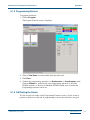
5.1.5. Programming Devices .................................................................................................................... 21
5.1.6. QA/Testing the Device.................................................................................................................... 21
5.1.7. Reading the Device ........................................................................................................................ 22
www.quicklogic.com
© 2004 QuickLogic Corporation
•
•
•
•
•
•
iii