1
SECTION 4
“APMDEC” WINDOWS BASED
SETUP PROGRAM REFERENCE
________________________________________________________
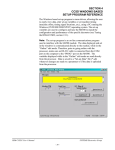
4.5.4 THE COLOR CONTROL WINDOW
The “Color Control” window is used to view and adjust any of the
color control settings. This window is selected from the “Window”
menu or by pressing the “F8” function key.
Note: For virtually all fields that allow the user to adjust a setting,
the user may either use the increment/decrement control or simply
select the field and enter in a number. Once a value has been changed
or the “Enter” key pressed, the new value is validated for proper
range and then written to the M4503.
HSL-DC6 User’s Manual
SYSTEMS Electronics Group
- 68 -