1
363/392
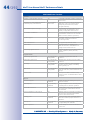
Solutions To Common Issues
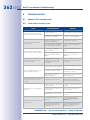
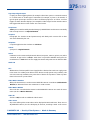
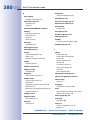
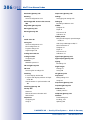
B.1.2 File Server/NAS Issues
Issue
Camera does not store images/
video streams on file server/NAS
Access to stored recordings/
video searches is slow.
Camera cannot write to file
server/NAS after some time.
MxCC cannot find file server
path of specified camera.
Camera only stores single JPEG
images although set to Event/
Continuous recording.
Possible Cause
Solution
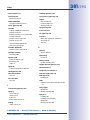
Firewall blocks network traffic.
Correct firewall settings. Check
if file server share is accessible
from workstation.
MxCC is set to access recordings via the camera(s).
Directly access file server/
NAS share using Access
Recordings dialog.
Direct file server path set to
mapped network drive, but
drive is missing after next
login.
Make sure that mapped
network drive is reconnected
on next login and that user
has proper access rights.
File server/NAS cannot handle
load of attached cameras.
Add more file servers/NAS to
distribute load more evenly.
Storage capacity reached.
Set or reduce storage limits
(max. MB) for camera.
File server/NAS down.
Check/restore file server/NAS.
MxCC cannot find file server
path.
Check if you can access
file server path in Windows
Explorer.
MxCC cannot read from file
server path.
Check if MxCC has read
access to file server path.
Camera does not store on file
server/NAS.
Check camera system messages and Storage on
External File Server dialog.
Intended behavior - camera
stores segmented MxPEG
stream in .jpg files of max. 10 s
length.
Only use MxCC to read file
server contents.
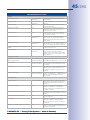
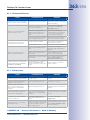
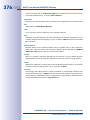
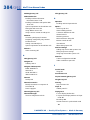
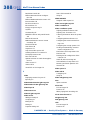
B.1.3 Camera Issues
Issue
Possible Cause
Solution
Camera only shows gray image.
Lens missing/lens protection
foil still on lens
Mount lens/remove protection foil.
Images of M24/D14/D24/Q24
cameras are out of focus.
Lens not properly focused.
Correct focus of lens.
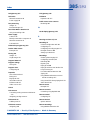
Images in darkness are out
of focus/high image noise
although this is a Day/Night
camera.
Minimum lighting required.
Install (IR) lamps for additional
lighting.
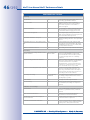
Dual camera does not detect
video motion in darkness.
Video motion only activated
on Day sensor of Day/Night
camera.
Activate video motion on Night
sensor.
Camera does not detect video
motion in darkness.
Low-Light Suppression for
video motion detection activated.
Deactivate Low-Light
Suppression.
Camera does not reach maximum frame rate.
Frame rates depend on many
factors (resolution, quality, full
image recording, exposure
times, lighting, etc.).
Open camera in browser and
select Image Program > Fast
in Quick Controls.
© MOBOTIX AG • Security-Vision-Systems • Made in Germany
www.mobotix.com • [email protected]