1
Exercising
UDP Commander
6.5 Error codes
At the end of the operations required by the command line, UDP Commander returns a
code indicating whether or not errors occurred. The exit code 0 indicates that all the
operations have been successfully completed while a value different from 0 designates
that there have been impediment to one or more operations.
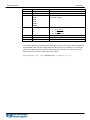
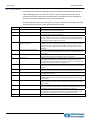
The following table shows the meaning of error codes returned by UDP Commander with
some indications about the causes and the possible remedies.
Code
62
10
Description
Error in the command line
20
Error connecting with the UDP30
22
UDP30 not found
24
UDP30 with the serial number
specified not found
30
Connection with the drive failed
40
Error during loading file
50
Compile error
52
Firmware update necessary
58
60
Syntax error in the correspondence
file
Error during program download
66
Error during field BUS configuration
68
Error during firmware update
70
Unable to start the program
90
Error log file
99
Generic error
Notes
Verify the parameters syntax and if the application rules are conformity with
the instruction contained in this manual.
Verify the proper installation of the drive. Check the USB connection with the
PC and eventually replace the USB cable.
It was not possible to connect with the interface UDP30. Verify there is at
least one UDP30 interface connected to the PC with the green led ON and
that this interface is not already in use (for example by another application of
the UDP Commander program in execution).
It was not possible to connect with the UDP30 with the serial number
specified. Verify that the UDP30 interface with the serial number specified is
connected to the PC, with the green led ON and that this interface is not
already in use (for example by another application of the UDP Commander
program).
The UDP30 interface was found but it was not possible to communicate with
the drive. Verify that the UDP30 cable is properly connected to the DUP port
of the drive.
Verify to have correctly specified the type and location of the file for the
setting/configuration of the firmware and/or correspondence.
Verify the user’s program by compiling it with the windows version of the UDP
Commander. Verify that the eventual correspondence file contains all the
parameters that must be replaced in the user’s program, if one of them is not
replaced it is possible it leads to a compiling error.
One or more operations cannot be completed because the firmware currently
installed in the drive is obsolete and must be updated to the latest available
version.
Verify the syntax used in the correspondence file and make the appropriate
adjustments. Make sure that the comments are preceded by the character “;”.
Verify that the UDP30 cable is properly connected to the DUP port of the drive
and repeat the operation.
An error occurred during the configuration of the field BUS. Verify that the
UDP30 cable is properly connected to the DUP port of the drive and repeat
the operation.
An error occurred during the firmware update of the drive. Verify that the
UDP30 cable is properly connected to the DUP port of the drive and repeat
the operation.
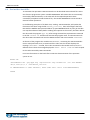
The user’s program has been correctly transferred in the drive, but an error
occurred at the start of the program. Verify that the UDP30 cable is properly
connected to the DUP port of the drive and repeat the operation.
UDP Commander was not able to complete the requested operation because
of a problem. Inside the installation folder of the UDP Commander is a file
called log.txt containing the description of the problem occurred.