1
• They can contain any keyboard character except for '/' and be
up to 256 characters long (note that characters such as *,?,# and
& have special meaning in most shells and should not therefore
be used in filenames).
• Putting spaces in filenames also makes them difficult to
manipulate - rather use the underscore '_'.
2. Directories
• Directories are containers or folders that hold files, and other
directories.
3. Devices
• To provide applications with easy access to hardware devices,
Linux allows them to be used in much the same way as
ordinary files.
• There are two types of devices in Linux:
o block-oriented devices which transfer data in blocks
(e.g. hard disks) and
o character-oriented devices that transfer data on a byteby-byte basis (e.g. modems and dumb terminals).
4. Links
A link is a pointer to another file. There are two types of links a hard link to a file is indistinguishable from the file itself. A soft
link (or symbolic link) provides an indirect pointer or shortcut to a
file. A soft link is implemented as a directory file entry containing a
pathname.
2.3 Typical UNIX Directory Structure
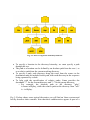
• The Linux filesystem is laid out as a hierarchical tree structure which is
anchored at a special top-level directory known as the root (designated by a
slash '/').
• Because of the tree structure, a directory can have many child directories,
but only one parent directory.
• Fig. 2.1 illustrates this layout.
Oyelade, O. J. and Isewon I – H3AbioNet Postgraduate course, 2014
Page 2