1
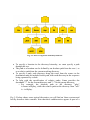
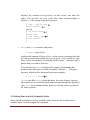
Fig. 2.1: Part of a typical UNIX filesystem tree
• To specify a location in the directory hierarchy, we must specify a path
through the tree.
• The path to a location can be defined by an absolute path from the root /, or
as a relative path from the current working directory.
• To specify a path, each directory along the route from the source to the
destination must be included in the path, with each directory in the sequence
being separated by a slash.
• To help with the specification of relative paths, Linux provides the
shorthand "." for the current directory and ".." for the parent directory.
o For example, the absolute path to the directory "play"
is /home/will/play, while the relative path to this directory from "zeb"
is ../will/play.
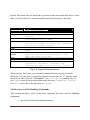
Fig. 2.2 below shows some typical directories you will find on Linux systems and
briefly describes their contents. Note that these subdirectories appear as part of a
Oyelade, O. J. and Isewon I – H3AbioNet Postgraduate course, 2014
Page 3