1
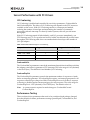
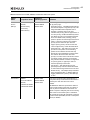
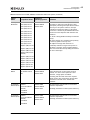
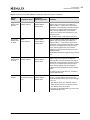
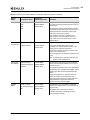
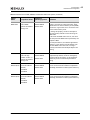
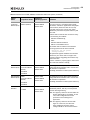
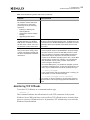
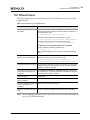
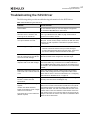
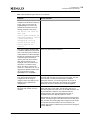
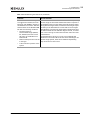
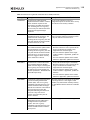
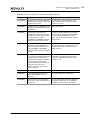
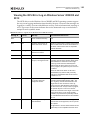
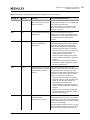
2. Configuration NIC/TOE Driver Configuration Typical cases for using the MTU: Server interconnects are typically deployed using jumbo frames. This is the most efficient configuration for high bandwidth server-to-server communication, such as Network Attached Storage, iSCSI and database transactions. Servers connected to client systems that run desktop operating systems typically use standard 1500-byte frames. Most desktop systems do not support jumbo packets. Servers that need both high performance server-to-server communication and client access can be configured with jumbo frames with Path MTU Discovery enabled. Path MTU Discovery is enabled by default in Windows Server, and it allows TCP connections to negotiate the optimal packet size that avoids IP fragmentation. Flow Control The UCNA supports IEEE 802.3x standard flow control, which uses control packets to temporarily pause the transmission of packets between two endpoints. These control messages are point-to-point, they are not forwarded by switches or routers. You must configure both endpoints for flow control. The UCNA can either respond to flow control packets (by temporarily pausing transmits) or send flow control PAUSE packets when the transmitter is overwhelming the system's receive bandwidth. For best performance, flow control must be enabled on the switches as well as on UCNAs. Receive and transmit flow control are on by default. Flow control is not available if using FCoE on a converged network adapter. In this situation, priority pause is negotiated with the network switch and used only for the FCoE protocol packets. The NIC function can also use priority pause if supported by the switch. This requires tagging packets in the operating system with the correct priority value, and enabling ETS in the driver properties. Configurations that support multiple PCI functions per port generally configure flow control from the switch or blade configuration application. Since flow control is an Ethernet port property, it must be the same for all PCI functions using the same port. If multiple PCI functions are exposed for a single 10-Gb/s Ethernet port, such as in a blade configuration, the flow control parameter must be set the same on all adapters for the port. The results are unpredictable if the setting differs among PCI functions, because this is a shared property of the 10-Gb/s port. Examples: Flow control greatly improves the following situations: The UCNA is installed in 4x PCI-Express slot or an underpowered server system. If the PCI-Express bus does not provide 10 Gb/s of throughput due to chipset limitations or the bus width, the UCNA cannot maintain 10 Gb/s of incoming receive data. It starts dropping packets quickly. In this situation it may be beneficial to enable receive flow control in the UCNA, and enable flow control in the attached switch for all devices. This helps to slow down the transmitters. Emulex Drivers for Windows User Manual P008011-01A Rev. A 62