1
SystemConsoleSwitch User Manual
Table of Contents
Page
1.0
Product Description ...................................................................................................... 3
2.0
System Overview ........................................................................................................... 4
2.1 Connect up to twelve RS-232C compatible ports.................................................. 4
2.2 Buffered Data Storage.......................................................................................... 4
2.3 Direct and Remote Access ................................................................................... 4
2.4 Security Password ............................................................................................... 4
2.5 Configurable Modem/Auxiliary Port...................................................................... 4
2.6 Parallel Printer..................................................................................................... 4
3.0
System Components...................................................................................................... 5
3.1 Chassis ................................................................................................................ 5
3.2 Spooler Modules .................................................................................................. 5
3.3 External Power Supply ......................................................................................... 5
3.4 System Cable Requirements ................................................................................ 5
4.0
Installation Instructions ................................................................................................ 7
4.1 SystemConsoleSwitch Installation........................................................................ 7
4.2 Daisy-Chaining SystemConsoleSwitches............................................................... 18
5.0
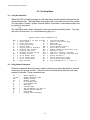
The Help Menu .............................................................................................................. 20
5.1 Using the Help Menu............................................................................................ 20
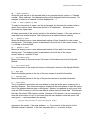
5.2 Using Channel Commands ................................................................................... 20
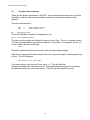
5.3 Using Scan Commands ........................................................................................ 22
5.4 Using the Printer Commands ............................................................................... 24
5.5 Using the Direct Mode Command......................................................................... 25
5.6 Name Servers ...................................................................................................... 26
5.7 Other Useful Commands ...................................................................................... 27
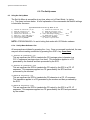
The Set-Up Menu........................................................................................................... 28
6.1 Using the Set-Up Menu ........................................................................................ 28
6.1.a Set-Up Menu Reference List.............................................................................. 28
Remote Access.............................................................................................................. 32
7.1 Using Remote Access........................................................................................... 32
7.1.a Remote Access Configurations ................................................................... 32
Modem Initialization................................................................................. 32
Modem Hang-Up String ............................................................................ 32
System Connection/Remote Access Password.......................................... 32
Remote Break-In....................................................................................... 33
Modem Privacy......................................................................................... 34
Technical Support and Warranty Information................................................................. 35
6.0
7.0
8.0
Appendix
Appendix
Appendix
Appendix
A - Component Part Numbers ............................................................................... A-i
B - Trouble Shooting ............................................................................................. B-i
C - Rack Mount SystemConsoleSwitch .................................................................. C-i
D - Flow Control .................................................................................................... D-i
1