1
SystemConsoleSwitch User Manual
5.0 The Help Menu
5.1 Using the Help Menu
When the SCS is initially powered up, the Help menu is automatically displayed on the
connected terminal. The Help Menu is the main level for all other menus in the system.
The Help Menu, entitled "System Console Switch Commands" is accessible at any time
by typing the command:
H ↵
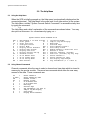
The Help Menu and a brief explanation of the commands are shown below. You may
also print out this menu for convenience by typing PH ↵.
System Console Switch Commands Vx.xx
ALn
Z
CL
C
D
A
H
DL
V
Fn
T
O
E
NA
=
=
=
=
=
=
=
=
=
=
=
=
=
=
Add Channel n to Scan List IM
Clear Queue
Jt
Clear Scan List
N
Configure Slaves
P
Direct Mode
PSn
Display Active Channels
PH
Display Help Screen
RLn
Display Scan List
Rn
Display Spooler Set-Up
SCs
Forward n Lines
SLs
Go To Newest Data
Sn
Go To Oldest Data
Sn
Go To Set-Up Menu
Bl
Name Servers
Mt
=
=
=
=
=
=
=
=
=
=
=
=
=
=
Initialize Modem
Jump To tag And Display
Next Page
Previous Page
Print Channel LineS n
Print Help Screen
Remove Channel n From Scan List
Reverse n Lines
SCan All Channels (seconds)
SCan List (seconds) Any key Stop
Select Channel n
Select Channel by name
Set Display Page Length
Tag inforMation (t = 1 thru 4)
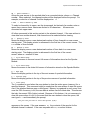
5.2 Using Channel Commands
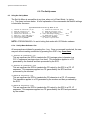
Channel commands allow the user to select a channel and view data which is stored in
memory by the spooler module. There are ten commands which allow the user easy
access to the data. These commands are:
Sn
=
S name =
FN
=
Rn
=
T
=
O
=
N
=
P
=
Mt
=
Jt
=
Z
=
A
=
Select Channel n
Select Channel by name
Forward n Lines
Reverse n Lines
Go To Newest Data
Go To Oldest Data
Next Page
Previous Page
Tag inforMation (t=1 thru 4)
Jump To tag And Display
Clear Queue
Display Active Channels
20