1
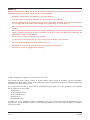
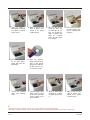
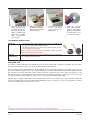
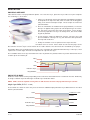
9. Spray the Stage 1
foam polish head with
6-8 sprays of optical
spray cleaner.
10. Apply a 1 inch (2.5 cm)
spot of polish compound to the polish
head as shown.
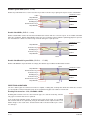
13. Close the clear lid, turn
on the main power
switch and press the
start button.
14. When the machine
stops, remove the disc,
spray it with optical
spray cleaner and wipe
the disc from the center to the outer edge.**
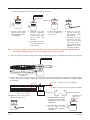
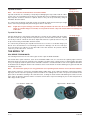
11. Place the disc on the
small turn table with
the label side up. The
disc will overlap the
Stage 1 polish head.
Place the retaining
plate, felt side down,
over the disc.*
12. Hold the disc and retaining plate stationary and
turn the retaining knob
until tight.**
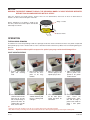
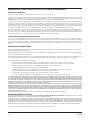
QUICK CLEAN & POLISH
1. Remove the retaining
plate and retaining
knob.
2. Insert the Stage 1 foam
polish head by lining
up the three holes with
the three posts on the
large turntable.
3
Spray the foam polish
head with 6 - 8 sprays
of optical spray cleaner.
4. Apply a 1 inch (2.5 cm)
spot of polish compound to the polish
head as shown.
Tips
* Caution: To prevent disc breakage, ensure the disc is properly aligned on the small platen turntable.
** Note: When inserting or removing a disc from the machine, hold the disc stationary while tightening or loosening the retaining knob.
2
Ver 3.0
05-05-2004