1
BG-Map PropNoter User's Manual
•
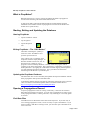
Use the calendar to select the date.
•
To clear a date, tap the “Clear Date” button.
The “Propagules” Tab
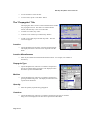
The Propagules Tab is used to record individual entries within
one propagation record. The data is recorded in tabular
format, and each entry is one row in the table.
•
To add a row of data, tap “Add.”
•
To delete a row of data, tap it and then tap “Delete.”
•
To edit a row of data, tap it and then tap “Edit.” The edit
screen will appear.
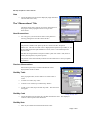
Location
•
Tap the dropdown list and select a location for this material.
The displayed location codes have been exported from BGBASE.
The “Propagules” Tab
Location Miscellaneous
•
Enter any miscellaneous information about this location - for example, row number in
the nursery.
Propagule Type
•
Tap the dropdown list, and select a code that corresponds to
the type of material being propagated. The displayed codes
have been exported from BG-BASE.
Medium
•
Tap the dropdown list, and select a code that corresponds to
growing medium being used. The displayed codes have been
exported from BG-BASE.
Quantity
•
Enter the quantity of plants being propagated.
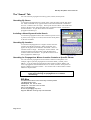
Editing Propagule Data
Container
•
Page 6 of 8
Tap the dropdown list, and select a code that corresponds to the type of container
being used. The displayed codes have been exported from BG-BASE.