1
BG-Map PropNoter User's Manual
Date
•
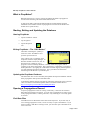
Tap the dropdown list and use the displayed popup calendar to
select the date of this entry.
The “Observations” Tab
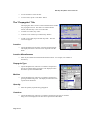
The Observations Tab is used to record new observations on
the progress of this propagation and to view previous
observations.
New Observations
•
You can type in your observations and/or select phrases to
insert by picking them from the “Phrase Picker.”
The “Observations” Tab
How to Edit the Phrase Picker
The phrases available in the phrase picker are stored in the file "PropNoter
Phrases.txt". This file is located in the C:\Bgmapwin\PropNoter Export folder (or, for
GreVid and Garden Notepad Standalone Version, in the C:\GrevidGN\PropNoter
Export Folder.”
Edit this file using Windows Notepad or another "plain text" editor. Edit, delete or
add any desired phrase, one phrase per line.
The phrases will be automatically transferred to the mobile device when you update
the database.
Previous Observations
Observations previously recorded in BG-BASE will be
displayed but cannot be edited.
Die Why Table
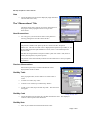
If the propagation dies, use this table to record the cause or
causes.
•
To add a row of data, tap “Add.”
•
To delete a row of data, tap it and then tap “Delete.”
•
To edit a row of data, tap it and then tap “Edit.” The edit screen
will appear.
Die Why Code
•
Editing “Die Why” Data
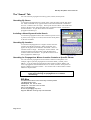
Tap the dropdown list and select the code that describes the cause. The displayed
codes have been exported from BG-BASE.
Die Why Note
•
Enter any miscellaneous information about the cause.
Page 7 of 8