1
ReportWare
Download Setup.exe to any location on your hard drive. Double click this Setup.exe file
(or “RUN” it from your Start Menu). This will allow you to select a subdirectory for
installation or, by default, install into your Programs subdirectory. An uninstall program
is also created.
BASIC OPERATION
These instructions are only to initially familiarize you with some of ReportWare’s
features. This is a deep, fully featured program whose extensive features are more fully
described in our user manual and supported in the full version of our software.
1. Launching the program:
Windows: Launch DanceWare from the ReportWare Group on your Start Menu.
You may also open the DanceWare subdirectory and double click the file called
DanceWare.exe.
2.
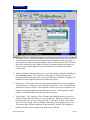
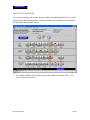
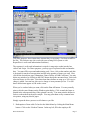
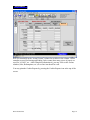
Selections: When you launch the program, you will be prompted to register this
software. If you have purchased a license, you may register the software to fully
enable it, or you may click to Run Demo (without registering the software). You are
now presented with an information screen that you may dismiss with the “Continue”
button. If you don’t press Continue, the screen will move on to the Main Menu
anyway in 30 seconds. You will be asked if you want this Demo to display Dance
dollar printing and tracking functions. If you say NO, the menu above will be
Demo Instructions
Page 2