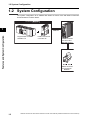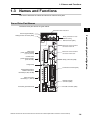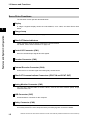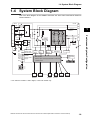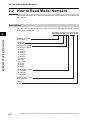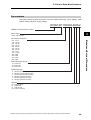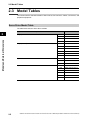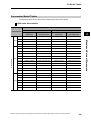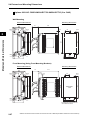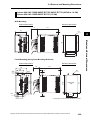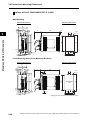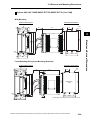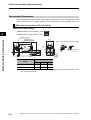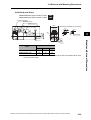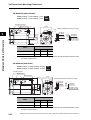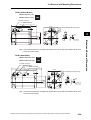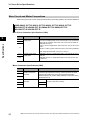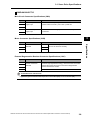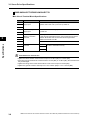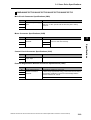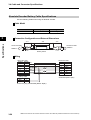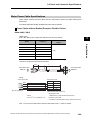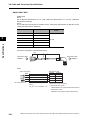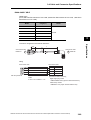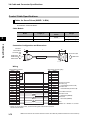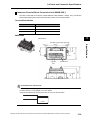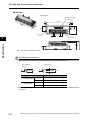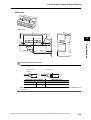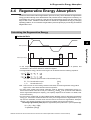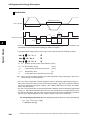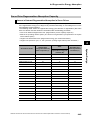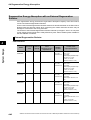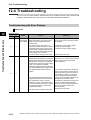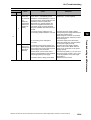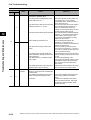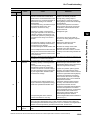
1
Cat. No. I573-E1-02 USER’S MANUAL OMNUC G5 SERIES R88M-K@ (AC Servomotors) R88D-KN@-ECT-R (AC Servo Drives) AC SERVOMOTORS/SERVO DRIVES WITH BUILT-IN EtherCAT COMMUNICATIONS Trademarks and Copyrights • EtherCAT is a registered trademark of Beckhoff Automation Gmbh (Germany). EtherCAT technology is protected by patents. • Other system names and product names that appear in this manual are the trademarks or registered trademarks of the relevant companies. OMRON, 2010 All rights reserved. No part of this publication may be reproduced, stored in a retrieval system, or transmitted, in any form, or by any means, mechanical, electronic, photocopying, recording, or otherwise, without the prior written permission of OMRON. No patent liability is assumed with respect to the use of the information contained herein. Moreover, because OMRON is constantly striving to improve its high-quality products, the information contained in this manual is subject to change without notice. Every precaution has been taken in the preparation of this manual. Nevertheless, OMRON assumes no responsibility for errors or omissions. Neither is any liability assumed for damages resulting from the use of the information contained in this publication. Introduction Introduction Thank you for purchasing an OMNUC G5-series Servo Drive. This manual explains how to install and wire the Servo Drive, set parameters needed to operate the Servo Drive, and remedies to be taken and inspection methods to be used should problems occur. Intended Readers This manual is intended for the following individuals. Those having electrical knowledge (certified electricians or individuals having equivalent knowledge) and also being qualified for one of the following: • Introducing FA equipment • Designing FA systems • Managing FA sites Notice This manual contains information you need to know to correctly use the Servo Drive and peripheral equipment. Before using the Servo Drive, read this manual and gain a full understanding of the information provided herein. After you finished reading this manual, keep it in a convenient place so that it can be referenced at any time. Make sure this manual is delivered to the end user. OMNUC G5-series AC Servomotors and Servo Drives User’s Manual (with Built-in EtherCAT Communications) 1 Read and Understand this Manual Read and Understand this Manual Warranty and Limitations of Liability WARRANTY OMRON's exclusive warranty is that the products are free from defects in materials and workmanship for a period of one year (or other period if specified) from date of sale by OMRON. OMRON MAKES NO WARRANTY OR REPRESENTATION, EXPRESS OR IMPLIED, REGARDING NONINFRINGEMENT, MERCHANTABILITY, OR FITNESS FOR PARTICULAR PURPOSE OF THE PRODUCTS. ANY BUYER OR USER ACKNOWLEDGES THAT THE BUYER OR USER ALONE HAS DETERMINED THAT THE PRODUCTS WILL SUITABLY MEET THE REQUIREMENTS OF THEIR INTENDED USE. OMRON DISCLAIMS ALL OTHER WARRANTIES, EXPRESS OR IMPLIED. LIMITATIONS OF LIABILITY OMRON SHALL NOT BE RESPONSIBLE FOR SPECIAL, INDIRECT, OR CONSEQUENTIAL DAMAGES, LOSS OF PROFITS OR COMMERCIAL LOSS IN ANY WAY CONNECTED WITH THE PRODUCTS, WHETHER SUCH CLAIM IS BASED ON CONTRACT, WARRANTY, NEGLIGENCE, OR STRICT LIABILITY. In no event shall the responsibility of OMRON for any act exceed the individual price of the product on which liability is asserted. IN NO EVENT SHALL OMRON BE RESPONSIBLE FOR WARRANTY, REPAIR, OR OTHER CLAIMS REGARDING THE PRODUCTS UNLESS OMRON'S ANALYSIS CONFIRMS THAT THE PRODUCTS WERE PROPERLY HANDLED, STORED, INSTALLED, AND MAINTAINED AND NOT SUBJECT TO CONTAMINATION, ABUSE, MISUSE, OR INAPPROPRIATE MODIFICATION OR REPAIR. 2 OMNUC G5-series AC Servomotors and Servo Drives User’s Manual (with Built-in EtherCAT Communications) Read and Understand this Manual Application Considerations SUITABILITY FOR USE OMRON shall not be responsible for conformity with any standards, codes, or regulations that apply to the combination of products in the customer's application or use of the products. At the customer's request, OMRON will provide applicable third party certification documents identifying ratings and limitations of use that apply to the products. This information by itself is not sufficient for a complete determination of the suitability of the products in combination with the end product, machine, system, or other application or use. The following are some examples of applications for which particular attention must be given. This is not intended to be an exhaustive list of all possible uses of the products, nor is it intended to imply that the uses listed may be suitable for the products: • Outdoor use, uses involving potential chemical contamination or electrical interference, or conditions or uses not described in this manual. • Nuclear energy control systems, combustion systems, railroad systems, aviation systems, medical equipment, amusement machines, vehicles, safety equipment, and installations subject to separate industry or government regulations. • Systems, machines, and equipment that could present a risk to life or property. Please know and observe all prohibitions of use applicable to the products. NEVER USE THE PRODUCTS FOR AN APPLICATION INVOLVING SERIOUS RISK TO LIFE OR PROPERTY WITHOUT ENSURING THAT THE SYSTEM AS A WHOLE HAS BEEN DESIGNED TO ADDRESS THE RISKS, AND THAT THE OMRON PRODUCTS ARE PROPERLY RATED AND INSTALLED FOR THE INTENDED USE WITHIN THE OVERALL EQUIPMENT OR SYSTEM. PROGRAMMABLE PRODUCTS OMRON shall not be responsible for the user's programming of a programmable product, or any consequence thereof. OMNUC G5-series AC Servomotors and Servo Drives User’s Manual (with Built-in EtherCAT Communications) 3 Read and Understand this Manual Disclaimers CHANGE IN SPECIFICATIONS Product specifications and accessories may be changed at any time based on improvements and other reasons. It is our practice to change model numbers when published ratings or features are changed, or when significant construction changes are made. However, some specifications of the products may be changed without any notice. When in doubt, special model numbers may be assigned to fix or establish key specifications for your application on your request. Please consult with your OMRON representative at any time to confirm actual specifications of purchased products. DIMENSIONS AND WEIGHTS Dimensions and weights are nominal and are not to be used for manufacturing purposes, even when tolerances are shown. PERFORMANCE DATA Performance data given in this manual is provided as a guide for the user in determining suitability and does not constitute a warranty. It may represent the result of OMRON's test conditions, and the users must correlate it to actual application requirements. Actual performance is subject to the OMRON Warranty and Limitations of Liability. ERRORS AND OMISSIONS The information in this manual has been carefully checked and is believed to be accurate; however, no responsibility is assumed for clerical, typographical, or proofreading errors, or omissions. 4 OMNUC G5-series AC Servomotors and Servo Drives User’s Manual (with Built-in EtherCAT Communications) Safety Precautions Safety Precautions To ensure that the OMNUC G5-series Servomotor and Servo Drive as well as peripheral equipment are used safely and correctly, be sure to read this Safety Precautions section and the main text before using the product in order to learn items you should know regarding the equipment as well as required safety information and precautions. Make an arrangement so that this manual also gets to the end user of this product. After reading this manual, keep it in a convenient place so that it can be referenced at any time. Definition of Precautionary Information The precautions explained in this section describe important information regarding safety and must be followed without fail. The display of precautions in this manual and their meanings are explained below. DANGER Caution Indicates an imminently hazardous situation which, if not avoided, will result in death or serious injury. Additionally, there may be severe property damage. Indicates a potentially hazardous situation which, if not avoided, may result in minor or moderate injury, or property damage. Even those items denoted by the caution symbol may lead to a serious outcome depending on the situation. Accordingly, be sure to observe all safety precautions. Precautions for Safe Use Indicates precautions on what to do and what not to do to ensure using the product safely. Precautions for Correct Use Indicates precautions on what to do and what not to do to ensure proper operation and performance. Reference Indicates an item that helps deepen your understanding of the product or other useful tip. Explanation of Symbols Example of symbols This symbol indicates danger and caution. The specific instruction is indicated using an illustration or text inside or near The symbol shown to the left indicates “beware of electric shock.” . This symbol indicates a prohibited item (an item you must not do). The specific instruction is indicated using an illustration or text inside or near The symbol shown to the left indicates “disassembly prohibited,” . This symbol indicates a compulsory item (an item that must be done). The specific instruction is indicated using an illustration or text inside or near The symbol shown to the left indicates “grounding required,” OMNUC G5-series AC Servomotors and Servo Drives User’s Manual (with Built-in EtherCAT Communications) . 5 Safety Precautions Precautions for Safe Use of This Product Illustrations contained in this manual sometimes depict conditions without covers and safety shields for the purpose of showing the details. When using this product, be sure to install the covers and shields as specified and use the product according to this manual. If the product has been stored for an extended period of time, contact your OMRON sales representative. DANGER Be sure to ground the frame ground terminals of the Servo Drive and Servomotor to 100 Ω or less. Electric shock may result. Never touch the parts inside the Servo Drive. Electric shock may result. While the power is supplied, do not remove the front cover, terminal covers, cables, and options. Electric shock may result. Installation, operation, and maintenance or inspection by unauthorized personnel is prohibited. Electric shock or injury may result. Before carrying out wiring or inspection, turn OFF the power supply and wait for at least 15 minutes. Electric shock may result. Do not damage, pull, stress strongly, or pinch the cables or place heavy articles on them. Electric shock, stopping of Servo Drive operation, or burn damage may result. Never touch the rotating part of the Servomotor during operation. Injury may result. Never modify the Servo Drive. Injury or equipment damage may result. Install a stopping device on the machine to ensure safety. * The holding brake is not a stopping device to ensure safety. Injury may result. Install an immediate stop device externally to the machine so that the operation can be stopped and the power supply cut off immediately. Injury may result. When the power is restored after a momentary power interruption, the machine may restart suddenly. Never come close to the machine when restoring power. * Implement measures to ensure safety of people nearby even when the machine is restarted. Injury may result. After an earthquake, be sure to conduct safety checks. Electric shock, injury, or fire may result. Never drive the Servomotor using an external drive source. Fire may result. 6 OMNUC G5-series AC Servomotors and Servo Drives User’s Manual (with Built-in EtherCAT Communications) Safety Precautions DANGER Do not place flammable materials near the Servomotor, Servo Drive, or Regeneration Resistor. Fire may result. Install the Servomotor, Servo Drive, and Regeneration Resistor on non-flammable materials such as metals. Fire may result. When you perform a system configuration using the safety function, be sure to fully understand the relevant safety standards and the information in the operation manual, and apply them to the system design. Injury or damage may result. Do not use the cable when it is laying in oil or water. Electric shock, injury, or fire may result. Never connect a commercial power supply directly to the Servomotor. Fire or failure may result. Do not perform wiring or any operation with wet hands. Electric shock, injury, or fire may result. Do not touch the key grooves with bare hands if a Servomotor with shaft-end key grooves is being used. Injury may result. Caution Use the Servomotor and Servo Drive in a specified combination. Fire or equipment damage may result. Do not store or install the Servo Drive in the following locations: • • • • • • • • Location subject to direct sunlight Location where the ambient temperature exceeds the specified level Location where the relative humidity exceeds the specified level Location subject to condensation due to rapid temperature changes Location subject to corrosive or flammable gases Location subject to high levels of dust, salt content, or iron dust Location subject to splashes of water, oil, chemicals, etc. Location where the Servo Drive may receive vibration or impact directly Installing or storing the Servo Drive in any of these locations may result in fire, electric shock, or equipment damage. The Servo Drive radiator, Regeneration Resistor, Servomotor, etc., may become hot while the power is supplied or remain hot for a while even after the power supply is cut off. Never touch these components. A burn injury may result. OMNUC G5-series AC Servomotors and Servo Drives User’s Manual (with Built-in EtherCAT Communications) 7 Safety Precautions Storage and Transportation Caution When transporting the Servo Drive, do not hold it by the cables or Servomotor shaft. Injury or failure may result. Do not overload the Servo Drive or Servomotor. (Follow the instructions on the product label.) Injury or failure may result. Use the Servomotor eye-bolts only when transporting the Servomotor. Do not use them to transport the machine. Injury or failure may result. 8 OMNUC G5-series AC Servomotors and Servo Drives User’s Manual (with Built-in EtherCAT Communications) Safety Precautions Installation and Wiring Caution Do not step on the Servo Drive or place heavy articles on it. Injury may result. Do not block the intake or exhaust openings. Do not allow foreign objects to enter the Servo Drive. Fire may result. Be sure to observe the mounting direction. Failure may result. Provide the specified clearance between the Servo Drive and the inner surface of the control panel or other equipment. Fire or failure may result. Do not apply strong impact on the Servomotor shaft or Servo Drive. Failure may result. Wire the cables correctly and securely. Runaway Servomotor, injury, or failure may result. Securely tighten the mounting screws, terminal block screws, and cable screws. Failure may result. Use crimp terminals for wiring. If simple twisted wires are connected directly to the protective ground terminal, fire may result. Only use the power supply voltage specified in this manual. Burn damage may result. In locations where the power supply infrastructure is poor, make sure the rated voltage can be supplied. Equipment damage may result. Provide safety measures, such as a breaker, to protect against short circuiting of external wiring. Fire may result. If the Servo Drive is used in the following locations, provide sufficient shielding measures. • • • • Location subject to noise e.g., due to static electricity Location subject to a strong electric or magnetic field Location where exposure to radioactivity may occur Location near power supply lines Using the Servo Drive in any of these locations may result in equipment damage. Connect an immediate stop relay in series with the brake control relay. Injury or failure may result. When connecting the battery, make sure the polarity is correct. Battery damage or explosion may result. OMNUC G5-series AC Servomotors and Servo Drives User’s Manual (with Built-in EtherCAT Communications) 9 Safety Precautions Operation and Adjustment Caution Conduct a test operation after confirming that the equipment is not affected. Equipment damage may result. Before operating the Servo Drive in an actual environment, check if it operates correctly based on the parameters you have set. Equipment damage may result. Never adjust or set parameters to extreme values, because it will make the operation unstable. Injury may result. Separate the Servomotor from the mechanical system and check its operation before installing the Servomotor to the machine. Injury may result. If an error occurs, remove the cause of the error and ensure safety, and then reset the alarm and restart the operation. Injury may result. Do not use the built-in brake of the Servomotor for normal braking operation. Failure may result. Do not operate the Servomotor connected to an excessive load inertia. Failure may result. Install safety devices to prevent idling or locking of the electromagnetic brake or the gear head, or leakage of grease from the gear head. Injury, damage, or taint damage result. If the Servo Drive fails, cut off the power supply to the Servo Drive at the power supply. Fire may result. Do not turn ON and OFF the main Servo Drive power supply frequently. Failure may result. Maintenance and Inspection Caution After replacing the Servo Drive, transfer to the new Servo Drive all data needed to resume operation, before restarting operation. Equipment damage may result. Never repair the Servo Drive by disassembling it. Electric shock or injury may result. Be sure to turn OFF the power supply when the Servo Drive is not going to be used for a prolonged period of time. Injury may result. 10 OMNUC G5-series AC Servomotors and Servo Drives User’s Manual (with Built-in EtherCAT Communications) Safety Precautions Location of Warning Label The Servo Drive bears a warning label at the following location to provide handling warnings. When handling the Servo Drive, be sure to observe the instructions provided on this label. VOLT AG IN PHAS E 10PUT 0~12 E FL 0V 1Ø C FREQ 2.6A POWE 50/60 R Hz SERIA L No . A0 9080 OM RO 004 N Co rpo ration OU TP 0-1 UT 20 3Ø V 1.7A 0~50 0. 100W 0Hz MA DE IN JA PAN Warning label display location (R88D-KN02H-ECT-R) Instructions on Warning Label Disposal • When disposing of the battery, insulate it using tape, and dispose of it by following the applicable ordinances of your local government. • Dispose of the Servo Drive as industrial waste. OMNUC G5-series AC Servomotors and Servo Drives User’s Manual (with Built-in EtherCAT Communications) 11 Items to Check after Unpacking Items to Check after Unpacking After unpacking, check the following items. • Is this the model you ordered? • Was there any damage sustained during shipment? Accessories Safety Precautions document x 1 copy • Connectors, mounting screws, mounting brackets, and other accessories other than those in the table below are not supplied. They must be prepared by the customer. • If any item is missing or a problem is found such as Servo Drive damage, contact the OMRON dealer or sales office where you purchased your product. Specifications Connector for main circuit power supply terminals and control circuit power supply terminals Connector for External Regeneration Resistor connection terminals and Motor connection terminals Safety bypass connector 50 W Singlephase 100 VAC 100 W 200 W 400 W 100 W Included 200 W Singlephase/3phase 200 VAC 400 W 750 W 1 kW 1.5 kW 2 kW 3-phase 200 VAC 3 kW 5 kW − Included 600 W 1 kW Included 3-phase 400 VAC 1.5 kW 2 kW 3 kW 5 kW 12 − Included OMNUC G5-series AC Servomotors and Servo Drives User’s Manual (with Built-in EtherCAT Communications) Revision History Revision History The manual revision code is a number appended to the end of the catalog number found in the bottom left-hand corner of the front or back cover. Example Cat. No. I573-E1-02 Revision code Revision code Revision Date 01 March 2010 02 October 2010 Revised content Original production Added models and made corrections. OMNUC G5-series AC Servomotors and Servo Drives User’s Manual (with Built-in EtherCAT Communications) 13 Structure of This Document Structure of This Document This manual consists of the following chapters. Read the necessary chapter or chapters referring the following table. Outline Chapter 1 Features and System Configuration This chapter explains the features of the Servo Drive, name of each part, and applicable EC Directives and UL standards. Chapter 2 Standard Models and External Dimensions This chapter explains the models of Servo Drives, Servomotors, and peripheral equipment, and provides the external dimensions and mounting dimensions. Chapter 3 Specifications This chapter provides the general specifications, characteristics, connector specifications, and I/O circuits of the Servo Drives as well as the general specifications, characteristics, encoder specifications of the Servomotors and other peripheral devices. Chapter 4 System Design This chapter explains the installation conditions for the Servo Drive, Servomotor, and Decelerator, wiring methods including wiring conforming to EMC Directives and regenerative energy calculation methods as well as the performance of External Regeneration Resistors. Chapter 5 EtherCAT Communications This chapter describes EtherCAT communications under the assumption that the Servo Drive is connected to a CJ1W-NC281/ NC481/NC881/NCF81/NC482/NC882 Position Control Unit. Chapter 6 CiA 402 Drive Profile This chapter describes the profile that is used to control the Servo Drive. Chapter 7 Applied Functions This chapter outlines the applied functions such as the electronic gear, gain switching and soft start, and explains the settings. Chapter 8 Safety Function This chapter gives an outline of application functions, such as electronic gears, gain switching, and soft start, and explains the settings. Chapter 9 Details on Servo Parameters and Objects This chapter explains the set values and contents of each object. Chapter 10 Operation This chapter gives the operating procedures and explains how to operate in each mode. Chapter 11 Adjustment Functions This chapter explains the functions, setting methods, and items to note regarding various gain adjustments. Chapter 12 Troubleshooting This chapter explains the items to check when problems occur, error and Maintenance diagnosis using the error display and measures, error diagnosis based on the operating condition and measures, and periodic maintenance. Appendix 14 The appendix provides a list of objects and EtherCAT terminology. OMNUC G5-series AC Servomotors and Servo Drives User’s Manual (with Built-in EtherCAT Communications) Table Of Contents Introduction ............................................................................................1 Read and Understand this Manual ........................................................2 Safety Precautions.................................................................................5 Items to Check after Unpacking...........................................................12 Revision History...................................................................................13 Structure of This Document .................................................................14 Chapter 1 Features and System Configuration 1-1 Outline ................................................................................................... 1-1 Outline of the OMNUC G5 Series................................................................................ 1-1 Features of OMNUC G5-series Servo Drives.............................................................. 1-1 What Is EtherCAT?...................................................................................................... 1-2 Object Dictionary ......................................................................................................... 1-2 1-2 System Configuration ............................................................................ 1-3 1-3 Names and Functions............................................................................ 1-4 Servo Drive Part Names .............................................................................................. 1-4 Servo Drive Functions ................................................................................................. 1-5 1-4 System Block Diagram .......................................................................... 1-6 1-5 Applicable Standards............................................................................. 1-7 EC Directives............................................................................................................... 1-7 UL and cUL Standards ................................................................................................ 1-7 Chapter 2 Models and External Dimensions 2-1 Servo System Configuration .................................................................. 2-1 2-2 How to Read Model Numbers................................................................ 2-3 Servo Drive.................................................................................................................. 2-3 Servomotors ................................................................................................................ 2-4 2-3 Model Tables ......................................................................................... 2-5 Servo Drive Model Table ............................................................................................. 2-5 Servomotor Model Tables ........................................................................................... 2-6 Servo Drive and Servomotor Combination Tables .................................................... 2-10 Cable and Peripheral Device Model Tables .............................................................. 2-12 2-4 External and Mounting Dimensions ..................................................... 2-21 Servo Drive Dimensions ............................................................................................ 2-21 Servomotor Dimensions ............................................................................................ 2-31 External Regeneration Resistor Dimensions ............................................................. 2-50 2-5 16 EMC Filter Dimensions ........................................................................ 2-51 OMNUC G5-series AC Servomotors and Servo Drives User’s Manual (with Built-in EtherCAT Communications) Table Of Contents Chapter 3 Specifications 3-1 Servo Drive Specifications......................................................................3-1 General Specifications................................................................................................. 3-1 Characteristics............................................................................................................. 3-2 EtherCAT Communications Specifications.................................................................. 3-6 Main Circuit and Motor Connections ........................................................................... 3-7 EtherCAT Communications Connector Specifications (RJ45) .................................. 3-12 Control I/O Connector Specifications (CN1).............................................................. 3-13 Control Input Circuits ................................................................................................. 3-16 Control Input Details .................................................................................................. 3-17 Control Output Circuits .............................................................................................. 3-19 Control Output Details ............................................................................................... 3-20 Encoder Connector Specifications (CN2).................................................................. 3-23 External Encoder Connector Specifications (CN4).................................................... 3-23 Analog Monitor Connector Specifications (CN5) ....................................................... 3-27 USB Connector Specifications (CN7)........................................................................ 3-28 Safety Connector Specifications (CN8) ..................................................................... 3-29 3-2 Overload Characteristics (Electronic Thermal Function) ......................3-31 Overload Characteristics Graphs .............................................................................. 3-31 3-3 Servomotor Specifications....................................................................3-32 General Specifications............................................................................................... 3-32 Characteristics........................................................................................................... 3-33 Encoder Specifications .............................................................................................. 3-56 3-4 Cable and Connector Specifications ....................................................3-57 Encoder Cable Specifications.................................................................................... 3-57 Absolute Encoder Battery Cable Specifications ........................................................ 3-59 Motor Power Cable Specifications............................................................................. 3-60 Connector Specifications........................................................................................... 3-67 EtherCAT Communications Cable Specifications ..................................................... 3-70 Analog Monitor Cable Specifications......................................................................... 3-73 Control Cable Specifications ..................................................................................... 3-75 3-5 External Regeneration Resistor Specifications ....................................3-80 External Regeneration Resistor Specifications ......................................................... 3-80 3-6 EMC Filter Specifications .....................................................................3-82 Chapter 4 System Design 4-1 Installation Conditions ............................................................................4-1 Servo Drive Installation Conditions.............................................................................. 4-1 Servomotor Installation Conditions.............................................................................. 4-2 Decelerator Installation Conditions.............................................................................. 4-5 4-2 Wiring .....................................................................................................4-6 Peripheral Equipment Connection Examples .............................................................. 4-6 Main Circuit and Motor Connections ......................................................................... 4-12 4-3 Wiring Conforming to EMC Directives ..................................................4-21 Wiring Method ........................................................................................................... 4-21 Selecting Connection Component ............................................................................. 4-26 4-4 Regenerative Energy Absorption..........................................................4-40 Calculating the Regenerative Energy ........................................................................ 4-40 Servo Drive Regeneration Absorption Capacity ........................................................ 4-42 Regenerative Energy Absorption with an External Regeneration Resistor ............... 4-43 Connecting an External Regeneration Resistor ........................................................ 4-44 OMNUC G5-series AC Servomotors and Servo Drives User’s Manual (with Built-in EtherCAT Communications) 17 Table Of Contents Chapter 5 EtherCAT Communications 5-1 Display Area and Settings ..................................................................... 5-1 Node Address Setting.................................................................................................. 5-1 Status Indicators.......................................................................................................... 5-2 5-2 Structure of the CAN Application Protocol over EtherCAT .................... 5-3 5-3 EtherCAT State Machine ....................................................................... 5-4 5-4 Process Data Objects (PDOs) ............................................................... 5-5 PDO Mapping Settings ................................................................................................ 5-5 Sync Manager PDO Assignment Settings ................................................................... 5-6 Fixed PDO Mapping .................................................................................................... 5-6 5-5 Service Data Objects (SDOs) ................................................................ 5-7 Abort Codes................................................................................................................. 5-7 5-6 Synchronization with Distributed Clocks................................................ 5-8 Communications Cycle (DC Cycle) ............................................................................. 5-8 5-7 Emergency Messages ........................................................................... 5-9 Chapter 6 Drive Profile 6-1 Controlling the State Machine of the Servo Drive.................................. 6-1 State Machine.............................................................................................................. 6-1 6-2 Modes of Operation ............................................................................... 6-4 6-3 Cyclic Synchronous Position Mode ....................................................... 6-5 Related Objects ........................................................................................................... 6-6 Block Diagram for Position Control Mode.................................................................... 6-7 6-4 Torque Limit........................................................................................... 6-8 Related Objects ........................................................................................................... 6-8 6-5 Touch Probe Function (Latch Function) ................................................ 6-9 Related Objects ........................................................................................................... 6-9 Trigger Signal Settings ................................................................................................ 6-9 Operation Sequences................................................................................................ 6-10 6-6 Fully-closed Control ............................................................................. 6-12 Outline of Operation .................................................................................................. 6-12 Objects Requiring Settings ........................................................................................ 6-13 Parameter Block Diagram for Fully-closed Control Mode ......................................... 6-18 6-7 Object Dictionary ................................................................................. 6-19 Object Dictionary Area............................................................................................... 6-19 Data Types ................................................................................................................ 6-19 Object Description Format ......................................................................................... 6-20 Communication Objects ............................................................................................ 6-21 PDO Mapping Objects ............................................................................................... 6-27 Sync Manager Communication Objects .................................................................... 6-29 Manufacturer Specific Objects................................................................................... 6-33 Servo Drive Profile Object ......................................................................................... 6-36 Reserved Objects ...................................................................................................... 6-52 6-8 Connecting with OMRON Controllers .................................................. 6-53 Related Objects ......................................................................................................... 6-53 18 OMNUC G5-series AC Servomotors and Servo Drives User’s Manual (with Built-in EtherCAT Communications) Table Of Contents Chapter 7 Applied Functions 7-1 Sequence I/O Signals.............................................................................7-1 Input Signals................................................................................................................ 7-1 Output Signals ............................................................................................................. 7-4 7-2 Forward and Reverse Drive Prohibition Functions .................................7-6 Objects Requiring Settings .......................................................................................... 7-6 7-3 Overrun Protection .................................................................................7-9 Operating Conditions................................................................................................... 7-9 Objects Requiring Settings .......................................................................................... 7-9 Operation Example.................................................................................................... 7-10 7-4 Backlash Compensation.......................................................................7-11 Objects Requiring Settings ........................................................................................ 7-11 7-5 Brake Interlock......................................................................................7-13 Objects Requiring Settings ........................................................................................ 7-13 Operation Timing ....................................................................................................... 7-14 7-6 Electronic Gear Function ......................................................................7-18 Objects Requiring Settings ........................................................................................ 7-18 Operation Example.................................................................................................... 7-20 7-7 Torque Limit Switching .........................................................................7-21 Operating Conditions................................................................................................. 7-21 Objects Requiring Settings ........................................................................................ 7-21 7-8 Gain Switching Function.......................................................................7-23 Objects Requiring Settings ........................................................................................ 7-24 Gain Switching........................................................................................................... 7-25 Diagrams of Gain Switching Setting .......................................................................... 7-27 7-9 Gain Switching 3 Function....................................................................7-30 Operating Conditions................................................................................................. 7-30 Objects Requiring Settings ........................................................................................ 7-30 Operation Example.................................................................................................... 7-31 Chapter 8 Safety Function 8-1 Safe Torque OFF Function.....................................................................8-1 I/O Signal Specifications.............................................................................................. 8-2 8-2 Operation Example.................................................................................8-4 8-3 Connection Examples.............................................................................8-6 Chapter 9 Details on Servo Parameter Objects 9-1 Basic Settings.........................................................................................9-1 9-2 Gain Settings ..........................................................................................9-6 9-3 Vibration Suppression Settings ............................................................9-15 9-4 Analog Control Objects.........................................................................9-21 9-5 Interface Monitor Settings.....................................................................9-24 9-6 Extended Objects .................................................................................9-32 OMNUC G5-series AC Servomotors and Servo Drives User’s Manual (with Built-in EtherCAT Communications) 19 Table Of Contents 9-7 Special Objects.................................................................................... 9-38 9-8 Reserved Objects ................................................................................ 9-50 Chapter 10Operation 10-1 Operational Procedure......................................................................... 10-1 10-2 Preparing for Operation ....................................................................... 10-2 Items to Check Before Turning ON the Power Supply .............................................. 10-2 Turning ON the Power Supply ................................................................................... 10-3 Checking the Displays ............................................................................................... 10-4 Absolute Encoder Setup ............................................................................................ 10-6 Setting Up an Absolute Encoder from the CX-Drive.................................................. 10-6 10-3 Trial Operation ..................................................................................... 10-7 Preparations for Trial Operation ................................................................................ 10-7 Test Operation via USB Communications from the CX-Drive ................................... 10-8 Chapter 11Adjustment Functions 11-1 Analog Monitor..................................................................................... 11-1 Objects Requiring Settings ........................................................................................ 11-1 11-2 Gain Adjustment .................................................................................. 11-4 Purpose of the Gain Adjustment................................................................................ 11-4 Gain Adjustment Methods ......................................................................................... 11-4 Gain Adjustment Procedure ...................................................................................... 11-5 11-3 Realtime Autotuning ............................................................................ 11-6 Objects Requiring Settings ........................................................................................ 11-7 Setting Realtime Autotuning ...................................................................................... 11-7 Setting Machine Rigidity ............................................................................................ 11-8 11-4 Manual Tuning ................................................................................... 11-13 Basic Settings.......................................................................................................... 11-13 11-5 Damping Control................................................................................ 11-15 Outline of Operation ................................................................................................ 11-15 Objects Requiring Settings ...................................................................................... 11-15 11-6 Adaptive Filter.................................................................................... 11-18 Objects Requiring Settings ...................................................................................... 11-19 Operating Procedure ............................................................................................... 11-20 11-7 Notch Filters....................................................................................... 11-21 Objects Requiring Settings ...................................................................................... 11-22 11-8 Disturbance Observer Function ......................................................... 11-24 Operating Conditions............................................................................................... 11-24 Objects Requiring Settings ...................................................................................... 11-25 Operating Procedure ............................................................................................... 11-25 11-9 Friction Torque Compensation Function............................................ 11-26 Operating Conditions............................................................................................... 11-26 Objects Requiring Settings ...................................................................................... 11-26 Operation Example.................................................................................................. 11-27 20 OMNUC G5-series AC Servomotors and Servo Drives User’s Manual (with Built-in EtherCAT Communications) Table Of Contents 11-10 Hybrid Vibration Suppression Function .............................................11-28 Operating Conditions............................................................................................... 11-28 Objects Requiring Settings ...................................................................................... 11-28 Operating Procedure ............................................................................................... 11-28 11-11 Feed-forward Function ......................................................................11-29 Objects Requiring Settings ...................................................................................... 11-29 Operating Procedure ............................................................................................... 11-30 11-12 Instantaneous Speed Observer Function ..........................................11-32 Operating Conditions............................................................................................... 11-32 Objects Requiring Settings ...................................................................................... 11-32 Operating Procedure ............................................................................................... 11-33 Chapter 12Troubleshooting and Maintenance 12-1 Troubleshooting....................................................................................12-1 Preliminary Checks When a Problem Occurs ........................................................... 12-1 Precautions When a Problem Occurs ....................................................................... 12-2 Replacing the Servomotor or Servo Drive ................................................................. 12-2 12-2 Warnings ..............................................................................................12-4 Related Objects ......................................................................................................... 12-4 Warning List............................................................................................................... 12-5 12-3 Errors....................................................................................................12-7 Immediate Stop Operation at Errors........................................................................ 12-11 12-4 Troubleshooting..................................................................................12-13 Troubleshooting with Error Displays........................................................................ 12-13 Troubleshooting Using the Operation State ............................................................ 12-25 12-5 Periodic Maintenance .........................................................................12-31 Servomotor Life Expectancy.................................................................................... 12-31 Servo Drive Life Expectancy ................................................................................... 12-32 Replacing the Absolute Encoder Battery ................................................................ 12-33 Appendices A-1 Object List.............................................................................................. A-1 A-2 EtherCAT Terminology ........................................................................ A-19 Index OMNUC G5-series AC Servomotors and Servo Drives User’s Manual (with Built-in EtherCAT Communications) 21 Features and System Configuration This chapter explains the features of the Servo Drive, name of each part, and applicable EC Directives and UL standards. 1-1 Outline ...........................................................................1-1 1-2 System Configuration ..................................................1-3 1-3 Names and Functions ..................................................1-4 1-4 System Block Diagram.................................................1-6 1-5 Applicable Standards ...................................................1-7 OMNUC G5-series AC Servomotors and Servo Drives User’s Manual (with Built-in EtherCAT Communications) 1 1-1 Outline 1-1 Outline Outline of the OMNUC G5 Series The OMNUC G5-series Servo Drives with Built-in EtherCAT Communications support 100Mbps EtherCAT. When you use the Servo Drive with a Position Control Unit with EtherCAT interface (CJ1WNC@8@), you can create a sophisticated positioning control system. Also, you need only one communications cable to connect the Servo Drive and the Controller. Therefore, you can realize a position control system easily with reduced wiring effort. With real time autotuning, adaptive filter, notch filter, and damping control, you can set up a system that provides stable operation by suppressing vibration in low-rigidity machines. Features and System Configuration 1 Features of OMNUC G5-series Servo Drives OMNUC G5-series Servo Drives have the following features. Data Transmission Using EtherCAT Communications When you use it with a Position Control Unit with EtherCAT interface (CJ1W-NC@8@), you can exchange all control data between the Servo Drive and the Controller through high-speed data communications. Since the various control commands are transmitted via data communications, Servomotor's operational performance is maximized without being limited by interface specifications such as the response frequency of the encoder feedback pulses. You can use the Servo Drive's various control parameters and monitor data on a host controller, and unify the system data for management. Achievement of Accurate Positioning by Fully-closed Control Feedback from the external encoder connected to the motor is used to accurately control positioning. Position control is not affected by deviations caused by ball screws or temperature changes. Wide Range of Power Supplies to Meet Any Need The OMNUC G5 Series now has models supporting 400 V for use with large equipment, at overseas facilities and in wide-ranging applications and environment. Since the utilization ratio of facility equipment also increases, the TCO (total cost of ownership) will come down. Safe Torque OFF (STO) Function to Ensure Safety You can cut off the motor current to stop the motor based on a signal from an emergency stop button or other safety equipment. This can be used for an emergency stop circuit that is compliant with safety standards without using an external contactor. Even during the torque OFF status, the present position of the motor is monitored by the control circuits to eliminate the need to perform an origin search when restarting. 1-1 OMNUC G5-series AC Servomotors and Servo Drives User’s Manual (with Built-in EtherCAT Communications) 1-1 Outline Suppressing Vibration of Low-rigidity Mechanisms during Acceleration/ Deceleration The damping control function suppresses vibration of low-rigidity mechanisms or devices whose tips tend to vibrate. Two damping filters are provided to enable switching the damping frequency automatically according to the rotation direction and also via an external signal. In addition, the settings can be made easily by setting the damping frequency and filter values. You are assured of stable operation even if the set values are inappropriate. 1 What Is EtherCAT? Object Dictionary OMNUC G5-series Servo Drives with Built-in EtherCAT Communications use the object dictionary for CAN application protocol over EtherCAT (CoE) as a base for communications. An object is a special data structure inside a device that consists of data, parameters, and methods. An object dictionary is a data structure that describes the data type objects, communications objects, and application objects. All objects are assigned four-digit hexadecimal numbers in the areas shown in the following table. Indexes Area Contents 0000 to 0FFF hex Data Type Area Definitions of data types. 1000 to 1FFF hex CoE Communications Area Definitions of variables that can be used by all servers for designated communications. 2000 to 2FFF hex Manufacturer Specific Area 1 Variables with common definitions for all OMRON products. 3000 to 5FFF hex Manufacturer Specific Area 2 Variables with common definitions for all OMNUC G5-series Servo Drives (servo parameters). 6000 to 9FFF hex Device Profile Area Variables defined in the Servo Drive's CiA402 drive profile. A000 to FFFF hex Reserved Area Area reserved for future use. OMNUC G5-series AC Servomotors and Servo Drives User’s Manual (with Built-in EtherCAT Communications) 1-2 Features and System Configuration EtherCAT is an open high-speed industrial network system that conforms to Ethernet (IEEE 802.3). Each node achieves a short cycle time by transmitting Ethernet frames at high speed. A mechanism that allows sharing clock information enables high-precision synchronization control with low communications jitter. EtherCAT is a registered trademark of Beckhoff Automation Gmbh (Germany). EtherCAT technology is protected by patents. 1-2 System Configuration 1-2 System Configuration The system configuration for a OMNUC G5-Series AC Servo Drive with Built-in EtherCAT Communications is shown below. Controller (EtherCAT (EtherCAT) 1 Features and System Configuration EtherCAT Programmable Controller SYSMAC CJ2 Position Control Unit CJ1W-NC@8@ OMNUC G5 Series AC Servo Drive R88D-KN@-ECT-R INC NC ABS BS OMNUC G5 Series AC Servomotor R88M-K@ 1-3 OMNUC G5-series AC Servomotors and Servo Drives User’s Manual (with Built-in EtherCAT Communications) 1-3 Names and Functions 1-3 Names and Functions This section describes the names and functions of Servo Drive parts. Servo Drive Part Names The Servo Drive part names are given below. 1 EtherCAT status indicators Seven-segment display Features and System Configuration Analog monitor connector (CN5) ADR Rotary switches for node address setting USB connector (CN7) EtherCAT communications connector: ECAT IN Main circuit power supply terminals (L1, L2, and L3) Control circuit power supply terminals (L1C and L2C) EtherCAT communications connector: ECAT OUT Safety connector (CN8) Charge lamp Control I/O connector (CN1) External Regeneration Resistor connection terminals (B1, B2, and B3) Motor connection terminals (U, V, and W) External encoder connector (CN4) Protective ground terminals Encoder connector (CN2) OMNUC G5-series AC Servomotors and Servo Drives User’s Manual (with Built-in EtherCAT Communications) 1-4 1-3 Names and Functions Servo Drive Functions The functions of each part are described below. Display A 2-digit 7-segment display shows the node address, error codes, and other Servo Drive status. 1 Charge Lamp Features and System Configuration Lights when the main circuit power supply is turned ON. EtherCAT Status Indicators These indicators show the status of EtherCAT communications. For details, refer to Status Indicators on page 5-2. Control I/O Connector (CN1) Used for command input signals and I/O signals. Encoder Connector (CN2) Connector for the encoder installed in the Servomotor. External Encoder Connector (CN4) Connector for an encoder signal used during fully-closed control. EtherCAT Communications Connectors (ECAT IN and ECAT OUT) These connectors are for EtherCAT communications. Analog Monitor Connector (CN5) You can use a special cable to monitor values, such as the motor rotation speed, torque command value, etc. USB Connector (CN7) Communications connector for the computer. Safety Connector (CN8) Connector for safety devices. If no safety devices are used, keep the factory-set safety bypass connector installed. 1-5 OMNUC G5-series AC Servomotors and Servo Drives User’s Manual (with Built-in EtherCAT Communications) 1-4 System Block Diagram 1-4 System Block Diagram This is the block diagram of the OMNUC G5-series AC Servo Drive with Built-in EtherCAT Communications. L1 L2 CN B CN A FUSE B1 B2 FUSE Internal Regeneration Resistor*1 L3 − FUSE L2C U V W Voltage detection + − GR GR 15 V G1 SW power supply main circuit control 5V 3.3 V 2.5 V 1.5 V E5 V ±12 V G2 Internal control power supply Relay drive Regeneration control Overcurrent detection Current detection Gate drive Display and setting circuit area MPU & ASIC Position, speed, and torque calculation control area • PWM control Cooling fan*1 CN1 CN2 Control Encoder interface CN4 CN5 CN7 CN8 External encoder Analog monitor USB Safety *1 For 200-VAC models of 1 kW or higher, or 400-VAC models only. OMNUC G5-series AC Servomotors and Servo Drives User’s Manual (with Built-in EtherCAT Communications) 1-6 1 Features and System Configuration L1C B3 + 1-5 Applicable Standards 1-5 Applicable Standards This section describes applicable EMC Directives. EC Directives Features and System Configuration 1 EC Directive Product Applicable standards Low Voltage Directive AC Servo Drives EN 61800-5-1 AC Servomotors EN 60034-1/-5 EMC Directive AC Servo Drives AC Servomotors EN 55011 class A group 1 IEC 61800-3 EN 61000-6-2 Machinery Directive AC Servo Drives EN 954-1 (Category 3) EN ISO 13849-1: 2008 (PLc, d) ISO 13849-1: 2006 (PLc, d) EN 61508 (SIL 2) EN 62061 (SIL 2) EN 61800-5-2 (STO) IEC 61326-3-1 (SIL 2) Note: To conform to EMC Directives, the Servomotor and Servo Drive must be installed under the conditions described in 4-3 Wiring Conforming to EMC Directives on page 4-21. UL and cUL Standards Standard Product Applicable standards File number UL standards AC Servo Drives UL 508C E179149 AC Servomotors UL 1004-1 E331224 CSA standards AC Servo Drives CSA 22.2 No. 14 E179149 AC Servomotors CSA 22.2 No. 100 E331224 1-7 OMNUC G5-series AC Servomotors and Servo Drives User’s Manual (with Built-in EtherCAT Communications) Models and External Dimensions This chapter explains the models of Servo Drive, Servomotor, and peripheral devices, and provides the external dimensions and mounting dimensions. 2-1 2-2 2-3 2-4 2-5 Servo System Configuration .......................................2-1 How to Read Model Numbers ......................................2-3 Model Tables .................................................................2-5 External and Mounting Dimensions..........................2-21 EMC Filter Dimensions...............................................2-51 OMNUC G5-series AC Servomotors and Servo Drives User’s Manual (with Built-in EtherCAT Communications) 2 2-1 Servo System Configuration 2-1 Servo System Configuration Controller SYSMAC PLC Position Control Unit with EtherCAT Interface Programmable Controller SYSMAC CJ2 Support Software ● CX-One FA Integrated Tool Package (Including CX-Drive) ● CX-Drive WS02-DRVC1 Position Control Unit (NC) CJ1W-NC@8@ Models and External Dimensions 2 Support Software ● CX-One FA Integrated Tool Package CX-Programmer, CX-Position, and CX-Motion 2-1 OMNUC G5-series AC Servomotors and Servo Drives User’s Manual (with Built-in EtherCAT Communications) 2-1 Servo System Configuration AC Servomotors AC Servo Drive Motor power signals Power Cables USB communications ● Flexible Cables • Without Brake R88A-CA@@@@@SR-E • With Brake R88A-CA@@@@@BR-E 2 EtherCAT communications Brake Cables (50 to 750 W max.) Feedback Signals Encoder Cables ● OMNUC G5-series Servo Drive ● Flexible Cables • 750 W or less: R88A-CRKA@@@CR-E • 1 kW or more: R88A-CRKC@@@NR-E R88D-KN@-ECT-R 100 VAC 200 VAC 400 VAC Peripheral Devices ● External External encoder Regeneration Resistors R88A-RR ● OMNUC G5-series Servomotor R88M-K 3000 r/min 2000 r/min 1000 r/min Absolute Encoder Battery Cable R88A-CRGD0R3C (-BS) (A battery is included with model numbers ending in “BS.”) * Not required if a battery is connected to the control connector (CN1). OMNUC G5-series AC Servomotors and Servo Drives User’s Manual (with Built-in EtherCAT Communications) 2-2 Models and External Dimensions ● Flexible Cable R88A-CAKA@@@BR-E 2-2 How to Read Model Numbers 2-2 How to Read Model Numbers This section describes how to read and understand the model numbers of Servo Drives and Servomotors. Servo Drive The Servo Drive model number tells the Servo Drive type, applicable Servomotor capacity, power supply voltage, etc. R88D-KN01H-ECT-R 2 Models and External Dimensions OMNUC G5-series Servo Drive Drive Type N: Network Maximum Applicable Servomotor Capacity A5: 50 W 01: 100 W 02: 200 W 04: 400 W 06: 600 W 08: 750 W 10: 1 kW 15: 1.5 kW 20: 2 kW 30: 3 kW 50: 5 kW Power Supply Voltage L: 100 VAC H: 200 VAC F: 400 VAC Communications Type ECT: EtherCAT Model R: Model limited to connection to CJ1W-NC@8@ 2-3 OMNUC G5-series AC Servomotors and Servo Drives User’s Manual (with Built-in EtherCAT Communications) 2-2 How to Read Model Numbers Servomotors The model number provides information such as the Servomotor type, motor capacity, rated rotation speed, and power supply voltage. R88M-KP10030H-BOS2 OMNUC G5-series Servomotor 2 Motor Type Blank: Cylinder type Servomotor Capacity Models and External Dimensions 050: 50 W 100: 100 W 200: 200 W 400: 400 W 600: 600 W 750: 750 W 900: 900 W 1K0: 1 kW 1K5: 1.5 kW 2K0: 2 kW 3K0: 3 kW 4K0: 4 kW 5K0: 5 kW Rated Rotation Speed 10: 1,000 r/min 20: 2,000 r/min 30: 3,000 r/min Applied Voltage F: H: L: C: T: S: 400 VAC (incremental encoder) 200 VAC (incremental encoder) 100 VAC (incremental encoder) 400 VAC (absolute encoder) 200 VAC (absolute encoder) 100 VAC (absolute encoder) Options No: B: O: S2: Straight shaft With brake With oil seal With key and tap OMNUC G5-series AC Servomotors and Servo Drives User’s Manual (with Built-in EtherCAT Communications) 2-4 2-3 Model Tables 2-3 Model Tables This section lists the standard models of Servo Drives, Servomotors, Cables, Connectors, and peripheral equipment. Servo Drive Model Table The table below lists the Servo Drive models. Specifications 2 Models and External Dimensions Single-phase 100 VAC Single-phase/3-phase 200 VAC 3-phase 200 VAC 3-phase 400 VAC 2-5 Model 50 W R88D-KNA5L-ECT-R 100 W R88D-KN01L-ECT-R 200 W R88D-KN02L-ECT-R 400 W R88D-KN04L-ECT-R 100 W R88D-KN01H-ECT-R 200 W R88D-KN02H-ECT-R 400 W R88D-KN04H-ECT-R 750 W R88D-KN08H-ECT-R 1 kW R88D-KN10H-ECT-R 1.5 kW R88D-KN15H-ECT-R 2 kW R88D-KN20H-ECT-R 3 kW R88D-KN30H-ECT-R 5 kW R88D-KN50H-ECT-R 600 W R88D-KN06F-ECT-R 1 kW R88D-KN10F-ECT-R 1.5 kW R88D-KN15F-ECT-R 2 kW R88D-KN20F-ECT-R 3 kW R88D-KN30F-ECT-R 5 kW R88D-KN50F-ECT-R OMNUC G5-series AC Servomotors and Servo Drives User’s Manual (with Built-in EtherCAT Communications) 2-3 Model Tables Servomotor Model Tables The following tables list the Servomotor models by the rated motor speed. 3,000-r/min Servomotors Model Specifications Without brakes 200 V 400 V With absolute encoder Straight shaft without key Straight shaft with key and tap Straight shaft without key Straight shaft with key and tap 50 W R88M-K05030H R88M-K05030H-S2 R88M-K05030T R88M-K05030T-S2 100 W R88M-K10030L R88M-K10030L-S2 R88M-K10030S R88M-K10030S-S2 200 W R88M-K20030L R88M-K20030L-S2 R88M-K20030S R88M-K20030S-S2 400 W R88M-K40030L R88M-K40030L-S2 R88M-K40030S R88M-K40030S-S2 50 W R88M-K05030H R88M-K05030H-S2 R88M-K05030T R88M-K05030T-S2 100 W R88M-K10030H R88M-K10030H-S2 R88M-K10030T R88M-K10030T-S2 200 W R88M-K20030H R88M-K20030H-S2 R88M-K20030T R88M-K20030T-S2 400 W R88M-K40030H R88M-K40030H-S2 R88M-K40030T R88M-K40030T-S2 750 W R88M-K75030H R88M-K75030H-S2 R88M-K75030T R88M-K75030T-S2 1 kW R88M-K1K030H R88M-K1K030H-S2 R88M-K1K030T R88M-K1K030T-S2 1.5 kW R88M-K1K530H R88M-K1K530H-S2 R88M-K1K530T R88M-K1K530T-S2 2 kW R88M-K2K030H R88M-K2K030H-S2 R88M-K2K030T R88M-K2K030T-S2 3 kW R88M-K3K030H R88M-K3K030H-S2 R88M-K3K030T R88M-K3K030T-S2 4 kW R88M-K4K030H R88M-K4K030H-S2 R88M-K4K030T R88M-K4K030T-S2 5 kW R88M-K5K030H R88M-K5K030H-S2 R88M-K5K030T R88M-K5K030T-S2 750 W R88M-K75030F R88M-K75030F-S2 R88M-K75030C R88M-K75030C-S2 1 kW R88M-K1K030F R88M-K1K030F-S2 R88M-K1K030C R88M-K1K030C-S2 1.5 kW R88M-K1K530F R88M-K1K530F-S2 R88M-K1K530C R88M-K1K530C-S2 2 kW R88M-K2K030F R88M-K2K030F-S2 R88M-K2K030C R88M-K2K030C-S2 3 kW R88M-K3K030F R88M-K3K030F-S2 R88M-K3K030C R88M-K3K030C-S2 4 kW R88M-K4K030F R88M-K4K030F-S2 R88M-K4K030C R88M-K4K030C-S2 5 kW R88M-K5K030F R88M-K5K030F-S2 R88M-K5K030C R88M-K5K030C-S2 OMNUC G5-series AC Servomotors and Servo Drives User’s Manual (with Built-in EtherCAT Communications) 2-6 2 Models and External Dimensions 100 V With incremental encoder 2-3 Model Tables Model Specifications 100 V 200 V With brakes Models and External Dimensions 2 400 V With incremental encoder With absolute encoder Straight shaft without key Straight shaft with key and tap Straight shaft without key Straight shaft with key and tap 50 W R88M-K05030H-B R88M-K05030H-BS2 R88M-K05030T-B R88M-K05030T-BS2 100 W R88M-K10030L-B R88M-K10030L-BS2 R88M-K10030S-B R88M-K10030S-BS2 200 W R88M-K20030L-B R88M-K20030L-BS2 R88M-K20030S-B R88M-K20030S-BS2 400 W R88M-K40030L-B R88M-K40030L-BS2 R88M-K40030S-B R88M-K40030S-BS2 50 W R88M-K05030H-B R88M-K05030H-BS2 R88M-K05030T-B R88M-K05030T-BS2 100 W R88M-K10030H-B R88M-K10030H-BS2 R88M-K10030T-B R88M-K10030T-BS2 200 W R88M-K20030H-B R88M-K20030H-BS2 R88M-K20030T-B R88M-K20030T-BS2 400 W R88M-K40030H-B R88M-K40030H-BS2 R88M-K40030T-B R88M-K40030T-BS2 750 W R88M-K75030H-B R88M-K75030H-BS2 R88M-K75030T-B R88M-K75030T-BS2 1 kW R88M-K1K030H-B R88M-K1K030H-BS2 R88M-K1K030T-B R88M-K1K030T-BS2 1.5 kW R88M-K1K530H-B R88M-K1K530H-BS2 R88M-K1K530T-B R88M-K1K530T-BS2 2 kW R88M-K2K030H-B R88M-K2K030H-BS2 R88M-K2K030T-B R88M-K2K030T-BS2 3 kW R88M-K3K030H-B R88M-K3K030H-BS2 R88M-K3K030T-B R88M-K3K030T-BS2 4 kW R88M-K4K030H-B R88M-K4K030H-BS2 R88M-K4K030T-B R88M-K4K030T-BS2 5 kW R88M-K5K030H-B R88M-K5K030H-BS2 R88M-K5K030T-B R88M-K5K030T-BS2 750 W R88M-K75030F-B R88M-K75030F-BS2 R88M-K75030C-B R88M-K75030C-BS2 1 kW R88M-K1K030F-B R88M-K1K030F-BS2 R88M-K1K030C-B R88M-K1K030C-BS2 1.5 kW R88M-K1K530F-B R88M-K1K530F-BS2 R88M-K1K530C-B R88M-K1K530C-BS2 2 kW R88M-K2K030F-B R88M-K2K030F-BS2 R88M-K2K030C-B R88M-K2K030C-BS2 3 kW R88M-K3K030F-B R88M-K3K030F-BS2 R88M-K3K030C-B R88M-K3K030C-BS2 4 kW R88M-K4K030F-B R88M-K4K030F-BS2 R88M-K4K030C-B R88M-K4K030C-BS2 5 kW R88M-K5K030F-B R88M-K5K030F-BS2 R88M-K5K030C-B R88M-K5K030C-BS2 Note: Models with oil seals are also available. 2-7 OMNUC G5-series AC Servomotors and Servo Drives User’s Manual (with Built-in EtherCAT Communications) 2-3 Model Tables 2,000-r/min Servomotors Model Specifications 400 V With brakes 200 V 400 V With absolute encoder Straight shaft without key Straight shaft with key and tap Straight shaft without key Straight shaft with key and tap 1 kW R88M-K1K020H R88M-K1K020H-S2 R88M-K1K020T R88M-K1K020T-S2 1.5 kW R88M-K1K520H R88M-K1K520H-S2 R88M-K1K520T R88M-K1K520T-S2 2 kW R88M-K2K020H R88M-K2K020H-S2 R88M-K2K020T R88M-K2K020T-S2 3 kW R88M-K3K020H R88M-K3K020H-S2 R88M-K3K020T R88M-K3K020T-S2 4 kW R88M-K4K020H R88M-K4K020H-S2 R88M-K4K020T R88M-K4K020T-S2 5 kW R88M-K5K020H R88M-K5K020H-S2 R88M-K5K020T R88M-K5K020T-S2 400 W R88M-K40020F R88M-K40020F-S2 R88M-K40020C R88M-K40020C-BS2 600 W R88M-K60020F R88M-K60020F-S2 R88M-K60020C R88M-K60020C-BS2 1 kW R88M-K1K020F R88M-K1K020F-S2 R88M-K1K020C R88M-K1K020C-S2 1.5 kW R88M-K1K520F R88M-K1K520F-S2 R88M-K1K520C R88M-K1K520C-S2 2 kW R88M-K2K020F R88M-K2K020F-S2 R88M-K2K020C R88M-K2K020C-S2 3 kW R88M-K3K020F R88M-K3K020F-S2 R88M-K3K020C R88M-K3K020C-S2 4 kW R88M-K4K020F R88M-K4K020F-S2 R88M-K4K020C R88M-K4K020C-S2 5 kW R88M-K5K020F R88M-K5K020F-S2 R88M-K5K020C R88M-K5K020C-S2 1 kW R88M-K1K020H-B R88M-K1K020H-BS2 R88M-K1K020T-B R88M-K1K020T-BS2 1.5 kW R88M-K1K520H-B R88M-K1K520H-BS2 R88M-K1K520T-B R88M-K1K520T-BS2 2 kW R88M-K2K020H-B R88M-K2K020H-BS2 R88M-K2K020T-B R88M-K2K020T-BS2 3 kW R88M-K3K020H-B R88M-K3K020H-BS2 R88M-K3K020T-B R88M-K3K020T-BS2 4 kW R88M-K4K020H-B R88M-K4K020H-BS2 R88M-K4K020T-B R88M-K4K020T-BS2 5 kW R88M-K5K020H-B R88M-K5K020H-BS2 R88M-K5K020T-B R88M-K5K020T-BS2 400 W R88M-K40020F-B R88M-K40020F-BS2 R88M-K40020C-B R88M-K40020C-BS2 600 W R88M-K60020F-B R88M-K60020F-BS2 R88M-K60020C-B R88M-K60020C-BS2 1 kW R88M-K1K020F-B R88M-K1K020F-BS2 R88M-K1K020C-B R88M-K1K020C-BS2 1.5 kW R88M-K1K520F-B R88M-K1K520F-BS2 R88M-K1K520C-B R88M-K1K520C-BS2 2 kW R88M-K2K020F-B R88M-K2K020F-BS2 R88M-K2K020C-B R88M-K2K020C-BS2 3 kW R88M-K3K020F-B R88M-K3K020F-BS2 R88M-K3K020C-B R88M-K3K020C-BS2 4 kW R88M-K4K020F-B R88M-K4K020F-BS2 R88M-K4K020C-B R88M-K4K020C-BS2 5 kW R88M-K5K020F-B R88M-K5K020F-BS2 R88M-K5K020C-B R88M-K5K020C-BS2 Note: Models with oil seals are also available. OMNUC G5-series AC Servomotors and Servo Drives User’s Manual (with Built-in EtherCAT Communications) 2-8 2 Models and External Dimensions Without brakes 200 V With incremental encoder 2-3 Model Tables 1,000-r/min Servomotors Model With incremental encoder 200 V 400 V 200 V With brakes Models and External Dimensions 2 Without brakes Specifications 400 V With absolute encoder Straight shaft without key Straight shaft with key and tap Straight shaft without key Straight shaft with key and tap 900 kW R88M-K90010H R88M-K90010H-S2 R88M-K90010T R88M-K90010T-S2 2 kW R88M-K2K010H R88M-K2K010H-S2 R88M-K2K010T R88M-K2K010T-S2 3 kW R88M-K3K010H R88M-K3K010H-S2 R88M-K3K010T R88M-K3K010T-S2 900 kW R88M-K90010F R88M-K90010F-S2 R88M-K90010C R88M-K90010C-S2 2 kW R88M-K2K010F R88M-K2K010F-S2 R88M-K2K010C R88M-K2K010C-S2 3 kW R88M-K3K010F R88M-K3K010F-S2 R88M-K3K010C R88M-K3K010C-S2 900 kW R88M-K90010H-B R88M-K90010H-BS2 R88M-K90010T-B R88M-K90010T-BS2 2 kW R88M-K2K010H-B R88M-K2K010H-BS2 R88M-K2K010T-B R88M-K2K010T-BS2 3 kW R88M-K3K010H-B R88M-K3K010H-BS2 R88M-K3K010T-B R88M-K3K010T-BS2 900 kW R88M-K90010F-B R88M-K90010F-BS2 R88M-K90010C-B R88M-K90010C-BS2 2 kW R88M-K2K010F-B R88M-K2K010F-BS2 R88M-K2K010C-B R88M-K2K010C-BS2 3 kW R88M-K3K010F-B R88M-K3K010F-BS2 R88M-K3K010C-B R88M-K3K010C-BS2 Note: Models with oil seals are also available. 2-9 OMNUC G5-series AC Servomotors and Servo Drives User’s Manual (with Built-in EtherCAT Communications) 2-3 Model Tables Servo Drive and Servomotor Combination Tables The tables in this section show the possible combinations of OMNUC G5-series Servo Drives and Servomotors. The Servomotors and Servo Drives can only be used in the listed combinations. “-@” at the end of the motor model number is for options, such as the shaft type, brake, oil seal and key. 3,000-r/min Servomotors and Servo Drives 2 Servomotor Voltage With incremental encoder With absolute encoder Servo Drive 50 W R88M-K05030H-@ R88M-K05030T-@ R88D-KNA5L-ECT-R 100 W R88M-K10030L-@ R88M-K10030S-@ R88D-KN01L-ECT-R Single-phase/ 3-phase 100 V 200 W R88M-K20030L-@ R88M-K20030S-@ R88D-KN02L-ECT-R 400 W R88M-K40030L-@ R88M-K40030S-@ R88D-KN04L-ECT-R Single-phase/ 3-phase 200 V 50 W R88M-K05030H-@ R88M-K05030T-@ R88D-KN01H-ECT-R* 100 W R88M-K10030H-@ R88M-K10030T-@ R88D-KN01H-ECT-R 200 W R88M-K20030H-@ R88M-K20030T-@ R88D-KN02H-ECT-R 400 W R88M-K40030H-@ R88M-K40030T-@ R88D-KN04H-ECT-R 750 W R88M-K75030H-@ R88M-K75030T-@ R88D-KN08H-ECT-R 1 kW R88M-K1K030H-@ R88M-K1K030T-@ R88D-KN15H-ECT-R* 1.5 kW R88M-K1K530H-@ R88M-K1K530T-@ R88D-KN15H-ECT-R 2 kW R88M-K2K030H-@ R88M-K2K030T-@ R88D-KN20H-ECT-R 3 kW R88M-K3K030H-@ R88M-K3K030T-@ R88D-KN30H-ECT-R 4 kW R88M-K4K030H-@ R88M-K4K030T-@ R88D-KN50H-ECT-R 5 kW R88M-K5K030H-@ R88M-K5K030T-@ R88D-KN50H-ECT-R 750 W R88M-K75030F-@ R88M-K75030C-@ R88D-KN10F-ECT-R 1 kW R88M-K1K030F-@ R88M-K1K030C-@ R88D-KN15F-ECT-R* 1.5 kW R88M-K1K530F-@ R88M-K1K530C-@ R88D-KN15F-ECT-R 2 kW R88M-K2K030F-@ R88M-K2K030C-@ R88D-KN20F-ECT-R 3 kW R88M-K3K030F-@ R88M-K3K030C-@ R88D-KN30F-ECT-R 4 kW R88M-K4K030F-@ R88M-K4K030C-@ R88D-KN50F-ECT-R 5 kW R88M-K5K030F-@ R88M-K5K030C-@ R88D-KN50F-ECT-R Single-phase 100 V 3-phase 200 V 3-phase 400 V * Use these combination with caution because the Servo Drive and Servomotor have different capacities. OMNUC G5-series AC Servomotors and Servo Drives User’s Manual (with Built-in EtherCAT Communications) 2-10 Models and External Dimensions Rated output 2-3 Model Tables 2,000-r/min Servomotors and Servo Drives Servomotor Voltage Rated output With incremental encoder With absolute encoder Servo Drive Single-phase/ 3-phase 200 V 1 kW R88M-K1K020H-@ R88M-K1K020T-@ R88D-KN10H-ECT-R 1.5 kW R88M-K1K520H-@ R88M-K1K520T-@ R88D-KN15H-ECT-R 2 kW R88M-K2K020H-@ R88M-K2K020T-@ R88D-KN20H-ECT-R 3 kW R88M-K3K020H-@ R88M-K3K020T-@ R88D-KN30H-ECT-R 4 kW R88M-K4K020H-@ R88M-K4K020T-@ R88D-KN50H-ECT-R 5 kW R88M-K5K020H-@ R88M-K5K020T-@ R88D-KN50H-ECT-R 400 W R88M-K40020F-@ R88M-K40020C-@ R88D-KN06F-ECT-R 600 W R88M-K60020F-@ R88M-K60020C-@ R88D-KN06F-ECT-R 1 kW R88M-K1K020F-@ R88M-K1K020C-@ R88D-KN10F-ECT-R 1.5 kW R88M-K1K520F-@ R88M-K1K520C-@ R88D-KN15F-ECT-R 2 kW R88M-K2K020F-@ R88M-K2K020C-@ R88D-KN20F-ECT-R 3 kW R88M-K3K020F-@ R88M-K3K020C-@ R88D-KN30F-ECT-R 4 kW R88M-K4K020F-@ R88M-K4K020C-@ R88D-KN50F-ECT-R 5 kW R88M-K5K020F-@ R88M-K5K020C-@ R88D-KN50F-ECT-R 3-phase 200 V 2 Models and External Dimensions 3-phase 400 V 1,000-r/min Servomotors and Servo Drives Servomotor Voltage With incremental encoder With absolute encoder Single-phase/ 3-phase 200 V 900 W R88M-K90010H-@ R88M-K90010T-@ R88D-KN15H-ECT-R* 3-phase 200 V 2 kW R88M-K2K010H-@ R88M-K2K010T-@ R88D-KN30H-ECT-R* 3 kW R88M-K3K010H-@ R88M-K3K010T-@ R88D-KN50H-ECT-R* 900 W R88M-K90010F-@ R88M-K90010C-@ R88D-KN15F-ECT-R* 2 kW R88M-K2K010F-@ R88M-K2K010C-@ R88D-KN30F-ECT-R* 3 kW R88M-K3K010F-@ R88M-K3K010C-@ R88D-KN50F-ECT-R* 3-phase 400 V * 2-11 Servo Drive Rated output Use these combination with caution because the Servo Drive and Servomotor have different capacities. OMNUC G5-series AC Servomotors and Servo Drives User’s Manual (with Built-in EtherCAT Communications) 2-3 Model Tables Cable and Peripheral Device Model Tables The following tables list the models of cables and peripheral devices. The cables include motor power cables, brake cables, encoder cables, EtherCAT communications cables, and absolute encoder battery cables. The peripheral devices include Connectors, External Regeneration Resistors, and Mounting Brackets. Encoder Cables (European Flexible Cables) Specifications 1.5 m R88A-CRKA001-5CR-E 3m R88A-CRKA003CR-E 5m R88A-CRKA005CR-E 10 m R88A-CRKA010CR-E 15 m R88A-CRKA015CR-E 20 m R88A-CRKA020CR-E [100 V and 200 V] 3,000-r/min Servomotors of 1.0 kW or more For 2,000-r/min Servomotors For 1,000-r/min Servomotors 1.5 m R88A-CRKC001-5NR-E 3m R88A-CRKC003NR-E 5m R88A-CRKC005NR-E [400 V] For 3,000-r/min Servomotors For 2,000-r/min Servomotors For 1,000-r/min Servomotors 10 m R88A-CRKC010NR-E 15 m R88A-CRKC015NR-E 20 m R88A-CRKC020NR-E OMNUC G5-series AC Servomotors and Servo Drives User’s Manual (with Built-in EtherCAT Communications) 2-12 Models and External Dimensions [100 V and 200 V] For 3,000-r/min Servomotors of 50 to 750 W (for both absolute encoders and incremental encoders) 2 Model 2-3 Model Tables Motor Power Cables (European Flexible Cables) Model Specifications For motor without brake [100 V and 200 V] For 3,000-r/min Servomotors of 50 to 750 W 2 Models and External Dimensions [200 V] For 3,000-r/min Servomotors of 1 to 2 kW For 2,000-r/min Servomotors of 1 to 2 kW For 1,000-r/min Servomotors of 900 W [400 V] For 3,000-r/min Servomotors of 750 W to 2 kW For 2,000-r/min Servomotors of 400 W to 2 kW For 1,000-r/min Servomotors of 900 W For 3,000-r/min Servomotors of 3 to 5 kW For 2,000-r/min Servomotors of 3 to 5 kW For 1,000-r/min Servomotors of 2 to 3 kW 1.5 m R88A-CAKA001-5SR-E 3m R88A-CAKA003SR-E 5m R88A-CAKA005SR-E 10 m R88A-CAKA010SR-E 15 m R88A-CAKA015SR-E 20 m R88A-CAKA020SR-E 1.5 m R88A-CAGB001-5SR-E For motor with brake (See note 1.) R88A-CAGB001-5BR-E 3m R88A-CAGB003SR-E R88A-CAGB003BR-E 5m R88A-CAGB005SR-E R88A-CAGB005BR-E 10 m R88A-CAGB010SR-E R88A-CAGB010BR-E 15 m R88A-CAGB015SR-E R88A-CAGB015BR-E 20 m R88A-CAGB020SR-E R88A-CAGB020BR-E 1.5 m R88A-CAGB001-5SR-E R88A-CAKF001-5BR-E 3m R88A-CAGB003SR-E R88A-CAKF003BR-E 5m R88A-CAGB005SR-E R88A-CAKF005BR-E 10 m R88A-CAGB010SR-E R88A-CAKF010BR-E 15 m R88A-CAGB015SR-E R88A-CAKF015BR-E 20 m R88A-CAGB020SR-E R88A-CAKF020BR-E 1.5 m R88A-CAGD001-5SR-E R88A-CAGD001-5BR-E 3m R88A-CAGD003SR-E R88A-CAGD003BR-E 5m R88A-CAGD005SR-E R88A-CAGD005BR-E 10 m R88A-CAGD010SR-E R88A-CAGD010BR-E 15 m R88A-CAGD015SR-E R88A-CAGD015BR-E 20 m R88A-CAGD020SR-E R88A-CAGD020BR-E Note: It requires both, the power cable R88A-CAKA@@@SR-E and the separate brake cable R88ACAKA@@@BR-E. For the separate brake cable selection, see brake cables table in page 2-14. 2-13 OMNUC G5-series AC Servomotors and Servo Drives User’s Manual (with Built-in EtherCAT Communications) 2-3 Model Tables Brake Cables (European Flexible Cables) Specifications [100 V and 200 V] For 3,000-r/min Servomotors of 50 to 750 W Model 1.5 m R88A-CAKA001-5BR-E 3m R88A-CAKA003BR-E 5m R88A-CAKA005BR-E 10 m R88A-CAKA010BR-E 15 m R88A-CAKA015BR-E 20 m R88A-CAKA020BR-E 2 Encoder Cables (Global Non-flexible Cables) [100 V and 200 V] For 3,000-r/min Servomotors of 50 to 750 W (for both absolute encoders and incremental encoders) [100 V and 200 V] 3,000-r/min Servomotors of 1.0 kW or more For 2,000-r/min Servomotors For 1,000-r/min Servomotors [400 V] For 3,000-r/min Servomotors For 2,000-r/min Servomotors For 1,000-r/min Servomotors Models and External Dimensions Specifications Model 3m R88A-CRKA003C 5m R88A-CRKA005C 10 m R88A-CRKA010C 15 m R88A-CRKA015C 20 m R88A-CRKA020C 30 m R88A-CRKA030C 40 m R88A-CRKA040C 50 m R88A-CRKA050C 3m R88A-CRKC003N 5m R88A-CRKC005N 10 m R88A-CRKC010N 15 m R88A-CRKC015N 20 m R88A-CRKC020N 30 m R88A-CRKC030N 40 m R88A-CRKC040N 50 m R88A-CRKC050N OMNUC G5-series AC Servomotors and Servo Drives User’s Manual (with Built-in EtherCAT Communications) 2-14 2-3 Model Tables Motor Power Cables (Global Non-flexible Cables) Model Specifications [100 V and 200 V] For 3,000-r/min Servomotors of 50 to 750 W Models and External Dimensions 2 [200 V] For 3,000-r/min Servomotors of 1 to 2 kW For 2,000-r/min Servomotors of 1 to 2 kW For 1,000-r/min Servomotors of 900 W [400 V] For 3,000-r/min Servomotors of 750 W to 2 kW For 2,000-r/min Servomotors of 400 W to 2 kW For 1,000-r/min Servomotors of 900 W For 3,000-r/min Servomotors of 3 to 5 kW For 2,000-r/min Servomotors of 3 to 5 kW For 1,000-r/min Servomotors of 2 to 3 kW For motor without brake For motor with brake 3m R88A-CAKA003S (See note 1.) 5m R88A-CAKA005S 10 m R88A-CAKA010S 15 m R88A-CAKA015S 20 m R88A-CAKA020S 30 m R88A-CAKA030S 40 m R88A-CAKA040S 50 m R88A-CAKA050S 3m R88A-CAGB003S R88A-CAGB003B 5m R88A-CAGB005S R88A-CAGB005B 10 m R88A-CAGB010S R88A-CAGB010B 15 m R88A-CAGB015S R88A-CAGB015B 20 m R88A-CAGB020S R88A-CAGB020B 30 m R88A-CAGB030S R88A-CAGB030B 40 m R88A-CAGB040S R88A-CAGB040B 50 m R88A-CAGB050S R88A-CAGB050B 3m R88A-CAGB003S R88A-CAKF003B 5m R88A-CAGB005S R88A-CAKF005B 10 m R88A-CAGB010S R88A-CAKF010B 15 m R88A-CAGB015S R88A-CAKF015B 20 m R88A-CAGB020S R88A-CAKF020B 30 m R88A-CAGB030S R88A-CAKF030B 40 m R88A-CAGB040S R88A-CAKF040B 50 m R88A-CAGB050S R88A-CAKF050B 3m R88A-CAGD003S R88A-CAGD003B 5m R88A-CAGD005S R88A-CAGD005B 10 m R88A-CAGD010S R88A-CAGD010B 15 m R88A-CAGD015S R88A-CAGD015B 20 m R88A-CAGD020S R88A-CAGD020B 30 m R88A-CAGD030S R88A-CAGD030B 40 m R88A-CAGD040S R88A-CAGD040B 50 m R88A-CAGD050S R88A-CAGD050B Note: It requires both, the power cable R88A-CAKA@@@S and the separate brake cable R88ACAKA@@@B. For the separate brake cable selection, see brake cables table in page 2-16. 2-15 OMNUC G5-series AC Servomotors and Servo Drives User’s Manual (with Built-in EtherCAT Communications) 2-3 Model Tables Brake Cables (Global Non-flexible Cables) Specifications [100 V and 200 V] For 3,000-r/min Servomotors of 50 to 750 W Model 3m R88A-CAKA003B 5m R88A-CAKA005B 10 m R88A-CAKA010B 15 m R88A-CAKA015B 20 m R88A-CAKA020B 30 m R88A-CAKA030B 40 m R88A-CAKA040B 50 m R88A-CAKA050B 2 Specifications [100 V and 200 V] For 3,000-r/min Servomotors of 50 to 750 W (for both absolute encoders and incremental encoders) [100 V and 200 V] 3,000-r/min Servomotors of 1.0 kW or more For 2,000-r/min Servomotors For 1,000-r/min Servomotors [400 V] For 3,000-r/min Servomotors For 2,000-r/min Servomotors For 1,000-r/min Servomotors Model 3m R88A-CRKA003CR 5m R88A-CRKA005CR 10 m R88A-CRKA010CR 15 m R88A-CRKA015CR 20 m R88A-CRKA020CR 30 m R88A-CRKA030CR 40 m R88A-CRKA040CR 50 m R88A-CRKA050CR 3m R88A-CRKC003NR 5m R88A-CRKC005NR 10 m R88A-CRKC010NR 15 m R88A-CRKC015NR 20 m R88A-CRKC020NR 30 m R88A-CRKC030NR 40 m R88A-CRKC040NR 50 m R88A-CRKC050NR OMNUC G5-series AC Servomotors and Servo Drives User’s Manual (with Built-in EtherCAT Communications) 2-16 Models and External Dimensions Encoder Cables (Global Flexible Cables) 2-3 Model Tables Motor Power Cables (Global Flexible Cables) Model Specifications [100 V and 200 V] For 3,000-r/min Servomotors of 50 to 750 W Models and External Dimensions 2 [200 V] For 3,000-r/min Servomotors of 1 to 2 kW For 2,000-r/min Servomotors of 1 to 2 kW For 1,000-r/min Servomotors of 900 W [400 V] For 3,000-r/min Servomotors of 750 W to 2 kW For 2,000-r/min Servomotors of 400 W to 2 kW For 1,000-r/min Servomotors of 900 W For 3,000-r/min Servomotors of 3 to 5 kW For 2,000-r/min Servomotors of 3 to 5 kW For 1,000-r/min Servomotors of 2 to 3 kW For motor without brake For motor with brake 3m R88A-CAKA003SR (See note 1.) 5m R88A-CAKA005SR 10 m R88A-CAKA010SR 15 m R88A-CAKA015SR 20 m R88A-CAKA020SR 30 m R88A-CAKA030SR 40 m R88A-CAKA040SR 50 m R88A-CAKA050SR 3m R88A-CAGB003SR R88A-CAGB003BR 5m R88A-CAGB005SR R88A-CAGB005BR 10 m R88A-CAGB010SR R88A-CAGB010BR 15 m R88A-CAGB015SR R88A-CAGB015BR 20 m R88A-CAGB020SR R88A-CAGB020BR 30 m R88A-CAGB030SR R88A-CAGB030BR 40 m R88A-CAGB040SR R88A-CAGB040BR 50 m R88A-CAGB050SR R88A-CAGB050BR 3m R88A-CAGB003SR R88A-CAKF003BR 5m R88A-CAGB005SR R88A-CAKF005BR 10 m R88A-CAGB010SR R88A-CAKF010BR 15 m R88A-CAGB015SR R88A-CAKF015BR 20 m R88A-CAGB020SR R88A-CAKF020BR 30 m R88A-CAGB030SR R88A-CAKF030BR 40 m R88A-CAGB040SR R88A-CAKF040BR 50 m R88A-CAGB050SR R88A-CAKF050BR 3m R88A-CAGD003SR R88A-CAGD003BR 5m R88A-CAGD005SR R88A-CAGD005BR 10 m R88A-CAGD010SR R88A-CAGD010BR 15 m R88A-CAGD015SR R88A-CAGD015BR 20 m R88A-CAGD020SR R88A-CAGD020BR 30 m R88A-CAGD030SR R88A-CAGD030BR 40 m R88A-CAGD040SR R88A-CAGD040BR 50 m R88A-CAGD050SR R88A-CAGD050BR Note: It requires both, the power cable R88A-CAKA@@@SR and the separate brake cable R88ACAKA@@@BR. For the separate brake cable selection, see brake cables table in page 2-18. 2-17 OMNUC G5-series AC Servomotors and Servo Drives User’s Manual (with Built-in EtherCAT Communications) 2-3 Model Tables Brake Cables (Global Flexible Cables) Specifications [100 V and 200 V] For 3,000-r/min Servomotors of 50 to 750 W Model 3m R88A-CAKA003BR 5m R88A-CAKA005BR 10 m R88A-CAKA010BR 15 m R88A-CAKA015BR 20 m R88A-CAKA020BR 30 m R88A-CAKA030BR 40 m R88A-CAKA040BR 50 m R88A-CAKA050BR Category 5 or higher (cable with double, aluminum tape and braided shielding) is recommended Absolute Encoder Battery Cables Name Model Absolute Encoder Battery Cable (battery not supplied) 0.3 m R88A-CRGD0R3C Absolute Encoder Battery Cable (R88A-BAT01G battery × 1 supplied) 0.3 m R88A-CRGD0R3C-BS Absolute Encoder Backup Battery Name Model Absolute Encoder Backup Battery R88A-BAT01G Analog Monitor Cable Name Analog Monitor Cable Model 1m R88A-CMK001S OMNUC G5-series AC Servomotors and Servo Drives User’s Manual (with Built-in EtherCAT Communications) 2-18 Models and External Dimensions EtherCAT Communications Cable (Recommended) 2 2-3 Model Tables Connectors Name and applications Motor Connector for Encoder Cable Models and External Dimensions 2 Model [100 V and 200 V] For 3,000-r/min of 50 to 750 W R88A-CNK02R [100 V and 200 V] For 3,000-r/min of 1 to 5 kW For 2,000 r/min, 1,000 r/min [400 V] For 3,000 r/min, 2,000 r/min and 1,000 r/min R88A-CNK04R Control I/O Connector (CN1) R88A-CNW01C Encoder Connector (CN2) R88A-CNW01R External Encoder Connector (CN4) R88A-CNK41L Safety Connector (CN8) R88A-CNK81S Power Cable Connector (for 750 W max.) R88A-CNK11A Brake Cable Connector (for 750 W max.) R88A-CNK11B Control Cables Name Model Connector-terminal Block Cables Connector-terminal Block 1m XW2Z-100J-B34 2m XW2Z-200J-B34 M3 screws XW2B-20G4 M3.5 screws XW2B-20G5 M3 screws XW2D-20G6 External Regeneration Resistors Specifications 2-19 Model Regeneration process capacity: 20 W, 50 Ω (with 150°C thermal sensor) R88A-RR08050S Regeneration process capacity: 20 W, 100 Ω (with 150°C thermal sensor) R88A-RR080100S Regeneration process capacity: 70 W, 47 Ω (with 150°C thermal sensor) R88A-RR22047S1 Regeneration process capacity: 70 W, 47 Ω (with 170°C thermal sensor) R88A-RR22047S Regeneration process capacity: 180 W, 20 Ω (with 200°C thermal sensor) R88A-RR50020S OMNUC G5-series AC Servomotors and Servo Drives User’s Manual (with Built-in EtherCAT Communications) 2-3 Model Tables Mounting Brackets (L-brackets for Rack Mounting) Applicable Servo Drives Model R88D-KNA5L-ECT-R/-KN01L-ECT-R/-KN01H-ECT-R/-KN02H-ECT-R R88A-TK01K R88D-KN02L-ECT-R/-KN04H-ECT-R R88A-TK02K R88D-KN04L-ECT-R/-KN08H-ECT-R R88A-TK03K R88D-KN10H-ECT-R/-KN15H-ECT-R/-KN06F-ECT-R/-KN10F-ECT-R/KN15F-ECT-R R88A-TK04K 2 Models and External Dimensions OMNUC G5-series AC Servomotors and Servo Drives User’s Manual (with Built-in EtherCAT Communications) 2-20 2-4 External and Mounting Dimensions 2-4 External and Mounting Dimensions This section describes the external dimensions and the mounting dimensions of Servo Drives, Servomotors, and peripheral devices. Servo Drive Dimensions The dimensional description starts with a Servo Drive of the smallest motor capacity, which is followed by the next smallest, and so on. 2 Models and External Dimensions Single-phase 100 VAC: R88D-KNA5L-ECT-R/-KN01L-ECT-R (50 to 100 W) Single-phase/3-phase 200 VAC: R88D-KN01H-ECT-R/-KN02H-ECT-R (100 to 200 W) Wall Mounting External dimensions 70 40 Mounting dimensions 132 140 150 150 φ5.2 6 28 40 2-21 OMNUC G5-series AC Servomotors and Servo Drives User’s Manual (with Built-in EtherCAT Communications) 2-4 External and Mounting Dimensions Front Mounting (Using Front Mounting Brackets) External dimensions Mounting dimensions 132 70 40 19.5 2.5 7 φ5.2 φ5.2 7 (158)* 170 180 170 Rectangular hole R26 5.2 (42)* 2.5 7 * Rectangular hole dimensions are reference values. OMNUC G5-series AC Servomotors and Servo Drives User’s Manual (with Built-in EtherCAT Communications) 2-22 Models and External Dimensions 150 2 2-4 External and Mounting Dimensions Single-phase/3-phase 100 VAC: R88D-KN02L-ECT-R (200 W) Single-phase/3-phase 200 VAC: R88D-KN04H-ECT-R (400 W) Wall Mounting External dimensions Mounting dimensions 70 55 132 φ5.2 140 150 150 Models and External Dimensions 2 6 43 55 Front Mounting (Using Front Mounting Brackets) External dimensions Mounting dimensions 70 55 132 19.5 47 2.5 7 7 φ5.2 Rectangular hole (158)* 170 150 170 180 φ5.2 R2.6 (57)* 5.2 7 2-23 2.5 * Rectangular hole dimensions are reference values. OMNUC G5-series AC Servomotors and Servo Drives User’s Manual (with Built-in EtherCAT Communications) 2-4 External and Mounting Dimensions Single-phase/3-phase 100 VAC: R88D-KN04L-ECT-R (400 W) Single-phase/3-phase 200 VAC: R88D-KN08H-ECT-R (750 W) Wall Mounting External dimensions Mounting dimensions 70 65 172 4 φ5.2 140 150 7.5 50 65 Front Mounting (Using Front Mounting Brackets) External dimensions 70 65 172 19.5 40 20 4 φ5.2 2.5 Rectangular hole (158)* 170 180 20 150 170 φ5.2 Mounting dimensions R2.6 5.2 (67)* 2.5 20 40 * Rectangular hole dimensions are reference values. OMNUC G5-series AC Servomotors and Servo Drives User’s Manual (with Built-in EtherCAT Communications) 2-24 Models and External Dimensions 150 2 2-4 External and Mounting Dimensions Single-phase/3-phase 200 VAC: R88D-KN10H-ECT-R/-KN15H-ECT-R (900 W to 1.5 kW) Wall Mounting External dimensions Mounting dimensions 70 172 4 86 φ5.2 140 150 150 8.5 70 86 Front Mounting (Using Front Mounting Brackets) External dimensions Mounting dimensions 86 70 172 19.5 φ5.2 φ5.2 4 R2.6 10 5.2 40 5.2 R2.6 φ5.2 2.5 170 Rectangular hole 2.5 11 (158)* 10 60 40 150 170 180 Models and External Dimensions 2 40 (88)* * Rectangular hole dimensions are reference values. 2-25 OMNUC G5-series AC Servomotors and Servo Drives User’s Manual (with Built-in EtherCAT Communications) 2-4 External and Mounting Dimensions 3-phase 200 VAC: R88D-KN20H-ECT-R (2 kW) Wall Mounting External dimensions Mounting dimensions 86 85 17.5 50 42.5 5.2 R2.6 φ5.2 5.2 195 70 1.8 25 R2.6 φ5.2 R2.6 17.5 188 168 R2.6 5.2 φ5.2 5.2 42.5 50 50 86 17.5 Front Mounting (Using Front Mounting Brackets) External dimensions Mounting dimensions 86 85 φ5.2 5.2 30.7 R2.6 R2.6 17.5 5.2 42.5 50 R2.6 5.2 φ5.2 25 2.5 2.5 17.5 Rectangular hole φ5.2 188 42.5 5.2 168 188 198 R2.6 195 70 50 (176)* 17.5 50 (88)* * Rectangular hole dimensions are reference values. OMNUC G5-series AC Servomotors and Servo Drives User’s Manual (with Built-in EtherCAT Communications) 2-26 Models and External Dimensions 168 188 198 2 2-4 External and Mounting Dimensions 3-phase 200 VAC: R88D-KN30H-ECT-R/-KN50H-ECT-R (3 to 5 kW) Wall Mounting External dimensions 70 130 100 15 Mounting dimensions R2.6 65 5.2 φ5.2 5.2 R2.6 5.2 65 5.2 φ5.2 214 3.5 R2.6 φ5.2 50 240 220 250 240 220 15 R2.6 15 100 130 100 Front Mounting (Using Front Mounting Brackets) External dimensions 5.2 φ5.2 5.2 65 R2.6 15 100 214 40.7 R2.6 50 (228)* 250 2.5 φ5.2 Rectangular hole 15 240 2.5 R2.6 240 φ5.2 5.2 65 5.2 R2.6 Mounting dimensions 70 130 100 15 220 Models and External Dimensions 2 100 (132)* * Rectangular hole dimensions are reference values. 2-27 OMNUC G5-series AC Servomotors and Servo Drives User’s Manual (with Built-in EtherCAT Communications) 2-4 External and Mounting Dimensions 3-phase 400 VAC: R88D-KN06F-ECT-R/-KN10F-ECT-R (600 W to 1.0 kW) 3-phase 400 VAC: R88D-KN15F-ECT-R (1.5 kW) Wall Mounting External dimensions Mounting dimensions 70 172 4 92 φ5.2 140 150 Models and External Dimensions 150 2 70 14.5 92 Front Mounting (Using Front Mounting Brackets) External dimensions 19.5 φ5.2 4 φ5.2 2.5 (158)* Rectangular hole 170 60 40 150 170 180 φ5.2 172 70 92 10 Mounting dimensions 6 R2.6 5.2 10 5.2 40 2.5 18 40 (94)* * Rectangular hole dimensions are reference values. OMNUC G5-series AC Servomotors and Servo Drives User’s Manual (with Built-in EtherCAT Communications) 2-28 2-4 External and Mounting Dimensions 3-phase 400 VAC: R88D-KN20F-ECT-R (2 kW) Wall Mounting External dimensions Mounting dimensions 94 85 17.5 42.5 5.2 50 φ5.2 5.2 70 195 1.8 φ5.2 25 180 168 168 188 198 Models and External Dimensions 2 R2.6 5.2 17.5 5.2 φ5.2 R2.6 50 26.5 94 50 Front Mounting (Using Front Mounting Brackets) External dimensions Mounting dimensions 94 85 50 70 195 φ5.2 2.5 25 Rectangular hole 180 30.7 (176)* φ5.2 5.2 168 188 198 17.5 42.5 5.2 R2.6 5.2 17.5 5.2 φ5.2 R2.6 50 2.5 26.5 50 (96)* * Rectangular hole dimensions are reference values. 2-29 OMNUC G5-series AC Servomotors and Servo Drives User’s Manual (with Built-in EtherCAT Communications) 2-4 External and Mounting Dimensions 3-phase 400 VAC: R88D-KN30F-ECT-R/-KN50F-ECT-R (3 to 5 kW) Wall Mounting External dimensions Mounting dimensions 130 100 15 65 5.2 214 70 3.5 φ5.2 50 φ5.2 5.2 240 250 240 220 R2.6 15 5.2 φ5.2 5.2 65 15 100 R2.6 130 100 Front Mounting (Using Front Mounting Brackets) External dimensions φ5.2 5.2 250 240 220 40.7 R2.6 15 2.5 Rectangular hole 15 5.2 φ5.2 5.2 65 R2.6 2.5 φ5.2 50 (228)* 65 5.2 214 70 240 130 100 15 Mounting dimensions 100 (132)* * Rectangular hole dimensions are reference values. 100 OMNUC G5-series AC Servomotors and Servo Drives User’s Manual (with Built-in EtherCAT Communications) 2-30 Models and External Dimensions 220 2 2-4 External and Mounting Dimensions Servomotor Dimensions In this description, the Servomotors are grouped by rated rotation speed. The description starts with a Servomotor of the smallest capacity, which is followed by the next smallest, and so on. 3,000-r/min Servomotors (100 V and 200 V) 50 W/100 W (without Brake) 2 R88M-K05030H (-S2)/-K10030@ (-S2) INC R88M-K05030T (-S2)/-K10030@ (-S2) ABS Encoder connector Models and External Dimensions Motor connector LL 40×40 25 (Shaft end specifications with key and tap) LM 25 6 3 3h9 6.2 φ8h6 1.5 min. φ30h7 2 LN 14 12.5 3 R3.7 M3 (depth 6) φ46 ±0. 2 R4.2 2-φ4.3 Dimensions (mm) Model LL LM LN R88M-K05030@ 72 48 23 R88M-K10030@ 92 68 43 Note: The standard models have a straight shaft. Models with a key and tap are indicated with S2 at the end of the model number. 2-31 OMNUC G5-series AC Servomotors and Servo Drives User’s Manual (with Built-in EtherCAT Communications) 2-4 External and Mounting Dimensions 50 W/100 W (with Brake) R88M-K05030H-B (S2)/-K10030@-B (S2) INC R88M-K05030T-B (S2)/-K10030@-B (S2) ABS Encoder connector Brake connector Motor connector 25 LL 40×40 (Shaft end specifications with key and tap) LM 25 3 14 12.5 3h9 3 6 φ8h6 φ30h7 2 LN 6.2 R3.7 M3 (depth 6) 2 φ46 Dimensions (mm) Model LL LM LN R88M-K05030@-B@ 102 78 23 R88M-K10030@-B@ 122 98 43 Note: The standard models have a straight shaft. Models with a key and tap are indicated with S2 at the end of the model number. OMNUC G5-series AC Servomotors and Servo Drives User’s Manual (with Built-in EtherCAT Communications) 2-32 Models and External Dimensions ±0. 2 R4.2 2-φ4.3 1.5 min. 2-4 External and Mounting Dimensions 200 W/400 W (without Brake) R88M-K20030@ (-S2)/-K40030@ (-S2) INC R88M-K20030@ (-S2)/-K40030@ (-S2) ABS 60×60 30 LM 6.5 (Shaft end specifications with key and tap) 3 4-φ4.5 30 20 (200 W) 25 (400 W) φSh6 2 ±0.2 18 (200 W) 22.5 (400 W) 8.5 11 Models and External Dimensions φ50h7 φ70 4 (200 W) 5 (400 W) Encoder connector Motor connector LL 4h9 (200 W) 5h9 (400 W) M4, depth 8 (200 W) M5, depth 10 (400 W) 1.5 min. Dimensions (mm) Model LL LM S R88M-K20030@ 79.5 56.5 11 R88M-K40030@ 99 76 14 Note: The standard models have a straight shaft. Models with a key and tap are indicated with S2 at the end of the model number. 200 W/400 W (with Brake) R88M-K20030@-B (S2)/-K40030@-B (S2) INC R88M-K20030@-B (S2)/-K40030@-B (S2) ABS Encoder connector Brake connector Motor connector 30 6.5 60×60 4-φ4.5 (Shaft end specifications with key and tap) 3 φSh6 30 20 (200 W) 25 (400 W) ±0.2 8.5 11 φ50h7 φ70 18 (200 W) 22.5 (400 W) 4 (200 W) 5 (400 W) LL LM 4h9 (200 W) 5h9 (400 W) M4, depth 8 (200 W) M5, depth 10 (400 W) 1.5 min. Dimensions (mm) Model LL LM S R88M-K20030@-B@ 116 93 11 R88M-K40030@-B@ 135.5 112.5 14 Note: The standard models have a straight shaft. Models with a key and tap are indicated with S2 at the end of the model number. 2-33 OMNUC G5-series AC Servomotors and Servo Drives User’s Manual (with Built-in EtherCAT Communications) 2-4 External and Mounting Dimensions 750 W (without Brake) R88M-K75030H (-S2) INC R88M-K75030T (-S2) ABS Encoder connector Motor connector 112.2 35 86.2 80×80 8 (Shaft end specifications with key and tap) 3 4-φ6 0.2 0± φ9 35 25 22 2 15.5 φ70h7 φ19h6 6 6h9 M5 (depth 10) 750 W (with Brake) R88M-K75030H-B (S2) INC R88M-K75030T-B (S2) ABS Encoder connector Brake connector Motor connector 35 148.2 122.2 80×80 8 (Shaft end specifications with key and tap) 3 4-φ6 0.2 0± 35 25 22 6h9 15.5 φ19h6 φ70h7 6 φ9 M5 (depth 10) Note: The standard models have a straight shaft. Models with a key and tap are indicated with S2 at the end of the model number. OMNUC G5-series AC Servomotors and Servo Drives User’s Manual (with Built-in EtherCAT Communications) 2-34 Models and External Dimensions Note: The standard models have a straight shaft. Models with a key and tap are indicated with S2 at the end of the model number. 2-4 External and Mounting Dimensions 1 kW/1.5 kW/2 kW (without Brake) R88M-K1K030H (-S2)/-K1K530H (-S2)/-K2K030H (-S2) INC R88M-K1K030T (-S2)/-K1K530T (-S2)/-K2K030T (-S2) ABS 1 kW/1.5 kW/2 kW (with Brake) R88M-K1K030H-B (S2)/-K1K530H-B (S2)/-K2K030H-B (-S2) INC R88M-K1K030T-B (S2)/-K1K530T-B (S2)/-K2K030T-B (-S2) ABS Motor and brake connector Encoder connector 55 LM KB2 KB1 100×100 (Shaft end specifications with key and tap) 55 45 φ11 φ19h6 M3, through 5 6h9 6 42 5 φ13 15.5 4-φ9 φ95h7 60 Models and External Dimensions 3 φ19h6 101 10 φ95h7 2 LL M5 (depth 12) Dimensions (mm) Model LL LM KB1 KB2 R88M-K1K030@ 141 97 66 119 R88M-K1K530@ 159.5 115.5 84.5 137.5 R88M-K2K030@ 178.5 134.5 103.5 156.5 R88M-K1K030@-B@ 168 124 66 146 R88M-K1K530@-B@ 186.5 142.5 84.5 164.5 R88M-K2K030@-B@ 205.5 161.5 103.5 183.5 Note: The standard models have a straight shaft. Models with a key and tap are indicated with S2 at the end of the model number. 2-35 OMNUC G5-series AC Servomotors and Servo Drives User’s Manual (with Built-in EtherCAT Communications) 2-4 External and Mounting Dimensions 3 kW (without Brake) R88M-K3K030H (-S2) INC R88M-K3K030T (-S2) ABS 3 kW (with Brake) R88M-K3K030H-B (S2) INC R88M-K3K030T-B (S2) ABS 55 LM KB2 112 120×120 (Shaft end specifications with key and tap) 55 2 45 φ14 5 8h9 7 M3, through M5 (depth 12) Dimensions (mm) Model LL LM KB2 R88M-K3K030@ 190 146 168 R88M-K3K030@-B@ 215 171 193 Note. The standard models have a straight shaft. Models with a key and tap are indicated with S2 at the end of the model number. OMNUC G5-series AC Servomotors and Servo Drives User’s Manual (with Built-in EtherCAT Communications) 2-36 Models and External Dimensions φ22h6 60 2 φ16 18 41 4−φ9 φ110h7 3 113 12 φ22h6 Encoder connector LL φ110h7 Motor and brake connector 2-4 External and Mounting Dimensions 4 kW/5 kW (without Brake) R88M-K4K030H (-S2)/-K5K030H (-S2) INC R88M-K4K030T (-S2)/-K5K030T (-S2) ABS 4 kW/5 kW (with Brake) R88M-K4K030H-B (S2)/-K5K030H-B (S2) INC R88M-K4K030T-B (S2)/-K5K030T-B (S2) ABS 65 130×130 65 6 55 φ24h6 φ110h7 60 5 φ14 φ16 5 M3, through 8h9 7 51 4−φ9 20 12 φ24h6 Encoder connector Models and External Dimensions (Shaft end specifications with key and tap) LM KB2 KB1 118 2 LL φ110h7 Motor and brake connector M8 (depth 20) Dimensions (mm) Model LL LM KB1 KB2 R88M-K4K030@ 208 164 127 186 R88M-K5K030@ 243 199 162 221 R88M-K4K030@-B@ 233 189 127 211 R88M-K5K030@-B@ 268 224 162 246 Note. The standard models have a straight shaft. Models with a key and tap are indicated with S2 at the end of the model number. 2-37 OMNUC G5-series AC Servomotors and Servo Drives User’s Manual (with Built-in EtherCAT Communications) 2-4 External and Mounting Dimensions 3,000-r/min Servomotors (400 V) 750 W/1 kW/1.5 kW/2 kW (without Brake) R88M-K75030F (-S2)/-K1K030F (-S2)/-K1K530F (-S2)/-K2K030F (-S2) INC R88M-K75030C (-S2)/-K1K030C (-S2)/-K1K530C (-S2)/-K2K030C (-S2) ABS 750 W/1 kW/1.5 kW/2 kW (with Brake) R88M-K75030F-B (S2)/-K1K030F-B (S2)/-K1K530F-B (S2)/-K2K030F-B (-S2) R88M-K75030C-B (S2)/-K1K030C-B (S2)/-K1K530C-B (S2)/-K2K030C-B (-S2) Motor and brake connector ABS 2 55 LM KB2 KB1 (Shaft end specifications with key and tap) 100×100 55 φ11 M3, through 6h9 6 42 15.5 5 φ13 φ95h7 60 φ19h6 4-φ9 φ19h6 45 3 φ95h7 10 5 M5 (depth 12) Dimensions (mm) Model LL LM KB1 KB2 R88M-K75030@ 131.5 87.5 56.5 109.5 R88M-K1K030@ 141 97 66 119 R88M-K1K530@ 159.5 115.5 84.5 137.5 R88M-K2K030@ 178.5 134.5 103.5 156.5 R88M-K75030@-B@ 158.5 114.5 53.5 136.5 R88M-K1K030@-B@ 168 124 63 146 R88M-K1K530@-B@ 186.5 142.5 81.5 164.5 R88M-K2K030@-B@ 205.5 161.5 100.5 183.5 Note: The standard models have a straight shaft. Models with a key and tap are indicated with S2 at the end of the model number. OMNUC G5-series AC Servomotors and Servo Drives User’s Manual (with Built-in EtherCAT Communications) 2-38 Models and External Dimensions 101 (without brake) 103 (with brake) Encoder connector LL INC 2-4 External and Mounting Dimensions 3 kW (without Brake) R88M-K3K030F (-S2) INC R88M-K3K030C (-S2) ABS 3 kW (with Brake) R88M-K3K030F-B (S2) INC R88M-K3K030C-B (S2) ABS 120×120 55 45 φ22h6 60 2 φ16 φ14 5 M3, through 8h9 7 41 4-φ9 18 3 113 12 Models and External Dimensions (Shaft end specifications with key and tap) φ22h6 Encoder connector 55 LM KB2 112 φ110h7 2 LL φ110h7 Motor and brake connector M5 (depth 12) 0 Dimensions (mm) Model LL LM KB2 R88M-K3K030@ 190 146 168 R88M-K3K030@-B@ 215 171 193 Note. The standard models have a straight shaft. Models with a key and tap are indicated with S2 at the end of the model number. 2-39 OMNUC G5-series AC Servomotors and Servo Drives User’s Manual (with Built-in EtherCAT Communications) 2-4 External and Mounting Dimensions 4 kW/5 kW (without Brake) R88M-K4K030F (-S2)/-K5K030F (-S2) INC R88M-K4K030C (-S2)/-K5K030C (-S2) ABS 4 kW/5 kW (with Brake) R88M-K4K030F-B (S2)/-K5K030F-B (S2) INC R88M-K4K030C-B (S2)/-K5K030C-B (S2) ABS 65 (Shaft end specifications with key and tap) 130×130 2 65 6 55 φ24h6 φ110h7 118 60 5 φ16 5 M3, through 8h9 M8 (depth 20) Dimensions (mm) Model LL LM KB1 KB2 R88M-K4K030@ 208 164 127 186 R88M-K5K030@ 243 199 162 221 R88M-K4K030@-B@ 233 189 127 211 R88M-K5K030@-B@ 268 224 162 246 Note. The standard models have a straight shaft. Models with a key and tap are indicated with S2 at the end of the model number. OMNUC G5-series AC Servomotors and Servo Drives User’s Manual (with Built-in EtherCAT Communications) 2-40 Models and External Dimensions φ14 7 51 4−φ9 20 12 φ24h6 Encoder connector LL LM KB2 KB1 φ110h7 Motor and brake connector 2-4 External and Mounting Dimensions 2,000-r/min Servomotors (200 V) 1 kW/1.5 kW/2 kW/3 kW (without Brake) R88M-K1K020H (-S2)/-K1K520H (-S2)/-K2K020H (-S2)/-K3K020H (-S2) INC R88M-K1K020T (-S2)/-K1K520T (-S2)/-K2K020T (-S2)/-K3K020T (-S2) ABS 1 kW/1.5 kW/2 kW/3 kW (with Brake) R88M-K1K020H-B (S2)/-K1K520H-B (S2)/-K2K020H-B (S2)/-K3K020H-B (S2) R88M-K1K020T-B (S2)-K1K520T-B (S2)/-K2K020T-B (S2)/-K3K020T-B (S2) ABS (Shaft end specifications with key and tap) LR LR 130×130 45 (1.0 to 2.0 kW) 55 (3.0 kW) 41 (1.0 to 2.0 kW) 51 (3.0 kW) M3, through φSh6 φSh6 4−φ9 5 φ14 φ16 5 8h9 7 6 18 (1.0 to 2.0 kW) 20 (3.0 kW) LM KB2 KB1 12 60 116 (1.0 to 2.0 kW) 118 (3.0 kW) Models and External Dimensions Encoder connector LL φ110h7 Motor and brake connector φ110h7 2 INC M5, depth 12 (1.0 to 2.0 kW) M8, depth 20 (3.0 kW) Dimensions (mm) Model LL LR LM S KB1 KB2 R88M-K1K020@ 138 55 94 22 60 116 R88M-K1K520@ 155.5 55 111.5 22 77.5 133.5 R88M-K2K020@ 173 55 129 22 95 151 R88M-K3K020@ 208 65 164 24 127 186 R88M-K1K020@-B@ 163 55 119 22 60 141 R88M-K1K520@-B@ 180.5 55 136.5 22 77.5 158.5 R88M-K2K020@-B@ 198 55 154 22 95 176 R88M-K3K020@-B@ 233 65 189 24 127 211 Note: The standard models have a straight shaft. Models with a key and tap are indicated with S2 at the end of the model number. 2-41 OMNUC G5-series AC Servomotors and Servo Drives User’s Manual (with Built-in EtherCAT Communications) 2-4 External and Mounting Dimensions 4 kW/5 kW (without Brake) R88M-K4K020H (-S2)/-K5K020H (-S2) R88M-K4K020T (-S2)/-K5K020T (-S2) INC ABS 4 kW/5 kW (with Brake) R88M-K4K020H-B (S2)/-K5K020H-B (S2) R88M-K4K020T-B (S2)/-K5K020T-B (S2) 70 (Shaft end specifications with key and tap) 18 3.2 3 φ114.3h7 60 φ23 M3, through 10h9 M12 (depth 25) φ2 00 Dimensions (mm) Model LL LM KB1 KB2 R88M-K4K020@ 177 133 96 155 R88M-K5K020@ 196 152 115 174 R88M-K4K020@-B@ 202 158 96 180 R88M-K5K020@-B@ 221 177 115 199 Note. The standard models have a straight shaft. Models with a key and tap are indicated with S2 at the end of the model number. OMNUC G5-series AC Servomotors and Servo Drives User’s Manual (with Built-in EtherCAT Communications) 2-42 Models and External Dimensions φ35h6 140 4−φ13.5 2 70 55 50 8 176×176 30 LM KB2 KB1 φ35h6 Encoder connector LL φ114.3h7 Motor and brake connector INC ABS 2-4 External and Mounting Dimensions 2,000-r/min Servomotors (400 V) 400 W/600 W (without Brake) R88M-K40020F (-S2)/-K60020F (-S2) INC R88M-K40020C (-S2)/-K60020C (-S2) ABS 400 W/600 W (with Brake) INC R88M-K40020C-B (S2)/-K60020C-B (S2) ABS Motor and brake connector 100×100 (Shaft end specifications with key and tap) 55 45 42 3 M3, through 6h9 5 φ1 3 φ19h6 φ11 5 15.5 φ19h6 4-φ9 6 10 60 101 (without brake) 103 (with brake) Models and External Dimensions 55 LM KB2 KB1 φ95h7 LL Encoder connector φ95h7 2 R88M-K40020F-B (S2)/-K60020F-B (S2) M5 (depth 12) Dimensions (mm) Model LL LM KB1 KB2 R88M-K40020@ 131.5 87.5 56.5 109.5 R88M-K60020@ 141 97 66 119 R88M-K40020@-B@ 158.5 114.5 53.5 136.5 R88M-K60020@-B@ 168 124 63 146 Note: The standard models have a straight shaft. Models with a key and tap are indicated with S2 at the end of the model number. 2-43 OMNUC G5-series AC Servomotors and Servo Drives User’s Manual (with Built-in EtherCAT Communications) 2-4 External and Mounting Dimensions 1 kW/1.5 kW/2 kW/3 kW (without Brake) R88M-K1K020F (-S2)/-K1K520F (-S2)/-K2K020F (-S2)/-K3K020F (-S2) R88M-K1K020C (-S2)/-K1K520C (-S2)/-K2K020C (-S2)/-K3K020C (-S2) INC ABS 1 kW/1.5 kW/2 kW/3 kW (with Brake) R88M-K1K020F-B (S2)/-K1K520F-B (S2)/-K2K020F-B (S2)/-K3K020F-B (S2) INC R88M-K1K020C-B (S2)/-K1K520C-B (S2)/-K2K020C-B (S2)/-K3K020C-B (S2) Motor and brake connector (Shaft end specifications with key and tap) LR LM KB2 KB1 12 2 LR 130×130 45 (1 to 2 kW) 55 (3 kW) 41 (1 to 2 kW) 51 (3 kW) 6 M3, through 4-φ9 7 18 (1 to 2 kW) 20 (3 kW) φ16 φSh6 5 φ110h7 φ110h7 60 φSh6 8h9 φ14 5 M5, depth 12 (1.0 to 2.0 kW) M8, depth 20 (3.0 kW) Dimensions (mm) Model LL LR LM S KB1 KB2 R88M-K1K020@ 138 55 94 22 60 116 R88M-K1K520@ 155.5 55 111.5 22 77.5 133.5 R88M-K2K020@ 173 55 129 22 95 151 R88M-K3K020@ 208 65 164 24 127 186 R88M-K1K020@-B@ 163 55 119 22 57 141 R88M-K1K520@-B@ 180.5 55 136.5 22 74.5 158.5 R88M-K2K020@-B@ 198 55 154 22 92 176 R88M-K3K020@-B@ 233 65 189 24 127 211 Note: The standard models have a straight shaft. Models with a key and tap are indicated with S2 at the end of the model number. OMNUC G5-series AC Servomotors and Servo Drives User’s Manual (with Built-in EtherCAT Communications) 2-44 Models and External Dimensions 116 (1 to 2 kW/without brake) 118 (3 kW/without brake) 118 (1 to 3 kW/with brake) Encoder connector LL ABS 2-4 External and Mounting Dimensions 4 kW/5 kW (without Brake) R88M-K4K020F (-S2)/-K5K020F (-S2) R88M-K4K020C (-S2)/-K5K020C (-S2) INC ABS 4 kW/5 kW (with Brake) R88M-K4K020F-B (S2)/-K5K020F-B (S2) R88M-K4K020C-B (S2)/-K5K020C-B (S2) INC ABS Motor and brake connector LL 70 LM KB2 KB1 176×176 18 (Shaft end specifications with key and tap) 3.2 M3, through 3 10h9 φ2 00 30 φ35h6 φ35h6 φ114.3h7 8 φ23 60 Models and External Dimensions 140 4-φ13.5 70 55 50 φ114.3h7 2 Encoder connector M12 (depth 25) Dimensions (mm) Model LL LM KB1 KB2 R88M-K4K020@ 177 133 96 155 R88M-K5K020@ 196 152 115 174 R88M-K4K020@-B@ 202 158 96 180 R88M-K5K020@-B@ 221 177 115 199 Note. The standard models have a straight shaft. Models with a key and tap are indicated with S2 at the end of the model number. 2-45 OMNUC G5-series AC Servomotors and Servo Drives User’s Manual (with Built-in EtherCAT Communications) 2-4 External and Mounting Dimensions 1,000-r/min Servomotors (200 V) 900 W (without Brake) R88M-K90010H (-S2) INC R88M-K90010T (-S2) ABS 900 W (with Brake) R88M-K90010H-B (S2) INC R88M-K90010T-B (S2) ABS Motor and brake connector Encoder connector 2 LL 70 LM KB2 77.5 (Shaft end specifications with key and tap) 70 6 45 41 116 4-φ9 M3, through φ16 5 7 18 φ22h6 φ110h7 φ110h7 60 φ22h6 8h9 φ145 M5 (depth 12) Dimensions (mm) Model LL LM KB2 R88M-K90010@ 155.5 111.5 133.5 R88M-K90010@-B@ 180.5 136.5 158.5 Note: The standard models have a straight shaft. Models with a key and tap are indicated with S2 at the end of the model number. OMNUC G5-series AC Servomotors and Servo Drives User’s Manual (with Built-in EtherCAT Communications) 2-46 Models and External Dimensions 12 130×130 2-4 External and Mounting Dimensions 2 kW/3 kW (without Brake) R88M-K2K010H (-S2)/-K3K010H (-S2) R88M-K2K010T (-S2)/-K3K010T (-S2) INC ABS 2 kW/3 kW (with Brake) R88M-K2K010H-B (S2)/-K3K010H-B (S2) R88M/-K2K010T-B (S2)/-K3K010T-B (S2) (Shaft end specifications with key and tap) 3.2 φ23 φ35h6 φ114.3h7 60 Models and External Dimensions 140 4−φ13.5 3 80 55 50 M3, through 10h9 8 18 176×176 30 2 80 LM KB2 KB1 φ35h6 Encoder connector LL φ114.3h7 Motor and brake connector INC ABS M12 (depth 25) φ2 00 Dimensions (mm) Model LL LM KB1 KB2 R88M-K2K010@ 163.5 119.5 82.5 141.5 R88M-K3K010@ 209.5 165.5 128.5 187.5 R88M-K2K010@-B@ 188.5 144.5 82.5 166.5 R88M-K3K010@-B@ 234.5 190.5 128.5 212.5 Note. The standard models have a straight shaft. Models with a key and tap are indicated with S2 at the end of the model number. 2-47 OMNUC G5-series AC Servomotors and Servo Drives User’s Manual (with Built-in EtherCAT Communications) 2-4 External and Mounting Dimensions 1,000-r/min Servomotors (400 V) 900 W (without Brake) R88M-K90010F (-S2) INC R88M-K90010C (-S2) ABS 900 W (with Brake) R88M-K90010F-B (S2) INC R88M-K90010C-B (S2) ABS 70 LM KB2 KB1 (Shaft end specifications with key and tap) 70 6 45 41 M3, through φ16 7 8h9 φ145 φ110h7 60 φ22h6 4-φ9 18 12 130×130 φ110h7 LL M5 (depth 12) 5 Dimensions (mm) Model LL LM KB1 KB2 R88M-K90010@ 155.5 111.5 77.5 133.5 R88M-K90010@-B@ 180.5 136.5 74.5 158.5 Note: The standard models have a straight shaft. Models with a key and tap are indicated with S2 at the end of the model number. OMNUC G5-series AC Servomotors and Servo Drives User’s Manual (with Built-in EtherCAT Communications) 2-48 Models and External Dimensions 116 (without brake) 118 (with brake) Encoder connector 2 φ22h6 Motor and brake connector 2-4 External and Mounting Dimensions 2 kW/3 kW (without Brake) R88M-K2K010F (-S2)/-K3K010F (-S2) R88M-K2K010C (-S2)/-K3K010C (-S2) INC ABS 2 kW/3 kW (with Brake) R88M-K2K010F-B (S2)/-K3K010F-B (S2) R88M-K2K010C-B (S2)/-K3K010C-B (S2) 80 55 50 M3, through 10h9 8 4−φ13.5 3 φ23 φ35h6 φ114.3h7 60 Models and External Dimensions (Shaft end specifications with key and tap) 3.2 140 18 176×176 30 2 80 LM KB2 KB1 φ35h6 Encoder connector LL φ114.3h7 Motor and brake connector INC ABS M12 (depth 25) φ2 00 Dimensions (mm) Model LL LM KB1 KB2 R88M-K2K010@ 163.5 119.5 82.5 141.5 R88M-K3K010@ 209.5 165.5 128.5 187.5 R88M-K2K010@-B@ 188.5 144.5 82.5 166.5 R88M-K3K010@-B@ 234.5 190.5 128.5 212.5 Note. The standard models have a straight shaft. Models with a key and tap are indicated with S2 at the end of the model number. 2-49 OMNUC G5-series AC Servomotors and Servo Drives User’s Manual (with Built-in EtherCAT Communications) 2-4 External and Mounting Dimensions External Regeneration Resistor Dimensions External Regeneration Resistor Thermal switch output 2 28 43.5 48 62 4.2 ϕ3 (0.75 mm2) ϕ1.5 (0.3 mm2) R88A-RR08050S/-RR080100S t1.2 500 Models and External Dimensions 6 104 20 122 130 Thermal switch output 4.2 ϕ3 (0.75 mm2) ϕ1.5 (0.3 mm2) R88A-RR22047S/-RR22047S1 6 t1.2 500 20 200 220 230 25 43 78 10 40 76 5.2 R88A-RR50020S 360 386 402 OMNUC G5-series AC Servomotors and Servo Drives User’s Manual (with Built-in EtherCAT Communications) 2-50 2-5 EMC Filter Dimensions 2-5 EMC Filter Dimensions W M2 D Drive mounts H M1 2 Models and External Dimensions Output flexes External dimensions Mount dimensions Filter model H 2-51 W D M1 M2 R88A-FIK102-RE 190 42 44 180 20 R88A-FIK104-RE 190 57 30 180 30 R88A-FIK107-RE 190 64 35 180 40 R88A-FIK114-RE 190 86 35 180 60 R88A-FIK304-RE 190 86 40 180 60 R88A-FIK306-RE 245 94 40 235 60 R88A-FIK312-RE 290 130 45 280 100 OMNUC G5-series AC Servomotors and Servo Drives User’s Manual (with Built-in EtherCAT Communications) Specifications This chapter provides the general specifications, characteristics, connector specifications, and I/O circuits of the Servo Drives as well as the general specifications, characteristics, encoder specifications of the Servomotors and other peripheral devices. 3-1 Servo Drive Specifications ..........................................3-1 3-2 Overload Characteristics (Electronic Thermal Function)...................................3-31 3-3 Servomotor Specifications ........................................3-32 3-4 Cable and Connector Specifications ........................3-57 3-5 External Regeneration Resistor Specifications.......3-80 3-6 EMC Filter Specifications...........................................3-82 OMNUC G5-series AC Servomotors and Servo Drives User’s Manual (with Built-in EtherCAT Communications) 3 3-1 Servo Drive Specifications 3-1 Servo Drive Specifications Select a Servo Drive that matches the Servomotor to be used. Refer to Servo Drive and Servomotor Combination Tables on page 2-10. General Specifications Item Ambient operating temperature and operating humidity 0 to 55°C, 90% max. (with no condensation) Storage ambient temperature and humidity −20 to 65°C, 90% max. (with no condensation) Operating and storage atmosphere No corrosive gases Vibration resistance 10 to 60 Hz and at an acceleration of 5.88 m/s2 or less (Not to be run continuously at a resonance point) Insulation resistance Between power supply terminals/power terminals and FG terminal: 0.5 MΩ min. (at 500 VDC) Dielectric strength Between power supply/power line terminals and FG terminal: 1,500 VAC for 1 min at 50/60 Hz Protective structure Built into panel EC Directives International standard Specifications 3 Specifications EMC Directive EN 55011, EN 61000-6-2, IEC 61800-3 Low Voltage Directive EN 61800-5-1 Machinery Directive EN954-1 (Category 3), EN ISO 13849-1: 2008 (PLc,d), ISO 13849-1: 2006 (PLc,d), EN61508 (SIL2), EN62061 (SIL2), EN61800-5-2 (STO), IEC61326-3-1 (SIL2) UL standards UL 508C CSA standards CSA22.2 No. 14 Note 1. The above items reflect individual evaluation testing. The results may differ under compound conditions. Note 2. Never perform dielectric strength or other megameter tests on the Servo Drive. Failure to follow this guideline may result in damaging the internal elements. Note 3. Depending on the operating conditions, some Servo Drive parts will require maintenance. For details, refer to 12-5 Periodic Maintenance on page 12-31. 3-1 OMNUC G5-series AC Servomotors and Servo Drives User’s Manual (with Built-in EtherCAT Communications) 3-1 Servo Drive Specifications Characteristics 100-VAC Input Models Item Continuous output current (rms) Input power supply Main circuit Power supply capacity R88DKNA5L-ECT-R R88DKN01L-ECT-R R88DKN02L-ECT-R R88DKN04L-ECT-R 1.2 A 1.7 A 2.5 A 4.6 A 0.4 KVA 0.4 KVA 0.5 KVA 0.9 KVA Power supply voltage Rated current 1.7 A 2.6 A 4.3 A 7.6 A Heat value*1 11 W 16.6 W 21 W 25 W Power supply voltage Heat value*1 Single-phase 100 to 120 VAC (85 to 132 V) 50/60 Hz 6W 6W 6W Control method All-digital servo Inverter method IGBT-driven PWM PWM frequency 12.0 kHz Weight 6W 6.0 kHz Approx. 0.8 kg Approx. 0.8 kg Approx. 1.0 kg Approx. 1.6 kg 50 W 100 W 200 W 400 W INC K05030H K10030L K20030L K40030L ABS K05030T K10030S K20030S K40030S 2,000 r/min ABS − − − − 1,000 r/min ABS − − − − Maximum applicable motor capacity Applicable Servomotor Specifications Control circuit 3 Single-phase 100 to 120 VAC (85 to 132 V) 50/60 Hz 3,000 r/min *1. The heat value is given for rated operation. OMNUC G5-series AC Servomotors and Servo Drives User’s Manual (with Built-in EtherCAT Communications) 3-2 3-1 Servo Drive Specifications 200-VAC Input Models Item Continuous output current (rms) Input power Main supply circuit Power supply capacity Power supply voltage Specifications 3 Control circuit R88DKN01HECT-R R88DKN02HECT-R R88DKN04HECT-R R88DKN08HECT-R R88DKN10HECT-R R88DKN15HECT-R 1.2 A 1.6 A 2.6 A 4.1 A 5.9 A 9.4 A 0.5 KVA 0.5 KVA 0.9 KVA 1.3 KVA 1.8 KVA 2.3KVA Single-phase or 3-phase 200 to 240 VAC (170 to 264 V) 50/60 Hz Rated current 1.6/0.9 A *1 Heat value*2 14.3/13.7 W *1 Power supply voltage Heat value*2 23/19 W *1 30/22 W *1 30/35.5 W *1 6W 6W 6W 6W 12.0 kHz Weight 2,000 r/min 1,000 r/min 104/93 W *1 8W 8W 6.0 kHz Approx. 0.8 kg Approx. 0.8 kg Approx. 1.0 kg Approx. 1.6 kg Approx. 1.8 kg Approx. 1.8 kg 100 W 200 W 400 W 750 W 1 kW 1.5 kW INC K05030H K10030H K20030H K40030H K75030H − K1K030H K1K530H ABS K05030T K10030T K20030T K40030T K75030T − K1K030T K1K530T INC − − − − K1K020H K1K520H ABS − − − − K1K020T K1K520T INC − − − − − K90010H ABS − − − − − K90010T Maximum applicable motor capacity 3,000 r/min 63/64 W *1 Single-phase 200 to 240 VAC (170 to 264 V) 50/60 Hz PWM frequency Applicable Servomotor 2.4/1.3 A*1 4.1/2.4 A*1 6.6/3.6 A*1 9.1/5.2 A*1 14.2/8.1 A*1 Control method All-digital servo Inverter method IGBT-driven PWM *1. The first value is for single-phase input power and the second value is for 3-phase input power. *2. The heat value is given for rated operation. 3-3 OMNUC G5-series AC Servomotors and Servo Drives User’s Manual (with Built-in EtherCAT Communications) 3-1 Servo Drive Specifications Item Continuous output current (rms) Input power supply Main circuit Control circuit Power supply capacity R88D-KN20HECT-R R88D-KN30HECT-R R88D-KN50HECT-R 13.4 A 18.7 A 33.0 A 3.3 KVA 4.5 KVA 7.5 KVA Power supply voltage 3-phase 200 to 230 VAC (170 to 253 V) 50/60 Hz Rated current 11.8 A 15.1 A 21.6 A Heat value*1 139 W 108 W 328 W Power supply voltage 10 W PWM frequency Approx. 2.7 kg Approx. 4.8 kg Approx. 4.8 kg 2 kW 3 kW 5 kW INC K2K030H K3K030H K4K030H K5K030H ABS K2K030T K3K030T K4K030T K5K030T INC K2K020H K3K020H K4K020H K5K020H K2K020T K3K020T K4K020T K5K020T INC − K2K010H K3K010H ABS − K2K010T K3K010T K4K510T Maximum applicable motor capacity 3,000-r/ min 2,000-r/ min ABS 1,000-r/ min 10 W 6.0 kHz Weight Applicable Servomotor 10 W Control method All-digital servo Inverter method IGBT-driven PWM *1. The heat value is given for rated operation. OMNUC G5-series AC Servomotors and Servo Drives User’s Manual (with Built-in EtherCAT Communications) 3-4 Specifications Heat value*1 3 Single-phase 200 to 230 VAC (170 to 253 V) 50/60 Hz 3-1 Servo Drive Specifications 400-VAC Input Models Item Continuous output current (rms) Input power supply Specifications 3 Main circuit Control circuit R88DKN06FECT-R R88DKN10FECT-R R88DKN15FECT-R R88DKN20FECT-R R88DKN30FECT-R R88DKN50FECT-R 1.5 A 2.9 A 4.7 A 6.7 A 9.4 A 16.5 A Power supply voltage 3-phase 380 to 480 VAC (323 to 528 V) 50/60 Hz Rated current 2.1 A 2.8 A 3.9 A 5.9 A 7.6 A 12.1 A Heat value*1 32.2 W 48 W 49 W 65 W 108 W 200 W 12 W 12 W 12 W Power supply voltage Heat value*1 24 VDC (20.4 to 27.6 V) 9.6 W 9.6 W PWM frequency 6.0 kHz Weight Approx. 1.9 kg Approx. 1.9 kg Approx. 1.9 kg Approx. 2.7 kg Approx. 4.7 kg Approx. 4.7 kg 600 W 1 kW 1.5 kW 2 kW 3 kW 5 kW - K75030F K1K030F K1K530F K2K030F K3K030F K4K030F K5K030F - K75030C K1K030C K1K530C K2K030C K3K030C K4K030C K5K030C INC K40020F K60020F K1K020F K1K520F K2K020F K3K020F K4K020F K5K020F ABS K40020C K60020C K1K020C K1K520C K2K020C K3K020C K4K020C K5K020C - - K90010F - K2K010F K3K010F - - K90010C - K2K010C K4K510C Maximum applicable motor capacity Applicable Servomotor 3,000r/min INC ABS 2,000r/min 1,000r/min 9.6 W INC ABS Control method All-digital servo Inverter method IGBT-driven PWM *1. The heat value is given for rated operation. 3-5 OMNUC G5-series AC Servomotors and Servo Drives User’s Manual (with Built-in EtherCAT Communications) 3-1 Servo Drive Specifications EtherCAT Communications Specifications Item Specification Communications standard IEC 61158 Type 12, IEC 61800-7 CiA 402 Drive Profile Physical layer 100BASE-TX (IEEE802.3) Connectors RJ45 × 2 (shielded) ECAT IN: EtherCAT input ECAT OUT: EtherCAT output Communications media Category 5 or higher (cable with double, aluminum tape and braided shielding) is recommended. Communications distance Distance between nodes: 100 m max. Process data Fixed PDO mapping Mailbox (CoE) Emergency messages, SDO requests, SDO responses, and SDO information Distributed clock Synchronization in DC mode. DC cycle: 250 µs, 500 µs, 1 ms, 2 ms, 4 ms LED indicators L/A IN (Link/Activity IN) × 1 L/A OUT (Link/Activity OUT) × 1 RUN × 1 ERR × 1 CiA402 Drive Profile Cyclic synchronous position mode Touch probe function (Latch function) Torque limit function Specifications OMNUC G5-series AC Servomotors and Servo Drives User’s Manual (with Built-in EtherCAT Communications) 3 3-6 3-1 Servo Drive Specifications Main Circuit and Motor Connections When wiring the main circuit, use proper wire sizes, grounding systems, and noise resistance. R88D-KNA5L-ECT-R/-KN01L-ECT-R/-KN02L-ECT-R/-KN04L-ECT-R/ -KN01H-ECT-R/-KN02H-ECT-R/-KN04H-ECT-R/-KN08H-ECT-R/ -KN10H-ECT-R/-KN15H-ECT-R Main Circuit Connector Specifications (CNA) Symbol 3 L1 Specifications L2 Name Main circuit power supply input L3 Function R88D-KN@L-ECT-R 50 to 400 W: Single-phase 100 to 120 VAC (85 to 132 V) 50/60 Hz 200 to 400 W: 3-phase: 200 to 240 VAC (170 to 264 V) 50/60 Hz R88D-KN@H-ECT-R 50 W to 1.5 kW: Single-phase: 200 to 240 VAC (170 to 264 V) 50/ 60 Hz 100 W to 1.5 kW: 3-phase: 200 to 240 VAC (170 to 264 V) 50/60 Hz Note: Single-phase should connect to L1 and L3. L1C Control circuit power supply input L2C R88D-KN@L-ECT-R : Single-phase 100 to 120 VAC (85 to 132 V) 50/60 Hz R88D-KN@H-ECT-R : Single-phase 200 to 240 VAC (170 to 264 V) 50/60 Hz Motor Connector Specifications (CNB) Symbol Name Function B1 External Regeneration Resistor connection terminals Normally B2 and B3 are connected. If there is high regenerative energy, remove the short-circuit bar between B2 and B3 and connect an External Regeneration Resistor between B1 and B2. (R88D-KN08H-ECT-R/ KN10H-ECTR/ KN15H-ECT-R) B2 B3 U V W 3-7 Motor connection terminals Phase U Phase V These are the output terminals to the Servomotor. Be sure to wire them correctly. Phase W OMNUC G5-series AC Servomotors and Servo Drives User’s Manual (with Built-in EtherCAT Communications) 3-1 Servo Drive Specifications R88D-KN20H-ECT-R Main Circuit Connector Specifications (CNA) Symbol L1 L2 Name Function Main circuit power supply input R88D-KN@H-ECT-R (2 kW) : 3-phase: 200 to 230 VAC (170 to 253 V) 50/60 Hz Control circuit power supply input R88D-KN@H-ECT-R : Single-phase 200 to 230 VAC (170 to 253 V) 50/60 Hz L3 L1C L2C 3 Motor Connector Specifications (CNB) Symbol Motor connection terminals V W Function Phase U Phase V These are the output terminals to the Servomotor. Be sure to wire them correctly. Phase W External Regeneration Resistor Connector Specifications (CNC) Symbol B1 Name B3 Normally B2 and B3 are connected. If there is high regenerative energy, remove the short-circuit bar between B2 and B3 and connect an External Regeneration Resistor between B1 and B2. NC Do not connect. B2 External Regeneration Resistor connection terminals Function Precautions for Correct Use Tighten the ground screws to the torque of 0.7 to 0.8 N•m (M4) or 1.4 to 1.6 N•m (M5). OMNUC G5-series AC Servomotors and Servo Drives User’s Manual (with Built-in EtherCAT Communications) 3-8 Specifications U Name 3-1 Servo Drive Specifications R88D-KN30H-ECT-R/R88D-KN50H-ECT-R Main Circuit Terminal Block Specifications Symbol L1 Name Function Main circuit power supply input R88D-KN@H-ECT-R (3 to 5 kW): 3-phase 200 to 230 VAC (170 to 253 V) 50/60 Hz Control circuit power supply input R88D-KN@H-ECT-R : Single-phase 200 to 230 VAC (170 to 253 V) 50/60 Hz External Regeneration Resistor connection terminals B3 Normally B2 and B3 are connected. If there is high regenerative energy, remove the short-circuit bar between B2 and B3 and connect an External Regeneration Resistor between B1 and B2. NC Do not connect. L2 L3 L1C L2C B1 B2 3 Specifications U V Motor connection terminals W Phase U Phase V These are the output terminals to the Servomotor. Be sure to wire them correctly. Phase W Precautions for Correct Use Tighten the terminal block screws to the torque of 0.75 N•m (M4) or 1.5 N•m (M5). If the torque for terminal block screws exceeds 1.2 N•m (M4) or 2.0 N•m (M5), the terminal block may be damaged. Tighten the fixing screw of the terminal block cover to the torque of 0.2 N•m (M3). Tighten the ground screws to the torque of 0.7 to 0.8 N•m (M4) or 1.4 to 1.6 N•m (M5). 3-9 OMNUC G5-series AC Servomotors and Servo Drives User’s Manual (with Built-in EtherCAT Communications) 3-1 Servo Drive Specifications R88D-KN06F-ECT-R/-KN10F-ECT-R/-KN15F-ECT-R/-KN20F-ECT-R Main Circuit Connector Specifications (CNA) Symbol Name L1 Main circuit power supply input L2 Function R88D-KN@F-ECT-R 600 W to 1.5 kW: 3-phase: 380 to 480 VAC (323 to 528 V) 50/60 Hz L3 Motor Connector Specifications (CNB) Symbol U V Name Motor connection terminals Phase U Phase V These are the output terminals to the Servomotor. Be sure to wire them correctly. Phase W Control Circuit Connector Specifications (CNC) Symbol 24 V 0V Name Control circuit power supply input Function 24 VDC ± 15% External Regeneration Resistor Connector Specifications (CND) Symbol B1 Name Function B3 Normally B2 and B3 are connected. If there is high regenerative energy, remove the short-circuit bar between B2 and B3 and connect an External Regeneration Resistor between B1 and B2. NC Do not connect. B2 External Regeneration Resistor connection terminals OMNUC G5-series AC Servomotors and Servo Drives User’s Manual (with Built-in EtherCAT Communications) 3 Specifications W Function 3-10 3-1 Servo Drive Specifications R88D-KN30F-ECT-R/R88D-KN50F-ECT-R Main Circuit Terminal Block Specifications (TB1) Symbol 24 V Name Control circuit power supply input 0V Function 24 VDC ± 15% Main Circuit Terminal Block Specifications (TB2) Symbol L1 3 Name Function Main circuit power supply input R88D-KN@F-ECT-R (3 to 5 kW): 3-phase 380 to 480 VAC (323 to 528 V) 50/60 Hz External Regeneration Resistor connection terminals B3 Normally B2 and B3 are connected. If there is high regenerative energy, remove the short-circuit bar between B2 and B3 and connect an External Regeneration Resistor between B1 and B2. NC Do not connect. L2 L3 Specifications B1 B2 U V Motor connection terminals W Phase U Phase V These are the output terminals to the Servomotor. Be sure to wire them correctly. Phase W Precautions for Correct Use Tighten the terminal block screws to the torque of 0.75 N•m (M4) or 1.5 N•m (M5). If the torque for terminal block screws exceeds 1.2 N•m (M4) or 2.0 N•m (M5), the terminal block may be damaged. Tighten the fixing screw of the terminal block cover to the torque of 0.2 N•m (M3). Tighten the ground screws to the torque of 0.7 to 0.8 N•m (M4) or 1.4 to 1.6 N•m (M5). 3-11 OMNUC G5-series AC Servomotors and Servo Drives User’s Manual (with Built-in EtherCAT Communications) 3-1 Servo Drive Specifications EtherCAT Communications Connector Specifications (RJ45) The EtherCAT twisted-pair cable is connected to a shielded connector. Electrical characteristics: Confirm to IEEE 802.3. Connector structure: RJ45 8-pin modular connector (conforms to ISO 8877) Pin No. Signal name Abbreviation Direction Send data + TD+ Output 2 Send data − TD− Output 3 Receive data + RD+ Input 4 Not used − − 5 Not used − − 6 Receive data − RD− Input 7 Not used − − 8 Not used − − Protective ground FG − Connector hood OMNUC G5-series AC Servomotors and Servo Drives User’s Manual (with Built-in EtherCAT Communications) 3 Specifications 1 3-12 3-1 Servo Drive Specifications Control I/O Connector Specifications (CN1) Control I/O Signal Connections and External Signal Processing 12 to 24 VDC +24 VIN 6 4.7 kΩ 10 Ω 3 /ALM Error output General-purpose IN1 5 input 1 1 kΩ 4.7 kΩ General-purpose input 2 IN2 7 1 kΩ 4.7 kΩ 3 General-purpose IN3 8 input 3 1 kΩ Maximum service voltage: OUTM1 30 VDC General-purpose output 1 Maximum OUTM1COM output current: 50 mADC OUTM2 General-purpose output 2 OUTM2COM 4 ALMCOM 10 Ω 1 2 10 Ω 25 26 Specifications 4.7 kΩ General-purpose input 4 IN4 9 1 kΩ 4.7 kΩ General-purpose 1 kΩ input 5 IN5 10 4.7 kΩ General-purpose 1 kΩ input 6 IN6 11 4.7 kΩ 16 GND General-purpose 1 kΩ input 7 IN7 12 4.7 kΩ General-purpose 1 kΩ input 8 IN8 13 BAT 14 Backup battery*1 BATGND 15 Shell FG Frame ground *1. A cable equipped with a battery is not required if a backup battery is connected. Note 1. The input function of pins 5 and 7 to 13 are determined by object settings. Note 2. The output function of pins 1, 2, 25 and 26 are determined by object settings. Note 3. It is not necessary to wire input pins that are not being used. 3-13 OMNUC G5-series AC Servomotors and Servo Drives User’s Manual (with Built-in EtherCAT Communications) 3-1 Servo Drive Specifications Control I/O Signal Tables CN1 Control Inputs Signal Pin number Symbol 6 +24 VIN 5 IN1 7 Control mode Name Default Power supply input 12 to 24 VDC. The positive input terminal of the external power supply (12 to 24 VDC) for sequence inputs Immediate Stop Input IN2 Generalpurpose Input 2 Forward Drive Prohibition Input 8 IN3 Generalpurpose Input 3 Reverse Drive Prohibition Input 9 IN4 Generalpurpose Input 4 Origin Proximity Input 10 IN5 Generalpurpose Input 5 External Latch Signal 3 11 IN6 Generalpurpose Input 6 External Latch Signal 2 12 IN7 Generalpurpose Input 7 External Latch Signal 1 13 IN8 Generalpurpose Input 8 Monitor Input 0 14 BAT Backup battery input 15 BATGND ABS These are general-purpose inputs. The input functions can be selected with objects. External Latch Signals 1 to 3 can be allocated only to IN5 to IN7 (or pins 10 to 12) respectively. Refer to 7-1 Sequence I/O Signals on page 7-1 for the allocations. Backup battery connection terminals when the absolute encoder power is interrupted. (Connection to this terminal is not necessary if you use the absolute encoder battery cable for backup.) CN1 Control Outputs Pin number Symbol 3 /ALM 4 ALMCOM 1 OUTM1 Brake Interlock Output OUTM2 Servo Ready Output 2 25 26 16 Signal Control mode Name Generalpurpose OUTM1COM Output 1 Generalpurpose OUTM2COM Output 2 GND Default Error Output The output turns OFF when an error occurs in the Servo Drive. Signal Ground 3 Specifications Generalpurpose Input 1 These are general-purpose outputs. The output functions can be selected with objects. Refer to 7-1 Sequence I/O Signals on page 7-1 for the allocations. This is the signal ground. OMNUC G5-series AC Servomotors and Servo Drives User’s Manual (with Built-in EtherCAT Communications) 3-14 3-1 Servo Drive Specifications CN1 Pin Arrangement 1 3 OUTM1 (BKIR) /ALM General-purpose Output 1 (Brake Interlock Output) 14 General-purpose 2 OUTM1COM Output 1 Common Error Output 5 7 IN1 (STOP) IN2 (POT) General-purpose Input 2 (Forward Drive Prohibition Input) 6 8 3 9 Specifications 11 13 IN4 (DEC) IN6 (EXT2) IN8 (MONO) General-purpose Input 4 (Origin Proximity Input) General-purpose Input 6 (External Latch Input 2) General-purpose Input 8 (Monitor Input 0) ALMCOM +24 VIN 12 to 24-VDC Power Supply Input 18 20 22 10 12 IN5 (EXT3) IN7 (EXT1) GND General-purpose Input 5 (External Latch Input 3) General-purpose Input 7 (External Latch Input 2) 24 BATGND Absolute Encoder Backup Battery Input Signal Ground Error Output Common General-purpose Input 3 (Reverse Drive Prohibition Input) IN3 (NOT) Absolute Encoder Backup Battery Input 15 16 4 General-purpose Input 1 (Immediate Stop Input) BAT 17 * 19 * 21 * 23 * * * * * 25 General-purpose 26 OUTM2COM Output 2 Common OUTM2 (READY) General-purpose Output 2 (Servo Ready Output) Note: Do not connect anything to unused pins (those marked with *). The input functions for general-purpose inputs 1 to 8 (or IN1 to IN8) and the output functions for general-purpose outputs (OUTM1 and OUTM2) are determined by the objects 3400 to 3407 hex (Input Signal Selection 1 to 8) and objects 3410 and 3411 hex (Output Signal Selection 1 and 2). The functions that are allocated by default are given in parentheses. Refer to 7-1 Sequence I/O Signals on page 7-1 for the allocation. To use an absolute encoder, connect a battery to pin 14 and 15, which is the backup battery input, or connect the battery to the holder of the absolute encoder cable. (Never connect to both.) Connectors for CN1 (Pin 26) Name 3-15 Model Plug 10126-3000PE Cable Case 10326-52A0-008 Manufacturer OMRON model number Sumitomo 3M R88A-CNW01C OMNUC G5-series AC Servomotors and Servo Drives User’s Manual (with Built-in EtherCAT Communications) 3-1 Servo Drive Specifications Control Input Circuits External power supply 12 VDC ± 5% to 24 VDC ± 5% Power supply capacity 50 mA or more (per unit) Signal level ON level: 10 V or more OFF level: 3 V or less +24VIN 6 4.7 kΩ 1.0 kΩ IN1 Photocoupler input 5 4.7 kΩ 1.0 kΩ IN2 To another input circuit GND common Photocoupler input 7 3 To other input circuit Specifications OMNUC G5-series AC Servomotors and Servo Drives User’s Manual (with Built-in EtherCAT Communications) 3-16 3-1 Servo Drive Specifications Control Input Details This is the detailed information about the CN1 connector input pins. General-purpose Inputs (IN1 to IN8) Specifications 3 Pin 5: General-purpose Input 1 (IN1) [Immediate Stop Input (STOP)] Pin 7: General-purpose Input 2 (IN2) [Forward Drive Prohibition Input (POT)] Pin 8: General-purpose Input 3 (IN3) [Reverse Drive Prohibition Input (NOT)] Pin 9: General-purpose Input 4 (IN4) [Origin Proximity Input (DEC)] Pin 10: General-purpose Input 5 (IN5) [External Latch Input 3 (EXT3)] Pin 11: General-purpose Input 6 (IN6) [External Latch Input 2 (EXT2)] Pin 12: General-purpose Input 7 (IN7) [External Latch Input 1 (EXT1)] Pin 13: General-purpose Input 8 (IN8) [Monitor Input 0 (MON0)] Note: The functions that are allocated by default are given in brackets. Refer to 7-1 Sequence I/O Signals on page 7-1 for the allocation procedures. Immediate Stop Input (STOP) STOP is used when an external sequence such as the host forcibly turns OFF the servo. If the input is turned OFF during the Servomotor rotation, the dynamic brake makes a deceleration stop. After the motor stops, it remains in servo-free state. If the Immediate Stop Input (STOP) turns ON when the motor is energized, an Immediate Stop Input Error (Error No. 87.0) will occur. This input is allocated to the pin 5 with the default setting. Precautions for Safe Use Turn OFF the Immediate Stop Input (STOP) at the same time when you turn OFF the main power. When the main power turns OFF due to an external immediate stop, the motor will continues to rotate due to residual voltage. This may cause human injuries or damages to the machine and devices. 3-17 OMNUC G5-series AC Servomotors and Servo Drives User’s Manual (with Built-in EtherCAT Communications) 3-1 Servo Drive Specifications ] Forward Drive Prohibition Input (POT) and Reverse Drive Prohibition Input (NOT) These two signals are the inputs to prohibit forward and reverse rotation (over-travel inputs). When these terminals are shorted (factory setting), the Servo Drive can rotate in the specified direction. In the drive prohibition state, Servomotor switches to servo lock state after a deceleration stop. The maximum torque for a deceleration stop is the same as the maximum Servomotor torque. In the drive prohibition state, the Servo Drive does not switch to an error state. When the Drive Prohibition Input Selection (3504 hex) is set to 1, the operation at a drive prohibit input can be selected in the Stop Selection for Drive Prohibition Input (3505 hex). If the Drive Prohibition Input Selection (3504 hex) is set to 2, a Drive Prohibition Input Error (Error No. 38.0) will occur when there is a drive prohibition input. With the default settings, the Forward Drive Prohibition Input (POT) is allocated to pin 7, and the Reverse Drive Prohibition Input (NOT) is allocated to pin 8. 3 Precautions for Correct Use Origin Proximity Input (DEC) This is the deceleration signal for origin returns. If the Origin Proximity Input turns ON while the Servomotor is traveling at the origin proximity input search speed, it will decelerate to the Speed during search for zero (6099 hex). With the default settings, the Origin Proximity Input is assigned to pin 9. External Latch Input Signals (EXT1, EXT2, and EXT3) These are the external input signals to latch the actual value in the feedback pulse counter. The encoder position data is obtained when the External Latch Input is turned ON. With the default settings, External Latch Input 1 is allocated to pin 12, External Latch Input 2 to pin 11, and External Latch Input 3 to pin 10. Precautions for Correct Use The external latch inputs are detected by on the rising edge of the signal, but the minimal signal ON and OFF widths must be 2 ms. The external latch inputs can only be set to NO (normally open) contacts. The external latch inputs can be allocated to pins 10 to 12 only. OMNUC G5-series AC Servomotors and Servo Drives User’s Manual (with Built-in EtherCAT Communications) 3-18 Specifications Both signals are disabled (in a state in which drive prohibition will not operation) in the default settings. If prohibiting the drive input is required, set the Drive Prohibit Input Selection (3504 hex) to either 0 or 2. The setting on the Input Signal Selection 1 to 10 (3400 to 3409 hex) can change the logic and allocation for the respective Input terminals (CN1 to 7 and 8). 3-1 Servo Drive Specifications Monitor Inputs (MON0, MON1, and MON2) These are the general-purpose monitor inputs. The general-purpose monitor inputs do not affect operation and can be monitored from the host controller. With the default settings, MON0 is allocated to pin 13. Forward External Torque Limit Input (PCL) and Reverse External Torque Limit Input (NCL) Turn ON these inputs to limit the torque to the value set in the Forward External Torque Limit (3525 hex) and the Reverse External Torque Limit (3526 hex). While the input is ON, operation continues within the torque limit. With the default settings, the inputs are not allocated. 3 Specifications Backup Battery Inputs (BAT) Pin 14: Backup Battery + Input (BAT) Pin 15: Backup Battery − Input (BATGND) Function: These are the backup battery connection terminals used when the absolute encoder power is interrupted. If a battery is connected to the battery holder for the absolute encoder battery cable, do not connect anything to these terminals. Precautions for Correct Use Be sure not to connect to both of the absolute encoder battery cable and the backup battery inputs at the same time. Such connection may result in malfunction. Control Output Circuits Sequence Outputs Servo Drive 10 Ω + - X External power supply 12 to 24 VDC Maximum service voltage: 30 VDC or less Maximum output current: 50 mA max. Di Di: Surge voltage prevention diode*1 *1 When driving a relay directly with an output signal, always insert a diode as shown in the above figure. Use high-speed diodes. 3-19 OMNUC G5-series AC Servomotors and Servo Drives User’s Manual (with Built-in EtherCAT Communications) 3-1 Servo Drive Specifications Control Output Details Control Output Sequence The chart below illustrates the timing of the command inputs after the control power supply is turned ON. Input the Servo ON/OFF operation, position, speed, and torque commands in the correct timing, as shown in the chart. Control power supply (L1C and L2C) ON OFF Approx. 100 to 300 ms Internal control power supply OFF ON Approx. 3 s Approx. 1.5 s Iinitialization *1 Specifications MPU operation 3 ON Normal operation OFF 0 s or more Main circuit power supply (L1, L2 and L3) Servo ready completed output (READY) ON OFF ON Approx. 10 ms after initialization and main circuit ON *2 OFF 0 ms or more Accepted Servo ON accepted/rejected Rejected Approx. 2 ms ON Dynamic brake *3 OFF Approx. 60 ms Motor power supply ON OFF Approx. 4 ms Brake interlock output (BKIR) *4 Position, speed or torque command ON OFF ON 100 ms or more *5 OFF *1. Once the internal control power is established, the protective function starts working about 1.5 s after the MPU starts initializing itself. Be sure that all I/O signals that are connected to the Servo Drive, especially the Forward/Reverse Drive Prohibition Input (POT/NOT), the Origin Proximity Input (DEC), the external encoder input, are stable before the protective function starts working. The period can be extended by setting the Power Supply ON Initialization Time (3618 hex). *2. The Servo Ready Completed Output (READY) turns ON only when all of these conditions are met: MPU initialization is completed. The main power supply is established. No error exists. EtherCAT communications and servo are synchronized (phase alignment). *3. The above timing chart applies when the servo ON signal is accepted as soon as doing so is enabled. *4. The Brake Interlock Output (BKIR) turns ON either when a release request is received via servo controls or when a release request is received via EtherCAT communications. *5. Although the servo ON operation is accepted in this section, it is not yet enabled. OMNUC G5-series AC Servomotors and Servo Drives User’s Manual (with Built-in EtherCAT Communications) 3-20 3-1 Servo Drive Specifications Error Output (/ALM) Pin 3: Error Output (/ALM) Pin 4: Error Output Common (ALMCOM) Function This output is turned OFF when the drive detects an error. This output is OFF when the power supply is turned ON, but turns ON when the drive's initial processing has been completed. General-purpose Outputs (OUTM1 and OUTM2) 3 Pin 1: General-purpose Output 1 (OUTM1) − [Brake Interlock Output (BKIR)] Pin 2: General-purpose Output 1 Common (OUTM1COM) Pin 25: General-purpose Output 2 (OUTM2) − [Servo Ready Output (READY)] Specifications Pin 26: General-purpose Output 2 Common (OUTM2COM) Note: The functions that are allocated by default are given in brackets. Refer to the description in Output Signals in 7-1 Sequence I/O Signals on page 7-1 for the allocations. Servo Ready Completed Output (READY) This output signal indicates the Drive is ready to be energized. It turns ON when no error is detected after the main circuit power supply turns ON. With the default settings, the output is allocated to pins 25 and 26. Brake Interlock Output (BKIR) The Brake Interlock Output outputs the external brake timing signal according to the settings of the Brake Timing When Stopped (3437 hex), the Brake Timing During Operation (3438 hex), and the Brake Threshold Speed During Operation (3439 hex). With the default settings, the output is allocated to pins 1 and 2. Positioning Completion Output 2 (INP2) INP2 will turn ON when the position error is equal to or less than Positioning Completion Range 2 (3442 hex). With the default settings, the output is not allocated. Torque Limit Output (TLIMT) The output turns ON when the output torque reaches the limit set in the Positive torque limit value (60E0 hex) or the Negative torque limit value (60E1 hex). With the default settings, the output is not allocated. 3-21 OMNUC G5-series AC Servomotors and Servo Drives User’s Manual (with Built-in EtherCAT Communications) 3-1 Servo Drive Specifications Zero Speed Detection Output (ZSP) It turns ON when the motor rotation speed goes below the value set by the Zero Speed Detection (3434 hex). The output is effective both in forward and reverse directions regardless of the actual direction that the motor rotates. The detection contains a hysteresis of 10 r/min. With the default settings, the output is not allocated. Speed Forward direction (3434 hex + 10) r/min 3 (3434 hex - 10) r/min Reverse direction ON Warning Outputs (WARN1 and WARN2) The Warning Output 1 (WARN1) turns ON when the warning set by the Warning Output Selection 1 (3440 hex) is detected. The Warning Output 2 (WARN2) turns ON when the warning set by the Warning Output Selection 2 (3441 hex) is detected. With the default settings, the outputs are not allocated. Error Clear Attribute Output (ALM-ATB) This output turns ON when an error that can be reset occurs. With the default settings, the output is not allocated. Remote Outputs (R-OUT1 and R-OUT2) Remote Output 1 (R-OUT1) turns ON and OFF according to the ON/OFF status of bit 16 in the Digital outputs (60FE hex). Remote Output 2 (R-OUT2) turns ON and OFF according to the ON/OFF status of bit 17 in the Digital outputs (60FE hex). These outputs are not assigned in the default settings. OMNUC G5-series AC Servomotors and Servo Drives User’s Manual (with Built-in EtherCAT Communications) 3-22 Specifications Zero Speed Detection (ZSP) 3-1 Servo Drive Specifications Encoder Connector Specifications (CN2) 3 Pin No. Symbol Name Function and interface 1 E5V Encoder power supply +5 V Power supply output for the encoder 2 E0V Encoder power supply GND 3 BAT+ Battery + 4 BAT− Battery − 5 PS+ Encoder + phase S input 6 PS− Encoder − phase S input Shell FG Frame ground Backup power supply output for the absolute encoder Encoder signal I/O (serial signal) Frame ground Specifications Connectors for CN2 (6 Pins) Name Model Drive connector 53460-0629 Cable connector 55100-0670 Manufacturer Molex Japan OMRON model number R88A-CNW01R External Encoder Connector Specifications (CN4) These are the specifications of the connector that connect with the external encoder. Pin No. Symbol 1 E5V 2 E0V 3 +EXS 4 −EXS 5 +EXA 6 −EXA 7 +EXB 8 −EXB 9 +EXZ 10 −EXZ Shell FG Name External encoder power supply output External encoder signal I/O (serial signal) Function and interface Use at 5.2 V ± 5% and at or below 250 mA. This is connected to the control circuit ground connected to connector CN1. Perform serial signal input and output. Perform input and output of phase A, B, and Z signals. External encoder signal input (phase A, B, and Z signals) Frame ground Frame ground Connectors for CN4 (10 Pins) Name Model MUF Connector MUF-PK10K-X 3-23 Manufacturer JST Mfg. Co., Ltd. OMRON model number R88A-CNK41L OMNUC G5-series AC Servomotors and Servo Drives User’s Manual (with Built-in EtherCAT Communications) 3-1 Servo Drive Specifications Connection of External Encoder Input Signals and Processing of External Signals 5V E5V External encoder power supply output 52 V ± 5% E0V 250 mA max 1 2 GND +EXS 3 −EXS 4 +EXA 5 Serial number Phase A −EXA 2 kΩ 20 kΩ 6 −EXB +EXZ Phase Z 2 kΩ 7 20 kΩ 120 Ω 8 9 2 kΩ 20 kΩ 2 kΩ 20 kΩ PULS 120 Ω −EXZ 10 20 kΩ 2 kΩ FG PULS Specifications Phase B 3 20 kΩ 2 kΩ +EXB PULS 120 Ω Shell FG External Encoder Input Signal Table External Encoder I/O (CN4) Pin No. Symbol 1 E5V 2 E0V 3 +EXS 4 −EXS 5 +EXA 6 −EXA 7 +EXB 8 −EXB 9 +EXZ 10 −EXZ Shell FG Name Function and interface External encoder power supply output External encoder power supply: 5.2 VDC ± 5%, 250 mA max. If the above capacity is exceeded, provide a separate power supply. External encoder signal serial interface This is an external encoder serial bi-directional signal.*1 (Conforms to EIA485) Maximum response frequency: 400 Mpps External encoder signal 90° phase difference input (Phases A, B and Z) This is an external encoder 90 phase input signal.*1 Maximum response frequency: 4 Mpps (quadruple multiplier) EXA t1 t1 EXB t1 t1 t2 Frame ground t1>0.25 μs t2>1.0 μs Frame ground *1 Connect external encoder signals to the serial interface (+EXS/−EXS) or 90° phase difference inputs according to the encoder type. OMNUC G5-series AC Servomotors and Servo Drives User’s Manual (with Built-in EtherCAT Communications) 3-24 3-1 Servo Drive Specifications Example of Connection with External Encoder 90° Phase Difference Input (3323 Hex = 0) Servo Drive side (CN4) External encoder side 5V E5V 1 E0V 2 52 V ± 5% 250 mA max +5 V Power supply area 0V Phase A 3 GND PA +EXA 5 /PA −EXA 6 +EXB PB Specifications Phase B −EXB /PB +EXZ PC Phase Z 7 8 9 −EXZ 10 /PC 2 kΩ 20 kΩ 2 kΩ 20 kΩ 2 kΩ 20 kΩ FG PULS 120 Ω 2 kΩ 20 kΩ 2 kΩ 20 kΩ PULS 120 Ω 20 kΩ 2 kΩ FG PULS 120 Ω Shell FG Serial Communications, Incremental Encoder Specifications (3323 Hex = 1) Magnescale Incremental by Sony Manufacturing Systems Corporation SR75/SR85 Servo Drive side (CN4) 5V E5V 1 E0V 2 GND +EXS 3 -EXS 4 Serial signal FG FG Shell FG 3-25 OMNUC G5-series AC Servomotors and Servo Drives User’s Manual (with Built-in EtherCAT Communications) 3-1 Servo Drive Specifications Serial Communications, Absolute Encoder Specifications (3323 Hex = 2) Absolute encoder by Mitutoyo Corporation ABS ST771A/ST773A Servo Drive side (CN4) 5V E5V 1 3 • 4 • 11 +5 V 1 • 2 • 13 GND E0V 2 GND 7 +REQ/+SD +EXS 3 8 -REQ/+SD -EXS 4 Serial signal Shell FG FG 3 Shell FG Specifications OMNUC G5-series AC Servomotors and Servo Drives User’s Manual (with Built-in EtherCAT Communications) 3-26 3-1 Servo Drive Specifications Analog Monitor Connector Specifications (CN5) Monitor Output Signal Table Monitor Output (CN5) Pin No. 1 Symbol Name Function and interface Analog monitor output 1 Outputs the analog signal for the monitor. Default setting: Motor rotation speed 1 V/(1,000 r/min) You can use objects 3416 hex and 3417 hex to change the item and unit. You can use object 3421 hex to change the output method. Analog monitor output 2 Outputs the analog signal for the monitor. Default setting: Motor rotation speed 1 V/(1,000 r/min) You can use objects 3418 hex and 3419 hex to change the item and unit. You can use object 3421 hex to change the output method. Analog monitor ground Ground for analog monitors 1, 2 AM1 Specifications 3 2 AM2 3 GND 4 − Not used Do not connect. 5 − Not used Do not connect. 6 − Not used Do not connect. Connectors for CN5 (6 pins) Name Model Manufacturer Connector housing 51004-0600 Molex Japan Connector terminal 50011-8000 Molex Japan Monitor Output Circuit Servo Drive + 1 kΩ 1/2 AM1/AM2 Monitor equipment 3 GND 3-27 OMNUC G5-series AC Servomotors and Servo Drives User’s Manual (with Built-in EtherCAT Communications) 3-1 Servo Drive Specifications USB Connector Specifications (CN7) Through the USB connection with computer, operations such as parameter setting and changing, monitoring of control status, checking error status and error history, and parameter saving and loading can be performed. Pin No. Symbol 1 VBUS 2 D− 3 D+ 4 − 5 SENGND Name Function and interface Use this function for computer communication. USB signal terminal Reserved for manufacturer use Do not connect. Signal ground 3 Signal ground Use a commercially available USB cable that is shielded, equipped with a ferrite core for noise immunity, and supports USB2.0. The Mini B type USB cable can be used. OMNUC G5-series AC Servomotors and Servo Drives User’s Manual (with Built-in EtherCAT Communications) 3-28 Specifications Precautions for Correct Use 3-1 Servo Drive Specifications Safety Connector Specifications (CN8) Connection of Safety I/O Signals and Processing of External Signals 4.7 kΩ SF1+ 4 12 to 24 VDC 1 kΩ SF1- 10 Ω 3 3 Specifications 8 4.7 kΩ SF2+ 7 6 12 to 24 VDC EDM+ Maximum service voltage: 30 VDC or less Maximum output current: 50 mADC EDMLeakage current: 0.1 mA max. Residual voltage: 1.7 V max. 1 kΩ SF2- Shell 5 FG Safety I/O Signal Table Safety I/O (CN8) Pin No. Symbol 1 - 2 - 3 SF1− 4 SF1+ 5 SF2− 6 SF2+ 7 EDM− 8 EDM+ Shell FG Name Function and interface Reserved Do not connect. Safety input 1 Inputs 1 and 2 for operating the STO function, which are 2 independent circuits. This input turns OFF the power transistor drive signals in the Servo Drive to cut off the current output to the motor. Safety input 2 EDM output A monitor signal is output to detect a safety function failure. Frame ground Connected to the ground terminal inside the Servo Drive. Connector for CN8 (8 pins) Name Industrial Mini I/O Connector (D-SHAPE1) 3-29 Model 2013595-1 Manufacturer Tyco Electronics AMP KK OMRON model number R88A-CNK81S OMNUC G5-series AC Servomotors and Servo Drives User’s Manual (with Built-in EtherCAT Communications) 3-1 Servo Drive Specifications Safety Input Circuits Servo Drive SF1+ External power supply 12 VDC ± 5% to 24 VDC ± 5% 4 4.7 kΩ 1.0 kΩ SF1- 3 SF2+ 6 4.7 kΩ 1.0 kΩ SF2- Photocoupler input 5 Photocoupler input EDM Output Circuit Servo Drive 10 Ω 8 +EDM 7 -EDM X Di External power supply 12 to 24 VDC Maximum service voltage: 30 VDC or less Maximum output current: 50 mA max. Leakage current: 0.1 mA max. Residual voltage: 1.7 V max. Di: Surge voltage prevention diode (Use a high-speed diode.) Note: When driving a relay directly with an output signal, always insert a diode as shown in the above figure. OMNUC G5-series AC Servomotors and Servo Drives User’s Manual (with Built-in EtherCAT Communications) 3-30 3 Specifications Signal level ON level: 10 V min. OFF level: 3 V max. 3-2 Overload Characteristics (Electronic Thermal Function) 3-2 Overload Characteristics (Electronic Thermal Function) An overload protection function (electronic thermal) is built into the Servo Drive to protect the drive and motor from overloading. If an overload does occur, first eliminate the cause of the error and then wait at least 1 minute for the motor temperature to drop before turning ON the power again. If the error reset is repeated at short intervals, the motor windings may burn out. Overload Characteristics Graphs The following graphs show the characteristics of the load ratio and electronic thermal function's operation time. 3 Specifications Time [s] 100 [100 V, 200 V] 3,000-r/min Servomotors 50 W 100 W (100 V) 100 W (200 V) 200 W 400 W 750 W 10 1 0.1 115 100 150 200 250 Time [s] 100 300 Torque [%] [200 V] 3,000-r/min Servomotors 1.0 kW to 1.5 kW 2,000-r/min Servomotors 1,000-r/min Servomotors [400 V] 3,000-r/min Servomotors 2,000-r/min Servomotors 1,000-r/min Servomotors 10 1 0.1 115 100 150 200 250 300 Torque [%] When the torque command = 0, and a constant torque command is continuously applied after 3 or more times the overload time constant has elapsed, the overload time t [s] is t [s] = −Overload time constant [s] × log e (1 − Overload level [%] / Torque command [%]) 2 (The overload time constant [s] depends on the motor. The standard overload level is 115%.) 3-31 OMNUC G5-series AC Servomotors and Servo Drives User’s Manual (with Built-in EtherCAT Communications) 3-3 Servomotor Specifications 3-3 Servomotor Specifications The following OMNUC G5-Series AC Servomotors are available. 3,000-r/min Servomotors 2,000-r/min Servomotors 1,000-r/min Servomotors There are various options available, such as models with brakes, or different shaft types. Select a Servomotor based on the mechanical system's load conditions and the installation environment. General Specifications 3,000-r/min Servomotors Item 50 to 750 W 1 to 5 kW 1,000-r/min Servomotors 2,000-r/min Servomotors 900 W to 15 kW Storage ambient temperature and humidity −20 to 65°C, 20% to 85% (with no condensation) Maximum temperature: 80°C for 72 hours Operating and storage atmosphere No corrosive gases Vibration resistance *1 Acceleration of 49 m/s2 24.5 m/s2 max. in X, Y, and Z directions when the motor is stopped Impact resistance Acceleration of 98 m/s2 max. 3 times each in X, Y, and Z directions Insulation resistance Between power terminal and FG terminal: 20 MΩ min. (at 500 VDC) Dielectric strength 1,500 VAC between power terminal and FG terminal for 1 min (voltage 100 V, 200 V) 1,800 VAC between power terminal and FG terminal for 1 min (voltage 400 V) 1,000 VAC between brake terminal and FG terminal for 1 min Protective structure IP67 (except for through-shaft parts and motor and encoder connector pins) International standard 0 to 40°C, 20% to 85% (with no condensation) EMC Directive EN 55011 class A group 1 Low Voltage Directive EN 60034-1/-5 Specifications Ambient operating temperature and operating humidity EC Directives EN 61000-6-2, IEC 61800-3 and IEC 61326-3-1 UL standards UL1004-1 CSA standards CSA22.2 No. 100 3 *1. The amplitude may be increased by machine resonance. As a guideline, do not exceed 80% of the specified value. Note 1. Do not use the cable when it is laying in oil or water. Note 2. Do not expose the cable outlet or connections to stress due to bending or the weight of the cable itself. OMNUC G5-series AC Servomotors and Servo Drives User’s Manual (with Built-in EtherCAT Communications) 3-32 3-3 Servomotor Specifications Characteristics 3,000-r/min Servomotors 100 VAC Model (R88M-) Item K10030L K20030L K40030L Unit K05030T K10030S K20030S K40030S Rated output *1 W 50 100 200 400 Rated torque *1 N•m 0.16 0.32 0.64 1.3 Rated rotation speed r/min 3,000 Maximum rotation speed r/min 6,000 Momentary maximum torque *1 N•m 0.48 0.95 1.91 3.8 Rated current *1 A (rms) 1.1 1.6 2.5 4.6 Momentary maximum current *1 A (rms) 4.7 6.9 10.6 19.5 Without brake kg • m2 0.025×10⁻⁴ 0.051×10⁻⁴ 0.14×10⁻⁴ 0.26×10⁻⁴ With brake kg • m2 0.027×10⁻⁴ 0.054×10⁻⁴ 0.16×10⁻⁴ 0.28×10⁻⁴ Rotor inertia Applicable load inertia 30 times the rotor inertia max. * − Torque constant *1 2 N • m/A 0.11±10% 0.14±10% 0.20±10% 0.21±10% Power rate *1 Without brake kW/s 10.1 19.8 28.9 62.3 With brake kW/s 9.4 18.7 25.3 57.8 Mechanical time constant Without brake ms 1.43 1.03 0.61 0.48 With brake ms 1.54 1.09 0.70 0.52 ms 0.82 0.91 3.0 3.4 3 N 68 68 245 245 Allowable thrust load *3 N 58 58 98 98 Weight Without brake kg Approx. 0.31 Approx. 0.45 Approx. 0.78 Approx. 1.2 With brake kg Approx. 0.51 Approx. 0.65 Approx. 1.2 Approx. 1.6 Electrical time constant Allowable radial load * Radiator plate dimensions (material) Applicable drives (R88D-) kg • m2 Brake inertia Brake specifications Specifications 3 K05030H 100 × 80 × t10 (AI) 130 × 120 × t12 (AI) KNA5L-ECT-R KN01L-ECT-R KN02L-ECT-R KN04L-ECT-R 2×10⁻⁷ 2×10⁻⁷ 1.8×10⁻⁶ 1.8×10⁻⁶ Excitation voltage *4 V Power consumption (at 20°C) W 7 7 9 9 Current consumption (at 20°C) A 0.3 0.3 0.36 0.36 N•m 0.29 min. 0.29 min. 1.27 min. 1.27 min. ms 35 max. 35 max. 50 max. 50 max. ms 20 max. 20 max. 15 max. 20 max. Static friction torque Attraction time *5 Release time * 5 24 VDC ± 10% Backlash 1° (reference value) Allowable work per braking J 39.2 39.2 137 137 Allowable total work J 4.9×10³ 4.9×10³ 44.1×10³ 44.1×10³ Allowable angular acceleration rad/s2 30,000 max. (Speed of 2,800 r/min or more must not be changed in less than 10 ms.) Brake limit - 10 million times min. Insulation class - Type B 3-33 OMNUC G5-series AC Servomotors and Servo Drives User’s Manual (with Built-in EtherCAT Communications) 3-3 Servomotor Specifications 200 VAC Model (R88M-) K05030H K10030H K20030H K40030H Item Unit K05030T K10030T K20030T K40030T *1 W 50 100 200 400 N•m 0.16 0.32 0.64 1.3 Rated output Rated torque * 1 Rated rotation speed r/min 3,000 Maximum rotation speed r/min 6,000 Momentary maximum torque *1 N•m 0.48 0.95 1.91 3.8 Rated current *1 A (rms) 1.1 1.1 1.5 2.4 Momentary maximum current *1 A (rms) 4.7 4.7 6.5 10.2 Without brake kg • m2 0.025×10⁻⁴ 0.051×10⁻⁴ 0.14×10⁻⁴ 0.26×10⁻⁴ With brake kg • m2 0.027×10⁻⁴ 0.054 ×10⁻⁴ 0.16×10⁻⁴ 0.28×10⁻⁴ Rotor inertia Applicable load inertia N • m/A 0.11±10% 0.21±10% 0.32±10% 0.40±10% Without brake kW/s 10.1 19.8 28.9 62.3 With brake kW/s 9.4 18.7 25.3 57.8 Mechanical time constant Without brake ms 1.43 1.07 0.58 0.43 With brake ms 1.54 1.13 0.66 0.46 Electrical time constant ms 0.82 0.90 3.2 3.4 3 Allowable radial load * N 68 68 245 245 Allowable thrust load *3 N 58 58 98 98 Weight Without brake kg Approx. 0.31 Approx. 0.46 Approx. 0.79 Approx. 1.2 With brake kg Approx. 0.51 Approx. 0.66 Approx. 1.2 Approx. 1.6 Radiator plate dimensions (material) 100 × 80 × t10 (AI) Applicable drives (R88D-) Brake specifications Brake inertia KN01H-ECT-R kg • m 2 2×10 −7 130 × 120 × t12 (AI) KN01H-ECT-R 2×10 KN02H-ECT-R −7 1.8×10 −6 KN04H-ECT-R 1.8×10⁻⁶ Excitation voltage *4 V Power consumption (at 20°C) W 7 7 9 9 Current consumption (at 20°C) A 0.3 0.3 0.36 0.36 N•m 0.29 min. 0.29 min. 1.27 min. 1.27 min. ms 35 max. 35 max. 50 max. 50 max. ms 20 max. 20 max. 15 max. 15 max. Static friction torque Attraction time * Release time * 5 5 24 VDC ± 10% Backlash 1° (reference value) Allowable work per braking J 39.2 39.2 137 137 Allowable total work J 4.9×10³ 4.9×10³ 44.1×10³ 44.1×10³ Allowable angular acceleration rad/s2 30,000 max. (Speed of 2,800 r/min or more must not be changed in less than 10 ms.) Brake limit - 10 million times min. Insulation class - Type B OMNUC G5-series AC Servomotors and Servo Drives User’s Manual (with Built-in EtherCAT Communications) 3-34 Specifications Power rate *1 30 times the rotor inertia max.*2 - *1 Torque constant 3 3-3 Servomotor Specifications 200 VAC Model (R88M-) Item Rated output *1 K1K030H K1K530H Unit K75030T K1K030T K1K530T W 750 1000 1500 Rated torque *1 N•m 2.4 3.18 4.77 Rated rotation speed r/min Maximum rotation speed r/min 6,000 Momentary maximum torque *1 N•m 7.1 9.55 14.3 Rated current *1 A (rms) 4.1 6.6 8.2 Momentary maximum current *1 A (rms) 17.4 28 35 Without brake kg • m2 0.87×10⁻⁴ 2.03×10⁻⁴ 2.84×10⁻⁴ With brake kg • m2 0.97×10⁻⁴ 2.35×10⁻⁴ 3.17×10⁻⁴ - 20 times the rotor inertia max. N • m/A 0.45±10% 0.37 0.45 Without brake kW/s 65.4 49.8 80.1 With brake kW/s 58.7 43.0 71.8 Without brake ms 0.37 0.61 0.49 With brake ms 0.42 0.71 0.55 Rotor inertia 3 Applicable load inertia Torque constant *1 Power rate *1 Mechanical time constant Electrical time constant 3,000 5,000 15 times the rotor inertia max. *2 ms 5.3 5.8 6.3 3 N 490 490 490 Allowable thrust load *3 N 196 196 196 Weight Without brake kg Approx. 2.3 Approx. 3.5 Approx. 4.4 With brake kg Approx. 3.1 Approx. 4.5 Approx. 5.4 Allowable radial load * Radiator plate dimensions (material) 170 × 160 × t12 (AI) Applicable drives (R88D-) Brake inertia Brake specifications Specifications K75030H KN08H-ECT-R kg • m 2 0.33×10 −4 320 × 300 × t20 (AI) KN15H-ECT-R 0.33×10 KN15H-ECT-R −4 0.33×10⁻⁴ Excitation voltage *4 V Power consumption (at 20°C) W 17 19 19 Current consumption (at 20°C) A 0.70±10% 0.81±10% 0.81±10% N•m 2.5 min. 7.8 min. 7.8 min. ms 50 max. Static friction torque Attraction time * Release time * 5 5 ms 24 VDC ± 10% 15 max. * Backlash 50 max. 6 50 max. 6 15 max. *6 15 max. * ±1° (reference value) Allowable work per braking J 392 392 392 Allowable total work J 4.9×10⁵ 4.9×10⁵ 4.9×10⁻⁵ Allowable angular acceleration rad/s2 10,000 Brake limit - 10 million times min. Insulation class - 3-35 Type B Type F OMNUC G5-series AC Servomotors and Servo Drives User’s Manual (with Built-in EtherCAT Communications) 3-3 Servomotor Specifications 200 VAC Model (R88M-) Item Rated output *1 K2K030H K3K030H K4K030H K5K030H Unit K2K030T K3K030T K4K030T K5K030T W 2000 3000 4000 5000 Rated torque *1 N•m 6.37 9.55 12.7 15.9 Rated rotation speed r/min Maximum rotation speed r/min 4,500 4,500 Momentary maximum torque *1 N•m 19.1 28.6 38.2 47.7 Rated current *1 A (rms) 11.3 18.1 19.6 24.0 Momentary maximum current *1 A (rms) 48 77 83 102 Without brake kg • m2 3.68×10⁻⁴ 6.50×10⁻⁴ 12.9×10⁻⁴ 17.4×10⁻⁴ With brake kg • m2 4.01×10⁻⁴ 7.85×10⁻⁴ 14.2×10⁻⁴ 18.6×10⁻⁴ Rotor inertia Applicable load inertia 3,000 5,000 - 30 times the rotor inertia max. N • m/A 0.44 0.41 0.49 0.49 Power rate *1 Without brake kW/s 110 140 126 146 With brake kW/s 101 116 114 136 Mechanical time constant Without brake ms 0.44 0.41 0.51 0.50 With brake ms 0.48 0.49 0.56 0.54 ms 6.7 11 12 13 3 N 490 490 784 784 3 N 196 196 343 343 Electrical time constant Allowable radial load * Allowable thrust load * Weight Without brake kg Approx. 5.3 Approx. 8.3 Approx. 11.0 Approx. 14.0 With brake kg Approx. 6.3 Approx. 9.4 Approx. 12.6 Approx. 16.0 Radiator plate dimensions (material) 380 × 350 × t30 (AI) Applicable drives (R88D-) Brake inertia Brake specifications Specifications *1 Torque constant KN20H-ECT-R kg • m 2 0.33×10 −4 KN30H-ECT-R 0.33×10 KN50H-ECT-R −4 1.35×10 −4 KN50H-ECT-R 1.35×10⁻⁴ Excitation voltage *4 V Power consumption (at 20°C) W 19 19 22 22 Current consumption (at 20°C) A 0.81±10% 0.81±10% 0.90±10% 0.90±10% Static friction torque 24 VDC ± 10% N•m 7.8 min. 11.8 min. 16.1 min. 16.1 min. Attraction time *5 ms 50 max. 80 max. 110 max. 110 max. Release time *5 ms 15 max. *6 15 max. *6 50 max. *7 50 max. *7 Backlash ±1° (reference value) Allowable work per braking J 392 392 1,470 1,470 Allowable total work J 4.9×10⁶ 4.9×10⁶ 2.2×10⁶ 2.2×10⁶ Allowable angular acceleration rad/s2 10,000 Brake limit - 10 million times min. Rating - Continuous Insulation class - Type F 3 *2 OMNUC G5-series AC Servomotors and Servo Drives User’s Manual (with Built-in EtherCAT Communications) 3-36 3-3 Servomotor Specifications 400 VAC Model (R88M-) K75030F K1K030F K1K530F K2K030F Unit K75030C K1K030C K1K530C K2K030C W 750 1000 1500 2000 Rated torque * N•m 2.39 3.18 4.77 6.37 Rated rotation speed r/min 3,000 Maximum rotation speed r/min 5,000 Momentary maximum torque *1 N•m 7.16 9.55 14.3 19.1 Rated current *1 A (rms) 2.4 3.3 4.2 5.7 Momentary maximum current *1 A (rms) 10 14 18 24 Rotor inertia Without brake kg • m2 1.61×10⁻⁴ 2.03×10⁻⁴ 2.84×10⁻⁴ 3.68×10⁻⁴ With brake kg • m2 1.93×10⁻⁴ 2.35×10⁻⁴ 3.17×10⁻⁴ 4.01×10⁻⁴ Item Rated output *1 1 3 Specifications Applicable load inertia Torque constant *1 Power rate *1 30 times the rotor inertia max. *2 N • m/A 0.78 0.75 0.89 0.87 Without brake kW/s 35.5 49.8 80.1 110 With brake kW/s 29.6 43 71.8 101 Mechanica Without l time brake constant With brake ms 0.67 0.60 0.49 0.45 ms 0.8 0.70 0.55 0.49 Electrical time constant ms 5.9 5.8 6.5 6.6 Allowable radial load *3 N 490 490 490 490 Allowable thrust load *3 N 196 196 196 196 Weig ht Without brake kg Approx. 3.1 Approx. 3.5 Approx. 4.4 Approx. 5.3 With brake kg Approx. 4.1 Approx. 4.5 Approx. 5.4 Approx. 6.3 Radiator plate dimensions (material) Applicable Servo Drives (R88D-) 3-37 320 × 300 × t20 (AI) KN10F-ECT-R KN15F-ECT-R KN15F-ECT-R KN20F-ECT-R OMNUC G5-series AC Servomotors and Servo Drives User’s Manual (with Built-in EtherCAT Communications) 3-3 Servomotor Specifications 400 VAC Model (R88M-) Item Unit Brake inertia kg • m 2 K75030F K1K030F K1K530F K2K030F K75030C K1K030C K1K530C K2K030C -4 -4 -4 0.33×10⁻⁴ 0.33×10 0.33×10 Excitation voltage *4 V Power consumption (at 20°C) W 17 19 19 19 Current consumption (at 20°C) A 0.70±10% 0.81±10% 0.81±10% 0.81±10% Static friction torque N•m 2.5 min. 7.8 min. 7.8 min. 7.8 min. ms 50 max. Attraction time *5 Release time * 5 ms 24 VDC ± 10% 15 max. * 50 max. 6 Backlash 50 max. 6 15 max. * 15 max. * 50 max. 6 15 max. *6 1° (reference value) 3 Allowable work per braking J 392 392 392 392 Allowable total work J 4.9×10⁵ 4.9×10⁵ 4.9×10⁵ 4.9×10⁵ Allowable angular acceleration rad/s2 10,000 Brake limit - 10 million times min. Rating - Continuous Insulation class - Type F 400 VAC Model (R88M-) Item Specifications Brake specifications 0.33×10 K3K030F K4K030F K5K030F Unit K3K030C K4K030C K5K030C Rated output *1 W 3000 4000 5000 Rated torque *1 N•m 9.55 12.7 15.9 Rated rotation speed r/min Maximum rotation speed r/min 5,000 Momentary maximum torque *1 N•m 28.6 38.2 47.7 Rated current *1 A (rms) 9.2 9.9 12.0 Momentary maximum current *1 A (rms) 39 42 51 Rotor inertia Without brake kg • m2 6.50×10⁻⁴ 12.9×10⁻⁴ 17.4×10⁻⁴ With brake kg • m2 7.85×10⁻⁴ 14.2×10⁻⁴ 18.6×10⁻⁴ Applicable load inertia 4,500 30 times the rotor inertia max. *2 - Torque constant *1 Power rate *1 3,000 N • m/A 0.81 0.98 0.98 Without brake kW/s 140 126 146 With brake kW/s 116 114 136 Mechanica Without l time brake constant With brake ms 0.40 0.51 0.50 ms 0.49 0.56 0.54 Electrical time constant ms 12 13 13 N 490 784 784 Allowable radial load * 3 OMNUC G5-series AC Servomotors and Servo Drives User’s Manual (with Built-in EtherCAT Communications) 3-38 3-3 Servomotor Specifications 400 VAC Model (R88M-) K3K030F K4K030F K5K030F Unit K3K030C K4K030C K5K030C N 196 343 343 Without brake kg Approx. 8.3 Approx. 11.0 Approx. 14.0 With brake kg Approx. 9.4 Approx. 12.6 Approx. 16.0 Item Allowable thrust load * Weig ht 3 Radiator plate dimensions (material) Applicable Servo Drives (R88D-) 3 kg • m -4 0.33×10 -4 0.33×10 KN50F-ECT-R 1.35×10⁻⁴ V Power consumption (at 20°C) W 19 22 22 Current consumption (at 20°C) A 0.81±10% 0.90±10% 0.90±10% Static friction torque N•m 11.8 min. 16.1 min. 16.1 min. ms 80 max. 110 max. 110 max. *7 50 max. *7 Release time *5 *5 ms 24 VDC ± 10% 15 max. *6 Backlash Brake specifications KN50F-ECT-R Excitation voltage *4 Attraction time Specifications KN30F-ECT-R 2 Brake inertia 380 × 350 × t30 (AI) 50 max. 1° (reference value) Allowable work per braking J 392 1470 1470 Allowable total work J 4.9×10⁵ 2.2×10⁶ 2.2×10⁶ Allowable angular acceleration rad/s2 10,000 Brake limit - 10 million times min. Rating - Continuous Insulation class - Type F 3-39 OMNUC G5-series AC Servomotors and Servo Drives User’s Manual (with Built-in EtherCAT Communications) 3-3 Servomotor Specifications *1. These are the values when the motor is combined with a drive at normal temperature (20°C, 65%). The momentary maximum torque indicates the standard value. *2. Applicable load inertia. The operable load inertia ratio (load inertia/rotor inertia) depends on the mechanical configuration and its rigidity. For a machine with high rigidity, operation is possible even with high load inertia. Select an appropriate motor and confirm that operation is possible. If the dynamic brake is activated frequently with high load inertia, the Dynamic Brake Resistor may burn. Do not repeatedly turn the servo ON/OFF while the dynamic brake is enabled. *3. The allowable radial and thrust loads are the values determined for a limit of 20,000 hours at normal operating temperatures. The allowable radial loads are applied as shown in the following diagram. Radial load Thrust load Shaft center (LR/2) Torque-Rotation Speed Characteristics for 3,000-r/min Servomotors 3,000-r/min Servomotors (100 VAC) The following graphs show the characteristics with a 3-m standard cable and a 100-VAC input. • R88M-K05030H/T (50 W) Power supply voltage dropped by 10% 0.48 (4000) (N • m) 0.5 0.48 Momentary operation range 0.25 0.16 0.16 Continuous operation range 0 • R88M-K10030L/S (100 W) 0.3 (N • m) 1.0 0.95 Power supply voltage dropped by 10% 0.95 (3700) Momentary operation range 0.5 0.32 0.32 0.56 0.4 Continuous operation range 4300 0.16 0.08 1000 2000 3000 4000 5000 6000 (r/min) • R88M-K20030L/S (200 W) 0 1000 2000 3000 4000 5000 6000 (r/min) (N • m) 2.0 1.91 1.0 0 Power supply voltage 1.91 (2600) dropped by 10% Momentary operation range 0.64 0.64 0.8 0.64 0.32 Continuous operation range 3100 1000 2000 3000 4000 5000 6000 (r/min) • R88M-K40030L/S (400 W) (N • m) 4.0 3.8 Power supply voltage 3.8 (2600) dropped by 10% Momentary operation range 2.0 1.3 1.3 Continuous operation range 3100 0 1.7 1.3 0.32 1000 2000 3000 4000 5000 6000 (r/min) Note: The continuous operation range is the range in which continuous operation is possible. Continuous operation at the maximum speed is also possible. However, doing so will reduce the output torque. OMNUC G5-series AC Servomotors and Servo Drives User’s Manual (with Built-in EtherCAT Communications) 3-40 3 Specifications *4. This is a non-excitation brake. (It is released when excitation voltage is applied.) *5. The operation time is the value (reference value) measured with a surge suppressor (CR50500 by Okaya Electric Industries Co., Ltd.). *6. Direct current switching with a varistor (Z15D151 by Ishizuka Electronics Co.). *7. Direct current switching with a varistor (TNR9G820K by Nippon Chemi-Con Corporation). 3-3 Servomotor Specifications 3,000-r/min Servomotors (200 VAC) The following graphs show the characteristics with a 3-m standard cable and a 200-VAC input. • R88M-K05030H/T (50 W) Power supply voltage dropped by 10% 0.48 (4000) (N • m) 0.5 • R88M-K10030H/T (100 W) 0.48 0 Specifications Power supply voltage dropped by 10% (4000) 1.91 (4600) (N • m) 2.0 1.91 0.08 1000 2000 3000 4000 5000 6000 (r/min) 4.0 3.8 Momentary operation range 1.3 1.3 2.0 1.7 0.64 Continuous operation range 0 1000 2000 3000 4000 5000 6000 (r/min) • R88M-K1K530H/T (1.5 kW) (N • m) 15 14.3 0 4.77 2000 3000 4.0 4.0 4000 5000 (r/min) (3100) 10 9.55 Continuous operation range 0 1000 2000 3000 Momentary operation range 6.37 0 1000 7.0 6.37 2000 3000 Power supply voltage dropped by 10% (N • m) (3800) 9.55 (4200) 10 9.55 Momentary operation range 5 3.18 3.18 Continuous operation range 0 1000 2000 3000 6.0 4.0 1.9 4000 5000 (r/min) • R88M-K3K030H/T (3 kW) Power supply voltage dropped by 10% (3300) 19.1(3700) 20 19.1 1000 2000 3000 4000 5000 6000 (r/min) 0.60 1000 2000 3000 4000 5000 6000 (r/min) (N • m) Power supply voltage dropped by 10% (N • m) 30 28.6 (3100) 28.7(3400) Momentary operation range 15 9.55 9.55 Continuous operation range 4000 5000 (r/min) 0 1000 2000 3000 12.0 8.0 5.7 4000 5000 (r/min) (N • m) 28.7(3400) 40 38.2 Momentary operation range 15 9.55 3.4 3.0 2.4 Continuous operation range 0 0 0.32 • R88M-K5K030H/T (5 W) Power supply voltage dropped by 10% 30 28.6 Momentary operation range 2.4 1.3 1.1 0.64 • R88M-K1K030H/T (1 kW) Power supply voltage dropped by 10% (3200) 7.1 (3600) 8.0 7.1 0.64 Continuous operation range Continuous operation range • R88M-K4K030H/T (400 W) (N • m) 1000 2000 3000 4000 5000 6000 (r/min) (N • m) Continuous operation range 1000 0.16 Continuous operation range Momentary operation range 0 1.0 0.32 • R88M-K2K030H/T (2 kW) Power supply voltage dropped by 10% (3200) 14.3 (3600) 4.77 0.32 • R88M-K75030H/T (750 W) Power supply voltage dropped by 10% (3100) 3.8 (3600) (N • m) Momentary operation range Momentary operation range 0.5 • R88M-K40030H/T (400 W) 7.5 0.95 (5000) 1.0 0.95 0.3 Continuous operation range 2.0 Power supply voltage dropped by 10% (N • m) 0.9 Momentary operation range 0.25 0.16 0.16 3 • R88M-K20030H/T (200 W) (2800) 38.2(3100) Momentary operation range 12.0 8.0 5.7 20 4000 5000 (r/min) 0 12.7 12.7 Continuous operation range 1000 Power supply voltage dropped by 10% 2000 3000 10.0 4000 5000 (r/min) Note: The continuous operation range is the range in which continuous operation is possible. Continuous operation at the maximum speed is also possible. However, doing so will reduce the output torque. 3-41 OMNUC G5-series AC Servomotors and Servo Drives User’s Manual (with Built-in EtherCAT Communications) 3-3 Servomotor Specifications 3,000-r/min Servomotors (400 VAC) The following graphs show the characteristics with a 3-m standard cable and a 400-VAC input. • R88M-K75030F/C (750 W) Power supply voltage dropped by 10% (N • m) 8 7.16 4 • R88M-K1K030F/C (1 kW) (3500) 7.16 (3800) 1000 2000 3000 2.6 1.6 4000 5000 (r/min) • R88M-K2K030F/C (2 kW) (3300) 20 19.1 10 9.55 5 6.37 19.1(3700) 6.37 7.0 0 2000 3000 2000 3000 15 4000 5000 (r/min) (3100) 28.7(3400) Momentary operation range 9.55 9.55 1000 2000 3000 4.77 4.77 4.0 Continuous operation range 0 1000 2000 3000 4000 5000 (r/min) (N • m) 40 38.2 20 4000 5000 (r/min) 0 12.7 Power supply voltage dropped by 10% 12.7 Continuous operation range 1000 3 (2800) 38.2(3100) Momentary operation range 12.0 8.0 5.7 Continuous operation range 0 Momentary operation range 7.5 • R88M-K4K030F/C (4 kW) Power supply voltage dropped by 10% 30 28.6 15 14.3 1.9 4000 5000 (r/min) Power supply voltage dropped by 10% (3200) 14.3 (3600) (N • m) 2000 3000 10 4000 5000 (r/min) • R88M-K5K030F/C (5 kW) (N • m) 50 47.7 (2800) 47.7(3200) Momentary operation range 25 15.9 15.9 Power supply voltage dropped by 10% 15 Continuous operation range 0 1000 2000 3000 4000 5000 (r/min) Note: The continuous operation range is the range in which continuous operation is possible. Continuous operation at the maximum speed is also possible. However, doing so will reduce the output torque. OMNUC G5-series AC Servomotors and Servo Drives User’s Manual (with Built-in EtherCAT Communications) 3-42 Specifications 1000 1000 (N • m) 2.0 Continuous operation range 0 6.0 4.0 3.18 Continuous operation range Momentary operation range 10 3.18 • R88M-K3K030F/C (3 kW) Power supply voltage dropped by 10% (N • m) Power supply voltage dropped by 10% (3800) 9.55 (4200) (N • m) Momentary operation range Momentary operation range 2.39 2.39 Continuous operation range 0 • R88M-K1K530F/C (1.5 kW) 3-3 Servomotor Specifications Precautions for Correct Use Use the following Servomotors in the ranges shown in the graphs below. Usage outside of these ranges may cause the motor to generate heat, which could result in encoder malfunction. • R88M-K05030L/S/H/T (50 W: With oil seal) Rated torque ratio [%] Without brake With brake 100% • R88M-K10030L/S/H/T (100 W: With oil seal) Without brake Rated torque ratio [%] With brake 100% 75% 70% 3 0 10 20 30 Ambient temperature 40 [°C] Specifications With brake 100% 90% Without brake Rated torque ratio [%] With brake 100% 80% 70% 75% 70% 0 • R88M-K40030L/S/H/T (400 W: Without oil seal) Rated torque ratio [%] • R88M-K20030L/SH/T (200 W: With oil seal) 10 20 30 Ambient temperature 40 [°C] 0 • R88M-K40030L/S/H/T (400 W: With oil seal) 10 20 30 • R88M-K1K530H/T/F/C (1.5 kW) Without brake Rated torque ratio [%] With brake 100% Rated torque ratio [%] With brake 100% 85% 75% 0 10 20 30 Ambient temperature 40 [°C] 0 • R88M-K2K030H/T/F/C (2 kW) Without brake Rated torque ratio [%] With brake 100% 85% 70% 10 20 30 10 20 30 40 temperature [°C] Ambient temperature 40 [°C] 0 • R88M-K3K030H/T/F/C (3 kW) 10 20 30 With brake 100% 90% 85% Without brake Rated torque ratio [%] With brake 100% 90% 85% Ambient Ambient 0 10 20 30 40 temperature [°C] Ambient temperature 40 [°C] • R88M-K4K030H/T/F/C (4 kW) Without brake Rated torque ratio [%] Ambient 0 Ambient temperature 40 [°C] 0 10 20 30 40 temperature [°C] • R88M-K5K030H/T/F/C (5 kW) Rated torque ratio [%] With brake 100% 70% 0 3-43 10 20 30 Ambient temperature 40 [°C] OMNUC G5-series AC Servomotors and Servo Drives User’s Manual (with Built-in EtherCAT Communications) 3-3 Servomotor Specifications 2,000-r/min Servomotors 200 VAC Model (R88M-) Item Unit Rated output *1 K1K020H K1K520H K2K020H K1K020T K1K520T K2K020T 1,000 1,500 2,000 Rated torque * N•m 4.77 7.16 9.55 Rated rotation speed r/min 2,000 Maximum rotation speed r/min 3,000 Momentary maximum torque *1 N•m 14.3 21.5 28.6 Rated current *1 A (rms) 5.7 9.4 11.5 Momentary maximum current *1 A (rms) 24 40 49 Rotor inertia Without brake kg • m2 4.60×10⁻⁴ 6.70×10⁻⁴ 8.72×10⁻⁴ With brake kg • m2 5.90×10⁻⁴ 7.99×10⁻⁴ 10.0×10⁻⁴ Applicable load inertia - 10 times the rotor inertia max. *2 Torque constant *1 N • m/A 0.63 0.58 0.64 Power rate *1 Without brake kW/s 49.5 76.5 105 With brake kW/s 38.6 64.2 91.2 Mechanica Without l time brake constant With brake ms 0.80 0.66 0.66 ms 1.02 0.80 0.76 Electrical time constant ms 9.4 10 10 3 N 490 490 490 *3 N 196 196 196 Without brake kg Approx. 5.2 Approx. 6.7 Approx. 8.0 With brake kg Approx. 6.7 Approx. 8.2 Approx. 9.5 KN10H-ECT-R KN15H-ECT-R KN20H-ECT-R 1.35×10⁻⁴ 1.35×10⁻⁴ 1.35×10⁻⁴ Allowable radial load * Allowable thrust load Weig ht Radiator plate dimensions (material) 275 × 260 × t15 (AI) Brake specifications Applicable Servo Drives (R88D-) m2 Brake inertia kg • Excitation voltage *4 V 24 VDC ± 10% Power consumption (at 20°C) W 14 19 19 Current consumption (at 20°C) A 0.59±10% 0.79±10% 0.79±10% Static friction torque N•m 4.9 min. 13.7 min. 13.7 min. ms 80 max. 100 max. 100 max. 5 Attraction time * Release time *5 ms Backlash Allowable work per braking 3 Specifications W 1 70 max. *6 50 max. *6 50 max. *6 1 (reference value) J 588 1,176 1,176 OMNUC G5-series AC Servomotors and Servo Drives User’s Manual (with Built-in EtherCAT Communications) 3-44 3-3 Servomotor Specifications 200 VAC Model (R88M-) K1K020H Brake specifications Item J K1K020T K1K520T K2K020T 6 6 7.8×10 2 K2K020H 5 Unit Allowable total work K1K520H Allowable angular acceleration rad/s 10,000 Brake limit - 10 million times min. Rating - Continuous Insulation class - Type F 1.5×10 1.5×10 200 VAC Model (R88M-) Specifications 3 Item Unit K3K020H K4K020H K5K020H K3K020T K4K020T K5K020T Rated output *1 W 3,000 4,000 5,000 Rated torque *1 N•m 14.3 19.1 23.9 Rated rotation speed r/min 2,000 Maximum rotation speed r/min 3,000 Momentary maximum torque *1 N•m 43.0 57.3 71.6 Rated current *1 A (rms) 17.4 21.0 25.9 Momentary maximum current *1 A (rms) 74 89 110 Rotor inertia Without brake kg • m2 12.9×10⁻⁴ 37.6×10⁻⁴ 48.0×10⁻⁴ With brake kg • m2 14.2×10⁻⁴ 38.6×10⁻⁴ 48.8×10⁻⁴ Applicable load inertia - 10 times the rotor inertia max. *2 Torque constant *1 N • m/A 0.59 0.70 0.70 Without brake kW/s 159 97.1 119 With brake kW/s 144 94.5 117 Power rate *1 Mechanica Without l time brake constant With brake ms 0.57 0.65 0.63 ms 0.63 0.66 0.64 Electrical time constant ms 12 20 19 3 Allowable radial load * N 784 784 784 Allowable thrust load *3 N 343 343 343 Weig ht Without brake kg Approx. 11.0 Approx. 15.5 Approx. 18.6 With brake kg Approx. 12.6 Approx. 18.7 Approx. 21.8 Radiator plate dimensions (material) 380 × 350 × t30 (AI) 470 × 440 × t30 (AI) Applicable Servo Drives (R88D-) KN30H-ECT-R KN50H-ECT-R 3-45 KN50H-ECT-R OMNUC G5-series AC Servomotors and Servo Drives User’s Manual (with Built-in EtherCAT Communications) 3-3 Servomotor Specifications 200 VAC Model (R88M-) K3K020H Item Brake inertia kg • m Excitation voltage * 4 -4 1.35×10 K5K020H K4K020T K5K020T -4 -4 4.7×10 4.7×10 V 24 VDC ± 10% Power consumption (at 20°C) W 22 31 31 Current consumption (at 20°C) A 0.90±10% 1.3±10% 1.3±10% Static friction torque N•m 16.2 min. 24.5 min. 24.5 min. ms 110 max. 5 Attraction time * Release time * 5 ms Backlash 80 max. 6 50 max. * 80 max. 7 25 max. * 25 max. *7 1 (reference value) Allowable work per braking J 1470 1372 1372 Allowable total work J 2.2×10⁶ 2.9×10⁶ 2.9×10⁶ Allowable angular acceleration rad/s2 10,000 Brake limit − 10 million times min. Rating − Continuous Insulation class − Type F OMNUC G5-series AC Servomotors and Servo Drives User’s Manual (with Built-in EtherCAT Communications) 3 Specifications Brake specifications K3K020T Unit 2 K4K020H 3-46 3-3 Servomotor Specifications 400 VAC Model (R88M-) Item Rated output *1 Rated torque *1 K60020F K1K020F K1K520F K40020C K60020C K1K020C K1K520C W 400 600 1,000 1,500 N•m 1.91 2.86 4.77 7.16 Rated rotation speed r/min 2,000 Maximum rotation speed r/min 3,000 Momentary maximum torque *1 N•m 5.73 8.59 14.3 21.5 Rated current *1 A (rms) 1.2 1.5 2.8 4.7 Momentary maximum current *1 A (rms) 4.9 6.5 12 20 Without brake kg • m2 1.61×10⁻⁴ 2.03×10⁻⁴ 4.60×10⁻⁴ 6.70×10⁻⁴ With brake kg • m2 1.90×10⁻⁴ 2.35×10⁻⁴ 5.90×10⁻⁴ 7.99×10⁻⁴ Rotor inertia 3 Applicable load inertia Power rate *1 Mechanical time constant 10 times the rotor inertia max. *2 - *1 N • m/A 1.27 1.38 1.27 1.16 Without brake kW/s 22.7 40.3 49.5 76.5 With brake Torque constant kW/s 19.2 34.8 38.6 64.2 Without brake ms 0.70 0.62 0.79 0.66 With brake ms 0.83 0.72 1.01 0.79 Electrical time constant ms 5.7 5.9 10 10 3 Allowable radial load * N 490 490 490 490 Allowable thrust load *3 N 196 196 196 196 Weight kg Approx. 3.1 Approx. 3.5 Approx. 5.2 Approx. 6.7 kg Approx. 4.1 Approx. 4.5 Approx. 6.7 Approx. 8.2 Without brake With brake Radiator plate dimensions (material) Applicable drives (R88D-) kg • m2 Brake inertia Excitation voltage * Brake specifications Specifications K40020F Unit 4 320 × 300 × t20 (AI) 275 × 260 × t15 (AI) KN06F-ECT-R KN06F-ECT-R KN10F-ECT-R KN15F-ECT-R 1.35×10⁻⁴ 1.35×10⁻⁴ 1.35×10⁻⁴ 1.35×10⁻⁴ V 24 VDC ± 10% Power consumption (at 20°C) W 17 17 14 19 Current consumption (at 20°C) A 0.70±10% 0.70±10% 0.59±10% 0.79±10% N•m 2.5 min. 2.5 min. 4.9 min. 13.7 min. Static friction torque Attraction time * 5 Release time *5 ms 50 max. 50 max. 80 max. 100 max. ms 15 max. *7 15 max. *7 70 max. *6 50 max. *6 Backlash 1° (reference value) Allowable work per braking J 392 392 588 1176 Allowable total work J 4.9×10⁵ 4.9×10⁵ 7.8×10⁵ 1.5×10⁶ Allowable angular acceleration rad/s2 10,000 Brake limit - 10 million times min. Insulation class - Type F 3-47 OMNUC G5-series AC Servomotors and Servo Drives User’s Manual (with Built-in EtherCAT Communications) 3-3 Servomotor Specifications 400 VAC Model (R88M-) Item Unit K2K020F K3K020F K4K020F K5K020F K2K020C K3K020C K4K020C K5K020C W 2,000 3,000 4,000 5,000 1 Rated torque * N•m 9.55 14.3 19.1 23.9 Rated rotation speed r/min 2,000 Maximum rotation speed r/min 3,000 Momentary maximum torque *1 N•m 28.7 43.0 57.3 71.6 Rated current *1 A (rms) 5.9 8.7 10.6 13.0 Momentary maximum current *1 A (rms) 25 37 45 55 Rotor inertia Without brake kg • m2 8.72×10⁻⁴ 12.9×10⁻⁴ 37.6×10⁻⁴ 48.0×10⁻⁴ With brake kg • m2 10.0×10⁻⁴ 14.2×10⁻⁴ 38.6×10⁻⁴ 48.8×10⁻⁴ Applicable load inertia - 10 times the rotor inertia max. *2 Torque constant *1 N • m/A 1.27 1.18 1.40 1.46 Without brake kW/s 105 159 97.1 119 With brake kW/s 91.2 144 94.5 117 Rated output * Power rate *1 Mechanica Without l time brake constant With brake ms 0.68 0.56 0.60 0.60 ms 0.78 0.61 0.61 0.61 Electrical time constant 3 Specifications 1 ms 10 12 21 19 3 N 490 784 784 784 Allowable thrust load *3 N 196 343 343 343 Weig ht Without brake kg Approx. 8.0 Approx. 11.0 Approx. 15.5 Approx. 18.6 With brake kg Approx. 9.5 Approx. 12.6 Approx. 18.7 Approx. 21.8 Radiator plate dimensions (material) 275 × 260 × t15 (AI) 380 × 350 × t30 (AI) 470 × 440 × t30 (AI) Applicable Servo Drives (R88D-) KN20F-ECT-R KN30F-ECT-R KN50F-ECT-R Allowable radial load * OMNUC G5-series AC Servomotors and Servo Drives User’s Manual (with Built-in EtherCAT Communications) KN50F-ECT-R 3-48 3-3 Servomotor Specifications 400 VAC Model (R88M-) Item Unit K5K020F K5K020C 1.35×10⁻⁴ Excitation voltage *4 V 24 VDC ± 10% Power consumption (at 20°C) W Current consumption (at 20°C) Static friction torque 5 Release time * 1.35×10⁻⁴ 4.7×10⁻⁴ 4.7×10⁻⁴ 19 22 31 31 A 0.79±10% 0.90±10% 1.3±10% 1.3±10% N•m 13.7 min. 16.2 min. 24.5 min. 24.5 min. ms 100 max. ms 50 max. * Backlash Brake specifications K4K020F K4K020C kg • m2 5 Specifications K3K020F K3K020C Brake inertia Attraction time * 3 K2K020F K2K020C 110 max. 6 80 max. 6 50 max. * 25 max. * 80 max. 7 25 max. *7 1 (reference value) Allowable work per braking J 1176 1470 1372 1372 Allowable total work J 1.5×10⁶ 2.2×10⁶ 2.9×10⁶ 2.9×10⁶ Allowable angular acceleration rad/s2 10,000 Brake limit - 10 million times min. Rating - Continuous Insulation class - Type F *1. These are the values when the motor is combined with a drive at normal temperature (20°C, 65%). The momentary maximum torque indicates the standard value. *2. Applicable load inertia. The operable load inertia ratio (load inertia/rotor inertia) depends on the mechanical configuration and its rigidity. For a machine with high rigidity, operation is possible even with high load inertia. Select an appropriate motor and confirm that operation is possible. If the dynamic brake is activated frequently with high load inertia, the Dynamic Brake Resistor may burn. Do not repeatedly turn the servo ON/OFF while the dynamic brake is enabled. *3. The allowable radial and thrust loads are the values determined for a limit of 20,000 hours at normal operating temperatures. The allowable radial loads are applied as shown in the following diagram. Radial load Thrust load Shaft center (LR/2) *4. This is a non-excitation brake. (It is released when excitation voltage is applied.) *5. The operation time is the value (reference value) measured with a surge suppressor (CR50500 by Okaya Electric Industries Co., Ltd.). *6. Direct current switching with a varistor (TNR9G820K by Nippon Chemi-Con Corporation). *7. Direct current switching with a varistor (Z15D151 by Ishizuka Electronics Co.). 3-49 OMNUC G5-series AC Servomotors and Servo Drives User’s Manual (with Built-in EtherCAT Communications) 3-3 Servomotor Specifications Torque-Rotation Speed Characteristics for 2,000-r/min Motors 2,000-r/min Servomotors (200 VAC) The following graphs show the characteristics with a 3-m standard cable and a 200-VAC input. • R88M-K1K020H/T (1 kW) • R88M-K1K520H/T (1.5 kW) Power supply voltage dropped by 10% (N • m) 15 14.3 (2000) 14.3 (2200) 4.77 21.5 20 6.0 4.0 3.2 4.77 1000 2000 3000 (r/min) • R88M-K3K020H/T (3 kW) 50 43.0 10 7.16 (2200) 43.0(2400) Continuous operation range 0 1000 14.3 Continuous operation range 0 1000 2000 28.0 20.0 9.5 3000 (r/min) 2000 15 9.55 6.0 4.8 3000 (r/min) Power supply voltage dropped by 10% 15.0 11.0 6.4 9.55 Continuous operation range 0 1000 2000 3000 (r/min) • R88M-K5K020H/T (5 kW) (N • m) 3 (N • m) 57.3 (1900) 57.3(2100) 50 25 19.1 19.1 Continuous operation range 0 (2000) 28.6(2200) 1000 2000 Power supply voltage dropped by 10% 70 71.6 (1900) 71.6(2100) Momentary operation range 25.0 35 23.9 13.0 3000 (r/min) 23.9 Continuous operation range 0 1000 2000 Power supply voltage dropped by 10% 20.0 3.0 3000 (r/min) Note: The continuous operation range is the range in which continuous operation is possible. Continuous operation at the maximum speed is also possible. However, doing so will reduce the output torque. OMNUC G5-series AC Servomotors and Servo Drives User’s Manual (with Built-in EtherCAT Communications) 3-50 Specifications Momentary operation range 14.3 10.0 7.16 Momentary operation range 25 30 28.6 Momentary operation range • R88M-K4K020H/T (4 kW) Power supply voltage dropped by 10% (N • m) (N • m) Momentary operation range Continuous operation range 0 Power supply voltage dropped by 10% (2000) 21.5 (2300) (N • m) 10 Momentary operation range 5 • R88M-K2K020H/T (2 kW) 3-3 Servomotor Specifications 2,000-r/min Servomotors (400 VAC) The following graphs show the characteristics with a 3-m standard cable and a 400-VAC input. • R88M-K40020F/C (400 W) • R88M-K60020F/C (600 W) Power supply voltage dropped by 10% (2400) 5.73(2700) (N • m) 6 5.73 (N • m) 1.91 1.91 1000 • R88M-K1K520F/C (1.5 kW) 3 20 1000 Specifications 10.0 6.0 4.8 7.16 Continuous operation range 1000 0 3000 (r/min) 2000 • R88M-K4K020F/C (4 kW) 4.77 Continuous operation range 0 1000 (N • m) 30 28.6 (2000) 28.6(2200) Momentary operation range 9.55 Power supply voltage dropped by 10% 15.0 11.0 9.55 1000 2000 2000 6.0 4.0 3.2 3000 (r/min) Power supply voltage dropped by 10% (2200) 43.0(2400) 50 43.0 25 6.4 Continuous operation range 0 Momentary operation range 4.77 Power supply voltage dropped by 10% • R88M-K3K020F/C (3 kW) (N • m) 15 5 (2000) 14.3(2200) Momentary operation range 14.3 14.3 Continuous operation range 3000 (r/min) 0 1000 2000 28.0 20.0 9.5 3000 (r/min) • R88M-K5K020F/C (5 kW) (N • m) (N • m) 57.3 (1900) 57.3(2100) Power supply voltage dropped by 10% 50 70 25 19.1 19.1 Continuous operation range 1000 2000 71.6 (1900) 71.6(2100) Momentary operation range Momentary operation range 0 3000 (r/min) 2000 Momentary operation range 10 7.16 1.9 • R88M-K2K020F/C (2 kW) Power supply voltage dropped by 10% (2000) 21.5(2300) 21.5 0 15 14.3 4.5 2.86 Continuous operation range 3000 (r/min) 2000 (N • m) 2.86 2.0 1.3 Continuous operation range 0 5 (N • m) 10 Momentary operation range 3.5 3 Power supply voltage dropped by 10% (2100) 8.59(2400) 10 8.59 Momentary operation range • R88M-K1K020F/C (1 kW) 25.0 35 23.9 13.0 3000 (r/min) 23.9 Continuous operation range 0 1000 2000 Power supply voltage dropped by 10% 20.0 3.0 3000 (r/min) Note: The continuous operation range is the range in which continuous operation is possible. Continuous operation at the maximum speed is also possible. However, doing so will reduce the output torque. Use the following Servomotors in the ranges shown in the graphs below. Using outside of these ranges may cause the motor to generate heat, which could result in encoder malfunction. • R88M-K5K020H/T/F/C (5 kW) Without brake Rated torque ratio [%] With brake 100% 0 3-51 90% 85% 10 20 30 Ambient temperature 40 [°C] OMNUC G5-series AC Servomotors and Servo Drives User’s Manual (with Built-in EtherCAT Communications) 3-3 Servomotor Specifications 1,000-r/min Servomotors 200 VAC Model (R88M-) Item Unit K90010H K2K010H K3K010H K90010T K2K010T K3K010T W 900 2,000 3,000 1 N•m 8.59 19.1 28.7 Rated rotation speed r/min 1,000 Maximum rotation speed r/min 2,000 Momentary maximum torque *1 N•m 19.3 47.7 71.7 Rated current *1 A (rms) 7.6 17.0 22.6 Momentary maximum current *1 A (rms) 24 60 80 Rotor inertia Without brake kg • m2 6.70×10⁻⁴ 30.3×10⁻⁴ 48.4×10⁻⁴ With brake kg • m2 7.99×10⁻⁴ 31.4×10⁻⁴ 49.2×10⁻⁴ Applicable load inertia - 10 times the rotor inertia max. *2 Torque constant *1 N • m/A 0.86 0.88 0.96 Power rate *1 Without brake kW/s 110 120 170 With brake kW/s 92.4 116 167 Rated output * Rated torque * Mechanica Without l time brake constant With brake ms 0.66 0.75 0.63 ms 0.78 0.78 0.64 Electrical time constant ms 11 18 21 Allowable radial load *3 N 686 1176 1470 Allowable thrust load *3 N 196 490 490 Without brake kg Approx. 6.7 Approx. 14.0 Approx. 20.0 With brake kg Approx. 8.2 Approx. 17.5 Approx. 23.5 KN15H-ECT-R KN30H-ECT-R KN50H-ECT-R 1.35×10⁻⁴ 4.7×10⁻⁴ 4.7×10⁻⁴ Weig ht Radiator plate dimensions (material) 270 × 260 × t15 (AI) Brake specifications Applicable Servo Drives (R88D-) m2 Brake inertia kg • Excitation voltage *4 V 24 VDC ± 10% Power consumption (at 20°C) W 19 31 34 Current consumption (at 20°C) A 0.79±10% 1.3±10% 1.4±10% Static friction torque N•m 13.7 min. 24.5 min. 58.8 min. ms 100 max. 80 max. 150 max. Attraction time Release time Backlash *5 *5 3 Specifications 1 ms 50 max. *6 25 max. *7 50 max. *7 1 (reference value) OMNUC G5-series AC Servomotors and Servo Drives User’s Manual (with Built-in EtherCAT Communications) 3-52 3-3 Servomotor Specifications 200 VAC Model (R88M-) Brake specifications Item Unit K90010H K2K010H K3K010H K90010T K2K010T K3K010T Allowable work per braking J 1176 1372 1372 Allowable total work J 1.5×10⁶ 2.9×10⁶ 2.9×10⁶ Allowable angular acceleration rad/s2 10,000 Brake limit - 10 million times min. Rating - Continuous Insulation class - Type F Specifications 3 400 VAC Model (R88M-) Item Unit K90010F K2K010F K3K010F K90010C K2K010C K3K010C Rated output *1 W 900 2,000 3,000 Rated torque *1 N•m 8.59 19.1 28.7 Rated rotation speed r/min 1,000 Maximum rotation speed r/min 2,000 Momentary maximum torque *1 N•m 19.3 47.7 71.7 Rated current *1 A (rms) 3.8 8.5 11.3 Momentary maximum current *1 A (rms) 12 30 40 Rotor inertia Without brake kg • m2 6.70×10⁻⁴ 30.3×10⁻⁴ 48.4×10⁻⁴ With brake kg • m2 7.99×10⁻⁴ 31.4×10⁻⁴ 49.2×10⁻⁴ Applicable load inertia - 10 times the rotor inertia max. *2 Torque constant *1 N • m/A 1.72 1.76 1.92 Power rate *1 Without brake kW/s 110 120 170 With brake kW/s 92.4 116 167 Mechanica Without l time brake constant With brake ms 0.66 0.76 0.61 ms 0.79 0.78 0.62 Electrical time constant ms 11 18 22 Allowable radial load *3 N 686 1176 1470 Allowable thrust load *3 N 196 490 490 Weig ht Without brake kg Approx. 6.7 Approx. 14.0 Approx. 20.0 With brake kg Approx. 8.2 Approx. 17.5 Approx. 23.5 Radiator plate dimensions (material) 270 × 260 × t15 (AI) 470 × 440 × t30 (AI) Applicable Servo Drives (R88D-) KN15F-ECT-R KN30F-ECT-R 3-53 KN50F-ECT-R OMNUC G5-series AC Servomotors and Servo Drives User’s Manual (with Built-in EtherCAT Communications) 3-3 Servomotor Specifications 400 VAC Model (R88M-) K90010F Item Unit Brake inertia kg • m Excitation voltage * 4 K90010C -4 1.35×10 K3K010F K2K010C K3K010C -4 -4 4.7×10 4.7×10 V 24 VDC ± 10% Power consumption (at 20°C) W 19 31 34 Current consumption (at 20°C) A 0.79±10% 1.3±10% 1.4±10% Static friction torque N•m 13.7 min. 24.5 min. 58.8 min. ms 100 max. Attraction time *5 Release time * 5 80 max. 6 ms 50 max. * Backlash 150 max. 7 25 max. * 50 max. *7 1 (reference value) Allowable work per braking J 1176 1372 1372 Allowable total work J 1.5×10⁶ 2.9×10⁶ 2.9×10⁶ Allowable angular acceleration rad/s2 10,000 Brake limit - 10 million times min. Rating - Continuous Insulation class - Type F 3 *1. These are the values when the motor is combined with a drive at normal temperature (20°C, 65%). The momentary maximum torque indicates the standard value. *2. Applicable load inertia. The operable load inertia ratio (load inertia/rotor inertia) depends on the mechanical configuration and its rigidity. For a machine with high rigidity, operation is possible even with high load inertia. Select an appropriate motor and confirm that operation is possible. If the dynamic brake is activated frequently with high load inertia, the Dynamic Brake Resistor may burn. Do not repeatedly turn the servo ON/OFF while the dynamic brake is enabled. *3. The allowable radial and thrust loads are the values determined for a limit of 20,000 hours at normal operating temperatures. The allowable radial loads are applied as shown in the following diagram. Radial load Thrust load Shaft center (LR/2) *4. This is a non-excitation brake. (It is released when excitation voltage is applied.) *5. The operation time is the value (reference value) measured with a surge suppressor (CR50500 by Okaya Electric Industries Co., Ltd.). *6. Direct current switching with a varistor (TNR9G820K by Nippon Chemi-Con Corporation). *7. Direct current switching with a varistor (Z15D151 by Ishizuka Electronics Co.). OMNUC G5-series AC Servomotors and Servo Drives User’s Manual (with Built-in EtherCAT Communications) 3-54 Specifications Brake specifications 2 K2K010F 3-3 Servomotor Specifications Torque-Rotation Speed Characteristics for 1,000-r/min Servomotors 1,000-r/min Servomotors (200/400 VAC) The following graphs show the characteristics with a 3-m standard cable and a 200-VAC input. • R88M-K90010H/T/F/C (900 W) (N • m) 20 19.3 Power supply voltage dropped by 10% (1600) 19.3(1800) Momentary operation range 10 8.59 8.59 1000 (N • m) 50 47.7 14.0 8.0 Continuous operation range 0 • R88M-K2K010H/T/F/C (2 kW) 47.7(1600) Momentary operation range 25 19.1 4.3 2000 (r/min) (1400) 19.1 Continuous operation range 0 1000 Power supply voltage dropped by 10% 28.0 • R88M-K3K010H/T/F/C (3 kW) (N • m) 71.7 70 71.7(1600) Momentary operation range 35 28.7 18.0 9.6 2000 (r/min) (1400) 28.7 Continuous operation range 0 1000 Power supply voltage dropped by 10% 40.0 20.0 14.0 2000 (r/min) Note: The continuous operation range is the range in which continuous operation is possible. Continuous operation at the maximum speed is also possible. However, doing so will reduce the output torque. Specifications 3 Temperature Characteristics of the Motor and Mechanical System OMNUC G5-Series AC Servomotors use rare earth magnets (neodymium-iron magnets). The temperature coefficient for these magnets is approx. −0.13%/°C. As the temperature drops, the motor's momentary maximum torque increases, and as the temperature rises, the motor's momentary maximum torque decreases. The momentary maximum torque rises by 4% at a normal temperature of 20°C compared to a temperature of −10°C. Conversely, the momentary maximum torque decreases about 8% when the magnet warms up to 80°C from the normal temperature. Generally, when the temperature drops in a mechanical system, the friction torque and the load torque increase. For that reason, overloading may occur at low temperatures. In particular, in systems that use a Decelerator, the load torque at low temperatures may be nearly twice as much as the load torque at normal temperatures. Check whether overloading may occur during starting at low temperature. Also check to see whether abnormal motor overheating or errors occur at high temperatures. An increase in load friction torque seemingly increases load inertia. Therefore, even if the drive gains are adjusted at a normal temperature, the motor may not operate properly at low temperatures. Check to see whether optimal operation can be obtained even at low temperatures. 3-55 OMNUC G5-series AC Servomotors and Servo Drives User’s Manual (with Built-in EtherCAT Communications) 3-3 Servomotor Specifications Encoder Specifications Incremental Encoder Specifications Item Encoder system Specifications Optical encoder 20 bits Number of output pulses Phases A and B: 262,144 pulses/rotation Phase Z: 1 pulse/rotation Power supply voltage 5 VDC ± 5% 180 mA (max.) Output signal +S, −S Output interface RS485 compliant 3 Specifications Power supply current Absolute Encoder Specifications Item Encoder system Specifications Optical encoder 17 bits Number of output pulses Phases A and B: 32,768 pulses/rotation Phase Z: 1 pulse/rotation Maximum rotations −32,768 to +32,767 rotations or 0 to 65,535 rotations Power supply voltage 5 VDC ± 5% Power supply current 110 mA (max.) Applicable battery voltage 3.6 VDC Current consumption of battery 265 µA (for a maximum of 5 s right after power interruption) 100 µA (for operation during power interruption) 3.6 µA (when power is supplied to the drive) Output signal +S, −S Output interface RS485 compliant Note: Multi-rotation Data Backup • The multi-rotation data will be lost if the battery cable connector is disconnected at the motor when connecting the battery cable for the absolute encoder and battery. • The multi-rotation data will be lost if CN2 is disconnected when connecting the battery to CN1. OMNUC G5-series AC Servomotors and Servo Drives User’s Manual (with Built-in EtherCAT Communications) 3-56 3-4 Cable and Connector Specifications 3-4 Cable and Connector Specifications Encoder Cable Specifications These cables are used to connect the encoder between the Servo Drive and the Servomotor. Select the cable matching the Servomotor. The cables listed are flexible, shielded and have IP67 protection. Encoder Cables (European Flexible Cables) R88A-CRKA@CR-E 3 Specifications Cable types (For both absolute encoders and incremental encoders: [100 V and 200 V] For 3,000-r/min Servomotors of 50 to 750 W) Model Outer diameter of sheath Length (L) R88A-CRKA001-5CR-E 1.5 m R88A-CRKA003CR-E 3m R88A-CRKA005CR-E 5m R88A-CRKA010CR-E 10 m R88A-CRKA015CR-E 15 m R88A-CRKA020CR-E 20 m 6.9 dia. Connection configuration and external dimensions (φ6.9) L Servo Drive side Servomotor side R88D-K@ R88M-K@ Wiring Servo Drive side Symbol Number E5V 1 E0V 2 BAT+ 3 BAT− 4 S+ 5 S− 6 FG Shell Red Black Orange Orange/White Blue Blue/White [Servo Drive side connector] Connector model 55100-0670 (Molex Japan) 3-57 Cable 0.34 mm2 × 2C + 0.22 mm2 × 2P or AWG22 × 2C + AWG24 × 2P Servomotor side Number Symbol 6 E5V 3 E0V 5 BAT+ 2 BAT− 7 S+ 4 S− 1 FG [Servomotor side connector] Angle clamp model JN6FR07SM1 (Japan Aviation Electronics) Connector pin model LY10-C1-A1-1000 (Japan Aviation Electronics) OMNUC G5-series AC Servomotors and Servo Drives User’s Manual (with Built-in EtherCAT Communications) 3-4 Cable and Connector Specifications R88A-CRKC@NR Cable types (For both absolute encoders and incremental encoders: [100 V and 200 V] For 3,000-r/min Servomotors of 1 kW or more, [400 V] 3,000-r/min Servomotors, 2,000-r/min Servomotors and 1,000-r/min Servomotors) Model Length (L) R88A-CRKC001-5NR-E 1.5 m R88A-CRKC003NR-E 3m R88A-CRKC005NR-E 5m R88A-CRKC010NR-E 10 m R88A-CRKC015NR-E 15 m R88A-CRKC020NR-E 20 m Outer diameter of sheath 7.6 dia. 3 Connection configuration and external dimensions (φ7.6) Servo Drive side Servomotor side R88D-K@ R88M-K@ Wiring Servo Drive side Symbol Number E5V 1 E0V 2 BAT+ 3 BAT− 4 S+ 5 S− 6 FG Shell Red Black Orange Orange/White Blue Blue/White [Servo Drive side connector] Connector model 55100-0670 (Molex Japan) Cable 1 mm2 × 2C + 0.22 mm2 × 2P or AWG17 × 2C + AWG24 × 2P Servomotor side Number Symbol 4 E5V 1 E0V 6 BAT+ 5 BAT− 3 S+ 7 S− 9 FG [Servomotor side connector] Straight plug model JN2DS10SL2-R (Japan Aviation Electronics) Cable clamp model JN1-22-22S-10000 (Japan Aviation Electronics) OMNUC G5-series AC Servomotors and Servo Drives User’s Manual (with Built-in EtherCAT Communications) 3-58 Specifications L 3-4 Cable and Connector Specifications Absolute Encoder Battery Cable Specifications Use the following Cable when using an absolute encoder. Cable Model Model Length (L) R88A-CRGD0R3C 3 0.3 m Approx. 0.1 kg Connection Configuration and External Dimensions 43.5 90±5 43.5 Servomotor side 18.8 R88D-K@ 300 110 31 Servo Drive side 18.8 Specifications Weight t=27.2 Battery holder t=12 R88M-K@ t=12 Wiring Servo Drive side Symbol Number E5V 1 E0V 2 BAT+ 3 BAT− 4 S+ 5 S− 6 FG Shell Servomotor side Red Black Orange Orange/White Blue Blue/White Battery holder Symbol Number 1 BAT+ 2 BAT− Number 1 2 3 4 5 6 Shell Symbol E5V E0V BAT+ BAT− S+ S− FG Connector socket: 54280-0609 (Molex Japan) Connector plug: 55100-0670 (Molex Japan) 3-59 OMNUC G5-series AC Servomotors and Servo Drives User’s Manual (with Built-in EtherCAT Communications) 3-4 Cable and Connector Specifications Motor Power Cable Specifications These cables connect the Servo Drive and the Servomotor. Select the cable matching the Servomotor. The cables listed are flexible, shielded and have IP67 protection. Power Cables without Brakes (European Flexible Cables) R88A-CAKA@SR-E Cable types [100 V and 200 V] (For 3,000-r/min Servomotors of 50 to 750 W) Model Outer diameter of sheath Length (L) 1.5 m R88A-CAKA003SR-E 3m R88A-CAKA005SR-E 5m R88A-CAKA010SR-E 10 m R88A-CAKA015SR-E 15 m R88A-CAKA020SR-E 20 m Specifications R88A-CAKA001-5SR-E 3 6.7 dia. Connection configuration and external dimensions (50) (φ6.7) Servo Drive side L Servomotor side R88D-K@ R88M-K@ Wiring Servo Drive side Red White Blue Green/Yellow M4 crimp terminal Servomotor side Number Symbol 1 Phase U 2 Phase V 3 Phase W 4 FG [Servomotor side connector] Angle plug model Cable 0.5 mm2 × 4C or AWG20 × 4C JN8FT04SJ1 (Japan Aviation Electronics) Connector pin model ST-TMH-S-C1B-3500-A534G (Japan Aviation Electronics) Note: For servomotors with brake a separate cable R88A-CAKA@@@BR-E is needed. OMNUC G5-series AC Servomotors and Servo Drives User’s Manual (with Built-in EtherCAT Communications) 3-60 3-4 Cable and Connector Specifications R88A-CAGB@SR-E Cable types 200 V: (For 3,000-r/min Servomotors of 1 to 2 kW, 2,000-r/min Servomotors of 1 to 2 kW, 1,000-r/min Servomotors of 900 W) 400 V: (For 3,000-r/min Servomotors of 750W to 2 kW, 2,000-r/min Servomotors of 400 W to 2 kW, 1,000-r/min Servomotors of 900 W) Model 3 Outer diameter of sheath Length (L) R88A-CAGB001-5SR-E 1.5 m R88A-CAGB003SR-E 3m R88A-CAGB005SR-E 5m R88A-CAGB010SR-E 10 m R88A-CAGB015SR-E 15 m R88A-CAGB020SR-E 20 m Specifications 12.7 dia. Connection configuration and external dimensions (70) (φ12.7) L Servo Drive side Servomotor side R88D-K@ R88M-K@ Wiring Servo Drive side Black-1 Black-2 Black-3 Green/Yellow M4 crimp terminal Cable 2.5 mm2 × 4C or AWG14 × 4C Servomotor side Number Symbol A Phase U B Phase V C Phase W D FG [Servomotor side connector] Right angle plug model N/MS3108B20-4S (Japan Aviation Electronics) Cable clamp model N/MS3057-12A (Japan Aviation Electronics) 3-61 OMNUC G5-series AC Servomotors and Servo Drives User’s Manual (with Built-in EtherCAT Communications) 3-4 Cable and Connector Specifications R88A-CAGD@SR-E Cable types (For 3,000-r/min Servomotors of 3 to 5 kW, 2,000-r/min Servomotors of 3 to 5 kW, 1,000-r/min Servomotors of 2 to 3 kW) Model Outer diameter of sheath Length (L) R88A-CAGD001-5SR-E 1.5 m R88A-CAGD003SR-E 3m R88A-CAGD005SR-E 5m R88A-CAGD010SR-E 10 m R88A-CAGD015SR-E 15 m R88A-CAGD020SR-E 20 m 13.2 dia. 3 Connection configuration and external dimensions L (φ13.2) Servo Drive side Specifications (70) Servomotor side R88D-K@ R88M-K@ Wiring Servo Drive side Black-1 Black-2 Black-3 Green/Yellow M5 crimp terminal Servomotor side Number Symbol A Phase U B Phase V C Phase W D FG [Servomotor side connector] Cable 4 mm2 × 4C or AWG11 × 4C Right angle plug model N/MS3108B22-22S (Japan Aviation Electronics) Cable clamp model N/MS3057-12A (Japan Aviation Electronics) OMNUC G5-series AC Servomotors and Servo Drives User’s Manual (with Built-in EtherCAT Communications) 3-62 3-4 Cable and Connector Specifications Power Cables with Brakes (European Flexible Cables) R88A-CAGB@BR-E Cable types 200 V: (For 3,000-r/min Servomotors of 1 to 2 kW, 2,000-r/min Servomotors of 1 to 2 kW, 1,000-r/min Servomotors of 900 W) Model 3 Outer diameter of sheath Length (L) R88A-CAGB001-5BR-E 1.5 m R88A-CAGB003BR-E 3m R88A-CAGB005BR-E 5m R88A-CAGB010BR-E 10 m R88A-CAGB015BR-E 15 m R88A-CAGB020BR-E 20 m Specifications 12.5 dia. Connection configuration and external dimensions L (φ12.5) (150) Servo Drive side Servomotor side R88D-K@ R88M-K@ Wiring Servo Drive side Black-5 Black-6 0.5 0.5 Black-1 Black-2 Black-3 Green/Yellow 2.5 2.5 2.5 2.5 M4 crimp terminal Cable 2.5 mm2 × 4C + 0.5 mm2 × 2C or AWG14 × 4C + AWG20 × 2C Servomotor side Number Symbol G Brake H Brake A NC F Phase U I Phase V B Phase W E FG D FG C NC [Servomotor side connector] Right angle plug model N/MS3108B20-18S (Japan Aviation Electronics) Cable clamp model N/MS3057-12A (Japan Aviation Electronics) 3-63 OMNUC G5-series AC Servomotors and Servo Drives User’s Manual (with Built-in EtherCAT Communications) 3-4 Cable and Connector Specifications R88A-CAKF@BR-E Cable types 400 V: (For 3,000-r/min Servomotors of 750W to 2 kW, 2,000-r/min Servomotors of 400 W to 2 kW, 1,000-r/min Servomotors of 900 W) Model Outer diameter of sheath Length (L) R88A-CAKF001-5BR-E 1.5 m R88A-CAKF003BR-E 3m R88A-CAKF005BR-E 5m R88A-CAKF010BR-E 10 m R88A-CAKF015BR-E 15 m R88A-CAKF020BR-E 20 m 12.5 dia. 3 Specifications Connection configuration and external dimensions L (φ12.5) (150) Servo Drive side Servomotor side R88D-K@ R88M-K@ Wiring Servo Drive side Black-5 Black-6 0.5 0.5 Black-1 Black-2 Black-3 Green/Yellow 2.5 2.5 2.5 2.5 M4 crimp terminal Cable 2.5 mm2 × 4C + 0.5 mm2 × 2C or AWG14 × 4C + AWG20 × 2C Servomotor side Number Symbol A Brake B Brake I NC D Phase U E Phase V F Phase W G FG H FG C NC [Servomotor side connector] Right angle plug model N/MS3108B24-11S (Japan Aviation Electronics) Cable clamp model N/MS3057-16A (Japan Aviation Electronics) OMNUC G5-series AC Servomotors and Servo Drives User’s Manual (with Built-in EtherCAT Communications) 3-64 3-4 Cable and Connector Specifications R88A-CAGD@BR-E Cable types (For 3,000-r/min Servomotors of 3 to 5 kW, 2,000-r/min Servomotors of 3 to 5 kW, 1,000-r/min Servomotors of 2 to 3 kW) Model Outer diameter of sheath Length (L) R88A-CAGD001-5BR-E 1.5 m R88A-CAGD003BR-E 3m R88A-CAGD005BR-E 5m R88A-CAGD010BR-E 10 m R88A-CAGD015BR-E 15 m R88A-CAGD020BR-E 20 m 13.5 dia. 3 Specifications Connection configuration and external dimensions (150) (φ13.5) L Servo Drive side Servomotor side R88D-K@ R88M-K@ Wiring Servo Drive side Black-5 Black-6 0.5 0.5 Black-1 Black-2 Black-3 Green/Yellow 4 4 4 4 M4 crimp terminal Servomotor side Number Symbol A Brake B Brake I NC D Phase U E Phase V F Phase W G FG H FG C NC Cable 4 mm2 × 4C + 0.5 mm2 × 2C [Servomotor side connector] or AWG11 × 4C + AWG20 × 2C Right angle plug model N/MS3108B24-11S (Japan Aviation Electronics) Cable clamp model N/MS3057-16A (Japan Aviation Electronics) 3-65 OMNUC G5-series AC Servomotors and Servo Drives User’s Manual (with Built-in EtherCAT Communications) 3-4 Cable and Connector Specifications Brake Cables (European Flexible Cables) R88A-CAKA@BR-E Cable types 100 and 200 V: (For 3,000-r/min Servomotors of 50 to 750 W) Model Outer diameter of sheath Length (L) R88A-CAKA001-5BR-E 1.5 m R88A-CAKA003BR-E 3m R88A-CAKA005BR-E 5m R88A-CAKA010BR-E 10 m R88A-CAKA015BR-E 15 m R88A-CAKA020BR-E 20 m 6.0 dia. 3 L (φ6.0) (50) Servo Drive side R88D-K@ Servomotor side R88M-K@ Wiring Servo Drive side Black-1 Black-2 0.5 0.5 Cable 0.5 mm2 × 2C or AWG20 × 2C Servomotor side Number Symbol 1 Brake 2 Brake [Servomotor side connector] Connector model JN4FT02SJ1-R (Japan Aviation Electronics) Contact model ST-TMH-S-C1B (Japan Aviation Electronics) OMNUC G5-series AC Servomotors and Servo Drives User’s Manual (with Built-in EtherCAT Communications) 3-66 Specifications Connection configuration and external dimensions 3-4 Cable and Connector Specifications Connector Specifications Control I/O Connector (R88A-CNW01C) This is the connector to be connected to the drive's control I/O connector (CN1). Use this connector when preparing a control cable by yourself. Dimensions 39 Specifications 52.4 3 Connector plug model 10126-3000PE (Sumitomo 3M) Connector case model 10326-52A0-008 (Sumitomo 3M) t = 18 Encoder Connectors These connectors are used for encoder cables. Use them when preparing an encoder cable by yourself. Dimensions R88A-CNW01R (Drive's CN2 side) This connector is soldered. Use the following cable. Applicable wire: AWG16 max. Insulating cover outer diameter: 2.1 mm dia. max. Outer diameter of sheath: 6.7 ± 0.5 mm dia. 18.8 43.5 Connector plug model 55100-0670 (Molex Japan) t = 12 3-67 OMNUC G5-series AC Servomotors and Servo Drives User’s Manual (with Built-in EtherCAT Communications) 3-4 Cable and Connector Specifications Applicable motors R88A-CNK02R (Servomotor side) 100-V, 3,000-r/min Servomotors of 50 to 400 W Use the following cable. 200-V, 3,000-r/min Servomotors of 50 to 750 W Applicable wire: AWG22 max. Insulating cover outer diameter: 1.3 mm dia. max. Outer diameter of sheath: 5 ± 0.5 mm dia. Angle plug direction can be reversed. 12.5 8 (4) 11 13 2.2 φ13 21 16.6 11 3 21.5 10 8 4 JAE φ19.5 1 φ15.6 3 7 Applicable motors 200-V, 3,000-r/min Servomotors of 1.0 to 5.0 kW 200-V, 2,000-r/min Servomotors of all capacities 200-V, 1,000-r/min Servomotors of all capacities 400-V, 3,000-r/min Servomotors of all capacities 400-V, 2,000-r/min Servomotors of all capacities 400-V, 1,000-r/min Servomotors of all capacities φ20 R88A-CNK04R (Servomotor side) Use the following cable. Applicable wire: AWG20 max. Outer diameter of sheath: 6.5 to 8.0 mm dia. MAX 52 Straight plug model JN2DS10SL2-R (Japan Aviation Electronics) Contact model JN1-22-22S-R-PKG100 (Japan Aviation Electronics) OMNUC G5-series AC Servomotors and Servo Drives User’s Manual (with Built-in EtherCAT Communications) 3-68 Specifications Angle plug model JN6FR07SM1 (Japan Aviation Electronics) Connector pin model LY10-C1-A1-10000 (Japan Aviation Electronics) 3-4 Cable and Connector Specifications Power Cable Connector (R88A-CNK11A) This connector is used for power cables. Use it when preparing a power cable by yourself. R5.5 17.6 12 Angle plug direction can be reversed. 11 11 13.5 3 φ13 32 27.6 22 14.7 28.8 3 Specifications Angle plug model JN8FT04SJ1 (Japan Aviation Electronics) Socket contact model ST-TMH-S-C1B-3500-(A534G) (Japan Aviation Electronics) Brake Cable Connector (R88A-CNK11B) This connector is used for brake cables. Use it when preparing a brake cable by yourself. 29.6 Angle plug direction can be reversed. 17 12.3 12.7 2.5 (8.8) R4 φ11.6 11.8 19 14.3 12.5 R6 Angle plug model JN4FT02SM-R (Japan Aviation Electronics) Socket contact model ST-TMH-S-C1B-3500-(A534G) (Japan Aviation Electronics) 3-69 OMNUC G5-series AC Servomotors and Servo Drives User’s Manual (with Built-in EtherCAT Communications) 3-4 Cable and Connector Specifications EtherCAT Communications Cable Specifications For the EtherCAT communications cable, use a cable with double, aluminum tape and braided shielding of category 5 or higher. Precautions for Correct Use The maximum length between nodes is 100 m. However, some cables are specified for less than 100 m. Generally speaking, if the conductors are twisted wire rather than solid wire, transmission performance will be lower, and reliable communications may not be possible at 100 m. Confirm details with the cable manufacturer. 3 Reference Recommended Connector (Modular Plug) Use a shielded connector of category 5 or higher. Precautions for Correct Use When selecting a connector, confirm that it is applicable to the cable that will be used. Confirm the following items: Conductor size, conductor type (solid wire or twisted wire), number of twisted pairs (2 or 4), outer diameter, etc. OMNUC G5-series AC Servomotors and Servo Drives User’s Manual (with Built-in EtherCAT Communications) 3-70 Specifications If an Ethernet cable of category 5 or higher is used, communications will be possible even if the cable is not shielded. However, we recommend a cable with double, aluminum tape and braided shielding to ensure sufficient noise immunity. 3-4 Cable and Connector Specifications Attaching the Connectors to the Cable Use straight wiring for the communications cable, as shown below. Specifications 3 Pin No. Wire color Wire color Pin No. 1 White-Green White-Green 1 2 Green Green 2 3 White-Orange White-Orange 3 4 Blue Blue 4 5 White-Blue White-Blue 5 6 Orange Orange 6 7 White-Brown White-Brown 7 8 Brown Brown 8 Connector hood Shield Shield Connector hood Note 1: Connect the cable shield to the connector hood at both ends of the cable. Note 2: There are two connection methods for Ethernet: T568A and T568B. The T568A connection method is shown above, but the T568B connection method can also be used. 3-71 OMNUC G5-series AC Servomotors and Servo Drives User’s Manual (with Built-in EtherCAT Communications) 3-4 Cable and Connector Specifications Wiring This example shows how to connect a CJ1W-NC281/NC481/NC881/NCF81/NC482/NC882 Position Control Unit to Servo Drives using EtherCAT Communications Cables. Connect the EtherCAT master to the ECAT IN connector on the first Servo Drive. Connect the ECAT OUT connector on the first Servo Drive to the ECAT IN connector on the next Servo Drive. Do not connect the ECAT OUT connector on the last Servo Drive. Power CJ-series Supply Unit CPU Unit Position Control Unit L1 L2 Ln 3 Specifications Precautions for Correct Use Always turn OFF the power supply to the Position Control Unit and Servo Drives before connecting or disconnecting the EtherCAT Communications Cables. The cable between the two nodes (L1, L2 ... Ln) must be 100 m or less. OMNUC G5-series AC Servomotors and Servo Drives User’s Manual (with Built-in EtherCAT Communications) 3-72 3-4 Cable and Connector Specifications Analog Monitor Cable Specifications Analog Monitor Cable (R88A-CMK001S) Connection Configuration and External Dimensions Symbol SP IM GND 3 No. 1 2 3 4 5 6 Red Black White Cable: AWG24 × 3C UL1007 Specifications Connector housing: 51004-0600 (Molex Japan) Connector terminal: 50011-8100 (Molex Japan) 1,000 mm (1 m) 3-73 OMNUC G5-series AC Servomotors and Servo Drives User’s Manual (with Built-in EtherCAT Communications) 3-4 Cable and Connector Specifications External Encoder Connector (R88A-CNK41L) Use this connector to connect to an external encoder in fully-closed control. (42.5) 13.6 10.4 7.1 11.9 18.5 φ6.8 MAX (10.5) 7.2 Connector plug model MUF-PK10K-X (J.S.T. Mfg. Co., Ltd.) 3 Pin Arrangement 3 1 10 9 8 7 6 5 4 3 2 1 2 5 4 7 6 Specifications View from Soldered Housing Surface View from Inserted Portion 9 8 10 Safety I/O Signal Connector (R88A-CNK81S) Use this connector to connect to a safety device. 11 7.3 10.7 11 φ6.7 1.5 33 8 8 7 5.2 Pin arrangement Note: For information on wiring, refer to Safety Connector Specifications (CN8) in 3-1 Servo Drive Specifications. OMNUC G5-series AC Servomotors and Servo Drives User’s Manual (with Built-in EtherCAT Communications) 3-74 3-4 Cable and Connector Specifications Control Cable Specifications Cables for Servo Drives (XW2Z-@J-B34) These cables connect to the connector terminal blocks on G5-series Servo Drives with Builtin EtherCAT Communications. Cable Models Length (L) XW2Z-100J-B34 1m XW2Z-200J-B34 2m Outer diameter of sheath Weight Approx. 0.1 kg 8.8 dia. Approx. 0.2 kg Connection Configuration and Dimensions 6 L 39 Servo Drive side 37.2 ConnectorTerminal Block Conversion Unit side XW2B-20G4 XW2B-20G5 XW2D-20G6 30 Specifications 3 Model R88D- KN@ t = 14 Wiring Terminal block connector Signal No. +24 V 1 0V 2 +24 V 3 0V 4 +24 V 5 0V 6 7 STOP 8 DEC 9 POT 10 NOT 11 EXT1 12 EXT2 13 EXT3 14 BATGND 15 BAT BKIRCOM 16 17 BKIR 18 ALMCOM 19 ALM 20 FG Servo Drive connector (CN1) Signal No. 6 +24 VIN Servo Drive Connector 5 STOP Connector plug: 9 DEC 10126-3000PE (Sumitomo 3M) 7 POT Connector case: 8 NOT 10326-52A0-008 (Sumitomo 3M) 10 EXT1 EXT2 11 Terminal Block Connector 12 EXT3 Connector socket: BATGND 15 XG4M-2030 (OMRON) 14 BAT BKIRCOM Strain relief: 2 XG4T-2004 (OMRON) 1 BKIR 4 ALMCOM Cable ALM 3 AWG28 × 3P + AWG28 × 7C UL2464 Shell FG * Before you use the Servo Drive, confirm that the signals of Servo Drive connector are set as shown above. 3-75 OMNUC G5-series AC Servomotors and Servo Drives User’s Manual (with Built-in EtherCAT Communications) 3-4 Cable and Connector Specifications Connector-Terminal Block Conversion Unit (XW2B-20G@) The Unit is used with a Connector Terminal Block Cable (XW2Z-@J-B34). They convert the control input signal (CN1) of the G5-series Servo Drive into a terminal block. Terminal Block Models Model Description XW2B-20G4 M3 screw terminal block XW2B-20G5 M3.5 screw terminal block XW2D-20G6 M3 screw terminal block XW2B-20G4 3 Dimensions Flat cable connector (MIL type plug) 15.5 19 1 45 20 19 2 1 29.5 3.5 67.5 Specifications 3.5 2-φ3.5 20 2 Terminal block (45.3) 38.1 20.5 5.08 Precautions for Correct Use Use 0.3 to 1.25 mm2 wire (AWG22 to 16). The wire inlet is 1.8 mm (height) × 2.5 mm (width). Strip the insulation from the end of the wire for 6 mm as shown below. 6 mm OMNUC G5-series AC Servomotors and Servo Drives User’s Manual (with Built-in EtherCAT Communications) 3-76 3-4 Cable and Connector Specifications XW2B-20G5 Dimensions Flat cable connector (MIL type plug) 112.5 3.5 7 20 19 19 20 1 2 45 29.5 2 1 15.5 3.5 7 2-φ3.5 43.5 Terminal block 20.5 Specifications 3 7.3 (45.3) 8.5 Note: The pitch of terminals is 8.5 mm. Precautions for Correct Use When using crimp terminals, use crimp terminals with the following dimensions. Fork terminal Round terminal φ3.7 mm 6.8mm max. 3.7 mm 6.8mm max. Applicable crimp terminals Round terminals Fork terminals Applicable wires 1.25 to 3 AWG22 to 16 (0.30 to 1.25 mm2) 2 to 3.5 AWG16 to 14 (1.25 to 2.0 mm2) 1.25Y to 3 AWG22 to 16 (0.30 to 1.25 mm2) 2 to 3.5 AWG16 to 14 (1.25 to 2.0 mm2) When connecting wires and crimp terminals to a terminal block, tighten them to a tightening torque of 0.59 N·m. 3-77 OMNUC G5-series AC Servomotors and Servo Drives User’s Manual (with Built-in EtherCAT Communications) 3-4 Cable and Connector Specifications XW2D-20G6 Dimensions 79 57 (39.1) 17.6 2-φ4.5 (4.5) Specifications 40 6 3 39 Precautions for Correct Use When using crimp terminals, use crimp terminals with the following dimensions. Round terminal Fork terminal φ3.2mm 5.8 mm max. Applicable crimp terminals 3.2 mm 5.8 mm max. Applicable wires Round terminals 1.25 to 3 AWG22 to 16 (0.30 to 1.25 mm2) Fork terminals 1.25Y to 3 AWG22 to 16 (0.30 to 1.25mm2) When connecting wires and crimp terminals to a terminal block, tighten them to a tightening torque of 0.7 N·m. OMNUC G5-series AC Servomotors and Servo Drives User’s Manual (with Built-in EtherCAT Communications) 3-78 3-4 Cable and Connector Specifications Terminal Block Wiring Example The example is for the XW2B-20G4, XW2B-20G5, and XW2D-20G6. *1 +24 V +24 V 0V +24 V 0V STOP 0V DEC POT EXT1 NOT EXT3 EXT2 BAT 24 VDC ALM BATGND BKIRCOM ALMCOM *2 3 BKIR FG *3 XB X1 24 VDC Specifications *1. Assign the brake interlock output (BKIR) to pin CN1-1. *2. This is the absolute encoder backup battery of 2.8 to 4.5 V. Secure the battery in place using cable clips with double-sided adhesive tape. Connect the battery to either the connector terminal block or the absolute encoder backup battery cable (with a battery). The absolute encoder backup battery is not required when the Servomotor is equipped with an incremental encoder. *3. The XB contact is used to turn ON/OFF the electromagnetic brake. 3-79 OMNUC G5-series AC Servomotors and Servo Drives User’s Manual (with Built-in EtherCAT Communications) 3-5 External Regeneration Resistor Specifications 3-5 External Regeneration Resistor Specifications External Regeneration Resistor Specifications R88A-RR08050S Model 50 Ω Nominal capacity 80 W Regeneration absorption for 120°C temperature rise Heat radiation condition Thermal switch output specifications 20 W Aluminum 350 × 350, Thickness: 3.0 Operating temperature: 150°C ± 5% NC contact Rated output (resistive load) 125 VAC, 0.1 A max. 30 VDC, 0.1 A max. (minimum current: 1 mA) Regeneration absorption for 120°C temperature rise Heat radiation condition Thermal switch output specifications Aluminum 350 × 350, Thickness: 3.0 Operating temperature: 150°C ± 5% NC contact Rated output (resistive load) 125 VAC, 0.1 A max. 30 VDC, 0.1 A max. (minimum current: 1 mA) R88A-RR080100S Model R88ARR080100S Resistance value 100 Ω Nominal capacity 80 W 20 W R88A-RR22047S Model R88ARR22047S Resistance value 47 Ω Nominal capacity 220 W Regeneration absorption for 120°C temperature rise 70 W Heat radiation condition Aluminum 350 × 350, Thickness: 3.0 Thermal switch output specifications Operating temperature: 170°C ± 7°C NC contact Rated output (resistive load) 250 VAC, 3 A max. OMNUC G5-series AC Servomotors and Servo Drives User’s Manual (with Built-in EtherCAT Communications) 3-80 3 Specifications R88ARR08050S Resistance value 3-5 External Regeneration Resistor Specifications R88A-RR22047S1 Model R88ARR22047S1 Resistance value 47 Ω Nominal capacity Regeneration absorption for 120°C temperature rise Heat radiation condition Thermal switch output specifications 220 W 70 W Aluminum 350 × 350, Thickness: 3.0 Operating temperature: 150°C ± 5% NC contact Rated output (resistive load) 250 VAC, 0.2 A max. 42 VDC, 0.2 A max. (minimum current: 1 mA) Nominal capacity Regeneration absorption for 120°C temperature rise Heat radiation condition Thermal switch output specifications Aluminum 600 × 600, Thickness: 3.0 Operating temperature: 200°C ± 7°C NC contact Rated output (resistive load): 250 VAC, 0.2 A max. 42 VDC, 0.2 A max. (minimum current: 1 mA) 3 Specifications R88A-RR50020S Model R88ARR50020S 3-81 Resistance value 20 Ω 500 W 180 W OMNUC G5-series AC Servomotors and Servo Drives User’s Manual (with Built-in EtherCAT Communications) 3-6 EMC Filter Specifications 3-6 EMC Filter Specifications Specifications Applicable servo drive R88D-KN01H-ECT-R Filter model Rated current Leakage current Rated voltage R88A-FIK102-RE 2.4 A R88D-KN02H-ECT-R R88D-KN04H-ECT-R R88A-FIK104-RE 4.1 A R88D-KN08H-ECT-R R88A-FIK107-RE 6.6 A R88D-KN10H-ECT-R R88A-FIK114-RE 250 VAC singlephase 14.2 A 3 R88D-KN15H-ECT-R 3.5 mA R88D-KN06F-ECT-R R88A-FIK304-RE R88D-KN15F-ECT-R R88D-KN20F-ECT-R R88A-FIK306-RE R88D-KN30F-ECT-R R88A-FIK312-RE 6A 400 VAC singlephase 12 A R88D-KN50F-ECT-R OMNUC G5-series AC Servomotors and Servo Drives User’s Manual (with Built-in EtherCAT Communications) 3-82 Specifications 4A R88D-KN10F-ECT-R System Design This chapter explains the installation conditions, wiring methods (including wiring conforming to EMC Directives), and regenerative energy calculation methods for the Servo Drive and Servomotor. It also explains the performance of External Regeneration Resistors. 4-1 Installation Conditions .................................................4-1 4-2 Wiring.............................................................................4-6 4-3 Wiring Conforming to EMC Directives......................4-21 4-4 Regenerative Energy Absorption..............................4-40 OMNUC G5-series AC Servomotors and Servo Drives User’s Manual (with Built-in EtherCAT Communications) 4 4-1 Installation Conditions 4-1 Installation Conditions Servo Drive Installation Conditions Space Conditions around Servo Drives Install the Servo Drives according to the dimensions shown in the following illustration to ensure proper dispersion of heat from inside the drives and convection inside the panel. If the drives are installed side by side, install a fan for air circulation to prevent uneven temperatures inside the panel. Fan 100 mm min. Fan Air System Design 4 Drive Drive Drive A B C W 40 mm min. W Side of Drive 100 mm min. Air W = 10 mm min. Mounting Direction Mount the drive perpendicular on the panel so that the model number reads normally. Environment Operating Conditions The environment in which drives are operated must meet the following conditions. Drives may malfunction if operated under any other conditions. Ambient operating temperature: 0 to 55°C (Take into account the following temperature rises in the individual drives themselves.) Operating humidity: 90% max. (with no condensation) Operating atmosphere: No corrosive gases. Altitude: 1,000 m max. Drives of 100 V or 200 V with a capacity of 750 W max. can be installed side by side with a 1-mm clearance (W in above illustration). However, the specifications for operating ambient temperature depends on the drive. 4-1 Drive A: 0 to 50°C Drive B: 0 to 40°C Drive C: 0 to 45°C OMNUC G5-series AC Servomotors and Servo Drives User’s Manual (with Built-in EtherCAT Communications) 4-1 Installation Conditions Ambient Temperature Control Operation in an environment in which there is minimal temperature rise is recommended to maintain a high level of reliability. When the drive is installed in a closed space, such as a box, the ambient temperature may rise due to temperature rise in each unit. Use a fan or air conditioner to prevent the drive's ambient temperature from exceeding 55°C. Drive surface temperatures may rise to as much as 30°C above the ambient temperature. Use heat-resistant materials for wiring, and provide a distance from any devices or wiring that are sensitive to heat. The service life of a Servo Drive is largely determined by the ambient temperature around the internal electrolytic capacitors. When an electrolytic capacitor reaches its limit, electrostatic capacity drops and internal resistance increases. This leads to overvoltage errors, malfunctioning due to noise, and damage to individual elements. If a drive is always operated at the ambient temperature of 55°C and with a 100% output of the rated torque and rated rotation speed, its life is expected to be approx. 28,000 hours (excluding the axial-flow fan). A drop of 10°C in the ambient temperature will double the expected life of the drive. 4 Keeping Foreign Objects Out of Units Take measures during installation and operation to prevent foreign objects such as metal particles, oil, machining oil, dust, or water from getting inside of the drives. Servomotor Installation Conditions Environment Operating Conditions The environment in which the motor is operated must meet the following conditions. Operating the motor outside of the following ranges may result in malfunction of the motor. Ambient operating temperature: 0 to 40°C*1 Operating humidity: 85% max. (with no condensation) Operating atmosphere: No corrosive gases. *1. The ambient operating temperature is the temperature at a point 5 cm from the motor. Impact and Load The motor is resistant to impacts of up to 98 m/s2. Do not apply heavy impacts or loads during transport, installation, or removal of the motor. When transporting the motor, hold the motor body itself. And do not hold the encoder, cable, or connector areas. Failure to follow this guideline may result in damaging the motor. Always use a pulley remover to remove pulleys, couplings, or other objects from the shaft. After assembly, secure cables so that there is no impact or load placed on the cable outlet. OMNUC G5-series AC Servomotors and Servo Drives User’s Manual (with Built-in EtherCAT Communications) 4-2 System Design Place a cover over the drive or take other preventative measures to prevent foreign objects, such as drill filings, from getting into the drive during installation. Be sure to remove the cover after installation is complete. If the cover is left on during operation, drive's heat dissipation is blocked, which may result in malfunction. 4-1 Installation Conditions Connecting to Mechanical Systems For the allowable axial loads for motors, refer to Characteristics on page 3-2. If an axial load greater than that specified is applied to a motor, it may reduce the limit of the motor bearings and may break the motor shaft. When connecting to a load, use couplings that can sufficiently absorb mechanical eccentricity and declination. For spur gears, an extremely large radial load may be applied depending on the gear precision. Use spur gears with a high degree of precision (for example, JIS class 2: normal line pitch error of 6 µm max. for a pitch circle diameter of 50 mm). Ball screw center line Motor center line Axial offset Backlash Set a structure in which the distance between axes can be adjusted. If the gear precision is not adequate, allow backlash to ensure that no radial load is placed on the motor shaft. 4 System Design When using bevel gears, a load is applied in the thrust direction depending on the structural precision, the gear precision, and temperature changes. Provide appropriate backlash or take other measures to ensure that a thrust load larger than the specified level is not applied. Bevel gear Set a movable structure. Do not put rubber packing on the flange surface. If the flange is mounted with rubber packing, the motor flange may crack under the tightening force. When connecting to a V-belt or timing belt, consult the manufacturer for belt selection and tension. A radial load twice as large as the belt tension will be placed on the motor shaft. Do not allow a load that exceeds the allowable radial load to be placed on the motor shaft. If an excessive radial load is applied, the motor shaft and bearings may be damaged. Set up a movable pulley in the middle of the motor shaft and the load shaft so that the belt tension can be adjusted. Pulley Tension adjustment (Set a movable structure.) Belt Tension Water and Drip Resistance The protective structure for the motors is as follows: Equivalent to IP67 (except for through-shaft parts) 4-3 OMNUC G5-series AC Servomotors and Servo Drives User’s Manual (with Built-in EtherCAT Communications) 4-1 Installation Conditions Oil-water Measures Use the Servomotor with an oil seal if you are using it in an environment where oil drops can adhere to the through-shaft part. The operating conditions of the Servomotor with an oil seal are as follows: Keep the oil level below the lip of the oil seal. Prepare a good lubricated condition under which only oil droplets splash on the oil seal. If you are using the Servomotor with the shaft in upward direction, make sure that no oil accumulates on the lip of the oil seal. Radiator Plate Installation Conditions When you mount a Servomotor onto a small device, be sure to provide enough radiation space on the mounting area. Otherwise the Servomotor temperature rises too high. One of the preventive measures is to install a radiator plate between the motor attachment area and the motor flange. (See below) Refer to 3-3 Servomotor Specifications on page 3-32 for the radiator plate specifications. 4 Radiator plate Depending on the environment, such as when the Servomotor is installed near a heating element, the Servomotor temperature may rise significantly. In this case, take any of the following measures. Lower the load ratio. Review the heat radiation conditions of the Servomotor. Install a cooling fan and apply forced air cooling to the Servomotor. Other Precautions Take measures to protect the motor shaft from corrosion. The motor shaft is coated with anticorrosion oil when shipped, but anti-corrosion oil or grease should also be applied when connecting the components that apply load to the shaft. Caution Do not apply a commercial power supply directly to the motor. Failure to follow this guideline may result in fires. Never repair the product by disassembling it. Failure to follow this guideline may result in electric shock or injury. OMNUC G5-series AC Servomotors and Servo Drives User’s Manual (with Built-in EtherCAT Communications) 4-4 System Design The temperature rise depends on the mounting part materials and the installation environment. Check the actual temperature rise by using a real Servomotor. 4-1 Installation Conditions Decelerator Installation Conditions Using Another Company's Decelerator (Reference) If the system configuration requires another company's decelerator to be used in combination with an OMNUC G5-series Servomotor, select the decelerator so that the loads on the motor shaft (i.e., both the radial and thrust loads) are within the allowable ranges. (Refer to Characteristics on page 3-2 for details on the allowable loads for the motors.) Also, select the decelerator so that the allowable input rotation speed and allowable input torque of the decelerator are not exceeded. System Design 4 4-5 OMNUC G5-series AC Servomotors and Servo Drives User’s Manual (with Built-in EtherCAT Communications) 4-2 Wiring 4-2 Wiring Peripheral Equipment Connection Examples R88D-KNA5L-ECT-R/-KN01L-ECT-R-KN02L-ECT-R/-KN04L-ECT-R R88D-KN01H-ECT-R/-KN02H-ECT-R/-KN04H-ECT-R/-KN08H-ECT-R/ R88D-KN10H-ECT-R/-KN15H-ECT-R (Single-phase Input) R T Single-phase 100 to 120 VAC, 50/60Hz: R88D-KN@@L-ECT-R Single-phase 200 to 240 VAC, 50/60Hz: R88D-KN@@H-ECT-R NFB Main circuit contactor (*1) 2MC Main circuit power supply OFF ON 1MC 2MC 4 1MC System Design Surge suppressor (*1) 1MC 2MC X X PL Servo error display OMNUC G5-Series AC Servo Drive CNA L1C L2C Power cables (*3) XB OMNUC G5-Series AC Servomotor 1MC B 2MC Noise filter (*1) 1 2 E NF 3 4 Ground to 100 Ω or less CNB 24 VDC U V M CNA W L1 L3 CNB B1 (*4) Regeneration Resistor (*5) CN2 Ground to 100 Ω or less B3 Encoder cables B2 E CN1 X 24 VDC 3 /ALM 4 ALMCOM X CN1 User-side control device Control cables CN1 BKIR 1 BKIRCOM 2 XB (*2) 24 *1. A recommended product is listed in 4-3, Wiring Confirming to EMC Directives. *2. Recommended relay: MY relay by OMRON (24-V) For example, MY2 relay by OMRON can be used with all G5-series motors with brakes because its rated inductive VDC load is 2 A (24 VDC). *3. There is no polarity on the brakes. *4. Models with a built-in Regeneration Resistor (KN04L-ECT-R, KN08H-ECT-R, KN10H-ECT-R and KN15H-ECT-R) have B2 and B3 connected. When the amount of regeneration is large, remove the connection between B2 and B3 and connect a Regeneration Resistor between B1 and B2. *5. There is no Internal Regeneration Resistor for KNA5L-ECT-R to KN02L-ECT-R, and KN01H-ECT-R to KN04H-ECT-R. When the amount of regeneration is large, connect the necessary Regeneration Resistor between B1 and B2. OMNUC G5-series AC Servomotors and Servo Drives User’s Manual (with Built-in EtherCAT Communications) 4-6 4-2 Wiring R88D-KN01H-ECT-R/-KN02H-ECT-R/-KN04H-ECT-R/-KN08H-ECT-R/ -KN10H-ECT-R/-KN15H-ECT-R (3-phase Input) R S T 3-phase 100 to 120 VAC, 50/60 Hz: R88D-KN@@L-ECT-R 3-phase 200 to 240 VAC, 50/60 Hz: R88D-KN@@H-ECT-R NFB Main circuit contactor (*1) 2MC Main circuit power supply OFF ON 1MC 2MC 1MC Surge suppressor (*1) 1MC X 2MC X PL Servo error display 4 OMNUC G5-Series AC Servo Drive System Design CNA L1C L2C XB 1MC Power cables (*3) OMNUC G5-Series AC Servomotor B CNB 2MC Noise filter (*1) 1 2 3 NF E 4 5 24 VDC U V M 6 W CNA Ground to 100 Ω or less L1 L2 L3 CN2 CNB B1 (*4) Regeneration Resistor Encoder cables CN1 X 3 /ALM 4 ALMCOM CN1 X BKIR 1 CN1 User-side control device Control cables 4-7 E B3 B2 24 VDC Ground to 100 Ω or less BKIRCOM 2 *1. A recommended product is listed in 4-3, Wiring Confirming to EMC Directives. *2. Recommended relay: MY relay by OMRON (24-V) For example, MY2 relay by OMRON can be used with all G5-series motors with brakes because its rated inductive load is 2 A (24 VDC). 24 VDC XB *3. There is no polarity on the brakes. (*2) *4. Models with a built-in Regeneration Resistor (KN08H-ECT-R to KN15H-ECT-R) have B2 and B3 connected. When the amount of regeneration is large, remove the connection between B2 and B3 and connect a Regeneration Resistor between B1 and B2. OMNUC G5-series AC Servomotors and Servo Drives User’s Manual (with Built-in EtherCAT Communications) 4-2 Wiring R88D-KN20H-ECT-R R S T 3-phase 200 to 240 VAC, 50/60 Hz: R88D-KN@@H-ECT-R NFB Main circuit contactor (*1) 2MC Main circuit power supply OFF ON 1MC 2MC 1MC Surge suppressor (*1) 1MC X 2MC X PL Servo alarm display 4 OMNUC G5-series AC Servo Drive CNA L2C XB 1MC Power cables (*3) OMNUC G5-series AC Servomotor B CNB 2MC Noise filter (*1) 1 2 3 NF E 4 5 24 VDC U V M 6 CNA Ground to 100 Ω or less W L1 L2 L3 CN2 CNC B1 (*4) Regeneration Resistor Encoder cables CN1 X 37 /ALM 36 ALMCOM CN1 X BKIR 11 CN1 User-side control device Control cables E B3 B2 24 VDC Ground to 100 Ω or less BKIRCOM 10 *1. Recommended products are listed in 4-3, Wiring Conforming to EMC Directives. *2. Recommended relay: MY relay by OMRON (24-V) For example, MY2 relay by OMRON can be used with all G5-series motors with brakes because its rated induction load is 2 A (24 VDC). 24 VDC *3. There is no polarity on the brakes. XB *4. The Regeneration Resistor built-in type (*2) (KN20H-ECT-R) shorts B2 and B3. When the amount of regeneration is large, remove the connection between B2 and B3 and connect the Regeneration Resistor between B1 and B2. OMNUC G5-series AC Servomotors and Servo Drives User’s Manual (with Built-in EtherCAT Communications) 4-8 System Design L1C 4-2 Wiring R88D-KN30H-ECT-R/-KN50H-ECT-R R S T 3-phase 200 to 230 VAC, 50/60 Hz NFB Main circuit contactor (*1) 2MC Main circuit power supply OFF ON 1MC 2MC 1MC Surge suppressor (*1) 1MC X 2MC X PL Servo alarm display 4 OMNUC G5-series AC Servo Drive System Design TB1 L1C L2C XB Power cables (*3) OMNUC G5-series AC Servomotor B 1MC TB1 2MC Noise filter (*1) 1 24 VDC U 2 3 V 6 W M NF E 4 5 TB1 Ground to 100 Ω or less L1 L2 CN2 L3 B1 (*4) Regeneration Resistor Encoder cables CN1 X 37 /ALM 36 ALMCOM CN1 X BKIR 11 CN1 User-side control device Control cables 4-9 E B3 B2 24 VDC Ground to 100 Ω or less BKIRCOM 10 *1. Recommended products are listed in 4-3, Wiring Conforming to EMC Directives. *2. Recommended relay: MY relay by OMRON (24-V) For example, MY2 relay by OMRON can be used with all G5-series motors with brakes because its rated induction load is 2 A (24 VDC). *3. There is no polarity on the brakes. 24 VDC XB *4. The Regeneration Resistor built-in type (KN30H-ECT-R and KN50H-ECT-R) (*2) connects B2 and B3. When the amount of regeneration is large, remove the connection between B2 and B3 and connect the Regeneration Resistor between B1 and B2. OMNUC G5-series AC Servomotors and Servo Drives User’s Manual (with Built-in EtherCAT Communications) 4-2 Wiring R88D-KN06F-ECT-R/-KN10F-ECT-R/-KN15F-ECT-R/-KN20F-ECT-R R S T 3-phase 380 to 480 VAC 50/60Hz NFB Main circuit contactor (*1) 2MC Main circuit power supply OFF ON 1MC 2MC 1MC Surge suppressor (*1) 1MC X 2MC X PL Servo error display 4 OMNUC G5-Series AC Servo Drive CNA L2C XB 1MC Power cables (*3) OMNUC G5-Series AC Servomotor B CNB 2MC Noise filter (*1) 1 2 3 NF E 4 5 24 VDC U V M 6 CNA Ground to 100 Ω or less W L1 L2 L3 CN2 CNC B1 (*4) Regeneration Resistor Encoder cables CN1 X 3 /ALM 4 ALMCOM CN1 X BKIR 1 CN1 User-side control device Control cables E B3 B2 24 VDC Ground to 100 Ω or less BKIRCOM 2 *1. A recommended product is listed in 4-3, Wiring Confirming to EMC Directives. *2. Recommended relay: MY relay by OMRON (24-V) For example, MY2 relay by OMRON can be used with all G5-series motors with brakes because its rated inductive load is 2 A (24 VDC). 24 VDC *3. There is no polarity on the brakes. XB *4. Models with a built-in Regeneration (*2) Resistor (KN06F-ECT-R to KN20F-ECT-R) have B2 and B3 connected. When the amount of regeneration is large, remove the connector between B2 and B3 and connect a Regeneration Resistor between B1 and B2. OMNUC G5-series AC Servomotors and Servo Drives User’s Manual (with Built-in EtherCAT Communications) 4-10 System Design L1C 4-2 Wiring R88D-KN30F-ECT-R/-KN50F-ECT-R R S T 3-phase 380 to 480 VAC, 50/60 Hz NFB Main circuit contactor (*1) 2MC Main circuit power supply OFF ON 1MC 2MC 1MC Surge suppressor (*1) 1MC X 2MC X PL Servo alarm display System Design 4 OMNUC G5-series AC Servo Drive TB2 XB Power cables (*3) 24 V 1MC OMNUC G5-series AC Servomotor B TB1 0V 24 VDC 24 VDC U 2MC Noise filter (*1) 1 2 V 3 M NF E 4 5 W 6 TB1 Ground to 100 Ω or less L1 L2 L3 CN2 B1 (*4) Regeneration Resistor Encoder cables CN1 X 37 /ALM 36 ALMCOM CN1 X BKIR 11 CN1 User-side control device Control cables 4-11 E B3 B2 24 VDC Ground to 100 Ω or less BKIRCOM 10 *1. Recommended products are listed in 4-3, Wiring Conforming to EMC Directives. *2. Recommended relay: MY relay by OMRON (24-V) For example, MY2 relay by OMRON can be used with all G5-Series motors with brakes because its rated induction load is 2 A (24 VDC). 24 VDC *3. There is no polarity on the brakes. XB *4. The Regeneration Resistor built-in type (*2) (KN30F-ECT-R and KN50F-ECT-R) connects B2 and B3. When the amount of regeneration is large, remove the connection between B2 and B3 and connect the Regeneration Resistor between B1 and B2. OMNUC G5-series AC Servomotors and Servo Drives User’s Manual (with Built-in EtherCAT Communications) 4-2 Wiring Main Circuit and Motor Connections When wiring the main circuit, use proper wire sizes, grounding systems, and noise resistance. R88D-KNA5L-ECT-R/-KN01L-ECT-R/-KN02L-ECT-R/-KN04L-ECT-R/ R88D-KN01H-ECT-R/-KN02H-ECT-R/-KN04H-ECT-R/-KN08H-ECT-R/ R88-KN10H-ECT-R/-KN15H-ECT-R Main Circuit Connector Specifications (CNA) Symbol Function Main circuit power supply input R88D-KN@L-ECT-R 50 to 400 W : Single-phase 100 to 120 VAC (85 to 132 V) 50/60 Hz 200 to 400 W: 3-phase 100 to 120 VAC (85 to 132 V) 50/60 Hz R88D-KN@H-ECT-R 100 W to 1.5 kW : Single-phase 200 to 240 VAC (170 to 264 V) 50/ 60 Hz 100 W to 1.5 kW: 3-phase 200 to 240 VAC (170 to 264 V) 50/60 Hz Control circuit power supply input R88D-KN@L-ECT-R : Single-phase 100 to 120 VAC (85 to 132 V) 50/60Hz R88D-KN@H-ECT-R : Single-phase 200 to 240 VAC (170 to 264 V) 50/60 Hz L1 L2 L3 L1C L2C Motor Connector Specifications (CNB) Symbol Name B1 B2 B3 External Regeneration Resistor connection terminals U V W Function 50 to 400 W: These terminals normally do not need to be connected. If there is high regenerative energy, connect an External Regeneration Resistor between B1 and B2. 750 W to 1.5 kW: Normally B2 and B3 are connected. If there is high regenerative energy, remove the short-circuit bar between B2 and B3 and connect an External Regeneration Resistor between B1 and B2. Red Motor connection terminals White These are the output terminals to the Servomotor. Be sure to wire them correctly. Blue Green/ Yellow Frame ground This is the ground terminal. Ground to 100 Ω or less. OMNUC G5-series AC Servomotors and Servo Drives User’s Manual (with Built-in EtherCAT Communications) 4-12 4 System Design Name 4-2 Wiring R88D-KN20H-ECT-R Main Circuit Connector Specifications (CNA) Symbol Name L1 Main circuit power supply input R88D-KN@H-ECT-R (2 kW) : 3-phase: 200 to 230 VAC (170 to 253 V) 50/60 Hz Control circuit power supply input R88D-KN@H-ECT-R : Single-phase 200 to 230 VAC (170 to 253 V) 50/60 Hz L2 Function L3 L1C L2C Motor Connector Specifications (CNB) 4 Symbol U System Design V Name Motor connection terminals W Function Red White These are the output terminals to the Servomotor. Be sure to wire them correctly. Blue Green/ Yellow Frame ground This is the ground terminal. Ground to 100 Ω or less. External Regeneration Resistor Connector Specifications (CNC) Symbol B1 B2 B3 N 4-13 Name External Regeneration Resistor connection terminals Function Normally B2 and B3 are connected. If there is high regenerative energy, remove the short-circuit bar between B2 and B3 and connect an External Regeneration Resistor between B1 and B2. When using terminal N, make sure not to exceed the fuse's rated voltage (360 VDC, 60 A). OMNUC G5-series AC Servomotors and Servo Drives User’s Manual (with Built-in EtherCAT Communications) 4-2 Wiring R88D-KN30H-ECT-R/-KN50H-ECT-R Terminal Block Specifications Symbol Name Function L1 Main circuit power supply input R88D-KN@H-ECT-R (3 to 5 kW): 3-phase 200 to 230 VAC (170 to 253 V) 50/60 Hz Control circuit power supply input R88D-KN@H-ECT-R: Single-phase 200 to 230 VAC (170 to 253 V) 50/60 Hz External Regeneration Resistor connection terminals Normally B2 and B3 are connected. If there is high regenerative energy, remove the short-circuit bar between B2 and B3 and connect an External Regeneration Resistor between B1 and B2. Motor connection terminals These are the output terminals to the Servomotor. Be sure to wire them correctly. Frame ground This is the ground terminal. Ground to 100 Ω or less. L2 L3 L1C L2C B1 B2 B3 U V 4 W System Design R88D-KN06F-ECT-R/-KN10F-ECT-R/-KN15F-ECT-R/-KN20F-ECT-R Main Circuit Connector Specifications (CNA) Symbol Name Function L1 Main circuit power supply input R88D-KN@F-ECT-R (600 W to 2 kW) : 3-phase: 380 to 480 VAC (323 to 528 V) 50/ 60 Hz L2 L3 Motor Connector Specifications (CNB) Symbol U V Name Motor connection terminals W Function Red White These are the output terminals to the Servomotor. Be sure to wire them correctly. Blue Green/ Yellow Frame ground This is the ground terminal. Ground to 100 Ω or less. OMNUC G5-series AC Servomotors and Servo Drives User’s Manual (with Built-in EtherCAT Communications) 4-14 4-2 Wiring R88D-KN06F-ECT-R/-KN10F-ECT-R/-KN15F-ECT-R/-KN20F-ECT-R Main Circuit Connector Specifications (CNA) Symbol L1 L2 Name Function Main circuit power supply input R88D-KN@F-ECT-R 600 W to 1.5 kW: 3-phase: 380 to 480 VAC (323 to 528 V) 50/60 Hz L3 Motor Connector Specifications (CNB) Symbol U 4 Name Motor connection terminals V W Function Red White These are the output terminals to the Servomotor. Be sure to wire them correctly. Blue System Design Green/ Yellow Frame ground This is the ground terminal. Ground to 100 Ω or less. Control Circuit Connector Specifications (CNC) Symbol 24 V 0V Name Control circuit power supply input Function 24 VDC (21.6 to 26.4 V) External Regeneration Resistor Connector Specifications (CND) Symbol B1 B2 B3 N 4-15 Name External Regeneration Resistor connection terminals Function Normally B2 and B3 are connected. If there is high regenerative energy, remove the short-circuit bar between B2 and B3 and connect an External Regeneration Resistor between B1 and B2. When using terminal N, make sure not to exceed the fuse's rated voltage (660 VDC, 20 A). OMNUC G5-series AC Servomotors and Servo Drives User’s Manual (with Built-in EtherCAT Communications) 4-2 Wiring R88D-KN30F-ECT-R/-KN50F-ECT-R Terminal Block Specifications (TB1) Symbol Name Function L1 Main circuit power supply input R88D-KN@F-ECT-R (3 to 5 kW): 3-phase 380 to 480 VAC (323 to 528 V) 50/60 Hz External Regeneration Resistor connection terminals A Regeneration Resistor is not built in. Connect an External Regeneration Resistor between B1 and B2, if necessary. Motor connection terminals Red L2 L3 B1 B2 U V W White These are the output terminals to the Servomotor. Be sure to wire them correctly. Blue 4 Green/ Yellow 24 V 0V This is the ground terminal. Ground to 100 Ω or less. − Do not connect. Control circuit power supply input R88D-KN@F-ECT-R: 24 VDC (21.6 to 26.4 V) System Design NC Frame ground This is the ground terminal. Ground to 100 Ω or less. NC − Do not connect. OMNUC G5-series AC Servomotors and Servo Drives User’s Manual (with Built-in EtherCAT Communications) 4-16 4-2 Wiring Terminal Block Wire Sizes 100-VAC Input Drive Wire Sizes: R88D-KN@@L-ECT-R Model (R88D-) Item Power supply capacity 4 KNA5LECT-R KN01LECT-R KN02LECT-R KN04LECT-R kVA 0.4 0.4 0.5 0.9 A 1.4 2.6 4.3 7.6 Main circuit power supply input (L1 and L3, or L1, L2 and L3) Rated current Control circuit power supply input (L1C and L2C) Wire size Motor connection terminals (U, V, W, and FG) *1*2 Rated current A Wire size − AWG 14 to 18 Frame ground (FG) Wire size − AWG 14 − M4 N•m 1.2 Wire size Screw size System Design Unit Tightening torque − AWG 14 to 18 − AWG 18 1.2 1.7 2.5 4.6 *1. Connect OMRON Power Cables to the motor connection terminals. *2. Use the same wire size for B1 and B2. 200 VAC Input Drive Wire Sizes: R88D-KN@@H-ECT-R Model (R88D-) Item Unit Power supply capacity Main circuit power supply input (L1 and L3, or L1, L2 and L3) Rated current 1.3 0.9 1.3 1.8 2.4/1.3 4.1/2.4 6.6/3.6 9.1/5.9 *1 *1 *1 AWG14 to 18 *1 − − − − − − N·m − − − − − AWG14 Wire size − Screw size − − − − − − N·m − − − − − Rated current A 1.2 1.6 2.6 4.1 5.9 Wire size − Screw size − − − − − − N·m − − − − − AWG18 AWG14 to 18 Wire size − AWG14 Screw size − M4 N·m 1.2 Tightening torque 4-17 A 0.5 Screw size Tightening torque Frame ground (FG) 0.5 KN10HECT-R − Tightening torque Motor connection terminals (U, V, W, and FG) *2 *3 kVA KN08HECT-R Wire size Tightening torque Control circuit power supply input (L1C and L2C) KN01H- KN02H- KN04HECT-R ECT-R ECT-R AWG14 OMNUC G5-series AC Servomotors and Servo Drives User’s Manual (with Built-in EtherCAT Communications) 4-2 Wiring Model (R88D-) Item Power supply capacity Main circuit Rated current power supply Wire size input (L1 and L3, or L1, L2 and L3) Screw size Unit KN15HECT-R KN20HECT-R KN30HECT-R KN50HECT-R kVA 2.3 3.3 4.5 7.5 A 14.2/8.1*1 11.8 15.1 21.6 AWG14 − AWG12 − − − M5 Tightening torque N·m − − 2.0 Control circuit power supply input (L1C and L2C) Wire size − Screw size − − − M5 Tightening torque N·m − − 2.0 Motor connection terminals (U, V, W, and FG) *2 *3 Rated current A 9.4 13.4 Wire size − Screw size − − − M5 Tightening torque N·m − − 2.0 Wire size − AWG14 AWG12 Screw size − M4 M5 Tightening torque N·m 1.2 2.0 18.6 AWG14 33.0 AWG12 4 *1. The first value is for single-phase input power and the second value is for 3-phase input power. *2. Connect an OMRON power cable to the motor connection terminals. *3. Use the same wire size for B1 and B2. OMNUC G5-series AC Servomotors and Servo Drives User’s Manual (with Built-in EtherCAT Communications) 4-18 System Design Frame ground (FG) AWG18 4-2 Wiring 400 VAC Input Drive Wire Sizes: R88D-KN@@F-ECT-R Model (R88D-) Unit KN06FECT-R KN10FECT-R KN15FECT-R KN20FECT-R KN30FECT-R KN50FECT-R Rated current A 2.8 2.8 3.9 5.9 7.6 12.1 Wire size − Screw size − − − − − M5 Tightening torque N·m − − − − 2.0 Control circuit power supply input (L1C and L2C) Wire size − Screw size − − − − − M5 Tightening torque N·m − − − − 2.0 Motor connection terminals (U, V, W, and FG) *1 *2 Rated current A 2.9 2.9 4.7 6.7 Wire size − Screw size − − − − − M5 Tightening torque N·m − − − − 2.0 Wire size − AWG14 AWG12 Screw size − M4 M5 Tightening torque N·m 1.2 2.0 Item Main circuit power supply input (L1 and L3, or L1, L2 and L3) System Design 4 Frame ground (FG) AWG14 AWG12 AWG20 to 24 AWG18 9.4 AWG14 16.5 AWG12 *1. Use the same wire sizes for B1 and B2. *2. Connect an OMRON power cable to the motor connection terminals. Wire Sizes and Allowable Current (Reference) The following table shows the allowable current when there are 3 power supply wires. Use a current below these specified values. 600-V Heat-resistant Vinyl Wire (HIV) Nominal crosssectional area (mm2) Configuration (wires/ mm2) Conductive resistance (Ω/km) 20 0.5 19/0.18 − 0.75 18 AWG size 4-19 Allowable current (A) for ambient temperature 30°C 40°C 50°C 39.5 6.6 5.6 4.5 30/0.18 26.0 8.8 7.0 5.5 0.9 37/0.18 24.4 9.0 7.7 6.0 16 1.25 50/0.18 15.6 12.0 11.0 8.5 14 2.0 7/0.6 9.53 23 20 16 12 3.5 7/0.8 5.41 33 29 24 10 5.5 7/1.0 3.47 43 38 31 8 8.0 7/1.2 2.41 55 49 40 6 14.0 7/1.6 1.35 79 70 57 OMNUC G5-series AC Servomotors and Servo Drives User’s Manual (with Built-in EtherCAT Communications) 4-2 Wiring Terminal Block Wiring Procedure On a Servo Drive with 2.0 kW or less, connector-type terminal blocks are used. The procedure for wiring these terminal blocks is explained below. Connector-type terminal blocks (Example of R88D-KN02H-ECT-R) 4 1. Remove the terminal block from the Servo Drive before wiring. The Servo Drive may be damaged if the wiring is done with the terminal block in place. Refer to Terminal Block Wire Sizes on page 4-17 for applicable wire sizes. 8 to 9 mm 3. Open the wire insertion slots in the terminal block using a tool. There are 2 ways to open the wire insertion slots, as follows. Pry the slot open using the lever that comes with the Servo Drive. (Figure A) Insert a flat-blade screwdriver (end width: 3.0 to 3.5 mm) into the opening for the driver on the terminal block, and press down firmly to open the slot. (Figure B) Figure A Figure B 4. With the wire insertion slot held open, insert the end of the wire. After inserting the wire, let the slot close by releasing the pressure from the lever or the screwdriver. 5. Mount the terminal block to the Servo Drive. After all of the terminals have been wired, return the terminal block to its original position on the Servo Drive. OMNUC G5-series AC Servomotors and Servo Drives User’s Manual (with Built-in EtherCAT Communications) 4-20 System Design 2. Strip off 8 to 9 mm of the covering from the end of each wire. 4-3 Wiring Conforming to EMC Directives 4-3 Wiring Conforming to EMC Directives Conformance to the EMC Directives (EN 55011 Class A Group 1 (EMI) and EN 61000-6-2 (EMS)) can be ensured by wiring under the conditions described in this section. These conditions are for conformance of OMNUC G5-series products to the EMC directives. EMC-related performance of these products, however, may be influenced by the configuration, wiring, and other conditions of the equipment in which the products are installed. The EMC conformance of the system as a whole must be confirmed by the customer. The following are the requirements for EMC Directive conformance. The Servo Drive must be installed in a metal case (control panel). (The motor does not, however, have to be covered with a metal plate.) Noise filters and lightening surge absorptive elements (surge absorbers) must be installed on power supply lines. Braided shielded cables must be used for all I/O signal cables and encoder cables. (Use tinplated, mild steel wires for the shielding.) All cables, I/O wiring, and power lines connected to the Servo Drive must have clamp filters installed to improve the noise immunity. The shields of all cables must be directly connected to a ground plate. System Design 4 Wiring Method R88D-KNA5L-ECT-R/-KN01L-ECT-R/-KN02L-ECT-R/-KN04L-ECT-R/-KN01H-ECT-R/ -KN02H-ECT-R/-KN04H-ECT-R/-KN08H-ECT-R/-KN10H-ECT-R/-KN15H-ECT-R/ -KN20H-ECT-R/-KN30H-ECT-R/-KN50H-ECT-R (1) (2) Single-phase: 100 VAC FC2 3-phase: 200 VAC FC1 L1 NF L2 L3 SD CNA FC1 U V CNB W L1C SG*1 FC1 L2C (6) FC1 (5) (3) (4) CN2 FC3 CN1 ECAT IN (7) SM TB Single-phase: 100 VAC (8) Controller *1. Not required for single-phase models with a 100-VAC input. Note: For models with a single-phase power supply input (R88D-KNA5L-ECT-R/-KN01L-ECT-R/KN02L-ECT-R/-KN04L-ECT-R/-KN01H-ECT-R/-KN02H-ECT-R/-KN04H-ECT-R/-KN08H-ECTR), the main circuit power supply input terminals are L1 and L3. Ground the motor's frame to the machine ground when the motor is on a movable shaft. Use a ground plate for the frame ground for each unit, as shown in the above diagrams, and ground to a single point. Use ground lines with a minimum thickness of 3.5 mm2, and arrange the wiring so that the ground lines are as short as possible. A no-fuse breaker, surge absorber, and noise filter should be positioned near the input terminal block (ground plate), and I/O lines should be separated and wired at the shortest distance. 4-21 OMNUC G5-series AC Servomotors and Servo Drives User’s Manual (with Built-in EtherCAT Communications) 4-3 Wiring Conforming to EMC Directives R88D-KN06F-ECT-R/-KN10F-ECT-R/-KN15F-ECT-R/-KN20F-ECT-R/-KN30F-ECT-R/ -KN50F-ECT-R (2) FC2 FC1 (1) SD L1 NF L2 FC1 U CNA CNB V L3 3-phase: 400 VAC FC1 W L1C SG 24 VDC (6) (3) FC1 L2C (4) CN2 FC1 CN1 (5) FC3 ECAT IN 4 (7) System Design TB Single-phase: 100 VAC SM Controller (8) Unit Details Symbol SG NF Name Surge absorber (optional) Noise filter Manufacturer Okaya Electric Industries Co., Ltd. Okaya Electric Industries Co., Ltd. Model Comment RAV781BWZ-4 Single-phase 100 VAC RAV781BXZ-4 3-phase 200 VAC SUP-EK5-ER-6 Single-phase 100/200 VAC (5 A) 3SUP-HQ10-ER-6 3-phase 200 VAC (10 A) 3SUP-HU30-ER-6 3-phase 200 VAC (30 A) 3SUP-HL50-ER-6B 3-phase 200 VAC (50 A) SD Servo Drive OMRON − *1 SM Servomotor OMRON − *1 FC1 Clamp core TDK ZACT305-1330 − FC2 Clamp core Schaffner RJ8035 − Clamp core NEC TOKIN Corporation ESD-SR-250 FC3 − TB Switch box − − − - Controller − − − *1. A specified combination of Servo Drive and Servomotor must be used. OMNUC G5-series AC Servomotors and Servo Drives User’s Manual (with Built-in EtherCAT Communications) 4-22 4-3 Wiring Conforming to EMC Directives Noise Filter for Power Supply Input We recommend using a noise filter for the Servo Drive. Noise filter for power supply input Drive model Rated current Phase Leakage current (60 Hz) max SUP-EK5-ER-6 5A Singlephase 1.0 mA (at 250 VAC) 3SUP-HQ10-ER-6 10 A 3-phase 3.5 mA (at 500 VAC) 5A Singlephase 1.0 mA (at 250 VAC) 10 A 3-phase 3.5 mA (at 500 VAC) Model R88D-KNA5L-ECT-R R88D-KN01L-ECT-R R88D-KN02L-ECT-R R88D-KN04L-ECT-R R88D-KN01H-ECT-R R88D-KN02H-ECT-R SUP-EK5-ER-6 R88D-KN04H-ECT-R 4 R88D-KN08H-ECT-R 3SUP-HQ10-ER-6 R88D-KN10H-ECT-R 30 A 3-phase 3.5 mA (at 500 VAC) 50 A 3-phase 8.0 mA (at 500 VAC) 3SUP-HQ10-ER-6 10 A 3-phase 3.5 mA (at 500 VAC) 3SUP-HL50-ER-6B 50 A 3-phase 8.0 mA (at 500 VAC) System Design R88D-KN15H-ECT-R 3SUP-HU30-ER-6 R88D-KN20H-ECT-R R88D-KN30H-ECT-R 3SUP-HL50-ER-6B R88D-KN50H-ECT-R R88D-KN06F-ECT-R R88D-KN10F-ECT-R R88D-KN15F-ECT-R R88D-KN20F-ECT-R R88D-KN30F-ECT-R R88D-KN50F-ECT-R Manufacturer Okaya Electric Industries Co., Ltd. If no-fuse breakers are installed at the top and the power supply line is wired from the lower duct, use metal tubes for wiring or make sure that there is adequate distance between the input lines and the internal wiring. If input and output lines are wired together, noise resistance will decrease. The noise filter must be installed as close as possible to the entrance of the control panel. Wire as shown at the left in the following illustration. Separate the input and output. AC input Ground 1 2 3 NF E 4 5 6 AC output The effect of the noise filter is small. AC input 1 2 3 NF E 4 5 6 Ground AC output 4-23 OMNUC G5-series AC Servomotors and Servo Drives User’s Manual (with Built-in EtherCAT Communications) 4-3 Wiring Conforming to EMC Directives Use twisted-pair cables for the power supply cables, or bind the cables. Twisted-pair cables Servo Drive Bound cables Servo Drive L1 L1C L2 L2C L3 Binding Separate power supply lines and signal lines when wiring. 4 System Design OMNUC G5-series AC Servomotors and Servo Drives User’s Manual (with Built-in EtherCAT Communications) 4-24 4-3 Wiring Conforming to EMC Directives Control Panel Structure Openings in the control panel, such as holes for cables, panel mounting holes, and gaps around the door, may allow electromagnetic waves into the panel. To prevent this, observe the recommendations described below when designing or selecting a control panel. Case Structure Use a metal control panel with welded joints at the top, bottom, and sides so that the surfaces are electrically conductive. If assembly is required, strip the paint off the joint areas (or mask them during painting), to make them electrically conductive. The panel may warp and gaps may appear when screws are tightened. Be sure that no gaps appear when tightening screws. Do not leave any conductive part unconnected. Ground all units within the case to the case itself. Door Structure Use a metal door. Use a water-draining structure where the door and case fit together, and leave no gaps. (Refer to the diagrams.) Use a conductive gasket between the door and the case. (Refer to the diagrams.) Strip the paint off the sections of the door and case that will be in contact with the conductive gasket (or mask them during painting), so that they are electrically conductive. The panel may warp and gaps may appear when screws are tightened. Be sure that no gaps appear when tightening screws. System Design 4 Case Door A B Door side Oil-resistant gasket Control Panel Conductive gasket A-B Cross-section Diagram Oil-resistant gasket Conductive gasket Door (Interior Side) 4-25 OMNUC G5-series AC Servomotors and Servo Drives User’s Manual (with Built-in EtherCAT Communications) 4-3 Wiring Conforming to EMC Directives Selecting Connection Component This section explains the criteria for selecting the connection components required to improve noise resistance. Understand each component's characteristics, such as its capacity, performance, and applicable range when selecting the connection components. For more details, contact the manufacturers directly. No-fuse Breaker (NFB) When selecting a no-fuse breaker, consider the maximum input current and the inrush current. Maximum Input Current Inrush Current The following table lists the Servo Drive inrush currents. With low-speed no-fuse breakers, an inrush current 10 times the rated current can flow for 0.02 second. When the power of multiple Servo Drives are turned ON simultaneously, select a no-fuse breaker with a 20-ms allowable current that is greater than the total inrush current, shown in the following table. Inrush current (Ao-p) Servo Drive model Main circuit power supply Control circuit power supply R88D-KNA5L-ECT-R 7 14 R88D-KN01L-ECT-R 7 14 R88D-KN02L-ECT-R 7 14 R88D-KN04L-ECT-R 15 14 R88D-KN01H-ECT-R 14 28 R88D-KN02H-ECT-R 14 28 R88D-KN04H-ECT-R 14 28 R88D-KN08H-ECT-R 29 28 R88D-KN10H-ECT-R 29 28 R88D-KN15H-ECT-R 29 28 R88D-KN20H-ECT-R 29 14 R88D-KN30H-ECT-R 22 14 R88D-KN50H-ECT-R 22 14 OMNUC G5-series AC Servomotors and Servo Drives User’s Manual (with Built-in EtherCAT Communications) 4-26 4 System Design The momentary maximum output of Servo Drive is approx. 3 times the rated output, and can be output for up to 3 seconds. Therefore, select no-fuse breakers with an operation time of at least 5 seconds at 300% of the rated current ratio. General and low-speed no-fuse breakers are generally suitable. Select a no-fuse breaker with a rated current greater than the total effective load current of all the motors (when multiple Servo Drives are used). (The rated current of the power supply input for each motor is provided in "Main Circuit and Motor Connections"(P.4-12).) Add the current consumption of other controllers, and any other components when selecting. 4-3 Wiring Conforming to EMC Directives Inrush current (Ao-p) Servo Drive model Main circuit power supply Control circuit power supply R88D-KN06F-ECT-R 28 48 R88D-KN10F-ECT-R 28 48 R88D-KN15F-ECT-R 28 48 R88D-KN20F-ECT-R 32 48 R88D-KN30F-ECT-R 32 48 R88D-KN50F-ECT-R 32 48 Leakage Breaker Select leakage breakers designed for protection against ground faults. Because switching takes place inside the Servo Drives, high-frequency current leaks from the SW elements of the Servo Drive, the armature of the motor, and the cables. High-frequency, surge-resistant leakage breakers, because they do not detect high-frequency current, can prevent operation with high-frequency leakage current. When using a general leakage breaker, use 3 times the total of the leakage current given in the following table as a reference value. When selecting leakage breakers, remember to add the leakage current from devices other than the motor, such as devices using a switching power supply, noise filters, inverters, and so on. To prevent malfunction due to inrush current, we recommend using a leakage breaker of 10 times the total of all current values. The leakage breaker is activated at 50% of the rated current. Select a leakage breaker with enough capacity. For details on leakage breakers selection method, refer to the manufacturer's catalog. System Design 4 Surge Absorber Use surge absorbers to absorb lightning surge voltage and abnormal voltage from power supply input lines. When selecting surge absorbers, take into account the varistor voltage, the surge immunity and the energy tolerated dose. For 200-VAC systems, use surge absorbers with a varistor voltage of 620 V. The surge absorbers shown in the following table are recommended. Manufacturer Model Okaya Electric Industries Co., Ltd. R•A•V-781BWZ-4 Okaya Electric Industries Co., Ltd. R•A•V-781BXZ-4 Surge immunity 700 V ± 20% Type Single-phase 100/ 200 VAC 2500 A Block 700 V ± 20% 2500 A Comment 3-phase 200 VAC Note 1. Refer to the manufacturers' catalog for operating details. Note 2. The surge immunity is for a standard impulse current of 8/20 µs. If pulses are wide, either decrease the current or change to a larger-capacity surge absorber. 4-27 OMNUC G5-series AC Servomotors and Servo Drives User’s Manual (with Built-in EtherCAT Communications) 4-3 Wiring Conforming to EMC Directives External Dimensions For single-phase (BWZ series) 200 200 28.5 28.5 5.5 11 φ4.2 5.5 11 φ4.2 For 3-phase (BXZ series) 41 4.5 4.5 28 1 2 3 28 1 2 4 41 System Design Equalizing Circuits For single-phase (BWZ series) (1) (2) For 3-phase (BXZ series) (1) (2) (3) OMNUC G5-series AC Servomotors and Servo Drives User’s Manual (with Built-in EtherCAT Communications) 4-28 4-3 Wiring Conforming to EMC Directives Noise Filter for Power Supply Input We recommend using a noise filter for the Servo Drive. Noise filter for power supply input Drive model Rated current Phase Leakage current (60 Hz) max SUP-EK5-ER-6 5A Singlephase 1.0 mA (at 250 VAC) 3SUP-HQ10-ER-6 10 A 3-phase 3.5 mA (at 500 VAC) 5A Singlephase 1.0 mA (at 250 VAC) 10 A 3-phase 3.5 mA (at 500 VAC) Model R88D-KNA5L-ECT-R R88D-KN01L-ECT-R R88D-KN02L-ECT-R R88D-KN04L-ECT-R R88D-KN01H-ECT-R R88D-KN02H-ECT-R SUP-EK5-ER-6 R88D-KN04H-ECT-R 4 R88D-KN08H-ECT-R 3SUP-HQ10-ER-6 R88D-KN10H-ECT-R 30 A 3-phase 3.5 mA (at 500 VAC) 50 A 3-phase 8.0 mA (at 500 VAC) 3SUP-HQ10-ER-6 10 A 3-phase 3.5 mA (at 500 VAC) 3SUP-HL50-ER-6B 50 A 3-phase 8.0 mA (at 500 VAC) System Design R88D-KN15H-ECT-R 3SUP-HU30-ER-6 R88D-KN20H-ECT-R R88D-KN30H-ECT-R R88D-KN50H-ECT-R 3SUP-HL50-ER-6B R88D-KN06F-ECT-R R88D-KN10F-ECT-R R88D-KN15F-ECT-R R88D-KN20F-ECT-R R88D-KN30F-ECT-R R88D-KN50F-ECT-R 4-29 Manufacturer Okaya Electric Industries Co., Ltd. OMNUC G5-series AC Servomotors and Servo Drives User’s Manual (with Built-in EtherCAT Communications) 4-3 Wiring Conforming to EMC Directives External Dimensions SUP-EK5-ER-6/3SUP-HQ10-ER-6 100±2.0 88.0 75.0 5.0 5.5 Ground terminal M4 2-φ4.5×6.75 70 43 10.0 50.0 60.0 2.0 10 12.0 7.0 115 105 95 53.1±2.0 11.6 13.0 6-M4 2-φ4.5 Attachment screw for cover M3 52 M4 Cover 4 Noise filter unit 115 105 95 286±3.0 270 255±1.0 240 150 5.5 2-φ5.5×7 M6 Ground terminal M4 2-φ5.5 13 70 43 10 18 90±1.0 120 M6 Attachment screw for cover M3 52 M4 Cover Noise filter unit Circuit Diagram SUP-EK5-ER-6 L R Cy Cx 3SUP-HQ10-ER-6 L IN OUT Cx L1 Cy R Cx1 Cx1 Cy1 OMNUC G5-series AC Servomotors and Servo Drives User’s Manual (with Built-in EtherCAT Communications) 4-30 System Design 3SUP-HU30-ER-6 4-3 Wiring Conforming to EMC Directives 3SUP-HU30-ER-6 IN OUT L1 R Cx1 Cx1 Cy1 Noise Filter for the Brake Power Supply Use the following noise filter for the brake power supply. System Design 4 Model Rated current Rated voltage Leakage current Manufacturer SUP-EK5-ER-6 5A 250 V 1.0 mA (at 250 Vrms, 60 Hz) Okaya Electric Industries Co., Ltd. Note: Noise can also be reduced by 1.5 turns with the ZCAT3035-1330 (TDK) Radio Noise Filter. Radio Noise Filter and Emission Noise Prevention Clamp Core Use one of the following filters to prevent switching noise of PWM of the Servo Drive and to prevent noise emitted from the internal clock circuit. Model Application 3G3AX-ZCL1 *1 OMRON For Drive output and power cable 3G3AX-ZCL2 *2 OMRON For Drive output and power cable NEC TOKIN For Drive output and power cable TDK For Encoder cable and I/O cable ESD-R-47B *3 ZCAT3035-1330 *1. *2. *3. *4. 4-31 Manufacturer *4 Generally used for 1.5 kW or higher. Generally used for 1.5 kW or lower. The maximum number of windings is 3 turns. Generally used for 50/100 W. The maximum number of windings is 2 turns. Also used on the Drive output power lines to comply with the EMC Directives. Only a clamp is used. This clamp can also be used to reduce noise current on a FG line. OMNUC G5-series AC Servomotors and Servo Drives User’s Manual (with Built-in EtherCAT Communications) 4-3 Wiring Conforming to EMC Directives External Dimensions 3G3AX-ZCL1 3G3AX-ZCL2 130 85 39.5 7 35 80 83±2 78 72 3-M4 50 95 80 26 2-M5 31.5 12.5 180±2 160±2 φ7 7×14 Long hole 4 ESD-R-47B 17.5 39 34 30 13 51.5 φ25.5 34.0 φ5.1 System Design 3.0 6.5 ZCAT3035-1330 OMNUC G5-series AC Servomotors and Servo Drives User’s Manual (with Built-in EtherCAT Communications) 4-32 4-3 Wiring Conforming to EMC Directives Impedance Characteristics 3G3AX-ZCL1 3G3AX-ZCL2 1000 4T 100 Impedance (Ω) Impedance (Ω) 20 15T 40 60 10 1 80 100 0.1 10 1 100 10 Frequency (kHz) 100 1000 10000 Frequency (kHz) ESD-R-47B ZCAT3035-1330 1000 10000 Impedance (Ω) 1000 Impedance (Ω) System Design 4 0.1 1 100 100 10 1 1 10 100 Frequency (MHz) 4-33 1000 10 10 100 1000 Frequency (MHz) OMNUC G5-series AC Servomotors and Servo Drives User’s Manual (with Built-in EtherCAT Communications) 4-3 Wiring Conforming to EMC Directives Surge Suppressors Install surge suppressors for loads that have induction coils, such as relays, solenoids, brakes, clutches, etc. The following table shows the types of surge suppressors and recommended products. Type Feature Recommended product Diodes are used for relatively small loads such as relays when the reset time is not a critical issue. At power shutoff the surge voltage is the lowest, but the reset time takes longer. Used for 24/48-VDC systems. Use a fast-recovery diode with a short reverse recovery time. (e.g. RU2 of Sanken Electric Co., Ltd.). Thyristors and varistors Thyristors and varistors are used for loads when induction coils are large, as in electromagnetic brakes, solenoids, etc., and when reset time is critical. The surge voltage at power shutoff is approx. 1.5 times the varistor voltage. Select the varistor voltage as follows. 24-VDC systems: varistor voltage 39 V 100-VDC systems: varistor voltage 200 V 100-VAC systems: varistor voltage 270 V 200-VAC systems: varistor voltage 470 V The capacitor plus resistor combination is used to absorb vibration in the surge at power supply shutoff. The reset time can be shortened by selecting the appropriate capacitance and resistance. Okaya Electric Industries Co., Ltd. XEB12002 0.2 µF-120 Ω XEB12003 0.3 µF-120 Ω Capacitor + resistor Thyristors and varistors are made by the following manufacturers. Refer to manufacturer's documentation for details on these components. Thyristors: Ishizuka Electronics Co. Varistor: Ishizuka Electronics Co., Panasonic Corporation Contactors Select contactors based on the circuit's inrush current and the maximum momentary phase current. The drive inrush current is covered in the preceding explanation of no-fuse breaker selection. And the maximum momentary phase current is approx. twice the rated current. OMNUC G5-series AC Servomotors and Servo Drives User’s Manual (with Built-in EtherCAT Communications) 4-34 4 System Design Diodes 4-3 Wiring Conforming to EMC Directives Improving Encoder Cable Noise Resistance Take the following steps during wiring and installation to improve the encoder's noise resistance. Always use the specified encoder cables. If cables are joined midway, be sure to use connectors. And do not remove more than 50 mm of the cable insulation. In addition, always use shielded cables. Do not roll cables. If cables are long and are rolled, mutual induction and inductance will increase and cause malfunctions. Always use cables fully extended. When installing noise filters for encoder cables, use clamp filters. The following table shows the recommended clamp filters. Manufacturer Product name Model Specifications NEC TOKIN Clamp filters ESD-SR-250 13 mm dia. max. TDK Clamp filters ZCAT3035-1330 13 mm dia. max. Do not place the encoder cable with the following cables in the same duct. Control cables for brakes, solenoids, clutches, and valves. 4 External Dimensions 31.6 System Design ESD-SR-250 to φ13 31.5 38.0 Impedance Characteristics ESD-SR-250 10000 Impedance (Ω) 1000 100 10 1 1 10 100 1000 Frequency (MHz) 4-35 OMNUC G5-series AC Servomotors and Servo Drives User’s Manual (with Built-in EtherCAT Communications) 4-3 Wiring Conforming to EMC Directives Improving Control I/O Signal Noise Resistance Positioning can be affected and I/O signal errors can occur if control I/O is influenced by noise. Use completely separate power supplies for the control power supply (especially 24 VDC) and the external operation power supply. In particular, do not connect the 2 power supply ground wires. Install a noise filter on the primary side of the control power supply. If motors with brakes are being used, do not use the same 24-VDC power supply for both the brakes and the control I/O. Additionally, do not connect the ground wires. Connecting the ground wires may cause I/O signal errors. If the control power supply wiring is long, noise resistance can be improved by adding 1-µF laminated ceramic capacitors between the control power supply and ground at the drive input section or the controller output section. Reactor to Reduce Harmonic Current Harmonic Current Measures OMNUC G5-series AC Servomotors and Servo Drives User’s Manual (with Built-in EtherCAT Communications) 4-36 4 System Design Use a Reactor to suppress harmonic currents. The Reactor functions to suppress sudden and quick changes in electric currents. The Guidelines for Suppressing Harmonic Currents in Home Appliances and General Purpose Components requires that manufacturers take appropriate remedies to suppress harmonic current emissions onto power supply lines. Select the proper Reactor model according to the Servo Drive to be used. 4-3 Wiring Conforming to EMC Directives Selecting Other Parts for Noise Resistance This section explains the criteria for selecting the connection components required to improve noise resistance. Understand each component's characteristics, such as its capacity, performance, and applicable range when selecting the connection components. For more details, contact the manufacturers directly. Noise Filter for Power Supply Input A noise filter is used to attenuate external noise and noise radiated by the Servo Drive. Select a noise filter with a rated current that is at least twice the effective load current (i.e., the rated current of the main circuit power supply input given in Main Circuit and Motor Connections on page 4-12). Noise filter for power supply input Drive model Rated current Phase Leakage current (60 Hz) max SUP-EK5-ER-6 5A Singlephase 1.0 mA (at 250 VAC) 3SUP-HQ10-ER-6 10 A 3-phase 3.5 mA (at 500 VAC) 5A Singlephase 1.0 mA (at 250 VAC) 10 A 3-phase 3.5 mA (at 500 VAC) Model 4 R88D-KNA5L-ECT-R R88D-KN01L-ECT-R System Design R88D-KN02L-ECT-R R88D-KN04L-ECT-R R88D-KN01H-ECT-R R88D-KN02H-ECT-R SUP-EK5-ER-6 R88D-KN04H-ECT-R R88D-KN08H-ECT-R 3SUP-HQ10-ER-6 R88D-KN10H-ECT-R 30 A 3-phase 3.5 mA (at 500 VAC) 50 A 3-phase 8.0 mA (at 500 VAC) 3SUP-HQ10-ER-6 10 A 3-phase 3.5 mA (at 500 VAC) 3SUP-HL50-ER-6B 50 A 3-phase 8.0 mA (at 500 VAC) R88D-KN15H-ECT-R 3SUP-HU30-ER-6 R88D-KN20H-ECT-R R88D-KN30H-ECT-R R88D-KN50H-ECT-R 3SUP-HL50-ER-6B R88D-KN06F-ECT-R R88D-KN10F-ECT-R R88D-KN15F-ECT-R R88D-KN20F-ECT-R R88D-KN30F-ECT-R R88D-KN50F-ECT-R Manufacturer Okaya Electric Industries Co., Ltd. Note 1: To attenuate low-frequency noise (200 kHz or lower), use an isolating transformer and noise filter. Note 2: To attenuate high-frequency noise (30 MHz or higher), use a high-frequency noise filter with a feed-through capacitor and a ferrite core. Note 3: When connecting more than one Servo Drive to the same noise filter, select a noise filter with a rated current that is at least twice the total of the rated currents of the Servo Drives. 4-37 OMNUC G5-series AC Servomotors and Servo Drives User’s Manual (with Built-in EtherCAT Communications) 4-3 Wiring Conforming to EMC Directives Noise Filters for Motor Output Use noise filters without built-in capacitors on the motor output lines. Select a noise filter with a rated current at least twice the Servo Drive's continuous output current. The following table shows the noise filters that are recommended for motor output lines. Manufacturer OMRON Rated current Model 3G3AX-NF001 6A 3G3AX-NF002 12 A 3G3AX-NF003 25 A 3G3AX-NF004 50 A 3G3AX-NF005 75 A 3G3AX-NF006 100 A Comment For inverter output Note 1. Motor output lines cannot use the same noise filters for power supplies. Note 2. General noise filters are made for power supply frequencies of 50/60 Hz. If these noise filters are connected to output of the Servo Drive, a very large (about 100 times larger) leakage current may flow through the noise filter's capacitor. This may damage the Servo Drive. System Design External Dimensions 3G3AX-NF001/-NF002 E F G 4-M J C B A P M4 H Dimensions (mm) Model 3G3AX-NF001 3G3AX-NF002 4 A B C E F G H J M P 140 125 110 70 95 22 50 20 4.5 dia. 156 160 145 130 80 110 30 70 25 5.5 dia. 176 OMNUC G5-series AC Servomotors and Servo Drives User’s Manual (with Built-in EtherCAT Communications) 4-38 4-3 Wiring Conforming to EMC Directives 3G3AX-NF003/-NF004/-NF005/-NF006 6-O 4-φ6.5 30 P F E 50 2-N C B A System Design J H 4 50 Dimensions (mm) Model 4-39 A B C E F H J N O P 3G3AX-NF003 160 145 130 80 112 120 − − M4 154 3G3AX-NF004 200 180 160 100 162 150 120 M5 M5 210 3G3AX-NF005 220 200 180 100 182 170 140 M6 M6 230 3G3AX-NF006 220 200 180 100 182 170 140 M8 M8 237 OMNUC G5-series AC Servomotors and Servo Drives User’s Manual (with Built-in EtherCAT Communications) 4-4 Regenerative Energy Absorption 4-4 Regenerative Energy Absorption The Servo Drives have internal regeneration process circuitry, which absorbs the regenerative energy produced during motor deceleration and prevents the DC voltage from increasing. An overvoltage error occurs, however, if the amount of regenerative energy from the motor is too large. If this occurs, remedies must be taken to reduce the regenerative energy by changing operating patterns, or to increase the regeneration process capacity by connecting an External Regeneration Unit. Calculating the Regenerative Energy Horizontal Axis +N1 4 Motor operation System Design −N2 TD2 Eg2 TD1 Motor output torque Eg1 t1 t2 T In the output torque graph, acceleration in the forward direction is shown as positive, and acceleration in the reverse direction is shown as negative. The regenerative energy values in each region can be derived from the following equations. N 1 , N 2: Rotation speed at start of deceleration [r/min] TD1 , TD2: Deceleration torque [N·m] t 1 , t 2: [s] Deceleration time Note: Due to the loss of motor winding resistance and PWM, the actual regenerative energy will be approx. 90% of the values derived from these equations. For Servo Drive models with internal capacitors used for absorbing regenerative energy (i.e., Servo Drive models of 400 W or less), the values Eg1 and Eg2 (unit: J) must be lower than the drive's regeneration absorption capacity. (The capacity depends on the model. For details, refer to the next section.) For Servo Drive models with an Internal Regeneration Resistor used for absorbing regenerative energy (i.e., Servo Drive models of 500 W or more), the average amount of regeneration Pr (unit: W) must be calculated, and this value must be lower than the drive's regeneration absorption capacity. (The capacity depends on the model. For details, refer to the next section.) The average regeneration power (Pr) is the regeneration power produced in 1 cycle of operation [W]. P r = ( E g1 + E g2 ) / T[W] T: Operation cycle [s] OMNUC G5-series AC Servomotors and Servo Drives User’s Manual (with Built-in EtherCAT Communications) 4-40 4-4 Regenerative Energy Absorption Vertical Axis +N1 Downward movement Motor operation Upward movement −N2 TD2 Eg2 TL2 Eg3 Motor output torque TD1 Eg1 4 t t 1 2 t 3 T System Design In the output torque graph, acceleration in the forward direction (rising) is shown as positive, and acceleration in the reverse direction (falling) is shown as negative. The regenerative energy values in each region can be derived from the following equations. N 1 , N 2: Rotation speed at start of deceleration [r/min] TD1 , TD2: Deceleration torque [N·m] TL2: Torque during downward movement [N·m] t 1 , t 3: Deceleration time [s] t 2: Constant-speed driving time during downward movement [s] Note: Due to the loss of winding resistance, the actual regenerative energy will be approx. 90% of the values derived from these equations. For Servo Drive models with internal capacitors used for absorbing regenerative energy (i.e., Servo Drive models of 400 W or less), the values Eg1 and Eg2 + Eg3 (unit: J) must be lower than the drive's regeneration absorption capacity. (The capacity depends on the model. For details, refer to the next section.) For Servo Drive models with an Internal Regeneration Resistor used for absorbing regenerative energy (i.e., Servo Drive models of 500 W or more), the average amount of regeneration Pr (unit: W) must be calculated, and this value must be lower than the drive's regeneration absorption capacity. (The capacity depends on the model.For details, refer to the next section.) The average regeneration power (Pr) is the regeneration power produced in 1 cycle of operation [W]. P r = ( E g1 + E g2 + E g3 ) / T [W] T: Operation cycle [s] 4-41 OMNUC G5-series AC Servomotors and Servo Drives User’s Manual (with Built-in EtherCAT Communications) 4-4 Regenerative Energy Absorption Servo Drive Regeneration Absorption Capacity Amount of Internal Regeneration Absorption in Servo Drives This Servo Drive absorbs regenerative energy internally with built-in capacitors. If the regenerative energy is too large to be processed internally, an overvoltage error occurs and operation cannot continue. The following table shows the regenerative energy (and amount of regeneration) that each drive can absorb. If these values are exceeded, take the following processes. Connect an External Regeneration Unit. (Regeneration process capacity improves.) Reduce the operating rotation speed. (The amount of regeneration is proportional to the square of the rotation speed.) Lengthen the deceleration time. (Regenerative energy per unit time decreases.) Lengthen the operation cycle, i.e., the cycle time. (Average regenerative power decreases.) 4 Regenerative energy absorbable by built-in capacitor (J) Average amount of regenerative energy absorbable (W) Allowable minimum regeneration resistance (Ω) R88D-KNA5L-ECT-R 16 − 17 R88D-KN01L-ECT-R 16 − 17 R88D-KN02L-ECT-R 22 − 17 R88D-KN04L-ECT-R 32 17 13 R88D-KN01H-ECT-R 25 − 34 R88D-KN02H-ECT-R 25 − 34 R88D-KN04H-ECT-R 36 − 34 R88D-KN08H-ECT-R 62 12 25 R88D-KN10H-ECT-R 99 18 25 R88D-KN15H-ECT-R 99 18 25 R88D-KN20H-ECT-R 99 72 10 R88D-KN30H-ECT-R 150 60 7 R88D-KN50H-ECT-R 150 60 5 R88D-KN06F-ECT-R 85 21 100 R88D-KN10F-ECT-R 85 21 100 R88D-KN15F-ECT-R 85 21 100 R88D-KN20F-ECT-R 85 29 40 R88D-KN30F-ECT-R 142 60 40 R88D-KN50F-ECT-R 142 60 29 OMNUC G5-series AC Servomotors and Servo Drives User’s Manual (with Built-in EtherCAT Communications) 4-42 System Design Servo Drive model Internal regeneration resistor 4-4 Regenerative Energy Absorption Regenerative Energy Absorption with an External Regeneration Resistor If the regenerative energy exceeds the regeneration absorption capacity of the Servo Drive, connect an External Regeneration Resistor. Connect the External Regeneration Resistor between B1 and B2 terminals on the Servo Drive. Double-check the terminal names when connecting the resistor because the drive may be damaged if connected to the wrong terminals. The surface of the External Regeneration Resistor will heat up to approx. 200°C. Do not place it near equipment and wiring that is easily affected by heat. Attach radiator plates suitable for the heat radiation conditions. External Regeneration Resistor Characteristics 4 System Design Model 4-43 Resistance value Nominal capacity The amount of regeneration absorption for 120°C temperature rise Heat radiation condition Thermal switch output specifications R88ARR08050S 50 Ω 80 W 20 W Aluminum 350 × 350, Thickness: 3.0 Operating temperature: 150°C ± 5% NC contact Rated output (resistive load): 125 VAC, 0.1 A max. 30 VDC, 0.1 A max. (minimum current: 1 mA) R88ARR080100S 100 Ω 80 W 20 W Aluminum 350 × 350, Thickness: 3.0 Operating temperature: 150°C ± 5% NC contact Rated output (resistive load): 125 VAC, 0.1 A max. 30 VDC, 0.1 A max. (minimum current: 1 mA) R88ARR22047S 47 Ω 220 W 70 W Aluminum 350 × 350, Thickness: 3.0 Operating temperature: 170°C ± 7°C NC contact Rated output: 250 VAC, 3 A max. R88ARR22047S1 47 Ω 220 W 70 W Aluminum 350 × 350, Thickness: 3.0 Operating temperature: 150°C ± 5% NC contact Rated output (resistive load): 250 VAC, 0.2 A max. 42 VDC, 0.2 A max. (minimum current: 1 mA) R88ARR50020S 20 Ω 500 W 180 W Aluminum 600 × 600, Thickness: 3.0 Operating temperature 200°C ± 7°C NC contact Rated output: 250 VAC, 0.2 A max. 42 VDC, 0.2 A max. (minimum current: 1 mA) OMNUC G5-series AC Servomotors and Servo Drives User’s Manual (with Built-in EtherCAT Communications) 4-4 Regenerative Energy Absorption Connecting an External Regeneration Resistor R88D-KNA5L-ECT-R/-KN01L-ECT-R/-KN02L-ECT-R/-KN01H-ECT-R/ R88D-KN02H-ECT-R/-KN04H-ECT-R Normally B2 and B3 are open. If an External Regeneration Resistor is necessary, connect the External Regeneration Resistor between B1 and B2 as shown in the diagram below. Servo Drive θ> B1 Thermal switch output External Regeneration Resistor B2 4 Precautions for Correct Use R88D-KN04L-ECT-R/-KN08H-ECT-R/-KN10H-ECT-R/-KN15H-ECT-R/-KN20HECT-R/-KN30H-ECT-R/-KN50H-ECT-R/-KN06F-ECT-R/-KN10F-ECT-R/KN15F-ECT-R/-KN20F-ECT-R/-KN30F-ECT-R/-KN50F-ECT-R Normally B2 and B3 are shorted. If an External Regeneration Resistor is necessary, remove the short-circuit bar between B2 and B3, and then connect the External Regeneration Resistor between B1 and B2 as shown in the diagram below. Servo Drive θ> B1 Thermal switch output External Regeneration Resistor B3 B2 Remove the short-circuit bar between B2 and B3. Precautions for Correct Use Connect the thermal switch output so that the main circuit power supply is shut OFF when the contacts open. When using multiple External Regeneration Resistors, connect each thermal switch in series. The resistor may be damaged by burning, or cause fire if it is used without setting up a power supply shutoff sequence using the output from the thermal switch. OMNUC G5-series AC Servomotors and Servo Drives User’s Manual (with Built-in EtherCAT Communications) 4-44 System Design Connect the thermal switch output so that the main circuit power supply is shut OFF when the contacts open. When using multiple External Regeneration Resistors, connect each thermal switch in series. The resistor may be damaged by burning, or cause fire if it is used without setting up a power supply shutoff sequence using the output from the thermal switch. 4-4 Regenerative Energy Absorption Combining External Regeneration Resistors Regeneration absorption capacity *1 20 W 40 W 70 W 140 W Model R88A-RR08050S R88A-RR080100S R88A-RR08050S R88A-RR080100S R88A-RR22047S R88A-RR22047S1 R88A-RR22047S R88A-RR22047S1 Resistance value *2 50 Ω/100 Ω 25 Ω/50 Ω 47 Ω 94 Ω Connection method R R R R R R System Design 4 Regeneration absorption capacity *1 140 W 280 W 560 W Model R88A-RR22047S R88A-RR22047S1 R88A-RR22047S R88A-RR22047S1 R88A-RR22047S R88A-RR22047S1 Resistance value *2 23.5 Ω 47 Ω 23.5 Ω Connection method R R R R R R R R R R R R R R Regeneration absorption capacity *1 180 W 360 W 1440 W Model R88A-RR50020S R88A-RR50020S R88A-RR50020S 20 Ω 10 Ω 10 Ω Resistance value *2 R R R R R R R R R R R Connection method *1. Select a combination that has an absorption capacity greater than the average regeneration power (Pr). *2. Do not use a combination with resistance values lower than the allowable minimum regeneration resistance of each drive. For information on the allowable minimum regeneration resistance, refer to Servo Drive Regeneration Absorption Capacity on page 4-42. Precautions for Safe Use Surface temperatures on regeneration resistance can reach 200°C. Do not place objects that tend to catch fire nearby. To prevent people from touching them, install a cover that enables heat dissipation. 4-45 OMNUC G5-series AC Servomotors and Servo Drives User’s Manual (with Built-in EtherCAT Communications) EtherCAT Communications This chapter describes EtherCAT communications under the assumption that the Servo Drive is connected to a CJ1W-NC281/NC481/NC881/NCF81/NC482/ NC882 Position Control Unit. 5-1 Display Area and Settings ...........................................5-1 5-2 Structure of the CAN Application Protocol over EtherCAT ..........................5-3 5-3 EtherCAT State Machine ..............................................5-4 5-4 Process Data Objects (PDOs)......................................5-5 5-5 Service Data Objects (SDOs).......................................5-7 5-6 Synchronization with Distributed Clocks...................5-8 5-7 Emergency Messages ..................................................5-9 OMNUC G5-series AC Servomotors and Servo Drives User’s Manual (with Built-in EtherCAT Communications) 5 5-1 Display Area and Settings 5-1 Display Area and Settings Status indicators @ RUN @ ERR @ L/A IN @ L/A OUT Rotary switches for node address setting ADR CN5 x10 x1 Node Address Setting The rotary switches in the display area are used to set the EtherCAT node address. Description 5 Rotary switch setting Connection to CJ1W-NC281/NC481/NC881/NCF81/NC482/NC882 00 EtherCAT Communications 01 to 99 The Position Control Unit sets the node address. The rotary switch setting is used as the node address. Precautions for Correct Use Do not change the rotary switch setting after the turning ON the power supply. The node address rotary switches can be set to between 00 and 99. The node address used over the network is determined by the value set on the rotary switches. If the node address is not between 00 and 99, a Node Address Setting Error (Error 88.0) will occur. Reference EtherCAT Slave Information File Information on EtherCAT slave settings is stored in the ESI (EtherCAT Slave Information) file. Information in this file is used by the master to configure the network and set communications parameters. This information is in an XML file. 5-1 OMNUC G5-series AC Servomotors and Servo Drives User’s Manual (with Built-in EtherCAT Communications) 5-1 Display Area and Settings Status Indicators The following table shows the EtherCAT status indicators and their meaning. Name RUN ERR L/A OUT Green Status OFF Init state Blinking Pre-Operational state Single flash Safe-Operational state ON Operational state OFF No error Blinking Communications setting error Single flash Synchronization error or communications data error Double flash Application WDT timeout Flickering Boot error ON PDI WDT timeout OFF Link not established in physical layer ON Link established in physical layer Flickering In operation after establishing link OFF Link not established in physical layer ON Link established in physical layer Flickering In operation after establishing link Red Green Green Description 5 EtherCAT Communications L/A IN Color Indicator status is described below. 50 ms ON Flickering OFF ON 200 200 ms ms Blinking OFF ON 200 ms Single flash 1000 ms 200 ms OFF ON 200 200 200 ms ms ms Double flash 1000 ms 200 ms OFF OMNUC G5-series AC Servomotors and Servo Drives User’s Manual (with Built-in EtherCAT Communications) 5-2 5-2 Structure of the CAN Application Protocol over EtherCAT 5-2 Structure of the CAN Application Protocol over EtherCAT The structure of the CAN application protocol over EtherCAT (CoE) for an OMNUC G5-series Servo Drive with built-in EtherCAT communications is described in this section. Servo Drive Application layer Servo drive application Object dictionary Communications status transitions Registers 5 SDO (mailbox) PDO mapping PDO (cyclic) Mailbox Process data SyncManager FMMU EtherCAT Communications EtherCAT data link layer EtherCAT physical layer Normally, multiple protocols can be transmitted using EtherCAT. The IEC 61800-7 (CiA 402) drive profile is used for OMNUC G5-series Servo Drives with Built-in EtherCAT Communications. The object dictionary in the application layer contains parameters and application data as well as information on the PDO mapping between the process data servo interface and Servo Drive application. The process data object (PDO) consists of objects in the object dictionary that can be mapped to the PDO. The contents of the process data are defined by the PDO mapping. Process data communications cyclically reads and writes the PDO. Mailbox communications (SDO) uses asynchronous message communications where all objects in the object dictionary can be read and written. 5-3 OMNUC G5-series AC Servomotors and Servo Drives User’s Manual (with Built-in EtherCAT Communications) 5-3 EtherCAT State Machine 5-3 EtherCAT State Machine The EtherCAT State Machine (ESM) of the EtherCAT slave is controlled by the EtherCAT Master. Init Pre-Operational Safe-Operational Operational State Init PDO reception PDO transmission Not possible. Not possible. Not possible. Communications are being initialized. Communications are not possible. Possible. Not possible. Not possible. Only mailbox communications are possible in this state. This state is entered after initialization has been completed. It is used to initialize network settings. Safe-Operational (Safe-Op) Operational (Op) Description 5 Possible. Not possible. Possible. In this state, PDO transmissions are possible in addition to mailbox communications. DC mode cyclic communications can be used to send information such as status from the Servo Drive. Possible. Possible. Possible. This is a normal operating state. DC mode cyclic communications can be used to control the motor. OMNUC G5-series AC Servomotors and Servo Drives User’s Manual (with Built-in EtherCAT Communications) 5-4 EtherCAT Communications Pre-Operational (Pre-Op) SDO communications 5-4 Process Data Objects (PDOs) 5-4 Process Data Objects (PDOs) The process data objects (PDOs) are used to transfer data during cyclic communications in realtime. PDOs can be reception PDOs (RxPDOs), which receive data from the controller, or transmission PDOs (TxPDOs), which send status from the Servo Drive to the host controller. RxPDO Operation command, target position, etc. Host Controller Servo Drive TxPDO Operation status, actual position, etc The EtherCAT application layer can hold multiple objects to enable transferring Servo Drive process data. The contents of the process data are described in the PDO Mapping object and the Sync manager PDO assignment object. OMNUC G5-series Servo Drives support PDO mapping for position control. PDO Mapping Settings The PDO mapping indicates the mapping for application objects (realtime process data) between the object dictionary and PDO. The number of mapped objects is described in subindex 0 of the mapping table. In this mapping table, 1600 hex to 17FF hex are for RxPDOs and 1A00 hex to 1BFF hex are for TxPDOs. G5-series Servo Drives use 1701 hex for RxPDOs and 1B01 hex for the TxPDOs. The following table is an example of PDO mapping. Mapping objects EtherCAT Communications 5 Object Dictionary Index Sub Object contents 1ZZZh 01h 6TTTh TTh 8 1ZZZh 02h 6UUUh UUh 8 1ZZZh 03h YYYYh YYh 16 PDO-Length: 32 bits Application objects PDO_1 5-5 6TTTh 6UUUh 6VVVh 6YYYh 6ZZZh TTh UUh VVh YYh ZZh Object A Object B Object D Object A Object B Object C Object D Object E OMNUC G5-series AC Servomotors and Servo Drives User’s Manual (with Built-in EtherCAT Communications) 5-4 Process Data Objects (PDOs) Sync Manager PDO Assignment Settings Object Dictionary Index Sub Object contents 1C1zh 1 1A00h 1C1zh 2 1A01h 1C1zh 3 1A03h Sync Manager Entity z PDO A 1A00h PDO A 1A01h PDO B 1A02h PDO C 1A03h PDO D 1A04h PDO E 1A05h PDO F 1A06h PDO G PDO B PDO D 5 Fixed PDO Mapping This section describes the contents of fixed PDO mapping for G5-series Servo Drives. This contents cannot be changed. PDO Mapping for Position Control RxPDO (1701h) Controlword (6040 hex), Target position (607A hex), Touch probe function (60B8 hex), and Digital outputs (60FE hex) TxPDO (1B01h) Error code (603F hex), Statusword (6041 hex), Position actual value (6064 hex), Torque actual value (6077 hex), Following error actual value (60F4 hex), Touch probe status (60B9 hex), Touch probe pos1 pos value (60BA hex), Touch probe pos2 pos value(60BC hex), and Digital inputs (60FD hex) OMNUC G5-series AC Servomotors and Servo Drives User’s Manual (with Built-in EtherCAT Communications) 5-6 EtherCAT Communications Mapping objects Sync Manager PDO Assign objects A Sync manager channel consists of several PDOs. The Sync manager PDO assignment objects describe how these PDOs are related to the Sync Manager. The number of PDOs is given in sub-index 0 of the Sync manager PDO assignment table. In this table, index 1C12 hex is for RxPDOs and 1C13 hex is for TxPDOs. The following table is an example of sync manager PDO mapping. 5-5 Service Data Objects (SDOs) 5-5 Service Data Objects (SDOs) OMNUC G5-series Servo Drives support SDO communications. SDO communications are used for setting objects and monitoring the status of G5-series Servo Drives. Objects can be set and the status monitored by reading and writing data to the entries in the object dictionary of the host controller. Abort Codes The following table lists the abort codes for when an SDO communications error occurs. Code EtherCAT Communications 5 5-7 Meaning 0503 0000 hex Toggle bit not changed 0504 0000 hex SDO protocol timeout 0504 0001 hex Client/Server command specifier not valid or unknown 0504 0005 hex Out of memory 0601 0000 hex Unsupported access to an object 0601 0001 hex Attempt to read a write only object 0601 0002 hex Attempt to write to a read only object 0602 0000 hex The object does not exist in the object directory 0604 0041 hex The object can not be mapped into the PDO. 0604 0042 hex The number and length of the objects to be mapped would exceed the PDO length. 0604 0043 hex General parameter incompatibility reason 0604 0047 hex General internal incompatibility in the device. 0606 0000 hex Access failed due to a hardware error. 0607 0010 hex Data type does not match, length of service parameter does not match 0607 0012 hex Data type does not match, length of service parameter too high 0607 0013 hex Data type does not match, length of service parameter too low 0609 0011 hex Subindex does not exist 0609 0030 hex Value range of parameter exceeded (only for write access) 0609 0031 hex Value of parameter written too high 0609 0032 hex Value of parameter written too low 0609 0036 hex Maximum value is less than minimum value 0800 0000 hex General error 0800 0020 hex Data cannot be transferred or stored to the application 0800 0021 hex Data cannot be transferred or stored to the application because of local control 0800 0022 hex Data cannot be transferred or stored to the application because of the present device state 0800 0023 hex Object dictionary dynamic generation fails or no object dictionary is present OMNUC G5-series AC Servomotors and Servo Drives User’s Manual (with Built-in EtherCAT Communications) 5-6 Synchronization with Distributed Clocks 5-6 Synchronization with Distributed Clocks A mechanism called a distributed clock (DC) is used to synchronize EtherCAT communications. The DC mode is used for OMNUC G5-series Servo Drives to perform highly accurate control in a multi-axis system. In DC mode, the master and slaves are synchronized by sharing the same clock. Interruptions (Sync0) are generated in the slaves at precise intervals based on this clock. Servo Drive control is carried out at this precise timing. Communications Cycle (DC Cycle) The communications cycle is determined by setting the Sync0 signal output cycle. Setting range: 250 µs/500 µs/1 ms/2 ms/4 ms 5 Precautions for Correct Use OMNUC G5-series AC Servomotors and Servo Drives User’s Manual (with Built-in EtherCAT Communications) 5-8 EtherCAT Communications Set 6091 hex (Gear ratio) to 1:1 for 250 µs or 500 µs. If it is not set to 1:1, a Function Setting Error (Error 93.4) will occur. 5-7 Emergency Messages 5-7 Emergency Messages When an error or warning occurs in a OMNUC G5-series Servo Drive, an emergency message is sent to the master using mailbox communications. An emergency message is not sent for a communications error. You can select whether to send emergency messages setting Diagnosis history (10F3 hex). The default setting is to not send emergency messages. (10F3 hex, Sub: 05 hex (Flags) = 0) Set the sub-index 05 hex (Flags) in object 10F3 hex to 1 every time the power is turned ON to send emergency messages. Emergency messages consist of 8 bytes of data. Byte Contents 0 1 Emergency Error Code*1 2 Error register (1001 hex) 3 4 5 6 7 Manufacturer Specific Error Field (reserved) *1 Error codes (FF00 hex to FFFF hex) in the manufacturer-specific area are used. Note: For details on errors and warnings of the Servo Drive, refer to Chapter 12 Troubleshooting and Maintenance. EtherCAT Communications 5 5-9 OMNUC G5-series AC Servomotors and Servo Drives User’s Manual (with Built-in EtherCAT Communications) Drive Profile This chapter describes the profile that is used to control the Servo Drive. 6-1 6-2 6-3 6-4 Controlling the State Machine of the Servo Drive .....6-1 Modes of Operation ......................................................6-4 Cyclic Synchronous Position Mode............................6-5 Torque Limit ..................................................................6-8 6-5 6-6 6-7 6-8 Touch Probe Function (Latch Function) ....................6-9 Fully-closed Control ...................................................6-12 Object Dictionary ........................................................6-19 Connecting with OMRON Controllers.......................6-53 OMNUC G5-series AC Servomotors and Servo Drives User’s Manual (with Built-in EtherCAT Communications) 6 6-1 Controlling the State Machine of the Servo Drive 6-1 Controlling the State Machine of the Servo Drive The state of OMNUC G5-series Servo Drives with built-in EtherCAT communications is controlled by using the Controlword (6040 hex). Control state is given in the Statusword (6041 hex). State Machine The state of an OMNUC G5-series Servo Drive changes as shown below. Each box indicates a state, while numbers 2 to 10 and 15 indicate the state control commands. For details on the states, refer to State Descriptions on page 6-2 and Command Coding on page 6-2. Power turned OFF or Reset Start Control circuit power supply Main circuit power supply ON ON or OFF OFF ON ON OFF ON ON ON Servo ON/OFF 0: After the control power is turned ON Not ready to switch on 6 1: After initialization is completed Drive Profile Switch on disabled Shutdown: 2 15: Error reset Fault 7: Disable voltage Ready to switch on Switch on: 3 6: Shutdown Switched on Disable voltage: 10 14: Error response operation completed Fault reaction active Enable operation: 4 5: Disable operation Operation enabled 8: Shutdown 13: Error occurs 9: Disable voltage Note 1: Quick stop active state is not supported. Even if a Quick stop command is received, it will be ignored. Note 2: The operation to perform when the main circuit power is turned OFF while the Servo is ON can be set using the Undervoltage Error Selection (3508 hex). 3508h=0: Moves to a state where the main circuit power supply is turned OFF and stops according to the setting of the Shutdown option code (605B hex). 3508h=1: Moves to an error processing state and stops according to the setting of the Fault reaction option code (605E hex). 6-1 OMNUC G5-series AC Servomotors and Servo Drives User’s Manual (with Built-in EtherCAT Communications) 6-1 Controlling the State Machine of the Servo Drive State Descriptions States Description Not ready to switch on The control circuit power supply is turned ON and initialization is being executed. Switch on disabled Initialization has been completed. Servo Drive parameters can be set. Ready to switch on The main circuit power supply can be turned ON. Servo Drive parameters can be set. Switched on The main circuit power supply is ON. Servo Drive parameters can be set. Operation enabled The Servo is ON. Servo Drive parameters can be set. Fault reaction active There was an error in the Servo Drive and the cause is being determined. Servo Drive parameters can be set. Fault There is an error in the Servo Drive. Servo Drive parameters can be set. 6 Command Coding Controlword Bit Command Bit 7 fr Bit 3 eo Bit 2 qs Bit 1 ev Bit 0 so Move to Shutdown × × 1 1 0 2, 6, 8 Switch on × 0 1 1 1 3 Switch on + enable operation × 1 1 1 1 3 + 4*1 Disable voltage × × × 0 × 7, 9, 10 × × 0 1 × Not supported*2 Disable operation × 0 1 1 1 5 Enable operation × 1 1 1 1 4 Fault reset 0 → 1*3*4 × × × × 15 Quick stop *1 The state automatically moves to Operation enabled state after Switched on state. *2 Quick stop commands are not supported. Even if a quick stop command is received, it will be ignored. OMNUC G5-series AC Servomotors and Servo Drives User’s Manual (with Built-in EtherCAT Communications) 6-2 Drive Profile State is controlled by combining the bits in the Controlword (6040 hex) as shown in the following table. fr = fault reset, eo = enable operation, qs = quick stop, ev = enable voltage, so = switch on 6-1 Controlling the State Machine of the Servo Drive *3 Bit 7: Operation when Fault reset bit turns ON. Fault state: Errors are reset and the Servo Drive returns to its initialized state. If there are any warnings (Warning (6041 hex: Statusword bit 7), they are reset. State other than Fault state: If there are any warnings (Warning (6041 hex: Statusword bit 7), they are reset. The state will change according to command bits 0 to 3. *4 When an error reset is executed with bit 7, set the bit back to 0 before giving the next command. State Coding State is indicated by the combination of bits in Statusword (6041 hex), as shown in the following table. Bit 6 sod*1 Bit 5 qs*2 Bit 4 ve*3 Bit 3 f*4 Bit 2 oe*5 Bit 1 so*6 Bit 0 rtso*7 Not ready to switch on 0 0 × 0 0 0 0 Switch on disabled 1 1 × 0 0 0 0 Ready to switch on 0 1 × 0 0 0 1 Switched on 0 1 × 0 0 1 1 Operation enabled 0 1 × 0 1 1 1 Fault reaction active 0 1 × 1 1 1 1 Fault 0 1 × 1 0 0 0 State 6 Drive Profile *1 *2 *3 *4 *5 *6 *7 6-3 sod = switch on disabled qs = quick stop ve = voltage enabled f = fault oe = operation enabled so = switched on rtso = ready to switch on OMNUC G5-series AC Servomotors and Servo Drives User’s Manual (with Built-in EtherCAT Communications) 6-2 Modes of Operation 6-2 Modes of Operation OMNUC G5-series Servo Drives with built-in EtherCAT communications support the following Modes of operation. csp: Cyclic synchronous position mode The operation mode is set in Modes of operation (6060 hex). It is also given in Modes of operation display (6061 hex). The operation modes supported by the Servo Drive can be checked in Supported drive modes (6502 hex). If an unsupported operation mode is specified, a Function Setting Error (Error 93.4) will occur. 6 Drive Profile OMNUC G5-series AC Servomotors and Servo Drives User’s Manual (with Built-in EtherCAT Communications) 6-4 6-3 Cyclic Synchronous Position Mode 6-3 Cyclic Synchronous Position Mode In this mode of operation, the controller has a path generation function (an operation profile calculation function) and it gives the target position to the Servo Drive using cyclic synchronization. Position control, speed control, and torque control are performed by the Servo Drive. The Velocity offset (60B1 hex) and Torque offset (60B2 hex) can be used as speed feedforward and torque feed-forward amounts. Cyclic Synchronous Position Mode Configuration The following diagram shows the configuration of the Cyclic synchronous position mode. Torque offset (60B2 hex) Velocity offset (60B1 hex) Position offset (60B0 hex) + + + Position Control Target position (607A hex) + + Speed Control + Torque Control S Following error actual value (60F4 hex) 6 M Velocity actual value (606C hex) Drive Profile Torque actual value (6077 hex) (=Torque demand) Position actual value (6064 hex) The following diagram shows the configuration of the control function of the Cyclic synchronous position mode. Position offset (60B0 hex) + Target position (607A hex) + Position actual value (6064 hex) Limit function Following error actual value (60F4 hex) Software position limit (607D hex) Following error window (6065 hex) Velocity offset (60B1 hex) Control function Velocity actual value (606C hex) Torque actual value (6077 hex) (=Torque demand) Torque offset (60B2 hex) Max torque (6072 hex) 6-5 OMNUC G5-series AC Servomotors and Servo Drives User’s Manual (with Built-in EtherCAT Communications) 6-3 Cyclic Synchronous Position Mode Related Objects Subindex Access Size Unit Setting range Default setting 6040 hex 0 RW U16 0 to FFFF hex 0 to FFFF hex 0000h 6060 hex 0 RW INT8 − 0 to 10 0 607A hex 0 RW INT32 Command units −2,147,483,648 to 2,147,483,647 0000h 6065 hex*1 0 Following error window RW U32 Command units 0 to 134,217,728, or 4,294,967,295 100000 6072 hex 0 Max torque RW U16 0.1% 0 to 5,000 5000 60B0 hex 0 RW INT32 Command units −2,147,483,648 to 2,147,483,647 0000h 60B1 hex 0 RW INT32 Command units/s −2,147,483,648 to 2,147,483,647 0000h 60B2 hex 0 RW INT16 0.1% −5,000 to 5,000 0 6041 hex 0 RO U16 0 to FFFF hex 0 to FFFF hex 0000h 6064 hex 0 Position actual value RO INT32 Command units −2,147,483,648 to 2,147,483,647 0000h 606C hex 0 Velocity actual value RO INT32 Command units/s −2,147,483,648 to 2,147,483,647 0000h 6077 hex 0 Torque actual value RO INT16 0.1% −5,000 to 5,000 0000h 60F4 hex 0 Following error actual value RO INT32 Command units −2,147,483,648 to 2,147,483,647 0000h Name Controlword Modes of operation Target position Position offset Velocity offset Torque offset Statusword *1 The Following error window object can be set to between 0 and 134,217,728, or 4,294,967,295. If the object is set to 4,294,967,295, the detection of Following error will be disabled. If it is set to 0, a Following error will always occur. If the set value is between 134,217,729 and 4,294,967,294, it is set to 134,217,728. In this case, 134,217,728 will be returned when the object is read. OMNUC G5-series AC Servomotors and Servo Drives User’s Manual (with Built-in EtherCAT Communications) 6-6 6 Drive Profile Index 6-3 Cyclic Synchronous Position Mode Block Diagram for Position Control Mode The following block diagram is for position control using an R88D-KN@@@-ECT-series Servo Drive. 607A hex Target position [command units] 6062 hex Position demand value [command units] 4015 hex Velocity Demand Value [command units/s] 4016 hex Motor Velocity Demand Value [r/min] Gear ratio forward conversion Generate Position Command Denominator 6081 hex Profile velocity [command units/s] 606C hex Velocity actual value [command units/s] FIR 60F4 hex Following error actual value [command units] 6064 hex Position actual value [command units] − Electronic gear reverse conversion 6 Drive Profile Gain 3110 Filter 3111 Speed FF unit conversion 60B1 hex Velocity offset [command units/s] Gain Switching Filter 1 3214 3215 2 3 4 3216 3217 3218 3219 3220 3221 Setting 2 3114 Setting 3 3605 Mode 3115 Ratio Delay Time 3116 Level 3117 Hysteresis 3118 Switching Time 3119 Electronic gear reverse conversion + Gain 3112 Friction compensation Offset Value 3607 Forward 3608 Filter 3113 Reverse 3609 Torque Feed-forward + + + + + − Position Control 1 3100 2 + + + 3105 4019 hex Following Error Actual Internal Value [encoder pulses] 6063 hex Position actual internal value [encoder pulses] 401A hex Motor Control Effort [r/min] 3606 401F hex Velocity Demand Value After Filtering [command units/s] 4018 hex Position Demand Value After Filtering [command units] 60FA hex Control effort [command units/s] Speed Feed-forward 60B2 hex Torque offset [0.1%] 3222 60FC hex Position demand internal value [encoder pulses] 3213 Frequency 3818 First-order Lag 6091(02) 60BA or 60BC hex Touch probe pos 1/2 pos value [command units] Switch Selection Smoothing filter Numerator 6091(01) 4017 hex Motor Velocity Demand Value After Filtering [r/min] Damping Control − Speed Detection Filter 3103 1 2 Expansion Setting Speed Control Linear Integral + 1 3101 3102 + 2 3106 3107 Inertia Ratio 3004 + + + Notch Filter Frequency Width Depth 1 3201 3202 3203 2 3204 3 3207 4 3210 Adaptive Filter Selection 3205 3206 3208 3209 3211 3212 3200 3108 3610 Disturbance Observer Gain 3623 401B hex Motor Velocity Actual Value [r/min] Filter 3624 Torque Filter 1 3104 2 3109 Speed detection Encoder Motor Load Current control Torque Limit Selection 3521 Response 3611 Setting Positive 60E0 Negative 60E1 MAX 6072 Main power supply 6074 or 6077 hex Torque demand or Torque actual value [0.1%] Note 1: Numbers within parentheses are sub-index numbers. Note 2: Numbers within boxes are hexadecimal index numbers. 6-7 OMNUC G5-series AC Servomotors and Servo Drives User’s Manual (with Built-in EtherCAT Communications) 6-4 Torque Limit 6-4 Torque Limit OMNUC G5-series Servo Drives can limit the torque using various methods. The following objects are used to limit the torque using EtherCAT communications. For details refer to Torque Limit Switching on page 7-21. Related Objects Index Name Description 6072 hex Max torque Torque limit for forward and reverse rotation. 60E0 hex Positive torque limit value Torque limit for forward rotation. 60E1 hex Negative torque limit value Torque limit for reverse rotation. Note 1: The smaller of the two limits is applied. Note 2: The torque limit state is given in Internal Limit Active (bit 11) in the Statusword (6041 hex). 6 Drive Profile OMNUC G5-series AC Servomotors and Servo Drives User’s Manual (with Built-in EtherCAT Communications) 6-8 6-5 Touch Probe Function (Latch Function) 6-5 Touch Probe Function (Latch Function) The latch function latches the position actual value when an external latch input signal or the encoder's phase-Z signal turns ON. OMNUC G5-series Servo Drives can latch two positions. Related Objects Index Drive Profile 6 Name Description 60B8 hex Touch probe function Controls the latch function. 60B9 hex Touch probe status Gives the state of latches 1 and 2. 60BA hex Touch probe pos1 pos value Latch position of latch 1. 60BC hex Touch probe pos2 pos value Latch position of latch 2. 3404 hex Input Signal Selection 5 Set the function for general-purpose input 5 (IN5). 3405 hex Input Signal Selection 6 Set the function for general-purpose input 6 (IN6). 3406 hex Input Signal Selection 7 Set the function for general-purpose input 7 (IN7). 3758 hex Touch Probe Trigger Selection Select the trigger signals for latch 1 and 2. Trigger Signal Settings The latch trigger can be selected from general-purpose inputs 5 to 7 or the encoder's phaseZ signal. The functions of general-purpose signals 5 to 7 from the control I/O connector are set with the Input Signal Selection 5 to 7 (3404 to 3406 hex). External latch input signals used by Latches 1 and 2 are set with the Touch Probe Trigger Selection (3758 hex). Bits 2 and 10 of the Touch probe function (60B8 hex) are used to specify weather to latch with an external signal or the phase-Z signal. Position actual value IN5/6/7 (1) EXT1/2/3 Latch trigger EXT#1 Phase-Z signal (2) Phase-Z signal (3) Latch 1 LT1 3404 to 3406 hex 3758 hex (TP1_SEL) 60BA hex Touch probe pos1 pos value 60B8h (Bit 2) Position actual value Latch trigger EXT#2 Phase-Z signal (2) 3758 hex (TP2_SEL) 6-9 Phase-Z signal (3) LT2 Latch 2 60BC hex Touch probe pos2 pos value 60B8 hex (Bit 10) OMNUC G5-series AC Servomotors and Servo Drives User’s Manual (with Built-in EtherCAT Communications) 6-5 Touch Probe Function (Latch Function) General-purpose Input Assignment in (1) Signal Index Assignment IN5 3404 hex Select either EXT1, EXT2, or EXT3. IN6 3405 hex Select either EXT1, EXT2, or EXT3. IN7 3406 hex Select either EXT1, EXT2, or EXT3. *1 The same function cannot be assigned more than once. Touch Probe Trigger Selection (3758 hex) in (2) Latch 1 Latch 2 TP1_SEL TP2_SEL EXT#1 Bit 0 Bit 1 0 0 1 EXT#2 Bit 8 Bit 9 EXT1 0 0 EXT1 0 EXT2 1 0 EXT2 0 1 EXT3 0 1 EXT3 1 1 Phase-Z signal 1 1 Phase-Z signal Touch probe function (60B8 hex) in (3) Bit 2 LT1 Bit 10 LT2 0 EXT#1 0 EXT#2 1 Phase-Z signal 1 Phase-Z signal 6 Drive Profile Operation Sequences Trigger first event (60B8 Hex Bit 1/9 = 0: Trigger first event) 60B8 hex Bit 0/8 Trigger input 60B9 hex Bit 0/8 60B9 hex Bit 1/9 60BA /60BC hex OMNUC G5-series AC Servomotors and Servo Drives User’s Manual (with Built-in EtherCAT Communications) 6-10 6-5 Touch Probe Function (Latch Function) Continuous (60B8 Hex Bit 1/9 = 1: Continuous) 60B8 hex Bit 0/8 Trigger input 60B9 hex Bit 0/8 60B9 hex Bit 1/9 60B9 hex Bit 6/14 60B9 hex Bit 7/15 60BA /60BC hex Drive Profile 6 6-11 OMNUC G5-series AC Servomotors and Servo Drives User’s Manual (with Built-in EtherCAT Communications) 6-6 Fully-closed Control 6-6 Fully-closed Control An externally provided encoder is used to directly detect the position of the control target and feedback the detected machine position to perform position control. This way, controls can be performed without being affected by ball screw error, temperature changes, etc. You can achieve highly accurate positioning by configuring a fully-closed control system. Outline of Operation Host Controller with EtherCAT Communications Position Control Unit CJ1W-NC@8@ Servo Drive R88D-KN@-ECT-R Target position (607A hex) [command units] Electronic gear forward conversion 6091h-01h -----6091h-02h Internal circuits Position actual value (6064 hex) [command units] Motor current Load Encoder External feedback pulse dividing ratio 3324h -----3325h 6 Position actual internal value (6063 hex) [external encoder units] External encoder Reference If the Gear ratio (6091-01 and 6091-02 hex) is 1:1, 1 command unit from the Target position (607A hex) is equivalent to a movement of 1 external encoder pulse. Example for an External Encoder with a Resolution of 0.1 µm Gear ratio (6091-01 and 6091-02 hex) of 1:1: The external encoder executes positioning for 10 µm when 100 command units are applied as the Target position (607A hex). 100 command units × 1:1 (Gear ratio) × 0.1 µm = 10 µm Here, 100 command units are returned to the host controller as the Position actual value (6064 hex). Gear ratio (6091-01 and 6091-02 hex) of 1:2: The external encoder executes positioning for 10 µm when 200 command units are applied as the Target position (607A hex). 200 command units × 1:2 (Gear ratio) × 0.1 µm = 10 µm Here, 200 command units are returned to the host controller as the Position actual value (6064 hex). Set the External Feedback Pulse Dividing Ratio (3324 and 3325 hex) according to External Feedback Pulse Dividing Ratio Setting (3324 Hex, 3325 Hex) on page 6-16. Set the Hybrid Following Error Counter Overflow Level (3328 hex) and Hybrid Following Error Counter Reset (3329 hex) according to Hybrid Error Setting (3328 Hex, 3329 Hex) on page 6-17 OMNUC G5-series AC Servomotors and Servo Drives User’s Manual (with Built-in EtherCAT Communications) 6-12 Drive Profile Electronic gear reverse conversion 6091h-02h -----6091h-01h Motor 6-6 Fully-closed Control Objects Requiring Settings Index 3000 hex 3001 hex 6091 hex 6091 hex 3323 hex 3324 hex 6 Drive Profile 3325 hex 3326 hex Sub-index 3329 hex Description Reference 0 Rotation Direction Switching Set the relation between the command direction and the motor rotation direction. page 9-1 0 Control Mode Selection Select the control mode. page 9-2 1 Motor revolutions Set the numerator of the electronic gear ratio for the Target position (607A hex). page 6-44 2 Shaft revolutions Set the denominator of the electronic gear ratio for the Target position (607A hex). 0 External Feedback Pulse Type Selection Select the external encoder type. page 9-21 0 External Feedback Pulse Dividing Numerator Set the numerator of the external feedback pulse divider setting. page 9-22 0 External Feedback Pulse Dividing Denominator Set the denominator of the external feedback pulse divider setting. page 9-22 0 External Feedback Pulse Direction Switching Set the polarity of the external encoder feedback pulse. page 9-22 0 External Feedback Pulse Phase-Z Setting Set whether to enable or disable the disconnection detection function for phase Z when an external encoder with a 90° phase difference output is used. page 9-23 0 Hybrid Following Error Counter Overflow Level Set the threshold for the Excessive Hybrid Deviation Error (Error 25.0) in the command unit. page 9-23 0 Hybrid Following Error Counter Reset The hybrid error becomes 0 every time the motor rotates by the set value. page 9-23 3327 hex 3328 hex Name Rotation Direction Switching (3000 Hex) Set the relation between the command direction and the motor rotation direction. 0: Counterclockwise when viewed from the end of the shaft for positive commands 1: Clockwise when viewed from the end of the shaft for positive commands When object 3000 hex is set to 1, opposite directions will be used for the external encoder counting direction and the total external encoder feedback pulses and other monitor counts. Control Mode Selection (3001 Hex) Select the fully-closed control (set value: 6). 6-13 OMNUC G5-series AC Servomotors and Servo Drives User’s Manual (with Built-in EtherCAT Communications) 6-6 Fully-closed Control Electronic Gear Function (6091-01 Hex, 6091-02 Hex) This function sets the position command for the position control part to the value that is calculated by multiplying the command from the Host Controller with the electronic gear ratio. Index Name 6091-01 hex 6091-02 hex Description Setting range Unit Motor revolutions Set the numerator of the electronic gear ratio for the command pulse input. 0 to 1,073,741,824 − Shaft revolutions Set the denominator of the electronic gear ratio for the command pulse input. 1 to 1,073,741,824 − For details on the electronic gear function, refer to Electronic Gear Function on page 7-18 External Feedback Pulse Type Selection (3323 Hex, 3326 Hex) Set the external encoder output type and direction. Index 3323 hex Description External Feedback Pulse Type Selection Select the type of the external encoder to be used. 0: Encoder with 90° phase difference output 1: Incremental encoder with serial communications 2: Absolute encoder with serial communications 0 to 2 If the count directions of the external encoder feedback pulse and the encoder total feedback pulses do not match, reverse the external encoder feedback pulse direction in this setting. 0: Not reversed, 1: Reversed 0 to 1 External Feedback Pulse Direction Switching Setting range Unit − 6 − Supported External Encoders The corresponding external encoders for each output type are given in the following table. Set value of 3323 hex External encoder type Corresponding external encoder examples Maximum input frequency*1 0 Encoder with 90° phase difference output*2*3 External encoder with phase-AB outputs 0 to 4 Mpps (After x4) 1 Incremental encoder with serial communications*3 Sony Manufacturing Systems Corporation SR75, SR85 0 to 400 Mpps Absolute encoder with serial communications*3 Mitutoyo Corporation AT573, ST771A, ST773A Sony Manufacturing Systems Corporation SR77, SR87 0 to 400 Mpps 2 *1 These are the feedback speeds from the external encoder at which Servo Drive can respond. Check the external encoder operation manual for its maximum output frequency. OMNUC G5-series AC Servomotors and Servo Drives User’s Manual (with Built-in EtherCAT Communications) 6-14 Drive Profile 3326 hex Name 6-6 Fully-closed Control *2 These are the directions in which the Servo Drive counts the pulses from an external encoder with a 90° phase difference outputs. Count-down direction t1 EXA Count-up direction t1 EXA EXB t2 EXB is 90° ahead of EXA. t1 > 0.25 µs t2 > 1.0 µs EXB t2 EXB is 90° behind EXA. t1 > 0.25 µs t2 > 1.0 µs *3 For the external encoder connection direction, set the direction so that count-up occurs when the motor shaft is rotating counterclockwise, and count-down occurs when the motor shaft is rotating clockwise. If the connection direction cannot be selected due to installation conditions or any other reason, the count direction can be reversed using External Feedback Pulse Direction Switching (3326 hex). Precautions for Correct Use If 3000 hex = 1, the encoder count direction becomes opposite to the count direction used for monitoring, e.g., for the total external encoder feedback pulses. If 3000 hex = 0, the count direction matches the count direction for monitoring. Even when the speed command is within the Servo Drive's speed command range, an acceleration alarm will occur if the speed command exceeds the maximum speed of the motor. To confirm that the installation direction is correct, use the front-panel monitor or the CX-Drive monitor function to check the counting direction of the total external encoder feedback pulses and the total encoder feedback pulses. If the counting directions are the same, the connections are correct. Drive Profile 6 Reference Maximum Input Frequency The maximum speed when an external encoder with a resolution of 0.01 µm is used for the serial communications is 0.01 µm × (400 × 106) pps = 4.00 m/s. An overspeed error will occur, however, if the motor shaft rotation speed exceeds the maximum speed. 6-15 OMNUC G5-series AC Servomotors and Servo Drives User’s Manual (with Built-in EtherCAT Communications) 6-6 Fully-closed Control External Feedback Pulse Dividing Ratio Setting (3324 Hex, 3325 Hex) Set the dividing ratio for the encoder resolution and external encoder resolution. Index Name Description Setting range Unit External Feedback Pulse 3324 hex Dividing Numerator Set the numerator of the external feedback pulse divider setting. Normally, set the number of encoder output pulses per motor rotation. If the set value is 0, the encoder resolution is set automatically. 0 to 1,048,576 − External Feedback Pulse 3325 hex Dividing Denominator Set the denominator of the external feedback pulse divider setting. Normally, set the number of external encoder output pulses per motor rotation. 1 to 1,048,576 − Check the number of encoder feedback pulses and the number of external encoder output pulses per motor rotation, and set the External Feedback Pulse Dividing Numerator (3324 hex) and External Feedback Pulse Dividing Denominator (3325 hex) the so that the following equation is true. Object 3324 hex Object 3325 hex = Encoder resolution per motor rotation [pulses] External encoder resolution per motor rotation [pulses] Precautions for Correct Use 6 Setting Example Ball screw pitch: 10 mm External encoder resolution: 0.1 µm Encoder resolution: 20 bits Servomotor Encoder resolution: 20 bits/rotation 10 mm 1 rotation Ball screw Ball screw pitch: 10 mm Encoder Output Pulses per Motor Rotation (3324 hex) External encoder resolution: 0.1 µm 20 bits = 1,048,576 External Encoder Output Pulse per Motor Rotation (3325 hex) 10 [mm]/0.1 [µm/pulse] = 100,000 [pulses] Object 3324 hex = Object 3325 hex Encoder resolution per motor rotation [pulses] External encoder resolution per motor rotation [pulses] 1048576 = 100000 OMNUC G5-series AC Servomotors and Servo Drives User’s Manual (with Built-in EtherCAT Communications) 6-16 Drive Profile If this divider setting is wrong, there will be error between the position calculated from encoder pulses and the position calculated from external encoder pulses. If the movement distance is long, this error accumulates and causes a Excessive Hybrid Deviation Error (error 25.0). The recommended divider setting is 1/40 ≤ External Feedback Pulse Ratio ≤ 160. If the ratio is set too small, control to the unit of 1 external feedback pulse may be disabled. On the other hand, if the external feedback pulse ratio is increased, operating noise may increase. 6-6 Fully-closed Control Hybrid Error Setting (3328 Hex, 3329 Hex) The difference between the encoder position and external encoder position is detected, and if the difference exceeds the value of Hybrid Following Error Counter Overflow Level (3328 hex), an error occurs. Index 3328 hex 3329 hex Name Description Setting range 227 Hybrid Following Error Counter Overflow Level Set the allowable difference (hybrid error) between the encoder-detected position and external encoder-detected position in command units. 1 to Hybrid Following Error Counter Reset The hybrid error becomes 0 every time the motor rotates by the set value. If the set value is 0, the hybrid error is not cleared. 0 to 100 Unit Command units Rotations 3329 Hex: Hybrid Following Error Counter Reset The hybrid error is cleared every time the motor rotates by the amount set in object 3329 hex. This function can be used when there is error between the position calculated from encoder pulses and the position calculated from external encoder because hybrid error accumulated due to slipping or other factors. 6 Drive Profile Amount of hybrid error [Command units] Error detected 3328 hex: Hybrid Following Error Counter Overflow Level Cleared to 0. 3329 hex Hybrid Following Error Counter Reset 3329 hex Hybrid Following Error Counter Reset Cleared to 0. 3329 hex Hybrid Following Error Counter Reset Number of motor rotations [rotations] Precautions for Correct Use The machine may run out of control and be damaged if the external encoder breaks down or the motor or load coupling becomes disconnected. To prevent this from happening, set the Hybrid Following Error Counter Overflow Level (3328 hex) and Hybrid Following Error Counter Reset (3329 hex). If the Hybrid Following Error Counter Overflow Level (3328 hex) is set too high, detection is delayed and error detection will be ineffective. If an extremely small value is set, the amount of motor or machine torsion during normal operation may be detected as an error. Be sure to set an appropriate value. Take sufficient safety measures, such as installing limit sensors. 6-17 OMNUC G5-series AC Servomotors and Servo Drives User’s Manual (with Built-in EtherCAT Communications) 6-6 Fully-closed Control Parameter Block Diagram for Fully-closed Control Mode The following is a block diagram for fully-closed control using an R88D-KN@@@-ECT-Series Servo Drive. 6062 hex Position demand value [command units] 607A hex Target position [command units] 4015 hex Velocity Demand Value [command units/s] 4016 hex Motor Velocity Demand Value [r/min] Gear ratio forward conversion Generate Position Command Denominator 6081 hex Profile Velocity [command units/s] 6091(02) 60BA or 60BC hex Touch probe pos 1/2 pos value [command units] 606C hex Velocity actual value [command units/s] Filter FIR 3818 3222 1 3214 2 3216 3 3218 4 3220 Gain Switching Setting 2 3114 Setting 3 3605 3115 Ratio 3606 Mode Delay Time 3116 3117 Level Filter 3215 3217 3219 3221 Hysteresis 3118 Switching Time 3119 401F hex Velocity Demand Value After Filtering [command units/s] 4018 hex Position Demand Value After Filtering [command units] + - Electronic gear reverse conversion 60FA hex Control effort [command units/s] 3111 3213 Frequency First-order Lag 60F4 hex Following error actual value [command units] Speed Feed-forward Gain 3110 60B2 hex Torque offset [0.1%] Gain 3112 Friction Compensation Offset Value 3607 Forward 3608 Filter 3113 Reverse 3609 Torque Feed-forward + + + 6 + Speed FF unit conversion Position Control 1 3100 + - 6063 hex Position actual internal value [external encoder pulses] 2 Speed Control Linear Integral 3101 3102 1 + + + - 3105 401D hex Fully-closed Following Error [external encoder pulses] 401A hex Motor Control Effort [r/min] 401E hex Hybrid Following Error [command units] 401B hex Motor Velocity Actual Value [r/min] Input setting 3323 Type Reverse Phase Z disabled 3326 3327 + External Encoder reverse dividing Denominator 3325 Numerator 3324 + + 1 3201 2 3204 3 3207 4 3210 Adaptive Filter Selection + + Speed Detection Filter 3103 1 2 Electronic gear reverse conversion 3106 3107 + 2 Inertia Ratio 3004 Notch Filter Frequency Width Depth Expansion Setting 3205 3206 3208 3209 3211 3212 3200 3108 3610 Disturbance Observer 3623 Gain Filter 3624 Torque Filter 3104 1 2 3109 Speed detection Torque Limit Selection 3521 Current control Encoder 3202 3203 Motor External encoder Positive 60E0 Response 3611 Setting Main power supply 6074 or 6077 hex Torque demand or Torque actual value [0.1%] Negative 60E1 MAX 6072 Note 1: Numbers within parentheses are sub-index numbers. Note 2: Numbers within boxes are hexadecimal index numbers. OMNUC G5-series AC Servomotors and Servo Drives User’s Manual (with Built-in EtherCAT Communications) 6-18 Drive Profile 60B1 hex Velocity offset [command units/s] 60FC hex Position demand internal value [encoder pulses] 6064 hex Position actual value [command units] Electronic gear reverse conversion Damping Control Switch Selection Smoothing filter Numerator 6091(01) 4017 hex Motor Velocity Demand Value After Filtering [r/min] 6-7 Object Dictionary 6-7 Object Dictionary Object Dictionary Area CAN application protocol over EtherCAT (CoE) uses the object dictionary as its base. All objects are assigned four-digit hexadecimal numbers in the areas shown in the following table. Index 0000 to 0FFF hex 1000 to 1FFF hex 2000 to 2FFF hex 3000 to 5FFF hex 6000 to 9FFF hex Description Data Type Area Definitions of data types. CoE Communication Area Definitions of variables that can be used by all servers for designated communications. Manufacturer Specific Area 1 Variables with common definitions for all OMRON products. Manufacturer Specific Area 2 Variables with common definitions for all OMNUC G5-series Servo Drives (servo parameters). Device Profile Area Variables defined in the Servo Drive's CiA402 drive profile. A000 to FFFF hex Reserved Area 6 Drive Profile Area Area reserved for future use. Data Types Data types shown in the following table are used in this profile. 6-19 Data Types Code Size Range Boolean BOOL 1 bit Unsigned 8 U8 1 byte 0 to 255 Unsigned 16 U16 2 bytes 0 to 65,535 Unsigned 32 U32 4 bytes 0 to 4,294,967,295 Integer 8 INT8 1 byte −128 to 127 Integer 16 INT16 2 bytes −32,768 to 32,767 Integer 32 INT32 4 bytes −2,147,483,648 to 2,147,483,647 Visible string VS − 0 or 1 − OMNUC G5-series AC Servomotors and Servo Drives User’s Manual (with Built-in EtherCAT Communications) 6-7 Object Dictionary Object Description Format In this manual, objects are described in the following format. Object Description Format The object format is shown below. <Object name> <Index> Range <Range> Size <Size> Modes of Operation Unit <Unit> Default <Default> Attribute Access <Access> PDO map <Possible/Not possible> <Attribute> Data is indicated in pointed brackets <>. Possible data are listed below. Index: Object index given by a four-digit hexadecimal number. Object name: The object name. Modes of Operation: 6 Range: The possible range of settings. Unit: Physical units. Default: Default value set before shipment. Attribute: The timing when a change in the contents is updated for a writable object. A: Always updated B: Changing prohibited during motor rotation or commands. If a change is made during motor rotation or commands, the update timing is unknown. C: Updated after the control power is reset, or after a Config command is executed via EtherCAT communications. R: Updated after the control power is reset. It is not updated for a Config command via EtherCAT communications. -: Write prohibited. Size: The object size is given in bytes. Access: Indicates whether the object is read only, or read and write. RO: Read only. RW: Read and write. PDO map: Indicates the PDO mapping attribute. Possible (RxPDO): Reception PDOs can be mapped. Possible (TxPDO): Transmission PDOs can be mapped. Not possible: PDOs cannot be mapped. OMNUC G5-series AC Servomotors and Servo Drives User’s Manual (with Built-in EtherCAT Communications) Drive Profile Related operation modes. Common: All operation modes csp: Cyclic synchronous position mode csp (Semi): Only operation modes related to semi-closed control. csp (Full): Only operation modes related to fully-closed control. 6-20 6-7 Object Dictionary Format When There Is Sub-indexing The object description format with subindices is shown below. <Object name> <Index> Sub-index 0 Range Modes of Operation Number of entries <Range> Size Unit <Size> Sub-index 1 Range Default <Default > Access <Access> PDO map <Unit> Default <Default > Access <Access> PDO map <Unit> Default <Default > Access <Access> PDO map <Unit> Default <Default > Access <Access> PDO map Attribute <Attribute> <Possible/Not possible> <Sub-index name> <Range> Size Unit <Size> Sub-index 2 Range <Unit> Attribute <Attribute> <Possible/Not possible> <Sub-index name> <Range> Size Unit <Size> Attribute <Attribute> <Possible/Not possible> : Sub-index N Range Drive Profile 6 <Sub-index name> <Range> Size Unit <Size> Attribute <Attribute> <Possible/Not possible> The data remains the same even with sub-indexing. Communication Objects 1000 hex Device type Range Unit − Size All 4 bytes (U32) − Default 0002 0192 hex Access RO PDO map Attribute − Not possible Gives the CoE device profile number. Description of Set Values Bit 6-21 Name Contents 0 to 15 Device profile number 402 (192 hex): Drive Profile 16 to 23 Type 02: Servo Drive 25 to 31 Mode 0: Manufacturer specific OMNUC G5-series AC Servomotors and Servo Drives User’s Manual (with Built-in EtherCAT Communications) 6-7 Object Dictionary 1001 hex Error register Range All Unit − Size 1 byte (U8) - Default 0 Access RO PDO map Attribute − Not possible Gives the error type that has occurred in the Servo Drive. Description of Set Values Bit 1008 hex Range Size Description Bit Description 0 Generic error 4 Communication error 1 Current error 5 Device profile specific error 2 Voltage error 6 (Reserved) 3 Temperature error 7 Manufacturer specific error Manufacturer device name − All − Default *1 Access RO PDO map Unit 20 bytes (VS) Attribute − Not possible 6 *1. The following table shows the default settings. Single-phase 100 VAC Single-phase/3-phase 200 VAC 3-phase 400 VAC Drive Profile Specifications Model 50 W R88D-KNA5L-ECT 100 W R88D-KN01L-ECT 200 W R88D-KN02L-ECT 400 W R88D-KN04L-ECT 100 W R88D-KN01H-ECT 200 W R88D-KN02H-ECT 400 W R88D-KN04H-ECT 750 W R88D-KN08H-ECT 1 kW R88D-KN10H-ECT 1.5 kW R88D-KN15H-ECT 600 W R88D-KN06F-ECT 1 kW R88D-KN10F-ECT 1.5 kW R88D-KN15F-ECT Gives the Servo Drive model number. 1009 hex Range Size Manufacturer hardware version − 20 bytes (VS) Unit All − Default − Access RO PDO map Attribute − Not possible Gives the version of the Servo Drive hardware. OMNUC G5-series AC Servomotors and Servo Drives User’s Manual (with Built-in EtherCAT Communications) 6-22 6-7 Object Dictionary This is not used by OMNUC G5-series Servo Drives. 100A hex Manufacturer software version Range - Default *1 Access RO PDO map Unit − Size All 20 bytes (VS) Attribute − Not possible *1. The version number is saved in “V*.**”. Gives the version of the Servo Drive software. 1010 hex Store parameters All Sub-index 0 Range Size Number of entries Unit − 1 byte (U8) Sub-index 1 Range Size 6 − Default 01 hex Access RO PDO map − Default 0000 0001 hex Access RW PDO map Attribute − Not possible Save all parameters Unit − 4 bytes (U32) Attribute A Not possible Drive Profile All savable parameters are saved in the Servo Drive EEPROM. Saving is executed only when a specific value is written to sub-index 1. This prevents parameter values from being accidentally overwritten. The specific value means “save”. MSB LSB e v a s 65 hex 76 hex 61 hex 73 hex A value of 0000 0001 hex (command valid) is given when reading. Nothing can be saved to the EEPROM while there is a Control Power Supply Undervoltage Error (Error 11.0). Objects with attribute C are enabled for Config (4100 hex) or when the control power supply is reset. Objects with attribute R are enabled when the control power supply is reset. In the following cases, an ABORT code is returned. Writing with CompleteAccess. Writing a value other than 6576 6173 hex. Writing when there is a Control Power Supply Undervoltage Error (Error 11.0). Writing to the EEPROM may take up to 10 seconds. (This is when all objects are changed.) There is a limit to the number of times you can write to the EEPROM. The following objects are saved. Index 6-23 Sub-index Description 2200 hex 00 hex Communications Error Setting 3000 to 3999 hex 00 hex 605B hex 00 hex Shutdown option code 605C hex 00 hex Disable operation option code 605E hex 00 hex Fault reaction option code 6065 hex 00 hex Following error window All OMNUC G5-series Servo Drive parameters OMNUC G5-series AC Servomotors and Servo Drives User’s Manual (with Built-in EtherCAT Communications) 6-7 Object Dictionary Index 1011 hex Sub-index 607C hex 00 hex Home offset 607D hex 01 hex Min position limit 607D hex 02 hex Max position limit 6091 hex 01 hex Motor revolutions 6091 hex 02 hex Shaft revolutions 60E0 hex 00 hex Positive torque limit value 60E1 hex 00 hex Negative torque limit value Restore default parameters Sub-index 0 Range Size Size All Number of entries Unit − 1 byte (U8) Sub-index 1 Range Description − Default 01 hex Access RO PDO map Attribute − Not possible Restore all default parameters Unit − 4 bytes (U32) − Default 000 0001 hex Access RW PDO map Attribute A Not possible MSB LSB d a o l 64 hex 61 hex 6f hex 6c hex A value of 0000 0001 hex (command valid) is given when reading. EEPROM contents cannot be reset to default values if there is a Control Power Supply Undervoltage Error (error 11.0). Reset the control power supply to enable the objects. In the following cases, an ABORT code is returned. Writing with CompleteAccess. Writing a value other than 6461 6F6C hex. Writing when there is a Control Power Supply Undervoltage Error (error 11.0). Writing in operation enabled state. Writing to the EEPROM may take up to 10 seconds. (This is when all objects are changed.) There is a limit to the number of times you can write to the EEPROM. OMNUC G5-series AC Servomotors and Servo Drives User’s Manual (with Built-in EtherCAT Communications) 6-24 6 Drive Profile Parameters are returned to their default values. A restoration operation is executed only when a specific value is written to sub-index 1. This prevents parameter values from being accidentally overwritten. The specific value means “load.” 6-7 Object Dictionary 1018 hex Identity object All Sub-index 0 Range Size Number of entries Unit − 1 byte (U8) Sub-index 1 Range Size 4 bytes (U32) 4 bytes (U32) Size 6 PDO map − Default 0000 0083 hex Access RO PDO map − Default Refer to the table. Access RO PDO map − Default Refer to the table. Access RO PDO map − Default 0000 0000 hex Access RO PDO map − Not possible Attribute − Not possible Attribute − Not possible Revision number Unit − 4 bytes (U32) Sub-index 4 Range RO Unit Sub-index 3 Size Access Attribute Product code − Range 04 hex Unit Sub-index 2 Size Default Vender ID − Range − Attribute − Not possible Serial number Unit − 4 bytes (U32) Attribute − Not possible This object contains device information. Sub-index 1 (Vendor ID) gives the manufacturer identifier. Sub-index 2 (Product code) gives the value assigned to each device. Drive Profile Specifications Single-phase 100 VAC Single-phase/3-phase 200 VAC 3-phase 400 VAC Model Product code 50 W R88D-KNA5L-ECT 0000 0001 hex 100 W R88D-KN01L-ECT 0000 0002 hex 200 W R88D-KN02L-ECT 0000 0003 hex 400 W R88D-KN04L-ECT 0000 0004 hex 100 W R88D-KN01H-ECT 0000 0005 hex 200 W R88D-KN02H-ECT 0000 0006 hex 400 W R88D-KN04H-ECT 0000 0007 hex 750 W R88D-KN08H-ECT 0000 0008 hex 1 kW R88D-KN10H-ECT 0000 0009 hex 1.5 kW R88D-KN15H-ECT 0000 000A hex 600 W R88D-KN06F-ECT 0000 000B hex 1 kW R88D-KN10F-ECT 0000 000C hex 1.5 kW R88D-KN15F-ECT 0000 000D hex Sub-index 3 (Revision number) gives the device revision number. Bits Description 0 to 15 Device's minor revision number 16 to 31 Device's major revision number Sub-index 4 (Serial number) is not used. A value of 0000 0000 hex is always given. 6-25 OMNUC G5-series AC Servomotors and Servo Drives User’s Manual (with Built-in EtherCAT Communications) 6-7 Object Dictionary 10F0 hex Backup parameter mode Sub-index 0 Range Number of entries − Size Unit 1 byte (U8) Sub-index 1 Range Unit 4 bytes (U32) Sub-index 2 Range Default 02 hex Access RO PDO map Attribute − Not possible − Default − Access RO PDO map − Default 0 Access RW PDO map Attribute − Not possible Backup parameter changed − Size − Backup parameter checksum − Size All Unit 1 bit (BOOL) Attribute A Not possible This object gives the state of EEPROM changes. Sub-index 1 (Backup parameter checksum) gives the EEPROM's checksum value. The checksum value is calculated based on objects saved for Store parameters (1010 hex). Sub-index 2 (Backup parameter changed) gives 1 when the EEPROM is changed. After you have checked that it is 1, write 0 to it from the Master. 10F3 hex Diagnosis history Sub-index 0 Size Number of entries − Size Size 00 to 0E hex Size Size Default 13 hex Access RO PDO map − Default 00 hex Access RO PDO map − Default 06 hex Access RO PDO map − Default 0000 hex Access RW PDO map Attribute − Not possible Attribute − Not possible Newest message 06 to 13 hex Unit 1 byte (U8) Attribute − Not possible Flags 0000 to 0001 hex Unit 2 bytes (U16) Sub-indexes 6 to 19 Range Unit 1 byte (U8) Sub-index 5 Range − Maximum messages Sub-index 2 Range Unit 1 byte (U8) Sub-index 1 Range 6 − 16 bytes (VS) Attribute A Not possible Diagnosis messages 1 to 14 Unit − Default − Access RO PDO map Attribute − Not possible This object gives up to 14 error history items. It also enables/disables emergency messages. Sub-index 1 (Maximum messages) gives the number of error messages. Sub-index 2 (Newest message) gives the sub index where the latest error history is saved. Sub-index 5 (Flags) sets whether or not to notify the error history as an emergency message. It is set to Emergency Message Disabled (0000 hex) when power is turned ON. Write 0001 hex from the master to enable this function. Sub-indexes 6 to 19 (Diagnosis messages 1 to 14) give the error history. The error history is saved in Diagnosis messages 1 to 14 in ascending order. When the 15th error is reached, it is saved as Diagnosis message 1 and the sequence starts again. OMNUC G5-series AC Servomotors and Servo Drives User’s Manual (with Built-in EtherCAT Communications) 6-26 Drive Profile Range All 6-7 Object Dictionary PDO Mapping Objects Indexes 1600 to 17FF hex are used for Receive PDO mapping and indexes 1A00 to 1BFF hex are used for Transmit PDO mapping. Sub-indexes after sub-index 1 provide information about the application object being mapped. 31 16 15 Index 8 7 Sub-index Bit length MSB 1701 hex 6 Bits 0 to 7: Bit length of the mapped object. (For example, for 32 bits, 20 hex is given.) Bits 8 to 15: Sub-index of the mapped object. Bits 16 to 31: Index of the mapped object. 258th RxPDO mapping parameter Range Drive Profile LSB Sub-index 0 Size − − − Size 04 hex Access RO PDO map − Default 6040 0010 hex Access RO PDO map − Default 607A 0020 hex Access RO PDO map − Default 60B8 0010 hex Access RO PDO map − Default 60FE 0020 hex Access RO PDO map Attribute − Not possible Attribute − Not possible Attribute − Not possible 3rd object − Unit 4 bytes (U32) Sub-index 4 Range Unit 4 bytes (U32) Range Default 2nd object Sub-index 3 Size Unit 4 bytes (U32) Range − 1st object Sub-index 2 Size Unit 1 byte (U8) Range All Number of objects Sub-index 1 Size 0 Attribute − Not possible 4th object − 4 bytes (U32) Unit Attribute − Not possible This object gives the mapping for an application that uses only cyclic synchronous position control. Touch probe function is available. The following objects are mapped. Controlword (6040 hex), Target position (607A hex), Touch probe function (60B8 hex), and Digital outputs (60FE hex) 6-27 OMNUC G5-series AC Servomotors and Servo Drives User’s Manual (with Built-in EtherCAT Communications) 6-7 Object Dictionary 1B01 hex Sub-index 0 Number of objects − Range Size Sub-index 2 − − − − − Size Unit 4 bytes (U32) 603F 0010 hex Access RO PDO map − Default 6041 0010 hex Access RO PDO map − Default 6064 0020 hex Access RO PDO map − Default 6077 0010 hex Access RO PDO map − Default 60F4 0020 hex Access RO PDO map − Default 60B9 0010 hex Access RO PDO map − Default 60BA 0020 hex Access RO PDO map − Default 60BC 0020 hex Access RO PDO map − Default 60FD 0020 hex Access RO PDO map − Attribute Not possible − Attribute Not possible − Attribute Not possible − Attribute Not possible − Attribute − Unit 4 bytes (U32) − Attribute Not possible − Attribute Not possible − Attribute Not possible 9th object − 4 bytes (U32) Unit − Attribute Not possible This object gives the mapping for an application that uses only cyclic synchronous position control. Touch probe status is available. The following objects are mapped. Error code (603F hex), Statusword (6041 hex), Position actual value (6064 hex), Torque actual value (6077 hex), Following error actual value (60F4 hex), Touch probe status (60B9 hex), Touch probe pos1 pos value (60BA hex), Touch probe pos2 pos value (60BC hex), and Digital inputs (60FD hex) OMNUC G5-series AC Servomotors and Servo Drives User’s Manual (with Built-in EtherCAT Communications) 6 Not possible 8th object Sub-index 9 Range Default 7th object Sub-index 8 Size Unit 4 bytes (U32) Range − Not possible 6-28 Drive Profile − Range PDO map 6th object Sub-index 7 Size Unit 4 bytes (U32) Range RO 5th object Sub-index 6 Size Unit 4 bytes (U32) Range Access − Attribute 4th object Sub-index 5 Size Unit 4 bytes (U32) Range 09 hex 3rd object Sub-index 4 Size Unit 4 bytes (U32) Range Default 2nd object Sub-index 3 Size Unit 4 bytes (U32) Range − 1st object − Range Size Unit 1 byte (U8) Sub-index 1 Size All 258th TxPDO mapping parameter 6-7 Object Dictionary Sync Manager Communication Objects Objects 1C00 to 1C33 hex set how to use the EtherCAT communications memory. 1C00 hex Sync manager communication type Sub-index 0 Range Number of used sync manager channels − Size Sub-index 1 Sub-index 2 Sub-index 3 Drive Profile Sub-index 4 − Default 01 hex Access RO PDO map − Default 02 hex Access RO PDO map − Default 03 hex Access RO PDO map − Default 04 hex Access RO PDO map − Not possible Attribute − Not possible Attribute − Not possible Attribute − Not possible Communication type SM3 − Size PDO map Unit 1 byte (U8) Range RO Attribute Communication type SM2 − Size Access Unit 1 byte (U8) Range 04 hex Communication type SM1 − Size Default Unit 1 byte (U8) Range − Communication type SM0 − Size 6 Unit 1 byte (U8) Range All Unit 1 byte (U8) Attribute − Not possible The sync manager has the following settings. SM0: Mailbox receive (Master to Slave) SM1: Mailbox send (Slave to Master) SM2: Process data output (Master to Slave) SM3: Process data input (Slave to Master) 1C10 hex Sync manager 0 PDO assignment Sub-index 0 Range Size All Number of assigned PDOs − 1 byte (U8) Unit − Default 00 hex Access RO PDO map Attribute − Not possible The PDO mapping used by this sync manager is given. Mailbox reception sync manager does not have PDOs. 6-29 OMNUC G5-series AC Servomotors and Servo Drives User’s Manual (with Built-in EtherCAT Communications) 6-7 Object Dictionary 1C11 hex Sync manager 1 PDO assignment Sub-index 0 Range Number of assigned PDOs − Size All Unit 1 byte (U8) − Default 00 hex Access RO PDO map Attribute − Not possible The PDO mapping used by this sync manager is given. Mailbox reception sync manager does not have PDOs. 1C12 hex Sync manager 2 PDO assignment Sub-index 0 Range Number of assigned RxPDOs − Size Unit 1 byte (U8) Sub-index 1 Range − Default 01 hex Access RO PDO map − Default 1701 hex Access RO PDO map Attribute − Not possible Assigned PDO 1 − Size All Unit 2 bytes (U16) Attribute − Not possible The reception PDOs used by this sync manager are given. Use the default value of 1701 hex. Sync manager 3 PDO assignment Sub-index 0 Range Size Number of assigned TxPDOs − Size Unit 1 byte (U8) Sub-index 1 Range All − Default 01 hex Access RO PDO map − Default 1B01 hex Access RO PDO map Attribute − Not possible Assigned PDO 1 − 2 bytes (U16) Unit Attribute − Not possible The transmission PDOs used by this sync manager are given. Use the default value of 1B01 hex. OMNUC G5-series AC Servomotors and Servo Drives User’s Manual (with Built-in EtherCAT Communications) 6-30 Drive Profile 1C13 hex 6 6-7 Object Dictionary 1C32 hex SM2 synchronization Sub-index 0 Range Size Number of synchronization parameters − Range − − − − Drive Profile Size Size − Size Unit 4 bytes (U32) PDO map − Default 0002 hex Access RO PDO map ns Default 0000 0000 hex Access RO PDO map Not possible Attribute − Not possible Attribute − Not possible − Default 0004 hex Access RO PDO map ns Default 0003 2C8 hex Access RO PDO map ns Default 0007 A120 hex Access RO PDO map ns Default 0000 0000 hex Access RO PDO map − Default 0 Access RO PDO map Attribute − Not possible Attribute − Not possible Attribute − Not possible Delay time − Unit 4 bytes (U32) Sub-index 32 Range RO − Calc and copy time Sub-index 9 Range Unit 4 bytes (U32) Range Access Attribute Minimum cycle time Sub-index 6 6 Unit 2 bytes (U16) Range 20 hex Synchronization types supported Sub-index 5 Size Unit 4 bytes (U32) Range Default Cycle time Sub-index 4 Size Unit 2 bytes (U16) Range − Synchronization type Sub-index 2 Size Unit 1 byte (U8) Sub-index 1 Size All − 1 bit (BOOL) Attribute − Not possible Sync error Unit Attribute − Not possible The Synchronization type indicates the synchronization mode of Sync Manager 2. 0002 hex: DC mode 0 The Cycle time indicates the sync 0 event cycle in nanoseconds. The Synchronization types supported indicates the types of synchronization supported. 0004 hex: DC mode 0 The Sync error is 1 when there is a synchronization error. 6-31 OMNUC G5-series AC Servomotors and Servo Drives User’s Manual (with Built-in EtherCAT Communications) 6-7 Object Dictionary 1C33 hex SM3 synchronization Sub-index 0 Range Size Number of synchronization parameters − Range − − − − − Size Unit 4 bytes (U32) − Default 0002 hex Access RO PDO map ns Default 0000 0000 hex Access RO PDO map Not possible Attribute − Not possible Attribute − Not possible − Default 0004 hex Access RO PDO map ns Default 0000 32C8 hex Access RO PDO map ns Default 0006 06F8 hex Access RO PDO map ns Default 0000 0000 hex Access RO PDO map − Default 0 Access RO PDO map Attribute − Not possible Attribute − Not possible 6 Attribute − Not possible Delay time − Unit 4 bytes (U32) Sub-index 32 Range PDO map − 1 bit (BOOL) Attribute − Not possible Sync error Unit Attribute − Not possible The Synchronization type indicates the synchronization mode of Sync Manager 3. 0002 hex: DC mode 0 The Cycle time indicates the sync 0 event cycle in nanoseconds. The Synchronization types supported indicates the types of synchronization supported. 0004 hex: DC mode 0 The Delay time is not supported. It reads as 0000 0000 hex. The Sync error is 1 when there is a synchronization error. OMNUC G5-series AC Servomotors and Servo Drives User’s Manual (with Built-in EtherCAT Communications) 6-32 Drive Profile Size RO − Calc and copy time Sub-index 9 Range Unit 4 bytes (U32) Range Access Attribute Minimum cycle time Sub-index 6 Size Unit 2 bytes (U16) Range 20 hex Synchronization types supported Sub-index 5 Size Unit 4 bytes (U32) Range Default Cycle time Sub-index 4 Size Unit 2 bytes (U16) Range − Synchronization type Sub-index 2 Size Unit 1 byte (U8) Sub-index 1 Size All 6-7 Object Dictionary Manufacturer Specific Objects This section describes objects specific to OMNUC G5-series Servo Drives with built-in EtherCAT communications. OMNUC G5-series Servo Drive parameters (Pn@@@) are allocated to objects 3000 to 3999 hex. Index 3@@@ hex corresponds to OMNUC G5-series Servo Drive parameter Pn@@@. For example, object 3504 hex is the same as parameter Pn504. For details on servo parameters, refer to Chapter 9 Details on Servo Parameter Objects. Precautions for Correct Use Pn@@@ uses decimal numbers but object 3 @@@ is a hexadecimal number. 2100 hex 6 Range Size Error History Clear 0000 0000 to FFFF FFFF hex All Unit 4 bytes (U32) − Default 0000 0000 hex Access RW PDO map Attribute A Not possible Drive Profile This object clears the contents of Diagnosis history (10F3 hex). This function can be executed by writing 6c63 6861 hex using SDO mailbox communications. The error history is saved in the EEPROM. If there is a Control Power Supply Undervoltage Error (Error 11.0), you cannot make write access to the EEPROM. This means that the diagnosis history cannot be cleared. In the following cases, an ABORT code is returned. Writing with CompleteAccess. Writing a value other than 6c63 6861 hex. Writing when there is a Control Power Supply Undervoltage Error (Error 11.0). 2200 hex Range Size Communications Error Setting 0 to 15 1 byte (U8) All Unit Times Default 1 Access RW PDO map Attribute C Not possible This object sets the number of times communications errors can occur consecutively before being detected as an error. It can be set to between 0 and 15. The detection value will be set to one value higher than the set value. Reference The default setting is 1, i.e., an error is detected when two communications errors occur consecutively. 6-33 OMNUC G5-series AC Servomotors and Servo Drives User’s Manual (with Built-in EtherCAT Communications) 6-7 Object Dictionary 4000 hex Statusword 1 Range All 0000 to FFFF hex Size Unit 2 bytes (U16) − Default 0000 hex Access RO PDO map Attribute − Possible This object gives the present state of the Servo Drive. Bit Descriptions Bit Name Symbol 0 Origin Position 1 Distribution Completed DEN 2 Zero Speed Detected**1 ZSP 3 Torque Limit Applied 4 Speed Limit*1 ZPOINT TLIMT PSOT 6 Reverse Software Limit NSOT 8 9 Speed Agreement*1 Positioning Completed 2 Servo Ready*2 10 to 15 Reserved Outside origin range 1 Within origin range 0 Distributing 1 Distribution Completed 0 Zero speed not detected 1 Zero speed detected 0 Torque limit not applied 1 Torque Limit Applied 0 Speed limit not detected during torque control 1 Speed limit detected during torque control 0 Outside limit range 1 Within limit range 0 Outside limit range 1 Within limit range 0 No speed agreement during speed control 1 Speed agreement during speed control 0 Outside positioning proximity range during positioning control 1 Within positioning proximity range during positioning control 0 Commands cannot be accepted during processing 1 Commands can be accepted VCMP INP2 CMDRDY − − − *1. Not supported in Cyclic synchronous position mode (csp). OMNUC G5-series AC Servomotors and Servo Drives User’s Manual (with Built-in EtherCAT Communications) 6-34 6 Drive Profile Forward Software Limit Description 0 VLIMT 5 7 Code 6-7 Object Dictionary *2. When Servo Ready is 0, one of the following operations is being processed. It changes to 1 when all processing has been completed. : Writing to object using SDO mailbox communications. : Executing Config (4100 hex). : Resetting Warning/Error. : Executing Error History Clear (2100 hex). : Executing Backup parameter changed (10F0 hex, Sub: 02 hex). : Executing Save all parameters (1010 hex, Sub: 01 hex). : Executing Restore all default parameters (1011 hex, Sub: 01 hex). : Executing Absolute Encoder Setup (4102 hex). : From when a Servo ON command (Enable operation) is accepted until the Servo ON state is reached. : From when a Servo OFF command (Disable operation, shutdown, or Disable voltage) is accepted until the Servo OFF state is reached. 4100 hex Range Size All 0000 0000 to FFFF FFFF hex Unit 4 bytes (U32) − Default 0000 0000 hex Access RW PDO map Attribute B Not possible This object enables changing objects with data attribute C. This function can be executed by writing 666e 6f63 hex using SDO mailbox communications. The Servo will be forced OFF if Configuration is executed in the Servo ON state. The Servo Drive moves to a Fault state (error 27.7) after this process is completed. In the following cases, an ABORT code is returned. Writing with CompleteAccess. Writing a value other than 666e 6f63 hex. Writing when there is a Control Power Supply Undervoltage Error (error 11.0). 6 Drive Profile Config 4102 hex Range Size Absolute Encoder Setup 0000 0000 to FFFF FFFF hex 4 bytes (U32) All except full Unit − Default 0000 0000 hex Access RW PDO map Attribute B Not possible This object clears the multi-rotation counter of the absolute encoder. This function can be executed by writing 6a64 6165 hex using SDO mailbox communications. The Servo Drive moves to a Fault State (error 27.7) after this process is completed. In the following cases, an ABORT code is returned. Writing with CompleteAccess. Writing a value other than 6a64 6165 hex. Writing during semi-closed control when using an absolute encoder as an absolute encoder and the Servo is not OFF. 6-35 OMNUC G5-series AC Servomotors and Servo Drives User’s Manual (with Built-in EtherCAT Communications) 6-7 Object Dictionary Servo Drive Profile Object This section describes the CiA402 drive profile supported by OMNUC G5-series Servo Drives. 603F hex Range Size Error code All 0000 to FFFF hex Unit 2 bytes (U16) − Default 0000 hex Access RO PDO map Attribute − Possible This object gives the latest error code or warning code in the Servo Drive. The given error is from the manufacturer specific area FF00 to FFFF hex. The lower word of FF00 to FFFF hex gives the main number of the error. 4001 hex: Sub Error Code (4001 hex) gives the main number and sub number of the error. The main number and sub number are hexadecimal numbers but are combinations of 0 to 9. Index 603F hex Name Error code Data types U16 Specifications 0000 hex: No error FF01 hex: Error main number 1 6 FF02 hex: Error main number 2 : : Drive Profile FF99 hex: Error main number 99 FFA0 hex: Warning A0 hex : : FFA9 hex: Warning A9 hex FFB0 hex: Warning B0 hex FFB1 hex: Warning B1 hex FFB2 hex: Warning B2 hex Others 4001 hex Sub Error Code U16 Reserved Upper 8 bits F0 to F9 hex: Sub numbers 0 to 9 Lower 8 bits 00 to 99 hex: Main numbers 0 to 99 OMNUC G5-series AC Servomotors and Servo Drives User’s Manual (with Built-in EtherCAT Communications) 6-36 6-7 Object Dictionary 6040 hex Controlword Range All 0000 to FFFF hex Size Unit 2 bytes (U16) − Default 0000 hex Access RW PDO map Attribute A Possible This object controls the state machine of the Servo Drive. Description of Set Values Bit 0 Switch on 1 Enable voltage 2 Quick stop 3 Enable operation Drive Profile Range Size The state is controlled by these bits. Quick stop is not supported. The Quick stop bit is ignored even if set to 0. For details, refer to Command Coding on page 6-2. These bits are specific to the operation mode. They are not used in Cyclic synchronous position mode. 7 Fault reset Errors and warnings are reset when this bit turns ON. 8 Halt They are not used in Cyclic synchronous position mode. 9 Operation mode specific They are not used in Cyclic synchronous position mode. 10 Reserved 11 P_CL 12 N_CL 13 to 15 6041 hex Description Operation mode specific 4 to 6 6 Name These bits switch the torque limit function. They are normally set to 0. For details, refer to Torque Limit Switching. Manufacturer specific These are manufacturer specific bits. Always keep them at 0. Statusword All 0000 to FFFF hex 2 bytes (U16) Unit − Default 0000 hex Access RO PDO map Attribute − Possible This object gives the present state of the Servo Drive. 6-37 OMNUC G5-series AC Servomotors and Servo Drives User’s Manual (with Built-in EtherCAT Communications) 6-7 Object Dictionary Bit Descriptions Bit Name 0 Ready to switch on 1 Switched on 2 Operation enabled 3 Fault 4 Voltage enabled*1 5 Quick Stop*2 6 Switch on disabled 7 8 These bits give the state. For details, refer to State Coding on page 6-3. Warning This bit indicates that warning status exists. Operation continues without changing the status. Manufacturer specific These are manufacturer specific bits. This bit is not used by OMNUC G5-series Servo Drives. Remote This bit indicates that the Servo Drive is being controlled by the Controlword. Changes to 1 (remote) after initialization has been completed. When 0 (local) is given, it indicates that the support software has the control right to the Servo Drive. Target reached This bit is not used in Cyclic synchronous position mode. Internal limit active This bit indicates that the limit function is in effect. This bit becomes 1 when the limit function in the Servo Drive is activated. The limit function has four limits, the torque limit, speed limit, drive prohibition input, and software limit. 9 10 Description 11 12 This bit indicates that the target position was ignored. The Target Value Ignored bit becomes 0 when the Servo Drive could not move according to the host's command while in the Servo ON state and in csp mode. This bit will not become 0 if there is an error. When the Target Position Ignored bit is 0, the target position is ignored and operation will follow the Servo Drive's internal commands. Update the target position in the controller while monitoring items such as the Position actual value for operation when the Target Value Ignored bit changes to 1 and the target position is enabled. It becomes 0 in the following cases. Between when the drive prohibition input (PLS/NLS) is input until when the Servomotor decelerates and stops when the Drive Prohibition Input Setting (3504 hex) is set to 0. When a drive prohibition direction command is received while in a drive prohibition state. When there is a change in position command that exceeds the motor's maximum speed. Following error The Following error (Error counter overflow) is indicated in Cyclic synchronous position mode. Position Error Counter Overflow is set to 1 when the Position actual value (6064 hex) exceeds the Following error window (6065 hex) that is set based on Position demand value (6062 hex). Manufacturer specific These are manufacturer specific bits. This bit is not used by OMNUC G5-series Servo Drives. 13 14 and 15 *1. The Voltage enabled bit indicates that the main circuit power supply is ON when it is 1. *2. Not applicable in Quick stop active state. This bit is 0 in a “Not ready to switch ON” state only. It is always 1 in all other cases. OMNUC G5-series AC Servomotors and Servo Drives User’s Manual (with Built-in EtherCAT Communications) 6-38 Drive Profile Target value ignored 6 6-7 Object Dictionary 605B hex Shutdown option code Range All −5 to 0 Size Unit 2 bytes (INT16) − Default −1 Access RW PDO map Attribute B Not possible This object sets the (operation enable → ready to switch on) operation during shutdown. Description of Set Values Set value Decelerating*1 Deceleration method *2 After stopping Error Operation after stopping Error -5 Immediate Stop Immediate Stop Torque = 3511 hex Clear*3 Free Clear*3 -4 Immediate Stop*2 Immediate Stop Torque = 3511 hex Clear*3 Dynamic brake operation Clear*3 -3 Dynamic brake operation Clear*3 Free Clear*3 -2 Free-run Clear*3 Dynamic brake operation Clear*3 -1 Dynamic brake operation Clear*3 Dynamic brake operation Clear*3 0 Free-run Clear*3 Free Clear*3 *1. Decelerating is the time between when the motor is running and when the motor speed reaches 30 r/min or less. Once the motor reaches 30 r/min or less and moves to the after-stop status, subsequent operation is based on the after-stop status regardless of the motor speed. *2. “Immediate Stop” means that the Servomotor stops immediately by using controls while the servo is kept ON. The torque command value at this time is restricted by the Immediate Stop Torque (3511 hex). *3. When the error is cleared, a process which makes the Position demand value follow the Position actual value comes into effect. To operate in cyclic sync mode (csp) after the servo turns ON, reset the command coordinates in the host controller and then execute the operation. The motor may move suddenly. Drive Profile 6 Precautions for Correct Use Position control is forced into operation during deceleration and after the motor has stopped (main power supply OFF). The internal position command generation process is also forced to stop. If an error occurs while the main power supply is OFF, operation will follow the Fault reaction option code (605E hex). If the main power supply turns OFF while the Servo is ON and the Undervoltage Error Selection (3508 hex) is set to 1, a Main Power Supply Undervoltage (Error 13.1) will occur. Operation will then follow the Fault reaction option code (605E hex). The default value is 1. 6-39 OMNUC G5-series AC Servomotors and Servo Drives User’s Manual (with Built-in EtherCAT Communications) 6-7 Object Dictionary 605C hex Disable operation option code Range −5 to 0 Size All Unit 2 bytes (INT16) − Default −1 Access RW PDO map Attribute B Not possible This object sets the operation during Disable operation (operation enable → switched on). Description of Set Values Set value Decelerating*1 Deceleration method *2 After stopping Error Operation after stopping Error -5 Immediate Stop Immediate Stop Torque = 3511 hex Clear*3 Free Clear*3 -4 Immediate Stop*2 Immediate Stop Torque = 3511 hex Clear*3 Dynamic brake operation Clear*3 -3 Dynamic brake operation Clear*3 Free Clear*3 -2 Free-run Clear*3 Dynamic brake operation Clear*3 -1 Dynamic brake operation Clear*3 Dynamic brake operation Clear*3 0 Free-run Clear*3 Free Clear*3 Precautions for Correct Use Position control is forced into operation during deceleration and after the motor has stopped (during servo OFF). The internal position command generation process is also forced to stop. If an error occurs while the servo is OFF, operation will follow the Fault reaction option code (605E hex). If the main power supply turns OFF while the servo is OFF, the Shutdown option code (605B hex) will be followed. OMNUC G5-series AC Servomotors and Servo Drives User’s Manual (with Built-in EtherCAT Communications) 6-40 6 Drive Profile *1. Decelerating is the time between when the motor is running and when the motor speed reaches 30 r/min or less. Once the motor reaches 30 r/min or less and moves to the after-stop status, subsequent operation is based on the after-stop status regardless of the motor speed. *2. “Immediate Stop” means that the Servomotor stops immediately by using controls while the servo is kept ON. The torque command value at this time is restricted by the Immediate Stop Torque (3511 hex). *3. When the error is cleared, a process which makes the Position demand value follow the Position actual value comes into effect. To execute interpolation feeding commands after the servo turns ON, reset the command coordinates in the host controller before executing them. The motor may move suddenly. 6-7 Object Dictionary 605E hex Fault reaction option code Range −7 to 0 Size All Unit 2 bytes (INT16) − Default −1 Access RW PDO map Attribute B Not possible This object sets the behavior when an error occurs. Description of Set Values Decelerating*1 Set value −7 −6 −5 6 Deceleration method Immediate Immediate Stop Torque = 3511 hex Operation B*2 Free-run A*2 Immediate Stop*2 Immediate Stop Torque = 3511 hex Operation B*2 Dynamic brake operation A*2 Immediate Stop*2 Immediate Stop Torque = 3511 hex Operation Drive Profile Operation B*2 −4 Operation after stopping Error Clear*3 Free Clear*3 Clear*3 Free Clear*3 Clear*3 Dynamic brake operation Clear*3 Clear*3 Dynamic brake operation Clear*3 Free-run A*2 Immediate Stop*2 Immediate Stop Torque = 3511 hex Operation B*2 Dynamic brake operation Operation Error Stop*2 Operation A*2 Operation After stopping −3 Dynamic brake operation Clear*3 Free Clear*3 −2 Free-run Clear*3 Dynamic brake operation Clear*3 −1 Dynamic brake operation Clear*3 Dynamic brake operation Clear*3 0 Free-run Clear*3 Free Clear*3 *1. Decelerating is the time between when the motor is running and when the motor speed reaches 30 r/min or less. Once the motor reaches 30 r/min or less and moves to the after-stop status, subsequent operation is based on the after-stop status regardless of the motor speed. *2. Operation A and B indicate whether or not to stop immediately when an error occurs. If this value is set to between 4 and 7, the motor is stopped immediately when a specified error occurs as indicated by operation A. If an error occurs that is not subject to this function, an immediate stop is not applied and dynamic braking is applied or the motor is left to run free as indicated by operation B. For details on errors, refer to Troubleshooting on page 12-7. *3. When the error is cleared, a process which makes the Position demand value follow the Position actual value comes into effect. To operate in cyclic sync mode (csp) after the servo turns ON, reset the command coordinates in the host controller and then execute the operation. The motor may move suddenly. Precautions for Correct Use Position control is forced into operation during deceleration and after the motor has stopped (during an error or when the servo is OFF). The internal position command generation process is also forced to stop. 6-41 OMNUC G5-series AC Servomotors and Servo Drives User’s Manual (with Built-in EtherCAT Communications) 6-7 Object Dictionary 6060 hex Modes of operation Range All 0 to 10 Size Unit 1 byte (INT8) − Default 0 Access RW PDO map Attribute A Possible This object sets the operation mode. The default value is 0 (Not specified). Set the operation mode from the master after the power supply is turned ON. Description of Set Values Code Description 0 Not specified 8 Cyclic synchronous position mode (csp) 6061 hex Modes of operation display Range 0 to 10 Size All Unit 1 byte (INT8) − Default 0 Access RO PDO map Attribute − Possible 6 This object gives the present operation mode. The value definitions are the same as for the Modes of operation (6060 hex). Range Size Position demand value −2147483648 to 2147483647 csp Unit 4 bytes (INT32) Command units Default 0 Access RO PDO map Attribute − Possible This object gives the Servo Drive's internal command position. 6063 hex Position actual internal value Range −2147483648 to 2147483647 Size All Unit 4 bytes (INT32) Pulses Default 0 Access RO PDO map Attribute − Possible This object gives the Servo Drive's present internal position. The value is in encoder units or external encoder units. 6064 hex Range Size Other than fully-closed control : Encoder units Fully-closed control : External encoder units Position actual value −2147483648 to 2147483647 4 bytes (INT32) All Unit Command units Default 0 Access RO PDO map OMNUC G5-series AC Servomotors and Servo Drives User’s Manual (with Built-in EtherCAT Communications) Attribute − Possible 6-42 Drive Profile 6062 hex 6-7 Object Dictionary This object gives the present position. 6065 hex Range Following error window 0 to 134217728, 4294967295 Size csp Unit 4 bytes (U32) Command units Default 100000 Access RW PDO map Attribute A Not possible This object sets the threshold for following errors. If it is set to 4,294,967,295 (FFFF FFFF hex), detection of following errors is disabled. If it is set to 0, there will always be a following error. When it is set to between 134,217,729 and 4,294,967,294, the set value becomes 134,217,728. 606C hex Range Velocity actual value −2147483648 to 2147483647 Size All Unit 4 bytes (U32) Command units/s Default 0 Access RO PDO map Attribute - Possible This object gives the present speed. 6 6072 hex Drive Profile Range Size Max torque All 0 to 5000 Unit 2 bytes (U16) 0.1% Default 5000 Access RW PDO map Attribute A Possible This object sets the maximum torque. It is in units of 0.1% of the rated torque. 6074 hex Range Size Torque demand −5000 to 5000 All Unit 2 bytes (INT16) 0.1% Default 0 Access RO PDO map Attribute - Possible This object gives the Servo Drive's internal torque command value. It is in units of 0.1% of the rated torque. 6077 hex Range Size Torque actual value −5000 to 5000 All Unit 2 bytes (INT16) 0.1% Default 0 Access RO PDO map Attribute - Possible This object gives the feedback torque value. The values are the same as for the internal torque command value. It is in units of 0.1% of the rated torque. 607A hex Range Size 6-43 Target position −2147483648 to 2147483647 4 bytes (INT32) csp Unit Command units Default 0 Access RW PDO map Attribute A Possible OMNUC G5-series AC Servomotors and Servo Drives User’s Manual (with Built-in EtherCAT Communications) 6-7 Object Dictionary This object sets the target position in the Cyclic synchronous position mode. 607C hex Home offset All −1073741823 to 1073741823 Range Size Unit Command units Default 0 Access RW PDO map 4 bytes (INT32) Attribute C Not possible This object sets the amount of offset from the origin of the absolute encoder or absolute external encoder to the zero position of the Position actual value (6064 hex). 607D hex Software position limit Sub-index 0 Range Number of entries Unit − Size All 1 byte (U8) Sub-index 1 Size Unit 4 bytes (INT32) Sub-index 2 Access RO PDO map Command units Default −500000 Access RW PDO map Command units Default 500000 Access RW PDO map Attribute - Not possible Attribute A Not possible 6 Unit 4 bytes (INT32) Attribute A Not possible This object sets the software limit. Ranges for the Position demand value and Position actual value are restricted. New target positions are checked against these ranges. The software limit is always relative to the mechanical origin. The Min position limit is the limiting value for reverse rotation and the Max position limit is the limiting value for forward rotation. Precautions for Correct Use Make sure that the Max position limit is larger than the Min position limit. The software position limit is disabled when an origin return has not been completed. 6091 hex Gear ratio Sub-index 0 Range Size Number of entries − Size 0 to 1073741824 Size 1 to 1073741824 4 bytes (U32) − Default 02 hex Access RO PDO map − Default 1 Access RW PDO map − Default 1 Access RW PDO map Attribute − Not possible Motor revolutions Unit 4 bytes (U32) Sub-index 2 Range Unit 1 byte (U8) Sub-index 1 Range All Attribute C Not possible Shaft revolutions Unit OMNUC G5-series AC Servomotors and Servo Drives User’s Manual (with Built-in EtherCAT Communications) Attribute C Not possible 6-44 Drive Profile Size 02 hex Max position limit −1073741823 to 1073741823 Range Default Min position limit −1073741823 to 1073741823 Range − 6-7 Object Dictionary These objects set the gear ratio. Set the numerator of the electronic gear in the object for sub-index 1 (Motor revolutions). If the set value is 0, the encoder resolution will be set as the numerator. Set the denominator of the electronic gear in the object for sub-index 2 (Shaft revolutions). Set the gear ratio to between 1/1,000 and 1,000. If the gear ratio is out of range, an Object Setting Error (Error No. 93.0) will occur. If the set value of Motor revolutions is 0, the encoder resolution will be set as the numerator, even for fully-closed control. Refer to Electronic Gear Function on page 7-18 for details. 60B0 hex Range Size Position offset −2147483648 to 2147483647 csp Unit 4 bytes (INT32) Command units Default 0 Access RW PDO map Attribute A Possible This object sets the position command offset. In Cyclic synchronous position mode (csp), the offset value is added to the Target position (607A hex) for use as the target position in controlling the position. Drive Profile 6 60B1 hex Range Size Velocity offset −2147483648 to 2147483647 4 bytes (INT32) csp Unit Command units/s Default 0 Access RW PDO map Attribute A Possible The value obtained by adding the value of this object (60B1 hex) and speed feed-forward value calculated from the internal position command and related objects (3110 hex and 3111 hex) is used as a speed feed-forward input value for the speed command which is calculated by comparing the internal position command and the position feedback. The Block Diagram for Position Control Mode on page 6-7 shows the relationship of above description. Refer to 11-11 Feed-forward Function on page 11-29 for details. 6-45 OMNUC G5-series AC Servomotors and Servo Drives User’s Manual (with Built-in EtherCAT Communications) 6-7 Object Dictionary 60B2 hex Torque offset Range csp −5000 to 5000 Size Unit 2 bytes (INT16) 0.1% Default 0 Access RW PDO map Attribute A Possible The value obtained by adding the value of this object (60B2 hex) and the torque feed-forward value calculated from the Control effort (60FA hex) and related objects (3112 hex and 3113 hex) is used as a torque feed-forward input value for the torque command which is calculated by comparing the Control effort (60FA hex) and the speed feedback. The Block Diagram for Position Control Mode on page 6-7 shows the relationship of above description. Refer to 11-11 Feedforward Function on page 11-29 for details. 60B8 hex Touch probe function (Latch function) Range Unit − Size 2 bytes (U16) All − Default 0 Access RW PDO map Attribute A Possible This object sets and controls the latch function. There are two channels, Latch 1 (bits 1 to 7) and Latch 2 (bits 8 to 15). Bits 0 and 8 execute latching when changed from 0 to 1. To change the settings, set bit 0 or 8 to 0 and then to 1 again. Latching is disabled in the following cases. 6 When communications is in the Init state. When the Statusword (6041 hex) bit 9 (remote) is 0 (local). For details on the latch function, refer to Touch Probe Function (Latch Function) on page 6-9. Drive Profile Bit Descriptions Bit 0 1 2 3 to 7 8 9 10 11 to 15 Code Description 0 Latch 1 is disabled. 1 Latch 1 is enabled. 0 Trigger first event (Latch on the first trigger). 1 Continuous (Latch continuously on trigger input). 0 Latch on the signal selected in the Touch Probe Trigger Selection (3758 hex). 1 Latch on the encoder's phase-Z signal. 0 Reserved (always set to 0). 0 Latch 2 is disabled. 1 Latch 2 is enabled. 0 Trigger first event (Latch on the first trigger). 1 Continuous (Latch continuously on trigger input). 0 Latch on the signal selected in the Touch Probe Trigger Selection (3758 hex). 1 Latch on the encoder's phase-Z signal. 0 Reserved (always set to 0). OMNUC G5-series AC Servomotors and Servo Drives User’s Manual (with Built-in EtherCAT Communications) 6-46 6-7 Object Dictionary 60B9 hex Touch probe status (Latch status) Range Unit − Size 2 bytes (U16) All − Default 0 Access RO PDO map Attribute − Possible This object gives the status of the Touch probe function (Latch Function). Bit Descriptions Bit Latch 1 is disabled. 1 Latch 1 is enabled. 0 No value latched with Latch 1. 1 There is a value latched with Latch 1. 2 to 5 0 Reserved (always set to 0). 6 and 7 0 to 3 1 The number of times latching is performed by Latch 1 in continuous latching.*1 0 Latch 2 is disabled. 1 Latch 2 is enabled. 0 No value latched with Latch 2. 1 There is a value latched with Latch 2. 10 to 13 0 Reserved (always set to 0). 14 to 15 0 to 3 8 9 Drive Profile Description 0 0 6 Code The number of times latching is performed by Latch 2 in continuous latching.*1 *1. These bits cyclically indicate the number of times latching is performed between 0 and 3 when continuous latching is set (bits 1 or 9 of 60B8 hex is set to 1). They are cleared when bit 0 or 8 becomes 0. 60BA hex Touch probe pos1 pos value Range −2147483648 to 2147483647 Size All Unit 4 bytes (INT32) Command units Default 0 Access RO PDO map Attribute − Possible This object gives the latch position for Latch 1. 60BC hex Touch probe pos2 pos value Range −2147483648 to 2147483647 Size 4 bytes (INT32) All Unit Command units Default 0 Access RO PDO map Attribute − Possible This object gives the latch position for Latch 2. 6-47 OMNUC G5-series AC Servomotors and Servo Drives User’s Manual (with Built-in EtherCAT Communications) 6-7 Object Dictionary 60E0 hex Positive torque limit value Range 0 to 5000 Size All Unit 2 bytes (U16) 0.1% Default 5000 Access RW PDO map Attribute B Not possible This object sets the forward torque limit. It is limited by the maximum torque of the connected motor. For details refer to Torque Limit Switching on page 7-21. This object is set in units of 0.1% of the rated torque. 60E1 hex Negative torque limit value Range 0 to 5000 Size All Unit 2 bytes (U16) 0.1% Default 5000 Access RW PDO map Attribute B Not possible This object sets the reverse torque limit. It is limited by the maximum torque of the connected motor. For details refer to Torque Limit Switching on page 7-21. This object is set in units of 0.1% of the rated torque. 60F4 hex Following error actual value Range −536,870,912 to 536,870,912 Unit 4 bytes (INT32) Command units Default 0 Access RO PDO map Attribute − Possible This object gives the amount of position error. 60FD hex Range Digital inputs All 0000 0000h to FFFF FFFF hex Size Unit 4 bytes (U32) − Default 00000000h Access RO PDO map Attribute − Possible The bits in this object give the signal status of functions allocated by servo parameters 3400 to 3407, 3410, and 3411 hex. The brake interlock output gives the output status when brake interlock is selected as the generalpurpose output. EDM output status gives the status of the EDM output. Bit Descriptions Bit Signal name Symbol 0 Negative limit switch (Reverse Drive Prohibition Input) NOT 1 Positive limit switch (Forward Drive Prohibition Input) POT 2 Home switch (Origin Proximity Input) DEC Code Description 0 OFF 1 ON 0 OFF 1 ON 0 OFF 1 ON OMNUC G5-series AC Servomotors and Servo Drives User’s Manual (with Built-in EtherCAT Communications) 6 6-48 Drive Profile Size csp 6-7 Object Dictionary Bit 3 to 15 Signal name Reserved Symbol Code Description − − − Encoder Phase Z Detection 16 17 18 19 20 21 6 Drive Profile 22 External Latch Input 1 External Latch Input 2 External Latch Input 3 Monitor Input 0 Monitor Input 1 Monitor Input 2 EXT1 EXT2 EXT3 MON0 MON1 MON2 Forward External Torque Limit Input PCL 24 Reverse External Torque Limit Input NCL 26 27 28 29 Phase-Z signal not detected during communication cycle 1 Phase-Z signal detected during communication cycle 0 OFF 1 ON 0 OFF 1 ON 0 OFF 1 ON 0 OFF 1 ON 0 OFF 1 ON 0 OFF 1 ON 0 OFF 1 ON 0 OFF 1 ON 0 OFF 1 ON 0 Brake released 1 Brake locked 0 OFF 1 ON 0 OFF 1 ON 0 OFF 1 ON PC 23 25 0 Immediate Stop Input Brake Interlock Output Safety Input 1 Safety Input 2 EDM Output STOP BKIR SF1 SF2 EDM This object will be 0 if the brake interlock output (BKIR) is not assigned to a general-purpose output. 6-49 OMNUC G5-series AC Servomotors and Servo Drives User’s Manual (with Built-in EtherCAT Communications) 6-7 Object Dictionary 60FE hex Digital outputs All Sub-index 0 Range Number of entries Unit − Size 1 byte (U8) Sub-index 1 Range 4 bytes (U32) Attribute Access RO PDO map − Default 0000 0000 hex Access RW PDO map − Default 0000 0000 hex Access RW PDO map − Not possible Attribute A Possible Bit mask 0000 0000 to FFFF FFFF hex Size 02 hex Unit Sub-index 2 Range Default Physical outputs 0000 0000 to FFFF FFFF hex Size − Unit 4 bytes (U32) Attribute B Not possible The bits in the physical outputs of this object set the outputs of function signals allocated by servo parameters 3400 to 3407, 3410, and 3411 hex. The bit mask sets masks for the physical outputs. Bit Descriptions for Sub-index 1 Bit 0 16 17 24 25 26 Set brake (Brake Interlock Output) Reserved Remote Output 1 Remote Output 2 Gain Switching Reserved Speed Loop P/PI Control Symbol BKIR − R-OUT1 R-OUT2 G-SEL − P/PI Code 6 Description 0 don’t set brake 1 set brake 0 Drive Profile 1 to 15 Signal name − 0 OFF 1 ON 0 OFF 1 ON 0 Gain 1 1 Gain 2 0 − 0 PI control 1 P control The gain can be switched when realtime autotuning is disabled and gain 2 is enabled. Speed loop P/PI control can be switched when realtime autotuning and gain 2 are disabled. Set all reserved bits to 0. OMNUC G5-series AC Servomotors and Servo Drives User’s Manual (with Built-in EtherCAT Communications) 6-50 6-7 Object Dictionary Bit Descriptions for Sub-index 2 Bit 0 1 to 15 16 17 24 25 26 6 6402 hex Drive Profile Range Size Signal name Symbol Set brake Mask (Brake Interlock Output Mask) Code Description 0 Set brake disable output 1 Set brake enable output BKIR Reserved − Remote Output 1 Mask − R-OUT1 Remote Output 2 Mask R-OUT2 Gain Switching Mask G-SEL Reserved − Speed Loop P/PI Control Mask − 0 R-OUT1 disable output 1 R-OUT1 enable output 0 R-OUT2 disable output 1 R-OUT2 enable output 0 Switch setting disable 1 Switch setting enable − P/PI − 0 Switch setting disable 1 Switch setting enable Motor type All − 2 bytes (U16) Unit − Default 3 Access RO PDO map Attribute − Not possible This object indicates the type of motor that is connected. It is always 3 (PM synchronous motor) for OMNUC G5-series Servo Drives. 6-51 OMNUC G5-series AC Servomotors and Servo Drives User’s Manual (with Built-in EtherCAT Communications) 6-7 Object Dictionary 6502 hex Supported drive modes Range All Size − Default 0000 0080 hex Access RO PDO map Unit − 4 bytes (U32) Attribute − Not possible This object indicates the supported operation modes. Bit Descriptions Bit Supported mode Definition 0 pp (Profile position mode) 0: Not supported 1 vl (Velocity mode) 0: Not supported 2 pv (Profile velocity mode) 0: Not supported 3 tq (Profile torque mode) 0: Not supported 4 Reserved: 0 5 hm (Homing mode) 0: Not supported 6 ip (Interpolated position mode) 0: Not supported 7 csp (Cyclic synchronous position mode) 1: Supported 8 csv (Cyclic synchronous velocity mode) 0: Not supported 9 cst (Cyclic synchronous torque mode) 0: Not supported Reserved 0 10 to 31 Drive Profile Reserved Objects The following objects are reserved. Do not use them. Index Sub 605D hex 0 Halt option code 6067 hex 0 Position window 6083 hex 0 Profile acceleration 6084 hex 0 Profile deceleration Name Homing speeds 6099 hex 0 Number of entries 1 Speed during search for switch 2 Speed during search for zero 6 OMNUC G5-series AC Servomotors and Servo Drives User’s Manual (with Built-in EtherCAT Communications) 6-52 6-8 Connecting with OMRON Controllers 6-8 Connecting with OMRON Controllers This section describes the settings required to connect with an OMRON EtherCAT-compatible CJ1W-NC281/NC481/NC881/NCF81/NC482/NC882 Position Control Unit Related Objects Objects listed in the following table must be used without changing them from their default values. Drive Profile 6 Index Sub-index Name Default setting Description 3015 hex 00 hex Operation Switch When Using Absolute Encoder 0002 hex Use absolute values and ignore multi-rotation counter overflow. 3324 hex 00 hex External Feedback Pulse Dividing Numerator 00000000 hex 3401 hex 00 hex Input Signal Selection 2 00818181 hex Forward Drive Prohibition Input (NC) 3402 hex 00 hex Input Signal Selection 3 00828282 hex Reverse Drive Prohibition Input (NC) 3403 hex 00 hex Input Signal Selection 4 00222222 hex Origin Proximity Input (NO) 3404 hex 00 hex Input Signal Selection 5 002B2B2B hex External Latch Signal 3 (NO)*1 3405 hex 00 hex Input Signal Selection 6 00212121 hex External Latch Signal 2 (NO)*1 3406 hex 00 hex Input Signal Selection 7 00202020 hex External Latch Signal 1 (NO)*1 3504 hex 00 hex Drive Prohibition Input Selection 0001 hex The drive prohibition input is disabled in the servo and processed in the controller. 3508 hex 00 hex Undervoltage Error Selection 0001 hex Stopping for undervoltage errors 3521 hex 00 hex 0006 hex Both forward and reverse directions have two limits which are switched using PCL and NCL. 3801 hex 00 hex 3758 hex 00 hex 3759 hex 00 hex 607C hex 00 hex Torque Limit Selection Software Position Limit Function Touch Probe Trigger Selection Warning Hold Selection Home offset 0003 hex Encoder resolution is set automatically. Disable the software limits in both directions. 0100 hex Touch probe1 = External Latch Signal 1 Touch probe2 = External Latch Signal 2 0000 hex Automatically cleared when the cause is removed. 00000000 hex An offset value of 0 is used by the Servo Drive. 01 hex Motor revolutions 00000001 hex 02 hex Shaft revolutions 00000001 hex 60E0 hex 00 hex Positive torque limit value 1388 hex Default setting = 500.0% 60E1 hex 00 hex Negative torque limit value 1388 hex Default setting = 500.0% 6091 hex Gear ratio used by the Servo Drive is 1:1, and user units are handled by the controller. *1. The CJ1W-NC@8@ uses the latch signals as follows: External Latch Signal 1: Origin Input External Latch Signal 2: Interrupt Input External Latch Signal 3: Not used. 6-53 OMNUC G5-series AC Servomotors and Servo Drives User’s Manual (with Built-in EtherCAT Communications) Applied Functions This chapter outlines the applied functions such as the electronic gear, gain switching and soft start, and explains the settings. 7-1 Sequence I/O Signals ...................................................7-1 7-2 Forward and Reverse Drive Prohibition Functions ...7-6 7-3 Overrun Protection .......................................................7-9 7-4 7-5 7-6 7-7 7-8 7-9 Backlash Compensation ............................................7-11 Brake Interlock............................................................7-13 Electronic Gear Function ...........................................7-18 Torque Limit Switching ..............................................7-21 Gain Switching Function............................................7-23 Gain Switching 3 Function.........................................7-30 OMNUC G5-series AC Servomotors and Servo Drives User’s Manual (with Built-in EtherCAT Communications) 7 7-1 Sequence I/O Signals 7-1 Sequence I/O Signals You can set sequences in various operating conditions. For the connection of I/O signals and processing of external signals, refer to Control I/O Connector Specifications (CN1) on page 3-13. Input Signals You can allocate input signal functions to the input pins of the control I/O connector (CN1). In addition, you can change logic. Refer to Input Signal Allocation Method on page 7-2 for more information because some signals have allocation limitations. If a G-series Servo Drive is being replaced with a G5-series Servo Drive, use the G5-series Servo Drive to with the default settings. Input Signal Default Settings The allocations of the default input signals are as follows. Refer to Input Signal Allocation Method on page 7-2 to change the allocations. Default setting state Index Applied Functions 7 Input signal Default setting (hex) Position control or fully-closed control Signal name Logic *1 3400 hex IN1 0094 9494 hex STOP NC 3401 hex IN2 0081 8181 hex POT NC 3402 hex IN3 0082 8282 hex NOT NC 3403 hex IN4 0022 2222 hex DEC NO 3404 hex IN5 002B 2B2B hex EXT3 NO 3405 hex IN6 0021 2121 hex EXT2 NO 3406 hex IN7 0020 2020 hex EXT1 NO 3407 hex IN8 002E 2E2E hex MON0 NO *1. NO (normally open) and NC (normally close) in the table above refer to the following states. NO: Disabled (OFF) when signal input is open with COM− Enabled (ON) when signal input is shorted with COM− NC: Disabled (OFF) when signal input is shorted with COM− Enabled (ON) when signal input is open with COM− 7-1 OMNUC G5-series AC Servomotors and Servo Drives User’s Manual (with Built-in EtherCAT Communications) 7-1 Sequence I/O Signals Objects That Can Be Assigned Use the following objects when changing the input signal allocations. For the setting method, refer to Input Signal Allocation Method on page 7-2. Index Name Explanation Reference 3400 hex Set the IN1 input function allocation. This Input Signal Selection 1 object is based on hexadecimal.(The display on the front panel is based on decimal.) page 9-24 3401 hex Input Signal Selection 2 Set the IN2 input function allocation. page 9-24 3402 hex Input Signal Selection 3 Set the IN3 input function allocation. page 9-24 3403 hex Input Signal Selection 4 Set the IN4 input function allocation. page 9-24 3404 hex Input Signal Selection 5 Set the IN5 input function allocation. page 9-24 3405 hex Input Signal Selection 6 Set the IN6 input function allocation. page 9-24 3406 hex Input Signal Selection 7 Set the IN7 input function allocation. page 9-25 3407 hex Input Signal Selection 8 Set the IN8 input function allocation. page 9-25 Input Signal Allocation Method Input the setting for each control mode to any of the objects from 3400 to 3407 hex to allocate the signals. 00####** hex Position control/fully-closed control Reserved Example: Position control or fully-closed control: Monitor Input 0 with NO (normally open) contacts (2E hex) 002C002E hex Position control/fully-closed control OMNUC G5-series AC Servomotors and Servo Drives User’s Manual (with Built-in EtherCAT Communications) 7-2 7 Applied Functions Set the objects using hexadecimal. Set the set value of the function for each control mode in "**" below. Refer to the function number table provided later for the set value of each function. The logic setting is included in the function numbers. 7-1 Sequence I/O Signals Function Number Table The set values to be used for allocations are as follows: Set value Signal name Symbol NO NC − 00 hex Setting not available Forward Drive Prohibition Input POT 01 hex 81 hex Reverse Drive Prohibition Input NOT 02 hex 82 hex Immediate Stop Input STOP 14 hex 94 hex External Latch Input 1 EXT1 20 hex Setting not available External Latch Input 2 EXT2 21 hex Setting not available Origin Proximity Input DEC 22 hex A2 hex External Latch Input 3 EXT3 2B hex Setting not available Forward External Torque Limit Input PCL 2C hex AC hex Reverse External Torque Limit Input NCL 2D hex AD hex Monitor Input 0 MON0 2E hex AE hex Monitor Input 1 MON1 2F hex AF hex Monitor Input 2 MON2 30 hex B0 hex Disabled 7 Applied Functions Precautions for Correct Use Do not use any settings other than the settings listed. Do not allocate the same function to more than one input signal. If you allocate the same function to more than one input signal, and Interface Input Duplicate Allocation Error 1 (Error No. 33.0) or Interface Input Duplicate Allocation Error 2 (Error No. 33.1) will occur. The External Latch Inputs 1, 2, and 3 (EXT1, EXT2 and EXT3) can be allocated only to IN5 to IN7. If you allocate them to any other inputs, an External Latch Input Allocation Error (Error No. 33.8) will occur. If you use the External Latch Input 1, 2, or 3 (EXT1, EXT2 or EXT3), you must set it for all control modes. Otherwise, an External Latch Input Allocation Error (Error No. 33.8) will occur. The External Latch Inputs 1, 2, and 3 (EXT1, EXT2 and EXT3) can be set only to NO (normally open) contacts. The control input pins that are disabled do not affect the operation. The functions that are used by more than one control mode, such as Immediate Stop Input, and Origin Proximity Input, must be allocated to the same pin, in the same logic. If they are allocated to different pins, an Interface Input Duplicate Allocation Error 1 (Error No. 33.0) or an Interface Input Duplicate Allocation Error 2 (Error No. 33.1) will occur. If the logic is inconsistent, an Interface Input Function Number Error 1 (Error No. 33.2) or an Interface Input Function Number Error 2 (Error No. 33.3) will occur. 7-3 OMNUC G5-series AC Servomotors and Servo Drives User’s Manual (with Built-in EtherCAT Communications) 7-1 Sequence I/O Signals Output Signals You can allocate output signal functions to the output pins for the control I/O connector (CN1). If a G-series Servo Drive is being replaced with a G5-series Servo Drive, use the G5-series Servo Drive to with the default settings. Output Signal Default Setting The allocations of the default output signals are as follows. Refer to Output Signal Allocation Method on page 7-4 to change the allocations. Default setting state Index Output signal Default setting (hex) Position control or fully-closed control Signal name Logic*1 3410 hex OUTM1 0003 0303 hex BKIR NO 3411 hex OUTM2 0002 0202 hex READY NO *1.*NO (normally open) and NC (normally close) refer to the following states. NO: When the function is disabled (OFF state), output transistor is OFF. When the function is enabled (ON state), output transistor is ON. NC: When the function is disabled, output transistor is ON. When the function is enabled, output transistor is OFF. 7 Use the following objects when changing the output signal allocations. For the setting method, refer to Output Signal Allocation Method on page 7-4. Index Object name Explanation Reference 3410 hex Set the OUTM1 output function allocation. This object is set in hexadecimal. Refer to the Output Signal Selection 1 output signal function number table for details. page 9-25 3411 hex Output Signal Selection 2 Set the OUTM2 output function allocation. page 9-25 Output Signal Allocation Method Input the setting for each control mode to objects 3410 and 3411 hex to allocate the signals. Set the objects based on hexadecimal in the same manner as for the input signal allocations. Set the set value of the function for each control mode in "**" below. Refer to the function number table provided below for the set value of each function. The logic setting is included in the function numbers. 00####** hex Position control/fully-closed control Reserved OMNUC G5-series AC Servomotors and Servo Drives User’s Manual (with Built-in EtherCAT Communications) 7-4 Applied Functions Objects That Can Be Assigned 7-1 Sequence I/O Signals Example: Position control or fully-closed control: Position command output (0B hex) 0007 050B hex Position control/fully-closed control Function Number Table The set values to be used for allocations are as follows: Set value Signal name Symbol NO (or normally open) contact NC (or normally close) contact − 00 hex 00 hex READY 02 hex 82 hex Brake Interlock Output BKIR 03 hex Setting not available Torque Limit Output TLIMT 06 hex 86 hex ZSP 07 hex 87 hex Warning Output 1 WARN1 09 hex 89 hex Warning Output 2 WARN2 0A hex 8A hex INP2 0C hex 8C hex ALM-ATB 0E hex 8E hex Remote Output 1 R-OUT1 10 hex Setting not available Remote Output 2 R-OUT2 11 hex Setting not available Disabled Servo Ready Completed Output Zero Speed Detection Output Positioning Completion Output 2 7 Applied Functions Error Clear Attribute Output Precautions for Correct Use Do not use any settings other than the settings listed. You can allocate the same function to more than one output signal. When you disable the control output pin, the output transistor always stays OFF. If you use the Brake Interlock Output (BKIR), you must set the function in all control modes. Otherwise, an Interface Output Function Number Error 1 (Error No. 33.4) or an Interface Output Function Number Error 2 (Error No. 33.5) will occur. The Brake Interlock Output (BKIR) can be set only to NO (normally open) contacts. 7-5 OMNUC G5-series AC Servomotors and Servo Drives User’s Manual (with Built-in EtherCAT Communications) 7-2 Forward and Reverse Drive Prohibition Functions 7-2 Forward and Reverse Drive Prohibition Functions If the Forward Drive Prohibition Input (POT) or the Reverse Drive Prohibition Input (NOT) is turned OFF, the motor will stop rotating. You can thus prevent the motor from rotation outside of the movement range of the device by using limit inputs from the device connected to the Servo Drive. Objects Requiring Settings Index Name Explanation Reference 3400 hex to 3407 hex Input Signal Selection 1 to 8 Set the input signal allocations and logic. 3504 hex Drive Prohibition Input Selection Set the operation to be performed upon forward and reverse drive prohibition input. page 9-32 3505 hex Stop Selection for Drive Prohibition Input Set the deceleration and stop methods upon forward and reverse drive prohibition input. page 9-33 3511 hex Immediate Stop Torque Set the torque limit for immediate stops. page 9-34 page 9-24 Input Signal Selection Function (Default Settings: 3401 Hex, 3402 Hex) 7 In the default settings, the allocations are as follows. Default setting Name Set value Position Control or fully-closed control 3401 hex Input Signal Selection 2 0081 8181 hex POT (NC) 3402 hex Input Signal Selection 3 0082 8282 hex NOT (NC) Applied Functions Index Refer to 7-1 Sequence I/O Signals on page 7-1 for details on input signal selections 1 to 8. OMNUC G5-series AC Servomotors and Servo Drives User’s Manual (with Built-in EtherCAT Communications) 7-6 7-2 Forward and Reverse Drive Prohibition Functions Drive Prohibition Input Selection (3504 Hex) Set the operation of the Forward Drive Prohibition Input (POT) and the Reverse Drive Prohibition Input (NOT). Install limit switches at both ends of the axis to prohibit the Servomotor from driving in the direction specified by the switch. This can be used to prevent the workpiece from driving too far and thus prevent damage to the machine. Set the operation to be performed upon forward and reverse drive prohibition input. 7 Drive Prohibitio n Input Selection (3504 hex) Explanation 0 Forward drive prohibition input and reverse drive prohibition input enabled. The operation when a signal is input is as follows: Forward drive prohibition input closed: Forward limit switch not operating and status normal. Forward drive prohibition input open: Forward direction prohibited and reverse direction permitted. Reverse drive prohibition input closed: Reverse limit switch not operating and status normal. Reverse drive prohibition input open: Reverse direction prohibited and forward direction permitted. The Servomotor decelerates and stops according to the sequence set in Stop Selection for Drive Prohibition Input (3505 hex).*1 If the forward and the reverse prohibition inputs are both open, a Drive Prohibition Input Error 1 (Error No. 38.0) will occur because it is taken that Servo Drive is in error condition. 1 Forward and reverse drive prohibition input disabled. 2 Forward and reverse drive prohibition input enabled. If either the forward or the reverse prohibition input is open, a Drive Prohibition Input Error 1 (Error No. 38.0) will occur. Applied Functions *1. For details, refer to explanation for Stop Selection for Drive Prohibition Input (3505 hex). Precautions for Correct Use Both signals are disabled (in a state in which drive prohibition will not operation) in the default settings. If prohibiting the drive input is required, set the Drive Prohibit Input Selection (3504 hex) to either 0 or 2. The setting on the Input Signal Selection 1 to 10 (3400 to 3409 hex) can change the logic and allocation for the respective Input terminals (CN1 to 7 and 8). Stop Selection for Drive Prohibition Input (3505 Hex) Set the deceleration and stop methods upon a forward or reverse drive prohibition is input. 3504 hex set value*1 0 Decelerating*2 3505 hex set value Deceleration method Error counter 0 Dynamic brake Clear Torque command = 0 for drive prohibition direction Held 1 Free-run Clear Torque command = 0 for drive prohibition direction Held Clear Torque command and torque limit are as specified. Cleared after deceleration completes, then held. 2 7-7 After stopping Immediate stop*3 Operation after stop Error counter OMNUC G5-series AC Servomotors and Servo Drives User’s Manual (with Built-in EtherCAT Communications) 7-2 Forward and Reverse Drive Prohibition Functions *1.If the Drive Prohibition Input Selection (3504 hex) is set to 2, a Drive Prohibition Input Error (Error No. 38.0) will occur as soon as either the Forward or Reverse Drive Prohibition Input becomes open. The subsequent operation conforms not to the set value, but to the setting of the Fault reaction option code (605E hex). In the same way, the Fault reaction option code (605E hex) takes priority when any other error occurs. *2.The term "During deceleration" means the distance until the motor decreases its speed to 30 r/min or less from the normal operation. Once it decelerates to 30 r/min or lower, the operation conforms to the description for “post-stopping”, regardless of the actual motor speed. *3."Immediate Stop" means that the Servomotor stops immediately by using controls while the servo is kept ON. The torque limit at this time is controlled by the Immediate Stop Torque (3511 hex) set value. Stop Selection for Drive Prohibition Input (3505 hex) Deceleration method Decelerate with dynamic brake Stop status Servo free 0 POT or NOT opens. 1 2 Decelerate in the free-run status Stop with Immediate Stop Torque (3511 hex) Servo locked Precautions for Correct Use At an immediate stop, an Error Counter Overflow (Error No. 24.0) or an Overrun Limit Error (Error No. 34.0) may occur. This is because the immediate stop forces the motor to decelerate quickly, and the position control creates a large position error momentarily. If an error occurs, set the Following error window (6065 hex) and the Overrun Limit Setting (3514 hex) to appropriate values. A Command Warning (Warning No. B1 hex) will occur if a command is given in the drive prohibition direction while the Servomotor is stopped (i.e., decreases the speed to 30 r/min or lower) and the Drive Prohibition Input is open. Reference While the Forward Drive Prohibition Input (POT) is open, the Servomotor cannot be driven in the forward direction, but it can be driven in the reverse direction. Conversely, while the Reverse Drive Prohibition Input (NOT) is open, the Servomotor cannot be driven in the reverse direction, but it can be driven in the forward direction. Immediate Stop Torque (3511 Hex) This is the torque limit when the Stop Selection for Drive Prohibition Input (3505 hex) is set to 2, and the Servomotor decelerates due to a drive prohibition input. The settable range is 0 to 500% in units of 0.1%. When it is set to 0%, the normal torque limit is used. OMNUC G5-series AC Servomotors and Servo Drives User’s Manual (with Built-in EtherCAT Communications) 7-8 7 Applied Functions A load on the vertical axis and so forth may fall due to its own weight in the drive prohibition input state. To prevent the load from falling, set deceleration with the immediate stop torque and stopping with a servo lock (set value: 2) in the Stop Selection for Drive Prohibition Input (3505 hex), or limit the operation using the Host Controller rather than using this function. 7-3 Overrun Protection 7-3 Overrun Protection This function detects an Overrun Limit Error (Error No. 34.0) and stops the Servomotor if the motor exceeds the allowable operating range set for the Overrun Limit Setting (3514 hex) with respect to the position command input. The function can also prevent the Servomotor from clash into the machine edge due to vibration. Operating Conditions The overrun limit works under the following conditions. Conditions Operating Mode Position Control Mode, Fully-closed Control Mode Others Servo ON state The factors other than control objects must be set correctly. This includes the torque limit. The motor must operate normally without any failures. Conditions for Clearing the Position Command Input Range The position command input range will be cleared to zero under any of the following conditions. When the power supply is turned ON, 7 While the position error is cleared. This includes when the servo is OFF and when the error counter is cleared due to a deceleration stop for the drive prohibit input. Applied Functions When a trial operation via USB communications starts and when it ends. When the position data is initialized. This includes at a component setup request, at an origin return, when setting the coordinate system, at an adjustment command, and when clearing a multi-rotation data via USB. Precautions for Correct Use This function is not intended to protect against incorrect position commands. When this function works, the Servomotor decelerates and stops according to the Fault reaction option code (605E hex). Take this deceleration operation into account when you set the Overrun Limit Setting (3514 hex). Otherwise, the load during deceleration may hit and cause damage to the machine edges. The overrun limit function is disabled for FFT analysis from the CX-Drive. Objects Requiring Settings Index 3514 hex 7-9 Name Overrun Limit Setting Description Sets the Servomotor's allowable operating range for the position command input range. Reference page page 9-35 OMNUC G5-series AC Servomotors and Servo Drives User’s Manual (with Built-in EtherCAT Communications) 7-3 Overrun Protection Operation Example No Position Command Input (Servo ON) No position command is entered. The Servomotor's allowable operating range is the range set in object 3514 hex on both the right and left. An overrun limit error will occur (Error No. 34.0) if the load enters the error range, or the shaded area in the drawing below, due to vibration. Servomotor Load 3514 hex 3514 hex Error range Servomotor's allowable (Error No. 34.0) operating range Error range (Error No. 34.0) Right Side Operation (Servo ON) When a rightward position command is entered, the Servomotor's allowable operating range increases for the commanded amount. The range will be the result where the rotation set for 3514 hex is added on both sides for the position command. Applied Functions Servomotor Load Entered position command range 3514 hex Error range (Error No. 34.0) 3514 hex Error range (Error No.34.0) Servomotor's allowable operating range Left Side Operation (Servo ON) When a leftward position command is entered, the Servomotor's allowable operating range further increases. Servomotor Load 3514 hex Error range (Error No.34.0) Entered position command range 3514 hex Servomotor's allowable operating range Error range (Error No.34.0) OMNUC G5-series AC Servomotors and Servo Drives User’s Manual (with Built-in EtherCAT Communications) 7 7-10 7-4 Backlash Compensation 7-4 Backlash Compensation The function compensates for backlash for position control and fully-closed control. Objects Requiring Settings Index Name Description Select whether to enable or disable backlash compensation during position control. Set the compensation direction. Reference page 3704 hex Backlash Compensation Selection 3705 hex Backlash Set the compensation amount during position control. Compensation Amount page 9-46 3706 hex Backlash Compensation Time Constant page 9-46 Set the backlash compensation time constant during position control. page 9-46 Backlash Compensation Selection (3704 Hex) This object is used to select whether to enable or disable backlash compensation during position control, and to set the compensation direction. 7 Applied Functions Set value Description 0 Disable backlash compensation. 1 Compensate for backlash at the first forward operation after the servo is turned ON. 2 Compensate for backlash at the first reverse operation after the servo is turned ON. Setting Method The backlash compensation works in different directions depending on the setting in the Backlash Compensation Selection (3704 hex) and on whether the set value for the Backlash Compensation Amount (3705 hex) is positive or negative. 3704 hex 7-11 3705 hex contains a positive value 3705 hex contains a negative value 1 Compensate in positive direction when operation is in forward. Compensate in negative direction when operation is in forward. 2 Compensate positive direction when it is in reverse operation. Compensate in negative directions when operation is in reverse. OMNUC G5-series AC Servomotors and Servo Drives User’s Manual (with Built-in EtherCAT Communications) 7-4 Backlash Compensation Precautions for Correct Use To determine the actual position of the Servomotor, offset the Servomotor position data acquired via EtherCAT communications by the backlash compensation amount. Backlash compensation is performed on the first position command in the set direction after the servo is turned ON. Any prior operations in the opposite direction are not compensated. But the first reverse operation after the initial backlash compensation is compensated. Backlash compensation is not performed again as long as the operation continues in the same direction. When the Servo OFF status occurs while backlash compensation is performed, the backlash compensation amount is cleared. This is done by presetting the position command data of the Servo Drive to the Servomotor position data that includes the backlash compensation amount. When the servo is turned ON again, backlash compensation is performed as described above. Reference Conditions for Clearing Backlash Compensation Backlash compensation is cleared to zero under any of the following conditions: When the position error is reset. This includes when the servo is turned OFF, and when the error counter is reset for the drive prohibition input. When the position data is initialized. This excludes commands for an origin return and coordinate system setup, but includes commands for an equipment setup request and adjustment. 7 Applied Functions OMNUC G5-series AC Servomotors and Servo Drives User’s Manual (with Built-in EtherCAT Communications) 7-12 7-5 Brake Interlock 7-5 Brake Interlock This function lets you set the output timing for the brake interlock output (BKIR) that activates the holding brake when the servo is turned ON, an error occurs, or the servo is turned OFF. The brake can also be controlled via EtherCAT communications. Objects Requiring Settings Index 3437 hex 3438 hex Applied Functions 7 Sub-index - - Bit Name Explanation Reference Brake Timing when Stopped Set the time after a servo OFF command is issued upon servo lock stop, until the brake interlock output (BKIR) turns OFF and power supply stops. page 9-29 Brake Timing During Operation Set the time after a servo OFF command is issued while the motor is rotating, until the brake interlock output (BKIR) turns OFF and power supply stops. If the speed drops to or below the value set in object 3439 hex before the time set here, BKIR will turn OFF. page 9-29 - Set the speed at which to turn OFF power to the Servomotor when the Brake Interlock Output (BKIR) signal turns OFF after execution of a servo OFF command while the Servomotor is rotating. If the time set in object 3438 hex elapses before the Servomotor drops to the speed set here, BKIR will turn OFF. page 9-30 0 This is the Set Brake Bit for EtherCAT communications. 0: Brake released*1 1: Brake engaged*2 0 This is the Set Brake Mask Bit for enabling/ disabling the Set Brake Bit for EtherCAT communications. 0: Set Brake Bit enabled. 1: Set Brake Bit disabled. - - Brake Threshold Speed During Operation 3439 hex - 01 hex 60FE hex 02 hex page 6-50 *1 The Brake Interlock Output (BKIR) is turned ON. The brake is released for a brake release command from either EtherCAT communications or the Servo Drive. *2 The Brake Interlock Output (BKIR) is turned OFF. The brake is engaged only when a set brake command is received from both EtherCAT communications and the Servo Drive. Applying the brake from EtherCAT communications is enabled only while the servo is OFF. If a Set Brake command is received while the servo is ON, a Command Warning (B1 hex) will occur. Precautions for Correct Use The brake on a Servomotor with a brake is a normally closed brake designed only to hold when the operation is stopped. Accordingly, set an appropriate time so that the brake actuates after the motor stops. If the brake is engaged while the Servomotor is rotating, the brake disc will wear abnormally or sustain damage, resulting in a bearing or encoder failure in the Servomotor. The workpiece may fall when the brake is released for a vertical axis. Carefully consider the timing of releasing the brake. 7-13 OMNUC G5-series AC Servomotors and Servo Drives User’s Manual (with Built-in EtherCAT Communications) 7-5 Brake Interlock Operation Timing This section shows the timing of the Brake Interlock Output (BKIR). Basic Timing Control power supply (L1C and L2C) ON OFF ON OFF ON Servo ON/OFF Servo OFF Servo ON Servo OFF OFF Brake Interlock Output (BKIR) ON Request to release brake OFF Forced-braking is possible. Forced-braking is possible. Servo ON/OFF Operation Timing When Motor Is Stopped 7 ON Servo ON/OFF Servo ON *1 Servo OFF Servo OFF OFF ON DB engaged *1 DB engaged*2 DB released OFF Approx. 60 ms 3437 hex ON Motor power supply No power supply No power supply Power supply OFF Approx. 4 ms Brake interlock output (BKIR) *3 1 to 6 ms ON Release request OFF Attraction time Holding brake operation Release time Released Brake released Held *1. The servo does not turn ON until the motor rotation speed drops to approx. 30 r/min or below. *2. The operation of the dynamic brake when the servo is OFF depends on the setting of the Disable operation option code (605C hex). *3. The Brake Interlock Output (BKIR) signal is output either when a release request command is received via Servo controls or when a release request command is received via EtherCAT communications. The above example shows when there is no brake release request from EtherCAT communications. The BKIR is assigned to the generalpurpose output (CN1). Note: The brake application time and release time vary depending on the Servomotor brake. For details, refer to 3-3 Servomotor Specifications on page 3-32. OMNUC G5-series AC Servomotors and Servo Drives User’s Manual (with Built-in EtherCAT Communications) 7-14 Applied Functions Approx. 2 ms Dynamic brake relay 7-5 Brake Interlock Servo ON/OFF Operation Timing When Motor Is Operating Based on these operation timings, regenerative energy is produced if the motor rotation stops abnormally. Accordingly, repeated operation cannot be performed. Provide a wait time of at least 10 minutes for the motor to cool down. ON Servo ON/OFF Servo ON *1 Servo OFF Servo OFF OFF 1 to 5 ms *1 ON Dynamic brake relay DB engaged DB engaged *2 DB released OFF Approx. 60 ms ON Motor power supply No power supply No power supply *2 Power supply OFF t1 *4 Approx. 4 ms Brake interlock output (BKlR) *3 3438 hex ON Brake held Release request Brake held OFF Approx. +30 r/min When the 3438 hex setting is early Value set on 3439 hex Motor rotation speed Servo ON enabled Approx. -30 r/min 7 When the 3439 hex setting is early BKIR Applied Functions Release request Brake held Value set on 3439 hex *1. The servo does not turn ON until the motor rotation speed drops to approx. 30 r/min or below. If a Servo ON is commanded during motor rotation, the Command Warning (Warning No. B1 hex) will occur. The Servo ON command is ignored. *2. The operation of the dynamic brake when the servo is OFF depends on the setting of the Disable operation option code (605C hex). *3. The Brake Interlock output (BKIR) signal is output when a release request command is received from Servo controls or from EtherCAT communications. In the above example, there is no release request command from EtherCAT communications. The BKIR signal is assigned to the general-purpose output (CN1). *4. “t1” is the period until the value becomes lower than the set value on the Brake Timing During Operation (3438 hex) or the Brake Threshold Speed During Operation (3439 hex), whichever is shorter. Note: Even when the Servo ON Input is turned ON again while the motor is decelerating, the system does not enter the servo ON state until the motor stops. 7-15 OMNUC G5-series AC Servomotors and Servo Drives User’s Manual (with Built-in EtherCAT Communications) 7-5 Brake Interlock Operation Timing When an Error Occurs (Servo ON) OFF Error status Normal Error ON 0.5 to 5 ms ON Motor power supply Power supply No power supply DB Released DB engaged *1 OFF Dynamic brake relay ON OFF ON Servo ready output (READY) READY OFF Error Output (/ALM) ON Normal Error OFF When object 3438 hex set value comes earlier Motor rotation speed A Value set in 3439 hex Brake interlock output (BKIR) *2 3438 hex 7 ON Release request Brake held OFF Motor rotation speed B Value set on 3439 hex BKIR Brake interlock output (BKIR) *2 Release request Brake held *1. The operation of the dynamic brake when there is an error depends on the setting of the Fault reaction option code (605E hex). *2. The Brake Interlock Output (BKIR) signal is output either when a release request command is received via Servo controls or when a release request command is received via EtherCAT communications. The above example shows when there is no brake release request from EtherCAT communications. The BKIR signal is assigned to the generalpurpose output (CN1). *3. “t1” is the period until the value becomes lower than the set value on the Brake Timing During Operation (3438 hex) or the Brake Threshold Speed During Operation (3439 hex), whichever is shorter. Note 1. Even when the servo ON input is turned ON again while the motor is decelerating, the system does not enter the servo ON state until the motor stops. Note 2. If the main circuit power supply turns OFF while the motor is operating, a phase loss error or main circuit voltage low error will occur, in which case this operation timing is applied. OMNUC G5-series AC Servomotors and Servo Drives User’s Manual (with Built-in EtherCAT Communications) 7-16 Applied Functions When object 3439 hex set value comes earlier t1 *3 7-5 Brake Interlock Operation Timing When Resetting Errors Error reset command ON Reset OFF 16 ms or more ON Servo ready output (READY) READY OFF Error Output (/ALM) ON Error Normal OFF 0 ms or more ON Servo ON/OFF OFF Dynamic brake relay Servo ON Servo OFF *1 2 ms or more ON Brake Engaged Brake Released OFF Approx. 60 ms Motor power supply ON No power supply Power supply OFF 4 ms 7 ON Brake interlock output (BKIR) *2 Release request Brake held OFF 100 ms or more ON Applied Functions Operation command input Input prohibited Input allowed OFF *1. The servo does not turn ON until the motor rotation speed drops to approx. 30 r/min or below. *2. The Brake Interlock Output (BKIR) signal is output either when a release request command is received via Servo controls or when a release request command is received via EtherCAT communications. The above example shows when there is no brake release request from EtherCAT communications. The BKIR signal is assigned to the generalpurpose output (CN1). Note: After the error has been reset, the system enters the servo OFF state (motor not energized). To turn ON the servo, send a servo ON command again after resetting the error, according to the above timing. 7-17 OMNUC G5-series AC Servomotors and Servo Drives User’s Manual (with Built-in EtherCAT Communications) 7-6 Electronic Gear Function 7-6 Electronic Gear Function This function controls the position by using the value multiplied the position command entered on the Host Controller by the preset electronic gear ratio. The functions is used in the Position Control and Fully-closed Control modes. (This applies only when the communications cycle is 1, 2, or 4 ms.) For communications cycles for which the electronic gear is not supported (250 or 500 µs), a Function Setting Error (Error No. 93.4) will occur if the electronic gear is enabled. When connected to an OMRON CJ1W-NC@81/@82 Position Control Unit, the electronic gear ratio is set in the Position Control Unit. Set the electronic gear ratio in the Servo Drive to 1:1. Objects Requiring Settings Index Sub-index 01 hex Name Motor revolutions *1 6091 hex 02 hex Shaft revolutions *1 Explanation Set the numerator of the electronic gear ratio. If the set value is 0, the encoder resolution is automatically set as the numerator. *2 • 131072 for a 17-bit absolute encoder • 1048576 for a 20-bit incremental encoder Reference page 6-44 Set the denominator of the electronic gear ratio. OMNUC G5-series AC Servomotors and Servo Drives User’s Manual (with Built-in EtherCAT Communications) 7-18 7 Applied Functions *1. The electronic gear ratio must be set between 1/1000 and 1000. If it is set outside the range, an Object Setting Error 1 (Error No. 93.0) will occur. Whether the electronic gear is enabled is determined from the setting of the objects. If the gear ratio setting is 1:1, the electronic gear is disabled. *2. If object 6091-01 hex is set to 0, the encoder resolution is set to the numerator during fully-closed control also. 7-6 Electronic Gear Function Gear ratio Setting (6091-01 and 6091-02 Hex) Motor revolutions (6091-01 hex) Shaft revolutions (6091-02 hex) Description When the Motor revolutions (6091-01 hex) is 0, the processing changes with the set value of Shaft revolutions (6091-02 hex). Position command Encoder resolution*1 0 Position command Shaft revolutions (6091-02 hex) Position command = Encoder resolution/Shaft revolutions (6091-02 hex) 1 to 1073741824 1 to 1073741824 When the Motor revolutions (6091-01 hex) is not 0, the processing changes with the set values of Motor revolutions (6091-01 hex) and Shaft revolutions (6091-02 hex). Position command Motor revolutions (6091-01 hex) Position command Shaft revolutions (6091-02 hex) Position command = Motor revolutions (6091-01 hex) / Shaft revolutions (6091-02 hex) *1 The encoder resolution is set as the numerator for fully-closed control. 7 Precautions for Correct Use Applied Functions To make the position command smoother after the electronic gear setting, adjust it by using the Position Command Filter Time Constant (3222 hex) or by the Position Command FIR Filter Time Constant (3818 hex). 7-19 OMNUC G5-series AC Servomotors and Servo Drives User’s Manual (with Built-in EtherCAT Communications) 7-6 Electronic Gear Function Operation Example The example uses a motor with a 20- bit encoder (1,048,576 pulses per rotation) When the Motor Revolutions (6091-01 Hex) Is Set to 0 If you set 6091-02 hex to 2,000, the operation is the same as the 2,000 (pulses/rotation) Servomotor. Servo Drive Servomotor encoder resolution: 20 bits 2,000 pulses Encoder resolution 1,048,576 pulses Shaft revolutions (6091-02 hex) 1,048,576 = 2000 1-rotation (1,048,576 pulses) When the Motor Revolutions (6091-01 Hex) Is Set to a Value Other Than 0 If you set 6091-01 hex and 6091-02 hex to 1,048,576 and 2,048, respectively, the operation is the same as a 2,048-pulses/rotation Servomotor. Servomotor encoder resolution: 20 bits 2,048 pulses Motor revolutions (6091-01 hex) 1,048,576 pulses Shaft revolutions (6091-02 hex) = 1,048,576 2000 = 512 1 1-rotation (1,048,576 pulses) OMNUC G5-series AC Servomotors and Servo Drives User’s Manual (with Built-in EtherCAT Communications) 7-20 Applied Functions Servo Drive 7 7-7 Torque Limit Switching 7-7 Torque Limit Switching This function switches the torque limit according to the operation direction, and depending on the Forward External Torque Limit (PCL), the Reverse External Torque Limit (NCL), and the Forward/Reverse Torque Limit Input Commands from EtherCAT communications. This function is used in the following conditions. • When push-motion operation, such as pressing, is performed. • When the torque at startup and during deceleration should be suppressed to protect the mechanical system, etc. The Torque Limit Selection (3521 hex) is used to select a method to switch the torque limit. Operating Conditions The torque limit switching function works under the following conditions. Conditions Operation mode Others Applied Functions 7 Position Control Mode or Fully-closed Control Mode Servo ON state The factors other than control objects must be set correctly. This includes the torque limit. The motor must operate normally without any failures. Objects Requiring Settings Index Name Explanation Reference 3521 hex Torque Limit Selection Select the torque limit based on the various objects and input signals. page 9-36 60E0 hex Positive torque limit value Set the forward torque limit value. page 6-53 60E1 hex Negative torque limit value Set the reverse torque limit value. page 6-53 3525 hex Forward External Torque Limit Set the forward torque limit for a network signal. page 9-36 3526 hex Reverse External Torque Limit Set the reverse torque limit for a network signal. page 9-36 7-21 OMNUC G5-series AC Servomotors and Servo Drives User’s Manual (with Built-in EtherCAT Communications) 7-7 Torque Limit Switching Torque Limits in Position Control Mode or Fully-closed Control Mode The term Torque FF refers to the torque feed-forward function. Position Control/Fully-closed Control Set value Forward torque limit value Reverse torque limit value PCL ON *1 NCL ON *1 PCL OFF *2 0,1 Torque FF 60E0 hex 2 3 NCL OFF *2 60E0 hex 60E1 hex 4 60E0 hex 60E0 hex 5 60E1 hex 60E1 hex 60E0 hex 60E1 hex 6 3525 hex 60E0 hex 3526 hex 60E1 hex 7 60E0 hex 3525 hex 60E1 hex 3526 hex Disabled *1. When either the external input signal (PCL or NCL) or the EtherCAT communications torque control command (P-CL or N-CL) is ON. *2. When both the external input signal (PCL or NCL) and the EtherCAT communications torque control command (P-CL or N-CL) are OFF. Torque Limit Settings by Servomotors The torque limit setting range is between 0% and 300%. The default setting is 300%. This is not the case when a Servo Drive and a Servomotor are used in the following combinations. R88D-KN15@-ECT-R Applicable Servomotor R88M-K90010@ Maximum torque limit [%] Applied Functions Servo Drive 225 OMNUC G5-series AC Servomotors and Servo Drives User’s Manual (with Built-in EtherCAT Communications) 7 7-22 7-8 Gain Switching Function 7-8 Gain Switching Function This function switches the position loop and speed loop gain. Select enable or disable using Gain Switching Input Operating Mode Selection (3114 hex). Set the switching condition using the gain switching setting. If the load inertia changes or you want to change the responsiveness depending on whether the motor is stopping or operating, you can perform optimal control by using gain switching. The function is used when the realtime autotuning does not work effectively, such as: • When the load inertia fluctuates in 200 ms or less. • When the motor rotation speed does not exceed 500 r/min, or load torque does not exceed 50% of the rated torque. • When an external force is constantly applied, as with a vertical axis. Precautions for Correct Use When Gain 2 has been selected, realtime autotuning does not operate normally. If using the gain switching, set the Realtime Autotuning to "Disabled" (3002 hex = 0). Applied Functions 7 7-23 OMNUC G5-series AC Servomotors and Servo Drives User’s Manual (with Built-in EtherCAT Communications) 7-8 Gain Switching Function Objects Requiring Settings Index Name 3002 hex Realtime Autotuning Mode Selection Set the operation mode for realtime autotuning. Realtime autotuning cannot be used if the gain switching function is being used. Gain Switching Input Operating Mode Selection Set whether to enable or disable the gain switching function. 3114 hex Description Reference page 9-2 page 9-10 Position Control Mode and Fully-closed Control Mode 3115 hex Switching Mode in Position Control Set the condition for switching between Gain 1 and Gain 2. 3116 hex Gain Switching Delay Time in Position Control Set the delay time for switching from the Gain 2 to Gain 1. (Unit: 0.1 ms) page 9-12 3117 hex Gain Switching Level in Position Control Set the judgment level for switching between the Gain 1 and Gain 2. page 9-13 3118 hex Gain Switching Hysteresis in Position Control Set the hysteresis width to be used for the judgment level set in Gain Switching Level (3117 hex). page 9-13 3119 hex Position Gain Switching Time Set the time to change from one position gain to the other one. (Unit: 0.1 ms) page 9-13 page 9-11 7 Applied Functions OMNUC G5-series AC Servomotors and Servo Drives User’s Manual (with Built-in EtherCAT Communications) 7-24 7-8 Gain Switching Function Gain Switching Refer to Chapter 9 Details on Servo Parameter Objects for details on gain-related objects. Position Control Mode and Fully-closed Control Mode In the Position Control mode and Fully-closed Control Mode, operation varies as follows according to switching mode in Position Control (3115 hex). Description Set value of 3115 hex 7 Gain Switching Level in Position Control (3117 hex) Gain Switching Hysteresis in Position Control (3118 hex) *2 0 Always Gain 1 (3100 to 3104 hex). Disabled Disabled Disabled 1 Always Gain 2 (3105 to 3109 hex). Disabled Disabled Disabled 2 Gain switching command input via EtherCAT communications*3 Disabled Disabled Disabled 3 Command torque value (Refer to Figure A.) Enabled Enabled *4 Enabled*4 4 Always Gain 1 (3100 to 3104 hex). Disabled Disabled Disabled Enabled Enabled (r/min) Command speed (Refer to Figure B) 5 Applied Functions Gain switching conditions Gain Switching Delay Time in Position Control (3116 hex)*1 (%) Enabled *5 6 Pulse position error (Refer to Figure C.) Enabled 7 Whether there is a position command (Refer to Figure D.) Enabled Disabled 9 Actual motor speed (Refer to Figure B). Enabled Enabled (r/min) 10 Combination of whether there is a position command and actual motor speed (Refer to Figure E.) Enabled (pulses) Enabled *6 (r/min) (%) Enabled (r/min) Enabled*5 (pulses) Disabled Enabled (r/ min) Enabled *6 (r/min) *1. The Gain Switching Delay Time in Position Control (3116 hex) becomes effective when the gain is switched from 2 to 1. *2. The Gain Switching Hysteresis in Position Control (3118 hex) is defined in the drawing below. 3117 hex 3118 hex 0 Gain 1 Gain 2 Gain 1 3116 hex If object 3117 hex is less than object 3118 hex, object 3117 hex will automatically be set to the same value as object 3118 hex. *3. When the Gain Switching command of EtherCAT communications (G-SEL) is 0, the gain switches to gain 1. When the command is 1, the gain switches to gain 2. *4. Set the percentage of the rated torque. Example: To set 10% of the rated torque, set the set value would be 10. *5. The position error is set according to the encoder resolution (i.e., pulses) for position control and according to the external encoder resolution (i.e., pulses) for fully-closed control. 7-25 OMNUC G5-series AC Servomotors and Servo Drives User’s Manual (with Built-in EtherCAT Communications) 7-8 Gain Switching Function *6. When the set value is 10, the meanings of the Gain Switching Delay Time in Position Control, the Gain Switching Level in Position Control, and the Gain Switching Hysteresis in Position Control differ from the normal case. (Refer to Figure E). Figure A Rotation speed (V) Figure C Rotation speed (V) Command torque Pulse position error H L Level H L Level L H Time Time Time Gain 2 Gain 1 Gain 1 Rotation speed (V) Figure B Gain 2 Gain 1 Figure D Time Time Gain 1 Gain 2 Position command value H L Level Gain 1 Gain 2 Gain 1 Gain 1 Gain 1 Gain 2 Gain 1 Figure E Commanded rotation speed (S) 7 Motor speed H L Level Time Gain 2 Applied Functions Gain 1 Gain 1 OMNUC G5-series AC Servomotors and Servo Drives User’s Manual (with Built-in EtherCAT Communications) 7-26 7-8 Gain Switching Function Diagrams of Gain Switching Setting Switching between Gain 1 (3100 to 3104 hex) and Gain 2 (3105 to 3109 hex) occurs at the following timing. For the position loop gain, switching occurs based on the setting of 3119 hex. The details of the gain switching settings vary depending on the control mode used. For the details of settings available in each mode, refer to Gain Switching on page 7-25. Gain Switching Mode = 2: Gain Switching (GSEL) Instant switching occurs when a gain switching command is issued from the network. Position command GSEL Gain switching instruction Gain 1 7 Gain 1 Gain 2 Gain Switching Mode = 3: Switching by Command Torque Value Applied Functions If the absolute value of the command torque exceeds the sum of the Gain Switching Level in Position Control (3117 hex) plus the Gain Switching Hysteresis in Position Control (3118 hex), the gain switches to gain 2. If the absolute value of the command torque exceeds the difference of the Gain Switching Level in Position Control (3117 hex) minus the Gain Switching Hysteresis in Position Control (3118 hex) for the time specified in the Gain Switching Delay Time in Position Control (3116 hex), the gain switches back to gain 1. Speed command 3118 hex 3118 hex 3117 hex Torque command 3116 hex 3117 hex 3118 hex 3118 hex 3116 hex Gain 1 7-27 Gain 2 Gain 1 Gain 2 Gain 1 OMNUC G5-series AC Servomotors and Servo Drives User’s Manual (with Built-in EtherCAT Communications) 7-8 Gain Switching Function Gain Switching Mode = 5 or 9: Switching by Speed Command or Actual Motor Speed Speed command or actual motor speed 3118 hex 3118 hex 3117 hex 3116 hex Gain 1 Gain 1 Gain 2 Note: The “speed command” is the Motor Control Effort (401A hex) [r/min]. Gain Switching Mode = 6: Switching by Pulse Position Error The gain is switched according to the pulse position error [encoder pulses/external encoder pulses]. Pulse position error 3118 hex 7 3118 hex 3117 hex Gain 1 Gain 2 Gain 1 Gain Switching Mode = 7: Switching by Whether There Is a Position Command The gain is switched according to whether there is a position command. Position command 3116h Gain 1 Gain 2 Gain 1 Note: Whether there is a position command is determined by changes in the Target position (607A hex). OMNUC G5-series AC Servomotors and Servo Drives User’s Manual (with Built-in EtherCAT Communications) 7-28 Applied Functions 3116 hex 7-8 Gain Switching Function Gain Switching Mode = 10: Switching by Combination of Whether There Is a Position Command and Actual Motor Speed Switching to the gain 2 occurs when a position command is received. If there is no position command but the absolute value of the actual motor speed remains less than the difference of the Gain Switching Level in Position Control (3117 hex) minus the Gain Switching Hysteresis in Position Control (3118 hex) [r/min] for the time specified in the Gain Switching Delay Time in Position Control (3116 hex), the gain switches to gain 1. Position command 3118 hex Actual motor speed 3117 hex 3116 hex Gain 1 Gain 2 Gain 1 Note: Whether there is a position command is determined by changes in the Target position (607A hex). Position Gain Switching Time (3119 Hex) Torque fluctuations or vibration will occur if the position loop gain is changed too quickly during position control or fully-closed control. To suppress these, set a Position Gain Switching Time (3119 hex). By setting the Position Gain Switching Time (3119 hex), the gain will be switched gradually when there is a large change in the position loop gain. If there is a large difference between Position Loop Gain 1 (3100 hex) and Position Loop Gain 2 (3105 hex), set the Position Gain Switching Time (3119 hex). When the position loop gain increases, the gain changes in the set time. Applied Functions 7 Position Loop Gain 1 < Position Loop Gain 2 Gain 2 Gain 1 Position Gain Switching Time (ms) (3119 hex) Gain 1 Gain 2 Gain 1 Gain 1 Precautions for Correct Use When the position loop gain is switched to a smaller value (e.g., when switching from gain 2 to gain 1 in the above figure), Position Gain Switching Time (3119 hex) is ignored and the gain is switched immediately. 7-29 OMNUC G5-series AC Servomotors and Servo Drives User’s Manual (with Built-in EtherCAT Communications) 7-9 Gain Switching 3 Function 7-9 Gain Switching 3 Function This function adds a new setting (gain 3) to the gain switching function of the Gain Switching Input Operating Mode Selection (3114 hex). It switches the gain right before a stop. The positioning time can be reduced by keeping the gain immediately before the stop at a higher level for a certain period of time. Operating Conditions You can use the gain 3 switching function in the following situations for position control or fullyclosed control. Conditions Operating mode Position Control Mode or Fully-closed Control Mode Servo ON state. The factors other than control parameters must be set correctly. This includes the torque limit. The motor must operate normally without any failures. Others Objects Requiring Settings Index Name Explanation Reference Gain 3 Effective Time Set effective time of gain 3. page 9-38 3606 hex Gain 3 Ratio Setting Set gain 3 as a multiple of gain 1. page 9-38 OMNUC G5-series AC Servomotors and Servo Drives User’s Manual (with Built-in EtherCAT Communications) 7-30 Applied Functions 3605 hex 7 7-9 Gain Switching 3 Function Operation Example When the conventional gain switching function works correctly, set the time to use Gain 3 in Gain 3 Effective Time (3605 hex), and the magnification of Gain 3 against Gain 1 in the Gain 3 Ratio Setting (3606 hex). Operation Timings of Gain 1, 2 and 3 When the Switching Mode in Position Control (3115 hex) is set to 7, i.e., when the command pulses are received as the switching condition, the operation will be as shown below: Position command speed [r/min] 3605 hex × 0.1 ms Gain 2 Gain 3 3105 to 3109 hex Gain 1 3100 to 3104 hex Gain 3 region Position loop gain = 3100 × 3606 hex/100 Speed loop gain = 3101 × 3606 hex/100 7 The gain 1 values are used for the speed loop integral time constant, speed feedback filter time constant, and torque command filter time constant. Applied Functions Precautions for Correct Use If gain 3 is not used, set the Gain 3 Effective Time (3605 hex) to 0 and the Gain 3 Ratio Setting (3606 hex) to 100. In the gain 3 region, only the position loop gain and the speed loop gain are treated as gain 3, and the gain 1 setting is applied for all other gains. If the gain 2 switching condition is established in the gain 3 region, operation switches to gain 2. If gain 2 is switching to gain 3, the Position Gain Switching Time (3119 hex) is enabled. There is a gain 3 region even when gain 2 is switched to gain 1 due to an object change and so forth. 7-31 OMNUC G5-series AC Servomotors and Servo Drives User’s Manual (with Built-in EtherCAT Communications) Safety Function This function stops the Servomotor based on a signal from a safety controller or safety sensor. An outline of the function is given together with operation and connection examples. 8-1 Safe Torque OFF Function...........................................8-1 8-2 Operation Example .......................................................8-4 8-3 Connection Examples ..................................................8-6 8 OMNUC G5-series AC Servomotors and Servo Drives User’s Manual (with Built-in EtherCAT Communications) 8-1 Safe Torque OFF Function 8-1 Safe Torque OFF Function The safe torque OFF function (hereinafter referred to as STO according to IEC 61800-5-2) is used to cut off the motor current and stop the motor through the input signals from a safety device, such as a safety controller or safety sensor, that is connected to the safety connector (CN8). When the STO function is operating, the Servo Drive turns OFF the servo ready completed output (READY) to go into the safety status. The PFH value is 2.30 × 10⁻⁸. Precautions for Safe Use When using the STO function, be sure to execute a risk assessment of the equipment to confirm that the system safety requirements are met. There are the following risks even when the STO function is operating. Be sure to take safety into account as part of the risk assessment. • The motor runs if an external force is present (e.g., force of gravity on a vertical axis). If holding is required, implement appropriate measures, such as providing external brakes. The brakes for a Servo Drive with brakes are used for holding only, and cannot be used for control. • Even if there is no external force, when the Fault reaction option code (605E hex) is set to freerun with the dynamic brake disabled, the motor uses free-run stopping and the stop distance is long. • In case of internal failure of components, the motor may operate in the range of up to 180 degrees of electrical angle. • The power supply to the motor is cut off by the STO function, but the power supply to the Servo Drive will not be cut off nor electrically isolated. For Servo Drive maintenance, cut off the power supply to the Servo Drive through another means. Do not use the EDM output for any purpose other than the failure monitoring function. The EDM output signal is not a safety output. The dynamic brake and external brake release signal outputs are not safety-related parts. Make sure to design the equipment not to be dangerous even if the external brake release fails during the STO status. When using the STO function, connect equipment that meets the safety standards. The OMNUC G5-series AC Servo Drives fulfill the requirements of the following certifications (application pending): • CAT-3 (EN 954-1) • Performance level d (EN/ISO 13849-1) • SIL 2 (IEC/EN 62061) Safety Function 8 8-1 OMNUC G5-series AC Servomotors and Servo Drives User’s Manual (with Built-in EtherCAT Communications) 8-1 Safe Torque OFF Function I/O Signal Specifications Safety Input Signals There are 2 safety input circuits to operate the STO function. Signal name Symbol Pin number Safety input 1 SF+ CN8-4 SF− CN8-3 SF2+ CN8-6 SF2− CN8-5 Safety input 2 Control mode Description Position Speed Torque Fullyclosed • The upper arm drive signal of the power transistor inside the Servo Drive is cut off. √ √ √ √ √ √ √ √ • The lower arm drive signal of the power transistor inside the Servo Drive is cut off. √ √ √ √ √ √ √ √ When safety input 1 or 2 turns OFF, the STO function will start operating within 5 ms of the input, and the motor output torque will be reduced to 0. Connect the equipment so that the safety input circuit is turned OFF to operate the STO function. Set the operation when the safety input turns OFF in the Fault reaction option code (605E hex). Precautions for Correct Use 8 L pulses for self-diagnosis of safety equipment For self-diagnosis L pulse 5 ms or more Safety input signal Within 1 ms Servo Drive operation Within 5 ms Normal operation STO status OMNUC G5-series AC Servomotors and Servo Drives User’s Manual (with Built-in EtherCAT Communications) 8-2 Safety Function When you are connecting a safety device, such as a safety controller or a safety sensor, the safety output signal of the device may include L pulses for self-diagnosis. To avoid malfunction due to the L pulses for self-diagnosis, a filter that removes the L pulses is built into the safety input circuit. If the OFF time of the safety input signal is 1 ms or less, the safety input circuit does not recognize it as OFF. To make sure that OFF is recognized, maintain the OFF status of safety input signal for at least 5 ms. 8-1 Safe Torque OFF Function External Device Monitor (EDM) Output Signal This is a monitor output signal that is used to monitor the status of safety input signals using an external device. Connect a safety device, such as a safety controller or a safety sensor. Connect the EDM output signal to the monitoring terminal on a safety device. Signal name Symbol Pin number EDM+ CN8-8 EDM− CN8-7 EDM output Control mode Description • Monitor signal is output to detect malfunctioning of the safety function. * This is not a safety output. Position Speed Torque Fullyclosed √ √ √ √ √ √ √ √ Relationship between Safety Input Signals and EDM Output Signal Normally when both safety inputs 1 and 2 are OFF, i.e., when the STO function is activated for both safety input circuits, the EDM output is ON. You can detect a failure of the safety input circuit and the EDM output circuit by monitoring all of the following 4 signal states using an external device. These are the two cases of errors: Both safety inputs 1 and 2 are OFF, but the EDM output circuit signal does not turn ON. Either or both safety inputs 1 and 2 are ON, but the EDM output circuit signal is ON. Signal name Safety Function 8 Symbol Signal status Safety input 1 SF1 ON ON OFF OFF Safety input 2 SF2 ON OFF ON OFF EDM output EDM OFF OFF OFF ON The maximum delay time is 6 ms after the safety input signal is input until the EDM output signal is output. 8-3 OMNUC G5-series AC Servomotors and Servo Drives User’s Manual (with Built-in EtherCAT Communications) 8-2 Operation Example 8-2 Operation Example Operation Timings to a Safety Status Servo ON/OFF Servo ON Safety input 1 Safety input 2 *1 Normal status Servo OFF STO status max 5 ms Motor power is supplied. Power supply No power supply max 6 ms EDM output ON OFF 0.5 to 5 ms Dynamic brake relay *2 DB released Servo ready completed output (READY) READY Error Output (/ALM) Normal DB engaged Error 3438 hex set value Brake interlock output (BKIR) 8 Brake held Brake released t1 *3 3439 hex set value 3438 hex set value Brake released 3439 hex set value Safety Function When object 3438 hex set value comes earlier. Brake held When object 3439 hex set value comes earlier. *1. STO status is entered when either safety input 1 or 2 turns OFF *2. The dynamic brake operates according to the setting of the Fault reaction option code (605E hex). *3. t1 is the set value of the Brake Timing During Operation (3438 hex), or the time needed for the motor rotation speed to drop to or below the Brake Threshold Speed During Operation (3439 hex), whichever occurs first. OMNUC G5-series AC Servomotors and Servo Drives User’s Manual (with Built-in EtherCAT Communications) 8-4 8-2 Operation Example Timing of Return from Safety Status Servo ON /OFF*1 Safety input 1 Safety input 2 Servo OFF command STO status Servo ON Normal status No power supply Motor power is supplied. 6 ms max. EDM output Dynamic brake relay OFF ON DB released/engaged *2 Error READY Reset Error reset input (RESET)*1 8 Brake interlock output (BKIR) DB released/engaged *3 Servo OFF Servo ready completed output (READY) Error Output (/ALM) After the servo turns ON, operation will follow the normal servo ON/OFF operation timing diagram. For details, refer to 7-5 Brake Interlock. Normal Error Brake held Safety Function *1. Make sure that servo ON input is turned OFF when you return the input signals of safety inputs 1 and 2 to ON. If an error exists in this state, be sure to clear the error when both safety inputs 1 and 2 have returned to ON state. An error will occur immediately if the error reset is executed when even one of them is still in OFF status. *2. An error exists in this state. The dynamic brake operates according to the Fault reaction option code (605E hex). *3. An error exists in this state. The dynamic brake operates according to the Disable operation option code (605C hex). 8-5 OMNUC G5-series AC Servomotors and Servo Drives User’s Manual (with Built-in EtherCAT Communications) 8-3 Connection Examples 8-3 Connection Examples Connection with a Safety Controller (Two Safety Inputs and One EDM Output) Safety Controller G9SP-series Safety Controller Safety output (source) Servo Drive Safety output 1 SF1+ Safety input SF1− M Safety output 2 SF2+ SF2− 0V Test output EDM+ Safety input EDM− EDM input EDM output 8 Safety Function OMNUC G5-series AC Servomotors and Servo Drives User’s Manual (with Built-in EtherCAT Communications) 8-6 Details on Servo Parameter Objects This chapter explains the settings of each object. 9-1 9-2 9-3 9-4 Basic Settings ...............................................................9-1 Gain Settings.................................................................9-6 Vibration Suppression Settings ................................9-15 Analog Control Objects..............................................9-21 9-5 9-6 9-7 9-8 Interface Monitor Settings .........................................9-24 Extended Objects .......................................................9-32 Special Objects ...........................................................9-38 Reserved Objects .......................................................9-50 9 OMNUC G5-series AC Servomotors and Servo Drives User’s Manual (with Built-in EtherCAT Communications) 9-1 Basic Settings 9-1 Basic Settings Some objects are enabled by turning the power supply OFF and then ON again. After changing these objects, turn OFF the power supply, confirm that the power supply indicator has gone OFF, and then turn ON the power supply again. Do not change the objects marked "reserved." Also, do not change the set values that are indicted as being unused or reserved for the system. See below for the data attributes. A : Always enabled B : Prohibited to change during motor rotation or commands. If it is changed during motor rotation or commands, the update timing will be unknown. C : Updated after the control power is reset, or after a Config command is executed via EtherCAT communications. R : Updated when the control power supply is reset. It is not updated for a Config command via EtherCAT communications. - : Write prohibited. The operation modes are shown as follows: Details on Servo Parameter Objects 9 3000 hex All : All operation modes csp : Cyclic synchronous position mode csp semi : Only objects related to semi-closed control. csp full : Only objects related to fully-closed control. Rotation Direction Switching Setting range 0 to 1 Size All − Default setting 1 Access RW PDO map Unit 2 bytes (INT16) Data attribute C Not possible. This object switches the motor rotation direction for a position, speed, or torque command. Explanation of Set Values Set value Description 0 A forward direction command sets the motor rotation direction to clockwise. 1 A forward direction command sets the motor rotation direction to counterclockwise. The motor rotation direction when viewing the shaft from the load side is called clockwise (CW) or counterclockwise (CCW). CW CCW 9-1 OMNUC G5-series AC Servomotors and Servo Drives User’s Manual (with Built-in EtherCAT Communications) 9-1 Basic Settings 3001 hex Control Mode Selection Setting range 0 to 6 Size All Unit 2 bytes (INT16) − Default setting 0 Access RW PDO map Data attribute R Not possible. Set the control mode to be used. Explanation of Set Values Set value 0 to 5 Description Semi-closed control (position control)*1 6 Fully-closed control *1 Set any value between 0 and 5 for semi-closed control. 3002 hex Realtime Autotuning Mode Selection Setting range 0 to 6 Size Unit 2 bytes (INT16) All − Default setting 1 Access RW PDO map Data attribute B Not possible. Set the operating mode for realtime autotuning. Refer to 11-3 Realtime Autotuning on page 11-6. Explanation of Set Values Set value Disabled Realtime autotuning is disabled. 1 Focus on stability (default setting) No unbalanced load, friction compensation, or gain switching. 2 Focus on position control Used for a horizontal axis or other axes that have no unbalanced load, or for a ball screw drive with little friction. 3 Vertical axis Used when an unbalanced load is present, such as a vertical axis. 4 Friction compensation and vertical axis Used when friction is large (unbalanced load also calculated). Used for a belt-driving shaft with large friction. Variations in finalizing the positioning are suppressed. 5 Load characteristic estimation Used only for estimating load characteristics. Customization This mode is used for customizing the realtime autotuning function by using the Realtime Autotuning Customization Mode Setting (3632 hex). Size Realtime Autotuning Machine Rigidity Setting 0 to 31 2 bytes (INT16) Unit 9 All − Default setting 13 *1 Access RW PDO map Data attribute B Not possible. *1. The default setting is 11 for a Drive with 200 V and 1 kW or greater, or for a Drive with 400 V. Set the machine rigidity to one of 32 levels when realtime autotuning is enabled. The higher the machine rigidity set value is, the higher the responsiveness is, however, the more vibration occurs. OMNUC G5-series AC Servomotors and Servo Drives User’s Manual (with Built-in EtherCAT Communications) 9-2 Details on Servo Parameter Objects Setting range Description 0 6 3003 hex Realtime autotuning 9-1 Basic Settings Low ←Machine rigidity→ High 3003h Low ←Servo gain→ High 0.1 - - - - - - - - - - - - - - - 31 Low ←Responsiveness→ High Refer to 11-3 Realtime Autotuning on page 11-6. Precautions for Correct Use If the set value is changed suddenly by a large amount, the gain may change rapidly, subjecting the machine to shock. Always start with a small setting, and gradually increase the setting while monitoring machine operation. 3004 hex Setting range Inertia Ratio All 0 to 10,000 Size % Default setting 250 Access RW PDO map Unit 2 bytes (INT16) Data attribute B Not possible. Set the load inertia as a percentage of the motor rotor inertia. 3004 hex = (Load inertia/Rotor inertia) × 100% When realtime autotuning is enabled, the inertia ratio is continuously estimated and saved in EEPROM every 30 minutes. If the inertia ratio is set correctly, the setting unit for the Speed Loop Gain 1 (3101 hex) and Speed Loop Gain 2 (3106 hex) is Hz. If the Inertia Ratio (3004 hex) is set larger than the actual value, the setting for speed loop gain will increase. If the Inertia Ratio (3004 hex) is set smaller than the actual value, the setting for speed loop gain will decrease. 3015 hex 9 Operation Switch when Using Absolute Encoder Setting range 0 to 2 Size − Default setting 2 Access RW PDO map Unit 2 bytes (INT16) csp Data attribute C Not possible. Details on Servo Parameter Objects Set the operating method for the 17-bit absolute encoder. Explanation of Set Values Set value 9-3 Description 0 Use as absolute encoder. 1 Use as incremental encoder. 2 Use as absolute encoder but ignore multi-rotation counter overflow. OMNUC G5-series AC Servomotors and Servo Drives User’s Manual (with Built-in EtherCAT Communications) 9-1 Basic Settings 3016 hex Regeneration Resistor Selection Setting range 0 to 3 Size Unit 2 bytes (INT16) All − Default setting 3*1 Access RW PDO map Data attribute C Not possible. *1. The default setting is 0 for a Drive with 100 V and 400 W, with 200 V and 750 W or greater, or with 400 V. The setting is different whether the Regeneration Resistor built in the Drive is directly used, or it is removed and replaced by an external regeneration resistor. In the latter case, the resistor is connected to the external regeneration resistor connection terminal. Explanation of Set Values Set value Description 0 Regeneration Resistor used: Built-in Resistor The regeneration processing circuit operates and the Regeneration Overload Error (Error No. 18) are enabled according to the Built-in Resistor (with approx. 1% duty). 1 Regeneration Resistor used: External Resistor The regeneration processing circuit operates, and Regeneration Overload Error (Error No. 18) cause a trip when the operating rate of the Regeneration Resistor exceeds 10%. 2 Regeneration Resistor used: External Resistor The regeneration processing circuit operates, but Regeneration Overload Error (Error No. 18) do not occur. 3 Regeneration Resistor used: None The regeneration processing circuit and Regeneration Overload Error (Error No. 18) do not operate, and all regenerative energy is processed by the built-in capacitor. 9 Precautions for Correct Use 3017 hex Setting range Size External Regeneration Resistor Setting 0 to 4 2 bytes (INT16) Unit All − Default setting 0 Access RW PDO map Data attribute C Not possible. Select the method to calculate the regeneration resistance load ratio, when the External Resistor is selected in the Regeneration Resistor Selection (3016 hex = 1 or 2). OMNUC G5-series AC Servomotors and Servo Drives User’s Manual (with Built-in EtherCAT Communications) 9-4 Details on Servo Parameter Objects Do not touch the External Regeneration Resistor. A burn injury may result. Always provide a temperature fuse or other protective measure when using an external regeneration resistor. Regardless of whether the regeneration overload error is enabled or disabled, the Regeneration Resistor can generate heat and may cause burning. To use the Built-in Regeneration Resistor, always set this object to 0. 9-1 Basic Settings Explanation of Set Values Set value Description 0 Regeneration load ratio is 100% when operating rate of the External Regeneration Resistor is 10%. 1 Reserved 2 Reserved 3 Reserved 4 Reserved Details on Servo Parameter Objects 9 9-5 OMNUC G5-series AC Servomotors and Servo Drives User’s Manual (with Built-in EtherCAT Communications) 9-2 Gain Settings 9-2 Gain Settings Refer to 11-2 Gain Adjustment on page 11-4 for the settings for gain adjustment. 3100 hex Setting range Size Position Loop Gain 1 0 to 30000 csp Unit 2 bytes (INT16) 0.1/s Default setting 480*1 Access RW PDO map Data attribute B Not possible. *1. The default setting is 320 for a Drive with 200 V and 1 kW or greater, or with 400 V. Set the position loop response in accordance with the machine rigidity. The responsiveness of the servo system is determined by the position loop gain. Servo systems with a high position loop gain have a high responsiveness and fast positioning. To increase the position loop gain, you must improve machine rigidity and increase the specific damping frequency. This should be 500 to 700 (0.1/s) for ordinary machine tools, 300 to 500 (0.1/ s) for general-use and assembly machines, and 100 to 300 (0.1/s) for industrial robots. The default position loop gain is 480 (0.1/s), so be sure to lower the set value for machines with low machine rigidity. Increasing the position loop gain in systems with low machine rigidity or systems with low specific damping frequencies may cause machine resonance, resulting in an overload error. If the position loop gain is low, you can shorten the positioning time using feed-forward. This object is automatically changed by executing realtime autotuning. To set it manually, set the Realtime Autotuning Mode Selection (3002 hex) to 0. Position loop gain is generally expressed as follows: Position loop gain (Kp) = Command pulse frequency (pulses/s) Pulse position error (pulses) (0.1/s) 9 Response for Position Loop Gain Changes Position loop gain is high. Motor speed Time OMNUC G5-series AC Servomotors and Servo Drives User’s Manual (with Built-in EtherCAT Communications) 9-6 Details on Servo Parameter Objects Position loop gain is low. 9-2 Gain Settings If the speed loop gain and position loop gain are optimally set, the motor operation for the command delays 2/Kp at acceleration and delays 3/Kp at deceleration. 2 Kp Motor speed Position command Motor operation Time 3 Kp 3101 hex Setting range Size Speed Loop Gain 1 1 to 32767 2 bytes (INT16) All Unit 0.1 Hz Default setting 270*1 Access RW PDO map Data attribute B Not possible. *1. The default setting is 180 for a Drive with 200 V and 1 kW or greater, or with 400 V. This object determines speed loop responsiveness. The setting for the speed loop gain must be increased to increase the position loop gain and improve the responsiveness of the entire servo system. Setting too high, however, may result in vibration. The setting unit for 3101 hex is Hz if the Inertia Ratio (3004 hex) is set correctly. When the speed loop gain is changed, the response is as shown in the following diagram. Motor speed Overshooting occurs if the speed loop gain is high. (Vibration occurs if the gain is too high.) 9 Details on Servo Parameter Objects Speed loop gain is low. Time 9-7 OMNUC G5-series AC Servomotors and Servo Drives User’s Manual (with Built-in EtherCAT Communications) 9-2 Gain Settings 3102 hex Setting range Size Speed Loop Integral Time Constant 1 1 to 10000 All Unit 2 bytes (INT16) 0.1 ms Default setting 210*1 Access RW PDO map Data attribute B Not possible. *1. The default setting is 310 for a Drive with 200 V and 1 kW or greater, or with 400 V. Set the speed loop integral time constant. The smaller the set value, the faster the error approaches 0 when stopping. When the speed loop integral time constant is changed, the response is as shown in the following diagram. Overshooting occurs if the speed loop integral Motor speed time constant is small. Speed loop integral time constant is large. Time 3103 hex Setting range Size Speed Feedback Filter Time Constant 1 0 to 5 Unit 2 bytes (INT16) All − Default setting 0 Access RW PDO map Data attribute B Not possible. 3104 hex Setting range Size Torque Command Filter Time Constant 1 0 to 2500 Unit 2 bytes (INT16) All 0.01 ms Default setting 84*1 Access RW PDO map Data attribute B Not possible. *1. The default setting is 126 for a Drive with 200 V and 1 kW or greater, or with 400 V. Set the time constant for the first-order lag filter inserted into the torque command. This object may be effective in suppressing vibration due to torsion resonance. 3105 hex Setting range Size Position Loop Gain 2 0 to 30000 2 bytes (INT16) csp Unit 0.1/s Default setting 570*1 Access RW PDO map Data attribute B Not possible. *1. The default setting is 380 for a Drive with 200 V and 1 kW or greater, or with 400 V. Set the responsiveness of the position control system for the second position loop. OMNUC G5-series AC Servomotors and Servo Drives User’s Manual (with Built-in EtherCAT Communications) 9-8 9 Details on Servo Parameter Objects Set the time constant for the low pass filter (LPF) after speed detection to one of 6 levels (0 to 5). Increasing the set value increases the time constant and decreases the noise generated by the motor. Responsiveness, however, also decreases. Normally, use the default set value. 9-2 Gain Settings 3106 hex Setting range Size Speed Loop Gain 2 1 to 32767 All Unit 2 bytes (INT16) 0.1 Hz Default setting 270*1 Access RW PDO map Data attribute B Not possible. *1. The default setting is 180 for a Drive with 200 V and 1 kW or greater, or with 400 V. Set the responsiveness of the second speed loop. 3107 hex Setting range Size Speed Loop Integral Time Constant 2 1 to 10000 All Unit 2 bytes (INT16) 0.1 ms Default setting 10000 Access RW PDO map Data attribute B Not possible. Set the second speed loop integral time constant. 3108 hex Setting range Size Speed Feedback Filter Time Constant 2 0 to 5 All Unit 2 bytes (INT16) − Default setting 0 Access RW PDO map Data attribute B Not possible. Set the second speed feedback filter. 3109 hex Setting range Size Torque Command Filter Time Constant 2 0 to 2500 Unit 2 bytes (INT16) All 0.01 ms Default setting 84*1 Access RW PDO map Data attribute B Not possible. *1. The default setting is 126 for a Drive with 200 V and 1 kW or greater, or with 400 V. Details on Servo Parameter Objects 9 Set the second torque filter time constant. The objects from 3105 to 3109 hex are the gain and time constants to be selected when the Gain Switching Input Operating Mode Selection (3114 hex) is enabled. The gain is switched according to the condition set in the Switching Mode (3115 hex, 3120 hex, and 3124 hex). If the mechanical system inertia changes greatly or if you want to change the responsiveness depending on whether the motor is rotating or being stopped, you can achieve the appropriate control by setting the gains and time constants beforehand for each of these conditions, and switching them according to the condition. This object is automatically changed by executing realtime autotuning function. To set it manually, set the Realtime Autotuning Mode Selection (3002 hex) to 0. 3110 hex Speed Feed-forward Gain Setting range 0 to 1000 Size 2 bytes (INT16) csp Unit 0.1% Default setting 300 Access RW PDO map Data attribute B Not possible. Set the feed-forward gain. Increasing the set value decreases the position error and increases the responsiveness. Overshooting, however, will occur more easily. Refer to 11-11 Feed-forward Function on page 11-29. 9-9 OMNUC G5-series AC Servomotors and Servo Drives User’s Manual (with Built-in EtherCAT Communications) 9-2 Gain Settings 3111 hex csp Speed Feed-forward Command Filter Setting range 0 to 6400 Size Unit 2 bytes (INT16) 0.01 ms Default setting 50 Access RW PDO map Data attribute B Not possible. Set the time constant for the first-order lag filter inserted into the feed-forward. Setting the filter may improve operation if speed overshooting occurs or the noise during operation is large when the feed-forward is set high. Refer to 11-11 Feed-forward Function on page 11-29. 3112 hex Torque Feed-forward Gain Setting range 0 to 1000 Size csp Unit 2 bytes (INT16) 0.1% Default setting 0 Access RW PDO map Data attribute B Not possible. Set the feed-forward gain in torque control. Increasing the set value decreases the position error and increases the responsiveness. Overshooting, however, will occur more easily. Refer to 11-11 Feed-forward Function on page 11-29. 3113 hex csp Torque Feed-forward Command Filter Setting range 0 to 6400 Size Unit 2 bytes (INT16) 0.01 ms Default setting 0 Access RW PDO map Data attribute B Not possible. Set the time constant for the first-order lag filter inserted into the feed-forward. Setting the filter may improve operation if speed overshooting occurs or the noise during operation is large when the feed-forward is set high. Refer to 11-11 Feed-forward Function on page 11-29. 3114 hex Gain Switching Input Operating Mode Selection 0 to 1 Size 2 bytes (INT16) − Default setting 1 Access RW PDO map Unit Data attribute B Not possible. Select either PI/P operation switching or gain 1/gain 2 switching. The PI/P operation switching is performed with the Speed Loop PI/P Control command in EtherCAT communications. Refer to 7-9 Gain Switching 3 Function on page 7-30 for the Gain 1/Gain 2 switching. Explanation of Set Values Set value Description 0 Gain 1 (PI/P switching enabled) 1 Gain 1/gain 2 switching available OMNUC G5-series AC Servomotors and Servo Drives User’s Manual (with Built-in EtherCAT Communications) 9-10 Details on Servo Parameter Objects Setting range 9 All 9-2 Gain Settings 3115 hex Switching Mode in Position Control Setting range 0 to 10 Size csp − Default setting 0 Access RW PDO map Unit 2 bytes (INT16) Data attribute B Not possible. Select the conditions for switching between gain 1 and gain 2 when the Gain Switching Input Operating Mode Selection (3114 hex) is set to 1. Explanation of Settings Description 3115 hex set value Details on Servo Parameter Objects Gain Switching Level in Position Control (3117 hex) Gain Switching Hysteresis in Position Control (3118 hex) *2 0 Always Gain 1 (3100 to 3104 hex). Disabled Disabled Disabled 1 Always Gain 2 (3105 to 3109 hex). Disabled Disabled Disabled 2 Gain switching command input via EtherCAT communications *3 Disabled Disabled Disabled 3 Command torque value (Refer to Figure A.) Enabled Enabled *4 (%) Enabled *4 (%) 4 Always Gain 1 (3100 to 3104 hex). Disabled Disabled Disabled 5 Command speed (Refer to Figure B) Enabled Enabled (r/min) Enabled (r/min) 6 9 Gain switching conditions Gain Switching Delay Time in Position Control (3116 hex) *1 Pulse position error (Refer to Figure C.) Enabled (pulse) Enabled *5 Enabled *5 (pulse) 7 Whether there is a position command (Refer to Figure D.) Enabled Disabled Disabled 9 Actual motor speed (Refer to Figure B). Enabled Enabled (r/min) Enabled (r/min) 10 Combination of whether there is a position command and actual motor speed (Refer to Figure E.) Enabled Enabled *6 (r/min) Enabled *6 (r/min) *1. The Gain Switching Delay Time in Position Control (3116 hex) becomes effective when the gain is switched from 2 to 1. *2. The Gain Switching Hysteresis in Position Control (3118 hex) is defined in the drawing below. 3117 hex 3118 hex 0 Gain 1 Gain 2 Gain 1 3116 hex If object 3117 hex is less than object 3118 hex, object 3117 hex will automatically be set to the same value as object 3118 hex. *3. When the Gain Switching command of EtherCAT communications is 0, the gain switches to gain 1. When the command is 1, the gain switches to gain 2. *4. Set the percentage of the rated torque. Example: To set 10% of the rated torque, set the set value would be 10. *5. The position error is set according to the encoder resolution (i.e., pulses) for position control and according to the external encoder resolution (i.e., pulses) for fully-closed control. 9-11 OMNUC G5-series AC Servomotors and Servo Drives User’s Manual (with Built-in EtherCAT Communications) 9-2 Gain Settings *6. When the set value is 10, meanings of the Gain Switching Delay Time in Position Control, the Gain Switching Level in Position Control, and the Gain Switching Hysteresis in Position Control differ from the normal case. (Refer to Figure E). Figure A Speed V Figure C Speed V Command torque Pulse position error H L Level H L Level L H Time 1 Time Time 2 Gain 1 2 Figure B Speed V H L Level Position command values Figure D Time Time Gain 1 1 Gain 2 Gain 1 1 Gain 1 Gain 2 Gain 1 Gain 2 1 Figure E Position command values Motor speed H L Level Time Gain 1 Setting range Size Gain Switching Delay Time in Position Control 0 to 10000 2 bytes (INT16) Unit csp 0.1 ms Default setting 50 Access RW PDO map Data attribute B Not possible. Set the delay time when returning from gain 2 to gain 1 if the Switching Mode in Position Control (3115 hex) is set to 3 or 5 to 10. OMNUC G5-series AC Servomotors and Servo Drives User’s Manual (with Built-in EtherCAT Communications) 9-12 Details on Servo Parameter Objects 3116 hex 9 Gain 1 Gain 2 9-2 Gain Settings 3117 hex Setting range Gain Switching Level in Position Control 0 to 20000 Size Unit 2 bytes (INT16) csp − Default setting 50 Access RW PDO map Data attribute B Not possible. This object is enabled when the Switching Mode in Position Control (3115 hex) is 3, 5, 6, 9 or 10. It sets the judgment level for switching between gain 1 and gain 2. The unit depends on the Switching Mode in Position Control (3115 hex). 3118 hex Setting range Gain Switching Hysteresis in Position Control 0 to 20000 Size Unit 2 bytes (INT16) csp − Default setting 33 Access RW PDO map Data attribute B Not possible. Set the hysteresis width above and below the judgment level set in the Gain Switching Level in Position Control (3117 hex). The unit depends on the setting of the Switching Mode in Position Control (3115 hex). The following shows the definitions for the Gain Switching Delay Time in Position Control (3116 hex), Gain Switching Level in Position Control (3117 hex), and Gain Switching Hysteresis in Position Control (3118 hex). 3117h 3118h 0 Gain 1 Gain 2 Gain 1 3116h The settings for the Gain Switching Level in Position Control (3117 hex) and the Gain Switching Hysteresis in Position Control (3118 hex) are enabled as absolute values (positive/negative). Details on Servo Parameter Objects 9 3119 hex Setting range Size Position Gain Switching Time 0 to 10000 2 bytes (INT16) csp Unit 0.1 ms Default setting 33 Access RW PDO map Data attribute B Not possible. Torque fluctuations or vibration will occur if the position loop gain is changed too quickly during position control or fully-closed control. To suppress these, set a Position Gain Switching Time (3119 hex). By setting the Position Gain Switching Time (3119 hex), the gain will be switched gradually when there is a large change in the position loop gain. If there is a large difference between Position Loop Gain 1 (3100 hex) and Position Loop Gain 2 (3105 hex), set the Position Gain Switching Time (3119 hex). When the position loop gain 1 increases, the gain changes in the set time. 9-13 OMNUC G5-series AC Servomotors and Servo Drives User’s Manual (with Built-in EtherCAT Communications) 9-2 Gain Settings Position Loop Gain 1 < Position Loop Gain 2 Position Loop Gain 2 Position Loop Gain 1 Position Gain Switching Time (3119 hex) Position Loop Gain 1 Position Loop Gain 2 Position Loop Gain 1 Precautions for Correct Use When the position loop gain is switched to a smaller value (e.g., when switching from gain 2 to gain 1 in the above figure), Position Gain Switching Time (3119 hex) is ignored and the gain is switched immediately. 9 Details on Servo Parameter Objects OMNUC G5-series AC Servomotors and Servo Drives User’s Manual (with Built-in EtherCAT Communications) 9-14 9-3 Vibration Suppression Settings 9-3 Vibration Suppression Settings 3200 hex Adaptive Filter Selection Setting range 0 to 4 Size csp Unit 2 bytes (INT16) − Default setting 0 Access RW PDO map Data attribute B Not possible. Set the operation of the adaptive filter. Refer to 11-6 Adaptive Filter on page 11-18. Explanation of Set Values Set value 0 Adaptive filter disabled 1 One adaptive filter is enabled. The objects related to notch filter 3 are automatically updated. 2 Two adaptive filters are enabled. The objects related to notch filters 3 and 4 are updated. 3 For use by manufacturer. Do not use this setting. 4 Adaptive result is cleared. Objects related to notch filters 3 and 4 are disabled and the adaptive result is cleared. 3201 hex Notch 1 Frequency Setting Setting range 50 to 5000 Size 9 Details on Servo Parameter Objects Description All Unit 2 bytes (INT16) Hz Default setting 5000 Access RW PDO map Data attribute B Not possible. Set the frequency of resonance suppression notch filter 1. The notch filter function is disabled if this object is set to 5000. Refer to 11-7 Notch Filters on page 11-21. 3202 hex Setting range Size Notch 1 Width Setting 0 to 20 All Unit 2 bytes (INT16) − Default setting 2 Access RW PDO map Data attribute B Not possible. Set the width of resonance suppression notch filter 1 to one of 20 levels. Increasing the setting value widens the notch width. Normally, use the default set value. Refer to 11-7 Notch Filters on page 11-21. 3203 hex Setting range Size Notch 1 Depth Setting 0 to 99 2 bytes (INT16) All Unit − Default setting 0 Access RW PDO map Data attribute B Not possible. Set the notch depth of resonance suppression notch filter 1. Increasing the setting value shortens the notch depth and the phase lag. Refer to 11-7 Notch Filters on page 11-21. 9-15 OMNUC G5-series AC Servomotors and Servo Drives User’s Manual (with Built-in EtherCAT Communications) 9-3 Vibration Suppression Settings 3204 hex Notch 2 Frequency Setting Setting range 50 to 5000 Size All Unit 2 bytes (INT16) Hz Default setting 5000 Access RW PDO map Data attribute B Not possible. Set the notch frequency of resonance suppression notch filter 2. The notch filter function is disabled if this object is set to 5000. Refer to 11-7 Notch Filters on page 11-21. 3205 hex Setting range Size Notch 2 Width Setting 0 to 20 All Unit 2 bytes (INT16) − Default setting 2 Access RW PDO map Data attribute B Not possible. Select the notch width of resonance suppression notch filter 2. Increasing the setting value widens the notch width. Normally, use the default set value. Refer to 11-7 Notch Filters on page 11-21. 3206 hex Setting range Size Notch 2 Depth Setting 0 to 99 All Unit 2 bytes (INT16) − Default setting 0 Access RW PDO map Data attribute B Not possible. Set the notch depth of resonance suppression notch filter 2. Increasing the setting value shortens the notch depth and the phase lag. Refer to 11-7 Notch Filters on page 11-21. 3207 hex Notch 3 Frequency Setting Setting range 50 to 5000 Size All Unit 2 bytes (INT16) Hz Default setting 5000 Access RW PDO map Data attribute B Not possible. Setting range Size Notch 3 Width Setting 0 to 20 All Unit 2 bytes (INT16) − Default setting 2 Access RW PDO map Data attribute B Not possible. Select the notch width of resonance suppression notch filter 3. Increasing the setting value widens the notch width. Normally, use the default set value. While the adaptive filter is enabled, this object is set automatically. Refer to 11-6 Adaptive Filter on page 11-18 and 11-7 Notch Filters on page 11-21. 3209 hex Setting range Size Notch 3 Depth Setting 0 to 99 2 bytes (INT16) All Unit − Default setting 0 Access RW PDO map OMNUC G5-series AC Servomotors and Servo Drives User’s Manual (with Built-in EtherCAT Communications) Data attribute B Not possible. 9-16 Details on Servo Parameter Objects Set the notch frequency of resonance suppression notch filter 3. The notch filter function is disabled if this object is set to 5000. While the adaptive filter is enabled, the resonance frequency 1 that is assumed by the adaptive filter is automatically set. If no resonance point is found, the value 5000 is set. Refer to 11-6 Adaptive Filter on page 11-18 and 11-7 Notch Filters on page 11-21. 3208 hex 9 9-3 Vibration Suppression Settings Set the notch depth of resonance suppression notch filter 3. Increasing the setting value shortens the notch depth and the phase lag. While the adaptive filter is enabled, this object is set automatically. Refer to 11-6 Adaptive Filter on page 11-18 and 11-7 Notch Filters on page 11-21. 3210 hex Notch 4 Frequency Setting Setting range 50 to 5000 Size All Hz Default setting 5000 Access RW PDO map Unit 2 bytes (INT16) Data attribute B Not possible. Set the notch frequency of resonance suppression notch filter 4. The notch filter function is disabled if this object is set to 5000. While two adaptive filters are enabled, the resonance frequency 2 that is assumed by the adaptive filter is automatically set. If no resonance point is found, the value 5000 is set. Refer to 11-6 Adaptive Filter on page 11-18 and 11-7 Notch Filters on page 11-21. 3211 hex Notch 4 Width Setting Setting range 0 to 20 Size All − Default setting 2 Access RW PDO map Unit 2 bytes (INT16) Data attribute B Not possible. Select the notch width of resonance suppression notch filter 4. Increasing the setting value widens the notch width. Normally, use the default set value. This object is automatically set when two adaptive filters are enabled. Refer to 11-6 Adaptive Filter on page 11-18 and 11-7 Notch Filters on page 11-21. 3212 hex Notch 4 Depth Setting Setting range Details on Servo Parameter Objects 9 0 to 99 Size All − Default setting 0 Access RW PDO map Unit 2 bytes (INT16) Data attribute B Not possible. Set the notch depth of resonance suppression notch filter 4. Increasing the setting value shortens the notch depth and the phase lag. While the adaptive filter is enabled, this object is set automatically. Refer to 11-6 Adaptive Filter on page 11-18 and 11-7 Notch Filters on page 11-21. 3213 hex Damping Filter Selection Setting range 0 to 3 Size 2 bytes (INT16) csp − Default setting 0 Access RW PDO map Unit Data attribute B Not possible. Set the method to switch among four damping control filters. Explanation of Set Values Set value Explanation 0 Up two damping filters, damping filters 1 and 2, can be used at the same time. 1 Reserved for manufacturer use *1 2 Reserved for manufacturer use *1 3 The damping filters are switched with position command direction. • Forward direction: Damping filters 1 / 3 enabled • Reverse direction: Damping filters 2 / 4 enabled *1 The set value 1 and 2 are for manufacturer's use only. Users are not allowed to set 1 and 2 for this object. 9-17 OMNUC G5-series AC Servomotors and Servo Drives User’s Manual (with Built-in EtherCAT Communications) 9-3 Vibration Suppression Settings 3214 hex Setting range Size Damping Frequency 1 0 to 2000 csp Unit 2 bytes (INT16) 0.1 Hz Default setting 0 Access RW PDO map Data attribute B Not possible. Set damping frequency 1 to suppress vibration at the end of the load in damping control. Measure the frequency of vibration at the end of the load and make the setting in units of 0.1 Hz. The range of setting frequency is 1.0 to 200.0 Hz. The function is disabled if the setting is 0 to 0.9 Hz. Refer to 11-5 Damping Control on page 11-15. 3215 hex Setting range Size Damping Filter 1 Setting 0 to 1000 csp Unit 2 bytes (INT16) 0.1 Hz Default setting 0 Access RW PDO map Data attribute B Not possible. First set Damping Frequency 1 (3214 hex). Then reduce the setting if torque saturation occurs or increase the setting to increase operation speed. Normally, use a setting of 0. Set value is restricted in the following manner. Upper limit: Up to Damping Frequency 1 Lower limit: Damping frequency + damping filter setting ≥ 100 Refer to 11-5 Damping Control on page 11-15 for more information on settings. 3216 hex Setting range Size Damping Frequency 2 0 to 2000 csp Unit 2 bytes (INT16) 0.1 Hz Default setting 0 Access RW PDO map Data attribute B Not possible. Set damping frequency 2 to suppress vibration at the end of the load in damping control. Measure the frequency of vibration at the end of the load and make the setting in units of 0.1 Hz. Setting frequency is 1.0 to 200.0 Hz. The function is disabled if the setting is 0 to 0.9 Hz. Refer to 11-5 Damping Control on page 11-15 for more information on settings. Setting range Size Damping Filter 2 Setting 0 to 1000 csp Unit 2 bytes (INT16) 0.1 Hz Default setting 0 Access RW PDO map Data attribute B Not possible. First set Damping Frequency 2 (3216 hex). Then reduce the setting if torque saturation occurs or increase the setting to increase operation speed. Normally, use a setting of 0. Set value is restricted in the following manner. Upper limit: Up to Damping Frequency 2 Lower limit: Damping frequency + damping filter setting ≥ 100 Refer to 11-5 Damping Control on page 11-15 for more information on settings. 3218 hex Setting range Size Damping Frequency 3 0 to 2000 2 bytes (INT16) csp Unit 0.1 Hz Default setting 0 Access RW PDO map Data attribute B Not possible. Set damping frequency 3 to suppress vibration at the end of the load in damping control. Measure the frequency of vibration at the end of the load and make the setting in units of 0.1 Hz. Setting frequency is 1.0 to 200.0 Hz. The function is disabled if the setting is 0 to 0.9 Hz. Refer to 11-5 Damping Control on page 11-15 for more information on settings. OMNUC G5-series AC Servomotors and Servo Drives User’s Manual (with Built-in EtherCAT Communications) 9-18 Details on Servo Parameter Objects 3217 hex 9 9-3 Vibration Suppression Settings 3219 hex Setting range Size Damping Filter 3 Setting 0 to 1000 csp Unit 2 bytes (INT16) 0.1 Hz Default setting 0 Access RW PDO map Data attribute B Not possible. First set Damping Frequency 3 (3218 hex). Then reduce the setting if torque saturation occurs or increase the setting to increase operation speed. Normally, use a setting of 0. Set value is restricted in the following manner. Upper limit: Up to Damping Frequency 3 Lower limit: Damping frequency + damping filter setting ≥ 100 Refer to 11-5 Damping Control on page 11-15 for more information on settings. 3220 hex Setting range Size Damping Frequency 4 0 to 2000 csp Unit 2 bytes (INT16) 0.1 Hz Default setting 0 Access RW PDO map Data attribute B Not possible. Set damping frequency 4 to suppress vibration at the end of the load in damping control. Measure the frequency of vibration at the end of the load and make the setting in units of 0.1 Hz. Setting frequency is 1.0 to 200.0 Hz. The function is disabled if the setting is 0 to 0.9 Hz. Refer to 11-5 Damping Control on page 11-15 for more information on settings. 3221 hex Setting range Size Damping Filter 4 Setting 0 to 1000 2 bytes (INT16) csp Unit 0.1 Hz Default setting 0 Access RW PDO map Data attribute B Not possible. First set Damping Frequency 4 (3220 hex). Then reduce the setting if torque saturation occurs or increase the setting to increase operation speed. Normally, use a setting of 0. Set value is restricted in the following manner. Upper limit: Up to Damping Frequency 4 Lower limit: Damping frequency + damping filter setting ≥ 100 Refer to 11-5 Damping Control on page 11-15 for more information on settings. Details on Servo Parameter Objects 9 9-19 OMNUC G5-series AC Servomotors and Servo Drives User’s Manual (with Built-in EtherCAT Communications) 9-3 Vibration Suppression Settings 3222 hex Setting range Size Position Command Filter Time Constant 0 to 10000 Unit 2 bytes (INT16) csp 0.1 ms Default setting 0 Access RW PDO map Data attribute B Not possible. The Position Command Filter Time Constant is the first-order lag filter that is inserted after the electronic gear ratio for the command input. This constant is used to reduce the stepping movement of the motor and achieve a smooth operation when the electronic gear ratio is set in 10 times or greater. It sets the first-order lag filter time constant, as shown below, for the square-wave command of target speed Vc. Speed Position command after the smoothing filter process Input position command Target speed Vc Vc × 0.632*1 Vc × 0.368*1 Time tf tf tf = (3222 hex*3 × 0.1 ms) Filter switching dwell time *2 OMNUC G5-series AC Servomotors and Servo Drives User’s Manual (with Built-in EtherCAT Communications) 9-20 9 Details on Servo Parameter Objects *1 The error in the position command filter time constant is 0.4 max. (absolute error) for less than 100 ms and 0.2% max. (relative error) for 20 ms or greater for the set value times 0.1 ms. *2 The Position Command Filter Time Constant (3222 hex) is switched when the position command value per 0.250 ms changes from 0 to a value other than 0 while the positioning completed output is ON. *3 There is a delay from when the Position Command Filter Time Constant (3222 hex) is changed until the new value is applied in internal calculations. If the filter switch wait time expires during this delay, the change may be placed on hold. 9-4 Analog Control Objects 9-4 Analog Control Objects 3323 hex External Feedback Pulse Type Selection Setting range 0 to 2 Size csp full − Default setting 0 Access RW PDO map Unit 2 bytes (INT16) Data attribute R Not possible. Select the external encoder type. Be sure that the setting conforms to the external encoder which is actually used. Refer to 6-6 Fully-closed Control on page 6-12. Explanation of Set Values Set value Maximum input frequency*1 Description 0 90° phase difference output type*2*3 0 to 4 Mpps (Multiplication × 4) 1 Serial communications type (Incremental encoder specifications) 0 to 400 Mpps 2 Serial communications type (Absolute encoder specifications) 0 to 400 Mpps *1. The maximum input frequency is the feedback speed [pps] of the external encoder that can be processed by the Drive. Check the instruction manual of the external encoder for the maximum output frequency of the external encoder. *2. These are the directions that the Drive counts a 90° phase difference output. Count-down direction t1 9 EXA EXA EXB Details on Servo Parameter Objects Count-up direction t1 t2 EXB is 90° ahead of EXA. t1 > 0.25 µs t2 > 1.0 µs EXB t2 EXB is 90° behind EXA. t1 > 0.25 µs t2 > 1.0 µs *3 For the external encoder connection direction, set the direction so that count-up occurs when the motor shaft is rotating in the CCW direction, and count-down occurs when the motor shaft is rotating in the CW direction. If the connection direction cannot be selected due to installation conditions, the count direction can be reversed using External Feedback Pulse Direction Switching (3326 hex). Precautions for Correct Use If 3000 hex = 1, the encoder count direction will be opposite to the count direction used for monitoring the total external encoder feedback pulses. If 3000 hex = 0, the count direction matches the count direction for monitoring. Even when the speed command is within the Drive’s speed command range, an acceleration error will occur if the speed command exceeds the maximum speed of motor shaft rotation. 9-21 OMNUC G5-series AC Servomotors and Servo Drives User’s Manual (with Built-in EtherCAT Communications) 9-4 Analog Control Objects 3324 hex External Feedback Pulse Dividing Numerator Setting range 0 to 1048576 Size 3325 hex Unit 4 bytes (INT32) csp full − Default setting 0 Data attribute Access RW PDO map Not possible. External Feedback Pulse Dividing Denominator Setting range 1 to 1048576 Size Unit 4 bytes (INT32) R csp full − Default setting 10000 Data attribute Access RW PDO map R Not possible. Check the number of encoder pulses per motor rotation and number of external encoder pulses per motor rotation, and set External Feedback Pulse Dividing Numerator (3324 hex) and External Feedback Pulse Dividing Denominator (3325 hex). 3324 hex = Encoder resolution per motor rotation [pulses] 3325 hex External encoder resolution per motor rotation [pulses] Set object 3324 hex to 0 to have the encoder resolution automatically set as the numerator. Refer to 6-6 Fully-closed Control on page 6-12. Precautions for Correct Use If this divider setting is wrong, there will be error between the position calculated from encoder pulses and the position calculated from external encoder pulses. If the movement distance is long, this error accumulates and causes a Excessive Hybrid Deviation Error (Error No. 25.0). The recommended divider setting is 1/40 ≤ External Feedback Pulse Ratio ≤ 160. If the ratio is set too small, control to the unit of 1 external feedback pulse may be disabled. On the other hand, if the external feedback pulse ratio is increased, operating noise may increase. 9 Reference 3324 hex Encoder resolution per motor rotation [pulses] 1,048,576 = 3325 hex External encoder resolution per motor rotation [pulses] 3326 hex = 100,000 External Feedback Pulse Direction Switching Setting range 0 to 1 Size 2 bytes (INT16) Unit csp full − Default setting 0 Access RW PDO map Data attribute R Not possible. The direction of external encoder feedback count can be reversed. Refer to 6-6 Fully-closed Control on page 6-12. Explanation of Set Values Set value Description 0 External encoder feedback pulse count direction not reversed 1 External encoder feedback pulse count direction reversed OMNUC G5-series AC Servomotors and Servo Drives User’s Manual (with Built-in EtherCAT Communications) 9-22 Details on Servo Parameter Objects In the example below, ball screw pitch is 10 mm, encoder is 0.1 µm/pulse, and encoder resolution is 20 bits (or 1,048,576 pulses) 9-4 Analog Control Objects 3327 hex External Feedback Pulse Phase-Z Setting Setting range 0 to 1 Size Unit 2 bytes (INT16) csp full − Default setting 0 Access RW PDO map Data attribute R Not possible. Set to enable or disable phase-Z disconnection detection when an external encoder with a 90° phase difference output is used. Explanation of Set Values Set value 3328 hex Setting range Size Explanation 0 Phase-Z disconnection detection enabled 1 Phase-Z disconnection detection disabled Hybrid Following Error Counter Overflow Level 1 to 134217728 Unit 4 bytes (INT32) csp full Command unit Default setting 16000 Access RW PDO map Data attribute C Not possible. Set the allowable difference (feedback pulse error) between the motor (encoder) position and load (external encoder) position in command units. Refer to 6-6 Fully-closed Control on page 6-12. 3329 hex Setting range Size 0 to 100 Unit 2 bytes (INT16) csp full Rotation Default setting 0 Access RW PDO map Data attribute C Not possible. The feedback pulse error is reset every time the motor rotates for the amount set by the Hybrid Following Error Counter Reset (3329 hex). This can be used for applications where feedback pulse error accumulates due to slippage. Refer to 6-6 Fully-closed Control on page 6-12. Details on Servo Parameter Objects 9 Hybrid Following Error Counter Reset Feedback pulse error value [command units] (absolute value) Occurrence of excessive feedback pulse deviation error Excessive feedback pulse error setting Feedback pulse error reset setting Motor rotation speed [rotations] Ensure that an appropriate value is set to the Hybrid Following Error Counter Reset (3329 hex), before you use the feedback pulse error counter reset. When the set value is extremely small, the protective function may not work to prevent any erroneous operation due to improper connection of the external encoder. Precautions for Correct Use Provide sufficient safety measures. This includes mounting limit sensors. 9-23 OMNUC G5-series AC Servomotors and Servo Drives User’s Manual (with Built-in EtherCAT Communications) 9-5 Interface Monitor Settings 9-5 Interface Monitor Settings 3400 hex Setting range Size Input Signal Selection 1 0 to 00FF FFFF hex All Unit 4 bytes (INT32) − Default setting 0094 9494 hex Data attribute Access RW PDO map Not possible. C Set the function and logic for general-purpose input 1 (IN1). Refer to the Details of Control Inputs in Control Input Details on page 3-17, as well as 7-1 Sequence I/O Signals on page 7-1. 3401 hex Setting range Size Input Signal Selection 2 0 to 00FF FFFF hex All Unit 4 bytes (INT32) − Default setting 0081 8181 hex Data attribute Access RW PDO map Not possible. C Set the function and logic for general-purpose input 2 (IN2). Refer to the Details of Control Inputs in Control Input Details on page 3-17, as well as 7-1 Sequence I/O Signals on page 7-1. 3402 hex Setting range Size Input Signal Selection 3 0 to 00FF FFFF hex All Unit 4 bytes (INT32) − Default setting 0082 8282 hex Data attribute Access RW PDO map Not possible. C Set the function and logic for general-purpose input 3 (IN3). Refer to the Details of Control Inputs in Control Input Details on page 3-17, as well as 7-1 Sequence I/O Signals on page 7-1. 3403 hex Size 0 to 00FF FFFF hex 9 All Unit 4 bytes (INT32) − Default setting 0022 2222 hex Data attribute Access RW PDO map Not possible. C Set the function and logic for general-purpose input 4 (IN4). Refer to the Details of Control Inputs in Control Input Details on page 3-17, as well as 7-1 Sequence I/O Signals on page 7-1. 3404 hex Setting range Size Input Signal Selection 5 0 to 00FF FFFF hex All Unit 4 bytes (INT32) − Default setting 002B 2B2B hex Access RW PDO map Data attribute C Not possible. Set the function and logic for general-purpose input 5 (IN5). Refer to the Details of Control Inputs in Control Input Details on page 3-17, as well as 7-1 Sequence I/O Signals on page 7-1. 3405 hex Setting range Size Input Signal Selection 6 0 to 00FF FFFF hex 4 bytes (INT32) All Unit − Default setting 0021 2121 hex Data attribute Access RW PDO map Not possible. C Set the function and logic for general-purpose input 6 (IN6). Refer to the Details of Control Inputs in Control Input Details on page 3-17, as well as 7-1 OMNUC G5-series AC Servomotors and Servo Drives User’s Manual (with Built-in EtherCAT Communications) 9-24 Details on Servo Parameter Objects Setting range Input Signal Selection 4 9-5 Interface Monitor Settings Sequence I/O Signals on page 7-1. 3406 hex Setting range Size Input Signal Selection 7 0 to 00FF FFFF hex All Unit 4 bytes (INT32) − Default setting 0020 2020 hex Data attribute Access RW PDO map Not possible. C Set the function and logic for general-purpose input 7 (IN7). Refer to the Details of Control Inputs in Control Input Details on page 3-17, as well as 7-1 Sequence I/O Signals on page 7-1. 3407 hex Setting range Size Input Signal Selection 8 0 to 00FF FFFF hex All Unit 4 bytes (INT32) − Default setting 002E 2E2E hex Access RW PDO map Data attribute C Not possible. Set the function and logic for general-purpose input 8 (IN8). Refer to the Details of Control Inputs in Control Input Details on page 3-17, as well as 7-1 Sequence I/O Signals on page 7-1. 3410 hex Output Signal Selection 1 Setting range 0 to 00FF FFFF hex Size All Unit 4 bytes (INT32) − Default setting 0003 0303 hex Data attribute Access RW PDO map Not possible. C Set the function assignment for general-purpose output 1 (OUTM1). Refer to the Details of Control Inputs in Control Output Details on page 3-20, as well as 7-1 Sequence I/O Signals on page 7-1. 9 3411 hex Output Signal Selection 2 Setting range 0 to 00FF FFFF hex Size 4 bytes (INT32) All Unit − Default setting 0002 0202 hex Data attribute Access RW PDO map Not possible. C Details on Servo Parameter Objects Set the function assignment for general-purpose output 2 (OUTM2). Refer to the Details of Control Inputs in Control Output Details on page 3-20, as well as 7-1 Sequence I/O Signals on page 7-1. 9-25 OMNUC G5-series AC Servomotors and Servo Drives User’s Manual (with Built-in EtherCAT Communications) 9-5 Interface Monitor Settings 3416 hex Analog Monitor 1 Selection Setting range 0 to 21 Size All − Default setting 0 Access RW PDO map Unit 2 bytes (INT16) Data attribute A Not possible. Analog signals of various monitor values can be output from the analog monitor connector on the front panel. The monitor type to output and the scaling (or output gain) can be selected. These can be set for each object. Refer to 11-1 Analog Monitor on page 11-1. Explanation of Set Values Explanation Set value Feedback Motor Speed r/min 500 1 Internal Command Motor Speed r/min 500 2 Filtered Internal Command Motor Speed r/min 3 Motor Control Effort r/min 500 4 Torque demand % (rated torque ratio) 33 5 Position Error pulses (command units) 3000 6 Pulse Position Error pulses (encoder units) 3000 Fully-closed error pulses (external encoder units) 3000 8 Hybrid error pulses (command units) 3000 9 P-N voltage V 80 10 Regeneration load ratio % 33 11 Motor load ratio % 33 12 Forward External Torque Limit % (rated torque ratio) 33 13 Reverse External Torque Limit % (rated torque ratio) 33 14 Speed limit value r/min 500 15 Inertia ratio % 500 Reserved − − 19 Encoder temperature °C 10 20 Servo Drive temperature °C 10 21 Encoder 1-rotation data pulses (encoder units) Size 500 110000 Analog Monitor 1 Scale Setting 0 to 214,748,364 4 bytes (INT32) Unit 9 All 3416h monitor unit/ V Default setting 0 Access RW PDO map Data attribute A Not possible. Set the output gain for analog monitor 1. Refer to 11-1 Analog Monitor on page 11-1. OMNUC G5-series AC Servomotors and Servo Drives User’s Manual (with Built-in EtherCAT Communications) 9-26 Details on Servo Parameter Objects 16 to 18 Setting range Output gain when object 3417 hex = 0 Unit 0 7 3417 hex Monitor type 9-5 Interface Monitor Settings 3418 hex Analog Monitor 2 Selection Setting range 0 to 21 Size All − Default setting 4 Access RW PDO map Unit 2 bytes (INT16) Data attribute A Not possible. In the same way as for Analog Monitor 1, analog signals of various monitors can be output from the analog monitor connector on the front panel. Refer to the Analog Monitor 1 Selection (3416 hex) for the method to set this object. 3419 hex Setting range Analog Monitor 2 Scale Setting 0 to 214748364 Size Unit All Monitor unit of 3418 hex/V Default setting 0 Access RW PDO map 4 bytes (INT32) Data attribute A Not possible. Set the output gain for analog monitor 2. Refer to the Analog Monitor 1 Scale Setting (3417 hex) for the method to set this object. 3421 hex Analog Monitor Output Selection Setting range 0 to 2 Size Unit 2 bytes (INT16) All − Default setting 0 Data attribute Access RW PDO map A Not possible. Select the analog monitor output voltage direction. These are the output voltage range and the output direction when the Analog Monitor 1 Selection or Analog Monitor 2 Selection is set to the Feedback Motor Speed, and the Analog Monitor 1 Scale Setting or the Analog Monitor 2 Scale Setting is set to 0 (i.e., 1V = 500 r/min). Set value 9 Output range Data output Output voltage [V] Details on Servo Parameter Objects 10 V 0 −10 to 10 V 0V -5,000 Feedback Motor Speed 5,000 [r/min] -10 V Output voltage [V] 10 V 1 Feedback Motor Speed 0 to 10 V -5,000 0V 5,000 [r/min] -10 V 9-27 OMNUC G5-series AC Servomotors and Servo Drives User’s Manual (with Built-in EtherCAT Communications) 9-5 Interface Monitor Settings Set value Output range Data output Output voltage [V] 10 V 2 Feedback Motor Speed 0V 0 2,500 [r/min] -2,500 5V 0 to 10 V (5 V as a center) -10 V 3434 hex Zero Speed Detection Setting range 10 to 20000 Size All Unit 2 bytes (INT16) r/min Default setting 50 Access RW PDO map Data attribute A Not possible. Set the output timing of the Zero Speed Detection Output (ZSP) as rotation speed [r/min]. The Zero Speed Detection Output (ZSP) turns ON when the motor speed is lower than the set value of this object. The set value of this object is valid in both forward and reverse directions, regardless of the actual motor rotation direction. The setting has a hysteresis of 10 r/min. Refer to Control Output Details on page 3-20 for the Zero speed detection output (ZSP). Forward operation Speed (3434 hex + 10) r/min 9 (3434 hex - 10) r/min Details on Servo Parameter Objects Reverse operation OUTM1 ON OMNUC G5-series AC Servomotors and Servo Drives User’s Manual (with Built-in EtherCAT Communications) 9-28 9-5 Interface Monitor Settings 3437 hex Setting range Size Brake Timing when Stopped 0 to 10000 All ms Default setting 0 Access RW PDO map Unit 2 bytes (INT16) Data attribute B Not possible. Set the time required for the Servomotor to be de-energized (servo free) after the brake interlock output (BKIR) turns OFF (i.e., brake held), when servo OFF status is entered while the Servomotor is stopped. When the servo is turned OFF while the Servomotor is stopped, the brake interlock output (BKIR) turns ON, and the servo is de-energized after waiting for the set time (set value × ms). Servo ON/OFF 1 to 6 ms Brake interlock (BKIR) Released Actual brake Released Motor power is supplied. Held tb Held No power supply Power supply 3437 hex Make the setting as follows to prevent the machine (workpiece) from moving or falling due to the delay time in the brake operation (tb). Brake timing when stopped (set value × 1 ms) ≥ tb For the operation time, refer to 7-5 Brake Interlock on page 7-13. Details on Servo Parameter Objects 9 3438 hex Setting range Size Brake Timing During Operation 0 to 10000 All Unit 2 bytes (INT16) ms Default setting 0 Access RW PDO map Data attribute B Not possible. Set the required time for the Brake Interlock Output (BKIR) to turn OFF after the operation command (RUN) is detected to be OFF, when servo OFF status is entered while the Servomotor is operating. When the servo is turned OFF while the Servomotor is operating, the motor decelerates to reduce rotation speed, and the brake interlock output (BKIR) turns ON after the set time (set value × 1 ms) has elapsed. Servo ON/OFF Brake interlock (BKIR) Motor power is supplied. Motor speed Released Held TB Power supply No power supply Max. 3438 hex or 3439 hex set value The time TB in above drawing is either the brake timing during operation (i.e., the set value × 1 ms) or the time taken until it goes below the value set in the Brake Threshold Speed During Operation (3439 hex), whichever is shorter. 9-29 OMNUC G5-series AC Servomotors and Servo Drives User’s Manual (with Built-in EtherCAT Communications) 9-5 Interface Monitor Settings For the operation time, refer to 7-5 Brake Interlock on page 7-13. 3439 hex Setting range Size Brake Threshold Speed During Operation 30 to 3000 All r/min Default setting 30 Access RW PDO map Unit 2 bytes (INT16) Data attribute B Not possible. Set the required rotation speed for the Brake Interlock Output (BKIR) to turn OFF after the servo OFF command is detected while the Servomotor is operating. For the operation time, refer to 7-5 Brake Interlock on page 7-13. When the 3438 hex set value comes earlier Motor rotation speed 3439 hex set value Brake Release (ON) When the 3439 hex set value comes earlier Motor rotation speed 3439 hex set value Brake Release (ON) 3440 hex Warning Output Selection 1 Setting range 0 to 13 Size 3438 hex set value Brake Engage (OFF) 3438 hex set value 3439 hex set value Brake Engage (OFF) All Unit 2 bytes (INT16) − Default setting 0 Access RW PDO map Data attribute A 9 Not possible. Select the warning type to be output by Warning Output 1. Details on Servo Parameter Objects Refer to 12-2 Warnings on page 12-4. OMNUC G5-series AC Servomotors and Servo Drives User’s Manual (with Built-in EtherCAT Communications) 9-30 9-5 Interface Monitor Settings Explanation of Set Values Set value Description 0 Output by all types of warnings 1 Overload warning 2 Excessive regeneration warning 3 Battery warning 4 Fan warning 5 Encoder communications warning 6 Encoder overheating warning 7 Vibration warning 8 Service life warning 9 External encoder error warning 10 External encoder communications error warning 11 Data setting warning 12 Command warning 13 EtherCAT communications warning 3441 hex Warning Output Selection 2 Setting range 0 to 13 Size All Unit 2 bytes (INT16) − Default setting 0 Access RW PDO map Data attribute A Not possible. Select the warning type to be output by Warning Output 2. 9 Refer to the Warning Output Selection 1 (3440 hex) for the object setting method. Details on Servo Parameter Objects Refer to 12-2 Warnings on page 12-4. 3442 hex Setting range Size Positioning Completion Range 2 0 to 262144 4 bytes (INT32) Unit csp Command unit Default setting 10 Access RW PDO map Data attribute A Not possible. Set the positioning completion range to output Positioning Completion Output 2 (INP2). The Positioning Completion Output 2 (INP2) is not affected by the position commands. It is ON as long as the position error is below the set value. The setting unit is command units. It can be changed to encoder units by the Position Setting Unit Selection (3520 hex). However, note that the unit for the Following error window (6065 hex) will change as well. 9-31 OMNUC G5-series AC Servomotors and Servo Drives User’s Manual (with Built-in EtherCAT Communications) 9-6 Extended Objects 9-6 Extended Objects 3504 hex Drive Prohibition Input Selection Setting range 0 to 2 Size 2 bytes (INT16) Unit All − Default setting 1 Access RW PDO map Data attribute C Not possible. Set the operation of the Forward Drive Prohibition Input (POT) and the Reverse Drive Prohibition Input (NOT). Refer to 7-2 Forward and Reverse Drive Prohibition Functions on page 7-6. Explanation of Set Values Set value Explanation 0 An error will occur if both the forward and reverse drive prohibition inputs are open at the same time. 1 Forward drive prohibition input and reverse drive prohibition input disabled. 2 An error will occur if either the forward or the reverse drive prohibition input is open. If this object is set to 0, the Servomotor decelerates and stops according to the sequence set in the Stop Selection for Drive Prohibition Input (3505 hex). For details, refer to explanation for Stop Selection for Drive Prohibition Input (3505 hex). Reference If this object is set to 0 and the forward and reverse prohibition inputs are both open, a Drive Prohibition Input Error (Error No. 38) will occur because it is taken that Servo Drive is in error condition. If this object is set to 2, a Drive Prohibition Input Error (Error No. 38) will occur when the connection between either the forward or reverse prohibition input and COM is open. If a limit switch above the workpiece is turned OFF when using a vertical axis, the upward torque decreases, and there may be repeated vertical movement of the workpiece. If this occurs, set the Stop Selection for Drive Prohibition Input (3505 hex) to 2 or perform limit processing using the host controller. OMNUC G5-series AC Servomotors and Servo Drives User’s Manual (with Built-in EtherCAT Communications) 9-32 9 Details on Servo Parameter Objects Install limit switches at both ends of the axis to prohibit the motor from traveling in the direction where one of the switches operates. This can be used to prevent the workpiece from traveling too far and thus prevent damage to the machine. When the object is set to 0, the operation is as follows: Forward Drive Prohibition Input (POT) closed: Forward limit switch not operating and status normal. Forward Drive Prohibition Input (POT) open: Forward direction prohibited and reverse direction permitted. Reverse Drive Prohibition Input (NOT) closed: Reverse limit switch not operating and status normal. Reverse Drive Prohibition Input (NOT) open: Reverse direction prohibited and forward direction permitted. 9-6 Extended Objects 3505 hex Stop Selection for Drive Prohibition Input Setting range 0 to 2 Size All − Default setting 0 Access RW PDO map Unit 2 bytes (INT16) Data attribute C Not possible. Set the drive conditions during deceleration and after stopping, when the Forward or Reverse Drive Prohibition Input is enabled. Refer to 7-2 Forward and Reverse Drive Prohibition Functions on page 7-6. Explanation of Set Values Decelerating*2 Set value of 3504 hex*1 Set value of 3505 hex 0 0 1 2 Deceleration method Error counter After stopping Operation after stopping Dynamic brake Cleared Torque command in driveprohibited direction = 0 Free-run Cleared Torque command in driveprohibited direction = 0 Immediate stop*3 Cleared The torque command and torque limits will be as specified. *1. If the Drive Prohibition Input Selection (3504 hex) is set to 2, a Drive Prohibition Input Error (Error No. 38.0) will occur as soon as either the Forward or Reverse Drive Prohibition Input turns ON. The subsequent operation conforms not to the set value, but to the setting of the Fault reaction option code (605E hex). In the same way, the Fault reaction option code (605E hex) takes priority when any other error occurs. *2. The term "During deceleration" means the distance until the motor decreases its speed to 30 r/min or less from the normal operation. Once it decelerates to 30 r/min or lower speed, the operation conforms to the description for "after stopping", regardless of the actual speed. *3. "Immediate Stop" means that the Servomotor stops immediately by using controls while the servo is kept ON. The torque limit at this time is controlled by the Immediate Stop Torque (3511 hex) set value. Details on Servo Parameter Objects 9 Precautions for Correct Use At an immediate stop, an Error Counter Overflow Error (Error No. 24.0) or an Overrun Limit Error (Error No. 34.0) may occur. This is because the immediate stop forces the motor to decelerate quickly, and the position control creates a large position error momentarily. If an error occurs, set the Following error window (6065 hex) and the Overrun Limit Setting (3514 hex) to appropriate values. A Command Warning (Warning No. B1 hex) will occur if a command is given in the drive prohibition direction while the Servomotor is stopped (or decreased the speed to 30 r/min or lower) and the Drive Prohibition Input is ON. 9-33 OMNUC G5-series AC Servomotors and Servo Drives User’s Manual (with Built-in EtherCAT Communications) 9-6 Extended Objects 3508 hex Undervoltage Error Selection Setting range 0 to 1 Size All − Default setting 1 Access RW PDO map Unit 2 bytes (INT16) Data attribute B Not possible. Select either to let the servo off or to stop the error when a main power error occurs. Explanation of Set Values 3509 hex Setting range Size Set value Explanation 0 The servo is turned OFF based on the setting of the Shutdown option code (605B hex). The servo is then turned back ON when the main power supply is turned ON. 1 A Main Power Supply Undervoltage Error (Error No. 13.1) occurs and operation stops. Momentary Hold Time 70 to 2000 All ms Default setting 70 Access RW PDO map Unit 2 bytes (INT16) Data attribute C Not possible. Set main power supply error detection time. The main power supply OFF detection is disabled if this object is set to 2000. 3511 hex Setting range Size Immediate Stop Torque 0 to 5000 All 0.1% Default setting 0 Access RW PDO map Unit 2 bytes (INT16) Data attribute B Not possible. 9 Set the torque limit for immediate stops. The normal torque limit is applied if this object is set to 0. This object is set in units of 0.1% of the rated torque. 3512 hex Setting range Size Overload Detection Level Setting 0 to 500 Unit 2 bytes (INT16) All % Default setting 0 Access RW PDO map Data attribute A Not possible. Set the overload detection level. When the object is set to 0, the setting is 115%. If 115 or higher is set, a value of 115% will be used. This object is set as a percentage of the rated torque. OMNUC G5-series AC Servomotors and Servo Drives User’s Manual (with Built-in EtherCAT Communications) 9-34 Details on Servo Parameter Objects Set the torque limit for the following cases. • Drive prohibition deceleration with the Stop Selection for Drive Prohibition Input (3505 hex) set to 2. • When decelerating and the Disable operation option code (605C hex) is 8 or 9 • When decelerating and the Shutdown option code (605B hex) is 8 or 9 9-6 Extended Objects 3513 hex Overspeed Detection Level Setting Setting range 0 to 20000 Size Unit 2 bytes (INT16) All r/min Default setting 0 Access RW PDO map Data attribute A Not possible. Set the overspeed detection level. The overspeed detection level setting is 1.2 times the maximum motor rotation speed if this object is set to 0. This object should normally be set to 0. The setting should be changed only when it is necessary to lower the overspeed detection level. The set value of this object is limited to 1.2 times the maximum motor rotation speed. The detection margin of error for the set value is ±3 r/min for a 5-core absolute encoder and ±36 r/min for a 5-core incremental encoder. 3514 hex Overrun Limit Setting Setting range 0 to 1000 Size csp Unit 2 bytes (INT16) 0.1 rotation Default setting 10 Access RW PDO map Data attribute A Not possible. Set the allowable operating range for the position command input range. If the set value is exceeded, and Overrun Limit Error (Error No. 34.0) will occur. Refer to 7-3 Overrun Protection on page 7-9. 3515 hex Control Input Signal Read Setting Setting range 0 to 3 Size 2 bytes (INT16) Unit All − Default setting 0 Access RW PDO map Data attribute C Not possible. Select the signal read cycle for control input (digital input). 9 The External Latch Inputs 1, 2 and 3 (EXT1, 2, and 3) are excluded. Details on Servo Parameter Objects Explanation of Set Values Set value 9-35 Description 0 0.250 ms 1 0.500 ms 2 1.5 ms 3 2.5 ms OMNUC G5-series AC Servomotors and Servo Drives User’s Manual (with Built-in EtherCAT Communications) 9-6 Extended Objects 3520 hex Position Setting Unit Selection Setting range 0 to 1 Size csp − Default setting 0 Access RW PDO map Unit 2 bytes (INT16) Data attribute C Not possible. Select the setting unit of Position Completion Range 2 (3442 hex) and Following error window (6065 hex). Explanation of Set Values Set value Description 0 Command units 1 Encoder units (External encoder units) Precautions for Correct Use Detection of the Positioning Completed status in EtherCAT communications is always performed using command units, regardless of the setting on this object. Normally, use the default setting of 0 (command units). 3521 hex Torque Limit Selection Setting range csp 0 to 7 Size − Default setting 6 Access RW PDO map Unit 2 bytes (INT16) Data attribute B Not possible. Select the method to set the forward and reverse torque limits. 9 Refer to 7-7 Torque Limit Switching on page 7-21. Explanation of Set Values Position Control/Fully-closed Control Set value Forward torque limit value PCL ON*1 PCL 0,1 2 3 4 5 OFF*2 Reverse torque limit value NCL ON*1 NCL OFF*2 Torque FF 60E0 hex 60E0 hex 60E1 hex 60E0 hex 60E0 hex 60E1 hex 60E1 hex 60E0 hex 60E1 hex 6 3525 hex 60E0 hex 3526 hex 60E1 hex 7 60E0 hex 3525 hex 60E1 hex 3526 hex Disabled *1. When either the external input signal (PCL or NCL) or the EtherCAT communications torque control command (P-CL or N-CL) is ON. *2. When both the external input signal (PCL or NCL) or the EtherCAT communications torque control command (P-CL or N-CL) are OFF. When this object is set to 0 or 1, the Forward and Reverse Torque Limit Inputs are restricted by the Positive torque limit value (60E0 hex). OMNUC G5-series AC Servomotors and Servo Drives User’s Manual (with Built-in EtherCAT Communications) 9-36 Details on Servo Parameter Objects Torque FF: Torque feed-forward function 9-6 Extended Objects 3525 hex Setting range Size Forward External Torque Limit 0 to 5000 Unit 2 bytes (INT16) csp 0.1% Default setting 5000*1 Access RW PDO map Data attribute B Not possible. *1. It is limited by the maximum torque of the connected motor. Set the forward external torque limit for the torque limit switching input. This object is set in units of 0.1% of the rated torque. 3526 hex Setting range Size Reverse External Torque Limit 0 to 5000 2 bytes (INT16) Unit csp 0.1% Default setting 5000*1 Access RW PDO map Data attribute B Not possible. *1. It is limited by the maximum torque of the connected motor. Set the reverse external torque limit for the torque limit switching input. This object is set in units of 0.1% of the rated torque. Details on Servo Parameter Objects 9 9-37 OMNUC G5-series AC Servomotors and Servo Drives User’s Manual (with Built-in EtherCAT Communications) 9-7 Special Objects 9-7 Special Objects 3605 hex Setting range Size Gain 3 Effective Time 0 to 10,000 csp Unit 2 bytes (INT16) 0.1 ms Default setting 0 Access RW PDO map Data attribute B Not possible. Set effective time of gain 3 of 3-step gain switching. Refer to 7-9 Gain Switching 3 Function on page 7-30. 3606 hex Setting range Size Gain 3 Ratio Setting 50 to 1,000 csp Unit 2 bytes (INT16) % Default setting 100 Access RW PDO map Data attribute B Not possible. Set gain 3 as a multiple of gain 1. Refer to 7-9 Gain Switching 3 Function on page 7-30. 3607 hex Setting range Size Torque Command Value Offset −100 to 100 Unit 2 bytes (INT16) All % Default setting 0 Access RW PDO map Data attribute B Not possible. Set the offset torque to add to torque commands. Refer to 11-9 Friction Torque Compensation Function on page 11-26. This object is set as a percentage of the rated torque. 3608 hex Setting range −100 to 100 Unit 2 bytes (INT16) All % Default setting 0 Access RW PDO map 9 Data attribute B Not possible. Set the value to add to a torque command for forward operation. Refer to 11-9 Friction Torque Compensation Function on page 11-26. This object is set as a percentage of the rated torque. 3609 hex Setting range Size Reverse Direction Torque Offset −100 to 100 Unit 2 bytes (INT16) All % Default setting 0 Access RW PDO map Data attribute B Not possible. Set the value to add to a torque command for reverse operation. Refer to 11-9 Friction Torque Compensation Function on page 11-26. This object is set as a percentage of the rated torque. 3610 hex Function Expansion Setting Setting range 0 to 127 Size 2 bytes (INT16) csp semi Unit − Default setting 64 Access RW PDO map Data attribute B Not possible. Set the functions by bit. Set the decimal value that has been converted from the bits. OMNUC G5-series AC Servomotors and Servo Drives User’s Manual (with Built-in EtherCAT Communications) 9-38 Details on Servo Parameter Objects Size Forward Direction Torque Offset 9-7 Special Objects In the default settings, only the command compensation for communications errors for CSP is enabled. The number 64 decimal is 1000 0000 when represented as bits. Refer to 11-8 Disturbance Observer Function on page 11-24 and 11-12 Instantaneous Speed Observer Function on page 11-32. Set value Bit Function bit 0 Instantaneous speed observer function Disabled Enabled bit 1 Disturbance observer function Disabled Enabled Enabled at all time Only when gain 1 is selected bit 2 0 Disturbance observer operation setting bit 3 Reserved for manufacturer use bit 4 Electric current response improvement function bit 5 Reserved for manufacturer use bit 6 Command compensation for communications errors for CSP 1 Fixed to 0. Disabled Enabled Fixed to 0. Disabled Enabled Reference Example Instantaneous speed observer function: enabled Disturbance observer function: enabled Disturbance observer operation setting: enabled at all time Electric current response improvement function: enabled Command compensation for communications errors for CSP: Disabled If the settings are as described above, the bit will be 0010011, and the decimal value 19. Therefore, the set value will be 19. 9 Details on Servo Parameter Objects 3611 hex Setting range Size Electric Current Response Setting 50 to 100 Unit 2 bytes (INT16) All % Default setting 100 Access RW PDO map Data attribute B Not possible. Make fine adjustment to electric current response. The default setting is 100%. 3614 hex Setting range Size Error Detection Allowable Time Setting 0 to 1,000 2 bytes (INT16) Unit All ms Default setting 200 Access RW PDO map Data attribute B Not possible. Set the allowable time until stopping if an immediate stop is executed when an error is detected. When the time exceeds the set value, the operation forcibly turns to an error state. When the object is set to 0, the protection for the allowable time does not function. Refer to the Immediate Stop Operation on page 12-12 in 12-3 Errors on page 12-7. 9-39 OMNUC G5-series AC Servomotors and Servo Drives User’s Manual (with Built-in EtherCAT Communications) 9-7 Special Objects 3615 hex Setting range Size Overspeed Detection Level Setting at Immediate Stop 0 to 20,000 Unit 2 bytes (INT16) All r/min Default setting 0 Access RW PDO map Data attribute A Not possible. If the motor speed exceeds the set value during an immediate stop resulting from an error, an Overspeed 2 Error (Error No. 26.1) will occur. The overspeed detection level setting is 1.2 times the maximum motor rotation speed if this object is set to 0. This object should normally be set to 0. The setting should be changed only when it is necessary to lower the overspeed detection level. Refer to Immediate Stop Operation on page 12-12 in 12-3 Errors on page 12-7. 3618 hex Setting range Size Power Supply ON Initialization Time 0 to 100 Unit 2 bytes (INT16) All 0.1 s Default setting 0 Access RW PDO map Data attribute R Not possible. Set the initialization time after turning ON the power supply to the standard 1.5 seconds plus the specified value. Refer to the Control Output Sequence in 3-1 Servo Drive Specifications on page 3-1 for the details at power ON. 3623 hex Setting range Size Disturbance Torque Compensation Gain −100 to 100 Unit 2 bytes (INT16) csp semi % Default setting 0 Access RW PDO map Data attribute B Not possible. 9 Set the compensation gain for the disturbance torque. Refer to 11-8 Disturbance Observer Function on page 11-24. Setting range Size Disturbance Observer Filter Setting 10 to 2500 2 bytes (INT16) Unit csp semi 0.01 ms Default setting 53 Access RW PDO map Data attribute B Not possible. Set the filter time constant for disturbance torque compensation. Refer to 11-8 Disturbance Observer Function on page 11-24. OMNUC G5-series AC Servomotors and Servo Drives User’s Manual (with Built-in EtherCAT Communications) 9-40 Details on Servo Parameter Objects 3624 hex 9-7 Special Objects 3631 hex Realtime Autotuning Estimated Speed Selection Setting range 0 to 3 Size Unit 2 bytes (INT16) All − Default setting 0 Access RW PDO map Data attribute B Not possible. Set the speed to estimate the load characteristic while the realtime autotuning is enabled. The higher the set value is, the earlier the load characteristic change is followed, but the estimated variation against the disturbance becomes greater. The estimated results is updated in every 30 minutes and saved in EEPEOM. Refer to 11-3 Realtime Autotuning on page 11-6. Explanation of Set Values Set value 3632 hex Setting range Mode Description 0 No change Stops load estimation. 1 Little change Estimates every minute from the load characteristic changes. 2 Gradual change Estimates every second from the load characteristic changes. 3 Sharp change Estimates the optimum from the load characteristic changes. Realtime Autotuning Customization Mode Setting −32768 to 32767 Size Unit 2 bytes (INT16) All − Default setting 0 Access RW PDO map Data attribute B Not possible. Set the details of the autotuning function when the Realtime Autotuning Mode Selection (3002 hex) is set to 6. 9 Refer to 11-3 Realtime Autotuning on page 11-6. Details on Servo Parameter Objects Explanation of Set Values Bit 0 to 1 2 to 3 9-41 Name Description Load characteristic estimation *1 Select to enable or disable load characteristic estimation. 0: Disable 1: Enable Inertia ratio updating Select whether to update the present set value of the Inertial Ratio (3004 hex) with the load characteristic estimation result. 0: Use the present set value. 1: Update with the estimation result. OMNUC G5-series AC Servomotors and Servo Drives User’s Manual (with Built-in EtherCAT Communications) 9-7 Special Objects Bit 4 to 6 7 8 9 to 10 Name Description Torque compensation Select whether to update three objects, Torque Command Value Offset (3607 hex), Forward Direction Torque Offset (3608 hex), and Reverse Direction Torque Offset (3609 hex), with the load characteristic estimation result. 0: Use the present set value. 1: Disable the torque compensation. Clear the above three objects to zero. 2: Vertical mode. Update 3607 hex. Clear 3608 hex and 3609 hex to zero. 3: Friction compensation (small). Update 3607 hex. Set a small compensation to 3608 hex and 3609 hex. 4: Friction compensation (intermediate). Update 3607 hex. Set an intermediate compensation in 3608 hex and 3609 hex. 5: Friction compensation (large). Update 3607 hex. Set a large compensation in 3608 hex and 3609 hex. Rigidity setting Select to enable or disable the basic gain setting by the Realtime Autotuning Machine Rigidity Setting (3003 hex). 0: Disable 1: Enable Fixed object settings Select whether to allow changes to the objects that normally are fixed. 0: Use the present settings. 1: Set to fixed values. Gain switch setting Select the method to set the objects that relate to gain switching while the realtime autotuning is enabled. 0: Use the present settings. 1: Disable gain switching. 2: Enable gain switching. *1. When load characteristic estimation is disabled, inertial ratio updating is also disabled, even if the latter is set to be updated with the estimation result. When torque compensation is updated with the estimation result, load characteristic estimation is disabled. 9 Precautions for Safe Use Reference Procedure to Set the Object Bit by Bit Follow these steps and calculate the set values, when you make any setting other than 0. (1) Confirm the least significant bit (LSB) in each set value. E.g. LSB of Torque compensation function: 4 (2) Multiply the set value by 2 to the power of the bit number of the LSB. E.g. To set the torque compensation to Friction compensation (small): The set value is 3. The exponent is 4. 24 × 3 = 48 (3) Repeat Step (1) and (2) for all bit settings. Add all results and set the outcome to 3632 hex. E.g. When all of the Load characteristic estimation, the Inertia ratio updating, the Rigidity setting, and the Gain switch setting are enabled, the Torque compensation is set to Friction compensation (small), and the Fixed object setting is set to a Fixed value: 20 × 1 + 22 × 1 + 24 × 3 + 27 × 1 + 28 × 1 + 29 × 2 = 1461 OMNUC G5-series AC Servomotors and Servo Drives User’s Manual (with Built-in EtherCAT Communications) 9-42 Details on Servo Parameter Objects This object must be set in units of bits. Users must be fully aware that proper operation of your system is not guaranteed, if you have incorrect object settings. Pay a particular attention when you set them. 9-7 Special Objects 3634 hex Setting range Size Hybrid Vibration Suppression Gain 0 to 30,000 Unit 2 bytes (INT16) csp full 0.1/s Default setting 0 Access RW PDO map Data attribute B Not possible. Set the hybrid vibration suppression gain during fully-closed control. In general, set it to the same value as the position loop gain, and finely adjust it based on the situation. Refer to 11-10 Hybrid Vibration Suppression Function on page 11-28. 3635 hex Setting range Size Hybrid Vibration Suppression Filter 0 to 6,400 Unit 2 bytes (INT16) csp full 0.01 ms Default setting 10 Access RW PDO map Data attribute B Not possible. Set the hybrid vibration suppression filter. Refer to 11-10 Hybrid Vibration Suppression Function on page 11-28. 3637 hex Setting range Size Vibration Detection Threshold 0 to 1,000 All Unit 2 bytes (INT16) 0.1% Default setting 0 Access RW PDO map Data attribute B Not possible. Set the vibration detection threshold. If torque vibration that exceeds this setting is detected, a vibration detection warning occurs. Refer to 12-2 Warnings on page 12-4. This object is set in units of 0.1% of the rated torque. 9 3638 hex Details on Servo Parameter Objects Setting range Size Warning Mask Setting −32,768 to 32,767 2 bytes (INT16) All Unit − Default setting 4 Access RW PDO map Data attribute C Not possible. Set the warning detection mask setting. If you set the corresponding bit to 1, the corresponding warning detection is disabled. Refer to the General Errors in 12-2 Warnings on page 12-4. 9-43 OMNUC G5-series AC Servomotors and Servo Drives User’s Manual (with Built-in EtherCAT Communications) 9-7 Special Objects Warning number Warning name Warning Mask Setting (3638 hex)*1 Warning condition Overload warning The load ratio is 85% or more of the protection level. Bit 7 A1 Excessive regeneration warning The regeneration load ratio is 85% or more of the level. Bit 5 A2 Battery warning Battery voltage is 3.2 V or less. Bit 0 A3 Fan warning The fan stops for 1 second. Bit 6 A4 Encoder communications warning Encoder communications errors occurred in series more than the specified value. Bit 4 A5 Encoder overheating warning The encoder temperature exceeded the specified value. A6 Vibration detection warning Vibration is detected. A7 Life expectancy warning The life expectancy of the capacitor or the fan is shorter than the specified value. Bit 2 A8 External encoder error warning The external encoder detects a warning. Bit 8 A9 External encoder communications warning The external encoder has more communications errors in series than the specified value. A0 Bit 3 Bit 9 Bit 10 *1.Each warning detection can be masked with the Warning Mask Setting (3638 hex). The table above shows the corresponding bits. When a bit is set to 1, the warning detection is masked. 3700 hex Setting range 0 to 32,767 2 bytes (INT16) All Unit − Default setting 0 Access RW PDO map Data attribute 9 A Not possible. Select a data type to display on the 7-segment display on the front panel. OMNUC G5-series AC Servomotors and Servo Drives User’s Manual (with Built-in EtherCAT Communications) 9-44 Details on Servo Parameter Objects Size LED Display Selection 9-7 Special Objects Explanation of Set Value Set value 0 Indicated item Normal state Displays "−−" during Servo-OFF, and "00" during Servo ON. Mechanical angle Displays a value between 0 and FF hex. The value 0 indicates the zero position of the encoder. The value increments when the motor rotates in the counterclockwise (CCW) direction. The value returns to 0 when it exceeds FF, but the count continues. When an incremental encoder is used, it indicates "nF" (i.e., not fixed) is displayed until the zero position of the encoder is detected after the control power is turned ON. Electric angle Displays a value between 0 and FF hex. The value 0 indicates the position when the U-phase electro-motive force shows the positive peak. The value increments when the motor rotates in the counterclockwise (CCW) direction. The value returns to 0 when it exceeds FF, but the count continues. Total number of EtherCAT communications errors*1 Displays a value between 0 and FF hex. The cumulative count is saturated when it reaches the maximum value (FFFF hex). In this case, only the lowest order byte is shown. The value returns to 00 when it exceeds FF, but the count continues. Rotary switch setting (node address) Displays the rotary switch setting (i.e. node address) read at power-ON. The displayed value is in decimal. The value is not altered by any changes to the rotary switch setting after the power-ON. 5 Total number of encoder communications errors*1 6 Total number of external encoder communications errors*1 Displays a value between 0 and FF hex. The cumulative count is saturated when it reaches the maximum value (FFFF hex). In this case, only the lowest order byte is shown. The value returns to 00 when it exceeds FF, but the count continues. 1 2 3 4 9 7 Details on Servo Parameter Objects Description 8 or over Z-phase counter *2 Displays the Z-phase count value read from the external encoder when an incremental external encoder is used during fully-closed control. The value between 0 an FF hex is displayed. Unused Do not set anything. *1. The cumulative count of communication errors is cleared when the control power is cut OFF. *2. The value read from the encoder is indicated directly, regardless of the External Feedback Pulse Direction Switching (3326 hex). Power ON Address Display Duration Setting 3701 hex Setting range Size 0 to 1000 2 bytes (INT16) Unit All 100 ms Default setting 0 Access RW PDO map Data Attribute R Not possible. Set the time to indicate the node address when the control power is turned ON. 9-45 OMNUC G5-series AC Servomotors and Servo Drives User’s Manual (with Built-in EtherCAT Communications) 9-7 Special Objects Backlash Compensation Selection 3704 hex Setting range 0 to 2 Size Unit 2 bytes (INT16) csp − Default setting 0 Access RW PDO map Data Attribute C Not possible. Select to enable or disable the backlash compensation during position control. Set the compensation direction when compensation is enabled. Refer to 7-4 Backlash Compensation on page 7-11. Explanation of Set Value Set value Description 0 Disable backlash compensation. 1 Compensate for backlash at first forward operation after the servo turns ON. 2 Compensate for backlash at first reverse operation after the servo turns ON. Backlash Compensation Amount 3705 hex Setting range Size −32768 to 32767 Unit 2 bytes (INT16) csp Command unit Default setting 0 Access RW PDO map Data Attribute B Not possible. Set the backlash compensation amount during position control. Refer to 7-4 Backlash Compensation on page 7-11. Backlash Compensation Time Constant 3706 hex Setting range Size 0 to 6400 Unit 2 bytes (INT16) csp 0.01 ms Default setting 0 Access RW PDO map Data Attribute B Not possible. 9 Set the backlash compensation time constant for position control. Refer to 7-4 Backlash Compensation on page 7-11. Setting range Size 0000 to FFFF hex 2 bytes (U16) Unit All − Default setting 0100 hex Access RW PDO map Data Attribute B Not possible. Select EXT1, EXT2, EXT3, or phase Z at the external latch trigger for the latch function. For details on the latch function, refer to 6-5 Touch Probe Function (Latch Function) on page 6-9. OMNUC G5-series AC Servomotors and Servo Drives User’s Manual (with Built-in EtherCAT Communications) 9-46 Details on Servo Parameter Objects Touch Probe Trigger Selection 3758 hex 9-7 Special Objects Bit Descriptions Latch 1 Latch 2 Bit 0 Bit 1 Trigger signal 1 Bit 8 Bit 9 Trigger signal 2 0 0 EXT1 0 0 EXT1 1 0 EXT2 1 0 EXT2 0 1 EXT3 0 1 EXT3 1 1 Phase-Z signal 1 1 Phase-Z signal Warning Hold Selection 3759 hex Setting range 0000 to FFFF hex Size All Unit 2 bytes (U16) − Default setting 0000 hex Access RW PDO map Data Attribute B Not possible. Select whether to hold communications-related and general warning status. Bit Descriptions Bit Function Set value Warning status Resetting warning status 0 Do not hold The warnings are automatically cleared when the cause of the warning is eliminated. However, warnings are held for at least 1 s. 1 Hold 0 Do not hold 1 Hold Holding Communicationsrelated Warning Status 0 Holding General Warning Status 1 Details on Servo Parameter Objects 9 Remove the cause of the warning and then send a warning reset command. The warnings are automatically cleared when the cause of the warning is eliminated. However, warnings are held for at least 1 s. Remove the cause of the warning and then send a warning reset command. Communications Control 3800 hex Setting range −32768 to 32767 Size All Unit 2 bytes (INT16) − Default setting 0 Data Attribute Access RW PDO map C Not possible. Controls errors and warnings over EtherCAT communications. Precautions for Correct Use This function is for debugging. For normal operation, leave this object at the default setting. Bit Function 15 14 13 12 Error masks 11 10 9 8 7 6 5 4 Warning masks 3 2 1 0 Error masks Error Settings The following errors are detected if the data to be received in EtherCAT communications cycle is not received correctly, and there are more continuous communications errors that the value 9-47 OMNUC G5-series AC Servomotors and Servo Drives User’s Manual (with Built-in EtherCAT Communications) 9-7 Special Objects set in the Communications Control (3800 hex, bits 8 to 11). Error No. (hex) Communications Control (3800 hex)*1 Error name 83.1 EtherCAT state change error Bit 1 83.2 EtherCAT illegal state change error Bit 2 83.3 Communications synchronization error Bit 3 83.4 Synchronization error Bit 12 83.5 Sync Manager WDT Error Bit 13 *1 EtherCAT communications warning detection can be masked by using the setting of the Communications Control (3800 hex). The corresponding bits are shown in the table. Warning detection is masked if the corresponding bit is set to 1. Warning setting To mask a warning, set the corresponding bit to 1. The warning detection is disabled. Refer to Warnings Related to EtherCAT Communications on page 12-6. Warning number B0 hex Warning condition Communications Control (3800 hex) *1 Data setting warning • The set value in the command argument is out of the specified range. • Object write processing failed. • The command set value is incorrect. Bit 4 Command warning • The command transmission conditions are not met. • The sub-command transmission conditions are not met. • An operation command is given in the prohibited direction after the motor made an emergency stop due to a drive prohibition input. Bit 5 Warning name B1 hex B2 hex EtherCAT communications warning EtherCAT communications errors occurred one or more times. 9 Bit 6 Software Position Limit Function 3801 hex Setting range 0 to 3 Size 2 bytes (INT16) Unit All − Default setting 3 Access RW PDO map Data Attribute A Not possible. Select whether to enable or disable the software position limit function. When it is enabled, set the software limit values in the Max position limit (607D-02 hex) and the Min position limit (607D-01 hex). Explanation of Set Value Set value Description 0 Enable the software limits in both directions. 1 Disable the forward software limit, but enable the reverse software limit. 2 Enable the forward software limit, but disable the reverse software limit. 3 Disable the software limits in both directions. OMNUC G5-series AC Servomotors and Servo Drives User’s Manual (with Built-in EtherCAT Communications) 9-48 Details on Servo Parameter Objects *1.EtherCAT communications warning detection can be masked by using the setting of the Communications Control (3800 hex). The table above shows the corresponding bits. The warning detection is masked when you set the corresponding bit to 1. 9-7 Special Objects Precautions for Correct Use EtherCAT communications status will be 0 for limit signals that are disabled. The status will also be 0 if an origin return has not been performed. Origin Range 3803 hex Setting range Size 0 to 250 2 bytes (INT16) All Unit − Default setting 10 Access RW PDO map Data Attribute A Not possible. Set the threshold for detecting the origin as an absolute value. Details on Servo Parameter Objects 9 9-49 OMNUC G5-series AC Servomotors and Servo Drives User’s Manual (with Built-in EtherCAT Communications) 9-8 Reserved Objects 9-8 Reserved Objects The following objects are reserved. Do not use them. Index Sub Name 3120 hex 0 Switching Mode in Speed Control 3121 hex 0 Gain Switching Delay Time in Speed Control 3122 hex 0 Gain Switching Level in Speed Control 3123 hex 0 Gain Switching Hysteresis in Speed Control 3124 hex 0 Switching Mode in Torque Control 3125 hex 0 Gain Switching Delay Time in Torque Control 3126 hex 0 Gain Switching Level in Torque Control 3127 hex 0 Gain Switching Hysteresis in Torque Control 3312 hex 0 Soft Start Acceleration Time 3313 hex 0 Soft Start Deceleration Time 3314 hex 0 S-curve Acceleration/Deceleration Time Setting 3317 hex 0 Speed Limit Selection 3321 hex 0 Speed Limit Value Setting 3432 hex 0 Positioning Completion Condition Selection 3433 hex 0 Positioning Completed Hold Time 3435 hex 0 Speed Conformity Detection Range 3436 hex 0 Rotation Speed for Motor Rotation Detection 3703 hex 0 Torque Limit Flag Output Setting 3818 hex 0 Position Command FIR Filter Time Constant 3822 hex 0 Origin Return Mode Setting 9 Details on Servo Parameter Objects OMNUC G5-series AC Servomotors and Servo Drives User’s Manual (with Built-in EtherCAT Communications) 9-50 Operation This chapter explains the operating procedures and how to operate in each mode. 10-1 Operational Procedure ...............................................10-1 10-2 Preparing for Operation .............................................10-2 10-3 Trial Operation ............................................................10-7 10 OMNUC G5-series AC Servomotors and Servo Drives User’s Manual (with Built-in EtherCAT Communications) 10-1 Operational Procedure 10-1 Operational Procedure Turn ON the power supply after the correct installation and wiring to check the operation of the individual motor and drive. Then make the function settings as required according to the use of the motor and drive. If the user objects are set incorrectly, there is a risk of unexpected motor operation, which can be dangerous. Set the objects accurately according to the setting methods in this manual. Item Contents Reference Mounting and installation Install the motor and drive according to the installation conditions. (Do not connect the motor to the mechanical system before checking no-load operation.) Chapter 4, 4-1 Wiring and connections Connect the motor and drive to the power supply and peripheral equipment. Specified installation and wiring conditions must be satisfied, particularly for models conforming to the EC Directives. Chapter 4, 4-2 Preparing for operation Check the necessary items and then turn ON the power supply. Check on the display to see whether there are any internal errors in the drive. If using a motor with an absolute encoder, first set up the absolute encoder. Chapter 10, 10-2 Set the objects related to the functions required for application conditions. Chapter 9 First, check motor operation with no-load. Then turn the power supply OFF and connect the motor to the mechanical system. When using a Servomotor with an absolute encoder, set up the absolute encoder. Turn ON the power supply again, and check to see whether protective functions, such as the immediate stop and operational limits, are functioning properly. Check operation at both low speed and high speed using the system without a workpiece, or with dummy workpieces. Chapter 10, 10-3 Manually adjust the gain if necessary. Further adjust the various functions to improve the control performance. Chapter 11 Operation can now be started. If any problems should occur, refer to Chapter 12 Troubleshooting and Maintenance. Chapter 12 Function settings 10 Operation Trial operation Adjustment Operation 10-1 OMNUC G5-series AC Servomotors and Servo Drives User’s Manual (with Built-in EtherCAT Communications) 10-2 Preparing for Operation 10-2 Preparing for Operation This section explains the procedure to prepare the mechanical system for operation following installation and wiring of the motor and drive. It explains items to check both before and after turning ON the power supply. It also explains the setup procedure required if using a motor with an absolute encoder. Items to Check Before Turning ON the Power Supply Checking Power Supply Voltage Check to be sure that the power supply voltage is within the ranges shown below. R88D-KNA5L-ECT-R/-KN01L-ECT-R/-KN02L-ECT-R/-KN04L-ECT-R (Single-phase 100-VAC input) Main circuit power supply: Single-phase 100 to 120 VAC (85 to 132) 50/60 Hz Control circuit power supply: Single-phase 100 to 120 VAC (85 to 132) 50/60 Hz R88D-KN01H-ECT-R/-KN02H-ECT-R/-KN04H-ECT-R/-KN08H-ECT-R/-KN10H-ECT-R/-KN15HECT-R (Single-phase or single-phase/3-phase 200-VAC input) Main circuit power supply: Single-phase or single-phase/3-phase 200 to 240 VAC (170 to 264) 50/ 60 Hz Control circuit power supply: Single-phase 200 to 240 VAC (170 to 264) 50/60 Hz R88D-KN20H-ECT-R/-KN30H-ECT-R/-KN50H-ECT-R/-KN75H-ECT-R/-KN150H-ECT-R (3-phase 200 VAC input) Main circuit power supply: 3-phase 200 to 230 VAC (170 to 253) 50/60 Hz Control circuit power supply: Single-phase 200 to 230 VAC (170 to 253) 50/60 Hz R88D-KN06F-ECT-R/-KN10F-ECT-R/-KN15F-ECT-R/-KN20F-ECT-R/-KN30F-ECT-R/-KN50FECT-R/-KN75F-ECT-R/-KN150F-ECT-R (3-phase 400 VAC input) Main circuit power supply: 3-phase 380 to 480 VAC (323 to 528) 50/60 Hz Control circuit power supply: 24 VDC ± 15% The main circuit power supply inputs (L1/L3 or L1/L2/L3) must be properly connected to the terminal block. The control circuit power supply inputs (L1C/L2C) must be properly connected to the terminal block. The motor's red (U), write (V), and blue (W) power lines and the green/yellow ( ) must be properly connected to the terminal block. Checking the Motor There should be no load on the motor. (Do not connect the mechanical system.) The motor side power lines and the power cables must be securely connected. Checking the Encoder Wiring The encoder cable must be securely connected to the encoder connector (CN2) at the drive. The encoder cable must be securely connected to the encoder connector at the motor. OMNUC G5-series AC Servomotors and Servo Drives User’s Manual (with Built-in EtherCAT Communications) 10-2 Operation Checking Terminal Block Wiring 10 10-2 Preparing for Operation Checking the EtherCAT Communications Connectors The EtherCAT Communications Cables must be connected securely to the EtherCAT Communications Connectors (ECAT IN and ECAT OUT). Checking the Node Address Setting Make sure that the node address is correctly set on the node address rotary switches. Status indicators @ RUN @ ERR @ L/A IN @ L/A OUT Rotary switches for node address setting ADR CN5 x10 x1 Contents Rotary switch setting Connection to CJ1W-NC281/NC481/NC881/NCF81/NC482/NC882 00 01 to 99 The Position Control Unit sets the node address. The rotary switch setting is used as the node address. Precautions for Correct Use Do not change the setting on the rotary switches after the power supply has been turned ON. The node address rotary switches can be set to between 00 and 99. The node address used over the network is determined by the value set on the rotary switches. If the node address is not between 00 and 99, a Node Address Setting Error (Error 88.0) will occur. Operation 10 Turning ON the Power Supply Turn ON the control circuit power after you conduct the pre-power-ON checking. You may turn ON the main circuit power, but it is not a required. 10-3 OMNUC G5-series AC Servomotors and Servo Drives User’s Manual (with Built-in EtherCAT Communications) 10-2 Preparing for Operation Checking the Displays 7-Segment Display The 7-segment display is on the front panel. When the power is turned ON, it shows the node address that is set by the rotary switches. Then the display changes according to the setting of the LED Display Selection (3700 hex). An error code is displayed if an error occurs. A warning code is displayed if a warning occurs. Control power ON Fully OFF Fully ON Node Address Display "nA" (node address, approx. 0.6 s) Rotary switch setting (upper digit (×10) = 0, lower digit (×1) = 3) (It lasts for the period set in the Power ON Address Display Duration Setting (3701 hex).) To A 10 on the next page Operation OMNUC G5-series AC Servomotors and Servo Drives User’s Manual (with Built-in EtherCAT Communications) 10-4 10-2 Preparing for Operation A Normal Display (LED Display Selection (3700 hex) set to 0) Main power supply turned ON and EtherCAT communications established. Main power supply interrupted and EtherCAT communications not established. Servo ON + Dot on right lights. Servo OFF + Dot on right lights. Error occurs Error cleared Error Display*1 The main error code flashes as a decimal (example for an overload). Warning occurs. Warning Display The hexadecimal warning code and the normal display are displayed alternately (example for an overload). Warning code (for 2 s) *1 : “ “ 10 Warning cleared. Normal code (for approx. 4 s) ” will flash when a Safety Input Error (Error No. 30.0) occurs. ” does not flash on the display. EtherCAT Status Indicators Operation Check the status of the status indicators. If the RUN indicator will not turn ON or the ERR indicator will not turn OFF, refer to Status Indicators on page 5-2 and check the status. 10-5 OMNUC G5-series AC Servomotors and Servo Drives User’s Manual (with Built-in EtherCAT Communications) 10-2 Preparing for Operation Absolute Encoder Setup ABS You must set up the absolute encoder if using a motor with an absolute encoder. The setup is required when you turn ON the power supply for the first time, when an Absolute Encoder System Down Error (Error No. 40) occurs, or when the encoder cable is disconnected and then connected again. To use an absolute encoder, set the Operation Switch when Using Absolute Encoder (3015 hex) to 0 or 2 (factory setting). Refer to the SYSMAC CJ1W-NC281/NC481/NC881/NCF81/NC482/NC882 Position Control Unit Operation Manual (Cat. No. W487) and to information on Absolute Encoder Setup (4102 hex) to set up the absolute encoder. Setting Up an Absolute Encoder from the CX-Drive 1. Start the CX-Drive and go online with the Servo Drive via EtherCAT or USB communications. 2. Select Absolute Encoder from the Tuning Menu of the CX-Drive. 3. Select Multi-Turn Data and Encoder Error Clear from the Absolute Encoder Dialog Box. The following error will occur after execution has been completed. EtherCAT communications: Absolute Value Cleared (Error No. 27.1) USB communications: Position Data Initialized (Error No. 27.7) 4. Turn the power supply to the Servo Drive OFF and then ON again. 10 Operation OMNUC G5-series AC Servomotors and Servo Drives User’s Manual (with Built-in EtherCAT Communications) 10-6 10-3 Trial Operation 10-3 Trial Operation When you have finished installation, wiring, and switch settings, and have confirmed that status is normal after turning ON the power supply, perform trial operation. The main purpose of trial operation is to confirm that the servo system is electrically correct. If an error occurs during trial operation, refer to Chapter 12 Troubleshooting and Maintenance to eliminate the cause. Then check for safety, and retry trial operation. Preparations for Trial Operation Inspections before Trial Operation Check the following items. Wiring Make sure that there are no wiring errors (especially for the power supply input and motor output). Make sure that there are no short-circuits. (Check the ground for short circuits as well.) Make sure that there are no loose connections. Power Supply Voltage Make sure that the voltage corresponds to the rated voltage. Is the voltage stable? Motor Installation Make sure that the Servomotor is securely installed. Disconnection from Mechanical System If necessary, make sure that the load has been disconnected from the mechanical system. 10 Brake Released Operation Make sure that the brake has been released. Connections to the Mechanical System Are the load and Servomotor shaft properly aligned? Is the load on the Servomotor shaft within specifications? 10-7 OMNUC G5-series AC Servomotors and Servo Drives User’s Manual (with Built-in EtherCAT Communications) 10-3 Trial Operation Test Operation via USB Communications from the CX-Drive 1. Use the Connector CN1. 2. Supply 12 to 24 VDC to the control signal connector pins +24 VIN and COM. 3. Turn ON the Servo Drive power. 4. Connect a USB cable to the USB connector (CN7). 5. Start the CX-Drive and go online with the Servo Drive via USB communications. 6. Select Test Run from the Tuning Menu of the CX-Drive. 7. Select Servo ON to servo-lock the Servomotor. 8. Select Forward or Reverse and start the Servomotor. The Servomotor will rotate until Stop is selected. Precautions for Correct Use The test operation function via USB communications from the CX-Drive cannot be used while EtherCAT communications are established. 10 Operation OMNUC G5-series AC Servomotors and Servo Drives User’s Manual (with Built-in EtherCAT Communications) 10-8 Adjustment Functions This chapter explains the functions, setting methods, and items to note regarding various gain adjustments. 11-1 11-2 11-3 Analog Monitor.........................................................11-1 Gain Adjustment ......................................................11-4 Realtime Autotuning ................................................11-6 11-4 11-5 11-6 11-7 11-8 11-9 11-10 11-11 11-12 Manual Tuning........................................................11-13 Damping Control ....................................................11-15 Adaptive Filter ........................................................11-18 Notch Filters ...........................................................11-21 Disturbance Observer Function ...........................11-24 Friction Torque Compensation Function.............11-26 Hybrid Vibration Suppression Function ..............11-28 Feed-forward Function ..........................................11-29 Instantaneous Speed Observer Function ............11-32 OMNUC G5-series AC Servomotors and Servo Drives User’s Manual (with Built-in EtherCAT Communications) 11 11-1 Analog Monitor 11-1 Analog Monitor Two types of analog signals can be output from the analog monitor connector on the front panel. They are used when the monitoring is required for adjustment. The monitor items to be output and the scaling (output gain) can be set as required for each of the objects. The refresh period of the analog monitor is 1 ms. The analog monitor is not synchronized with another axes in the EtherCAT system. 11 Adjustment Functions Objects Requiring Settings Index Name Explanation Reference 3416 hex Analog Monitor 1 Selection Select the monitoring item for the analog monitor 1. page 9-26 3417 hex Analog Monitor 1 Scale Setting Set the output gain for the analog monitor 1. page 9-26 3418 hex Analog Monitor 2 Selection Select the monitoring item for the analog monitor 2. page 9-27 3419 hex Analog Monitor 2 Scale Setting Set the output gain for the analog monitor 2. page 9-27 3421 hex Analog Monitor Output Setting Select the analog monitor output method. page 9-27 Analog Monitor Objects (3416, 3417, 3418 and 3419 Hex) The analog monitor scales (3417 hex and 3419 hex) are set in units for 1 V. When the objects are set to 0, the values shown in the table below are automatically set. Description 3416 hex and 3418 hex set value Unit Output gain when 3417 hex and 3419 hex are set to 0 0 Feedback Motor Speed r/min 1 Internal Command Motor Speed *1 r/min 2 Filtered Internal Command Motor Speed *1 r/min 3 Motor Control Effort r/min 500 4 Torque demand % 33 5 *2 500 500 500 pulses (command units) 3,000 pulses (encoder units) 3,000 Fully-closed Error *2 pulses (external encoder unit) 3,000 8 Hybrid Error pulses (command units) 3,000 9 P-N Voltage V 80 10 Regeneration Load Ratio % 33 6 7 11-1 Monitoring item Position Error Pulse Position Error *2 OMNUC G5-series AC Servomotors and Servo Drives User’s Manual (with Built-in EtherCAT Communications) 11-1 Analog Monitor Description 3416 hex and 3418 hex set value Monitoring item Output gain when 3417 hex and 3419 hex are set to 0 Unit Motor Load Ratio % 33 12 Forward Torque Limit % 33 13 Reverse Torque Limit % 33 14 Speed Limit Value r/min 500 15 Inertia Ratio % 500 Reserved − − 19 Encoder Temperature*3 °C 10 20 Servo Drive Temperature °C 10 21 Encoder 1-rotation Data *4 pulses (encoder units) 16 to 18 11 110,000 *1. The Internal Command Motor Speed is the speed before the command input passes through the command filter (the position command filter time constant and the smoothing filter time constant). The Filtered Internal Command Motor Speed is the speed after the command input passes through the command filter. Filtered Internal Command Internal Command Motor Speed [r/min] Motor Speed [r/min] Command input Electronic gear Position command filter + Position Control − Position actual internal value [encoder units/external encoder units] Encoder feedback/external encoder feedback *2. The position error is calculated for the command input after processing for the position command filter. The pulse position error or fully-closed position error is reversely converted to command units for application. The pulse position error or fully-closed error is the error for the position control input. Pulse Position Error [encoder units] /Fully-closed Error [external encoder units] Position Error [command units] Electronic gear reverse conversion Command input Position actual value [command units] Electronic gear Electronic gear reverse conversion Position command filter + Position control − Position actual internal value [encoder units/external encoder units] Encoder feedback/external encoder feedback *3. The encoder temperature is indicated only for a 20-bit incremental encoder. The value is not stable for other types of encoders. OMNUC G5-series AC Servomotors and Servo Drives User’s Manual (with Built-in EtherCAT Communications) 11-2 Adjustment Functions 11 11-1 Analog Monitor *4. The direction of monitor data, either forward or reverse, is the direction set in the Rotation Direction Switching (3000 hex). However, CCW is the forward direction for the absolute encoder 1-rotation data. A normal value is output from the incremental encoder after the first phase Z. Analog Monitor Output Setting (3421 Hex) Select the direction for analog monitor output voltage. These are the output voltage range and the output direction when the Analog Monitor 1 Selection or Analog Monitor 2 Selection is set to the feedback motor speed, and the Analog Monitor 1 Scale Setting or the Analog Monitor 2 Scale Setting is set to 0 (i.e., 1V = 500 r/min). 11 Adjustment Functions Set value Output range Data output Output voltage [V] 10 V 0 −10 to 10 V 0V −5000 Feedback Motor Speed 5000 [r/min] −10 V Output voltage [V] 10 V 1 Feedback Motor Speed 0 to 10 V −5000 0 V 5000 [r/min] −10 V Output voltage [V] 10 V 2 0 to 10 V (5 V as the center) 5V 0V Feedback Motor Speed 0 2500 [r/min] −2500 −10 V 11-3 OMNUC G5-series AC Servomotors and Servo Drives User’s Manual (with Built-in EtherCAT Communications) 11-2 Gain Adjustment 11-2 Gain Adjustment OMNUC G5-Series Servo Drives provide a realtime autotuning function. With this function, gain adjustments can be made easily even by those using a servo system for the first time. If you cannot obtain the desired responsiveness with autotuning, use manual tuning. Purpose of the Gain Adjustment Example: Ball screw Gain setting: Low [r/min] +2000 Gain setting: High + feed-forward setting Gain setting: High 0 Actual motor speed Command speed -2000 0.0 125 250 375 Position loop gain: 3.0 Speed loop gain: 2.5 Speed loop integral time constant: 190.0 Speed feed-forward: 30 Inertia ratio: 300 0.0 125 250 375 Position loop gain: 251.0 Speed loop gain: 140.0 Speed loop integral time constant: 6.0 Speed feed-forward: 30 Inertia ratio: 300 0.0 125 250 375 251.0 Position loop gain: 180.0 Speed loop gain: Speed loop integral time constant: 6.0 Speed feed-forward: 100 Inertia ratio: 300 Gain Adjustment Methods Description Reference page Realtime autotuning Realtime autotuning estimates the load inertia of the machine in realtime and automatically sets the optimal gain according to the estimated load inertia. page 11-6 Manual tuning Manual adjustment is performed if autotuning cannot be executed due to restrictions on the control mode or load conditions or if ensuring that the maximum responsiveness matches each load is required. page 11-13 Position Control/Fully-closed Control Mode adjustment page 11-14 Function Automatic adjustment Manual adjustment Basic procedure Precautions for Safe Use Take sufficient measures to ensure safety. If vibration occurs (unusual noise or vibration), immediately turn OFF the power supply or turn OFF the servo. OMNUC G5-series AC Servomotors and Servo Drives User’s Manual (with Built-in EtherCAT Communications) 11-4 11 Adjustment Functions The Servo Drive must operate the motor in response to commands from the host system with minimal time delay and maximum reliability. The gain is adjusted to bring the actual operation of the motor as close as possible to the operation specified by the commands, and to maximize the performance of the machine. 11-2 Gain Adjustment Gain Adjustment Procedure Start adjustment. Automatic adjustment? 11 No Adjustment Functions Yes Realtime autotuning settings Realtime autotuning Operation OK? Yes No (Default setting) Manual tuning Operation OK? No Yes Write to EEPROM. Consult OMRON. Adjustment completed. Gain Adjustment and Machine Rigidity To improve machine rigidity: Install the machine on a secure base so that it does not have any play. Use couplings that have a high rigidity, and that are designed for servo systems. Use a wide timing belt, and use a tension within the range of allowable axial load for the motor. Use gears with small backlash. The specific vibration (resonance frequencies) of the mechanical system has a large impact on the gain adjustment of the servo. The servo system responsiveness cannot be set high for machines with a low resonance frequency (low machine rigidity). 11-5 OMNUC G5-series AC Servomotors and Servo Drives User’s Manual (with Built-in EtherCAT Communications) 11-3 Realtime Autotuning 11-3 Realtime Autotuning Realtime autotuning estimates the load inertia of the machine in realtime, and operates the machine by automatically setting the gain according to the estimated load inertia. At the same time, it can lower the resonance and vibration if the adaptive filter is enabled. Refer to 11-6 Adaptive Filter on page 11-18 for details about adaptive filters. Realtime autotuning is enabled for any control to adjust the speed loop PI control. Position/Speed command Position/Speed control Friction torque compensation Torque command Current control 11 SM Load Speed feedback RE Position feedback Precautions for Correct Use Realtime autotuning may not function properly under the conditions described in the following table. In such cases, use manual tuning. Conditions under which realtime autotuning does not operate properly Load inertia Load Operation pattern • If the load inertia is too small or too large compared with the rotor inertia (less than 3 times, more than 20 times, or more than the applicable load inertia ratio). • If the load inertia changes quickly. • If the machine rigidity is extremely low. • If there is a non-linear element (play), such as a backlash. • If the speed continues at below 100 r/min. • If the acceleration/deceleration is below 2,000 r/min in 1 s. • If the acceleration/deceleration torque is too small compared with the unbalanced load and the viscous friction torque. • If either a speed of 100 r/min or higher, or an acceleration/deceleration of 2,000 r/ min/s does not last for at least 50 ms. With realtime autotuning, each object is fixed to the value in the machine rigidity table at the time the machine rigidity is set. By estimating the load inertia from the operation pattern, the operation coefficient for the speed loop gain and the integral time constant are altered. Doing this for each pattern can cause vibration, so the estimation value is set conservatively. The torque feed-forward function cannot be used when realtime autotuning is being used. Set both the Torque Feed-forward Gain (3112 hex) and Torque Feed-forward Command Filter (3113 hex) to 0. OMNUC G5-series AC Servomotors and Servo Drives User’s Manual (with Built-in EtherCAT Communications) 11-6 Adjustment Functions Estimate load inertia. 11-3 Realtime Autotuning Objects Requiring Settings Index Adjustment Functions 11 Name Explanation Reference 3002 hex Realtime Autotuning Mode Selection Set the operation mode for the realtime autotuning. 3003 hex Realtime Autotuning Set the responsiveness when the realtime autotuning is Machine Rigidity Setting enabled. page 9-2 3631 hex Realtime Autotuning Estimated Speed Selection Set the speed to estimate the load characteristic when the realtime autotuning is enabled. page 9-41 3632 hex Realtime Autotuning Customization Mode Setting Make detailed settings for the autotuning function, when the customized mode (3002 hex = 6) is selected in the Realtime Autotuning Mode Selection (3002 hex). page 9-2 page 9-41 Setting Realtime Autotuning 1. When setting realtime autotuning, turn the servo OFF. 2. Set Realtime Autotuning mode Selection (3002 hex) depending on the load. Normally, set the object to 1 or 2. Use a setting of 3 or 4 when a vertical axis is used. A setting of 5 is used in combination with a software tool. Do not use it for normal operation. Gain switching function is enabled for set values 2 to 6. Set value 11-7 Realtime autotuning Description 0 Disabled Realtime autotuning is disabled. 1 Focus on stability (default setting) No unbalanced load or friction compensation, nor gain switching. 2 Focus on positioning Used for a horizontal axis or others that have no unbalanced load, or for a ball screw drive with little friction. 3 Vertical axis Used when unbalanced load is present, i.e., with a vertical axis, etc. 4 Friction compensation and vertical axis Used when a vertical axis or other unbalanced load is present and when friction is large. Used for a belt-driving shaft with large friction. Variations in finalizing the positioning are suppressed. 5 Load characteristic estimation Used only for estimating load characteristics. 6 Customization Detailed customization can be set in the Realtime Autotuning Customization Mode Setting (3632 hex). OMNUC G5-series AC Servomotors and Servo Drives User’s Manual (with Built-in EtherCAT Communications) 11-3 Realtime Autotuning Setting Machine Rigidity 1. Set the Realtime Autotuning Machine Rigidity Setting (3003 hex) according to the table below. Start from the lower machine rigidity number and check the operation. Realtime Autotuning Machine Rigidity Setting (3003 hex) Ball screw direct coupling 12 to 24 Ball screw and timing belt 8 to 20 Timing belt 4 to 16 Gears, rack and pinion drive 4 to 16 Other machines with low rigidity 1 to 8 Stacker cranes Perform manual tuning. 11 2. Turn the servo ON and operate the machine with a normal pattern. To increase responsiveness, increase the machine rigidity number, and check the response. If vibration occurs, enable the adaptive filter and operate. If already enabled, lower the machine rigidity number. 3. If there are no problems with the operation, turn the servo OFF and set the Realtime Autotuning Mode Selection (3002 hex) to 0 (disabled). The adaptive filter can be left enabled even if realtime autotuning is disabled after the completion of adjustments. Even if the adaptive filter is disabled, the settings of notch filters 3 and 4 are held. Precautions for Correct Use After startup, immediately after the first servo ON, or when the Realtime Autotuning Machine Rigidity Setting (3003 hex) is increased, unusual noise or vibration may occur until the load inertia is estimated or the adaptive filter stabilizes. This is not an error if it disappears right away. If the unusual noise or vibration, however, continues for 3 or more reciprocating operations, take the following measures in any order you can. • Write the objects used during normal operation to the EEPROM. • Lower the Realtime Autotuning Machine Rigidity Setting (3003 hex). • Manually set the notch filter. Once unusual noise or vibration occurs, Inertia Ratio (3004 hex), Torque Command Value Offset (3607 hex), Forward Direction Torque Offset (3608 hex), and Reverse Direction Torque Offset (3609 hex) may have changed to an extreme value. In this case, also take the measures described above. Out of the results of realtime autotuning, the Inertia Ratio (3004 hex), Torque Command Value Offset (3607 hex), Forward Direction Torque Offset (3608 hex) and Reverse Direction Torque Offset (3609 hex) are automatically saved to the EEPROM every 30 minutes. Realtime autotuning uses this saved data as the default settings when the power supply is turned ON again. The object is automatically set based on the Realtime Autotuning Machine Rigidity Setting (3003 hex) if realtime autotuning is enabled. OMNUC G5-series AC Servomotors and Servo Drives User’s Manual (with Built-in EtherCAT Communications) 11-8 Adjustment Functions Machine configuration and drive method 11-3 Realtime Autotuning Realtime Autotuning (RTAT) Object Table Index AT Machine Rigidity Setting (3003 hex) Name 0 1 2 3100 hex Position Loop Gain 1 20 25 30 40 45 3101 hex Speed Loop Gain 1 15 20 25 30 35 3004 hex Inertia Ratio Adjustment Functions 11 3 4 5 6 7 55 75 95 45 60 75 900 700 Estimated load inertia ratio 3102 hex Speed Loop Integral Time Constant 3700 2800 2200 1900 1600 1200 1 3103 hex Speed Feedback Filter Time Constant 1 3104 hex Torque Command Filter Time Constant 1*1 0 0 1500 1100 0 0 0 0 0 0 900 800 600 500 400 300 3105 hex Position Loop Gain 2 25 30 40 45 55 70 95 120 3106 hex Speed Loop Gain 2 15 20 25 30 35 45 60 75 3107 hex Speed Loop Integral Time Constant 10000 10000 10000 10000 10000 10000 10000 10000 2 3108 hex Speed Feedback Filter Time Constant 2 3109 hex Torque Command Filter Time Constant 2*1 0 0 0 0 0 0 1500 1100 900 800 600 500 400 300 300 300 300 300 300 300 300 300 50 50 50 50 50 50 50 50 3112 hex Torque Feed-forward Gain 0 0 0 0 0 0 0 0 Torque Feed-forward Command 3113 hex Filter 0 0 0 0 0 0 0 0 1 1 1 1 1 1 1 1 3110 hex Speed Feed-forward Gain 3111 hex 3114 hex Speed Feed-forward Command Filter Gain Switching Input Operating Mode Selection 0 0 Gain Switching Enable Mode: 10 Gain Switching Disable Mode: 0 3115 hex Switching Mode in Position Control 3116 hex Gain Switching Delay Time in Position Control 30 30 30 30 30 30 30 30 3117 hex Gain Switching Level in Position Control 50 50 50 50 50 50 50 50 3118 hex Gain Switching Hysteresis in Position Control 33 33 33 33 33 33 33 33 33 33 33 33 33 33 33 33 3119 hex Position Gain Switching Time 3607 hex Torque Command Value Offset Estimated if object 3002 hex = 3. 3608 hex Forward Direction Torque Offset Estimated if object 3002 hex = 4. 3609 hex Reverse Direction Torque Offset Estimated if object 3002 hex = 4. 3610 hex.0, Function Expansion Setting 3610 hex.1 0 0 0 0 0 0 0 0 Disturbance Torque Compensation Gain 0 0 0 0 0 0 0 0 3624 hex Disturbance Observer Filter Setting 0 0 0 0 0 0 0 0 3623 hex *1. This is limited to a minimum value of 10 if a 17-bit absolute encoder is used. 11-9 OMNUC G5-series AC Servomotors and Servo Drives User’s Manual (with Built-in EtherCAT Communications) 11-3 Realtime Autotuning Index AT Machine Rigidity Setting (3003 hex) Name 8 9 10 3100 hex Position Loop Gain 1 115 140 175 320 390 3101 hex Speed Loop Gain 1 90 110 140 180 3102 hex Speed Loop Integral Time Constant 1 600 500 400 3004 hex Inertia Ratio 11 12 13 14 15 480 630 720 220 270 350 400 310 250 210 160 140 Estimated load inertia ratio Speed Feedback Filter Time Constant 1 0 0 0 0 0 0 0 0 3104 hex Torque Command Filter Time Constant 1*1 300 200 200 126 103 84 65 57 3105 hex Position Loop Gain 2 140 175 220 380 460 570 730 840 3106 hex Speed Loop Gain 2 90 110 140 180 220 270 350 400 3107 hex Speed Loop Integral Time Constant 2 10000 10000 10000 10000 10000 10000 10000 10000 3108 hex Speed Feedback Filter Time Constant 2 0 0 0 0 0 0 0 0 3109 hex Torque Command Filter Time Constant 2*1 300 200 200 126 103 84 65 57 3110 hex Speed Feed-forward Gain 300 300 300 300 300 300 300 300 3111 hex Speed Feed-forward Command Filter 50 50 50 50 50 50 50 50 3112 hex Torque Feed-forward Gain 0 0 0 0 0 0 0 0 3113 hex Torque Feed-forward Command Filter 0 0 0 0 0 0 0 0 3114 hex Gain Switching Input Operating Mode Selection 1 1 1 1 1 1 1 1 Gain Switching Enable Mode: 10 Gain Switching Disable Mode: 0 3115 hex Switching Mode in Position Control 3116 hex Gain Switching Delay Time in Position Control 30 30 30 30 30 30 30 30 3117 hex Gain Switching Level in Position Control 50 50 50 50 50 50 50 50 3118 hex Gain Switching Hysteresis in Position Control 33 33 33 33 33 33 33 33 33 33 33 33 33 33 33 33 3119 hex Position Gain Switching Time 3607 hex Torque Command Value Offset Estimated if object 3002 hex = 3. 3608 hex Forward Direction Torque Offset Estimated if object 3002 hex = 4. 3609 hex Reverse Direction Torque Offset Estimated if object 3002 hex = 4. 3610 hex.0, Function Expansion Setting 3610 hex.1 0 0 0 0 0 0 0 0 Disturbance Torque Compensation Gain 0 0 0 0 0 0 0 0 3624 hex Disturbance Observer Filter Setting 0 0 0 0 0 0 0 0 3623 hex *1. This is limited to a minimum value of 10 if a 17-bit absolute encoder is used. OMNUC G5-series AC Servomotors and Servo Drives User’s Manual (with Built-in EtherCAT Communications) 11-10 11 Adjustment Functions 3103 hex 11-3 Realtime Autotuning Index AT Machine Rigidity Setting (3003 hex) Name 16 3004 hex Adjustment Functions 11 17 Inertia Ratio 18 19 20 21 22 23 Estimated load inertia ratio 3100 hex Position Loop Gain 1 900 1080 1350 1620 2060 2510 3050 3770 3101 hex Speed Loop Gain 1 500 600 750 900 3102 hex Speed Loop Integral Time Constant 1 120 110 90 80 70 60 50 40 3103 hex Speed Feedback Filter Time Constant 1 0 0 0 0 0 0 0 0 3104 hex Torque Command Filter Time Constant 1*1 45 38 30 25 20 16 13 11 1150 1400 1700 2100 3105 hex Position Loop Gain 2 1050 1260 1570 1880 2410 2930 3560 4400 3106 hex Speed Loop Gain 2 500 3107 hex Speed Loop Integral Time Constant 10000 10000 10000 10000 10000 10000 10000 10000 2 3108 hex Speed Feedback Filter Time Constant 2 0 0 0 0 0 0 0 0 3109 hex Torque Command Filter Time Constant 2*1 45 38 30 25 20 16 13 11 3110 hex Speed Feed-forward Gain 300 300 300 300 300 300 300 300 3111 hex Speed Feed-forward Command Filter 50 50 50 50 50 50 50 50 3112 hex Torque Feed-forward Gain 0 0 0 0 0 0 0 0 3113 hex Torque Feed-forward Command Filter 0 0 0 0 0 0 0 0 3114 hex Gain Switching Input Operating Mode Selection 1 1 1 1 1 1 1 1 3115 hex Switching mode in Position Control 3116 hex Gain Switching Delay Time in Position Control 30 30 30 30 30 30 30 30 3117 hex Gain Switching Level in Position Control 50 50 50 50 50 50 50 50 3118 hex Gain Switching Hysteresis in Position Control 33 33 33 33 33 33 33 33 3119 hex Position Gain Switching Time 33 33 33 33 33 33 33 33 3607 hex Torque Command Value Offset 3608 hex Forward Direction Torque Offset Estimated if object 3002 hex = 4. 3609 hex Reverse Direction Torque Offset Estimated if object 3002 hex = 4. 3610 hex.0, Function Expansion Setting 3610 hex.1 600 750 900 1150 1400 1700 2100 Gain Switching Enable Mode: 10 Gain Switching Disable Mode: 0 Estimated if object 3002 hex = 3. 0 0 0 0 0 0 0 0 3623 hex Disturbance Torque Compensation Gain 0 0 0 0 0 0 0 0 3624 hex Disturbance Observer Filter Setting 0 0 0 0 0 0 0 0 *1. This is limited to a minimum value of 10 if a 17-bit absolute encoder is used. 11-11 OMNUC G5-series AC Servomotors and Servo Drives User’s Manual (with Built-in EtherCAT Communications) 11-3 Realtime Autotuning Index AT Machine Rigidity Setting (3003 hex) Name 24 25 3004 hex Inertia Ratio 26 27 28 29 30 31 Estimated load inertia ratio 3100 hex Position Loop Gain 1 4490 5000 5600 6100 6600 7200 8100 9000 3101 hex Speed Loop Gain 1 2500 2800 3100 3400 3700 4000 4500 5000 3102 hex Speed Loop Integral Time Constant 1 40 35 30 30 25 25 20 20 3103 hex Speed Feedback Filter Time Constant 1 0 0 0 0 0 0 0 0 9 8 7 7 6 6 5 5 Torque Command Filter Time 3104 hex Constant 1*1 5240 5900 6500 7100 7700 8400 9400 10500 3106 hex Speed Loop Gain 2 2500 2800 3100 3400 3700 4000 4500 5000 3107 hex Speed Loop Integral Time Constant 10000 10000 10000 10000 10000 10000 10000 10000 2 3108 hex Speed Feedback Filter Time Constant 2 0 0 0 0 0 0 0 0 3109 hex Torque Command Filter Time Constant 2*1 9 8 7 7 6 6 5 5 3110 hex Speed Feed-forward Gain 300 300 300 300 300 300 300 300 Speed Feed-forward Command 3111 hex Filter 50 50 50 50 50 50 50 50 3112 hex Torque Feed-forward Gain 0 0 0 0 0 0 0 0 3113 hex Torque Feed-forward Command Filter 0 0 0 0 0 0 0 0 3114 hex Gain Switching Input Operating Mode Selection 1 1 1 1 1 1 1 1 Gain Switching Enable Mode: 10 Gain Switching Disable Mode: 0 3115 hex Switching mode in Position Control 3116 hex Gain Switching Delay Time in Position Control 30 30 30 30 30 30 30 30 3117 hex Gain Switching Level in Position Control 50 50 50 50 50 50 50 50 3118 hex Gain Switching Hysteresis in Position Control 33 33 33 33 33 33 33 33 33 33 33 33 33 33 33 33 3119 hex Position Gain Switching Time 3607 hex Torque Command Value Offset Estimated if object 3002 hex = 3. 3608 hex Forward Direction Torque Offset Estimated if object 3002 hex = 4. 3609 hex Reverse Direction Torque Offset Estimated if object 3002 hex = 4. 3610 hex.0, Function Expansion Setting 3610 hex.1 0 0 0 0 0 0 0 0 Disturbance Torque Compensation Gain 0 0 0 0 0 0 0 0 3624 hex Disturbance Observer Filter Setting 0 0 0 0 0 0 0 0 3623 hex *1. This is limited to a minimum value of 10 if a 17-bit absolute encoder is used. OMNUC G5-series AC Servomotors and Servo Drives User’s Manual (with Built-in EtherCAT Communications) 11-12 Adjustment Functions 3105 hex Position Loop Gain 2 11 11-4 Manual Tuning 11-4 Manual Tuning As described before, the OMNUC G5-series have a realtime autotuning function. Readjustment, however, is required if realtime autotuning cannot adjust the gain properly for same reasons: there is a restriction by load conditions, or a necessity to ensue optimum responsiveness and stability for each load. This section describes how to perform manual tuning. Adjustment Functions 11 Basic Settings Before Manual Setting More reliable adjustment can be performed quickly by using waveform monitoring with the data tracing function of the CX-Drive or by measuring the analog voltage waveform with the monitor function. Analog Monitor Output The feedback motor speed, internal command motor speed, command torque, and position error can be measured as an analog voltage level using an oscilloscope or other device. The type of signal to output and the output voltage level are set with Analog Monitor 1 Selection (3416 hex) and Analog Monitor 2 Selection (3418 hex) settings. For details, refer to 11-1 Analog Monitor on page 11-1. CX-Drive Data Tracing Function Commands to the motor and motor operation (speed, command torque, and position error) can be displayed on a computer as waveforms. Refer to the CX-Drive Operation Manual (Cat. No. W453). USB communications cable Connect to CN7. 11-13 OMNUC G5-series AC Servomotors and Servo Drives User’s Manual (with Built-in EtherCAT Communications) 11-4 Manual Tuning Position Control/Fully-closed Control Mode Adjustment Use the following procedure to perform the adjustment in position control for the Servo Drive. Start adjustment. Never adjust or set parameters to extreme values, as it will make the operation unstable. Failure to follow this guideline may result in injury. Gradually change the value to adjust the gain while checking the motor operation. Disable realtime autotuning (3002 hex = 0) Set each parameter according to the parameter settings for different applications. 11 Operate based on the normal operation pattern and load. Adjustment Functions Are the positioning time and other performances satisfied? No Yes Adjustment completed. Increase Speed Loop Gain 1 (3101 hex) to the extent that hunting does not occur upon servo lock. Decrease Speed Loop Integral Time Constant 1 (3102 hex) to the extent that hunting does not occur upon servo lock. Does hunting or vibration occur when the motor rotates? No Increase position loop gain to the extent that overshooting does not occur. Yes Decrease Speed Loop Gain 1 (3101 hex). Increase Speed Loop Integral Time Constant 1 (3102 hex). Write to the EEPROM in the Parameter Write mode. Adjustment completed. If vibration persists after repeated adjustments or the positioning is slow: Increase Torque Command Filter Time Constant 1 (3104 hex). Set the damping frequencies in the Notch 1 Frequency Setting (3201 hex), Notch 2 Frequency Setting (3204 hex), Notch 3 Frequency Setting (3207 hex), and Notch 4 Frequency Setting (3210 hex). OMNUC G5-series AC Servomotors and Servo Drives User’s Manual (with Built-in EtherCAT Communications) 11-14 11-5 Damping Control 11-5 Damping Control Outline of Operation If the tip of the mechanical unit vibrates, you can use the damping control function to reduce vibration. This is effective on vibration generated by a machine of low rigidity. The applicable frequencies are from 1 to 200 Hz. You can set four frequencies, and use two of them at the same time. 11 Adjustment Functions The end vibrates. Position Controller Servo Drive The damping frequency changes based on the position. Movement Objects Requiring Settings Index Description Reference 3213 hex Damping Filter Selection Select the Damping Filter Switching Mode according to the condition of the unit. 0: Up to two filters can be used simultaneously. 3: Switching with command direction page 9-17 3214 hex Damping Frequency 1 Set damping frequency 1 to suppress vibration at the end of the load in damping control. If the damping control function is not used, set the damping frequency to a value between 0 and 0.9 [Hz]. page 9-18 3215 hex Damping Filter 1 Setting When Damping Frequency 1 (3214 hex) is set, reduce this setting if torque saturation occurs or increase this setting to increase operation speed. Normally 0 is set. If damping filter 1 is disabled, this object is also disabled. page 9-18 3216 hex Damping Frequency 2 The function is the same with 3214 hex. 3217 hex Damping Filter 2 Setting The function is the same with 3215 hex. 3218 hex Damping Frequency 3 The function is the same with 3214 hex. 3219 hex Damping Filter 3 Setting The function is the same with 3215 hex. 3220 hex Damping Frequency 4 The function is the same with 3214 hex. 3221 hex Damping Filter 4 Setting The function is the same with 3215 hex. 11-15 Name page 9-18 page 9-18 page 9-18 page 9-19 page 9-19 page 9-19 OMNUC G5-series AC Servomotors and Servo Drives User’s Manual (with Built-in EtherCAT Communications) 11-5 Damping Control Precautions for Correct Use Stop operation before changing the objects or switching with DFSEL. Damping control may not function properly or the effect may not be apparent under the following conditions. Item Conditions under which the effect of damping control is inhibited Load condition • If forces other than position commands, such as external forces, cause vibration. • If the damping frequency is outside the range of 1.0 to 200 Hz. • If the ratio of the resonance frequency to anti-resonance frequency is large. 11 1. Adjust the position loop gain and speed loop gain. Adjust Position Loop Gain 1 (3100 hex), Speed Loop Gain 1 (3101 hex), Speed Loop Integral Time Constant 1 (3102 hex), and Torque Command Filter Time Constant 1 (3104 hex). If no problem occurs in realtime autotuning, you can continue to use the settings. 2. Measure the damping frequency at the tip of the mechanical unit. Measure the damping frequency by using a measurement device such as a laser displacement sensor, servo acceleration meter, or acceleration pick-up. Set the measured damping frequency in one of Damping Frequency 1 to Damping Frequency 4 (1: 3214 hex, 2: 3216 hex, 3: 3218 hex, 4: 3220 hex) according to the operation. Also set the Switching Mode using Damping Filter Selection (3213 hex). If the measurement device cannot be used, use CX-Drive tracing function, and read the residual damping frequency (Hz) from the position error waveform as shown in the following figure. Command speed The damping frequency in the figure is calculated with the following formula: Position error Calculate the damping frequency. Damping cycle T f (Hz) = 1 T (s) Since the object unit is 0.1 Hz: (3214 hex, 3216 hex, 3218 hex, 3220 hex) = 10 × f Application example If the damping cycle is 100 ms or 20 ms, set 100 or 500 in the object so that the damping frequency becomes 10 Hz or 50 Hz. If vibration persists after setting the frequency, increase or decrease the resonance frequency to find a proper one with minimum vibration. OMNUC G5-series AC Servomotors and Servo Drives User’s Manual (with Built-in EtherCAT Communications) 11-16 Adjustment Functions Operating Procedure 11-5 Damping Control 3. Make the damping filter settings. Make damping filter settings (1: 3215 hex, 2: 3217 hex, 3: 3219 hex, 4: 3221 hex). First, set the filter to 0 and check the torque waveform during operation. The stabilization time can be reduced by setting a large value; however, torque ripple will increase at the command change point as shown in the following figure. Set a range that will not cause torque saturation under actual operation conditions. The effects of vibration suppression will be lost if torque saturation occurs. Damping filter setting is appropriate. Damping filter setting is too large. 11 Torque saturation Adjustment Functions Torque command When setting the damping frequencies, reduce the setting if the torque become saturated and increase the setting to make operation faster. Normally 0 is set. The setting range is as follows: Damping filter setting range: Damping filter setting ≤ Damping frequency 100 ≤ (Damping frequency + Damping filter setting) 4. Set the Damping Filter Selection (3213 hex). Damping filters 1 to 4 can be switched according to the conditions of the machine vibration. Set value Switching mode 0 Up to two filters, Damping Filter 1 and Damping Filter 2, can be used simultaneously. 1, 2 3 11-17 For use by manufacturer. Switching with command direction Forward: Damping filter 1 and 3 enabled Reverse: Damping filter 2 and 4 enabled OMNUC G5-series AC Servomotors and Servo Drives User’s Manual (with Built-in EtherCAT Communications) 11-6 Adaptive Filter 11-6 Adaptive Filter The adaptive filter reduces resonance point vibration by estimating the resonance frequency from the vibration component that appears in the motor speed during actual operation and automatically sets the frequency of the notch filter, which removes the resonance component from the torque command. The automatically set notch filter frequency is set in Notch 3 (3207 to 3209 hex) or Notch 4 (3210 to 3212 hex). Refer to 11-7 Notch Filters on page 11-21 for information on notch filter. 11 Adaptive filter effect Adaptive filter disabled Position and speed command Filter frequency setting completed Position/ speed control Adaptive filter Torque command Current loop control SM Resonance frequency estimation Load inertia estimation Speed feedback RE Realtime autotuning OMNUC G5-series AC Servomotors and Servo Drives User’s Manual (with Built-in EtherCAT Communications) 11-18 Adjustment Functions After vibration suppression Motor speed 11-6 Adaptive Filter Objects Requiring Settings Index 11 Adjustment Functions 3200 hex Name Adaptive Filter Selection Description Reference Set the number of resonance frequencies to be estimated by the adaptive filter and the operation to be performed after estimation. 0: Adaptive filter disabled 1: One adaptive filter enabled. The objects related to notch filter 3 are automatically updated. 2: Two adaptive filters enabled. The objects related to notch filters 3 and 4 are automatically updated. 3: For use by manufacturer. Do not use this setting. 4: Adaptive result is cleared. Objects related to notch filters 3 and 4 are disabled and the adaptive result is cleared. page 9-15 Precautions for Correct Use Adaptive filter may not operate correctly under the following conditions. Item Resonance points Load Command pattern Conditions that interfere with the adaptive filter • If the resonance frequency is 300 Hz or lower. • If the resonance peak or control gain is too low to affect the motor speed. • If there are three or more resonance points. • If the motor speed with high-frequency components changes due to backlash or other non-linear elements. • If the acceleration/deceleration is 3,000 r/min/s or higher. If the adaptive filter does not operate properly, use Notch 1 (3201 to 3203 hex) or Notch 2 (3204 to 3206 hex) to reduce resonance according to the manual adjustment procedure. Refer to 11-7 Notch Filters on page 11-21 for information on notch filter. 11-19 OMNUC G5-series AC Servomotors and Servo Drives User’s Manual (with Built-in EtherCAT Communications) 11-6 Adaptive Filter Operating Procedure 1. Set the Adaptive Filter Selection (3200 hex). Select adaptive filter 1 or 2 in the Adaptive Filter Selection (3200 hex). 2. Start actual operation. Enter an operation command and start the actual operation. 3. The Notch Filters 3 and 4 are automatically set. When the influence of a resonance point appears in the motor speed, the Notch Filters 3 and 4 objects are set automatically according to the number of adaptive filters. An unusual noise or vibration may occur until the adaptive filter stabilizes after startup, immediately after the first servo ON, or when the Realtime Autotuning Machine Rigidity Selection (3003 hex) is increased. This is not a problem if it disappears right away. If the vibration or unusual noise, however, continues for three or more reciprocating operations, take the following measures in the possible order. • Write the objects used during normal operation to the EEPROM. • Lower the Realtime Autotuning Machine Rigidity Setting (3003 hex). • Disable the adaptive filter by setting the Adaptive Filter Selection (3200 hex) to 0. (Resetting of inertial estimation and adaptive operation) • Manually set the notch filter. If unusual noise or vibration occurs, the setting of Notch 3 (3207 to 3209 hex) or Notch 4 (3210 to 3212 hex) may have changed to an extreme value. In this case, set Adaptive Filter Selection (3200 hex) to 0 to disable the object and then set the Notch 3 Frequency Setting (3207 hex) and Notch 4 Frequency Setting (3210 hex) to 5,000 (disabled). Next, enable Adaptive Filter Selection again. The Notch 3 Frequency Setting (3207 hex) and Notch 4 Frequency Setting (3210 hex) are written to the EEPROM every 30 minutes. When the power supply is turned OFF and then turned ON again, this data is used as the default settings to perform adaptive operation. OMNUC G5-series AC Servomotors and Servo Drives User’s Manual (with Built-in EtherCAT Communications) 11-20 Adjustment Functions Precautions for Correct Use 11 11-7 Notch Filters 11-7 Notch Filters When the machine rigidity is low, axis torsion may produce resonance which results in vibration and noise. Thus you may not be able to set a high gain. The notch filter can restrict the resonance peak, and allows a high gain setting and vibration reduction. The OMNUC G5-series Servo Drives provide four notch filters that can be used for adjusting frequency, width and depth. If a ball screw or other controlled device causes resonance at a specific location, you can set the resonance frequency using a notch filter to eliminate resonance. A notch filter is used to eliminate a specified frequency component. 11 fw Adjustment Functions Width fw 0db -3db Depth=Fc/fw Frequency Hz Cut-off frequency Fc If machine resonance occurs, use this notch filter to eliminate resonance. Machine resonance Notch filter Notch filter 1 11-21 Characteristics after filtering Notch filter 2 OMNUC G5-series AC Servomotors and Servo Drives User’s Manual (with Built-in EtherCAT Communications) 11-7 Notch Filters Objects Requiring Settings Name Description Reference 3201 hex Notch 1 Frequency Setting Set the center frequency of notch filter 1. The notch filter is enabled at 50 to 4,999 Hz, and disabled if 5,000 Hz is set. page 9-15 3202 hex Notch 1 Width Setting Select the width of the notch filter 1 frequency. Increasing the value widens the notch width. (Setting range: 0 to 20) page 9-15 3203 hex Notch 1 Depth Setting Select the depth of the notch filter 1 center frequency. Increasing the value decreases the notch depth and thereby reduces the phase delay. The notch filter is disabled if 100 is set. (Setting range: 0 to 99) page 9-15 3204 hex Notch 2 Frequency Setting Set the center frequency of the notch filter 2. The details are the same with the notch filter 1 frequency. page 9-16 3205 hex Notch 2 Width Setting Select the width of the notch filter 2 frequency. The details are the same with the notch filter 1 width. page 9-16 3206 hex Notch 2 Depth Setting Select the depth of the notch filter 2 center frequency. The details are the same with the notch filter 1 depth. page 9-16 3207 hex Notch 3 Frequency Setting *1 Set the center frequency of the notch filter 3. The details are the same with the notch filter 1 frequency. page 9-16 3208 hex Notch 3 Width Setting *1 Select the width of the notch filter 3 frequency. The details are the same with the notch filter 1 width. page 9-16 3209 hex Notch 3 Depth Setting *1 Select the depth of the notch filter 3 center frequency. The details are the same with the notch filter 1 depth. page 9-16 3210 hex Notch 4 Frequency Setting *1 Set the center frequency of the notch filter 4. The details are the same with the notch filter 1 frequency. page 9-17 3211 hex Notch 4 Width Setting *2 Select the width of the notch filter 4 frequency. The details are the same with the notch filter 1 width. page 9-17 3212 hex Notch 4 Depth Setting *2 Select the depth of the notch filter 4 center frequency. The details are the same with the notch filter 1 depth. page 9-17 *1 If an adaptive filter is used, these objects are set automatically. *2 These objects are set automatically when two adaptive filters are enabled. Precautions for Correct Use Identify the resonance frequency using the FFT analysis function or operation waveform of the waveform graphics function of CX-Drive and set the identified frequency as the notch filter frequency. OMNUC G5-series AC Servomotors and Servo Drives User’s Manual (with Built-in EtherCAT Communications) 11-22 11 Adjustment Functions Index 11-7 Notch Filters Notch Filter Width and Depth Width Setting This is the ratio of the frequency bandwidth at a damping factor of -3 [dB] relative to the center frequency when the depth is 0. This value should conform to the left column in the table below. Depth Setting This is the I/O ratio at which the center frequency input is completely cut off at a set value of 0 and completely passed at a set value of 100. If the indication unit is [dB], this value should conform to the right column in the table below. 11 Width Bandwidth/center frequency Set value Adjustment Functions Depth Set value I/O ratio (%) Damping factor (dB) 0 0.50 0 0 (Cut off) −∞ 1 0.59 1 1 −40.0 2 0.71 2 2 −34.0 3 0.84 3 3 −30.5 4 1.00 4 4 −28.0 5 1.19 5 5 −26.0 6 1.41 10 10 −20.0 7 1.68 15 15 −16.5 8 2.00 20 20 −14.0 9 2.38 25 25 −12.0 10 2.83 30 30 −10.5 11 3.36 35 35 −9.1 12 4.00 40 40 −8.0 13 4.76 45 45 −6.9 14 5.66 50 50 −6.0 15 6.73 60 60 −4.4 16 8.00 70 70 −3.1 17 9.51 80 80 −1.9 18 11.31 90 90 −0.9 19 13.45 100 100 (Passed) 0.0 20 16.00 Notch filter frequency characteristics 10 5 Gain [dB] 0 -3[dB] -5 Depth 0, width 4 Depth 50, width 4 Depth 0, width 8 -10 -15 -20 -25 -30 10 11-23 100 Frequency [Hz] 1000 OMNUC G5-series AC Servomotors and Servo Drives User’s Manual (with Built-in EtherCAT Communications) 11-8 Disturbance Observer Function 11-8 Disturbance Observer Function You can lower the effect of the disturbance torque and reduce vibration by using the estimated disturbance torque value. Disturbance torque − Internal torque command + Add to the direction that negates the disturbance + Motor+load + Torque command − Adjustment Functions + 11 Feedback Motor Speed Load model Gain Setting with 3623 hex Filter Set with 3624 hex Disturbance observer Disturbance torque Estimation value Operating Conditions You can use the disturbance observer in the following situations. Conditions Operating mode Others Position control (semi-closed control) When Servo is ON When there is no trouble with the motor's normal rotation When realtime autotuning function is disabled When instantaneous speed observer function is disabled Precautions for Correct Use If there is a resonance point below the cut-off frequency estimated by the disturbance observer or if a large amount of high-frequency elements is found in the disturbance torque, the disturbance observer may not be effective. OMNUC G5-series AC Servomotors and Servo Drives User’s Manual (with Built-in EtherCAT Communications) 11-24 11-8 Disturbance Observer Function Objects Requiring Settings Index Adjustment Functions 11 Name Description Reference 3610 hex Function Expansion Settings Set the bits related to the disturbance observer. page 9-38 3623 hex Disturbance Torque Compensation Gain Set the compensation gain for disturbance torque. page 9-40 3624 hex Disturbance Observer Filter Setting Set the filter time constant for disturbance torque compensation. page 9-40 Operating Procedure 1. Set the Function Expansion Setting (3610 hex). Set whether to enable or disable the disturbance observer in bit 1. 0: Disabled 1: Enabled Set the operating conditions for enabling the function in bit 2. 0: Enabled at all time 1: Enabled only when gain 1 is selected 2. Set the Disturbance Observer Filter Setting (3624 hex). Set a small value for the Disturbance Torque Compensation Gain (3623 hex). Change the value in the Disturbance Observer Filter Setting (3624 hex) from a large value gradually to a smaller one. The smaller the value set of the Disturbance Observer Filter Setting (3624 hex) is, the lesser disturbance torque lag can be estimated, and the more effective control over the disturbance influence can be obtained. But the smaller the value is, the larger the operation noise can be. You must consider the balance of these advantage and disadvantage to set a value. 3. Set the Disturbance Torque Compensation Gain (3623 hex). After you set the Disturbance Observer Filter Setting (3624 hex), increase the value of the Disturbance Torque Compensation Gain (3623 hex) from a small value to a large value. The larger the value set on the Disturbance Torque Compensation Gain (3623 hex) is, the more effective control over the disturbance influence can be obtained. But the larger the value is, the larger the operation noise will be. Set this object in combination with the Disturbance Observer Filter Setting (3624 hex) to achieve balanced settings. 11-25 OMNUC G5-series AC Servomotors and Servo Drives User’s Manual (with Built-in EtherCAT Communications) 11-9 Friction Torque Compensation Function 11-9 Friction Torque Compensation Function Two types of friction torque compensations can be set to reduce the influence of mechanical frictions. One is the unbalanced load compensation that offsets the constantly applied unbalance torque. The other is the dynamic friction compensation that changes the offset direction in accordance with the operating direction. Operating Conditions 11 You can use the function under the following conditions: When Servo is ON When there is no trouble with the motor's normal rotation When realtime autotuning function is disabled When instantaneous speed observer function is disabled Objects Requiring Settings The torque compensation function needs the combined settings of following three objects. Index Name Description Reference 3607 hex Torque Command Value Offset Set the unbalanced load compensation value to always add to the internal torque command. page 9-38 3608 hex Forward Direction Torque Offset Set the dynamic friction compensation value to add to the internal torque command for forward operation. page 9-38 3609 hex Reverse Direction Torque Offset Set the dynamic friction compensation value to add to the internal torque command for reverse operation. page 9-38 OMNUC G5-series AC Servomotors and Servo Drives User’s Manual (with Built-in EtherCAT Communications) 11-26 Adjustment Functions Conditions 11-9 Friction Torque Compensation Function Operation Example The friction torque compensation is applied in the input direction of the position command as shown in the drawing below. Command speed 11 Adjustment Functions 3607 hex (Torque command value offset) Forward 3608 hex (Forward Direction Torque Offset) 3609 hex (Reverse Direction Torque Offset) Time Reverse Motor de-energized Motor power supply Motor de-energized The Torque Command Value Offset (3607 hex) reduces the variations of positioning operations due to the movement directions when a certain amount of unbalanced load torque is always applied to the motor at the vertical axis by setting the torque command. By setting the friction torque for each rotation direction in the Forward Direction Torque Offset (3608 hex) and Reverse Direction Torque Offset (3609 hex), you can reduce the deterioration of and inconsistencies in the positioning stabilization time due to dynamic friction for loads that require a large amount of dynamic friction torque due to a radial load, such as the belt-driven shaft. Precautions for Correct Use You can use unbalanced load compensation and the dynamic friction compensation together or separately. The following application limit applies. Servo ON The unbalanced load compensation and the dynamic friction compensation values are held until the first position command is input. When the position command is input, the unbalanced load compensation is updated based on 3607 hex. Also, based on the command direction, the dynamic friction compensation value is updated according to objects 3608 and 3609 hex. 11-27 OMNUC G5-series AC Servomotors and Servo Drives User’s Manual (with Built-in EtherCAT Communications) 11-10 Hybrid Vibration Suppression Function 11-10 Hybrid Vibration Suppression Function This function suppresses the vibration that is caused by the amount of the torsion between the motor and the load in the Fully-closed Control Mode. You can use this function to increase the gain setting. Operating Conditions 11 The hybrid vibration suppression function can be used in the following situations. Conditions Others Fully-closed Control mode When Servo is ON When there is no trouble with the motor's normal rotation When realtime autotuning function is disabled When instantaneous speed observer function is disabled Objects Requiring Settings Index 3634 hex 3635 hex Name Description Reference Hybrid Vibration Suppression Gain Set the hybrid vibration suppression gain. In general, set it to the same value as the position loop gain, and finely adjust it based on the situation. page 9-43 Hybrid Vibration Suppression Filter Set the hybrid vibration suppression filter. page 9-43 Operating Procedure 1. Set the Hybrid Vibration Suppression Gain (3634 hex) to the same value as the position loop gain. 2. Gradually increase the set value of the Hybrid Vibration Suppression Filter (3635 hex) while driving with fully-closed control and check the changes in the response. If the response improves, find the combination of 3634 hex and 3635 hex that result in the optimal response by adjusting them. Precautions for Correct Use This function is effective when the amount of torsion between the motor shaft and the load is large. It may be less effective when the amount of torsion is small. OMNUC G5-series AC Servomotors and Servo Drives User’s Manual (with Built-in EtherCAT Communications) 11-28 Adjustment Functions Operating mode 11-11 Feed-forward Function 11-11 Feed-forward Function The feed-forward function come in 2 types: speed feed-forward and torque feed-forward. The speed feed-forward can minimize the position error and increase the responsiveness during position or fully-closed control. Responsiveness is improved by adding the speed feed-forward value calculated from the internal position command and related objects (3110 hex and 3111 hex) to the speed command calculated by comparing the internal position command and the position feedback. If the Velocity offset (60B1 hex) is set, both the set value and the speed feed-forward valued are added to the Control effort (60FA hex). The torque feed-forward can increase the responsiveness of the speed control system. Responsiveness is improved by adding the torque feed-forward value calculated from the Control effort (60FA hex) and related objects (3112 hex and 3113 hex) to the torque command calculated by comparing the Control effort (60FA hex) and the speed feedback. If the Torque offset (60B2 hex) is set, both the set value and the torque feed-forward valued are added to the torque command. Adjustment Functions 11 Objects Requiring Settings Index Name Description Reference page 9-9 3110 hex Speed Feed-forward Gain The speed command from position control processing is added to the product of the Control effort (60FA hex) that is calculated from the internal position command times the ratio in this object. 3111 hex Speed Feed-forward Command Filter Set the time constant for the first-order lag filter that is applied to speed feed-forward input. page 9-10 3112 hex Torque Feed-forward Gain The torque command from speed control processing is added to the product of the Control effort (60FA hex) times the ratio in this object. page 9-10 3113 hex Torque Feed-forward Command Filter Set the time constant for the first-order lag filter that is applied to torque feed-forward input. page 9-10 60B1 hex Velocity offset Set the offset for the speed command. It will be added to the Control effort (60FA hex). page 6-45 60B2 hex Torque offset Set the offset for the torque command. It will be added to the torque command value. page 6-46 11-29 OMNUC G5-series AC Servomotors and Servo Drives User’s Manual (with Built-in EtherCAT Communications) 11-11 Feed-forward Function Operating Procedure Speed Feed-forward Operating Method 1. Set the Speed Feed-forward Command Filter (3111 hex). Set it to approx. 50 (0.5 ms). 2. Adjust the Speed Feed-forward Gain (3110 hex). The position error during an operation at a certain speed will decrease based on the following formula according to the speed feed-forward gain value. Position error [command units] = Command speed [command units/s]/Position loop gain [1/s] × (100 - Speed feed-forward gain [%])/100 Position error Speed FF gain Motor speed Command speed 0 [%] 50 [%] 80 [%] Time The position error in the range of constant speed becomes smaller as the speed feed-forward gain increases. Precautions for Correct Use If the updating cycle of the position command input is longer than the Servo Drive control cycle, or if the input command frequency is not uniform, the operating noise may increase while the speed feed-forward is enabled. Apply the position command filter (first-order lag or FIR smoothing) or increase the speed feed-forward filter setting. OMNUC G5-series AC Servomotors and Servo Drives User’s Manual (with Built-in EtherCAT Communications) 11-30 11 Adjustment Functions Gradually increase the value of the Speed Feed-forward Gain (3110 hex) and finely adjust it to avoid overshooting during acceleration/deceleration. If the speed feed-forward gain is set to 100%, the position error is calculated at 0. However, large overshooting will occur during acceleration/deceleration. 11-11 Feed-forward Function Torque Feed-forward Operating Method 1. Set the Inertia Ratio (3004 hex). Set the inertia ratio as correctly as possible. If the inertia ratio is calculated for the selected motor, input the calculated value. If the inertia ratio is not known, perform autotuning and set the inertia ratio. 2. Set the Torque Feed-forward Command Filter (3113 hex). Set it to approx. 50 (0.5 ms). 3. Adjust the Torque Feed-forward Gain (3112 hex). 11 Adjustment Functions Gradually increase the value of the Torque Feed-forward Gain (3112 hex). Since the position error during acceleration/deceleration at a constant speed can be brought close to 0, it can be controlled almost to 0 throughout the entire operation range during a trapezoidal speed pattern under ideal conditions where no disturbance torque is working. In reality, disturbance torque is always applied and, therefore, the position error cannot be completely 0. Motor speed Speed Feed-forward Gain = 100 [%] (fixed) Position error Command speed Torque Feed-forward Gain 0 [%] 50 [%] Time 100 [%] Torque feed-forward can reduce the position error in a range of constant acceleration/ deceleration. Precautions for Correct Use If you increase the torque feed-forward filter time constant, the operation noise will be reduced. However, the position error where the acceleration changes will become larger. The torque feed-forward function cannot be used when realtime autotuning is being used. Set both the Torque Feed-forward Gain (3112 hex) and Torque Feed-forward Command Filter (3113 hex) to 0. 11-31 OMNUC G5-series AC Servomotors and Servo Drives User’s Manual (with Built-in EtherCAT Communications) 11-12 Instantaneous Speed Observer Function 11-12 Instantaneous Speed Observer Function This function uses a load model to estimate the motor speed. It improves the speed detection accuracy and can provide both high responsiveness and minimum vibration when stopping. Motor Controller Effort Internal torque command Speed control Current control Motor current Motor Load 11 Speed estimation value Instantaneous speed observer (Total inertia) Feedback motor position To position control Adjustment Functions Load model Encoder Servo Drive Operating Conditions The instantaneous speed observer function can be used in the following situations. Conditions Operating mode Others Position control (semi-closed control) When Servo is ON When there is no trouble with the motor's normal rotation When realtime autotuning function is disabled When instantaneous speed observer function is disabled Objects Requiring Settings Index 3610 hex Name Description Function Set whether to enable or disable the instantaneous Expansion Settings observer function. Set the inertia ratio. 3004 hex Inertia Ratio 3100 hex Position Loop Gain 1 3101 hex Speed Loop Gain 1 Set the speed loop gain. Set the position loop gain. OMNUC G5-series AC Servomotors and Servo Drives User’s Manual (with Built-in EtherCAT Communications) Reference page 9-38 page 9-3 page 9-6 page 9-7 11-32 11-12 Instantaneous Speed Observer Function Operating Procedure 1. Set the Inertia Ratio (3004 hex). Set the inertia ratio as correctly as possible. If the Inertia Ratio (3004 hex) is obtained in realtime auto gain tuning, use the set value. If the inertia ratio is calculated for the selected motor, input the calculated value. If the inertia ratio is not known, perform autotuning and set the inertia ratio. 2. Adjust the position loop gain and speed loop gain. 11 Adjustment Functions Adjust Position Loop Gain 1 (3100 hex), Speed Loop Gain 1 (3101 hex), Speed Loop Integral Time Constant 1 (3102 hex), and Torque Command Filter Time Constant 1 (3104 hex). If no problem occurs in realtime autotuning, you can continue to use the settings. 3. Set the Function Expansion Setting (3610 hex). Set whether to enable or disable the instantaneous speed observer function in bit 0. If you set this to 1 (enabled), the speed detection method switches to instantaneous speed observer. If the machine operation noise or vibration increases, or fluctuations in the torque monitor waveform increase significant enough to cause a problem, return the setting to 0 and make sure that the inertia ratio or the adjustment objects are correct. If the machine operation noise or vibration decreases, or fluctuations in the torque monitor waveform decrease, make small adjustments to the Inertia Ratio (3004 hex) to find the setting that makes the smallest fluctuations while monitoring the position error waveform and the actual speed waveform. If Position Loop Gain 1 (3100 hex), Speed Loop Gain 1 (3101 hex), or Speed Loop Integral Time Constant 1 (3102 hex) is changed, the optimal value for the Inertia Ratio (3004 hex) may change, so make small adjustments to the value of the Inertia Ratio (3004 hex) again to set a value that makes the smallest fluctuations. Precautions for Correct Use This function may not function properly or the effect may not be apparent under the following conditions. • If there is a large resonance point at a frequency of 300 Hz or lower. • If there is a non-linear element (play), such as a large backlash. • If the load inertia changes. • If there is a large disturbance torque with high-frequency elements applied. • If the setting range for positioning is small. 11-33 OMNUC G5-series AC Servomotors and Servo Drives User’s Manual (with Built-in EtherCAT Communications) Troubleshooting and Maintenance 12 This chapter describes the items to check when problems occur, troubleshooting using the error displays, troubleshooting based on the operating conditions, and periodic maintenance. 12-1 Troubleshooting .........................................................12-1 12-2 Warnings .....................................................................12-4 12-3 Errors ...........................................................................12-7 12-4 Troubleshooting .......................................................12-13 12-5 Periodic Maintenance...............................................12-31 OMNUC G5-series AC Servomotors and Servo Drives User’s Manual (with Built-in EtherCAT Communications) 12-1 Troubleshooting 12-1 Troubleshooting Preliminary Checks When a Problem Occurs This section explains the preliminary checks and analytical software required to determine the cause of a problem if one occurs. Checking the Power Supply Voltage Check the voltage at the power supply input terminals. Main Circuit Power Supply Input Terminals (L1, L2, L3) R88D-KN@L-ECT-R (50 to 400 W): Single-phase 100 to 120 VAC (85 to 132 V) 50/60 Hz R88D-KN@H-ECT-R (100 W to 1.5 kW): Single-phase 200 to 240 VAC (170 to 264 V) 50/60 Hz R88D-KN@H-ECT-R (750 W to 1.5 kW): 3-phase 200 to 240 VAC (170 to 264 V) 50/60 Hz (2 kW to 5 kW): 3-phase 200 to 230 VAC (170 to 253 V) 50/60 Hz R88D-KN@F-ECT-R (750 W to 5 kW): 3-phase 380 to 480 VAC (323 to 528 V) 50/60 Hz Troubleshooting and Maintenance 12 Control Circuit Power Supply Input Terminals (L1C, L2C) R88D-KN@L-ECT-R (50 to 400 W): Single-phase 100 to 120 VAC (85 to 132 V) 50/60 Hz R88D-KN@H-ECT-R (100 W to 1.5 kW): Single-phase 200 to 240 VAC (170 to 264 V) 50/60 Hz (2 kW to 5 kW): 3-phase 200 to 230 VAC (170 to 253 V) 50/60 Hz R88D-KN@F-ECT-R (750 W to 5 kW): 24 VDC (21.6 to 26.4 V) If the voltage is out of range, there is a risk of operation failure. Be sure that the power supply is within the specified range. Check the voltage of the sequence input power supply (+24 VIN terminal (CN1 pin 7)). It must be between 11 and 25 VDC. If the voltage is out of range, there is a risk of operation failure. Be sure that the power supply is within the specified range. Checking Whether an Error Has Occurred Make an analysis using the 7-segment display on the front of the Servo Drive or using CX-Drive tools. When an Error Has Occurred … Check the error display (@@) and make an analysis based on the error that is indicated. When an Error Has Not Occurred … Make an analysis according to the error conditions. In either case, refer to 12-4 Troubleshooting on page 12-13 for details. 12-1 OMNUC G5-series AC Servomotors and Servo Drives User’s Manual (with Built-in EtherCAT Communications) 12-1 Troubleshooting Precautions When a Problem Occurs When checking and verifying I/O after a problem has occurred, the Servo Drive may suddenly start to operate or suddenly stop, so always take the following precautions. You should assume that anything not described in this manual is not possible with this product. Precautions Disconnect the wiring before checking for cable breakage. If you test conduction with the cable connected, test results may not be accurate due to conduction via bypassing circuit. If the encoder signal is lost, the motor may run away, or an error may occur. Be sure to disconnect the motor from the mechanical system before checking the encoder signal. When performing tests, first check that there are no persons in the vicinity of the equipment, and that the equipment will not be damaged even if the motor runs away. Before performing the tests, verify that you can immediately stop the machine using an immediate stop in case the machine runs out of control. Replacing the Servomotor or Servo Drive Use the following procedure to replace the Servomotor or Servo Drive. Replacing the Servomotor 1. Replace the motor. 2. Perform origin adjustment (for position control). When the motor is replaced, the motor's origin position (phase Z) may deviate, so origin adjustment must be performed. Refer to the position controller's manual for details on performing origin adjustment. 3. Set up the absolute encoder. If a motor with an absolute encoder is used, the absolute value data in the absolute encoder is cleared when the motor is replaced, so setup is again required. The multi-rotation data will be different from before it was replaced, so initialize the Motion Control Unit settings. For details, refer to Absolute Encoder Setup on page 10-6. OMNUC G5-series AC Servomotors and Servo Drives User’s Manual (with Built-in EtherCAT Communications) 12-2 Troubleshooting and Maintenance When measuring the encoder output, perform the measurement based on the GND (CN1 pin 16). When an oscilloscope is used for measurement, it will not be affected by noise if measurements are performed using the differential between CH1 and CH2. 12 12-1 Troubleshooting Replacing the Servo Drive 1. Take a record of all object settings. Use the CX-Drive or other software and take a record of the settings of all objects. 2. Replace the Servo Drive. 3. Set the objects. Use the CX-Drive or other software and set all of the objects. 4. Set up the absolute encoder. If a motor with an absolute encoder is used, the absolute value data in the absolute encoder is cleared when the Servo Drive is replaced, so setup is again required. The multi-rotation data will be different from before it was replaced, so initialize the Motion Control Unit settings. For details, refer to Absolute Encoder Setup on page 10-6. Troubleshooting and Maintenance 12 12-3 OMNUC G5-series AC Servomotors and Servo Drives User’s Manual (with Built-in EtherCAT Communications) 12-2 Warnings 12-2 Warnings This function outputs a warning signal and notifies state such as an overload before an error occurs. Set whether to hold warning state by setting the Warning Hold Selection (3759 hex). If not holding warnings is selected, a warning will be cleared automatically when the cause of the warning has been eliminated. If holding warnings is selected, the normal procedure to clear errors must be performed after removing the cause of the error. Battery warnings, however, are held in the encoder. The error will be cleared once the hold state has been cleared in the encoder. 12 Related Objects Index Name 3441 hex Reference Warning Output Selection 1 Select the warning for Warning Output 1 (WARN1). 0: Output for all warnings. 1 or higher: Refer to Warning List on page 12-5. page 9-30 Warning Output Selection 2 Select the warning for Warning Output 2 (WARN2). 0: Output for all warnings. 1 or higher: Refer to Warning List on page 12-5. page 9-31 Warning Mask Setting Set a mask for warning detection. If you set the corresponding bit to 1, the detection of the corresponding warning is disabled. Refer to Warning List on page 12-5. page 9-43 3638 hex Bit 0 Warning Hold Selection for Communicationsrelated Warnings Bit 1 Warning Hold Selection for General Warnings 3759 hex 3800 hex Communications Control Select whether to hold servo-related and communications-related warning state. 0: Do not hold 1: Hold Controls errors and warnings related to EtherCAT communications. If you set the corresponding bit to 1, the detection of the corresponding warning is disabled. OMNUC G5-series AC Servomotors and Servo Drives User’s Manual (with Built-in EtherCAT Communications) page 9-47 page 9-47 12-4 Troubleshooting and Maintenance 3440 hex Description 12-2 Warnings Warning List General Warnings Warning number Troubleshooting and Maintenance 12 Warning name Warning condition Warning Output Selection (3440 hex, 3441 hex) *1 Warning Mask Setting (3638 hex)*2 1 Bit 7 A0 hex Overload Warning The load ratio is 85% or more of the protection level. A1 hex Excessive Regeneration Warning The regeneration load ratio is 85% or more of the level. 2 Bit 5 A2 hex Battery Warning The battery voltage is 3.2 V or less. 3 Bit 0 Fan Warning The fan stop state continues for 1 second. 4 Bit 6 A4 hex Encoder Communications Warning The encoder communications errors occurred in series more frequently than the specified value. 5 Bit 4 A5 hex Encoder Overheating Warning*3 The encoder detects the overheat warning. 6 Bit 3 A6 hex Vibration Detection Warning Vibrating is detected. 7 Bit 9 Life Expectancy Warning The life expectancy of the capacitor or the fan is shorter than the specified value. 8 Bit 2 A8 hex External Encoder Error Warning The external encoder detects a warning. 9 Bit 8 A9 hex External Encoder Communications Warning The external encoder has communications errors in series more than the specified value. 10 Bit 10 A3 hex A7 hex *1. Set the Warning Output Selection 1 (3440 hex) to the warning type to output to Warning Output 1 (WARN1), and set the Warning Output Selection 2 (3441 hex) to the warning type to output to the Warning Output 2 (WARN2). If you set these objects to 0, all warning types are output. *2. Detection of general warnings can be masked with the Warning Mask Setting (3638 hex) and detection of EtherCAT communications-related warnings can be masked with the Communications Control (3800 hex). When the bit is set to 1, the warning detection is masked. *3 The encoder overheating warning is enabled only when using a 20-bit incremental encoder. It is disabled for all other types of encoders. Precautions for Correct Use Do not use any settings for Error Output Selection 1 (3440 hex) and Error Output Selection 2 (3441 hex) other than those given in the above table. 12-5 OMNUC G5-series AC Servomotors and Servo Drives User’s Manual (with Built-in EtherCAT Communications) 12-2 Warnings Warnings Related to EtherCAT Communications Warning name B0 hex Data Setting Warning An object setting is out of range. Command Warning Object operating conditions are not satisfied. A forced brake operation request was sent while the servo was ON. A Switch ON command was sent when the main circuit power supply was OFF and object 3508 hex = 0. An Enable Operation command was sent to request turning ON the servo when the Servomotor was operating at 30 r/min or higher. Warning condition A latch operation was started under the following conditions. An absolute external encoder was used and phase Z was selected as the trigger for fully-closed control. The absolute multi-rotation data is being cleared or the Config operation is being performed. The Statusword (6041 hex) bit 9 (remote) is 0 (local). B1 hex Warning Output Selection (3440 hex, 3411 hex)*1 Communications Control (3800 hex)*2 11 Bit 4 12 12 Bit 5 13 Bit 6 Troubleshooting and Maintenance Warning number An operation command was applied in the drive-prohibited direction after an immediate stop for a drive prohibition input. B2 hex EtherCAT Communications Warning EtherCAT communications errors occurred one or more times. *1. Set the Warning Output Selection (3440 hex) to the warning type to output to Warning Output 1 (WARN1), and set Warning Output Selection 2 (3441 hex) to the warning type to output to Warning Output 2 (WARN2). If you set these objects to 0, all warning types are output. *2. Detection of general warnings can be masked with the Warning Mask Setting (3638 hex) and detection of EtherCAT communications-related warnings can be masked with the Communications Control (3800 hex). The warning detection is masked when you set the corresponding bit to 1. Precautions for Correct Use Do not use any settings for Error Output Selection 1 (3440 hex) and Error Output Selection 2 (3441 hex) other than those given in the above table. OMNUC G5-series AC Servomotors and Servo Drives User’s Manual (with Built-in EtherCAT Communications) 12-6 12-3 Errors 12-3 Errors If the Servo Drive detects an abnormality, it outputs an error (ALM), turns OFF the power drive circuit, and displays the main error number on the front panel. Precautions for Correct Use Refer to Troubleshooting with Error Displays on page 12-13 for troubleshooting errors. Reset the error using one of the following methods. Remove the cause of the error first. • Turn OFF the power supply, then turn it ON again. • Reset the error via EtherCAT communications or from the CX-Drive via USB communications. However, some errors can only be reset by turning the power supply OFF then ON again. Refer to the Error List on page 12-8. 12 An Overload Error (Error No. 16) cannot be reset for 10 seconds after it occurs. Troubleshooting and Maintenance If "hh," "FF," or "HH" is displayed as the error number, the internal MPU has malfunctioned. Turn OFF the power immediately if one of these error numbers is displayed. 12-7 OMNUC G5-series AC Servomotors and Servo Drives User’s Manual (with Built-in EtherCAT Communications) 12-3 Errors Error List Error No. (hex) Attribute Error detection function History Can be reset Immediate stop*1 − √ − Overvoltage √ √ − 0 Main Power Supply Undervoltage (insufficient voltage between P and N) − √ − 1 Main Power Supply Undervoltage (AC cutoff detected) − √ − 0 Overcurrent √ − − 1 IPM Error √ − − 0 Servo Drive Overheat √ − √ Main Sub 11 0 12 0 13 15 16 *2 0 Overload √ 0 Regeneration Overload √ − √ 1 Regeneration Tr Error √ − − 0 Encoder Communications Disconnection Error √ − − 1 Encoder Communications Error √ − − 23 0 Encoder Communications Data Error √ − − 24 0 √ √ √ 25 0 √ − √ 18 21 26 27 29 30 (st) 33 Error Counter Overflow Excessive Hybrid Deviation Error √ − 0 Overspeed √ √ √ 1 Overspeed 2 √ √ − 1 Absolute Value Cleared √ − − 4 Command Error √ − − 5 Command Generation Error √ − − 6 Operation Command Duplicated √ √ − 7 Position Data Initialized − √ − 1 Error Counter Overflow 1 √ − − 2 Error Counter Overflow 2 √ − − − √ − 0 ABS ABS Safety Input Error 0 Interface Input Duplicate Allocation Error 1 √ − − 1 Interface Input Duplicate Allocation Error 2 √ − − 2 Interface Input Function Number Error 1 √ − − 3 Interface Input Function Number Error 2 √ − − 4 Interface Output Function Number Error 1 √ − − 5 Interface Output Function Number Error 2 √ − − 8 External Latch Input Allocation Error √ − − OMNUC G5-series AC Servomotors and Servo Drives User’s Manual (with Built-in EtherCAT Communications) 12 Troubleshooting and Maintenance 14 Control Power Supply Undervoltage 12-8 12-3 Errors Error No. (hex) Attribute Error detection function Main Sub 34 0 36 0 to 2 37 0 to 2 Troubleshooting and Maintenance Object Corrupted Immediate stop*1 √ √ − − − − − − − Drive Prohibition Input Error 1 − √ − 1 Drive Prohibition Input Error 2 − √ − 40 0 Absolute Encoder System Down Error ABS √ √ *3 − 41 0 Absolute Encoder Counter Overflow Error ABS √ − − 42 0 Absolute Encoder Overspeed Error ABS √ √ *3 − 43 0 √ − − 44 0 Absolute Encoder 1-rotation Counter Error ABS √ − − 45 0 Absolute Encoder Multi-rotation Counter Error ABS √ − − 47 0 Absolute Encoder Status Error ABS √ − − 48 0 Encoder Phase-Z Error √ − − 49 0 Encoder CS Signal Error √ − − 0 External Encoder Connection Error √ − − 1 External Encoder Communications Data Error √ − − 0 External Encoder Status Error 0 √ − − 1 External Encoder Status Error 1 √ − − 2 External Encoder Status Error 2 √ − − 3 External Encoder Status Error 3 √ − − 4 External Encoder Status Error 4 √ − − 5 External Encoder Status Error 5 √ − − 0 Phase-A Connection Error √ − − 1 Phase-B Connection Error √ − − 2 Phase-Z Connection Error √ − − 1 EtherCAT State Change Error √ √ − 2 EtherCAT Illegal State Change Error √ √ − 3 Communications Synchronization Error √ √ − 4 Synchronization Error √ √ − 5 Sync Manager WDT Error √ √ − 0 Immediate Stop Input Error − √ − 50 51 55 83 87 12-9 Object Error Can be reset 0 38 12 Overrun Limit Error History Encoder Initialization Error OMNUC G5-series AC Servomotors and Servo Drives User’s Manual (with Built-in EtherCAT Communications) 12-3 Errors Error No. (hex) Attribute Error detection function Main Sub History Can be reset Immediate stop*1 Node Address Setting Error √ − − 1 ESC Initialization Error √ − − 3 SII Verification Error √ − − 90 0 Communications Setting Error √ √ − 91 0 Command Error √ √ − 0 Encoder Data Restoration Error √ − − 1 External Encoder Data Restoration Error √ − − 0 Object Setting Error 1 √ − − 2 Object Setting Error 2 √ − − 3 External Encoder Connection Error √ − − 4 Function Setting Error √ √ − − − − √ − − 88 92 93 95 0 to 4 99 0 Other numbers Motor Non-conformity Other Error 1 12 Other errors *1. An immediate stop error is displayed if an immediate stop is performed when −4 to −7 is set for the Fault reaction option code (605E hex). Refer to the description of object 605E hex on page 6-41. *2. This error cannot be reset for 10 seconds after it occurs. *3. The error cannot be reset unless the absolute value is cleared. Note 1. If an error that cannot be reset occurs, remove the error factor and turn OFF the control power to reset the error. 2. If a resettable error occurs, reset the error via EtherCAT communications or on the CX-Drive. 3. If "hh," "FF," or "HH" is displayed as the error number, the internal MPU has malfunctioned. Turn OFF the power immediately if one of these error numbers is displayed. OMNUC G5-series AC Servomotors and Servo Drives User’s Manual (with Built-in EtherCAT Communications) 12-10 Troubleshooting and Maintenance 0 12-3 Errors Immediate Stop Operation at Errors The immediate stop function controls the motor and stop it immediately if an error that supports for immediate stopping occurs. Related Objects Index Troubleshooting and Maintenance 12 12-11 Name Explanation Reference Set the state during deceleration and after stopping for when an error occurs. page 6-41 605E hex Fault reaction option code 3511 hex Immediate Stop Torque Set the torque limit for immediate stops. page 9-34 3513 hex Overspeed Detection Level Setting If the motor rotation speed exceeds the set value, an Overspeed Error (Error No. 26.0) will occur. page 9-35 3614 hex Error Detection Allowable Time Setting Set the allowable time until stopping if an immediate stop is executed when an error is detected. page 9-35 3615 hex Overspeed Detection Level Setting at Immediate Stop If the motor speed exceeds the set value during an immediate stop resulting from an error, an Overspeed 2 Error (Error No. 26.1) will occur. page 9-35 OMNUC G5-series AC Servomotors and Servo Drives User’s Manual (with Built-in EtherCAT Communications) 12-3 Errors Immediate Stop Operation Speed [r/min] Motor speed Speed command Speed deemed as stop [30 r/min] Time Error Normal torque limit Error occurs for immediate stop Normal torque limit Immediate Stop Torque (3511 hex) (measure to reduce shock for immediate stops) Overspeed protection threshold Normal operation Normal operation Overspeed Detection Level Setting at Immediate Stop (3615 hex) (to protect again runaway for immediate stops) Normal operation (Command from the Host) Immediate stop operation Error state (Operation after stopping: Dynamic brake/free) Immediate stop time Precautions for Correct Use To prevent operation from running out of control for an immediate stop, set the allowable Overspeed Detection Level Setting at Immediate Stop (3615 hex). An Overspeed 2 Error (Error No. 26.1) does not support immediate stopping. If it occurs, an error trip will occur immediately. Set a higher value for the Overspeed Detection Level Setting at Immediate Stop (3615 hex) than for the Overspeed Detection Level Setting (3513 hex). If a value lower than the Overspeed Detection Level Setting (3513 hex) is set, an Overspeed 2 Error (Error No. 26.1) will occur before an Overspeed Error (Error No. 26.0). Thus an immediate stop will not occur. If an Overspeed Error (Error No. 26.0) and an Overspeed 2 error (Error No. 26.1) occur at the same time, the immediate stop will not occur, either. If the actual rotation speed is not lower than 30 r/min after the time set on the Error Detection Allowable Time Setting (3614 hex) elapses from when an error that supports immediate stopping occurs, an error state will occur immediately. If an error that does not support immediate stopping occurs during an immediate stop, an error state will occur immediately. OMNUC G5-series AC Servomotors and Servo Drives User’s Manual (with Built-in EtherCAT Communications) 12-12 Troubleshooting and Maintenance Torque limit No error 12 12-4 Troubleshooting 12-4 Troubleshooting If an error occurs in the machine, determine the error conditions from the error displays and operation state, identify the cause of the error, and take appropriate measures. Troubleshooting with Error Displays Error List 12 Error No. (hex) Name Troubleshooting and Maintenance Main 11 12 12-13 Cause Measures Sub 0 0 Control The voltage between the positive and Power Supply negative terminals in the control power Undervoltage supply converter dropped below the specified value. • The power supply voltage is low. A momentary power interruption occurred. • Insufficient power supply capacity: the power supply voltage dropped because there was inrush current when the main power supply was turned ON. • The Servo Drive is faulty (circuit fault). Measure the voltage between the L1C and L2C lines on the connectors and the terminal block. Overvoltage Measure the voltage between the connector (L1, L2, and L3) lines. Input the correct voltage. Remove the phase advance capacitor. The power supply voltage exceeded the allowable input voltage range, causing the voltage between the positive and negative terminals in the converter to exceed the specified value. The power supply voltage is high. The voltage was suddenly increased by the phase advance capacitor or the uninterruptible power supply (UPS). • The Regeneration Resistor wiring is broken. • Increase the power supply voltage. Change the power supply. • Increase the power supply capacity. • Replace the Servo Drive. • Use a tester to measure the resistance of the external resistor between the B1 and B2 terminals on the Servo Drive. If the resistance is infinite, the wiring is broken. Replace the external resistor. • The External Regeneration Resistor is • Change the regeneration resistance and inappropriate and cannot absorb all of wattage to the specified values. the regenerative energy. The load (Calculate the regenerative energy and inertia is too large, gravitational torque connect an External Regeneration on the vertical axis is too large, or there Resistor with the required regeneration is some other problem to absorb the absorption capacity. Reduce the regenerative energy. descent speed.) • Replace the Servo Drive. • The Servo Drive is faulty (circuit fault). OMNUC G5-series AC Servomotors and Servo Drives User’s Manual (with Built-in EtherCAT Communications) 12-4 Troubleshooting Error No. (hex) Name Main Cause Measures Sub 0 13 If the Undervoltage Error Selection (3508 Measure the voltage between the hex) is set to 1, a momentary power connector (L1, L2, and L3) lines. interruption occurred between L1 and L3 for longer than the value specified for the Momentary Hold Time (3509 hex). Alternatively, the voltage between the positive and negative terminals in the main power supply converter dropped below the specified value while the servo was ON. • The power supply voltage is low. A • Increase the power supply voltage. momentary power interruption occurred. Change the power supply. Eliminate the cause of the failure of the electromagnetic contactor on the main circuit power supply, and then turn ON the power again. • A momentary power interruption • Check the setting of the Momentary occurred. Hold Time (3509 hex). Set each phase of the power supply correctly. Main Power • Insufficient power supply capacity: the • Increase the power supply capacity. Supply Undpower supply voltage dropped because Refer to Servo Drive Model Table on ervoltage (AC there was inrush current when the main page 2-5 for information on the power interruption power supply was turned ON. supply capacity. detected) • Phase-failure: a Servo Drive with 3• Connect each phase (L1, L2, and L3) of phase input specifications was operated the power supply correctly. Use L1 and with single-phase power supply. L3 for single-phase 100 V and singlephase 200 V. • The Servo Drive is faulty (circuit fault). • Replace the Servo Drive. OMNUC G5-series AC Servomotors and Servo Drives User’s Manual (with Built-in EtherCAT Communications) 12-14 12 Troubleshooting and Maintenance 1 Main Circuit Power Supply Undervoltage (Undervoltage between positive and negative terminals) 12-4 Troubleshooting Error No. (hex) Name Main Overcurrent 0 Troubleshooting and Maintenance 12 14 IPM Error 1 Servo Drive Overheat 15 12-15 Cause Measures Sub 0 The current flowing through the converter exceeded the specified value. • The Servo Drive is faulty (faulty circuit, • Disconnect the Servomotor cable, and faulty IGBT part, etc.). turn ON the servo. If the problem immediately recurs, replace the Servo Drive with a new one. • The Servomotor cable is short-circuited • Check to see if the Servomotor cable is between phases U, V, and W. short-circuited between phases U, V and W by checking for loose wire strands on the connector lead. Connect the Servomotor cable correctly. • The Servomotor cable is ground-faulted. • Check the insulation resistance between phases U, V, and W of the Servomotor cable and the grounding wire of the Servomotor. If the insulation is faulty, replace the Servomotor. • Motor windings are burned out. • Check the balance between the resistance of each wire of the Servomotor. If resistance is unbalanced, replace the Servomotor. • The Servomotor wiring contacts are • Check for missing connector pins in faulty. Servomotor connections U, V, and W. If any loose or missing connector pins are found, secure them firmly. • The relay for the dynamic brake has • Replace the Servo Drive. Do not start or been welded due to frequent servo ON/ stop the system by turning the servo ON OFF operations. or OFF. • The Servomotor is not suitable for the • Check model (capacity) of the Servo Drive. Servomotor and the Servo Drive on the nameplates. Replace the Servomotor with a Servomotor that matches the Servo Drive. • The pulse input timing is the same as or • Wait at least 100 ms after the servo has earlier than the servo ON timing. been turned ON, then input pulses. The temperature of the Servo Drive radiator or power elements exceeded the specified value. • The ambient temperature of the Servo • Improve the ambient temperature and Drive exceeded the specified value. the cooling conditions of the Servo Drive. • Increase the capacities of the Servo • Overload Drive and the Servomotor. Set longer acceleration and deceleration times. Reduce the load. OMNUC G5-series AC Servomotors and Servo Drives User’s Manual (with Built-in EtherCAT Communications) 12-4 Troubleshooting Error No. (hex) Name Main Overload 16 Cause Measures When the feedback value for torque command exceeds the overload level specified in the Overload Detection Level Setting (3512 hex), overload protection is performed according to the overload characteristics. • The load was heavy, the effective torque exceeded the rated torque, and operation continued too long. Check if torque (current) waveforms oscillate or excessively oscillates vertically during analog output or communications. Check the overload warning display and the load rate through communications. • Increase the capacities of the Servo Drive and the Servomotor. Set longer acceleration and deceleration times. Reduce the load. • Readjust the gain. Sub 0 Refer to 3-2 Overload Characteristics (Electronic Thermal Function) on page 3-31 for information on overload characteristics. Regeneration The regenerative energy exceeds the Overload processing capacity of the Regeneration Resistor. • The regenerative energy during deceleration caused by a large load inertia increased the converter voltage, and then insufficient energy absorption by the Regeneration Resistor further increased the voltage. 0 18 Check the load rate of the Regeneration Resistor through communications. This Regeneration Resistor cannot be used for continuous regenerative braking. • Check the operation pattern (speed monitor). Check the load rate of the Regeneration Resistor and check for the excessive regeneration warning display. Increase the capacities of the Servo Drive and the Servomotor, and length the deceleration time. Use an External Regeneration Resistor. • The Servomotor rotation speed is too • Check the operation pattern (speed high to absorb the regenerative energy monitor). Check the load rate of the within the specified deceleration time. Regeneration Resistor and the excessive regeneration warning display. Increase the capacities of the Servo Drive and the Servomotor, and lengthen the deceleration time. Reduce the Servomotor rotation speed. Use an External Regeneration Resistor. • The operating limit of the external • Set the Regeneration Resistor Selection resistor is limited to a 10% duty. (3016 hex) to 2. Precautions for Correct Use Always provide a temperature fuse or other protective measure when setting the External Regeneration Resistor Setting (3017 hex) to 2. Otherwise, the Regeneration Resistor will not be protected, generate excessive heat, and be burnt. 1 Regeneration The Servo Drive regeneration drive Tr is Tr Error faulty. Replace the Servo Drive. OMNUC G5-series AC Servomotors and Servo Drives User’s Manual (with Built-in EtherCAT Communications) 12-16 12 Troubleshooting and Maintenance • Vibration or hunting occurred due to faulty gain adjustment. The Servomotor vibrates or makes unusual noise. The Inertia Ratio (3004 hex) setting is faulty. • The Servomotor wiring is incorrect or • Connect the Servomotor cable as broken. shown in the wiring diagram. Replace the cable. • The machine was hit by an object, or the • Remove the distortion from the machine load suddenly became heavy. machine. Reduce the load. The machine was distorted. • The electromagnetic brake remains ON. • Measure the voltage at the brake terminals. Turn OFF the brake. • When multiple machines were wired, the • Wire the Servomotor and the encoder wiring was incorrect and the Servomotor correctly so that the wiring matches the cable to was connected to a Servomotor axes. for another axis. 12-4 Troubleshooting Error No. (hex) Name Main 0 21 Troubleshooting and Maintenance 12 24 A disconnection was detected because communications between the encoder and the Servo Drive were stopped more frequently than the specified value. Encoder Communications Error There was a communications error in data • Provide the required encoder power from the encoder. There was a data error supply voltage 5 VDC ±5% (4.75 to 5.25 mainly due to noise. The encode cable is V). Be careful especially when the connected, but a communications data encode cable is long. error occurred. • If the Servomotor cable and the encoder cable are bundled together, separate them. • Connect the shield to FG. Encoder Communications Data Error No communications error occurred with • Provide the required encoder power the data from the encoder, but there is an supply voltage 5 VDC ±5% (4.75 to 5.25 error in the contents of the data. There V). Be careful especially when the was a data error mainly due to noise. The encode cable is long. encode cable is connected, but a • If the Servomotor cable and the communications data error occurred. encoder cable are bundled together, separate them. • Connect the shield to FG. 0 0 Wire the encoder correctly as shown in the wiring diagram. Correct the connector pin connections. Error Counter Position error pulses exceeded the setting • Check to see if the Servomotor rotates Overflow of the Following error window (6065 hex). according to the position command • Motor operation does not follow the pulse. Check on the torque monitor to command. see if the output torque is saturated. • The value of the Following error window Adjust the gain. Maximize the set values (6065 hex) is small. on the Positive torque limit value (60E0 hex) and the Negative torque limit value (60E1 hex). Wire the encoder as shown in the wiring diagram. Lengthen the acceleration and deceleration times. Reduce the load and the speed. • Increase the set value of object 6065 hex. Excessive Hybrid Deviation Error 25 Measures Encoder Communications Disconnection Error 1 23 Cause Sub 0 During fully-closed control, the difference • Check the Servomotor and load between the load position from the connection. external encoder and the Servomotor • Check the external encoder and Servo position from the encoder was larger than Drive connection. the number of pulses set as the Hybrid • When moving the load, check to see if Following Error Counter Overflow Level the change in the Servomotor position (3328 hex). (encoder feedback value) has the same sign as the change in the load position (external encoder feedback value). Check to see if the External Feedback Pulse Dividing Numerator and Denominator (3324 hex and 3325 hex), and External Feedback Pulse Direction Switching (3326 hex) are set correctly. Overspeed 0 26 1 12-17 The Servomotor rotation speed exceeded • Do not give excessive speed the value set on the Overspeed Detection commands. Level Setting (3513 hex). • Check the input frequency, dividing ratio, and multiplication ratio of the command pulse. Overspeed 2 The Servomotor rotation speed exceeded • If overshooting occurred due to faulty the value set for the Overspeed Detection gain adjustment, adjust the gain. Level Setting at Immediate Stop (3615 • Wire the encoder as shown in the wiring hex). diagram. OMNUC G5-series AC Servomotors and Servo Drives User’s Manual (with Built-in EtherCAT Communications) 12-4 Troubleshooting Error No. (hex) Name Main 1 Absolute Value Cleared ABS 4 27 5 Measures 7 The multi-rotation counter for the absolute • Check to see if the multi-rotation counter encoder was cleared during USB for the absolute encoder was cleared communications by the CX-Drive. during USB communications by the CXDrive. Note: This operation is performed for safety and is not an error. Command Error The position command variation after the • Check to see if the position command electronic gear is higher than the specified variation is large. value. • Check the electronic gear ratio. • Check to see if the backlash compensation amount is too large. Command Generation Error During position command processing, an Check to see if the electronic gear ratio, error such as an "over the calculation and the acceleration and deceleration range" error occurred. rates meet the restrictions. Operation Command Duplicated An attempt was made to establish EtherCAT communications (change from Init to Pre-Operational state) or to turn ON the servo from the controller (enable operation) while executing an FFT that operates with the Servo Drive alone or a trial run. Position Data A Config operation was performed or the Initialized multi-rotation counter was cleared for the absolute encoder during EtherCAT communications. Check to see if EtherCAT communications is established or the servo is turned ON (enable operation) while an FFT or a trial run was being conducted. Check to see if Config operation was performed or the multi-rotation counter was cleared for the absolute encoder during EtherCAT communications. Note: This operation is performed for safety and is not an error. 1 Error Counter The value that is obtained by dividing the Review the operation range of the Overflow 1 absolute encoder position (in pulses) by absolute external encoder position and the electronic gear ratio exceeded ±231 the electronic gear ratio. ABS (2,147,483,648) during the initialization of position data, after the control power was turned ON in absolute value mode, after a Config operation, after FFT was executed, or after a trial run was executed. 2 • Check to see if the Servomotor rotates Error Counter The position error in pulses exceeded according to the position command. Overflow 2 ±229 (536,870,912). Alternatively, the position error in command units exceeded • Check on the torque monitor to see if the output torque is saturated. ±230 (1,073,741,824). • Adjust the gain. • Maximize the set values on the Positive torque limit value (60E0 hex) and the Negative torque limit value (60E1 hex). • Wire the encoder as shown in the wiring diagram. 0 Safety Input Error 29 At least one of the input photocouplers for Check the input wiring of safety inputs 1 safety inputs 1 and 2 turned OFF. and 2. OMNUC G5-series AC Servomotors and Servo Drives User’s Manual (with Built-in EtherCAT Communications) 12-18 12 Troubleshooting and Maintenance 6 30 (st) Cause Sub 12-4 Troubleshooting Error No. (hex) Name Main Troubleshooting and Maintenance 12 33 0 Interface Input Duplicate Allocation Error 1 There is a duplicate setting in the input signal (IN1, IN2, IN3, and IN4) function allocations. 1 Interface Input Duplicate Allocation Error 2 There is a duplicate setting in the input signal (IN5, IN6, IN7, and IN8) function allocations. 2 Interface Input Function Number Error 1 There is an undefined number specification in the input signal (IN1, IN2, IN3, and IN4) function allocations. Alternatively, a logic setting error was detected. 3 Interface Input Function Number Error 2 There is an undefined number specification in the input signal (IN5, IN6, IN7, and IN8) function allocations. Alternatively, a logic setting error was detected. 4 Interface There is an undefined number Output specification in the output signal (OUTM1) Function function allocation. Number Error 1 5 Interface There is an undefined number Output specification in the output signal (OUTM2) Function function allocation. Number Error 2 8 34 36 External Latch Input Allocation Error Allocate the functions to the connector pins correctly. There is an error in the latch input function allocation. • The function was allocated to input signals other than IN5, IN6, or IN7. • The function was allocated to NC. • The function was not allocated for all control modes. 0 0 Object Error Data in the Object Save Area was corrupted when the power supply was turned ON and data was read from the EEPROM. • Reset all of the objects. • If this error occurs repeatedly, the Servo Drive may be faulty. In this case, replace the Servo Drive. Return the Servo Drive to the dealer that it was purchased from and ask for investigation and repair. Object Corrupted EEPROM write verification data was corrupted when the power supply was turned ON and data was read from the EEPROM. The Servo Drive is faulty. Replace the Servo Drive. Return the Servo Drive to the dealer that it was purchased from and ask for investigation and repair. 1 0 1 2 12-19 Measures Overrun Limit The Servomotor exceeded the allowable Error operating range set in the Overrun Limit Setting (3514 hex) with respect to the position command input range. • Check the gains (the balance between • The gain is not appropriate. position loop gain and speed loop gain) and the inertia ratio. • Increase the set value of object 3514 • The set value of object 3514 hex is too hex. Alternatively, set object 3514 hex to small. 0 to disable the protection function. 2 37 Cause Sub OMNUC G5-series AC Servomotors and Servo Drives User’s Manual (with Built-in EtherCAT Communications) 12-4 Troubleshooting Error No. (hex) Name Main Cause Measures Drive Prohibition Input Error 1 When the Drive Prohibition Input Selection (3504 hex) was set to 0, both the Forward Drive Prohibition Input (POT) and the Reverse Drive Prohibition Input (NOT) turned ON. When object 3504 hex was set to 2, either the Forward Drive Prohibition input or the Reverse Drive Prohibition input turned ON. Check for any problems with the switches, wires, and power supplies that are connected to the Forward Drive Prohibition input or the Reverse Drive Prohibition input. In particular, check to see if the control signal power supply (12 to 24 VDC) turned ON too slowly. Drive Prohibition Input Error 2 When object 3504 hex was set to 0, EtherCAT communications were interrupted and either POT or NOT was ON, an operation command (such as a trial run or FFT) was received from the CX-Drive. Conversely, POT or NOT turned ON while operation was being performed for a CX-Drive operation command. Sub 0 38 1 0 The voltage of the built-in capacitor dropped below the specified value because the power supply to the encoder or the battery power supply was down. Connect the battery power supply, and then clear the absolute encoder. Unless the absolute encoder is cleared, the error cannot be reset. ABS 41 0 Absolute Encoder Counter Overflow Error ABS 42 0 Absolute Encoder Overspeed Error ABS 43 44 0 0 Encoder Initialization Error The multi-rotation counter of the encoder • Set the Operation Switch When Using exceeded the specified value. Absolute Encoder (3015 hex) to an appropriate value. • Make sure that the traveling distance from the origin of the machine is no more than 32,767 revolutions. The Servomotor rotation speed exceeded • Check the power supply voltage (5V the specified value when only the battery ±5%) on the encoder side. power supply was used during a power • Check the connections to connector CN2. Unless the absolute encoder is interruption. cleared, the error cannot be reset. An encoder initialization error was detected. Replace the Servomotor. The encoder detected a 1-rotation counter Replace the Servomotor. Absolute Encoder error. 1-rotation Counter Error ABS 45 0 The encoder detected a multi-rotation Absolute counter error. Encoder Multi-rotation Counter Error Replace the Servomotor. ABS 47 0 Absolute Encoder Status Error The rotation of the encoder was higher than the specified value when the power supply was turned ON. Do not let the Servomotor move when the power supply is turned ON. ABS 48 0 Encoder A missing serial incremental encoder Phase-Z Error phase-Z pulse was detected. The encoder is faulty. Replace the Servomotor. OMNUC G5-series AC Servomotors and Servo Drives User’s Manual (with Built-in EtherCAT Communications) 12-20 Troubleshooting and Maintenance 40 Absolute encoder system down error 12 12-4 Troubleshooting Error No. (hex) Name Main Sub 49 0 0 12 50 Troubleshooting and Maintenance 1 83 12-21 Measures Encoder CS Signal Error A logic error was detected in the CS signal Replace the Servomotor. for serial incremental encoder. The encoder is faulty. External Encoder Connection Error A disconnection was detected because communications between the external encoder and the Servo Drive were interrupted more than the specified number of times. External Encoder Communications Data Error There was a communications error in data • Provide the required external encoder from external encoder. There was a data power supply voltage 5 VDC ±5% (4.75 error mainly due to noise. The external to 5.25 V). Be careful especially when encoder connection cable is connected, the external encoder connection cable is but a communications data error long. occurred. • If the Servomotor cable and the external encoder connection cable are bundled together, separate them. • Connect the shield to FG. Refer to the external encoder connection diagram. Wire the external encoder correctly as shown in the connection diagram. Correct the connector pin connections. Eliminate the cause of the error and then clear the external encoder error. Then, temporarily turn OFF the control power supply to reset. 0 External Bit 0 of the external encoder error code Encoder (ALMC) was set to 1. Status Error 0 Refer to the external encoder specifications. 1 External Bit 1 of the external encoder error code Encoder (ALMC) was set to 1. Status Error 1 Refer to the external encoder specifications. 2 Bit 2 of the external encoder error code External (ALMC) was set to 1. Encoder Status Error 2 Refer to the external encoder specifications. 3 Bit 3 of the external encoder error code External (ALMC) was set to 1. Encoder Status Error 3 Refer to the external encoder specifications. 4 External Bit 4 of the external encoder error code Encoder (ALMC) was set to 1. Status Error 4 Refer to the external encoder specifications. 5 Bit 5 of the external encoder error code External (ALMC) was set to 1. Encoder Status Error 5 Refer to the external encoder specifications. 0 Phase-A Connection Error An error such as broken wiring was Check the external encoder phase A detected in the external encoder phase-A connection. connection. 1 Phase-B Connection Error An error such as broken wiring was Check the external encoder phase-B detected in the external encoder phase-B connection. connection. 2 Phase-Z Connection Error An error such as broken wiring was Check the external encoder phase-Z detected in the external encoder phase-Z connection. connection. - Refer to Troubleshooting Errors Related to EtherCAT Communications on page 12-24. 51 55 Cause OMNUC G5-series AC Servomotors and Servo Drives User’s Manual (with Built-in EtherCAT Communications) 12-4 Troubleshooting Error No. (hex) Name Cause Measures Main Sub 87 0 Immediate Stop Input Error 88 - Refer to Troubleshooting Errors Related to EtherCAT Communications on page 12-24. 90 - 91 - 1 External Initialization of internal position data was • Provide the required external encoder power supply voltage 5 VDC ±5% (4.75 Encoder Data not processed correctly in fully-closed Restoration control mode and absolute value mode. to 5.25 V). Be careful especially when the external encoder connection cable is Error long. • If the Servomotor cable and the external encoder connection cable are bundled together, separate them. • Connect the shield to FG. Refer to the external encoder connection diagram. 0 Object Setting Electronic gear ratio exceeded the Error 1 allowable range. Check the object settings. The electronic gear ratio must be set between 1/1000 and 1000. 2 Object Setting External encoder ratio exceeded the Error 2 allowable range. Check the object settings. The external encoder ratio must be set between 1/40 and 160. 3 99 0 to 4 0 External Encoder Connection Error The set value of the External Feedback Pulse Type Selection (3323 hex) differs from the external encoder type that is actually connected for serial communications. Electronic gear ratio exceeded the allowable range. Function Setting Error The function that was set does not support Check the communications cycle settings the communications cycle. or the electronic gear object. • The electronic gear object ratio was not 1:1 when the communications cycle was set to 250/500 µs. Motor mismatch The Servomotor does not match the Servo Drive. Set object 3323 hex to conform with the external encoder type that is actually connected. Replace the Servomotor with a Servomotor that matches the Servo Drive. Other Error 1 • Error reset is executed when safety • Be sure to clear the error when both input 1 or safety input 2 is still in OFF safety input 1 and 2 have returned to ON status. status. • Power circuit detected a hardware error. • Turn OFF the power once, and turn it ON again. • If the error is displayed even after the power is turned ON again, the system may be faulty. Stop using the system, and replace the Servomotor and/or the Servo Drive. Return the Servo Drive to the dealer that it was purchased from and ask for investigation and repair. OMNUC G5-series AC Servomotors and Servo Drives User’s Manual (with Built-in EtherCAT Communications) 12-22 12 Troubleshooting and Maintenance 0 4 95 Check the Immediate Stop (STOP) signal wiring. Encoder Data Initialization of internal position data was • Provide the required encoder power Restoration not processed correctly in semi-closed supply voltage 5 VDC ±5% (4.75 to 5.25 Error control mode and absolute value mode. V). Be careful especially when the encode cable is long. • If the Servomotor cable and the encoder cable are bundled together, separate them. • Connect the shield to FG. 92 93 An Immediate Stop (STOP) signal was entered. 12-4 Troubleshooting Error No. (hex) Name Main Cause Measures Sub Other errors Other numbers The control circuit malfunctioned due to • Turn OFF the power once, and turn it excess noise or some other problem. The ON again. self-diagnosis function of the Servo Drive • If the error is displayed even after the was activated, and an error occurred in power is turned ON again, the system the Servo Drive. may be faulty. Stop using the system, and replace the Servomotor and/or the Servo Drive. Return the Servo Drive to the dealer that it was purchased from and ask for investigation and repair. Troubleshooting and Maintenance 12 12-23 OMNUC G5-series AC Servomotors and Servo Drives User’s Manual (with Built-in EtherCAT Communications) 12-4 Troubleshooting Troubleshooting Errors Related to EtherCAT Communications Error number Name Main 1 2 3 4 5 0 88 1 3 90 91 Cause Measures EtherCAT state change error Occurs during operation. A communications state change command was received for which the current communications state could not be changed. Check the specifications of the communications state change command for the host controller. EtherCAT illegal state change error Occurs during operation. An undefined communications state change command was received. Check the specifications of the communications state change command for the host controller. Communica- Occurs tions sync er- during ror operation. The number of consecutive errors in receiving data during the communication sync time exceeded the value specified for the Communications Control Setting. • Connect the EtherCAT communications cable correctly. • Check to see if the EtherCAT communications cable is exposed to excessive noise. Sync error Occurs during operation. Control PCB error Replace the Servo Drive. Sync Manager WDT Error Occurs during operation. PDO communications were stopped for more than the specified period of time. • Check the operation of the host controller. • Connect the EtherCAT communications cable correctly. Node address setting error Occurs when the power supply is turned ON. The node address that was read from the rotary switches was not between 00 and 99. • Turn OFF the power supply, then turn it ON again. • Replace the Servo Drive. ESC initialization error Occurs when the power supply is turned ON. Control PCB error • Turn OFF the power supply, then turn it ON again. • Replace the Servo Drive. SII verification error Occurs when the power supply is turned ON. Control PCB error • Turn OFF the power supply, then turn it ON again. • Replace the Servo Drive. Communications setting error Occurs when the power supply is turned ON. • An out-of-range value was set from the host controller. • A command that changes the communications state to an unsupported state was received. • Make EtherCAT communications settings such as the synchronous cycle (SYNC0 cycle) correctly. • Check the specifications of the communications state change command for the host controller. Command error Occurs during operation. • When bit 9 (Remote) of the Statusword (6041 hex) was set to 1 (remote), and the Servo Drive was in operation enabled state (Servo ON), a command that changes the communications state from Operational to another state (Init, Pre-Operational, SafeOperational) was received. Check the command specifications of the host controller. 0 1 OMNUC G5-series AC Servomotors and Servo Drives User’s Manual (with Built-in EtherCAT Communications) 12-24 12 Troubleshooting and Maintenance 83 Error timing Sub 12-4 Troubleshooting Troubleshooting Using the Operation State Symptom The 7-segment display does not light. Troubleshooting and Maintenance 12 Probable cause The control power is not supplied. Items to check Measures Check to see if the power supply input is within the allowed power supply voltage range. Supply the correct power supply voltage. Check to see if the power Wire correctly. supply input is wired correctly. The ERR indicator flashes or lights. A communications-related error occurred. Refer to Troubleshooting Errors Related to EtherCAT Communications on page 12-24. The L/A IN and the L/A OUT indicators are OFF. A link in the EtherCAT physical communications layer has not been established yet. Check to see if the communications cable is connected correctly. Connect the communications cable correctly. Check to see if the host controller has started. Start the host controller. An error occurred. Read the error number and the error log. Check the cause listed in Troubleshooting with Error Displays on page 12-13. Take appropriate measures against the cause of the error that are listed in Troubleshooting with Error Displays on page 12-13. The servo does not lock. The power cable is not connected correctly. Check to see if the Servomotor power cable is connected properly. Wire the Servomotor power cable correctly. The Servomotor power supply is not ON. Check the main circuit wiring and power voltage. Input the correct power and voltage for the main circuit. The Forward or Reverse Drive Prohibition Input (POT or NOT) is OFF. • Check to see if the input for Forward or Reverse Drive Prohibition Input (POT or NOT) is OFF. • Check the input of +24 VIN to CN1. • Turn ON POT and NOT. Input +24 VIN to CN1. The torque limit is set to 0. Check to see if the torque limits in the Positive torque limit value (60E0 hex) and the Negative torque limit value (60E1 hex) are set to 0. Set the maximum torque to be used for each of these objects. The Servo Drive has broken down. − Replace the Servo Drive. 12-25 OMNUC G5-series AC Servomotors and Servo Drives User’s Manual (with Built-in EtherCAT Communications) 12-4 Troubleshooting Symptom The servo locks but the Servomotor does not rotate. Items to check Measures The host controller does not give a command. For a position command, check to see if the speed and position are set to 0. Enter position and speed data. Start the Servomotor. It is hard to determine if the Servomotor is rotating Check to see it the speed command given by the host controller is too small. Check the speed command from the host controller. The holding brake is operating. Check the brake interlock output (BKIR) signal and the +24 VDC power supply. Check to see if the holding brake on a Servomotor with brake is released when the servo is locked. The torque limits set in the Positive torque limit value (60E0 hex) and the Negative torque limit value (60E1 hex) are too small. Check to see if the torque limits in objects 60E0 hex and 60E1 hex are set to a value close to 0. Set the maximum torque to be used for each of these objects. The Servo Drive has broken down. − Replace the Servo Drive. The Forward or Reverse Drive Prohibition Input (POT or NOT) is OFF. Check the ON/OFF state of the POT and NOT signals from the CX-Drive. • Turn ON the POT and NOT signals. • Disable them in the settings when the POT and NOT signals are not used. The control mode does not conform to the command. Check the set value of the Control Mode Selection (3001 hex). Set the control mode according to the command. The Servomotor power cable is wired incorrectly. Check the wiring. Wire correctly. Check the power supply and the 7-segment display. Turn ON the power. Check the voltage between the power terminals. Wire the power-ON circuit correctly. The Servo Drive has broken down. − Replace the Servo Drive. The position commands given are too little. Check the position data and the electronic gear ratio at the host controller. Set the correct data. The Servomotor power cable is wired incorrectly. Check the wiring of the Servomotor power cable's phases U, V, and W. Wire correctly. The encoder cable is wired incorrectly. Check the encoder cable's wiring. Wire correctly. There are inputs of small values in speed control mode. Check if there is an input in speed control mode. Set the speed command to 0. Alternatively, change the mode to position control mode. The Servo Drive has broken down. − Replace the Servo Drive. The encoder cable is wired incorrectly. Power is not supplied. The Servomotor operates momentarily, but then it does not operate after that. The Servomotor rotates without a command. OMNUC G5-series AC Servomotors and Servo Drives User’s Manual (with Built-in EtherCAT Communications) 12-26 12 Troubleshooting and Maintenance Probable cause 12-4 Troubleshooting Symptom Probable cause Items to check Measures The Servomotor rotates in the reverse direction from the command. The value set in the Rotation Direction Switching (3000 hex) is incorrect. Check the set value of object 3000 hex. Change the set value of object 3000 hex. The command given by the host controller is incorrect. • The size of the absolute command is set incorrect. • The polarity of an incremental command is set incorrect. • Check the actual and target values. • Check the rotation direction. Power is supplied to the holding brake. Check to see if power is supplied to the holding brake. • Check the brake interlock output (BKIR) signal and the relay circuit. • Check to see if the holding brake is worn down. Check the wiring of the Servomotor power cable's phases U, V, and W and check the encoder cable's wiring. Wire correctly. Low rigidity is causing vibration. Measure the vibration frequency of the load. Enable the damping control. Set the damping filter frequency. The load's moment of inertia exceeds the Servo Drive's allowable value. Calculate the load inertia. • Check if manual tuning can achieve proper adjustment. • Increase the Servomotor capacity. Loose joint and/or large clearance with the machine Check the joint with the machine. Remove the joint looseness with the machine. The load and gain do not match. Check the response waveforms for speed and torque. Adjust the speed loop gain to stabilize the rotation. The ambient temperature is too high. Check to see if the ambient temperature around the Servomotor is over 40°C. • Lower the ambient temperature around the Servomotor to 40°C or less. (Use a fan or air conditioner.) • Lower the load ratio. The heat radiation condition for the Servomotor is inappropriate. • Check to see if the specified radiation conditions are observed. • For a Servomotor with a brake, check the load ratio. • Improve the radiation conditions. • Reduce the load. • Improve ventilation. The Servomotor is overloaded. Measure the torque on the analog monitor on the front panel or from the CX-Drive. • Decrease the acceleration and deceleration rates. • Lower the speed and check the load. Check to see if the coupling of the Servomotor and the machine is misaligned. • Tighten the coupling again. • Replace the coupling with a coupling that has no looseness. The holding brake does not work. Troubleshooting and Maintenance 12 Motor rotation is unstable. The Servomotor power cable or encoder cable is wired incorrectly. The Servomotor is overheating. The Servomotor vibrates during rotation. The machine position is misaligned. The coupling of the Servomotor axis and the machine is abnormal. The host controller gave a Check the control ladder Review the control in the deceleration stop command. program in the host controller. host controller. 12-27 OMNUC G5-series AC Servomotors and Servo Drives User’s Manual (with Built-in EtherCAT Communications) 12-4 Troubleshooting Probable cause Items to check Measures The Servomotor does not stop or is hard to stop even if the servo is turned OFF while the Servomotor is rotating. The load inertia is too large. • Check the load inertia. • Check the Servomotor rotation speed. • The dynamic brake resistance is disconnected. • Review the load inertia. • Replace the Servomotor and Servo Drive with proper ones. The dynamic brake is disabled. Check if the dynamic brake is disabled or broken. • Enable the dynamic brake, if it is disabled. • Replace the brake if it is broken or if the resistor is disconnected. Vibration occurs due to improper mechanical installation. Check to see if the Servomotor's mounting screws are loose. Retighten the mounting screws. Check the load for eccentricity. Eliminate the eccentricity. It results in torque fluctuation and noise. Check to see if the coupling with the load is unbalanced. Balance the rotation. Check to see if the decelerator is generating any abnormal noise. Check the decelerator specifications. Check the decelerator for malfunctions. Vibration occurs due to low mechanical rigidity. Check to see if the vibration frequency is 100 Hz or lower. If the frequency is 100 Hz or lower, set the correct damping frequency for the damping filter to eliminate the vibration. Vibration occurs due to machine resonance. Check to see if the resonance frequency is high or low. If the resonance frequency is high, set the adaptive filter to eliminate the resonance. Alternatively, measure the resonance frequency and set Notch Filter 1 and 2. There is a problem with the bearings. Check for noise or vibration around the bearings. Check to see if the bearings are mounted properly, and adjust them if necessary. The gain is wrong. − Check if manual tuning can achieve proper adjustment. The Speed Feedback Filter Time Constant 1 (3103 hex) is wrong. Check the set value of object 3103 hex. Normally set 0. Return the setting to the default value of 0. Alternatively, set a large value and operate the Servomotor. The Torque Command Filter Time Constant 1 (3104 hex) does not match the load. Review the set value of object 3104 hex. Set a larger value for object 3104 hex to eliminate the vibration. The Servomotor or the load generates abnormal noise or vibration. OMNUC G5-series AC Servomotors and Servo Drives User’s Manual (with Built-in EtherCAT Communications) 12-28 12 Troubleshooting and Maintenance Symptom 12-4 Troubleshooting Symptom The Servomotor or the load generates abnormal noise or vibration. Troubleshooting and Maintenance 12 Overshooting at startup or when stopping 12-29 Probable cause Items to check Measures The Position Loop Gain 1 (3100 hex) is too large. Review the setting of object 3100 hex. Use the CX-Drive or the analog monitor to measure the response and adjust the gain. The Speed Loop Gain 1 (3101 hex) and the Speed Loop Integral Time Constant 1 (3102 hex) are balanced incorrectly. Review the set values of objects 3101 hex and 3102 hex. Noise is entering into the control I/O signal cable because the cable does not meet specifications. Check to see if the cable is a twisted-pair cable or shielded twisted-pair cable with core wires that are at least 0.08 mm dia. Use a control I/O signal cable that meets specifications. Noise is entering into the control I/O signal cable because the cable is longer than the specified length. Check the length of the control I/O signal cable. Shorten the control I/O signal cable to 3 m or less. Noise is entering into the cable because the encoder cable does not meet specifications. Check to see if it is a shielded twisted-pair cable with core wires that are at least 0.12 mm dia. Use an encoder cable that meets specifications. Noise is entering into the encoder cable because the cable is longer than the specified length. Check the length of the encoder cable. Shorten the encoder cable to less than 50 m. Noise is entering into the signal lines because the encoder cable is stuck or the sheath is damaged. Check the encoder cable for damage. Correct the encoder cable's pathway. Excessive noise on encoder cable. Check to see if the encoder Install the encoder cable cable is bound together with or where it won't be too close to high-current lines. subjected to surges. The FG's potential is fluctuating due to devices near the Servomotor, such as welding machines. Check for ground problems (loss of ground or incomplete ground) at equipment such as welding machines near the Servomotor. Ground the equipment properly and prevent current from flowing to the encoder FG. Errors are being caused by excessive vibration or shock on the encoder. There are problems with mechanical vibration or Servomotor installation (such as the precision of the mounting surface, attachment, or axial offset). Reduce the mechanical vibration or correct the Servomotor's installation. The Position Loop Gain 1 (3100 hex) is too large. Review the setting of object 3100 hex. Adjust the gain to prevent overshooting. The Speed Loop Gain 1 (3101 hex) and the Speed Loop Integral Time Constant 1 (3102 hex) are balanced incorrectly. Review the set values of objects 3101 hex and 3102 hex. Use the CX-Drive or the analog monitor to measure the response and adjust the gain. The machine rigidity set by realtime autotuning is incorrect. Review the setting of the machine rigidity. Match the machine rigidity setting to the load rigidity. The set inertia ratio differs from the load. Review the set value of the Inertial Ratio (3004 hex). Adjust the set value of object 3004 hex with the load. OMNUC G5-series AC Servomotors and Servo Drives User’s Manual (with Built-in EtherCAT Communications) 12-4 Troubleshooting Symptom Vibration is occurring at the same frequency as the power supply. The position is misaligned. (Position misalignment occurs without an error being output.) Probable cause Inductive noise is occurring. Items to check Measures Shorten the control signal lines. Check to see if the control signal lines and power supply lines are bound together. • Separate control signal lines from power supply lines. • Use a low-impedance power supply for control signals. There is an error in the Check to see if the coupling of coupling of the mechanical the mechanical system and system and the Servomotor. the Servomotor is misaligned. Correct the coupling between the mechanical system and the Servomotor. The gain is wrong. − Check if manual tuning can achieve proper adjustment. The load inertia is too large. • Check the load inertia. • Check the Servomotor rotation speed. • The dynamic brake resistance is disconnected. • Review the load inertia. • Replace the Servomotor and Servo Drive with proper ones. OMNUC G5-series AC Servomotors and Servo Drives User’s Manual (with Built-in EtherCAT Communications) 12-30 12 Troubleshooting and Maintenance Check to see if the drive control signal lines are too long. 12-5 Periodic Maintenance 12-5 Periodic Maintenance Caution After replacing the unit, transfer to the new unit all data needed to resume operation, before restarting the operation. Equipment damage may result. Never repair the product by disassembling it. Electric shock or injury may result. Troubleshooting and Maintenance 12 Servomotors and Servo Drives contain many components and will operate properly only when each of the individual components is operating properly. Some of the electrical and mechanical components require maintenance depending on application conditions. Periodic inspection and replacement are necessary to ensure proper long-term operation of Servomotors and Servo Drives. (Quoted from The Recommendation for Periodic Maintenance of a Generalpurpose Inverter published by JEMA.) The periodic maintenance cycle depends on the installation environment and application conditions of the Servomotors and Servo Drives. Recommended maintenance times are given below for Servomotors and Servo Drives. Use these for reference in periodic maintenance. Servomotor Life Expectancy The lifetimes for the different motor parts are listed below. Bearings: 20,000 hours Decelerator: 20,000 hours Oil seal: 5,000 hours Encoder: 30,000 hours These values assume an ambient motor operating temperature of 40°C, a shaft load within the specified value, operation within the rated values (rated torque and rated rotation speed), and proper installation as described in this manual. The oil seal can be replaced. The radial load during Servomotor operation on timing pulleys and other components contacting belts is two or more times the static load or more. Consult with the belt and pulley manufacturers and adjust designs and system settings so that the motor allowable axial load is not exceeded even during operation. If a motor is used under a shaft load exceeding the allowable limit, the motor shaft can break and the bearings can be damaged. 12-31 OMNUC G5-series AC Servomotors and Servo Drives User’s Manual (with Built-in EtherCAT Communications) 12-5 Periodic Maintenance Servo Drive Life Expectancy The lifetimes for the different drive parts are given below. Aluminum electrolytic capacitors: 28,000 hours (at an ambient drive operating temperature of 55°C, constant output at rated torque, constant output at rated rotation speed, and installation as described in this manual) Axial-flow fan: 10,000 to 30,000 hours (The limit depends on the operating conditions.) Inrush current prevention relay: Approx. 20,000 operations (The limit depends on the operation conditions.) When using the Servo Drive in continuous operation, use fans or air conditioners to maintain the ambient temperature below 40°C. We recommend that the ambient temperature and the power supply ON time be reduced as much as possible to lengthen the service life of the Servo Drive. Life expectancy at 25°C = Life expectancy at 55°C × 2 55 - 25 10 = 224,000 hours The aluminum electrolytic capacitors deteriorate even when the Servo Drive is stored with no power supplied. If the Servo Drive is not used for a long time, we recommend periodic inspection and a part replacement period of 5 years. If the Servomotor or Servo Drive is not to be used for a long time, or if they are to be used under conditions worse than those described above, a periodic inspection period of 5 years is recommended. Upon request, OMRON will inspect the Servo Drive and Servomotor and determine if part replacement is required. OMNUC G5-series AC Servomotors and Servo Drives User’s Manual (with Built-in EtherCAT Communications) 12-32 Troubleshooting and Maintenance The limit of aluminum electrolytic capacitors is greatly affected by the ambient operating temperature. Generally, an increase of 10°C in the operating ambient temperature will reduce capacitor service life by 50%. For example, when the ambient operating temperature is 25°C, the life expectancy will be as follows: 12 12-5 Periodic Maintenance Replacing the Absolute Encoder Battery ABS Replace the Absolute Encoder Backup Battery Unit if it has been used for more than 3 years or if an Absolute Encoder System Down Error (Error No. 40) has occurred. Replacement Battery Model and Specifications Troubleshooting and Maintenance 12 Item Specifications Name Absolute Encoder Backup Battery Unit Model R88A-BAT01G Battery model ER6V (Toshiba) Battery voltage 3.6 V Current capacity 2,000 mA • h Mounting the Backup Battery Unit Mounting the Battery Unit for the First Time Connect the Absolute Encoder Backup Battery Unit to the motor, then set up the absolute encoder. Refer to Absolute Encoder Setup on page 10-6. After the Absolute Encoder Backup Battery Unit is attached, it is recommended that the control power supply be turned ON and OFF once a day to refresh the battery. If you do not refresh the battery, battery errors may occur due to voltage delay in the battery. Replacing the Battery Unit If a battery warning occurs, the absolute encoder power supply must be replaced. Replace the Battery Unit with the control power supply of the Servo Drive turned ON. If the Battery Unit is replaced with the control power supply of the Servo Drive OFF, data held in the encoder will be lost. Precautions for Correct Use If the absolute encoder is cleared using the front panel or the absolute value is cleared using communications, all error and multi-rotation data will be lost and the absolute encoder must be set up again. Refer to Absolute Encoder Setup on page 10-6. 12-33 OMNUC G5-series AC Servomotors and Servo Drives User’s Manual (with Built-in EtherCAT Communications) 12-5 Periodic Maintenance Battery Unit Mounting Method 1. Prepare the replacement Battery Unit (R88A-BAT01G). R88A-BAT01G 2. Remove the Battery Unit box cover. 12 Troubleshooting and Maintenance Raise the tabs and remove the cover. 3. Put the Battery Unit into the battery box. Insert the Battery Unit. Plug in the connector. 4. Close the cover to the battery box. Close the battery box cover by making sure the connector wires are not pinched. OMNUC G5-series AC Servomotors and Servo Drives User’s Manual (with Built-in EtherCAT Communications) 12-34 Appendix The appendix provides a list of objects and EtherCAT terminology. A A-1 Object List .................................................................... A-1 A-2 EtherCAT Terminology.............................................. A-19 OMNUC G5-series AC Servomotors and Servo Drives User’s Manual (with Built-in EtherCAT Communications) A-1 Object List A-1 Object List Some objects are enabled by turning the power supply OFF and then ON again. After changing these objects, turn OFF the power supply, confirm that the power supply indicator has gone OFF, and then turn ON the power supply again. See below for the data attributes. A A: Always enabled B: Prohibited to change during motor rotation or commanding. If it is changed during motor rotation or commanding, the reflection timing is unknown. C: Updated after the control power is reset, or after a Config command is executed via EtherCAT communications. R: Updated when the control power supply is reset. It is not updated for a Config command via EtherCAT communications. Appendix RO: Read only Size Data attribute 4 bytes (U32) RO Not possible. Not possible. 1 byte (U8) RO Not possible. Not possible. Manufacturer device name 20 bytes (VS) RO Not possible. Not possible. Manufacturer hardware version 20 bytes (VS) RO Not possible. Not possible. 20 bytes (VS) RO Not possible. Not possible. Store parameters − − 0 Number of entries 1 byte (U8) RO Not possible. Not possible. 1 Save all parameters 4 bytes (U32) A Not possible. Not possible. − − 1 byte (U8) RO Not possible. Not possible. 4 bytes (U32) B Not possible. Not possible. − − 1 byte (U8) RO Not possible. Not possible. Index Sub 1000 hex 0 Device type 1001 hex 0 Error register 1008 hex 0 1009 hex 0 100A hex 0 1010 hex Name Manufacturer software version Restore default parameters 1011 hex 0 Number of entries 1 Restore all default parameters Identity object 1018 hex A-1 − − − Saving to EEPROM − − − 0 Number of entries 1 Vender ID 4 bytes (U32) RO Not possible. Not possible. 2 Product code 4 bytes (U32) RO Not possible. Not possible. 3 Revision number 4 bytes (U32) RO Not possible. Not possible. 4 Serial number 4 bytes (U32) RO Not possible. Not possible. − − 1 byte (U8) RO Not possible. Not possible. Backup parameters mode 10F0 hex PDO map − − 0 Number of entries 1 Backup parameter checksum 4 bytes (U32) RO Not possible. Not possible. 2 Backup parameter changed 1 bit (BOOL) A Not possible. Not possible. OMNUC G5-series AC Servomotors and Servo Drives User’s Manual (with Built-in EtherCAT Communications) A-1 Object List A Setting range Unit Corresponding Pn number Relevant control modes 0002 0192 hex − − − All 0 − − − All R88D-KN@@@-ECT − − − All − − − − All − − − All − − − − − 01 hex − − − All 0000 0001 hex − − − All − − − − − 01 hex − − − All 0000 0001 hex − − − All − − − − − 04 hex − − − All 0000 0083 hex − − − All Refer to the table for object 1018 hex on page 6-25. − − − All − − − All 0000 0000 hex − − − All − − − − − 02 hex − − − All − − − − All 0 − − − All Contains a number indicating the Servo Drive software version. OMNUC G5-series AC Servomotors and Servo Drives User’s Manual (with Built-in EtherCAT Communications) A-2 Appendix Default setting A-1 Object List Index 10F3 hex Size Data attribute PDO map Saving to EEPROM Diagnosis history − − − − 0 Number of entries 1 byte (U8) RO Not possible. Not possible. 1 Maximum messages 1 byte (U8) RO Not possible. Not possible. 2 Newest message 1 byte (U8) RO Not possible. Not possible. 5 Flags 2 bytes (U16) A Not possible. Not possible. 6 Diagnosis message 1 16 bytes (VS) RO Not possible. Not possible. 7 Diagnosis message 2 16 bytes (VS) RO Not possible. Not possible. : : : : 16 bytes (VS) RO − − 1 byte (U8) RO Not possible. Not possible. Sub 19 Diagnosis message 14 258th RxPDO mapping parameter A Appendix Name 1701 hex 1C10 hex 1C11 hex A-3 Not possible. Not possible. − − Number of objects 1 1st object 4 bytes (U32) RO Not possible. Not possible. 2 2nd object 4 bytes (U32) RO Not possible. Not possible. 3 3rd object 4 bytes (U32) RO Not possible. Not possible. 4 4th object 4 bytes (U32) RO Not possible. Not possible. − − 1 byte (U8) RO Not possible. Not possible. − − 0 Number of objects 1 1st object 4 bytes (U32) RO Not possible. Not possible. 2 2nd object 4 bytes (U32) RO Not possible. Not possible. 3 3rd object 4 bytes (U32) RO Not possible. Not possible. 4 4th object 4 bytes (U32) RO Not possible. Not possible. 5 5th object 4 bytes (U32) RO Not possible. Not possible. 6 6th object 4 bytes (U32) RO Not possible. Not possible. 7 7th object 4 bytes (U32) RO Not possible. Not possible. 8 8th object 4 bytes (U32) RO Not possible. Not possible. 9 9th object 4 bytes (U32) RO Not possible. Not possible. − − Sync manager communication type 1C00 hex : 0 258th TxPDO mapping parameter 1B01 hex : − − 0 Number of used sync manager channels 1 byte (U8) RO Not possible. Not possible. 1 Communication type SM0 1 byte (U8) RO Not possible. Not possible. 2 Communication type SM1 1 byte (U8) RO Not possible. Not possible. 3 Communication type SM2 1 byte (U8) RO Not possible. Not possible. 4 Communication type SM3 1 byte (U8) RO Not possible. Not possible. − − 1 byte (U8) RO − − 1 byte (U8) RO Sync manager 0 PDO assignment 0 Number of assigned PDOs Sync manager 1 PDO assignment 0 Number of assigned PDOs − − Not possible. Not possible. − − Not possible. Not possible. OMNUC G5-series AC Servomotors and Servo Drives User’s Manual (with Built-in EtherCAT Communications) A-1 Object List Default setting Setting range Unit Corresponding Pn number Relevant control modes − − − − − 13 hex − − − All 00 hex 00 to 0E hex − − All 06 hex 06 to 13 hex − − All 0000 hex 0000 to 0001 hex − − All − − − − All − − − − All : : : : : − − − − All − − − − − 04 hex − − − csp 6040 0010 hex − − − csp 607A 0020 hex − − − csp 60B8 0010 hex − − − csp 60FE 0120 hex − − − csp − − − − − 09 hex − − − csp 603F 0010 hex − − − csp 6041 0010 hex − − − csp 6064 0020 hex − − − csp 6077 0010 hex − − − csp 60F4 0020 hex − − − csp 60B9 0010 hex − − − csp 60BA 0020 hex − − − csp 60BC 0020 hex − − − csp 60FD 0020 hex − − − csp − − − − − 04 hex − − − All 01 hex − − − All 02 hex − − − All 03 hex − − − All 04 hex − − − All − − − − − 00 hex − − − All − − − − − 00 hex − − − All Appendix OMNUC G5-series AC Servomotors and Servo Drives User’s Manual (with Built-in EtherCAT Communications) A A-4 A-1 Object List Index 1C12 hex 1C13 hex Sub Name Sync manager 2 PDO assignment 0 Number of assigned RxPDOs 1 Assigned PDO 1 Sync manager 3 PDO assignment 0 Number of assigned TxPDOs 1 Assigned PDO 1 SM2 synchronization Appendix A 1C32 hex Size Data attribute PDO map Saving to EEPROM − − − − 1 byte (U8) RO Not possible. Not possible. 2 bytes (U16) RO Not possible. Not possible. − − 1 byte (U8) RO Not possible. Not possible. 2 bytes (U16) RO Not possible. Not possible. − − 1 byte (U8) RO Not possible. Not possible. − − − − 0 Number of synchronization parameters 1 Synchronization type 2 bytes (U16) RO Not possible. Not possible. 2 Cycle time 4 bytes (U32) RO Not possible. Not possible. 4 Synchronization types supported 2 bytes (U16) RO Not possible. Not possible. 5 Minimum cycle time 4 bytes (U32) RO Not possible. Not possible. 6 Calc and copy time 4 bytes (U32) RO Not possible. Not possible. 9 Delay time 4 bytes (U32) RO Not possible. Not possible. 32 Sync error 1 bit (BOOL) RO Not possible. Not possible. − − 1 byte (U8) RO Not possible. Not possible. SM3 synchronization − − 0 Number of synchronization parameters 1 Synchronization type 2 bytes (U16) − Not possible. Not possible. 2 Cycle time 4 bytes (U32) RO Not possible. Not possible. 4 Synchronization types supported 2 bytes (U16) RO Not possible. Not possible. 5 Minimum cycle time 4 bytes (U32) RO Not possible. Not possible. 6 Calc and copy time 4 bytes (U32) RO Not possible. Not possible. 9 Delay time 4 bytes (U32) RO Not possible. Not possible. 32 Sync error 1 bit (BOOL) RO Not possible. Not possible. 2100 hex 0 Error History Clear 4 bytes (U32) A Not possible. Not possible. 2200 hex 0 Communications Error Setting 1 byte (U8) C Not possible. Possible. 3000 hex 0 Rotation Direction Switching 2 bytes (INT16) C Not possible. Possible. 3001 hex 0 Control Mode Selection 2 bytes (INT16) R Not possible. Possible. 3002 hex 0 Realtime Autotuning Mode Selection 2 bytes (INT16) B Not possible. Possible. 3003 hex 0 Realtime Autotuning Machine Rigidity Setting 2 bytes (INT16) B Not possible. Possible. 3004 hex 0 Inertia Ratio 2 bytes (INT16) B Not possible. Possible. 3015 hex 0 Operation Switch when Using Absolute Encoder 2 bytes (INT16) C Not possible. Possible. 3016 hex 0 Regeneration Resistor Selection 2 bytes (INT16) C Not possible. Possible. 3017 hex 0 External Regeneration Resistor Setting 2 bytes (INT16) C Not possible. Possible. 3100 hex 0 Position Loop Gain 1 2 bytes (INT16) B Not possible. Possible. 1C33 hex A-5 OMNUC G5-series AC Servomotors and Servo Drives User’s Manual (with Built-in EtherCAT Communications) A-1 Object List Default setting Setting range Unit Corresponding Pn number Relevant control modes − − − − − 01 hex − − − All 1701 hex − − − All − − − − − 01 hex − − − All 1B01 hex − − − All − − − − − 20 hex − − − All 0002 hex − − − All 0000 0000 hex − ns − All 0004 hex − − − All 0000 32C8 hex − ns − All 0007 A120 hex − ns − All 0000 0000 hex − ns − All 0 − − − All − − − − − 20 hex − − − All 0002 hex − − − All 0000 0000 hex − ns − All 0004 hex − − − All 0000 32C8 hex − ns − All 0006 06F8 hex − ns − All 0000 0000 hex − ns − All 0 − − − All 0000 0000 hex 0 to 15 − − All 1 00 to 0F hex Times − All 1 0 to 1 − Pn000 All 0 0 to 6 − Pn001 All 1 0 to 6 − Pn002 All 11 / 13*1 0 to 31 − Pn003 All 250 0 to 10000 % Pn004 All 0 to 2 − Pn015 csp 0 / 3*2 0 to 3 − Pn016 All 0 0 to 4 − Pn017 All 0 to 30000 0.1/s Pn100 csp 320 / 480*3 Appendix 2 A *1. The default setting is 11 for a Drive for 200 V and 1 kW or greater, or for a Drive for 400 V. It is set to 13 for other Drives. *2. The default setting is 0 for a Drive for 100 V and 400 W, for 200 V and 750 W or greater, or for a Drive for 400 V. It is set to 3 for other Drives. *3. The default setting is 320 for a Drive for 200 V and 1 kW or greater, or for a Drive for 400 V. It is set to 480 for other Drives. OMNUC G5-series AC Servomotors and Servo Drives User’s Manual (with Built-in EtherCAT Communications) A-6 A-1 Object List Appendix A Size Data attribute PDO map Saving to EEPROM Speed Loop Gain 1 2 bytes (INT16) B Not possible. Possible. 0 Speed Loop Integral Time Constant 1 2 bytes (INT16) B Not possible. Possible. 3103 hex 0 Speed Feedback Filter Time Constant 1 2 bytes (INT16) B Not possible. Possible. 3104 hex 0 Torque Command Filter Time Constant 1 2 bytes (INT16) B Not possible. Possible. 3105 hex 0 Position Loop Gain 2 2 bytes (INT16) B Not possible. Possible. 3106 hex 0 Speed Loop Gain 2 2 bytes (INT16) B Not possible. Possible. 3107 hex 0 Speed Loop Integral Time Constant 2 2 bytes (INT16) B Not possible. Possible. 3108 hex 0 Speed Feedback Filter Time Constant 2 2 bytes (INT16) B Not possible. Possible. 3109 hex 0 Torque Command Filter Time Constant 2 2 bytes (INT16) B Not possible. Possible. 3110 hex 0 Speed Feed-forward Gain 2 bytes (INT16) B Not possible. Possible. 3111 hex 0 Speed Feed-forward Command Filter 2 bytes (INT16) B Not possible. Possible. 3112 hex 0 Torque Feed-forward Gain 2 bytes (INT16) B Not possible. Possible. 3113 hex 0 Torque Feed-forward Command Filter 2 bytes (INT16) B Not possible. Possible. 3114 hex 0 Gain Switching Input Operating Mode Selection 2 bytes (INT16) B Not possible. Possible. 3115 hex 0 Switching Mode in Position Control 2 bytes (INT16) B Not possible. Possible. 3116 hex 0 Gain Switching Delay Time in Position Control 2 bytes (INT16) B Not possible. Possible. 3117 hex 0 Gain Switching Level in Position Control 2 bytes (INT16) B Not possible. Possible. 3118 hex 0 Gain Switching Hysteresis in Position Control 2 bytes (INT16) B Not possible. Possible. 3119 hex 0 Position Gain Switching Time 2 bytes (INT16) B Not possible. Possible. 3200 hex 0 Adaptive Filter Selection 2 bytes (INT16) B Not possible. Possible. 3201 hex 0 Notch 1 Frequency Setting 2 bytes (INT16) B Not possible. Possible. 3202 hex 0 Notch 1 Width Setting 2 bytes (INT16) B Not possible. Possible. 3203 hex 0 Notch 1 Depth Setting 2 bytes (INT16) B Not possible. Possible. Index Sub 3101 hex 0 3102 hex A-7 Name OMNUC G5-series AC Servomotors and Servo Drives User’s Manual (with Built-in EtherCAT Communications) A-1 Object List Default setting Setting range Unit Corresponding Pn number Relevant control modes 180 / 270*1 1 to 32767 0.1 Hz Pn101 All 310*2 1 to 10000 0.1 ms Pn102 All 0 0 to 5 − Pn103 All 84 / 126*3 0 to 2500 0.01 ms Pn104 All 380 / 570*4 0 to 30000 0.1 Hz Pn105 csp *5 1 to 32767 0.1 Hz Pn106 All 10000 1 to 10000 0.1 ms Pn107 All 0 0 to 5 − Pn108 All 84 / 126*6 0 to 2500 0.01 ms Pn109 All 300 0 to 1000 0.1% Pn110 csp 50 0 to 6400 0.01 ms Pn111 csp 0 0 to 1000 0.1% Pn112 csp 0 0 to 6400 0.01 ms Pn113 csp 0 to 1 − Pn114 All 0 to 10 − Pn115 csp 0 to 10000 0.1 ms Pn116 csp 50 0 to 20000 − Pn117 csp 33 0 to 20000 − Pn118 csp 33 0 to 10000 0.1 ms Pn119 csp 0 0 to 4 − Pn200 csp 5000 50 to 5000 Hz Pn201 All 2 0 to 20 − Pn202 All 0 0 to 99 − Pn203 All 210 / 180 / 270 0 50 *1. *2. *3. *4. *5. *6. Appendix 1 A The default setting is 180 for a Drive for 200 V and 1 kW or greater, or for a Drive for 400 V. It is set to 270 for other Drives. The default setting is 310 for a Drive for 200 V and 1 kW or greater, or for a Drive for 400 V. It is set to 210 for other Drives. The default setting is 126 for a Drive for 200 V and 1 kW or greater, or for a Drive for 400 V. It is set to 84 for other Drives. The default setting is 380 for a Drive for 200 V and 1 kW or greater, or for a Drive for 400 V. It is set to 570 for other Drives. The default setting is 180 for a Drive for 200 V and 1 kW or greater, or for a Drive for 400 V. It is set to 270 for other Drives. The default setting is 126 for a Drive for 200 V and 1 kW or greater, or for a Drive for 400 V. It is set to 84 for other Drives. OMNUC G5-series AC Servomotors and Servo Drives User’s Manual (with Built-in EtherCAT Communications) A-8 A-1 Object List Appendix A Size Data attribute PDO map Saving to EEPROM Notch 2 Frequency Setting 2 bytes (INT16) B Not possible. Possible. 0 Notch 2 Width Setting 2 bytes (INT16) B Not possible. Possible. 3206 hex 0 Notch 2 Depth Setting 2 bytes (INT16) B Not possible. Possible. 3207 hex 0 Notch 3 Frequency Setting 2 bytes (INT16) B Not possible. Possible. 3208 hex 0 Notch 3 Width Setting 2 bytes (INT16) B Not possible. Possible. 3209 hex 0 Notch 3 Depth Setting 2 bytes (INT16) B Not possible. Possible. 3210 hex 0 Notch 4 Frequency Setting 2 bytes (INT16) B Not possible. Possible. 3211 hex 0 Notch 4 Width Setting 2 bytes (INT16) B Not possible. Possible. 3212 hex 0 Notch 4 Depth Setting 2 bytes (INT16) B Not possible. Possible. 3213 hex 0 Damping Filter Selection 2 bytes (INT16) B Not possible. Possible. 3214 hex 0 Damping Frequency 1 2 bytes (INT16) B Not possible. Possible. 3215 hex 0 Damping Filter 1 Setting 2 bytes (INT16) B Not possible. Possible. 3216 hex 0 Damping Frequency 2 2 bytes (INT16) B Not possible. Possible. 3217 hex 0 Damping Filter 2 Setting 2 bytes (INT16) B Not possible. Possible. 3218 hex 0 Damping Frequency 3 2 bytes (INT16) B Not possible. Possible. 3219 hex 0 Damping Filter 3 Setting 2 bytes (INT16) B Not possible. Possible. 3220 hex 0 Damping Frequency 4 2 bytes (INT16) B Not possible. Possible. 3221 hex 0 Damping Filter 4 Setting 2 bytes (INT16) B Not possible. Possible. 3222 hex 0 Position Command Filter Time Constant 2 bytes (INT16) B Not possible. Possible. 3323 hex 0 External Feedback Pulse Type Selection 2 bytes (INT16) R Not possible. Possible. 3324 hex 0 External Feedback Pulse Dividing Numerator 4 bytes (INT32) R Not possible. Possible. 3325 hex 0 External Feedback Pulse Dividing Denominator 4 bytes (INT32) R Not possible. Possible. 3326 hex 0 External Feedback Pulse Direction Switching 2 bytes (INT16) R Not possible. Possible. 3327 hex 0 External Feedback Pulse Phase-Z Setting 2 bytes (INT16) R Not possible. Possible. 3328 hex 0 Hybrid Following Error Counter Overflow Level 4 bytes (INT32) C Not possible. Possible. 3329 hex 0 Hybrid Following Error Counter Reset 2 bytes (INT16) C Not possible. Possible. 3400 hex 0 Input Signal Selection 1 4 bytes (INT32) C Not possible. Possible. 3401 hex 0 Input Signal Selection 2 4 bytes (INT32) C Not possible. Possible. 3402 hex 0 Input Signal Selection 3 4 bytes (INT32) C Not possible. Possible. 3403 hex 0 Input Signal Selection 4 4 bytes (INT32) C Not possible. Possible. 3404 hex 0 Input Signal Selection 5 4 bytes (INT32) C Not possible. Possible. 3405 hex 0 Input Signal Selection 6 4 bytes (INT32) C Not possible. Possible. 3406 hex 0 Input Signal Selection 7 4 bytes (INT32) C Not possible. Possible. Index Sub 3204 hex 0 3205 hex A-9 Name OMNUC G5-series AC Servomotors and Servo Drives User’s Manual (with Built-in EtherCAT Communications) A-1 Object List Default setting Setting range Unit Corresponding Pn number Relevant control modes 5000 50 to 5000 Hz Pn204 All 2 0 to 20 − Pn205 All 0 0 to 99 − Pn206 All 5000 50 to 5000 Hz Pn207 All 2 0 to 20 − Pn208 All 0 0 to 99 − Pn209 All 5000 50 to 5000 Hz Pn210 All 2 0 to 20 − Pn211 All 0 0 to 99 − Pn212 All 0 0 to 3 − Pn213 csp 0 0 to 2000 0.1Hz Pn214 csp 0 0 to 1000 0.1Hz Pn215 csp 0 0 to 2000 0.1Hz Pn216 csp 0 0 to 1000 0.1Hz Pn217 csp 0 0 to 2000 0.1Hz Pn218 csp 0 0 to 1000 0.1Hz Pn219 csp 0 0 to 2000 0.1Hz Pn220 csp 0 0 to 1000 0.1Hz Pn221 csp 0 0 to 10000 0.1ms Pn222 csp 0 0 to 2 − Pn323 csp full 0 0 to 1048576 − Pn324 csp full 1 to 1048576 − Pn325 csp full 0 0 to 1 − Pn326 csp full 0 0 to 1 − Pn327 csp full 16000 1 to 134217728 Command units Pn328 csp full 0 0 to 100 Rotations Pn329 csp full 0094 9494 hex 0 to 00FF FFFF hex − Pn400 All 0081 8181 hex 0 to 00FF FFFF hex − Pn401 All 0082 8282 hex 0 to 00FF FFFF hex − Pn402 All 0022 2222 hex 0 to 00FF FFFF hex − Pn403 All 002B 2B2B hex 0 to 00FF FFFF hex − Pn404 All 0021 2121 hex 0 to 00FF FFFF hex − Pn405 All 0020 2020 hex 0 to 00FF FFFF hex − Pn406 All OMNUC G5-series AC Servomotors and Servo Drives User’s Manual (with Built-in EtherCAT Communications) Appendix 10000 A A-10 A-1 Object List Appendix A Size Data attribute PDO map Saving to EEPROM Input Signal Selection 8 4 bytes (INT32) C Not possible. Possible. 0 Output Signal Selection 1 4 bytes (INT32) C Not possible. Possible. 3411 hex 0 Output Signal Selection 2 4 bytes (INT32) C Not possible. Possible. 3416 hex 0 Analog Monitor 1 Selection 2 bytes (INT16) A Not possible. Possible. 3417 hex 0 Analog Monitor 1 Scale Setting 4 bytes (INT32) A Not possible. Possible. 3418 hex 0 Analog Monitor 2 Selection 2 bytes (INT16) A Not possible. Possible. 3419 hex 0 Analog Monitor 2 Scale Setting 4 bytes (INT32) A Not possible. Possible. 3421 hex 0 Analog Monitor Output Setting 2 bytes (INT16) A Not possible. Possible. 3434 hex 0 Zero Speed Detection 2 bytes (INT16) A Not possible. Possible. 3437 hex 0 Brake Timing when Stopped 2 bytes (INT16) B Not possible. Possible. 3438 hex 0 Brake Timing During Operation 2 bytes (INT16) B Not possible. Possible. 3439 hex 0 Brake Threshold Speed During Operation 2 bytes (INT16) B Not possible. Possible. 3440 hex 0 Warning Output Selection 1 2 bytes (INT16) A Not possible. Possible. 3441 hex 0 Warning Output Selection 2 2 bytes (INT16) A Not possible. Possible. 3442 hex 0 Position Completion Range 2 4 bytes (INT32) A Not possible. Possible. 3504 hex 0 Drive Prohibition Input Selection 2 bytes (INT16) C Not possible. Possible. 3505 hex 0 Stop Selection for Drive Prohibition Input 2 bytes (INT16) C Not possible. Possible. 3508 hex 0 Undervoltage Error Selection 2 bytes (INT16) B Not possible. Possible. 3509 hex 0 Momentary Hold Time 2 bytes (INT16) C Not possible. Possible. 3511 hex 0 Immediate Stop Torque 2 bytes (INT16) B Not possible. Possible. 3512 hex 0 Overload Detection Level Setting 2 bytes (INT16) A Not possible. Possible. 3513 hex 0 Overspeed Detection Level Setting 2 bytes (INT16) A Not possible. Possible. 3514 hex 0 Overrun Limit Setting 2 bytes (INT16) A Not possible. Possible. 3515 hex 0 Control Input Signal Read Setting 2 bytes (INT16) C Not possible. Possible. 3520 hex 0 Position Setting Unit Selection 2 bytes (INT16) C Not possible. Possible. 3521 hex 0 Torque Limit Selection 2 bytes (INT16) B Not possible. Possible. 3525 hex 0 Forward External Torque Limit 2 bytes (INT16) B Not possible. Possible. 3526 hex 0 Reverse External Torque Limit 2 bytes (INT16) B Not possible. Possible. 3605 hex 0 Gain 3 Effective Time 2 bytes (INT16) B Not possible. Possible. 3606 hex 0 Gain 3 Ratio Setting 2 bytes (INT16) B Not possible. Possible. 3607 hex 0 Torque Command Value Offset 2 bytes (INT16) B Not possible. Possible. Index Sub 3407 hex 0 3410 hex A-11 Name OMNUC G5-series AC Servomotors and Servo Drives User’s Manual (with Built-in EtherCAT Communications) A-1 Object List Default setting Setting range Unit Corresponding Pn number Relevant control modes 002E 2E2E hex 0 to 00FF FFFF hex − Pn407 All 0003 0303 hex 0 to 00FF FFFF hex − Pn410 All 0002 0202 hex 0 to 00FF FFFF hex − Pn411 All 0 0 to 21 *1 Pn416 All 0 0 to 214748364 *2 Pn417 All 4 0 to 21 − Pn418 All 0 0 to 214748364 *3 Pn419 All 0 0 to 2 − Pn421 All 50 10 to 20000 r / min Pn434 All 0 0 to 10000 ms Pn437 All 0 0 to 10000 ms Pn438 All 30 30 to 3000 r / min Pn439 All 0 0 to 13 − Pn440 All 0 0 to 13 − Pn441 All 0 to 262144 Command units Pn442 csp 1 0 to 2 − Pn504 All 0 0 to 2 − Pn505 All 1 0 to 1 − Pn508 All 70 70 to 2000 ms Pn509 All 0 0 to 5000 0.1% − All 0 0 to 500 % Pn512 All 0 0 to 20000 r / min Pn513 All 10 0 to 1000 0.1 rotation Pn514 csp 0 0 to 3 − Pn515 All 0 0 to 1 − Pn520 csp 6 0 to 7 − Pn521 csp 5000 0 to 5000 0.1% − csp 5000 0 to 5000 0.1% − csp 0 0 to 10000 0.1 ms Pn605 csp 100 50 to 1000 % Pn606 csp 0 -100 to 100 % Pn607 All Appendix 10 A *1. For units, refer to information on object 3416 hex on page 9-26. *2. Monitor unit in object 3416 hex/V *3. Monitor unit in object 3418 hex/V OMNUC G5-series AC Servomotors and Servo Drives User’s Manual (with Built-in EtherCAT Communications) A-12 A-1 Object List Appendix A Size Data attribute PDO map Saving to EEPROM Forward Direction Torque Offset 2 bytes (INT16) B Not possible. Possible. 0 Reverse Direction Torque Offset 2 bytes (INT16) B Not possible. Possible. 3610 hex 0 Function Expansion Setting 2 bytes (INT16) B Not possible. Possible. 3611 hex 0 Electric Current Response Setting 2 bytes (INT16) B Not possible. Possible. 3614 hex 0 Error Detection Allowable Time Setting 2 bytes (INT16) B Not possible. Possible. 3615 hex 0 Overspeed Detection Level Setting at Immediate Stop 2 bytes (INT16) A Not possible. Possible. 3618 hex 0 Power Supply ON Initialization Time 2 bytes (INT16) R Not possible. Possible. 3623 hex 0 Disturbance Torque Compensation Gain 2 bytes (INT16) B Not possible. Possible. 3624 hex 0 Disturbance Observer Filter Setting 2 bytes (INT16) B Not possible. Possible. 3631 hex 0 Realtime Autotuning Estimated Speed Selection 2 bytes (INT16) B Not possible. Possible. 3632 hex 0 Realtime Autotuning Customization Mode Setting 2 bytes (INT16) B Not possible. Possible. 3634 hex 0 Hybrid Vibration Suppression Gain 2 bytes (INT16) B Not possible. Possible. 3635 hex 0 Hybrid Vibration Suppression Filter 2 bytes (INT16) B Not possible. Possible. 3637 hex 0 Vibration Detection Threshold 2 bytes (INT16) B Not possible. Possible. 3638 hex 0 Warning Mask Setting 2 bytes (INT16) C Not possible. Possible. 3700 hex 0 LED Display Selection 2 bytes (INT16) A Not possible. Possible. 3701 hex 0 Power ON Address Display Duration Setting 2 bytes (INT16) R Not possible. Possible. 3704 hex 0 Backlash Compensation Selection 2 bytes (INT16) C Not possible. Possible. 3705 hex 0 Backlash Compensation Amount 2 bytes (INT16) B Not possible. Possible. 3706 hex 0 Backlash Compensation Time Constant 2 bytes (INT16) B Not possible. Possible. 3758 hex 0 Touch Probe Trigger Selection 2 bytes (U16) B Not possible. Possible. 3759 hex 0 Warning Hold Selection 2 bytes (U16) B Not possible. Possible. 3800 hex 0 Communications Control 2 bytes (INT16) C Not possible. Possible. 3801 hex 0 Software Position Limit Function 2 bytes (INT16) A Not possible. Possible. 3803 hex 0 Origin Range 2 bytes (INT16) A Not possible. Possible. 4000 hex 0 Statusword 1 2 bytes (U16) RO TxPDO Not possible. 4100 hex 0 Config 4 bytes (U32) B Not possible. Not possible. 4102 hex 0 Absolute Encoder Setup 4 bytes (U32) B Not possible. Not possible. 603F hex 0 Error code 2 bytes (U16) RO TxPDO Not possible. 6040 hex 0 Controlword 2 bytes (U16) A RxPDO Not possible. 6041 hex 0 Statusword 2 bytes (U16) RO TxPDO Not possible. 605B hex 0 Shutdown option code 2 bytes (INT16) B Not possible. Possible. Index Sub 3608 hex 0 3609 hex A-13 Name OMNUC G5-series AC Servomotors and Servo Drives User’s Manual (with Built-in EtherCAT Communications) A-1 Object List Setting range Unit Corresponding Pn number Relevant control modes 0 -100 to 100 % Pn608 All 0 -100 to 100 % Pn609 All 64 0 to 127 − Pn610 csp semi 100 50 to 100 % Pn611 All 0 to 1000 ms Pn614 All 0 to 20000 r / min Pn615 All 0 to 100 0.1 s Pn618 All −100 to 100 % Pn623 csp semi 53 10 to 2500 0.01 ms Pn624 csp semi 1 0 to 3 − Pn631 All 0 −32768 to 32767 − Pn632 All 0 0 to 30000 0.1/s Pn634 csp full 10 0 to 6400 0.01 ms Pn635 csp full 0 0 to 1000 0.1% Pn637 All 4 −32768 to 32767 − Pn638 All 0 0 to 32767 − Pn700 All 0 to 1000 100 ms Pn701 All 0 0 to 2 − Pn704 csp 0 −32768 to 32767 Command units Pn705 csp 0 to 6400 0.01 ms Pn706 csp 0100 hex 0000 to FFFF hex − − All 0 0000 to FFFF hex − − All 0 −32768 to 32767 − Pn800 All 3 0 to 3 − Pn801 All 10 0 to 250 Command units Pn803 All 0000 hex 0000 to FFFF hex − − All 0000 0000 hex 0000 0000 to FFFF FFFF hex − − All 0000 0000 hex 0000 0000 to FFFF FFFF hex − − All except csp full 0000 hex 0000 to FFFF hex − − All 0000 hex 0000 to FFFF hex − − All 0000 hex 0000 to FFFF hex − − All -1 −5 to 0 − − All 200 0 0 0 0 0 OMNUC G5-series AC Servomotors and Servo Drives User’s Manual (with Built-in EtherCAT Communications) A-14 A Appendix Default setting A-1 Object List Appendix A Size Data attribute PDO map Saving to EEPROM Disable operation option code 2 bytes (INT16) B Not possible. Possible. 0 Fault reaction option code 2 bytes (INT16) B Not possible. Possible. 6060 hex 0 Modes of operation 1 byte (INT8) A RxPDO Not possible. 6061 hex 0 Modes of operation display 1 byte (INT8) RO TxPDO Not possible. 6062 hex 0 Position demand value 4 bytes (INT32) RO TxPDO Not possible. 6063 hex 0 Position actual internal value 4 bytes (INT32) RO TxPDO Not possible. 6064 hex 0 Position actual value 4 bytes (INT32) RO TxPDO Not possible. 6065 hex 0 Following error window 4 bytes (U32) A Not possible. Possible. 606C hex 0 Velocity actual value 4 bytes (INT32) RO TxPDO Not possible. 6072 hex 0 Max torque 2 bytes (U16) A RxPDO Not possible. 6074 hex 0 Torque demand 2 bytes (INT16) RO TxPDO Not possible. 6077 hex 0 Torque actual value 2 bytes (INT16) RO TxPDO Not possible. 607A hex 0 Target position 4 bytes (INT32) A RxPDO Not possible. 607C hex 0 Home offset 4 bytes (INT32) C Not possible. Possible. − − − − Index Sub 605C hex 0 605E hex Name Software position limit 607D hex 0 Number of entries 1 byte (U8) RO 1 Min position limit 4 bytes (INT32) A Not possible. Possible. 2 Max position limit 4 bytes (INT32) A Not possible. Possible. − − − − Gear ratio Not possible. Not possible. 0 Number of entries 1 byte (U8) RO 1 Motor revolutions 4 bytes (U32) C Not possible. Possible. 2 Shaft revolutions 4 bytes (U32) C Not possible. Possible. 60B0 hex 0 Position offset 4 bytes (INT32) A RxPDO Not possible. 60B1 hex 0 Velocity offset 4 bytes (INT32) A RxPDO Not possible. 60B2 hex 0 Torque offset 2 bytes (INT16) A RxPDO Not possible. 60B8 hex 0 Touch probe function 2 bytes (U16) A RxPDO Not possible. 60B9 hex 0 Touch probe status 2 bytes (U16) RO TxPDO Not possible. 6091 hex A-15 Not possible. Not possible. OMNUC G5-series AC Servomotors and Servo Drives User’s Manual (with Built-in EtherCAT Communications) A-1 Object List CorrespondRelevant ing Pn number control modes Setting range Unit -1 −5 to 0 − − All -1 −7 to 0 − − All 0 0 to 10 − − All 0 0 to 10 − − All 0 −2147483648 to 2147483647 Command units − csp 0 −2147483648 to 2147483647 Encoder units/external encoder units*1 − All 0 −2147483648 to 2147483647 Command units − All 100000 0 to 134217728 or 4294967295 Command units − csp 0 −2147483648 to 2147483647 Command units/s − All 5000 0 to 5000 0.1% − All 0 -5000 to 5000 0.1% − All 0 -5000 to 5000 0.1% − All 0 −2147483648 to 2147483647 Command units − csp 0 −1073741823 to 1073741823 Command units − All − − − − − 2 02 hex − − − −50000 −1073741823 to 1073741823 Command units − All 50000 −1073741823 to 1073741823 Command units − All − − − − − 02 hex − − − − 1 0 to 1073741824 − − *2 1 1 to 1073741824 − − *2 0 −2147483648 to 2147483647 Command units − csp 0 −2147483648 to 2147483647 Command units/s − csp 0 -5000 to 5000 0.1% − csp 0 − − − All 0 − − − All A Appendix Default setting *1. Encoder units are used for semi-closed control and external encoder units are used for fully-closed control. *2. Command: CSP, Monitor: All OMNUC G5-series AC Servomotors and Servo Drives User’s Manual (with Built-in EtherCAT Communications) A-16 A-1 Object List Size Data attribute PDO map Saving to EEPROM Touch probe pos1 pos value 4 bytes (INT32) RO TxPDO Not possible. 0 Touch probe pos2 pos value 4 bytes (INT32) RO TxPDO Not possible. 60E0 hex 0 Positive torque limit value 2 bytes (U16) B Not possible. Possible. 60E1 hex 0 Negative torque limit value 2 bytes (U16) B Not possible. Possible. 60F4 hex 0 Following error actual value 4 bytes (INT32) RO TxPDO Not possible. 60FD hex 0 Digital inputs 4 bytes (U32) RO TxPDO Not possible. Digital outputs − − − − 1 byte (U8) RO Not possible. Not possible. Index Sub 60BA hex 0 60BC hex 0 Number of entries 1 Physical outputs 4 bytes (U32) A RxPDO Not possible. 2 Bit mask 4 bytes (U32) B Not possible. Not possible. 6402 hex 0 Motor type 2 bytes (U16) RO Not possible. Not possible. 6502 hex 0 Supported drive modes 4 bytes (U32) RO Not possible. Not possible. 60FE hex Appendix A Name A-17 OMNUC G5-series AC Servomotors and Servo Drives User’s Manual (with Built-in EtherCAT Communications) A-1 Object List CorrespondRelevant ing Pn number control modes Default setting Setting range Unit 0 −2147483648 to 2147483647 Command units − All 0 −2147483648 to 2147483647 Command units − All 5000 0 to 5000 0.1% − All 5000 0 to 5000 0.1% − All 0 −536870912 to 536870912 Command units − csp 0000 0000 hex 0000 0000 to FFFF FFFF hex − − All − − − − − 02 hex − − − − 0000 0000 hex 0000 0000 to FFFF FFFF hex − − All 0000 0000 hex 0000 0000 to FFFF FFFF hex − − All 3 − − − All 0000 0080 hex − − − All A Appendix OMNUC G5-series AC Servomotors and Servo Drives User’s Manual (with Built-in EtherCAT Communications) A-18 A-2 EtherCAT Terminology A-2 EtherCAT Terminology Use the following list of EtherCAT terms for reference. Term Appendix A Abbreviation Description object − Abstract representation of a particular component within a device, which consists of data, parameters, and methods. object dictionary OD Data structure addressed by Index and Subindex that contains description of data type objects, communication objects and application objects. service data object SDO CoE asynchronous mailbox communications where all objects in the object dictionary can be read and written. index − Address of an object within an application process. subindex − Sub-address of an object within the object dictionary. process data − Collection of application objects designated to be transferred cyclically or acyclically for the purpose of measurement and control. process data object PDO Structure described by mapping parameters containing one or several process data entities. Receive PDO RxPDO A process data object received by an EtherCAT slave. Transmit PDO TxPDO A process data object sent from an EtherCAT slave. sync manager SM Collection of control elements to coordinate access to concurrently used objects. distributed clock DC Method to synchronize slaves and maintain a global time base. device profile − Collection of device dependent information and functionality providing consistency between similar devices of the same device type. fieldbus memory management unit FMMU Single element of the fieldbus memory management unit: one correspondence between a coherent logical address space and a coherent physical memory location. physical device internal interface PDI A series of elements to access data link services from the application layer. CAN in Automation CiA CiA is the international users’ and manufacturers’ group that develops and supports higher-layer protocols. CAN application protocol over EtherCAT CoE A CAN application protocol service implemented on EtherCAT. EEPROM EEPROM Electrically erasable PROM. EtherCAT Technology Group ETG The ETG is a global organization in which OEM, End Users and Technology Providers join forces to support and promote the further technology development. EtherCAT slave controller ESC A controller for EtherCAT slave communication. EtherCAT state machine ESM An EtherCAT communication state machine. EtherCAT slave information ESI An XML file that contains setting information for an EtherCAT slave. A-19 OMNUC G5-series AC Servomotors and Servo Drives User’s Manual (with Built-in EtherCAT Communications) Index I OMNUC G5-series AC Servomotors and Servo Drives User’s Manual (with Built-in EtherCAT Communications) Index Numerics 1,000-r/min Servomotors model table .................................................... 2-9 rotation speed characteristics .......................... 3-55 Servo Drives................................................. 2-11 2,000-r/min Servomotors model table .................................................... 2-8 rotation speed characteristics .......................... 3-50 Servo Drives................................................. 2-11 3,000-r/min Servomotors model table .................................................... 2-6 rotation speed characteristics .......................... 3-40 Servo Drives................................................. 2-10 7-Segment display ............................................. 10-4 A absolute encoder backup battery .............................................. 2-18 battery cables ............................................... 2-18 battery replacement ...................................... 12-33 setup........................................................... 10-6 specifications ................................................ 3-56 Accessories ......................................................... 12 adaptive filter ................................................... 11-18 analog control objects External Feedback Pulse Direction Switching (3326 hex) ................................................... 9-22 External Feedback Pulse Dividing Denominator (3325 hex) ................................................... 9-22 External Feedback Pulse Dividing Numerator (3324 hex) ................................................... 9-22 External Feedback Pulse Phase-Z Setting (3327 hex) ................................................... 9-23 External Feedback Pulse Type Selection (3323 hex) ................................................... 9-21 Hybrid Following Error Counter Overflow Level (3328 hex) ................................................... 9-23 Hybrid Following Error Counter Reset (3329 hex) 9-23 analog monitor .................................................. 11-1 Analog Monitor Cable ................................. 2-18, 3-73 analog monitor connector specifications (CN5) ....... 3-27 applicable standards ............................................ 1-7 B I backlash compensation ...................................... 7-11 Backup Battery Inputs (BAT) ............................... 3-19 basic settings Control Mode Selection (3001 hex) ..................... 9-2 External Regeneration Resistor Setting (3017 hex) 9-4 Inertia Ratio (3004 hex) .................................... 9-3 Operation Switch when Using Absolute Encoder (3015 hex) ..................................................... 9-3 Realtime Autotuning Machine Rigidity Setting (3003 hex) ..................................................... 9-2 Realtime Autotuning Mode Selection (3002 hex) ... 9-2 Regeneration Resistor Selection (3016 hex) ......... 9-4 Rotation Direction Switching (3000 hex) .............. 9-1 Brake Cable Connector ...................................... 3-69 brake cables (European flexible cables)................. 2-14 brake cables (global flexible cables) ...................... 2-18 2 brake cables (global non-flexible cables) ................ brake interlock ................................................... Brake Interlock Output (BKIR) .............................. brake power supply ............................................ 2-16 7-13 3-21 4-31 C CAN application protocol over EtherCAT ................. 5-3 clamp core ........................................................ 4-31 communication objects ........................................ 6-21 Backup parameter mode (10F0 hex) .................. 6-26 Device type (1000 hex) ................................... 6-21 Diagnosis history (10F3 hex) ............................ 6-26 Error register (1001 hex) ................................. 6-22 Identity object (1018 hex) ................................ 6-25 Manufacturer device name (1008 hex) ............... 6-22 Manufacturer hardware version (1009 hex) ......... 6-22 Manufacturer software version (100A hex) .......... 6-23 Restore default parameters (1011 hex) .............. 6-24 Store parameters (1010 hex) ............................ 6-23 Connector-terminal Block .................................... 2-19 Connector-terminal Block Cables .......................... 2-19 Connector-Terminal Block Conversion Unit ............. 3-76 connectors model list ...................................................... 2-19 contactors ......................................................... 4-34 control cables model list ...................................................... 2-19 control circuit connector specifications (CNC) .......... 4-15 control circuit connector specifications (CND) .......... 3-10 control I/O connector specifications ....................... 3-67 control I/O signal connections and external signal processing ........ 3-13 connectors .................................................... 3-15 control input table ........................................... 3-14 control output table ......................................... 3-14 pin arrangement ............................................ 3-15 control input circuits ............................................ 3-16 control output circuits .......................................... 3-19 control output sequence ...................................... 3-20 control panel structure......................................... 4-25 Cyclic synchronous position mode .......................... 6-4 D damping control ............................................... 11-15 decelerator installation conditions ....................................... 4-5 distributed clock (DC) ........................................... 5-8 disturbance observer function ............................. 11-24 E EC Directives ..................................................... 1-7 EDM output ........................................................ 8-3 EDM output circuit .............................................. 3-30 electronic gear function ....................................... 7-18 EMC filter specifications ...................................... 3-82 emergency messages .......................................... 5-9 encoder specifications ................................................ 3-56 encoder cable OMNUC G5-series AC Servomotors and Servo Drives User’s Manual (with Built-in EtherCAT Communications) Index noise resistance ............................................ 4-35 encoder cable specifications................................ 3-57 encoder cables (European flexible cables) ..... 2-12, 3-57 encoder cables (global flexible cables) .................. 2-16 encoder cables (global non-flexible cables) ............ 2-14 encoder connector specifications (CN2) ................ 3-23 encoder connectors ........................................... 3-67 Error Clear Attribute Output (ALM-ATB) ................. 3-22 error list ........................................................... 12-8 Error Output (/ALM) ........................................... 3-21 EtherCAT........................................................... 1-2 command coding ............................................. 6-2 communications cable .................................... 2-18 communications cycle ...................................... 5-8 communications specifications ........................... 3-6 Cyclic synchronous position mode ...................... 6-5 state coding ................................................... 6-3 state descriptions ............................................ 6-2 terminology .................................................. A-19 EtherCAT Slave Information file ............................. 5-1 EtherCAT State Machine ...................................... 5-4 extended objects Control Input Signal Read Setting (3515 hex) ..... 9-35 Drive Prohibition Input Selection (3504 hex) ....... 9-32 Forward External Torque Limit (3525 hex) ......... 9-37 Immediate Stop Torque (3511 hex) .................. 9-34 Momentary Hold Time (3509 hex) .................... 9-34 Overload Detection Level Setting (3512 hex) ...... 9-34 Overrun Limit Setting (3514 hex) ...................... 9-35 Overspeed Detection Level Setting (3513 hex) ... 9-35 Position Setting Unit Selection (3520 hex) ......... 9-36 Reverse External Torque Limit (3526 hex) ......... 9-37 Stop Selection for Drive Prohibition Input (3505 hex) ................................................... 9-33 Torque Limit Selection (3521 hex) .................... 9-36 Undervoltage Error Selection (3508 hex) ........... 9-34 external device monitor (EDM) output signal ............ 8-3 external encoder connection of external encoder input signals ...... 3-24 example of connection ................................... 3-25 input signal table ........................................... 3-24 External Encoder Connector................................ 3-74 external encoder connector specifications (CN4) ..... 3-23 External Feedback Pulse Dividing Ratio Setting ...... 6-16 External Latch Input Signals (EXT1, EXT2 and EXT3)..................................... 3-18 External Regeneration Resistor ........................... 4-43 combining .................................................... 4-45 connecting ................................................... 4-44 dimensions .................................................. 2-50 model list ..................................................... 2-19 specifications................................................ 3-80 External Regeneration Resistor connector specifications (CNC) .................................. 3-10, 4-13 External Regeneration Resistor connector specifications (CND) .......................................... 4-15 External Torque Limit Input (NCL) ........................ 3-19 F feed-forward function ........................................ 11-29 fixed PDO mapping ............................................. 5-6 forward drive prohibition function ............................ 7-6 Forward Drive Prohibition Input (POT) ................... 3-18 Forward External Torque Limit Input (PCL) ............. 3-19 friction torque compensation function ................... 11-26 fully-closed control ............................................. 6-12 supported external encoders ............................ 6-14 fully-closed mode adjustment ............................. 11-14 G gain adjustment ................................................. 11-4 gain settings Gain Switching Delay Time in Position Control (3116 hex) .................................................... 9-12 Gain Switching Hysteresis in Position Control (3118 hex) .................................................... 9-13 Gain Switching Input Operating Mode Selection (3114 hex) .................................................... 9-10 Gain Switching Level in Position Control (3117 hex) .................................................... 9-13 Position Gain Switching Time (3119 hex) ........... 9-13 Position Loop Gain 1 (3100 hex) ........................ 9-6 Position Loop Gain 2 (3105 hex) ........................ 9-8 Speed Feed-forward Command Filter (3111 hex) . 9-10 Speed Feed-forward Gain (3110 hex) ................. 9-9 Speed Feedback Filter Time Constant 1 (3103 hex) 9-8 Speed Feedback Filter Time Constant 2 (3108 hex) 9-9 Speed Loop Gain 1 (3101 hex) .......................... 9-7 Speed Loop Gain 2 (3106 hex) .......................... 9-9 Speed Loop Integral Time Constant 1 (3102 hex) . 9-8 Speed Loop Integral Time Constant 2 (3107 hex) . 9-9 Switching Mode in Position Control (3115 hex) .... 9-11 Torque Command Filter Time Constant 1 (3104 hex) ..................................................... 9-8 Torque Command Filter Time Constant 2 (3109 hex) ..................................................... 9-9 Torque Feed-forward Amount (3112 hex) ........... 9-10 Torque Feed-forward Command Filter (3113 hex) 9-10 gain switching 3 function ..................................... 7-30 gain switching function ........................................ 7-23 general-purpose inputs ....................................... 3-17 General-purpose Outputs (OUTM1 and OUTM2) ..... 3-21 H harmonic current measures ................................. 4-36 hybrid vibration suppression function ................... 11-28 I immediate stop operation at errors ...................... 12-11 improving control I/O signal noise resistance ........... 4-36 incremental encoder specifications ................................................ 3-56 instantaneous speed observer function ................ 11-32 interface monitor settings Analog Monitor 1 Scale Setting (3417 hex) ......... 9-26 Analog Monitor 1 Selection (3416 hex) ............... 9-26 Analog Monitor 2 Scale Setting (3419 hex) ......... 9-27 Analog Monitor 2 Selection (3418 hex) ............... 9-27 Analog Monitor Output Selection (3421 hex) ....... 9-27 Brake Threshold Speed During Operation (3439 hex) .................................................... 9-30 Brake Timing During Operation (3438 hex) ......... 9-29 Brake Timing when Stopped (3437 hex) ............. 9-29 Input Signal Selection 1 (3400 hex) ................... 9-24 OMNUC G5-series AC Servomotors and Servo Drives User’s Manual (with Built-in EtherCAT Communications) 3 I Index Input Signal Selection 2 (3401 hex) .................. Input Signal Selection 3 (3402 hex) .................. Input Signal Selection 4 (3403 hex) .................. Input Signal Selection 5 (3404 hex) .................. Input Signal Selection 6 (3405 hex) .................. Input Signal Selection 7 (3406 hex) .................. Input Signal Selection 8 (3407 hex) .................. Output Signal Selection 1 (3410 hex) ................ Output Signal Selection 2 (3411 hex) ................ Positioning Completion Range 2 (3442 hex) ....... Warning Output Selection 1 (3440 hex) ............. Warning Output Selection 2 (3441 hex) ............. Zero Speed Detection (3434 hex) ..................... 9-24 9-24 9-24 9-24 9-24 9-25 9-25 9-25 9-25 9-31 9-30 9-31 9-28 L leakage breaker ................................................ 4-27 M Main circuit connector specifications (CNA) ................................................ 3-8, 4-13, 4-14 main circuit connector specifications (CNA) ................................................ 3-7, 3-10, 4-12 Main circuit terminal block specifications .......... 3-9, 3-11 maintenance.................................................... 12-31 manual tuning .................................................. 11-13 manufacturer specific objects .............................. 6-33 Absolute Encoder Setup (4102 hex).................. 6-35 Communications Error Setting (2200 hex) .......... 6-33 Config (4100 hex) .......................................... 6-35 Error History Clear (2100 hex) ......................... 6-33 Statusword 1 (4000 hex) ................................. 6-34 monitor inputs (MON0, MON1, and MON2) ............ 3-19 monitor output circuit .......................................... 3-27 monitor output signal table .................................. 3-27 Motor connector specifications (CNB) ..... 3-8, 4-13, 4-14 motor connector specifications (CNB) ........................................ 3-7, 3-10, 4-12, 4-15 Motor connector specifications (CNC) ..................... 3-8 motor power cable specifications .......................... 3-60 motor power cables (European flexible cables) ....... 2-13 motor power cables (global flexible cables) ............ 2-17 motor power cables (global non-flexible cables) ...... 2-15 mounting brackets (L-brackets for rack mounting) ... 2-20 N I no-fuse breaker (NFB) ........................................ 4-26 node address setting ............................................ 5-1 noise filter for power supply input ......................... 4-23 noise filter for the brake power supply ................... 4-31 noise filters ....................................... 4-29, 4-31, 4-38 noise filters for motor output ................................ 4-38 notch filter ....................................................... 11-21 width and depth ........................................... 11-23 O object description format ..................................... 6-20 object dictionary .................................................. 1-2 area ............................................................ 6-19 4 data types ..................................................... 6-19 object list ........................................................... A-1 operational procedure ......................................... 10-1 Origin Proximity Input (DEC) ................................ 3-18 overload characteristics (electronic thermal function) 3-31 overrun protection ............................................... 7-9 P PDO mapping ..................................................... 5-5 PDO mapping for position control ........................... 5-6 PDO mapping objects ......................................... 6-27 258th RxPDO mapping parameter (1701 hex) ..... 6-27 258th TxPDO mapping parameter (1B01 hex) ..... 6-28 periodic maintenance ........................................ 12-31 peripheral equipment connection examples.............. 4-6 position control mode adjustment ........................ 11-14 Positioning Completion Output 2 (INP2) ................. 3-21 Power Cable Connector ...................................... 3-69 power cables with brakes (European flexible cables) 3-63 power cables without brakes (European flexible cables) ................................... 3-60 preparing for operation ........................................ 10-2 process data objects (PDOs) ................................. 5-5 R radio noise filter ................................................. 4-31 reactor to reduce harmonic current ........................ 4-36 reactors ............................................................ 4-36 realtime autotuning ............................................. 11-6 regeneration absorption capacity .......................... 4-42 regenerative energy absorption ............................ 4-40 Remote Outputs (R-OUT1 and R-OUT2) ................ 3-22 reverse drive prohibition function ............................ 7-6 Reverse Drive Prohibition Input (NOT) ................... 3-18 Reverse External Torque Limit Input (NCL) ............. 3-19 rotation speed characteristics 1,000-r/min Servomotors ................................. 3-55 2,000-r/min Servomotors ................................. 3-50 3,000-r/min Servomotors ................................. 3-40 S safe torque OFF function ...................................... 8-1 safety connector specifications (CN8) .................... 3-29 Safety I/O Signal Connector ................................. 3-74 safety I/O signal table ......................................... 3-29 safety I/O signals ............................................... 3-29 safety input circuit .............................................. 3-30 safety input signals .............................................. 8-2 sequence I/O signal input signals ................................................... 7-1 output signals ................................................. 7-4 sequence outputs ............................................... 3-19 service data objects (SDOs) .................................. 5-7 Servo Drive characteristics 100-VAC input models ................................. 3-2 200-VAC input models ................................. 3-3 400-VAC input models ................................. 3-5 OMNUC G5-series AC Servomotors and Servo Drives User’s Manual (with Built-in EtherCAT Communications) Index dimensions .................................................. 2-21 functions ........................................................ 1-5 general specifications....................................... 3-1 installation conditions ....................................... 4-1 life expectancy ............................................. 12-32 model number ................................................ 2-3 model table .................................................... 2-5 part names ..................................................... 1-4 replacing...................................................... 12-3 Servo Drive and Servomotor combination tables . 2-10 Servo Drive profile objects .................................. 6-36 Controlword (6040 hex) .................................. 6-37 Digital inputs (60FD hex) ................................ 6-48 Digital outputs (60FE hex)............................... 6-50 Disable operation option code (605C hex) ......... 6-40 Error code (603F hex) .................................... 6-36 Fault reaction option code (605E hex) ............... 6-41 Following error actual value (60F4 hex) ............. 6-48 Following error window (6065 hex) ................... 6-43 Gear ratio (6091 hex) ..................................... 6-44 Home offset (607C hex) ................................. 6-44 Max torque (6072 hex) ................................... 6-43 Modes of operation (6060 hex) ........................ 6-42 Modes of operation display (6061 hex) .............. 6-42 Motor type (6402 hex) .................................... 6-51 Negative torque limit value (60E1 hex) .............. 6-48 Position actual internal value (6063 hex)............ 6-42 Position actual value (6064 hex) ...................... 6-42 Position demand value (6062 hex) ................... 6-42 Position offset (60B0 hex) ............................... 6-45 Positive torque limit value (60E0 hex) ............... 6-48 Shutdown option code (605B hex) .................... 6-39 Software position limit (607D hex) .................... 6-44 Statusword (6041 hex) ................................... 6-37 Supported drive modes (6502 hex) ................... 6-52 Target position (607A hex) .............................. 6-43 Torque actual value (6077 hex)........................ 6-43 Torque demand (6074 hex) ............................. 6-43 Torque offset (60B2 hex) ................................ 6-46 Touch probe function (60B8 hex) ..................... 6-46 Touch probe pos1 pos value (60BA hex) ........... 6-47 Touch probe pos2 pos value (60BC hex) ........... 6-47 Touch probe status (60B9 hex) ........................ 6-47 Velocity actual value (606C hex) ...................... 6-43 Velocity offset (60B1 hex) ............................... 6-45 Servo Ready Completed Output (READY) ............. 3-21 Servomotor characteristics 1,000-r/min Servomotors ............................ 3-52 2,000-r/min Servomotors ............................ 3-44 3,000-r/min Servomotors ............................ 3-33 dimensions 1,000-r/min Servomotors ............................ 2-46 2,000-r/min Servomotors ............................ 2-41 3,000-r/min Servomotors ............................ 2-31 general specifications..................................... 3-32 installation conditions ....................................... 4-2 life expectancy ............................................. 12-31 model number ................................................ 2-4 model tables................................................... 2-6 replacing...................................................... 12-2 Servo Drive and Servomotor combination tables . 2-10 special objects Backlash Compensation Amount (3705 hex) ...... 9-46 Backlash Compensation Selection (3704 hex) .... 9-46 Backlash Compensation Time Constant (3706 hex) ................................................... 9-46 Communications Control (3800 hex) .................. 9-47 Disturbance Observer Filter Setting (3624 hex) ... 9-40 Disturbance Torque Compensation Gain (3623 hex) .................................................... 9-40 Electric Current Response Setting (3611 hex) ..... 9-39 Error Detection Allowable Time Setting (3614 hex) 9-39 Forward Direction Torque Offset (3608 hex) ....... 9-38 Function Expansion Setting (3610 hex) .............. 9-38 Gain 3 Effective Time (3605 hex) ...................... 9-38 Gain 3 Ratio Setting (3606 hex) ........................ 9-38 Hybrid Vibration Suppression Filter (3635 hex) .... 9-43 Hybrid Vibration Suppression Gain (3634 hex) .... 9-43 Origin Range (3803 hex) ................................. 9-49 Overspeed Detection Level Setting at Immediate Stop (3615 hex) ............................................. 9-40 Power ON Address Display Duration Setting (3701 hex) .................................................... 9-45 Power Supply ON Initialization Time (3618 hex) .. 9-40 Realtime Autotuning Estimated Speed Selection (3631 hex) .................................................... 9-41 Reverse Direction Torque Offset (3609 hex) ....... 9-38 Torque Command Value Offset (3607 hex) ......... 9-38 Vibration Detection Threshold (3637 hex) ........... 9-43 Warning Hold Selection (3759 hex) ................... 9-47 Warning Mask Setting (3638 hex) ..................... 9-43 status indicators .................................................. 5-2 surge absorber .................................................. 4-27 surge suppressor ............................................... 4-34 Sync Manager .................................................... 5-6 Sync manager communication objects ................... 6-29 SM2 synchronization (1C32 hex) ...................... 6-31 SM3 synchronization (1C33 hex) ...................... 6-32 Sync manager 0 PDO assignment (1C10 hex) .... 6-29 Sync manager 1 PDO assignment (1C11 hex) .... 6-30 Sync manager 2 PDO assignment (1C12 hex) .... 6-30 Sync manager 3 PDO assignment (1C13 hex) .... 6-30 Sync manager communication type (1C00 hex) ... 6-29 system block diagram .......................................... 1-6 system configuration ...................................... 1-3, 2-1 T terminal block wiring procedure ............................................ 4-20 Terminal block specifications ........................ 4-14, 4-16 terminal block wire sizes ...................................... 4-17 torque limit ......................................................... 6-8 Torque Limit Output (TLIMT) ................................ 3-21 torque limit switching .......................................... 7-21 Touch probe function ........................................... 6-9 trial operation .................................................... 10-7 troubleshooting ........................................ 12-1, 12-13 troubleshooting using the operation state ............. 12-25 troubleshooting with error displays ...................... 12-13 U UL and cUL standards ......................................... 1-7 USB connector specifications (CN7) ...................... 3-28 V vibration suppression settings OMNUC G5-series AC Servomotors and Servo Drives User’s Manual (with Built-in EtherCAT Communications) 5 I Index Adaptive Filter Selection (3200 hex).................. Damping Filter 1 Setting (3215 hex) .................. Damping Filter 2 Setting (3217 hex) .................. Damping Filter 3 Setting (3219 hex) .................. Damping Filter 4 Setting (3221 hex) .................. Damping Filter Selection (3213 hex) ................. Damping Frequency 1 (3214 hex) .................... Damping Frequency 2 (3216 hex) .................... Damping Frequency 3 (3218 hex) .................... Damping Frequency 4 (3220 hex) .................... Notch 1 Depth Setting (3203 hex) ..................... Notch 1 Frequency Setting (3201 hex) .............. Notch 1 Width Setting (3202 hex) ..................... Notch 2 Depth Setting (3206 hex) ..................... Notch 2 Frequency Setting (3204 hex) .............. Notch 2 Width Setting (3205 hex) ..................... Notch 3 Depth Setting (3209 hex) ..................... Notch 3 Frequency Setting (3207 hex) .............. Notch 3 Width Setting (3208 hex) ..................... Notch 4 Depth Setting (3212 hex) ..................... Notch 4 Frequency Setting (3210 hex) .............. Notch 4 Width Setting (3211 hex) ..................... Position Command Filter Time Constant (3222 hex) ................................................... 9-15 9-18 9-18 9-19 9-19 9-17 9-18 9-18 9-18 9-19 9-15 9-15 9-15 9-16 9-16 9-16 9-16 9-16 9-16 9-17 9-17 9-17 9-20 W warning list ....................................................... 12-5 Warning Outputs (WARN1 and WARN2) ............... 3-22 wiring conforming to EMC Directives ..................... 4-21 Z Zero Speed Detection Output (ZSP) ..................... 3-22 I 6 OMNUC G5-series AC Servomotors and Servo Drives User’s Manual (with Built-in EtherCAT Communications) Terms and Conditions of Sale 1. Offer; Acceptance. These terms and conditions (these "Terms") are deemed part of all quotes, agreements, purchase orders, acknowledgments, price lists, catalogs, manuals, brochures and other documents, whether electronic or in writing, relating to the sale of products or services (collectively, the "Products") by Omron Electronics LLC and its subsidiary companies (“Omron”). Omron objects to any terms or conditions proposed in Buyer’s purchase order or other documents which are inconsistent with, or in addition to, these Terms. 2. Prices; Payment Terms. All prices stated are current, subject to change without notice by Omron. Omron reserves the right to increase or decrease prices on any unshipped portions of outstanding orders. Payments for Products are due net 30 days unless otherwise stated in the invoice. 3. Discounts. Cash discounts, if any, will apply only on the net amount of invoices sent to Buyer after deducting transportation charges, taxes and duties, and will be allowed only if (i) the invoice is paid according to Omron’s payment terms and (ii) Buyer has no past due amounts. 4. Interest. Omron, at its option, may charge Buyer 1-1/2% interest per month or the maximum legal rate, whichever is less, on any balance not paid within the stated terms. 5. Orders. Omron will accept no order less than $200 net billing. 6. Governmental Approvals. Buyer shall be responsible for, and shall bear all costs involved in, obtaining any government approvals required for the importation or sale of the Products. 7. Taxes. All taxes, duties and other governmental charges (other than general real property and income taxes), including any interest or penalties thereon, imposed directly or indirectly on Omron or required to be collected directly or indirectly by Omron for the manufacture, production, sale, delivery, importation, consumption or use of the Products sold hereunder (including customs duties and sales, excise, use, turnover and license taxes) shall be charged to and remitted by Buyer to Omron. 8. Financial. If the financial position of Buyer at any time becomes unsatisfactory to Omron, Omron reserves the right to stop shipments or require satisfactory security or payment in advance. If Buyer fails to make payment or otherwise comply with these Terms or any related agreement, Omron may (without liability and in addition to other remedies) cancel any unshipped portion of Products sold hereunder and stop any Products in transit until Buyer pays all amounts, including amounts payable hereunder, whether or not then due, which are owing to it by Buyer. Buyer shall in any event remain liable for all unpaid accounts. 9. Cancellation; Etc. Orders are not subject to rescheduling or cancellation unless Buyer indemnifies Omron against all related costs or expenses. 10. Force Majeure. Omron shall not be liable for any delay or failure in delivery resulting from causes beyond its control, including earthquakes, fires, floods, strikes or other labor disputes, shortage of labor or materials, accidents to machinery, acts of sabotage, riots, delay in or lack of transportation or the requirements of any government authority. 11. Shipping; Delivery. Unless otherwise expressly agreed in writing by Omron: a. Shipments shall be by a carrier selected by Omron; Omron will not drop ship except in “break down” situations. b. Such carrier shall act as the agent of Buyer and delivery to such carrier shall constitute delivery to Buyer; c. All sales and shipments of Products shall be FOB shipping point (unless otherwise stated in writing by Omron), at which point title and risk of loss shall pass from Omron to Buyer; provided that Omron shall retain a security interest in the Products until the full purchase price is paid; d. Delivery and shipping dates are estimates only; and e. Omron will package Products as it deems proper for protection against normal handling and extra charges apply to special conditions. 12. Claims. Any claim by Buyer against Omron for shortage or damage to the Products occurring before delivery to the carrier must be presented in writing to Omron within 30 days of receipt of shipment and include the original transportation bill signed by the carrier noting that the carrier received the Products from Omron in the condition claimed. 13. Warranties. (a) Exclusive Warranty. Omron’s exclusive warranty is that the Products will be free from defects in materials and workmanship for a period of twelve months from the date of sale by Omron (or such other period expressed in writing by Omron). Omron disclaims all other warranties, express or implied. (b) Limitations. OMRON MAKES NO WARRANTY OR REPRESENTATION, EXPRESS OR IMPLIED, ABOUT NON-INFRINGEMENT, MERCHANTABIL- 14. 15. 16. 17. 18. ITY OR FITNESS FOR A PARTICULAR PURPOSE OF THE PRODUCTS. BUYER ACKNOWLEDGES THAT IT ALONE HAS DETERMINED THAT THE PRODUCTS WILL SUITABLY MEET THE REQUIREMENTS OF THEIR INTENDED USE. Omron further disclaims all warranties and responsibility of any type for claims or expenses based on infringement by the Products or otherwise of any intellectual property right. (c) Buyer Remedy. Omron’s sole obligation hereunder shall be, at Omron’s election, to (i) replace (in the form originally shipped with Buyer responsible for labor charges for removal or replacement thereof) the non-complying Product, (ii) repair the non-complying Product, or (iii) repay or credit Buyer an amount equal to the purchase price of the non-complying Product; provided that in no event shall Omron be responsible for warranty, repair, indemnity or any other claims or expenses regarding the Products unless Omron’s analysis confirms that the Products were properly handled, stored, installed and maintained and not subject to contamination, abuse, misuse or inappropriate modification. Return of any Products by Buyer must be approved in writing by Omron before shipment. Omron Companies shall not be liable for the suitability or unsuitability or the results from the use of Products in combination with any electrical or electronic components, circuits, system assemblies or any other materials or substances or environments. Any advice, recommendations or information given orally or in writing, are not to be construed as an amendment or addition to the above warranty. See http://www.omron247.com or contact your Omron representative for published information. Limitation on Liability; Etc. OMRON COMPANIES SHALL NOT BE LIABLE FOR SPECIAL, INDIRECT, INCIDENTAL, OR CONSEQUENTIAL DAMAGES, LOSS OF PROFITS OR PRODUCTION OR COMMERCIAL LOSS IN ANY WAY CONNECTED WITH THE PRODUCTS, WHETHER SUCH CLAIM IS BASED IN CONTRACT, WARRANTY, NEGLIGENCE OR STRICT LIABILITY. Further, in no event shall liability of Omron Companies exceed the individual price of the Product on which liability is asserted. Indemnities. Buyer shall indemnify and hold harmless Omron Companies and their employees from and against all liabilities, losses, claims, costs and expenses (including attorney's fees and expenses) related to any claim, investigation, litigation or proceeding (whether or not Omron is a party) which arises or is alleged to arise from Buyer's acts or omissions under these Terms or in any way with respect to the Products. Without limiting the foregoing, Buyer (at its own expense) shall indemnify and hold harmless Omron and defend or settle any action brought against such Companies to the extent based on a claim that any Product made to Buyer specifications infringed intellectual property rights of another party. Property; Confidentiality. Any intellectual property in the Products is the exclusive property of Omron Companies and Buyer shall not attempt to duplicate it in any way without the written permission of Omron. Notwithstanding any charges to Buyer for engineering or tooling, all engineering and tooling shall remain the exclusive property of Omron. All information and materials supplied by Omron to Buyer relating to the Products are confidential and proprietary, and Buyer shall limit distribution thereof to its trusted employees and strictly prevent disclosure to any third party. Export Controls. Buyer shall comply with all applicable laws, regulations and licenses regarding (i) export of products or information; (iii) sale of products to “forbidden” or other proscribed persons; and (ii) disclosure to non-citizens of regulated technology or information. Miscellaneous. (a) Waiver. No failure or delay by Omron in exercising any right and no course of dealing between Buyer and Omron shall operate as a waiver of rights by Omron. (b) Assignment. Buyer may not assign its rights hereunder without Omron's written consent. (c) Law. These Terms are governed by the law of the jurisdiction of the home office of the Omron company from which Buyer is purchasing the Products (without regard to conflict of law principles). (d) Amendment. These Terms constitute the entire agreement between Buyer and Omron relating to the Products, and no provision may be changed or waived unless in writing signed by the parties. (e) Severability. If any provision hereof is rendered ineffective or invalid, such provision shall not invalidate any other provision. (f) Setoff. Buyer shall have no right to set off any amounts against the amount owing in respect of this invoice. (g) Definitions. As used herein, “including” means “including without limitation”; and “Omron Companies” (or similar words) mean Omron Corporation and any direct or indirect subsidiary or affiliate thereof. Certain Precautions on Specifications and Use 1. Suitability of Use. Omron Companies shall not be responsible for conformity with any standards, codes or regulations which apply to the combination of the Product in the Buyer’s application or use of the Product. At Buyer’s request, Omron will provide applicable third party certification documents identifying ratings and limitations of use which apply to the Product. This information by itself is not sufficient for a complete determination of the suitability of the Product in combination with the end product, machine, system, or other application or use. Buyer shall be solely responsible for determining appropriateness of the particular Product with respect to Buyer’s application, product or system. Buyer shall take application responsibility in all cases but the following is a non-exhaustive list of applications for which particular attention must be given: (i) Outdoor use, uses involving potential chemical contamination or electrical interference, or conditions or uses not described in this document. (ii) Use in consumer products or any use in significant quantities. (iii) Energy control systems, combustion systems, railroad systems, aviation systems, medical equipment, amusement machines, vehicles, safety equipment, and installations subject to separate industry or government regulations. (iv) Systems, machines and equipment that could present a risk to life or property. Please know and observe all prohibitions of use applicable to this Product. NEVER USE THE PRODUCT FOR AN APPLICATION INVOLVING SERIOUS RISK TO LIFE OR PROPERTY OR IN LARGE QUANTITIES WITHOUT ENSURING THAT THE SYSTEM AS A WHOLE HAS BEEN DESIGNED TO 2. 3. 4. 5. ADDRESS THE RISKS, AND THAT THE OMRON’S PRODUCT IS PROPERLY RATED AND INSTALLED FOR THE INTENDED USE WITHIN THE OVERALL EQUIPMENT OR SYSTEM. Programmable Products. Omron Companies shall not be responsible for the user’s programming of a programmable Product, or any consequence thereof. Performance Data. Data presented in Omron Company websites, catalogs and other materials is provided as a guide for the user in determining suitability and does not constitute a warranty. It may represent the result of Omron’s test conditions, and the user must correlate it to actual application requirements. Actual performance is subject to the Omron’s Warranty and Limitations of Liability. Change in Specifications. Product specifications and accessories may be changed at any time based on improvements and other reasons. It is our practice to change part numbers when published ratings or features are changed, or when significant construction changes are made. However, some specifications of the Product may be changed without any notice. When in doubt, special part numbers may be assigned to fix or establish key specifications for your application. Please consult with your Omron’s representative at any time to confirm actual specifications of purchased Product. Errors and Omissions. Information presented by Omron Companies has been checked and is believed to be accurate; however, no responsibility is assumed for clerical, typographical or proofreading errors or omissions. OMRON ELECTRONICS LLC • THE AMERICAS HEADQUARTERS • Schaumburg, IL USA • 847.843.7900 • 800.556.6766 • www.omron247.com OMRON CANADA, INC. • HEAD OFFICE Toronto, ON, Canada • 416.286.6465 • 866.986.6766 www.omron247.com OMRON ARGENTINA • SALES OFFICE Cono Sur • 54.11.4783.5300 OMRON ELETRÔNICA DO BRASIL LTDA • HEAD OFFICE São Paulo, SP, Brasil • 55.11.2101.6300 • www.omron.com.br OMRON CHILE • SALES OFFICE Santiago • 56.9.9917.3920 OMRON ELECTRONICS MEXICO SA DE CV • HEAD OFFICE Apodaca, N.L. • 52.811.156.99.10 • 001.800.556.6766 • [email protected] OTHER OMRON LATIN AMERICA SALES 54.11.4783.5300 Omron Europe B.V. Wegalaan 67-69, NL-2132 JD, Hoofddorp, The Netherlands. Tel: +31 (0) 23 568 13 00 Fax: +31 (0) 23 568 13 88 www.industrial.omron.eu Cat. No. I573-E1-02 10/10 Note: Specifications are subject to change. © 2010 Omron Electronics LLC